Convert Portuguese Bank Statements to Excel (Banco do Brasil, Itaú, Nubank, and More)
Portuguese bank statements use comma decimals, DD/MM/YYYY dates, and PIX transaction codes that break in English-locale Excel. Here's how to convert them cleanly.
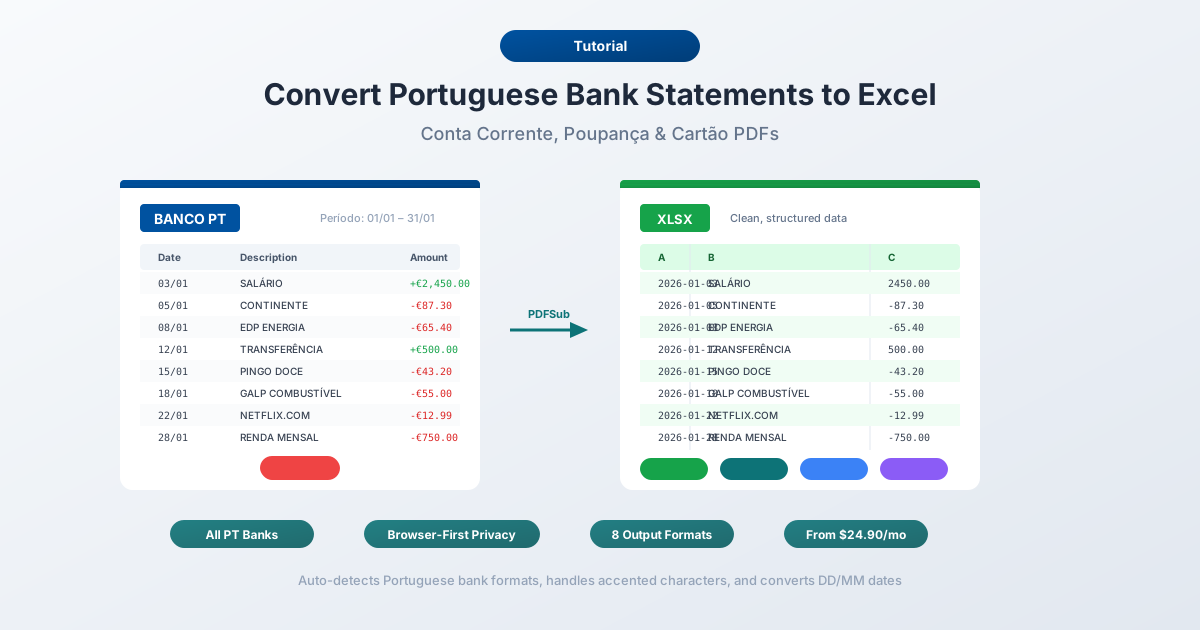
Your extrato bancário from Itaú looks perfectly structured on the PDF - until you try to do anything useful with it. The moment you open it in Excel, "1.234,56" turns into unrecognizable text. The date "05/03/2026" silently flips from March 5 to May 3. And the PIX transaction line that read "PIX RECEBIDO - FULANO DE TAL - CPF 123.456.789-00" now occupies three rows and has broken your entire transaction table.
This isn't a niche problem. Brazil has 215 million people with 84% banking penetration - the largest digital banking market in Latin America. Add Portugal's 10.3 million population with 59% online banking adoption, and you're looking at a combined market of over 225 million Portuguese-speaking bank customers generating statements that are fundamentally incompatible with English-locale spreadsheets.
The explosion of PIX - Brazil's instant payment system that processed 276.7 million transactions in a single day - has made matters worse. PIX entries flood modern Brazilian statements with transaction codes, CPF/CNPJ numbers, and reference strings that no generic PDF converter was designed to handle.
Whether you're a Brazilian accountant importing Banco do Brasil statements into QuickBooks, an American company reconciling payments from a Brazilian subsidiary, a Portuguese bookkeeper processing Millennium BCP extratos, or a fintech startup parsing Nubank PDFs at scale - the challenge is the same: extracting clean, structured data from Portuguese-language bank statement PDFs and getting it into a spreadsheet that actually calculates.
Why Portuguese Bank Statements Break in Excel
Portuguese financial formatting shares some problems with other European languages but adds its own distinctive challenges. Six major issues trip up every generic converter.
1. Comma Decimals and Period Thousands
Portuguese-speaking countries use the opposite number convention from English:
| Portuguese Format | English Equivalent | What Excel Sees |
|---|---|---|
| 1.234,56 | 1,234.56 | Text (unrecognized) |
| R$ 15.000,00 | R$ 15,000.00 | Text or 15.0 |
| -347,89 | -347.89 | Text |
| 1.234.567,89 | 1,234,567.89 | Text |
English-locale Excel cannot parse a number that uses both periods and commas in the "wrong" positions. A simple find-and-replace won't work because you need to strip the period thousands separators and convert the comma decimal simultaneously, in the correct order. Get the sequence wrong and "1.234,56" becomes "1,234,56" - which Excel still can't parse.
Brazilian statements add another wrinkle: currency symbols. "R$ 1.234,56" includes a multi-character currency prefix with a space, which needs to be stripped before any number conversion can happen. Some statements use "R$1.234,56" without the space, or place the symbol after the number.
2. DD/MM/YYYY - The Silent Date Swap
Portuguese dates use day-month-year with slashes: 05/03/2026 means March 5, 2026.
This is the most dangerous formatting issue because Portuguese dates use the exact same slash separator as American dates (MM/DD/YYYY). English-locale Excel reads "05/03/2026" as May 3, 2026 - no error, no warning, no visual cue that anything went wrong.
The damage is insidious. Dates where the day is 12 or below get silently swapped to the wrong month. Dates where the day exceeds 12 (like "15/03/2026") parse correctly because there's no 15th month. The result: a column where roughly 40% of dates are wrong, 60% are right, and your spreadsheet gives zero indication which is which. Sort by date and your March transactions appear in May.
Some Brazilian statements abbreviate dates further - showing only "05/03" without the year, with the year printed once in the statement header. A converter needs to infer the full date from context.
3. PIX Transaction Codes
PIX has become the dominant payment method in Brazil, and it has transformed what bank statements look like. A single PIX transaction on a statement might appear as:
05/03  PIX RECEBIDO
       FULANO DE TAL
       CPF 123.456.789-00
       E12345678202603051234abcdefghijkl
                                          1.500,00 C
That's one transaction spread across five lines. The description includes the transaction type (PIX RECEBIDO or PIX ENVIADO), the counterparty name, their CPF or CNPJ number, and a 32-character end-to-end identifier. A naive PDF parser creates five separate rows. A good converter recognizes the continuation pattern and merges them into a single transaction.
PIX entries also use specific terminology - "PIX ENVIADO" (sent), "PIX RECEBIDO" (received), "PIX AGENDADO" (scheduled), "PIX DEVOLUÇÃO" (refund) - that a converter needs to understand to correctly classify debits and credits.
4. CPF and CNPJ Numbers in Descriptions
Brazilian transaction descriptions are peppered with tax identification numbers:
- CPF (individual): 11 digits formatted as NNN.NNN.NNN-NN (e.g., 123.456.789-00)
- CNPJ (business): 14 digits formatted as NN.NNN.NNN/NNNN-NN (e.g., 12.345.678/0001-90)
These numbers contain periods, slashes, and hyphens - the same characters used in dates and numbers. A converter that isn't CPF/CNPJ-aware might try to parse "123.456.789-00" as a number (stripping it to 12345678900) or misinterpret the periods as thousands separators.
5. Multi-Line Descriptions and Boleto Barcodes
Beyond PIX, Brazilian statements include several transaction types with exceptionally long descriptions:
Boleto bancário (barcode payment slips) embed 47-48 digit barcode numbers in the description field. A single boleto payment might read:
PAG BOLETO 23793.38128 60000.000003 00123.456709 1 92350000015000That barcode string wraps across multiple lines on a PDF and creates phantom rows in a spreadsheet.
TED and DOC transfers include bank codes, branch numbers, and account numbers in the description. DOC was officially discontinued in February 2024, but legacy DOC entries still appear on statements covering earlier periods.
Débito automático (automatic debit) entries for utilities often include contract numbers, meter readings, and reference codes spanning multiple lines.
6. Accented Characters and Encoding
Portuguese uses characters outside basic ASCII: ã, é, ç, ô, ú, í, à, õ and their uppercase variants. These appear everywhere:
- Transaction types: "Transferência", "Aplicação", "Pagamento"
- Bank names: "Caixa Econômica Federal", "Itaú Unibanco"
- Description fields: "Débito automático", "Crédito em conta", "Remuneração"
Encoding mismatches turn "Transferência" into "Transferência" or "Transferencia." This happens when a PDF uses ISO-8859-1 (Latin-1) encoding but the converter reads it as UTF-8, or when Excel opens a CSV file with the wrong code page. Brazilian PDFs are particularly inconsistent - the same bank might use different encodings across statement periods.
The Major Banks and Their Statement Formats
Brazilian Traditional Banks
Banco do Brasil - Brazil's largest bank by branches, with over 67 million customers. Provides PDF extratos through online banking (Internet Banking BB) and the BB app. Electronic transaction exports (OFX) are available but limited to 60 days. Statements older than 60 days are PDF-only. Layouts are dense with small fonts and compressed spacing.
Itaú Unibanco - Brazil's largest private bank by market value. Offers PDF extratos via Itaú 30 Horas online banking. OFX export available for recent transactions. Statement PDFs use a clean two-column layout with separate debit and credit columns, but multi-line PIX descriptions break the pattern.
Bradesco - Third-largest private bank. PDF statements through Bradesco Net Empresa and the Bradesco app. Business accounts can access CNAB files (a Brazilian electronic bank data exchange standard). Consumer statements are PDF-only beyond the recent transaction window.
Caixa Econômica Federal - Government-owned bank handling social programs (FGTS, PIS, Bolsa Família). Statement layouts include additional fields for social benefit deposits and government payment codes not found on private bank statements.
Santander Brasil - Brazilian subsidiary of Spanish Santander. Offers both PDF and OFX export. Statement formats follow a hybrid layout that differs from both the Spanish parent bank and other Brazilian institutions.
Brazilian Digital Banks
Nubank - The world's largest digital bank outside Asia, with over 112 million customers in Brazil alone. Nubank offers the best export options of any Brazilian bank: PDF, OFX, and CSV downloads are all available through the app and web portal. CSV exports use semicolons as delimiters (matching the Portuguese number format convention) with comma decimals - so they still need conversion for English-locale tools.
Banco Inter - Over 35 million customers. PDF extratos through the Super App, with limited OFX support for recent transactions.
C6 Bank - Over 30 million customers. PDF statements through the app. Digital-first approach means clean native PDFs - no OCR needed.
Portuguese Banks
Caixa Geral de Depósitos (CGD) - Portugal's largest bank, state-owned. Provides PDF extratos through Caixadirecta online banking. Statement layouts use the European date format (DD/MM/YYYY) and EUR currency with comma decimals - the same number formatting as Brazil but with different transaction terminology.
Millennium BCP - Portugal's largest private bank. PDF statements via Millennium online banking. Cleaner than most Brazilian layouts, but SEPA-specific fields (IBAN, BIC, mandate references) add complexity.
Santander Totta - Portuguese subsidiary of Santander. PDF extratos through NetBanco. Shares some layout patterns with Santander Brasil but uses EUR formatting and SEPA conventions.
Novo Banco - Successor to Banco Espírito Santo. PDF statements through NB smart online banking with straightforward layouts.
BPI (Banco Português de Investimento) - Now part of CaixaBank group. PDF statement downloads through BPI Net.
Method 1: Use a Bank Statement Converter (Recommended)
PDFSub handles Portuguese bank statements natively - both Brazilian and Portuguese - including all the formatting challenges described above.
How It Works
-
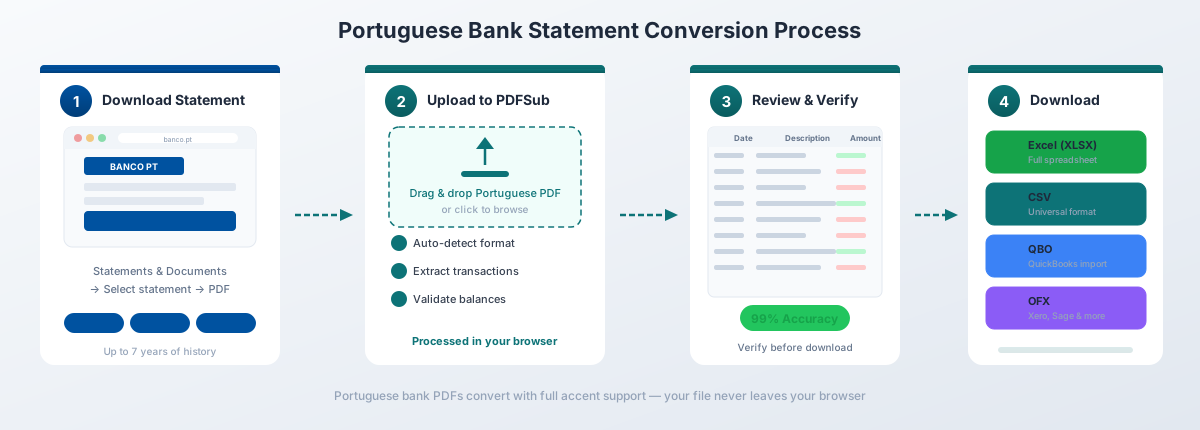
Upload your extrato - Drag and drop the PDF from any Brazilian or Portuguese bank. PDFSub auto-detects the bank format from the 20,000+ supported templates.
-
Automatic format handling - The converter automatically:
- Converts DD/MM/YYYY dates to your preferred format
- Transforms comma decimals (1.234,56) to standard numbers (1234.56)
- Strips R$ and EUR currency symbols cleanly
- Merges multi-line PIX descriptions into a single clean row
- Recognizes and preserves CPF/CNPJ numbers without misinterpreting them as amounts
- Cleans boleto barcode strings from payment descriptions
- Preserves accented characters (ã, é, ç, ô) with correct UTF-8 encoding
- Identifies TED, DOC, PIX, and boleto transaction types
-
Review and verify - Check the extracted transactions in the preview. Balances are validated against the statement's saldo anterior (opening balance) and saldo atual (closing balance).
-
Download - Export as Excel (.xlsx), CSV, QBO (QuickBooks), OFX (Xero, Wave), QFX (Quicken), or JSON.
Why It Works for Portuguese Statements
130+ languages including Portuguese. The extraction engine understands Portuguese banking terminology - extrato, saldo, crédito, débito, transferência, pagamento, compra - and maps them to structured fields.
PIX-aware parsing. PIX ENVIADO and PIX RECEBIDO entries are recognized as transaction types, and multi-line PIX descriptions (including end-to-end identifiers and CPF/CNPJ numbers) are merged into clean, single-row transactions.
Browser-first privacy. For digital PDFs from online banking - which is most Brazilian and Portuguese bank statements - text extraction happens entirely in your browser. The file never leaves your device. Server-side processing is only used for scanned documents.
Correct number handling. The converter doesn't just swap commas and periods - it understands Portuguese number formatting rules, including the R$ prefix, negative amounts in parentheses or with minus signs, and the distinction between debit (D) and credit (C) markers used by some Brazilian banks.
Bank statement conversion is included in the All-In-One plan at $20/user/mo (annual; 500 pages per user) with a 7-day free trial.
Method 2: Bank-Provided Downloads
Some Brazilian and Portuguese banks offer electronic transaction exports beyond PDF. Here's what to expect:
What's Available
| Bank | OFX | CSV | Date Limit | |
|---|---|---|---|---|
| Nubank | Yes | Yes | Yes | 90 days (electronic) |
| Banco do Brasil | Yes | Yes | No | 60 days (OFX) |
| Itaú | Yes | Yes | No | 60 days (OFX) |
| Bradesco | Yes | Limited | No | 60 days |
| Banco Inter | Yes | Limited | No | 90 days |
| Caixa Econômica | Yes | Limited | No | 60 days |
| Millennium BCP | Yes | No | Limited | Varies |
| CGD | Yes | No | No | PDF only |
The 60-Day Problem
Most traditional Brazilian banks impose a 60-day limit on electronic exports (OFX). Beyond 60 days, your only option is the PDF extrato. This means that for any historical analysis - tax returns, audits, multi-month reconciliation - you're working with PDFs whether you like it or not.
Nubank is the notable exception. Its digital-first approach provides OFX and CSV downloads covering a longer history window, and its PDF statements are among the cleanest in the Brazilian market - well-structured layouts with consistent formatting.
OFX Limitations
Even where OFX is available, Brazilian bank OFX files have quirks. Some banks export with ISO-8859-1 encoding, which mangles accented characters in UTF-8 tools. OFX description fields are often truncated - PIX details, boleto barcodes, and CPF/CNPJ numbers may be stripped. And OFX files don't always include opening and closing balances needed to verify completeness.
Nubank - The Best Export Options
Nubank provides PDF, OFX, and CSV downloads through both the app and web portal - the best export options of any Brazilian bank. The CSV export uses semicolons as delimiters with comma decimals, so it still needs conversion for English-locale tools, but the data is already structured.
Method 3: Copy-Paste (Not Recommended)
You can try copying transaction data from the PDF and pasting into Excel. Here's what happens:
- PIX descriptions spanning 3-5 lines create phantom rows that break the transaction table
- Boleto barcode numbers (47-48 digits) overflow into adjacent columns
- Comma decimals paste as text - no SUM, no AVERAGE, no sorting
- DD/MM/YYYY dates silently swap months
- CPF/CNPJ numbers lose their formatting or get interpreted as calculations
- Accented characters (ã, é, ç) may corrupt depending on the copy method
- No validation against saldo anterior/saldo atual
For anything beyond 10-15 transactions, manual copy-paste takes more time than it saves and introduces errors that are difficult to detect after the fact.
Brazil-Specific Formatting
Brazilian bank statements have several unique elements that don't exist on statements from other Portuguese-speaking countries.
PIX Transactions
PIX has fundamentally changed Brazilian bank statements. Launched in November 2020, it now accounts for the majority of electronic payments in Brazil. A typical 2025-2026 statement is dominated by PIX entries.
PIX transactions appear with specific prefixes:
| Statement Text | Meaning | Direction |
|---|---|---|
| PIX ENVIADO | PIX sent | Debit |
| PIX RECEBIDO | PIX received | Credit |
| PIX AGENDADO | PIX scheduled | Debit (future) |
| PIX DEVOLUÇÃO | PIX refund/reversal | Credit |
| PIX SAQUE | PIX cash withdrawal | Debit |
| PIX TROCO | PIX change (purchase + cash back) | Debit |
Each PIX entry typically includes the counterparty name, their CPF or CNPJ, and a 32-character end-to-end identifier (e.g., "E12345678202603051234abcdefghijkl"). This identifier is essential for dispute resolution but clutters spreadsheet descriptions.
TED and DOC Transfers
TED (Transferência Eletrônica Disponível) remains in use for larger transfers, though PIX has replaced it for most everyday payments. TED entries include the destination bank code, branch, and account number in the description.
DOC (Documento de Ordem de Crédito) was officially discontinued by the Central Bank of Brazil on February 15, 2024. However, DOC entries still appear on statements covering periods before that date, and some legacy descriptions reference DOC format even for newer TED transactions.
Boleto Bancário
Boleto is Brazil's barcode-based payment slip system - still widely used for utility bills, taxes, and commercial invoices. When a boleto is paid, the statement description includes:
- The barcode number (47-48 digits, often displayed in groups separated by periods)
- The payee name (sometimes truncated)
- The due date of the boleto
A boleto payment line might look like: "PAG BOLETO 23793.38128 60000.000003 00123.456709 1 92350000015000 EMPRESA XYZ LTDA." This wraps across multiple lines on the PDF and is essentially impossible to handle with copy-paste.
IOF Tax
IOF (Imposto sobre Operações Financeiras) is a federal tax applied to financial transactions including loans, insurance, currency exchange, and credit operations. IOF charges appear as separate line items on Brazilian statements, often with descriptions like "IOF COMPLEMENTAR" or "IOF ADICIONAL." These need to be correctly classified as tax expenses rather than regular transactions.
CPF and CNPJ in Transaction Data
CPF and CNPJ numbers serve as universal identifiers in Brazilian finance. They appear in PIX descriptions, TED transfers, boleto payments, and direct debit authorizations. A converter needs to:
- Recognize CPF format (NNN.NNN.NNN-NN) and not misparse it as a number
- Recognize CNPJ format (NN.NNN.NNN/NNNN-NN) and handle the slash correctly
- Preserve these identifiers in the description field for auditing purposes
Portugal-Specific Formatting
Portuguese bank statements share the comma-decimal and DD/MM/YYYY formatting with Brazil but include European payment system conventions that require different handling.
SEPA Transfers
Portugal is part of the Single Euro Payments Area. SEPA transfers on Portuguese statements include structured reference data:
- IBAN (International Bank Account Number): PT50 followed by 21 digits
- BIC/SWIFT: 8 or 11 characters identifying the bank
- Mandate references for SEPA Direct Debits (SDD)
- Creditor identifier codes
These fields create multi-line descriptions similar to German SEPA statements. A SEPA direct debit entry on a CGD statement might span 4-6 lines with the creditor ID, mandate reference, and payment purpose.
Multibanco Payments
Multibanco is Portugal's national interbank network, used for ATM withdrawals and a unique reference-based payment system. Multibanco payment descriptions include:
- Entity number (5 digits): identifies the payee
- Reference number (9 digits): identifies the specific payment
- Amount: the payment value
A typical entry reads: "PAG MULTIBANCO ENT 12345 REF 123456789." These numbers are essential for matching payments to invoices.
MB Way
MB Way is Portugal's mobile payment system - similar to PIX in Brazil but smaller in scale. MB Way transactions appear on statements with the counterparty's phone number or merchant name, and are becoming increasingly common.
Imposto de Selo
Imposto de selo (stamp tax) is Portugal's equivalent of stamp duty, applied to various financial transactions including credit card interest, loan origination, and certain insurance products. These appear as separate line items with descriptions like "IMP SELO" or "IMPOSTO DE SELO" and need to be classified as tax charges in accounting.
Digital vs Traditional Bank Statements
The distinction between digital-native banks and traditional banks matters significantly for conversion quality.
Digital Banks (Nubank, Banco Inter, C6 Bank)
Digital banks produce clean, consistent PDFs because their statements are generated entirely from structured data:
- Consistent layouts - Every statement uses the same template
- Native digital text - Characters are actual text objects, not images. No OCR needed.
- Shorter descriptions - Digital banks tend to use cleaner, more concise transaction descriptions
- Standardized PIX formatting - PIX is treated as a first-class transaction type with consistent structure
Nubank produces the easiest Brazilian statements to convert - modern layout, clean text, consistent formatting across periods.
Traditional Banks (Banco do Brasil, Itaú, Bradesco, Caixa)
Traditional banks present more challenges:
- Legacy layouts - Some statement templates date back to mainframe-era designs, with dense text and compressed spacing
- Inconsistent formatting - Statement layouts may change between branches, account types, or even statement periods
- Longer descriptions - Traditional banks include more verbose transaction descriptions with internal codes and reference numbers
- Multi-page continuation - A single transaction's description might start at the bottom of one page and continue at the top of the next
Caixa Econômica Federal is particularly challenging - social program deposit codes, FGTS references, and government payment identifiers create statement formats unique to that institution.
Importing into Accounting Software
Once your Portuguese bank statement is converted to a structured format, the next step is getting it into your accounting platform.
QuickBooks
Export from PDFSub as QBO format for direct import into QuickBooks Online or Desktop. The QBO file handles date format conversion and number formatting automatically. For a detailed walkthrough, see our QuickBooks import guide.
Xero
Export as OFX for Xero import. Xero's bank feed import accepts OFX files and correctly maps the converted transaction data. See our Xero import guide for step-by-step instructions.
Brazilian Accounting Software
Brazilian businesses often use local accounting platforms:
- ContaAzul - Cloud accounting popular with small businesses. Accepts OFX bank imports.
- Omie - ERP system for small and mid-size companies. Supports OFX and CNAB import.
- Nibo - Bookkeeping platform used by Brazilian accounting firms. Accepts OFX files from major banks.
For these platforms, export from PDFSub as OFX and use the platform's bank import function. The converted file will have clean dates, properly formatted numbers, and merged transaction descriptions.
Portuguese Accounting Software
Portuguese businesses commonly use PHC Software, Sage, and Primavera BSS. All three accept CSV or OFX bank data imports. Export from PDFSub in the appropriate format and use the platform's bank import function.
Frequently Asked Questions
Can I convert Banco do Brasil statements to Excel?
Yes. PDFSub supports Banco do Brasil statements including their dense legacy layouts, multi-line PIX descriptions, and boleto payment entries. The converter handles both current account (conta corrente) and savings account (poupança) statement formats. OFX from Banco do Brasil only covers 60 days, so PDF conversion is the only option for older statements.
How do I handle PIX transactions in my spreadsheet?
PDFSub merges multi-line PIX entries into single rows with a clean description that includes the transaction type (ENVIADO/RECEBIDO), counterparty name, and CPF/CNPJ. The 32-character end-to-end identifier is preserved in the description field but doesn't break the row structure. PIX ENVIADO transactions are automatically classified as debits and PIX RECEBIDO as credits.
Do Nubank statements convert easily?
Nubank produces the cleanest statements of any major Brazilian bank. The consistent digital-first layout, standard fonts, and well-structured formatting mean conversion is highly accurate. If you have the option, Nubank's own CSV export (semicolon-delimited with comma decimals) is also usable - but you'll still need to convert the number and date formats for English-locale tools.
What about statements that mix Portuguese and English?
Some international banks operating in Brazil (Santander, HSBC legacy) produce statements with a mix of Portuguese headers and English transaction codes. PDFSub handles multilingual statements - the extraction engine processes each field independently, so a Portuguese header paired with an English SWIFT code or a mixed-language description won't cause parsing failures.
How do I convert statements older than 60 days?
For most traditional Brazilian banks, statements older than 60 days are only available as PDF - there's no electronic export option. Upload the PDF to PDFSub for conversion. The converter works with statements from any date period, including historical statements going back years.
Can I batch-convert multiple Brazilian bank statements?
Yes. Upload multiple extratos and PDFSub processes them sequentially. Each statement is auto-detected and converted independently, even if they're from different banks - a Banco do Brasil statement followed by a Nubank statement followed by a CGD (Portugal) statement will each be parsed with the correct format rules.
Is the comma-decimal conversion automatic?
Completely automatic. PDFSub converts all Portuguese-format numbers (1.234,56) to standard decimal format (1234.56) during extraction. Currency symbols (R$, EUR) are stripped, and the resulting numbers are properly typed as numeric values in the output file - ready for SUM, AVERAGE, and other Excel calculations without any manual reformatting.
How does PDFSub handle boleto barcode numbers?
Boleto barcode numbers (47-48 digits) are preserved in the transaction description field as reference data but are not misinterpreted as amounts. The converter recognizes barcode patterns and keeps them as text strings within the description, while correctly extracting the actual transaction amount from the separate amount column.
Can I convert Portuguese bank statements to QBO format?
Yes. PDFSub exports to QBO (QuickBooks), OFX (Xero, Wave), QFX (Quicken), Excel (.xlsx), CSV, and JSON. The QBO export converts dates, numbers, and transaction types to the format QuickBooks expects, regardless of the source statement's language. See our QBO conversion guide for details.
What encoding should I use when opening converted CSV files?
PDFSub exports CSV files in UTF-8 encoding, which preserves all Portuguese accented characters (ã, é, ç, ô). When opening in Excel, use Data > From Text/CSV and select UTF-8 (65001) as the encoding. Google Sheets handles UTF-8 correctly by default. If you see garbled characters like "Transferência" instead of "Transferência," re-import with UTF-8 selected.