Bank Reconciliation Guide: Manual vs. Automated (2026)
Complete guide to bank reconciliation for accountants and bookkeepers. Compare manual vs. automated methods, common errors, and how to cut reconciliation time by 80%.
Bank reconciliation is one of those tasks that every accountant and bookkeeper knows is critical - and almost nobody enjoys doing. You're comparing two sets of records line by line, hunting for discrepancies that could be a simple timing difference or evidence of a $50,000 fraud. The stakes are high, the work is tedious, and there's no shortcut around the fact that every transaction needs to match.
Or is there?
This guide breaks down the full bank reconciliation process - manual and automated - so you can decide which approach makes sense for your practice. We'll cover the step-by-step manual workflow, the real costs of doing it by hand, how automation changes the equation, and the specific errors that trip up even experienced professionals.
The Printable Checklist (Save for Every Month)
Skip ahead to the printable version of this entire guide. Five sections, twenty-two checks. Print it, pin it next to your monitor, and run through it every month-end.

Want to use this checklist on your blog? Copy this embed code:
What Is Bank Reconciliation and Why Does It Matter?
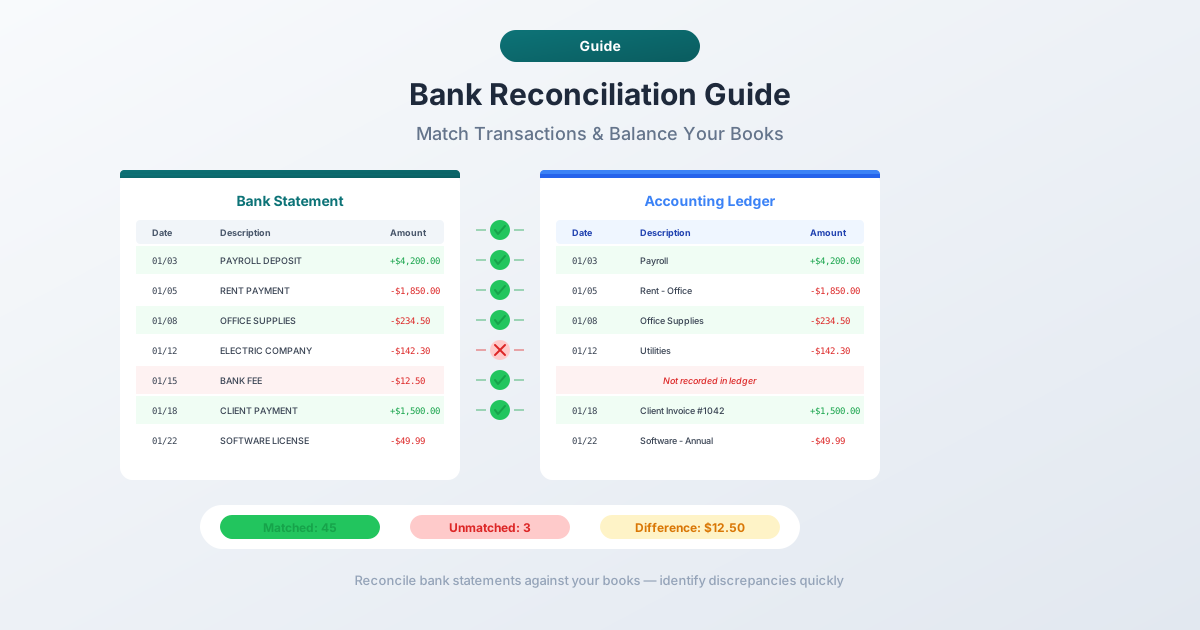
Bank reconciliation is the process of comparing your internal financial records (general ledger, accounting software, or spreadsheets) against your bank statements to ensure they agree. When they don't, you investigate why.
That's the textbook definition. In practice, reconciliation serves three purposes that keep businesses solvent and out of trouble:
1. Fraud detection. 89% of fraud cases involve asset misappropriation - employees skimming cash, writing unauthorized checks, or making unapproved transfers. Regular reconciliation is the most reliable way to catch these discrepancies before they snowball. A $200 unauthorized transaction in January becomes a $12,000 problem by December if nobody's checking.
2. Financial accuracy. 30% of small businesses have inaccurate financial records, and poor reconciliation is one of the leading causes. Bad books lead to bad decisions - overspending when cash is tight, underpaying estimated taxes, or misrepresenting financial health to lenders and investors.
3. Regulatory compliance. GAAP (Generally Accepted Accounting Principles) requires regular reconciliation of bank accounts. For publicly traded companies, SOX Section 404 mandates documented internal controls over financial reporting, and bank reconciliation is a core control. Even for small businesses, the IRS expects records that match bank activity - and discrepancies invite audits.
The bottom line: if your books and your bank don't agree, you don't actually know your financial position. Everything downstream - tax filings, financial statements, budgeting, cash flow projections - is built on sand.
Manual Bank Reconciliation: The Step-by-Step Process
Before we talk about automation, let's walk through what manual reconciliation actually looks like. Even if you plan to automate, understanding the manual process helps you evaluate what any tool needs to accomplish.
Step 1: Gather Your Records
Pull together your bank statement for the period (what the bank says happened) and your internal records for the same period (what you think happened - general ledger, check register, or accounting software bank register).
If your bank only provides PDF statements and your accounting software can't connect via bank feeds, this step already involves manual work: downloading PDFs and converting them to a workable format.
Step 2: Compare the Ending Balances
Start with the ending balance on the bank statement and in your books. If they don't match, you need to find every difference.
Step 3: Identify Deposits in Transit
Deposits you've recorded but that haven't appeared on the bank statement yet - for example, a check deposited on the 29th that the bank processes on the 2nd. Add these to the bank statement balance.
Step 4: Identify Outstanding Checks
Checks you've written and recorded but that the recipient hasn't cashed yet. Subtract these from the bank statement balance.
Step 5: Record Bank-Side Items You Missed
The bank statement often includes items you haven't recorded: service charges, interest earned, automatic payments, NSF charges, and wire transfer fees. Add or subtract these from your book balance.
Step 6: Investigate Remaining Discrepancies
If the balances still don't match after adjustments, compare transactions one by one to find actual errors on your side or the bank's.
Step 7: Make Journal Entries
Record adjustments in your accounting system - journal entries for bank fees, interest, and any errors you discovered.
Step 8: Document Everything
Keep a reconciliation worksheet showing starting balances, all adjustments, and the final reconciled balance. This is your audit trail - mandatory for SOX-compliant companies and essential for everyone else.
Why Manual Reconciliation Is Painful
The process above sounds straightforward. Eight steps. How hard can it be?
In practice, manual reconciliation is one of the most time-consuming tasks in any accounting practice. Here's why.
The Time Cost Is Brutal
Manual bank reconciliation takes 10 to 15 hours per month per client for the average bookkeeper. That includes gathering statements, matching transactions, investigating discrepancies, making adjustments, and documenting the results.
If you're managing 20 clients, that's 200 to 300 hours per month - roughly 1.5 to 2 full-time employees doing nothing but reconciliation. At a billing rate of $75/hour, you're spending $15,000 to $22,500 per month on a task that doesn't generate new business.
The Error Rate Compounds
Manual data entry has a 1 to 4% error rate. That sounds small until you do the math. A client with 500 transactions per month means 5 to 20 errors introduced during the reconciliation process itself. Each error costs an estimated $500 to $5,000 in downstream effects - incorrect financial statements, misstated taxes, failed audits, or misguided business decisions based on wrong numbers.
The cruelest irony: the process designed to catch errors introduces new ones.
Common Manual Reconciliation Mistakes
- Transposition errors. Writing $1,254 instead of $1,245. These are invisible until you've spent 45 minutes hunting for a $9 discrepancy.
- Omitted transactions. Missing a bank fee or automatic payment because you didn't scroll to the bottom of the statement.
- Double-counting. Recording the same transaction twice, or comparing it against the wrong entry.
- Date mismatches. Assigning a transaction to the wrong month, which makes the current month wrong and the next month wrong in the opposite direction.
- Stale outstanding checks. Checks that have been outstanding for months (or years) and should have been written off but are still sitting on the reconciliation.
The Scale Problem
Manual reconciliation doesn't scale. Two clients? Fine. Twenty? You need dedicated staff. Two hundred? You need a department. And every additional client adds linear time - there are no economies of scale in comparing two lists by hand.
Automated Bank Reconciliation: How It Works
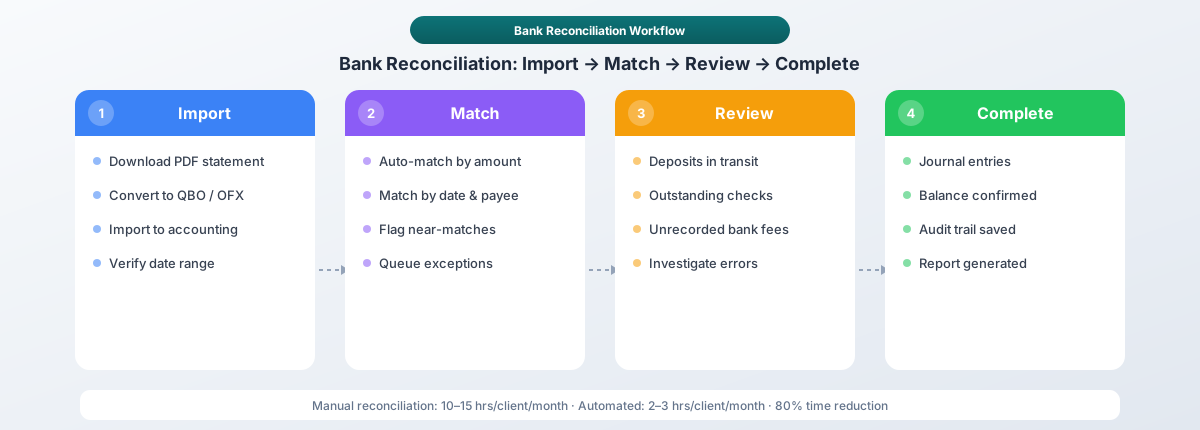
Automated reconciliation uses software to do what you've been doing manually: compare two sets of records and flag the differences. The core technology behind it is transaction matching - algorithms that pair entries from your bank feed with entries in your accounting software based on date, amount, payee, and reference number.
The Automated Workflow
- Bank data import. Transactions come in via bank feed (direct connection), file import (CSV, OFX, QBO), or PDF conversion.
- Matching engine. The software compares imported transactions against your recorded transactions. Exact matches (same date, same amount) are auto-reconciled. Near matches (off by a day, slightly different description) are flagged for review.
- Exception handling. Unmatched transactions are presented in a review queue. You investigate and categorize them - bank fee you forgot to record, deposit in transit, or actual error.
- Adjustment and documentation. The system generates journal entries for adjustments and produces a reconciliation report automatically.
What Automation Gets Right
- Speed. Automated matching can reduce reconciliation from 10 to 15 hours down to 2 to 3 hours per client per month - an 80% time reduction.
- Accuracy. No transposition errors. No missed transactions. No double-counting. The matching engine doesn't get tired at 4 PM on a Friday.
- Consistency. Every reconciliation follows the same process, every time. No variation between staff members.
- Audit trail. Every match, exception, and adjustment is logged automatically with timestamps and user IDs.
What Automation Requires
Automated reconciliation isn't magic. It needs clean data to work with. If your bank only provides PDF statements and your accounting software can't connect via bank feeds, you still need a way to get that data into a structured format. That's where bank statement conversion fits into the workflow - but more on that in a moment.
Manual vs. Automated: The Comparison
| Factor | Manual Reconciliation | Automated Reconciliation |
|---|---|---|
| Time per client/month | 10-15 hours | 2-3 hours |
| Accuracy | 96-99% (1-4% error rate) | 99.5-99.9% |
| Cost per reconciliation | $750-$1,125 (at $75/hr) | $150-$225 (at $75/hr) |
| Scalability | Linear - each client adds equal time | Sub-linear - matching engine handles volume |
| Audit trail | Manual worksheets, prone to gaps | Automatic, timestamped, complete |
| Fraud detection | Depends on reviewer's attention | Pattern detection flags anomalies |
| Setup time | None | 1-2 hours per client (initial connection) |
| Software cost | $0 (just labor) | $20-$200/month depending on tool |
| Best for | 1-5 simple clients | 5+ clients or complex accounts |
The breakeven point is typically around 5 clients. Below that, the setup time and software cost of automation may not pay off. Above that, manual reconciliation becomes an unsustainable time sink.
Common Bank Reconciliation Errors (and How to Fix Them)
Whether you reconcile manually or with software, these are the errors that show up most often.
1. Timing Differences
What it looks like: A deposit appears in your books on March 31 but on the bank statement on April 1. Or a check you wrote on March 28 doesn't clear until April 3.
Why it happens: Banks process transactions on their own schedule. Weekends, holidays, and cut-off times create gaps between when you record a transaction and when the bank does.
How to handle it: Track these as deposits in transit and outstanding checks. They should resolve in the next period. If they don't resolve within 30 days, investigate.
2. Outstanding Checks
Checks that appear in your books but never show up on the bank statement. The recipient hasn't cashed it, lost it, or is holding it. Review outstanding checks monthly, follow up on anything older than 90 days, and write off checks that exceed your state's escheatment threshold (typically 1 to 5 years).
3. Bank Errors
Transactions on the bank statement that don't belong to your account, or amounts that differ from what you authorized. Banks process millions of transactions daily, and errors occur at a rate of roughly 1 in 1,000 transactions. Contact the bank immediately with documentation - they're required to investigate under Regulation E or the UCC.
4. Duplicate Entries
The same transaction appears twice in your books because someone recorded it from both the bank statement and a receipt or invoice. Search your ledger for the exact amount and date, void the duplicate, and implement separation of duties: one person enters transactions, another reconciles.
5. Categorization Errors
A $2,000 equipment purchase recorded as office supplies, or a loan payment split incorrectly between principal and interest. Bank descriptions like "ACH DEBIT PAYROLL PROC 03-15" are cryptic. Use consistent vendor rules in your accounting software to auto-categorize based on payee name.
6. Unrecorded Bank Charges
Your book balance is higher than the bank balance by a suspiciously round number that matches a monthly service charge. Record all bank fees as they appear, and set up recurring journal entries for predictable monthly fees.
How to Speed Up Reconciliation with Converted Bank Statements
Here's where manual and automated reconciliation intersect with a practical problem: most banks deliver statements as PDFs. Your accounting software can't read PDFs. And bank feeds don't cover every situation - closed accounts, historical periods beyond 90 days, international banks, or banks that simply don't offer direct connections.
The solution is converting PDF bank statements into formats your accounting software can import. The workflow looks like this:
- Convert the PDF statement using a tool like PDFSub's bank statement converter. Upload the PDF, and it extracts every transaction - dates, descriptions, amounts, running balances - into structured data.
- Export in the right format. For QuickBooks, export as QBO. For Xero, export as OFX. For general use, CSV or Excel works. PDFSub supports all of these formats.
- Import into your accounting software. The transactions land in your bank feed or bank register, ready for matching and categorization.
- Reconcile. With clean, structured data already in the system, the matching engine can do its job. What used to take hours of manual comparison takes minutes.
This workflow eliminates the most painful part of manual reconciliation: staring at a PDF on one screen and your accounting software on another, comparing transactions line by line.
For detailed walkthroughs, see our guides on importing bank statements into QuickBooks and importing bank statements into Xero.
Bank Reconciliation by Accounting Software
Every major accounting platform handles reconciliation slightly differently. Here's what you need to know about each.
QuickBooks Online
QuickBooks has a built-in reconciliation tool under Settings > Reconcile. You select the account, enter the ending balance and date from your bank statement, and QuickBooks presents a list of transactions to check off. Bank feeds auto-import transactions, but for periods without feeds, you can import QBO or CSV files.
QuickBooks' strength: Automatic matching. When bank feed transactions match recorded transactions (same date, same amount), QuickBooks suggests the match. Accept it with one click.
QuickBooks' weakness: CSV imports require specific column formatting, and date format mismatches cause silent errors. QBO format bypasses these issues entirely - which is why converting bank statements to QBO is the preferred path.
Xero
Xero's reconciliation happens in the Bank Accounts section. Imported or bank-feed transactions appear as "statement lines," and Xero suggests matches against invoices, bills, and manual entries. You confirm or create new transactions directly from the reconciliation view.
Xero's strength: The matching suggestions are intelligent. Xero learns from your categorization patterns and gets more accurate over time.
Xero's weakness: Xero prefers OFX format for bank imports. CSV imports require very specific formatting (Date, Amount, Payee, Description columns in that order). PDFSub's OFX export is designed to match Xero's requirements exactly.
Sage
Sage Business Cloud Accounting reconciles under Banking > Reconcile with support for bank feeds, CSV, and OFX imports. Its strength is multi-currency support for international accounts. Its weakness is fewer direct bank connections than QuickBooks or Xero, especially for smaller regional banks.
Wave
Wave is a free platform popular with freelancers. It supports bank feeds and CSV imports, but no QBO or OFX. Reconciliation in Wave is close to fully manual - limited matching automation compared to paid platforms.
Best Practices for Accountants Managing Multiple Clients
If you're running a bookkeeping practice with 10, 50, or 200+ clients, reconciliation is either your biggest bottleneck or your most streamlined process. Here's how to make it the latter.
1. Standardize Your Workflow
Use the same reconciliation process for every client. Same steps, same checklist, same documentation format. This makes it possible to delegate - any staff member can pick up any client's reconciliation and know exactly what to do.
2. Convert PDFs Immediately
When a client sends PDF bank statements, convert them to structured data (QBO, OFX, or CSV) the same day. Don't let PDFs pile up. The conversion step takes two minutes per statement with PDFSub's bank statement converter; the matching and reconciliation are what take time.
3. Reconcile in Order
Start with the oldest unreconciled period and work forward. Skipping months creates a cascading mess - outstanding items from January affect February's reconciliation, which affects March, and so on.
4. Set a Reconciliation Schedule (and Stick to It)
Monthly reconciliation is the minimum for most clients. Assign specific dates: "Client A reconciled by the 10th, Client B by the 12th." Put it on the calendar. Treat it like a deadline, not a suggestion.
5. Separate Entry and Review
The person entering transactions should not be the person reconciling. This separation of duties is a basic internal control that catches errors and deters fraud.
6. Keep a Running List of Recurring Items
Bank fees, automatic payments, and recurring charges are the same every month. Build a checklist for each client so these items get recorded proactively instead of discovered during reconciliation.
7. Document Exceptions
When you encounter a discrepancy, document what it was, why it happened, and how you resolved it. This protects you during audits and helps when the same issue recurs.
Monthly vs. Weekly vs. Daily Reconciliation
How often should you reconcile? It depends on transaction volume, risk tolerance, and how much cash flow visibility the business needs.
Monthly Reconciliation
Best for: Small businesses with fewer than 200 transactions per month, stable cash flow, and low fraud risk. One concentrated effort per month, aligned with the bank statement cycle. The downside: errors and fraud go undetected for up to 30 days.
Weekly Reconciliation
Best for: Growing businesses with 200-1,000 transactions per month, or businesses with higher fraud risk. Catches errors within 7 days with a manageable 30 to 60 minute weekly commitment. Requires bank feeds or frequent statement access - some banks only provide monthly statements.
Daily Reconciliation
Best for: High-volume businesses (1,000+ transactions per month), cash-heavy operations, and elevated fraud risk environments like retail and e-commerce. Provides near-real-time accuracy and 24-hour fraud detection, but only makes sense with fully automated tooling - the time cost is too high for manual reconciliation.
The Trend
Most accounting firms are moving from monthly to weekly reconciliation as automation makes it practical. With automated matching, weekly reconciliation takes 15 to 20 minutes per client instead of several hours once a month.
Frequently Asked Questions
What is bank reconciliation?
Bank reconciliation is the process of comparing your internal accounting records against your bank statement to verify that both sets of records agree. When they don't, you investigate the differences and make adjustments until the balances match.
How often should I reconcile bank accounts?
Monthly is the minimum standard. Weekly is better for businesses with moderate to high transaction volume. Daily reconciliation is recommended for high-volume or high-risk businesses, but it requires automated tooling to be practical.
How long should bank reconciliation take?
Manually, expect 10 to 15 hours per month per client. With automated matching and clean data imports, that drops to 2 to 3 hours - mostly spent on investigating exceptions and documenting adjustments.
What causes most reconciliation discrepancies?
Timing differences are the most common cause - deposits in transit and outstanding checks that resolve in the next period. After that, unrecorded bank charges and data entry errors are the next most frequent causes.
Is bank reconciliation required by law?
GAAP requires regular bank reconciliation as a fundamental accounting control. SOX Section 404 requires publicly traded companies to maintain documented internal controls, and bank reconciliation is a core component. For small businesses, there's no specific law, but the IRS expects records that match bank activity.
Can I automate bank reconciliation completely?
Not entirely. Automation handles the matching, but exceptions still require human judgment. Is that $500 discrepancy a timing difference, a bank error, or fraud? Only a person can make that call. The goal is to eliminate the mechanical work (80% of the effort) so you can focus on the judgment calls.
What formats do I need for importing bank data?
QuickBooks Online works best with QBO files. Xero prefers OFX. Most platforms accept CSV, but CSV imports require careful formatting. PDFSub's bank statement converter exports in all of these formats - QBO, OFX, CSV, Excel, and more.
What's the average cost of a reconciliation error?
Estimates range from $500 to $5,000 per error in downstream effects - incorrect financial statements, tax filing penalties, and business decisions made on inaccurate data.
The Bottom Line
Bank reconciliation isn't optional. It's the process that keeps your books honest, your compliance in order, and your clients' businesses financially visible. The question isn't whether to reconcile - it's how.
Manual reconciliation works, but it's slow, error-prone, and doesn't scale. At 10 to 15 hours per client per month, it's the biggest time sink in most bookkeeping practices. Automated reconciliation cuts that to 2 to 3 hours by handling the mechanical matching and surfacing only the exceptions that need your expertise.
The missing piece for many accountants is the data pipeline. Bank feeds cover active accounts with direct connections, but they don't help with PDF-only statements, historical data, closed accounts, or international banks. Converting PDF bank statements into QBO, OFX, or CSV format bridges that gap and makes automated reconciliation possible for every client and every account.
Try PDFSub Free - full access to the Bank Statement Converter and 98+ other PDF tools on the All-In-One plan ($20/user/mo annual). Cancel anytime.
If you're spending more time entering data than analyzing it, the math is simple: convert, import, match, reconcile. Start with PDFSub's bank statement converter and see how much time you get back.