What Is OFX Format? Open Financial Exchange Explained
OFX is the open standard for exchanging financial data between banks and software. Here's what's inside an OFX file and why Xero, MYOB, and GnuCash prefer it.
Your accounting software is asking for an OFX file. Your bank gave you a PDF. And now you're staring at a format you've never heard of, wondering why a perfectly good spreadsheet won't do the job.
OFX -- Open Financial Exchange -- is the invisible standard that powers modern financial software. It's the reason Xero can import bank transactions without you mapping columns. It's why GnuCash can detect duplicates. And it's the foundation that QuickBooks' QBO format is built on.
This guide breaks down what OFX actually is, what it contains, how it compares to CSV and QBO, which software supports it, and how to create OFX files from PDF bank statements.
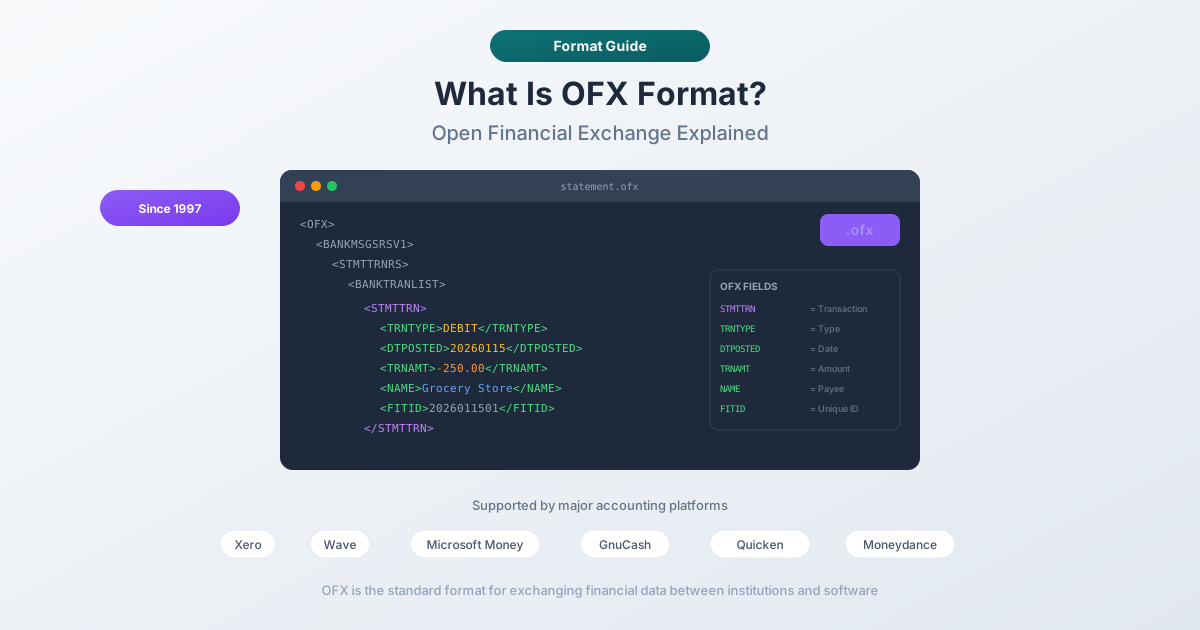
OFX in One Sentence
Open Financial Exchange is an XML-based data format for exchanging financial information between financial institutions, software applications, and end users. It's the open standard that Intuit's QBO format is based on -- and the format that most non-QuickBooks accounting software prefers for bank transaction imports.
Think of OFX as the lingua franca of financial data. Banks speak it. Accounting software reads it. And unlike CSV -- which is just rows and columns with no inherent meaning -- OFX carries structured metadata that tells the receiving software exactly what each piece of data represents.
The History of OFX
OFX was born in 1997, created by Microsoft, Intuit, and CheckFree. Each had its own competing standard -- Microsoft had OFC (Open Financial Connectivity), Intuit had its own interchange format, and CheckFree had its electronic billing protocols. OFX was the compromise that unified them.
Version Timeline
- OFX 1.0 (1997) -- The original specification, based on SGML (Standard Generalized Markup Language). SGML allows unclosed tags, which makes OFX 1.x files look different from modern XML.
- OFX 1.6 (2002) -- The most widely deployed version. Still SGML-based. Most banks that offer OFX downloads generate 1.6 files.
- OFX 2.0 (2005) -- Major rewrite. Switched from SGML to proper XML with closing tags.
- OFX 2.2 (2016) -- Security enhancements and improved investment transaction support.
- OFX 2.3 (Current) -- The latest version, maintained by the Financial Data Exchange (FDX), an industry consortium that took over governance from the original founders.
The SGML-to-XML transition matters because it affects parsing. A version 1.x file uses unclosed tags (<TRNTYPE>DEBIT with no </TRNTYPE>), while version 2.x uses proper XML with closing tags. Most modern parsers handle both, but version mismatches remain a common OFX import error.
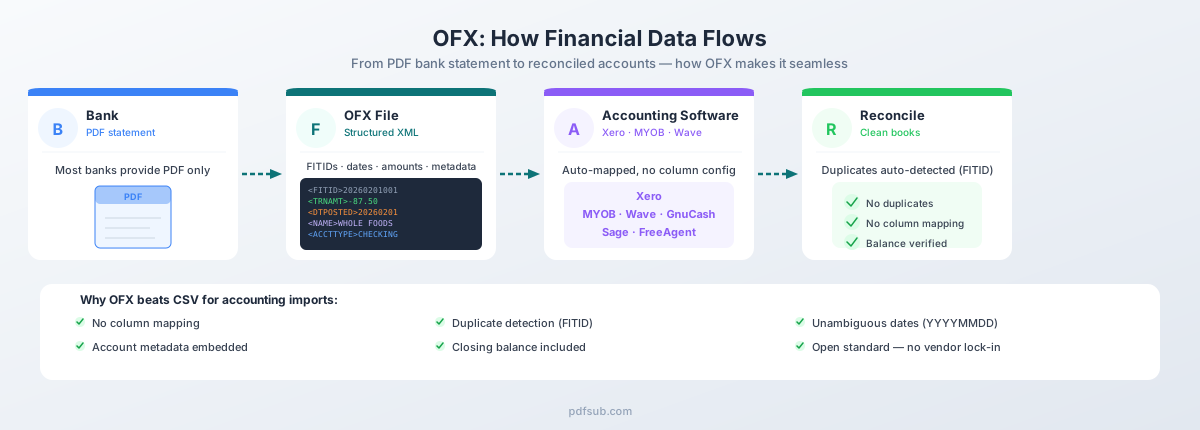
What OFX Can Contain
OFX is not just a bank statement format. The specification covers a broad range of financial data:
- Bank account statements -- Checking, savings, and money market account transactions. The most common use case.
- Credit card statements -- Transaction history with support for merchant category codes and purchase details.
- Investment and brokerage statements -- Stock purchases, dividend payments, fund transfers, and portfolio positions with lot-level cost basis data.
- Bill payment information -- Payee lists, scheduled payments, and payment confirmations.
- Tax information -- 1099 forms and other tax documents transmitted between financial institutions and tax software.
- Loan statements -- Mortgage, auto loan, and personal loan transaction records and balance information.
For most accountants and bookkeepers, OFX means one thing: importing bank and credit card transactions into accounting software without column mapping or date format guessing.
Inside an OFX File
Here's what a complete OFX 1.6 bank statement file looks like. This is the format you'll encounter most often -- the SGML-based version that the majority of banks and conversion tools generate:
OFXHEADER:100
DATA:OFXSGML
VERSION:160
SECURITY:NONE
ENCODING:USASCII
CHARSET:1252
COMPRESSION:NONE
OLDFILEUID:NONE
NEWFILEUID:NONE

<OFX>
  <SIGNONMSGSRSV1>
    <SONRS>
      <STATUS>
        <CODE>0
        <SEVERITY>INFO
      </STATUS>
      <DTSERVER>20260228120000
      <LANGUAGE>ENG
    </SONRS>
  </SIGNONMSGSRSV1>

  <BANKMSGSRSV1>
    <STMTTRNRS>
      <TRNUID>0
      <STATUS>
        <CODE>0
        <SEVERITY>INFO
      </STATUS>

      <STMTRS>
        <CURDEF>USD
        <BANKACCTFROM>
          <BANKID>021000021
          <ACCTID>123456789
          <ACCTTYPE>CHECKING
        </BANKACCTFROM>

        <BANKTRANLIST>
          <DTSTART>20260201120000
          <DTEND>20260228120000

          <STMTTRN>
            <TRNTYPE>CREDIT
            <DTPOSTED>20260201120000
            <TRNAMT>3500.00
            <FITID>20260201001
            <NAME>DIRECT DEP PAYROLL
            <MEMO>ACME CORP PAYROLL
          </STMTTRN>

          <STMTTRN>
            <TRNTYPE>DEBIT
            <DTPOSTED>20260203120000
            <TRNAMT>-87.50
            <FITID>20260203001
            <NAME>POS PURCHASE GROCERY
            <MEMO>WHOLE FOODS #10847
          </STMTTRN>

          <STMTTRN>
            <TRNTYPE>CHECK
            <DTPOSTED>20260210120000
            <TRNAMT>-1200.00
            <FITID>20260210001
            <NAME>CHECK 1045
            <CHECKNUM>1045
          </STMTTRN>

        </BANKTRANLIST>

        <LEDGERBAL>
          <BALAMT>4712.50
          <DTASOF>20260228120000
        </LEDGERBAL>

        <AVAILBAL>
          <BALAMT>4712.50
          <DTASOF>20260228120000
        </AVAILBAL>

      </STMTRS>
    </STMTTRNRS>
  </BANKMSGSRSV1>
</OFX>
Anatomy of the File
The file has three main sections:
1. The Header Block -- The plain-text lines at the top (before <OFX>) declare the OFX version, encoding, and security settings. This is not XML -- it's a simple key-value header that parsers read before processing the SGML/XML body.
2. The Sign-On Response (SIGNONMSGSRSV1) -- Authentication and server metadata. CODE of 0 means success. Most imported files use placeholder values here.
3. The Statement Response (BANKMSGSRSV1) -- The actual financial data:
BANKACCTFROM-- The account the transactions belong to (routing number, account number, account type)BANKTRANLIST-- The list of transactions, bounded by a start and end dateSTMTTRN-- Individual transaction recordsLEDGERBALandAVAILBAL-- Closing and available balances as of a specific date
Notice the SGML syntax: tags like <TRNTYPE>CREDIT have no closing </TRNTYPE>. The parser infers the end of a value from the start of the next tag -- valid SGML, but invalid XML, which is why OFX 2.x added closing tags.
Key OFX Tags
Here's a reference table of the tags you'll encounter most often inside bank statement OFX files:
| Tag | Description | Example |
|---|---|---|
STMTTRN |
Statement transaction wrapper | Contains all fields for one transaction |
TRNTYPE |
Transaction type | DEBIT, CREDIT, CHECK, DEP, ATM, POS, XFER, FEE, SRVCHG, INT |
DTPOSTED |
Date posted | 20260215120000 (YYYYMMDDHHMMSS) |
TRNAMT |
Transaction amount (signed) | -87.50 (negative = debit), 3500.00 (positive = credit) |
FITID |
Financial Institution Transaction ID | 20260215001 -- unique identifier for duplicate detection |
NAME |
Payee or merchant name | POS PURCHASE GROCERY |
MEMO |
Additional description | WHOLE FOODS #10847 AUSTIN TX |
CHECKNUM |
Check number | 1045 (only for check transactions) |
REFNUM |
Reference number | Bank-assigned reference for the transaction |
BANKACCTFROM |
Source account info | Contains BANKID (routing), ACCTID (account), ACCTTYPE |
LEDGERBAL |
Closing/ledger balance | Contains BALAMT and DTASOF |
AVAILBAL |
Available balance | Contains BALAMT and DTASOF |
CURDEF |
Currency code | USD, GBP, EUR, AUD, CAD |
The FITID -- Why It Matters
The FITID (Financial Institution Transaction ID) is the single most important tag in an OFX file from an accounting perspective. It's a unique identifier assigned to each transaction, and it's what enables duplicate detection.
When you import an OFX file into Xero, GnuCash, or any other compatible software, it stores every FITID it has seen. Import the same file again and the software checks each FITID against its database, silently skipping duplicates.
This is the primary advantage OFX has over CSV. With CSV, there's no unique identifier -- import the same file twice and you'll have double entries to clean up manually.
OFX vs CSV
Both formats can get bank transactions into accounting software. OFX wins on structure; CSV wins on flexibility.
Why OFX Is Better for Accounting Imports
| Feature | OFX | CSV |
|---|---|---|
| Column mapping | Automatic -- tags define meaning | Manual -- you assign each column |
| Duplicate detection | Yes (FITID-based) | No -- reimporting creates duplicates |
| Date format | Unambiguous (YYYYMMDDHHMMSS) | Varies by region -- DD/MM/YYYY vs MM/DD/YYYY |
| Amount handling | Signed values with TRNTYPE | Must parse signs, symbols, separators |
| Account identification | Embedded (routing + account number) | Not included |
| Balance verification | Closing balance included | Not typically included |
| Transaction types | Typed (DEBIT, CREDIT, CHECK, etc.) | Free-text or absent |
| Multi-account files | Supported in one file | Separate files needed |
The date format alone saves hours of troubleshooting. With CSV, 01/02/2026 is ambiguous -- January 2nd or February 1st? OFX eliminates this with YYYYMMDDHHMMSS. 20260201120000 is always February 1st, 2026.
When CSV Is the Better Choice
CSV has legitimate advantages:
- Data editing -- You can open a CSV in Excel, fix errors, add categorizations, and resave. OFX files require a text editor and knowledge of the tag structure.
- Excel analysis -- If you need to run formulas, pivot tables, or charts on transaction data, CSV is the natural intermediate format.
- Custom processing -- Programmatic scripts and data pipelines handle CSV more easily than OFX's nested tag structure.
- Universal compatibility -- Every application that reads tabular data reads CSV. Not every application reads OFX.
The practical advice: use OFX for importing into accounting software, and CSV for everything else.
OFX vs QBO
This is the question that confuses most people -- and the answer is simpler than you'd expect.
QBO (QuickBooks Web Connect) is OFX with a different file extension and a few Intuit-specific tags. The underlying data structure is identical. A QBO file is an OFX file that QuickBooks recognizes as its own.
The Key Differences
| Aspect | OFX | QBO |
|---|---|---|
| File extension | .ofx |
.qbo |
| Specification | Open standard (FDX) | Intuit's branded subset |
| FI identifier | Optional FI block |
INTU.BID tag (Intuit Bank ID) |
| Target software | Xero, MYOB, GnuCash, Wave, etc. | QuickBooks (Desktop and Online) |
| Compatibility | Broader -- most accounting software | QuickBooks-specific |
The INTU.BID tag is the main Intuit addition -- a bank identifier code that tells QuickBooks which financial institution the file came from, enabling auto-matching to the correct bank account during import.
In practice, you can rename a .ofx file to .qbo and QuickBooks will usually read it. Going the other direction also works -- most software that reads OFX will process a .qbo file. But for clean imports, use the format each application expects.
There's also QFX (Quicken Financial Exchange) -- same OFX foundation, different branding, different file extension, targeted at Quicken.
Software That Supports OFX
OFX enjoys broad support across accounting and personal finance software:
Xero (Preferred Format)
Xero explicitly recommends OFX over CSV for manual bank statement imports. OFX files auto-map without column configuration, include FITID-based duplicate detection, and carry account metadata.
To import: Go to Accounting > Bank Accounts, select the account, click Manage Account > Import a Statement, and choose your .ofx file. Maximum 1,000 transactions per file.
MYOB (Full Support)
MYOB accepts OFX for bank feed imports. The process is similar to Xero -- upload the file to the relevant bank account and transactions appear in the bank feed for matching and categorization.
GnuCash (Free, Open Source)
GnuCash has built-in OFX import via the libofx library. It's one of the best free options for processing OFX files.
To import: Go to File > Import > Import OFX/QFX, select your file, and map it to the correct account. GnuCash's duplicate detection uses the FITID to prevent double entries.
Other Compatible Software
- Wave -- Free accounting software with OFX import support
- Sage Business Cloud -- Accepts OFX for bank transaction imports
- FreeAgent -- Supports OFX and QIF file uploads
- Moneydance -- Personal finance software with OFX direct connect and file import
- KMyMoney -- Open-source personal finance manager with OFX support via
libofx - Microsoft Money -- Discontinued but still used by some; built-in OFX support was one of its core features
- Reckon (Australia) -- Accepts OFX files in its bank feed import workflow
QuickBooks is the notable absence -- it prefers its QBO-branded variant and works more reliably with .qbo files that include the INTU.BID identifier.
Creating OFX Files from PDF Bank Statements
Most banks don't offer OFX downloads directly. They give you a PDF -- formatted for printing, not for data exchange. Some offer CSV exports for recent transactions (typically the last 90 days), but for historical data, closed accounts, or banks without digital export options, you're stuck with PDFs.
PDFSub's Bank Statement Converter extracts transactions from PDF bank statements and generates valid OFX files with proper structure. The output includes unique FITIDs for each transaction, correct YYYYMMDD date formatting, signed amounts with appropriate transaction types, and account metadata -- everything accounting software needs for a clean import.
The converter works with statements from over 20,000 banks in 130+ languages. Digital PDFs (text-based statements) are processed in your browser -- the file never leaves your device. Scanned or image-heavy statements route through server-side AI extraction.
The All-In-One plan is $20/user/mo (annual) or $25/user/mo (monthly), including 500 bank statement pages per user. All paid plans include a 7-day free trial. For a detailed walkthrough of importing the resulting OFX files into Xero, see the Xero bank statement import guide.
Common OFX Issues and How to Fix Them
OFX files are structured, but not bulletproof. Here are the most frequent problems and how to resolve them:
1. Invalid XML/SGML Syntax
Symptom: Your software rejects the file with a parse error.
Cause: Malformed tags, missing closing tags (in 2.x files), or illegal characters in descriptions. Ampersands (&) are the most common culprit -- they must be encoded as & in XML but are often left raw in names like "AT&T."
Fix: Open the file in a text editor and replace bare & with &. Also check for unclosed tags if the file is version 2.x.
2. Missing or Duplicate FITIDs
Symptom: Import creates duplicate transactions, or the software reports missing identifiers.
Cause: Some conversion tools generate the same FITID for every transaction (like 0 or 1), or omit the tag entirely.
Fix: Each FITID must be unique within the file. A common pattern combines the date and a sequential counter: 20260215001, 20260215002, etc. Edit placeholder FITIDs in a text editor before importing.
3. Wrong Date Format
Symptom: Transactions appear on the wrong dates, or the software shows dates from 1900 or 2099.
Cause: The DTPOSTED value doesn't follow YYYYMMDDHHMMSS format. YYYYMMDD (without time) is fine, but DD/MM/YYYY or MM-DD-YYYY will cause misparses.
Fix: Ensure all DTPOSTED values use YYYYMMDD or YYYYMMDDHHMMSS. Both 20260215 and 20260215120000 are valid.
4. Character Encoding Issues
Symptom: Transaction descriptions show garbled characters, question marks, or missing accents.
Cause: The file header declares one encoding (typically USASCII or UTF-8) but the actual content uses a different encoding. This is especially common with international bank statements that contain non-ASCII characters.
Fix: Change the ENCODING header to match the actual file encoding. For international statements with accented characters, UTF-8 is the safest choice. Some older software requires USASCII with no special characters.
5. Version Compatibility (1.x vs 2.x)
Symptom: Software that expects OFX 2.x rejects a 1.x file, or vice versa.
Cause: OFX 1.x uses SGML (unclosed tags), while 2.x uses XML (closed tags). Parsers built for one version may choke on the other.
Fix: Most modern accounting software handles both versions. If yours doesn't, convert between versions by adding closing tags (1.x to 2.x) or stripping them (2.x to 1.x). Text editor search-and-replace handles this for small files.
Frequently Asked Questions
What does OFX stand for?
OFX stands for Open Financial Exchange -- an open standard for electronic exchange of financial data between financial institutions and end-user applications, maintained by the Financial Data Exchange (FDX).
Is OFX the same as QBO?
Nearly. QBO is Intuit's branded version of OFX for QuickBooks. The data structure is identical -- QBO adds an INTU.BID tag for bank identification and uses the .qbo extension. You can often rename .ofx to .qbo and QuickBooks will accept it.
Can I open an OFX file in Excel?
Not directly as structured data. Excel will open the file as a text file, showing the raw SGML/XML markup. To view OFX data in Excel, you need to either convert it to CSV or XLSX first, or use a third-party add-in that parses OFX tags into spreadsheet columns.
Which is better for Xero -- OFX or CSV?
OFX is better for Xero. It imports automatically without column mapping, includes FITID-based duplicate detection, uses an unambiguous date format, and carries account metadata. Xero's own documentation recommends OFX over CSV for manual bank statement imports.
Do banks provide OFX downloads?
Some do, but it's inconsistent. Major banks in the US, UK, and Australia may offer OFX or QFX downloads for recent transactions (typically the last 90 days). Many smaller banks, credit unions, and international institutions only provide PDF statements. For historical data beyond the download window, PDF conversion is usually the only option.
Is OFX secure?
The OFX specification includes provisions for SSL/TLS encryption during transmission and certificate-based authentication for direct connections. However, an OFX file saved on disk is plain text -- it contains account numbers and transaction details in readable form. Treat OFX files with the same care you'd give any financial document.
What's the difference between OFX 1.x and 2.x?
OFX 1.x uses SGML markup (tags don't need to be closed), while OFX 2.x uses proper XML (all tags must be opened and closed). The data content is the same -- the difference is syntactic. Version 1.6 remains the most widely generated format. Most modern accounting software parses both versions without issues.
Can I edit an OFX file manually?
Yes. OFX files are plain text and can be edited in any text editor. You can fix descriptions, correct amounts, add missing FITIDs, or adjust dates. Just maintain the tag structure -- an unclosed or mismatched tag will cause import failures. For OFX 2.x files, ensure every opening tag has a corresponding closing tag.