How to Create Employee Onboarding Document Packages
New hire starting Monday? Here's how to assemble a complete onboarding package - offer letter, tax forms, policies, benefits docs - into one organized PDF in minutes.
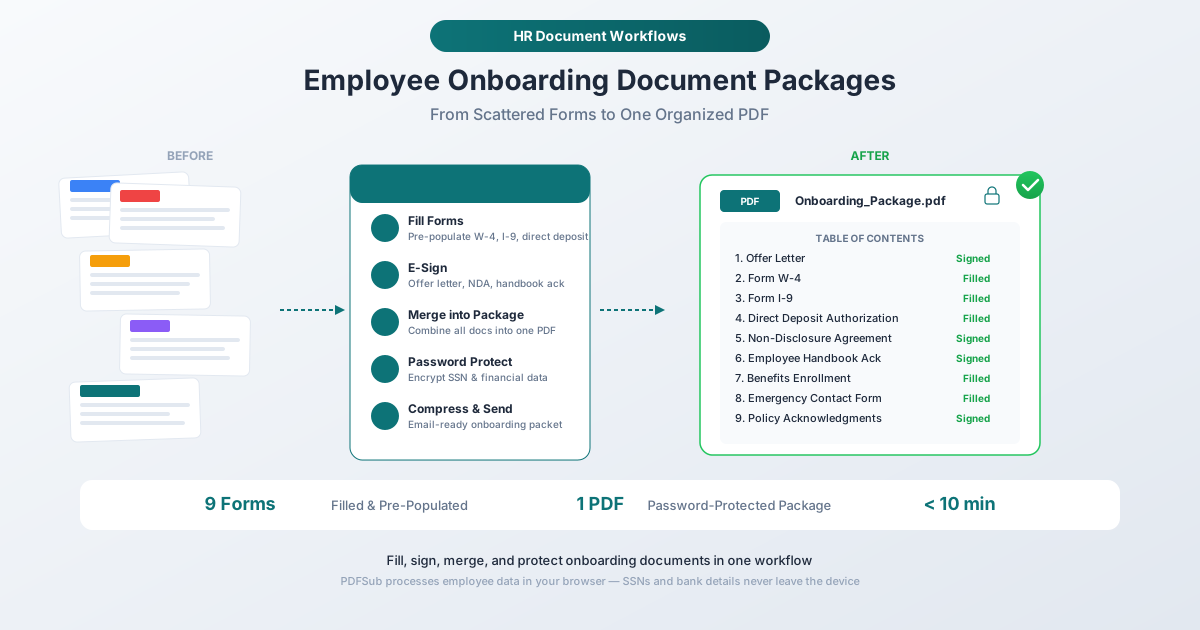
A new hire starts Monday. They need a signed offer letter, a completed W-4, a filled I-9, a direct deposit authorization form, a non-disclosure agreement, an employee handbook acknowledgment, a benefits enrollment packet, an emergency contact form, and at least two company policy sign-offs. That is nine documents minimum - before their first cup of coffee.
Now scale that. A company of 200 employees with typical 15% annual turnover onboards 30 people per year. At 9 to 15 forms per person, that is 270 to 450 individual documents just for onboarding. Add in annual policy re-acknowledgments, benefits open enrollment, salary adjustments, and termination paperwork, and an HR department of that size easily processes 2,000 to 5,000 PDF documents annually.
Most of these documents arrive as scattered PDFs across email threads, shared drives, and HRIS platforms. The new hire spends their first morning re-entering information they already provided in the application - their name, address, SSN, start date - across a dozen separate forms, filling them in by hand with inconsistent results.
There is a better approach. This guide walks through assembling a complete onboarding package - pre-populated, signed, merged, protected, and compressed - using PDF tools that process everything in the browser so sensitive employee data never leaves the device.
The Standard Onboarding Document Checklist
Before building the package, you need to know what goes in it. The specific forms vary by company, state, and industry, but most U.S. employers require the following categories.
Federally Required Documents
These are non-negotiable. Federal law mandates them for every hire.
Form I-9 (Employment Eligibility Verification) - Required by U.S. Citizenship and Immigration Services for every person hired. Section 1 must be completed by the employee on or before their first day of work. Section 2 must be completed by the employer within three business days of the start date. Employers must retain I-9 forms for three years after the date of hire or one year after termination, whichever is later.
Form W-4 (Employee's Withholding Certificate) - Required by the IRS. The employee must submit a W-4 before the first paycheck so the employer can calculate the correct federal income tax withholding. The current version uses the simplified format introduced in 2020.
State-Required Documents
Most states with income tax require their own withholding certificate separate from the federal W-4:
- California: DE 4
- New York: IT-2104
- Illinois: IL-W-4
- And similar forms in most other states with income tax
Check your state's requirements. Some states also require specific workplace safety acknowledgments, harassment prevention training confirmations, or state-specific I-9 supplements.
Company Documents Requiring Signatures
Offer letter or employment agreement - Outlines compensation, start date, job title, at-will employment status, and any non-compete or non-solicitation clauses. Requires signatures from both the employee and a company representative.
Non-disclosure agreement (NDA) - Protects proprietary information and trade secrets. Typically requires the employee's signature before they access any confidential company information, ideally before their first day.
Employee handbook acknowledgment - A signed statement confirming the employee received, read, and understood the company's employee handbook. The handbook itself is often 20 to 100+ pages.
Policy acknowledgments - Individual signed acknowledgments for specific policies: harassment prevention, acceptable use of technology, social media policy, remote work policy, safety procedures, and dress code. Each typically requires its own signature.
Financial and Benefits Documents
Direct deposit authorization - Collects bank routing and account numbers for payroll deposits. This is highly sensitive financial data.
Benefits enrollment forms - Health, dental, vision, life insurance, disability, FSA/HSA elections, and 401(k) or retirement plan enrollment. New hires usually have 30 days from their start date to complete benefits enrollment.
Personal Information Forms
Emergency contact form - Names, relationships, phone numbers, and sometimes medical information.
Equipment and IT access agreements - Acknowledgment of equipment issued (laptop, phone, badge) and agreement to acceptable use of company technology systems.
Step-by-Step: Building the Onboarding Package
Step 1: Pre-Populate Forms with Known Information
This is where most of the time savings happen. You already have the new hire's information from the application and offer process - name, address, Social Security number, start date, job title, department, salary. Instead of asking them to hand-write this same information across a dozen forms, pre-populate the fillable fields before day one.
Using PDFSub's PDF Form Filler:
- Open the fillable PDF (W-4, I-9, direct deposit form, benefits enrollment, emergency contact form)
- Enter the employee's name, address, SSN, start date, and other pre-known information into the form fields
- Save each pre-populated form
This reduces the new hire's form completion time from 45+ minutes of repetitive hand-writing to under 10 minutes of reviewing pre-filled information and adding the few fields that only they can complete (withholding elections on the W-4, beneficiary designations on benefits forms, emergency contact details).
The tool processes everything in the browser. Social Security numbers, bank account details, and salary information never get uploaded to an external server.
What to pre-populate vs. what the employee fills in:
| Pre-Populate (HR fills) | Employee Completes |
|---|---|
| Full legal name | W-4 withholding elections |
| Address | I-9 citizenship attestation |
| SSN / TIN | Benefits plan selections |
| Start date | Emergency contact details |
| Job title and department | Beneficiary designations |
| Manager name | Bank routing and account numbers |
| Salary / hourly rate | Signatures (all forms) |
Step 2: Collect E-Signatures on Employment Documents
Every document that requires a signature - offer letter, NDA, handbook acknowledgment, policy acknowledgments, benefits enrollment - can be signed electronically.
Using PDFSub's E-Sign PDF tool:
- Open the pre-populated document
- Create or upload a signature (typed, drawn, or image-based)
- Place the signature in the signature field
- Save the signed document
Electronic signatures are legally binding under both the federal ESIGN Act (2000) and UETA (adopted by 49 states plus DC). These laws confirm that e-signatures carry the same legal weight as wet-ink signatures for employment documents: offer letters, NDAs, non-competes, policy acknowledgments, benefits elections, and direct deposit authorizations.
Tip: Include a brief consent statement in the document itself, such as "By signing below, the parties consent to electronic signature." This strengthens enforceability.
For an onboarding package with 5 to 8 documents requiring signatures, e-signing takes approximately 5 minutes compared to 30+ minutes for the print-sign-scan cycle - and produces a cleaner, more legible result.
Step 3: Merge Everything into a Single Package
Once all forms are filled and signed, the scattered documents need to become one organized package. A single PDF is easier to email, easier to store, and easier to retrieve during an audit.
Using PDFSub's Merge PDFs tool:
- Upload all completed documents in the order you want them organized
- Arrange the page order - typically: offer letter, W-4, I-9, state tax form, direct deposit, benefits enrollment, NDA, handbook acknowledgment, policy sign-offs, emergency contact
- Merge into a single PDF
The result is one file: Smith_Jane_Onboarding_2026-03-17.pdf - containing every signed, filled document for that employee, in a logical order.
Recommended document order:
- Offer letter (signed by both parties)
- Form W-4 (completed)
- Form I-9 (Section 1 completed; Section 2 completed after document verification)
- State tax withholding form
- Direct deposit authorization
- Benefits enrollment
- Non-disclosure agreement (signed)
- Employee handbook acknowledgment (signed)
- Policy acknowledgments (signed)
- Emergency contact form
- Equipment / IT access agreement
Step 4: Password-Protect Sensitive Documents
An onboarding package contains some of the most sensitive data your organization handles: Social Security numbers, bank routing and account numbers, salary information, home addresses, and birth dates. This document should not sit unencrypted in an email inbox or shared drive.
Using PDFSub's Password Protect tool:
- Upload the merged onboarding PDF
- Set a strong password
- Save the encrypted document
Share the password through a separate channel from the document itself - if you email the PDF, send the password via text message or a secure messaging tool.
For additional sensitivity, consider splitting the package into two files: one with general employment documents (offer letter, NDA, policy acknowledgments) and one with financial/PII documents (W-4, I-9, direct deposit, benefits) that gets stronger protection.
Step 5: Compress for Email
A complete onboarding package with 9 to 15 forms can easily reach 15 to 30 MB - especially if the employee handbook runs long or forms include scanned elements. That is close to or beyond email attachment limits (25 MB for Gmail and Outlook).
Using PDFSub's Compress PDF tool:
- Upload the merged, protected PDF
- Select a compression level - medium typically reduces file size by 50-60% while maintaining full readability
- Download the compressed file
A 20 MB onboarding package typically compresses to 5-8 MB - well within email limits and faster to upload to your HRIS.
Batch Processing: Onboarding Multiple Hires
When you are onboarding 3, 5, or 10 people on the same start date - common for seasonal hiring, cohort-based training programs, or growth-stage companies - the individual workflow above becomes a batch workflow.
The Batch Approach
-
Create a template set - Start with blank, unfilled versions of every form in your standard onboarding package. Save this as your template.
-
Pre-populate per employee - For each new hire, open the template forms and fill in their specific information. Save each employee's set separately.
-
Collect signatures in parallel - Send the pre-populated forms to all new hires simultaneously for e-signing. Each person signs their own documents.
-
Merge, protect, and compress each package - Once all signatures are collected, merge each employee's documents into their individual package, apply password protection, and compress.
-
Name consistently - Use a standard naming convention:
LastName_FirstName_Onboarding_YYYY-MM-DD.pdf. This makes retrieval trivial during audits.
For a batch of 5 new hires, this workflow takes approximately 30 to 45 minutes total - compared to several hours using the print-sign-scan approach.
Retention Requirements and Compliance
Onboarding documents have specific retention schedules mandated by federal law. Missing a retention deadline can result in fines and compliance violations.
Federal Retention Requirements
| Document | Retention Period |
|---|---|
| Form I-9 | 3 years from hire date OR 1 year after termination - whichever is later |
| Form W-4 | 4 years after the tax is due or paid (whichever is later) |
| Payroll records (including direct deposit) | 3 years (FLSA) |
| Employment tax records | 4 years after the tax is due or paid |
| Benefits enrollment | 6 years (ERISA) |
| OSHA records (if applicable) | 5 years after the end of the year they relate to |
Best Practices for Document Storage
Organize by employee, then by document type. A folder structure like /employees/smith-jane/onboarding/ with the merged package and individual source documents makes retrieval straightforward.
Keep both the merged package and individual source files. If a specific form needs to be updated (a revised W-4, for example), having the individual file avoids re-merging the entire package.
Archive in a searchable format. PDFs with text layers (not just scanned images) are searchable, which matters when you need to find a specific employee's I-9 during a government audit.
Track retention dates. Set calendar reminders for retention period expiration so you can properly dispose of documents that are past their required retention window.
Handling Sensitive Data: Privacy Considerations
Onboarding documents contain the most sensitive categories of employee data. Handling them carefully is not just good practice - it is a legal obligation under federal and state privacy regulations.
Social Security Numbers
SSNs appear on W-4s, I-9s, and sometimes on benefits enrollment forms. Minimize the number of copies that contain full SSNs. Where possible, use last-4-digit masking for internal reference copies and retain the full SSN only where legally required.
After the onboarding package is complete and filed, consider creating a redacted version for day-to-day reference that masks SSNs. PDFSub's Redact PDF tool can permanently remove SSNs from a copy while you retain the full version in secure storage.
Bank Account Information
Direct deposit forms contain routing and account numbers. These documents should always be password-protected and stored separately from general personnel files if your access control system allows it. Not every manager needs access to an employee's bank details.
Browser-Based Processing
Every tool in this workflow - form filling, e-signing, merging, password protection, compression, and redaction - runs entirely in the browser. Employee data never gets uploaded to an external server. For HR teams handling SSNs, bank accounts, and salary information, this eliminates the security risk of sending employee PII through a third-party cloud service.
Frequently Asked Questions
What documents are legally required on an employee's first day?
Federal law requires the I-9 (Section 1 must be completed on or before the first day of work, and Section 2 within three business days) and the W-4 (must be on file before the first paycheck). State tax withholding forms also have their own deadlines. Other documents - NDAs, policy acknowledgments, benefits enrollment - have company-defined timelines, but best practice is to complete everything during the first week.
Are electronic signatures on employment documents legally binding?
Yes. The federal ESIGN Act (2000) and UETA (adopted by 49 states plus DC) confirm that electronic signatures carry the same legal weight as handwritten signatures for employment documents. This includes offer letters, NDAs, policy acknowledgments, benefits elections, W-4s, and direct deposit authorizations. The key legal requirement is demonstrable intent to sign and consent to electronic transactions.
How long do I need to keep onboarding documents?
It varies by document type. I-9s must be retained for 3 years after the hire date or 1 year after termination, whichever is later. W-4s and tax records must be kept for 4 years. Benefits records fall under ERISA's 6-year requirement. The safest approach is to retain the complete onboarding package for 7 years after termination, which covers all federal requirements.
Can I pre-populate the W-4 and I-9 for the employee?
You can pre-populate identifying information (name, address, SSN, employer details) on both forms. However, the employee must personally complete the substantive sections: withholding elections on the W-4 and the citizenship/authorization attestation on the I-9. Pre-populating the identifying information saves time and reduces errors while keeping the employee in control of the legally significant parts.
What if the merged onboarding package is too large to email?
A complete package with 9 to 15 documents can easily exceed 15 MB. Use PDFSub's Compress PDF tool to reduce the file size - medium compression typically achieves 50-60% reduction while maintaining readability. If the file is still too large after compression, use PDFSub's Split PDF to divide it into sections (employment documents, financial documents, policy acknowledgments) and send multiple smaller files.
How should I handle onboarding for remote employees?
The workflow is identical. Pre-populate forms and send them to the remote employee for e-signing. The only difference is the I-9: federal law requires the employer to physically examine the employee's identity and work authorization documents. For remote hires, this can be done through an authorized representative (someone the employer designates to examine documents on their behalf) or through an E-Verify employer agent. The document examination must still occur within three business days of the start date.
Wrapping Up
The difference between a chaotic first day and a professional one often comes down to document preparation. When a new hire walks in (or logs on) and finds their forms pre-populated, their signatures digital, and their entire onboarding package organized in a single protected PDF, the message is clear: this company has its processes together.
The workflow is straightforward: pre-populate with PDF Form Filler, sign with E-Sign PDF, combine with Merge PDFs, lock with Password Protect, and shrink with Compress PDF. Every step happens in the browser, keeping employee SSNs, bank details, and salary data off external servers.
For the complete HR document toolkit - including annual re-acknowledgments, performance reviews, and termination paperwork - see the PDF Tools for HR guide.