Convert Italian Bank Statements to Excel (UniCredit, Intesa Sanpaolo, and More)
Italian bank statements use comma decimals, dual date columns (data contabile and data valuta), and dare/avere debit/credit conventions that break in English Excel. Here's how to convert them cleanly.
Your estratto conto from Intesa Sanpaolo looks perfectly ordered -- crisp columns, each transaction stamped with both a data contabile and a data valuta, amounts neatly split into dare and avere. Then you try to work with it in Excel. The comma decimals turn into text strings. The DD/MM/YYYY dates silently flip months. The dual date columns -- a feature unique to Italian banking practice -- confuse every generic parser. And the quarterly competenze block, with its interest calculations and 26% ritenuta fiscale withholding, follows a completely different layout than the rest of the statement.
Italy has 428 banks -- the most fragmented banking system in Europe -- serving 59.1 million people. The top five institutions hold less than half the country's banking assets. Formats vary not just between banks but between account types, statement periods, and the quarterly interest settlement pages that Italian regulation requires. The world's oldest surviving bank, Monte dei Paschi di Siena, has been issuing statements since 1472 -- and its modern PDF format is as idiosyncratic as its history.
Whether you're an expat accountant processing UniCredit statements for a UK-based client, a commercialista importing client data into TeamSystem or Zucchetti, a multinational consolidating Italian subsidiary accounts, or a freelancer reconciling partita IVA income from Fineco -- the problem is the same: getting clean, structured data out of an Italian bank statement PDF and into a spreadsheet that actually works.
This guide covers the specific challenges of Italian statements, the banks you'll encounter, and the fastest way to convert them accurately.
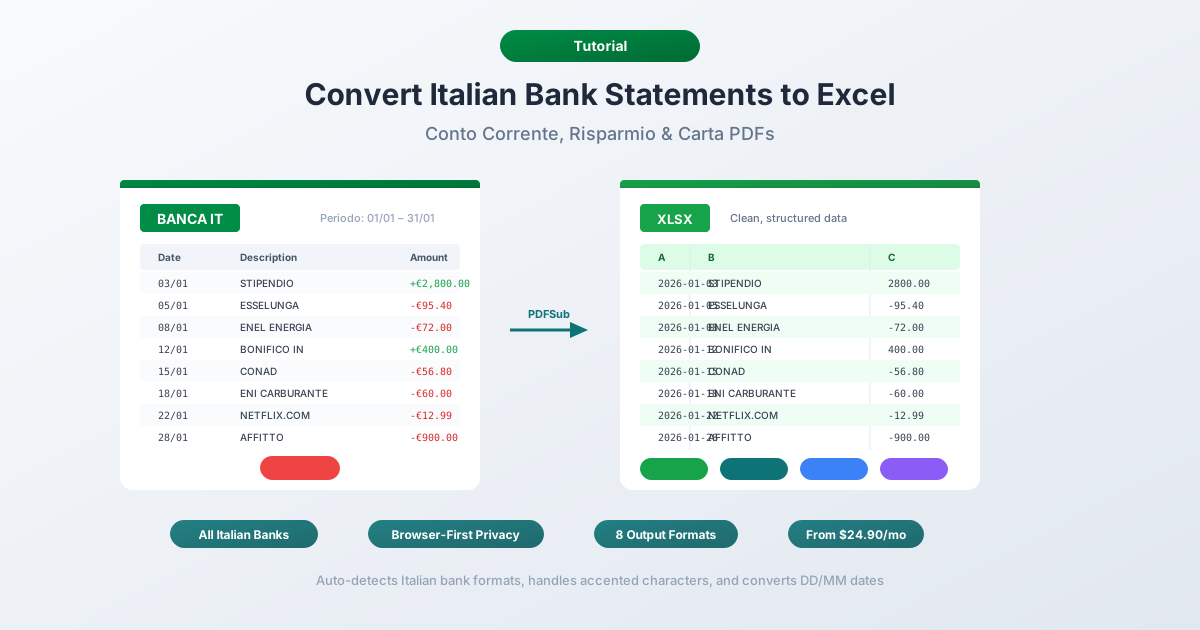
Why Italian Bank Statements Break in Excel
Italian bank statements combine European Continental number formatting with several conventions that are specific to Italy. Each one creates a different kind of breakage when you try to use the data in an English-locale spreadsheet.
1. Comma Decimals and Period Thousands
Italy uses the reversed convention from English:
| Italian Format | English Equivalent | What Excel Sees |
|---|---|---|
| 1.234,56 EUR | 1,234.56 EUR | Text (unrecognized) |
| 15.000,00 EUR | 15,000.00 EUR | "15.000" parsed as Jan 15, 2000 |
| -347,89 EUR | -347.89 EUR | Text |
English-locale Excel treats "1.234,56" as an unrecognizable text string -- it can't parse a number with periods and commas in the "wrong" positions. Simple find-and-replace fails because you need to handle both separators simultaneously, in the correct order.
The problem is worst with round amounts. "15.000" -- meaning fifteen thousand euros -- gets silently converted by English Excel into the date January 15, 2000. Once Excel performs that conversion, the original value is permanently destroyed. For amounts like "1.250,00", Excel may interpret "1.250" as 1.25, silently losing three orders of magnitude.
2. Dual Date Columns -- Data Contabile and Data Valuta
This is where Italian statements diverge from most other European formats. While Germany and France also show two dates, Italy's dual-date system is deeply embedded in banking regulation and has specific legal consequences:
- Data contabile (booking date) -- when the bank recorded the transaction
- Data valuta (value date) -- when the transaction starts affecting your balance for interest calculations
The distinction matters because Italian banks calculate quarterly interest (competenze) based on the data valuta, not the data contabile. A bonifico received on March 28 might have a data contabile of March 28 but a data valuta of March 30 -- shifting interest charges across quarter boundaries.
Both dates use DD/MM/YYYY format. In English-locale Excel, "05/03/2026" (March 5) gets silently parsed as May 3. Dates where the day is 12 or below are misinterpreted; dates above 12 are parsed correctly. Roughly 40% of dates end up wrong, with no error message.
3. Dare/Avere Debit-Credit Conventions
Italian statements use one of two layouts for transaction amounts:
Two-column format: Separate "Dare" (debit) and "Avere" (credit) columns. Dare means the bank "gives" (debits your account); Avere means it "receives" (credits your account). This is the traditional double-entry bookkeeping format that Italian banks favor.
Single-column format: A single "Importo" column where debits are negative and credits are positive -- or where a "D/A" indicator column specifies the direction.
Many converters fail on the two-column layout because they expect a single amount column. They either merge dare and avere into one (losing the sign), or they misalign amounts when one column is empty and the other has a value.
4. The Quarterly Competenze Block
Every Italian bank statement includes a quarterly interest settlement section called the "competenze" or "scalare interessi." This block has a completely different layout from the transaction list:
COMPETENZE DI TRIMESTRE 01/01/2026 - 31/03/2026
Numeri debitori:           234.567,89    Tasso:  8,750%
Numeri creditori:        1.456.789,01    Tasso:  0,125%
Interessi debitori:           56,18
Interessi creditori:           4,98
Commissione massimo scoperto:  15,00
Spese:                         2,50
TOTALE COMPETENZE:            -68,70
Ritenuta fiscale (26%):        -1,29
The competenze block uses label-value pairs instead of the standard date-description-amount columns. It includes interest rates, debit/credit interest numbers (numeri), and the ritenuta fiscale -- a 26% tax withholding on interest income that's mandated by Italian tax law. Naive parsers either skip this block entirely or mangle it into nonsensical transaction rows.
5. Transaction Type Codes Unique to Italy
Italian statements are filled with abbreviation codes and payment types that don't exist in other countries:
- Bonifico -- bank transfer, with fields for Ordinante (payer), Beneficiario (payee), and Causale (reason, max 140 characters)
- MAV (Pagamento Mediante Avviso) -- pre-printed payment slips for utilities, condominium fees, and university tuition
- RAV -- collection agency payment vouchers
- RID/SDD -- SEPA Direct Debit (Rapporto Interbancario Diretto, now replaced by SDD)
- F24 -- the unified tax payment form for all Italian national and local taxes
- Bollettino postale -- traditional Poste Italiane payment slips
- PagoPA -- the government digital payment system replacing MAV and RAV
Each of these has a distinct description format on the statement. A single F24 entry might reference the codice tributo, periodo di riferimento, and total across multiple tax types -- all on one multi-line description. These descriptions are dense, Italian-specific, and break apart when a generic parser tries to fit them into a standard transaction table.
6. Imposta di Bollo
Italian law requires an annual "imposta di bollo" (stamp tax) of EUR 34.20 on accounts with an average balance exceeding EUR 5,000. It appears as a periodic debit -- typically quarterly at EUR 8.55 -- and can confuse reconciliation if your converter doesn't recognize it as a regulatory charge rather than a transaction.
The Major Banks and Their Statement Formats
Italy's 428 banks produce a wide variety of statement formats. Here's what you'll encounter from the most common institutions.
Intesa Sanpaolo (~EUR 869B in Assets)
Italy's largest bank by total assets and one of the biggest in the eurozone. Provides digital statements (estratto conto) via online banking. Clean digital PDFs. Business clients can access SEPA CAMT formats via CBI (Corporate Banking Interbancario). Their PDF format uses the traditional dare/avere two-column layout with both data contabile and data valuta.
UniCredit (~EUR 274B in Assets)
Italy's largest bank by international presence and the most export-friendly. UniCredit is the exception in Italian banking -- it offers download in XLS, CSV, QIF, and PDF formats, in both Italian and English. The "Lista Movimenti" section of online banking provides the broadest export options of any major Italian bank. If you have a UniCredit account, use their native export first.
Banco BPM
Created from the 2017 merger of Banco Popolare and Banca Popolare di Milano. Italy's third-largest bank. PDF statements with standard Italian formatting. Limited native export options beyond PDF.
Monte dei Paschi di Siena (MPS)
The world's oldest surviving bank, founded in 1472 in Siena. Despite its age and turbulent recent history (EUR 5.4B government bailout in 2017), MPS remains a significant retail bank, especially in central Italy. PDF statements only for most personal account holders.
BPER Banca
Expanded significantly through acquisitions during the post-2012 consolidation, absorbing branches from UBI, Carige, and others. Growing presence in northern and central Italy. PDF statements via online banking.
FinecoBank (1.69 Million Customers)
Italy's leading online trading and banking platform, owned by UniCredit Group. Fully digital with a strong export culture -- the "Lista Movimenti" section offers Excel download. The best self-service option for users who want structured data without PDF conversion. However, the exported Excel file still uses Italian formatting that needs conversion for English-locale tools.
Poste Italiane (Banco Posta)
Italy's postal banking service, used by millions -- especially in smaller towns and among older demographics. Statements are PDF only. The bollettino postale payment system originates here.
Digital Banks
Hype (2 million customers) -- popular Italian neobank backed by Banca Sella. Revolut Italy and N26 Italy -- both offer PDF and CSV exports, though formats follow pan-European templates rather than traditional Italian conventions.
Method 1: Use a Bank Statement Converter (Recommended)
PDFSub handles Italian bank statements natively, including all the formatting challenges described above.
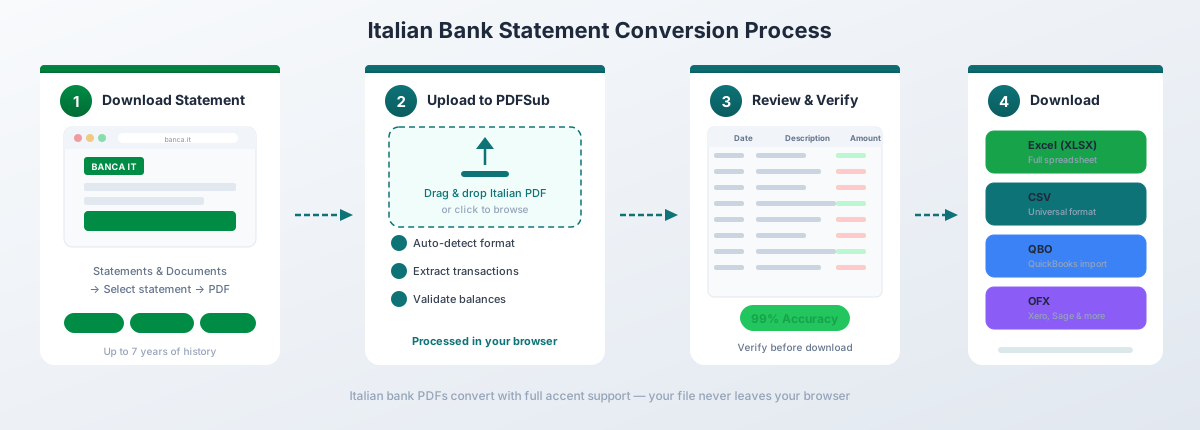
How It Works
-
Upload your estratto conto -- Drag and drop the PDF from any Italian bank. PDFSub auto-detects the bank format from the 20,000+ supported templates.
-
Automatic format handling -- The converter automatically:
- Converts DD/MM/YYYY dates to your preferred format
- Transforms comma decimals (1.234,56) to standard numbers (1234.56)
- Identifies and correctly maps dare/avere columns to signed amounts
- Maps data contabile and data valuta to separate date columns
- Handles the quarterly competenze block as a distinct section
- Parses MAV, RAV, F24, bollettino, and PagoPA entries
- Merges multi-line bonifico descriptions into single clean rows
- Preserves accented characters with correct UTF-8 encoding
-
Review and verify -- Check the extracted transactions in the preview. Balances are validated against the statement's saldo iniziale and saldo finale.
-
Download -- Export as Excel (.xlsx), CSV, QBO (QuickBooks), OFX (Xero, Wave), QFX (Quicken), or JSON.
Why It Works for Italian Statements
130+ languages including Italian. The extraction engine understands Italian banking terminology -- bonifico, addebito, accredito, commissione, competenze, ritenuta fiscale -- and maps them to structured fields.
428 bank formats. Instead of relying on a single template, PDFSub uses AI-assisted extraction that adapts to layout variations across Italy's fragmented banking landscape -- from Intesa Sanpaolo's dare/avere columns to FinecoBank's digital format to MPS's century-old conventions.
Browser-first privacy. For digital PDFs from online banking (which is most Italian bank statements), text extraction happens entirely in your browser. The file never leaves your device. Server-side processing is only used for scanned documents.
Correct dare/avere handling. The converter understands both the two-column (dare/avere) and single-column (importo with D/A indicator) layouts. Debits and credits are correctly signed regardless of which format the bank uses.
Italy-specific payment types. MAV, RAV, F24, bollettino postale, PagoPA, and RID/SDD entries are recognized and parsed with their reference numbers, causale descriptions, and codice tributo intact.
Bank statement conversion is included in the All-In-One plan at $20/user/mo (annual; 500 pages per user) with a 7-day free trial -- enough time to convert a full year of statements and verify that the output meets your needs.
Method 2: Bank-Provided Downloads
Most Italian banks offer PDF as the primary -- and often only -- export format. The notable exception is UniCredit.
UniCredit: The Best Native Export
UniCredit offers the most complete export options of any major Italian bank:
- XLS (Excel) -- Italian-formatted, but at least structured
- CSV -- Semicolon-delimited with Italian number formatting
- QIF -- Available in both Italian and English versions
- PDF -- Standard estratto conto
How to access: Online banking -> Conti e Carte -> Lista Movimenti -> Esporta
Even with UniCredit's Excel export, the file uses Italian formatting -- comma decimals, DD/MM/YYYY dates -- that English-locale Excel won't parse correctly without manual conversion.
Other Banks
| Bank | CSV | XLS | QIF/OFX | Notes | |
|---|---|---|---|---|---|
| Intesa Sanpaolo | Yes | Limited | No | No | CSV via "Scarica movimenti" for recent transactions only |
| Banco BPM | Yes | No | No | No | PDF is the only export option |
| MPS | Yes | No | No | No | PDF only |
| BPER | Yes | Limited | No | No | Some CSV export from online banking |
| FinecoBank | Yes | No | Yes | No | Excel export from Lista Movimenti |
| Poste Italiane | Yes | No | No | No | PDF only for BancoPosta |
| Hype | Yes | No | No | No | PDF only |
CSV Limitations
When Italian banks do offer CSV export:
Semicolon-delimited. Italian CSV files use semicolons (;) as delimiters because commas are used for decimals. English Excel expects comma-delimited CSV and dumps everything into column A.
Italian number formatting preserved. The CSV still contains Italian-format numbers with period thousands and comma decimals. You'll need manual conversion for English-locale tools.
Limited history. Most banks offer CSV export for 90 days to 12 months. Official estratti conto cover the full statement period.
Not an official statement. A CSV export of transactions lacks the legal standing of an estratto conto. For the Agenzia delle Entrate (Italian tax authority) or court proceedings, you need the official PDF.
Method 3: Copy-Paste (Not Recommended)
You can try copying transaction data directly from the PDF into Excel. The problems:
- Dual date columns (data contabile and data valuta) merge into a single text block
- Dare/avere column structure is lost -- amounts end up in the wrong cells
- Numbers paste as text with Italian formatting intact
- Multi-line bonifico descriptions create extra rows
- The competenze block produces complete nonsense when copy-pasted
- No validation against saldo iniziale and saldo finale
- F24, MAV, and bollettino reference numbers get separated from their amounts
For anything beyond a handful of transactions, this approach creates more errors than it solves.
Italy-Specific Transaction Types
Understanding what these entries mean on your statement is essential for correct categorization and reconciliation.
Bonifico (Bank Transfer)
The most common transaction type. SEPA bonifici include structured fields:
- Ordinante -- the payer (for incoming transfers)
- Beneficiario -- the payee (for outgoing transfers)
- Causale -- the payment reason, max 140 characters under SEPA rules
- CRO -- an 11-digit transaction reference number (Codice Riferimento Operazione)
- TRN -- a 30-character transaction reference for SEPA transfers
A single bonifico entry can span 4-6 lines on the statement as these fields wrap.
RID/SDD (SEPA Direct Debit)
RID (Rapporto Interbancario Diretto) was Italy's domestic direct debit system, now replaced by SDD (SEPA Direct Debit). Many statements still label these as "RID" or "Addebito SDD." Common for utility bills (Enel, ENI, Acea), insurance premiums, mortgage payments, and subscriptions.
MAV (Pagamento Mediante Avviso)
Pre-printed payment vouchers issued by creditors for condominium fees (spese condominiali), university tuition (tasse universitarie), and utility bills. Each MAV has a unique code in the transaction description. PagoPA is gradually replacing MAV, but both still appear on current statements.
RAV
Similar to MAV but used for collection agencies and tax collection. Each RAV entry includes a reference code linking to the specific obligation.
F24 (Unified Tax Payment)
Italy's universal tax payment form -- covering income tax (IRPEF), regional and municipal taxes, social security (INPS), property tax (IMU), and dozens of other obligations. A single F24 payment might reference multiple codici tributo and cover taxes across several periods.
Bollettino Postale
Traditional payment slips processed through Poste Italiane. Still widely used for utility payments, government fees, and fines. Each bollettino includes a c/c postale (postal current account) number and causale.
PagoPA
Italy's government-mandated digital payment platform, replacing MAV, RAV, and bollettino for government-related payments. Entries appear on statements with a PagoPA reference code (IUV -- Identificativo Univoco Versamento).
Understanding Dual Date Columns
The dual-date system on Italian statements is not just a display preference -- it has financial and legal significance.
Data Contabile (Booking Date)
When the bank officially recorded the transaction. For accounting and tax purposes, the data contabile is typically the relevant date -- it determines which fiscal period the transaction falls into.
Data Valuta (Value Date)
When the transaction begins affecting your balance for interest calculations. Italian banks use the data valuta to compute the "numeri" -- daily balance figures that feed into the quarterly competenze calculation.
Why the Difference Matters
| Scenario | Data Contabile | Data Valuta | Gap |
|---|---|---|---|
| Outgoing bonifico | Day of execution | Same day or D-1 | 0-1 days |
| Incoming bonifico | Day received | D+1 to D+2 | 1-2 days |
| Check deposit (assegno) | Day deposited | D+3 to D+5 | 3-5 business days |
| Card payment (POS) | Day posted | Day of purchase | 0-2 days |
| ATM withdrawal (prelievo) | Day posted | Day of withdrawal | 0-1 days |
For incoming transactions, the data valuta is typically later than the data contabile -- meaning you don't earn interest on the funds until after the bank has processed them. For outgoing transactions, the valuta is sometimes earlier, meaning interest stops accruing before the transaction officially posts. When converting statements, your spreadsheet should preserve both columns so you can reconcile against accounting records (data contabile) or interest calculations (data valuta).
The Quarterly Competenze Block
Every Italian bank statement includes a quarterly settlement section. Understanding its structure is necessary for accurate conversion.
What the Competenze Block Contains
- Numeri debitori -- the sum of daily debit balances multiplied by days, used to calculate debit interest
- Numeri creditori -- the same calculation for credit balances
- Tasso debitore -- the interest rate applied to debit balances (often 8-12% for unauthorized overdrafts)
- Tasso creditore -- the interest rate on credit balances (typically 0.01-0.25%)
- Interessi debitori -- calculated debit interest
- Interessi creditori -- calculated credit interest
- Commissione di massimo scoperto -- the fee on your highest overdraft balance during the quarter
- Spese di tenuta conto -- account maintenance fees
- Ritenuta fiscale -- 26% tax withholding on net interest income (if positive), automatically deducted by the bank
Why It Breaks Converters
The competenze block uses a label-value layout rather than the columnar transaction format. Most PDF-to-Excel tools either skip it entirely, parse each line as a separate "transaction" with mangled dates, or merge it with the last few transactions on the page. A proper converter recognizes the competenze block as a distinct section and extracts each component into a properly labeled row.
Importing into Accounting Software
Once your Italian bank statement is converted to a structured format, here's how to get it into your accounting system.
QuickBooks Online
Export from PDFSub as QBO format for the smoothest import. QuickBooks Online accepts QBO files via Banking -> Upload Transactions.
For CSV import, ensure dates are formatted as DD/MM/YYYY (if your QuickBooks is set to Italian locale) or MM/DD/YYYY (for US locale). Map the amount column correctly -- QuickBooks expects a single signed amount column, not separate dare/avere.
For a detailed walkthrough, see our guide: How to Import Bank Statements into QuickBooks Online.
Xero
Export from PDFSub as OFX format for Xero. Upload via Bank Accounts -> Manage Account -> Import a Statement.
Xero accepts OFX, QIF, and CSV. For CSV, Xero needs columns for Date, Amount, and Description at minimum. The date format should match your Xero organization's regional settings.
For a detailed walkthrough, see our guide: How to Import Bank Statements into Xero.
Italian Accounting Software
TeamSystem (Ago Infinity, Lynfa Studio) -- Italy's dominant accounting software provider. Import converted CSV or Excel files using TeamSystem's import module. Map columns to the standard fields: data registrazione, descrizione, dare, avere.
Zucchetti (Ad Hoc Revolution) -- Another major Italian software provider. Supports CSV import with column mapping for bank movements.
Wolters Kluwer (Arca Evolution) -- Accepts structured CSV for bank reconciliation.
For all Italian accounting software, the key is preserving both date columns and maintaining the dare/avere distinction. PDFSub's Excel and CSV output retains all original columns, so you can map them directly to your software's expected fields.
Frequently Asked Questions
Can I convert Intesa Sanpaolo statements to Excel?
Yes. Intesa Sanpaolo is the most common Italian bank statement format that PDFSub processes. The converter handles their dare/avere column layout, dual date columns, multi-line bonifico descriptions, and quarterly competenze blocks. Upload the PDF and the format is auto-detected.
How do I handle comma decimals from Italian statements?
PDFSub converts Italian comma decimals (1.234,56) to standard format (1234.56) automatically during extraction. If you're working with raw Italian data manually, you'll need a two-step process: first remove the period thousands separators, then replace the comma with a period for the decimal. Do it in that order -- reversing the steps will corrupt your data.
What's the difference between data contabile and data valuta?
Data contabile is the booking date -- when the bank recorded the transaction. Data valuta is the value date -- when the transaction starts affecting your balance for interest calculations. They can differ by 1-5 business days depending on the transaction type. For accounting purposes, data contabile is typically the relevant date. For reconciling against the bank's interest charges (competenze), you need the data valuta.
Do Italian digital bank statements have OCR issues?
Generally no. Statements downloaded from Italian online banking portals are native digital PDFs with selectable text, meaning extraction is fast and accurate. OCR is only needed for older paper statements or scanned documents. PDFSub handles both -- browser-based extraction for digital PDFs and server-side OCR for scans.
Can I convert the quarterly competenze block?
Yes. PDFSub recognizes the competenze block as a distinct section with its own layout. Interest charges, fees, and the ritenuta fiscale withholding are extracted and presented as separate line items rather than being mangled into the transaction table.
What is the imposta di bollo on my statement?
The imposta di bollo is a EUR 34.20 annual stamp tax (typically charged quarterly at EUR 8.55) that applies to bank accounts with an average annual balance exceeding EUR 5,000. It's a regulatory charge, not a bank fee. PDFSub extracts it as a standard transaction line item.
How many Italian banks does PDFSub support?
PDFSub supports 20,000+ bank formats globally, including all major Italian banks (Intesa Sanpaolo, UniCredit, Banco BPM, MPS, BPER, FinecoBank, Poste Italiane, Hype) and hundreds of smaller banche popolari and casse di risparmio.
Can I convert statements from Italian digital banks like Hype or Revolut Italy?
Yes. Digital bank statements from Hype, Revolut Italy, N26 Italy, and similar neobanks are fully supported. These tend to be cleaner digital PDFs with simpler layouts than traditional bank statements, making extraction particularly accurate.
Is PDFSub compliant with Italian data protection requirements?
For digital PDFs, PDFSub's Tier 1 extraction runs entirely in your browser - the file never leaves your device. When server-side processing is needed for scanned documents, the PDFSub Engine handles it - an isolated service with no internet access. Files are processed in an isolated environment and auto-deleted. This is a strong privacy model for handling sensitive Italian financial data under GDPR and Italian data protection law (Codice della Privacy). PDFSub is GDPR and CCPA compliant, and SOC 2 Ready.
Can I convert multiple Italian bank statements at once?
Yes. Upload multiple estratti conto and PDFSub processes them sequentially. Each statement is auto-detected and converted independently, even if they're from different banks with different formats -- Intesa Sanpaolo's dare/avere layout alongside UniCredit's single-column importo format.