How PDFSub Keeps Your Bank Statements Secure
Bank statement conversion requires server-side processing for accuracy. Here's how PDFSub's isolated engine architecture delivers both precision and security - with encrypted processing, automatic deletion, and zero internet access.
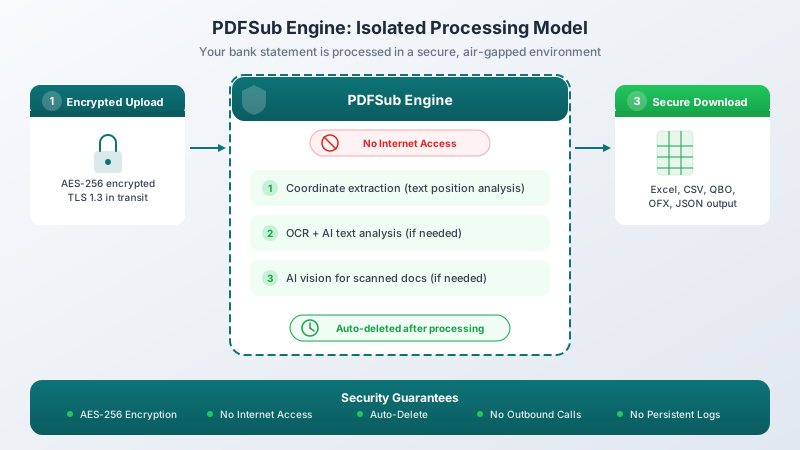
For the architectural deep-dive: Browser vs Cloud PDF Security walks through both processing models with side-by-side data flow diagrams. This page covers the specific case for bank statements; that page is the canonical comparison.
Let's be honest about something that the PDF conversion industry doesn't like to talk about: browser-only processing sounds great for privacy, but it doesn't produce accurate results for bank statements.
We know this because we tried it. PDFSub started with browser-based bank statement extraction. And for simple statements from major banks with clean, digital PDFs, it worked fine. But the real world isn't simple. Statements come from 20,000+ banks worldwide. They arrive in hundreds of formats. Some are scanned. Some have multi-line descriptions that wrap across rows. Some use date formats you've never seen. Some mix languages on the same page.
Browser-based JavaScript simply cannot handle this reliably. Not when your client's books depend on every transaction being correct.
So we built something better: the PDFSub Engine - a secure, isolated processing environment that delivers the accuracy of server-side extraction with security guarantees that go beyond what browser-only processing can offer.
The Threat Landscape Is Real
Before we get into architecture, let's acknowledge why security matters so much for financial documents. The numbers are alarming, and they're getting worse.
| Metric | Number |
|---|---|
| Global average data breach cost (2026) | $4.88 million |
| US average data breach cost (2025) | $10.22 million (all-time high) |
| Financial sector breach cost | $5.56 million |
| Cyberattack increase on accounting firms since 2020 | 300% |
| Average cyberattacks per week on accounting firms | 300 (900+ during tax season) |
| IRS data breach reports from tax professionals (2024) | 250+ |
| Clients impacted by those breaches | 200,000+ |
| Financial services ransomware recovery cost (2024) | $2.73 million average |
| Breached practices that lost >50% of clients within 6 months | 89% |
These statistics come from the IBM 2025/2026 Cost of a Data Breach Reports, IRS Newsroom, and Sophos financial services ransomware surveys. They represent real firms, real clients, and real consequences.
MOVEit: When the Big Four Got Hit
In May 2023, the Cl0p ransomware gang exploited a zero-day vulnerability in MOVEit file transfer software. The result: 2,559 organizations and over 60 million individuals impacted, with estimated total costs reaching $6.5 to $15.8 billion.
Three of the Big Four accounting firms were affected:
- Ernst & Young: Cl0p published samples from more than 3TB of allegedly stolen data
- PwC: Listed with 121GB of compromised data
- Deloitte: Named but claimed no client data was impacted
If the world's largest accounting firms - with billion-dollar security budgets - can be breached, the question isn't whether it can happen to your firm. It's when.
Ransomware During Tax Season
- Wojeski and Company (New York, 2023): Ransomware locked out employees; lost data for 4,700+ clients including unencrypted SSNs. Didn't alert customers until a year later. Attorney General fined them $60,000.
- Southeast Accounting Firm (2024): Hit 48 hours before the April 15 deadline. Paid a $250,000 ransom but still experienced 11 days of downtime. Total costs exceeded $2.1 million.
- IRS Contractor Breach: Charles Littlejohn, an IRS contractor, stole tax information from thousands of wealthy Americans. Affected approximately 406,000 taxpayers. Sentenced to 5 years in prison.
89% of breached practices lost over half their clients within six months. The reputational damage exceeds the financial damage - clients who trusted you with their most sensitive data will not come back.
Why Browser-Only Processing Falls Short
The privacy argument for browser-based processing is compelling: if your bank statement never leaves your device, there's nothing to breach. We agree with this principle, and PDFSub uses browser-first processing for about 28 general PDF tools - editing, form filling, merging, compressing, and more. For those tools, your files never leave your device.
But bank statements are different. Here's why browser-only extraction breaks down:
The Accuracy Problem
Bank statements are among the most complex documents to parse programmatically. A single statement might contain:
- Multi-line transaction descriptions that wrap across rows (is the second line a new transaction or a continuation?)
- Ambiguous date formats (is 03/04 March 4th or April 3rd? Depends on the bank and country)
- Merged cells and spanning headers that break column alignment
- Non-standard number formats (1.234,56 vs 1,234.56 vs 1 234.56)
- Mixed-language content (bank name in one language, transaction descriptions in another)
- Scanned documents that require OCR before any extraction can begin
- Image-based PDFs where the text layer is missing or unreliable
Browser-based JavaScript running in a sandbox has limited access to the sophisticated parsing tools needed to handle all of these cases. It can't run OCR on scanned documents. It can't leverage AI models to resolve ambiguous layouts. It can't apply the coordinate-level precision needed to correctly identify columns when spacing varies.
The result? Browser-only converters work for the easy cases. For the hard cases - which is where accuracy matters most - they silently produce wrong data. A missed transaction. A description assigned to the wrong row. A debit recorded as a credit.
When you're preparing books for audit or reconciling accounts, "mostly accurate" isn't acceptable.
The Honest Tradeoff
This is the tradeoff the industry doesn't want to discuss: maximum privacy and maximum accuracy are in tension for complex financial documents. You can process everything in the browser and accept lower accuracy, or you can use server-side processing and get reliable results.
PDFSub chose a third path: server-side processing inside an isolated, air-gapped environment that provides security guarantees stronger than what most browser implementations offer.
PDFSub's Three-Tier Architecture
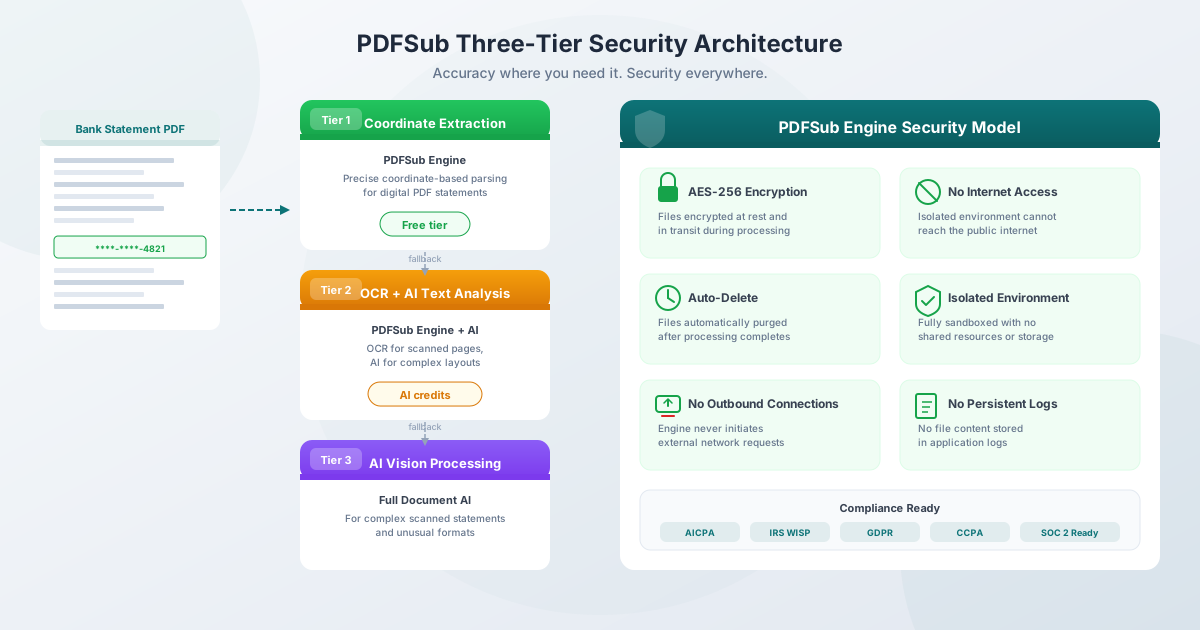
PDFSub's bank statement converter uses a tiered architecture that starts with the fastest, cheapest method and escalates only when needed. Each tier runs inside the PDFSub Engine - a secure, isolated processing environment with no internet access.
Tier 1: Coordinate Extraction (Free)
The PDFSub Engine parses the raw PDF structure, extracting text by its precise coordinate position on the page. This isn't simple text extraction - it's positional analysis. The engine knows that the text at coordinates (72, 340) is a date, the text at (180, 340) is a description, and the text at (450, 340) is an amount, because it understands the spatial layout of thousands of bank statement formats.
This tier handles the majority of digital PDF statements - the kind you download directly from your online banking portal. It's fast, it's accurate, and it costs you nothing (no AI credits used).
Tier 2: OCR + AI Text Analysis (AI Credits)
When Tier 1 can't confidently extract all transactions - maybe the PDF has unusual formatting, or some pages are scanned images - the engine automatically escalates to Tier 2.
This tier applies OCR (Optical Character Recognition) to convert images to text, then uses AI text analysis to understand the document structure. It can handle multi-line descriptions, non-standard date formats, and mixed-language content that would stump a browser-based parser.
This uses AI credits, but only when needed. Most statements resolve at Tier 1.
Tier 3: AI Vision Processing (AI Credits)
For the most complex cases - heavily scanned documents, statements with unusual layouts, or PDFs where the text layer is completely unreliable - the engine sends the document through full AI vision processing. The AI "sees" the document as a human would and extracts transactions from the visual layout.
This is the most expensive tier (more AI credits), but it handles cases that no other approach can reliably process.
Why Tiered Processing Matters
The tiered approach means you get the best possible result at the lowest possible cost:
| Tier | Method | Cost | Handles |
|---|---|---|---|
| Tier 1 | Coordinate extraction | Free | Digital PDFs from online banking (~70% of statements) |
| Tier 2 | OCR + AI text analysis | AI credits | Scanned pages, complex layouts, unusual formats |
| Tier 3 | AI vision processing | AI credits | Heavily scanned docs, unreliable text layers |
The system automatically selects the right tier. You don't need to think about it.
How the PDFSub Engine Keeps Your Data Secure
Here's where we address the elephant in the room: if the file leaves your browser, how do you know it's safe?
The PDFSub Engine was designed from the ground up with a simple principle: treat every document as if it contains the most sensitive data in the world. Because it might.
No Internet Access
The PDFSub Engine operates in a fully isolated environment with no access to the public internet. It can't make outbound connections. It can't phone home. It can't send your data anywhere. Even if the processing environment were somehow compromised, the attacker couldn't exfiltrate data because there's no network path out.
This is a stronger guarantee than most browser-based tools offer. Your browser has full internet access - a malicious browser extension, a compromised dependency in a JavaScript library, or a cross-site scripting attack could all potentially access data being processed in a browser tab.
AES-256 Encryption
Your bank statement is encrypted with AES-256 (the same standard used by the U.S. government for classified information) both in transit and at rest during processing. The encryption keys are unique per processing session and are destroyed when processing completes.
Automatic Deletion
Files are automatically purged after processing completes. There's no "retention period." There's no backup that keeps a copy for 30 days, or 2 hours, or 5 years. Processing finishes, results are returned to you, and the source file is deleted.
No Persistent Logs
The PDFSub Engine doesn't log file contents, extracted text, or transaction data. Processing metadata (timestamps, file sizes, tier used) is logged for debugging, but the actual financial data in your statement never appears in any log file.
No Outbound Connections
This bears repeating because it's the most important security feature: the engine never initiates outbound connections. It receives your encrypted file, processes it, and returns the result. That's it. There's no "phone home" capability, no analytics endpoint, no third-party subprocessor receiving a copy of your data.
How This Compares to Competitors
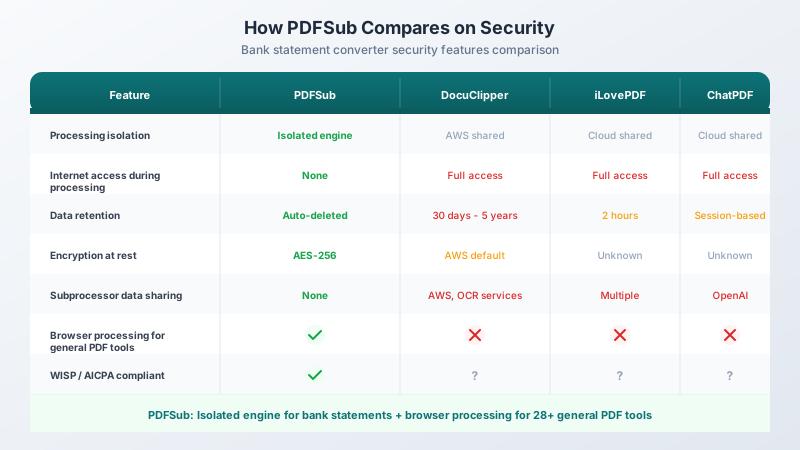
| Feature | PDFSub | DocuClipper | iLovePDF | ChatPDF |
|---|---|---|---|---|
| Processing isolation | Isolated engine | AWS shared infra | Cloud shared | Cloud shared |
| Internet during processing | None | Full access | Full access | Full access |
| Data retention | Auto-deleted | 30 days to 5 years | 2 hours | Session-based |
| Encryption at rest | AES-256 | AWS default | Unknown | Unknown |
| Subprocessor data sharing | None | AWS, OCR services | Multiple | OpenAI |
| Browser processing for general PDF tools | Yes (28+ tools) | No | No | No |
DocuClipper, one of the most popular bank statement converters, retains your files on AWS for up to 5 years on their Enterprise plan. That's 5 years of bank statements - containing account numbers, transaction history, and potentially SSNs - sitting on a third-party cloud server.
Browser Processing Where It Works
Here's an important distinction that sets PDFSub apart: we don't use server-side processing for everything. We use it only where accuracy demands it.
For about 28 general PDF tools - editing PDFs, filling forms, merging documents, compressing files, adding watermarks, rotating pages, and more - PDFSub processes everything entirely in your browser. Your files never leave your device. You can verify this yourself: open your browser's DevTools (F12, then the Network tab) while using any of these tools. You'll see zero outbound requests containing file data.
This is the right approach for these tools because browser-based processing produces excellent results for standard PDF operations. There's no accuracy tradeoff. The same technology that powers your browser's built-in PDF viewer handles these operations perfectly.
The key distinction: PDFSub uses browser processing where it works (editing, form filling, merging) and secure isolated service processing where accuracy demands it (bank statements, OCR, AI-powered extraction).
This hybrid approach gives you the best of both worlds: maximum privacy for general PDF operations and maximum accuracy for financial document conversion - all within a security architecture designed for sensitive data.
Your Legal Obligations
If you're a CPA, enrolled agent, bookkeeper, or tax preparer, you have specific legal requirements for handling client financial data. Your choice of bank statement converter directly affects your compliance posture.
AICPA Rule 1.700.001
The AICPA Code of Professional Conduct requires that CPAs in public practice not disclose confidential client information without specific consent. AICPA Interpretation 1.700.040 presumes confidentiality is threatened whenever a CPA uses a third-party service provider.
When you upload a client's bank statement to a cloud-based converter, you may be disclosing confidential information to that service provider - potentially violating this rule unless you have either:
- A contractual agreement with the provider requiring confidentiality, or
- Client consent for the disclosure
PDFSub's isolated engine architecture minimizes this risk: the processing environment has no internet access, no subprocessors receive your data, and files are auto-deleted after processing.
IRS WISP Requirement
The IRS requires all tax professionals to maintain a Written Information Security Plan (WISP) under the Gramm-Leach-Bliley Act. Since 2023, PTIN renewal on IRS Form W-12 (Line 11) asks explicitly whether you have one.
For 2026, the WISP requirements mandate:
- MFA for all system access (not just remote connections - this is a significant expansion)
- Security events affecting 500+ people must be reported to the FTC within 30 days
- You must evaluate service providers' ability to maintain appropriate safeguards
- Annual penetration testing for larger firms and biannual vulnerability assessments
Your WISP should document every tool that handles client financial data - including your bank statement converter. PDFSub's isolated architecture, AES-256 encryption, and automatic deletion make for a strong entry in your vendor evaluation section.
FTC Safeguards Rule
All tax preparers must comply because tax preparation is classified as a "financial activity" under the GLBA. Non-compliance penalties reach up to $100,000 per violation for organizations and $10,000 per violation for individual executives.
Required elements include: designated security coordinator, periodic data inventory, vendor evaluation, multi-factor authentication, encrypted data storage, and breach reporting.
GDPR, CCPA, and SOC 2
If you process financial data for EU residents, you're subject to GDPR's data processor obligations (Article 28). CCPA covers financial information explicitly. Both require service providers to contractually agree not to retain, use, or disclose personal information beyond the specified service.
PDFSub is GDPR and CCPA compliant, and SOC 2 Ready. But more importantly, the isolated engine architecture means the security posture goes beyond what compliance frameworks require.
What This Means for Compliance
| Compliance Requirement | Cloud Upload Tools | PDFSub Engine |
|---|---|---|
| AICPA 1.700.001 (confidentiality) | May require client consent or vendor DPA | Minimized risk - isolated, no subprocessors |
| IRS WISP (vendor evaluation) | Must document cloud vendor risks | Strong vendor profile - encryption, isolation, auto-delete |
| GDPR (data processor obligations) | Full Article 28 DPA required | DPA supported, minimal data footprint |
| FTC Safeguards Rule (data handling) | Must address cloud storage in security plan | Encrypted processing, no retention |
| Cyber insurance | Cloud tools may affect coverage terms | Strongest position - isolated processing, auto-delete |
Privacy Certifications Don't Solve the Problem
Cloud-based tools often point to certifications - SOC 2 Type II, ISO 27001, PCI DSS - as evidence of security. These certifications are valuable, but they validate processes and controls, not security outcomes.
A SOC 2-certified vendor can still:
- Store your data longer than you'd expect
- Grant broad internal access to support staff
- Use subprocessors that are less secure
- Have unpatched application vulnerabilities
- Be breached despite following all certified processes
Three of the Big Four accounting firms had SOC 2 and ISO 27001 certifications when MOVEit was breached. The certifications didn't prevent 60 million people from having their data exposed.
The better approach is to architect security into the system itself - isolation, encryption, auto-deletion, and no internet access. That way, even if something goes wrong, there's nothing to steal and nowhere to send it.
Practical Steps for Your Firm
1. Audit Your Current Tools
Check whether your bank statement converter, invoice extractor, receipt scanner, and other financial document tools upload files to cloud servers with internet access. If they do, document this in your WISP as a risk factor and evaluate alternatives.
2. Evaluate Isolation, Not Just Encryption
Encryption in transit (HTTPS) is table stakes. What matters is: does the processing environment have internet access? Are subprocessors receiving copies of your data? How long are files retained? These questions determine your actual risk exposure.
3. Use Browser Processing Where Possible
For non-financial document tasks - editing PDFs, filling forms, merging files - use tools that process entirely in your browser. PDFSub handles 28+ tool types client-side, meaning your files never leave your device for these operations.
4. Update Your WISP for 2026
The 2026 IRS updates expand MFA requirements to all system access. Review your WISP to ensure it covers every tool that handles client financial data, including your bank statement converter. Document the security architecture of each tool.
5. Review Your Cyber Insurance
Most insurers in 2026 require MFA, endpoint detection, and supply chain risk management. Your bank statement conversion tool is part of your supply chain. An isolated processing architecture with auto-delete and no internet access gives you the strongest possible position.
6. During Tax Season, Minimize Your Attack Surface
With cyberattacks spiking to 900+ per week during tax season, every piece of client data sitting on a cloud server is an exposure point. Choose tools that don't retain data - whether through browser processing or isolated, auto-delete server processing.
The Bottom Line
Bank statement conversion is a hard problem. Browser-only processing can't solve it accurately, and traditional cloud processing creates unacceptable security risks.
PDFSub's approach is different: a three-tier architecture inside an isolated engine that delivers accurate results while maintaining security guarantees that go beyond what even browser-only processing can offer. No internet access. AES-256 encryption. Automatic deletion. No subprocessors. No persistent logs.
And for the 28+ PDF tools where browser processing works perfectly - editing, form filling, merging, and more - your files never leave your device at all.
Accuracy where you need it. Security everywhere.
Try PDFSub Free - convert bank statements to Excel, CSV, QBO, or OFX with the precision of server-side extraction and the security of isolated processing.
FAQ
Does PDFSub upload my bank statement to a server?
Yes, for bank statement conversion specifically. The file is sent to the PDFSub Engine - an isolated processing environment with no internet access. The file is automatically deleted after processing. For about 28 other PDF tools (editing, form filling, merging, etc.), processing happens entirely in your browser and files never leave your device.
How is server-side processing more secure than browser-based?
The PDFSub Engine operates in a fully isolated environment with no internet access, no outbound connections, and no subprocessors. Your browser, by contrast, has full internet access - making it vulnerable to malicious extensions, compromised dependencies, and cross-site attacks. Isolation provides a stronger security boundary than the browser sandbox for sensitive financial data.
What happens to my file after processing?
It's automatically deleted. There's no retention period, no backup copy, and no "we'll delete it in 2 hours" window. Processing completes, results are returned, and the source file is purged.
Why can't browser-based processing handle bank statements accurately?
Bank statements come in thousands of formats from 20,000+ banks worldwide. Accurate extraction requires coordinate-level positional analysis, OCR for scanned pages, and AI for complex layouts. Browser-based JavaScript running in a sandbox can't access these capabilities. The result is that browser-only converters work for simple statements but produce errors on complex ones.
Does PDFSub share my data with third-party AI providers?
The PDFSub Engine processes your documents in isolation. When AI is needed (Tiers 2 and 3), the AI processing happens within the secure architecture. No third-party subprocessors receive copies of your bank statement.
Is PDFSub compliant with AICPA, IRS WISP, and GDPR requirements?
PDFSub is GDPR and CCPA compliant, and SOC 2 Ready. The isolated engine architecture - with AES-256 encryption, no internet access, auto-delete, and no subprocessor data sharing - provides a strong vendor security profile for your WISP documentation and AICPA compliance.
How much does bank statement conversion cost?
Tier 1 coordinate extraction is free - no AI credits used. This handles the majority of digital PDF statements. Tiers 2 and 3 use AI credits, which are included with PDFSub subscription plans. Visit the pricing page for current plan details.
Can I verify PDFSub's security claims?
For the 28+ browser-based PDF tools, yes - open DevTools (F12, Network tab) and verify zero outbound requests with file data. For bank statement processing, the security architecture is documented and auditable. PDFSub is SOC 2 Ready, which means the security controls are designed to meet SOC 2 trust service criteria for independent verification.