PDFSub vs Smallpdf: Honest Comparison (2026)
A detailed head-to-head comparison of PDFSub and Smallpdf - features, pricing, privacy, and more.
PDFSub is best for:
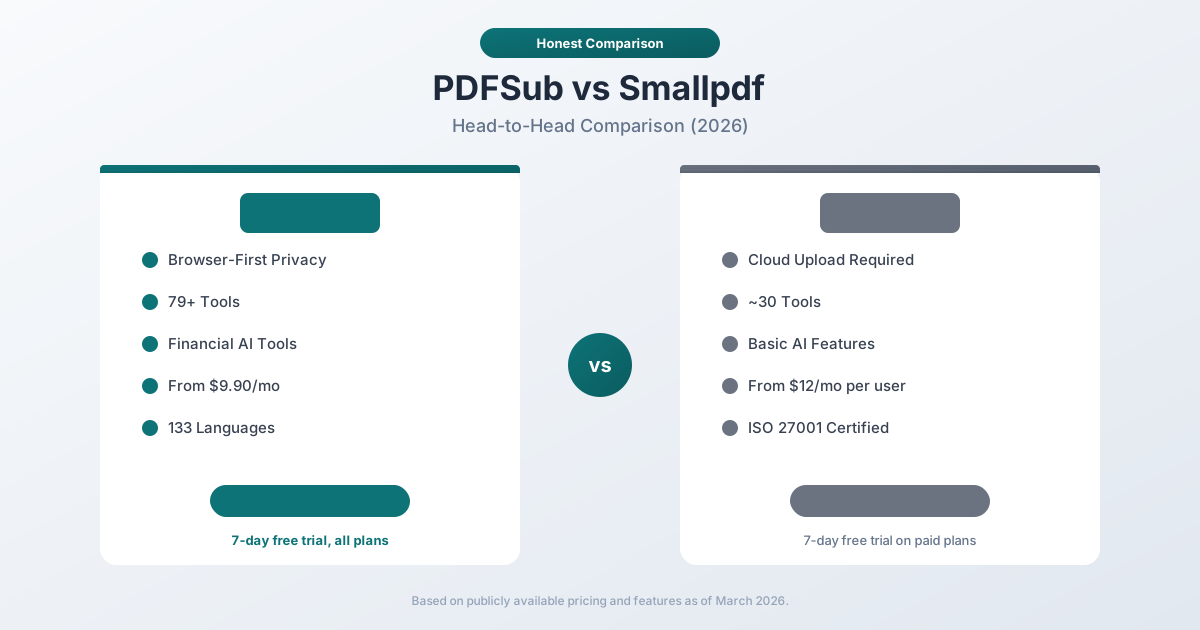
- Smallpdf users concerned about privacy - PDFSub processes editing files in-browser, Smallpdf uploads everything
- Users who want 98+ tools at $25/user/month annual ($30/user/month monthly) vs Smallpdf Pro at $12/user/month - and get AI features and bank statement conversion in the same per-user price
- Financial professionals who need bank statement conversion and AI extraction Smallpdf does not offer
- International teams needing document translation in 130+ languages with layout preservation
- Teams that want e-sign included in the per-user price with no per-envelope fees on top
PDFSub is NOT best for:
- Teams that value Smallpdf's ISO 27001 certification and Swiss data jurisdiction
- Users who want a native mobile app or desktop app alongside the web interface
- Organizations that require HIPAA compliance
Smallpdf is one of the most popular online PDF platforms in the world. With over a billion users since launch, it has become the default tool many people reach for when they need to compress, merge, or convert a PDF. PDFSub is a newer platform that takes a different architectural approach -- processing most operations in your browser instead of uploading files to the cloud -- while adding financial document AI that Smallpdf doesn't offer.
Both platforms serve the general PDF tool market. But they differ in meaningful ways on privacy, financial document handling, AI capabilities, and pricing structure.
Quick Verdict
The 30-second split.
Choose PDFSub if…
- You need AI document features - summarize, translate to 130+ languages, chat with PDFs, extract structured data - at Smallpdf's price tier.
- You process bank statements, invoices, or receipts to accounting formats (QBO, OFX, QIF).
- You value browser-first privacy where many tools never upload your file.
- You want Google Drive + Dropbox integration included in the $25/user/month annual seat price (no add-on tier).
Choose Smallpdf if…
- You only need basic PDF tasks (compress, merge, split, convert) and want the most polished consumer UI in the category.
- You specifically need ISO 27001 certification and Swiss data jurisdiction for compliance reasons.
- You use Smallpdf's native mobile and desktop apps for offline work - PDFSub is browser-only.
- Brand recognition matters and you're choosing a tool clients or colleagues already know.
Both are solid PDF platforms for general use. The decision usually comes down to whether you need AI and financial extraction (PDFSub) or polished basics with Swiss compliance (Smallpdf).
Company Overviews
PDFSub is a document platform offering 98+ PDF and document tools. It runs editing tools entirely in your browser. Conversions and advanced processing are powered by the PDFSub Engine - an isolated service with no internet access. Files are processed in an isolated environment and auto-deleted. Beyond standard PDF operations, PDFSub specializes in financial document extraction (bank statements to 8 formats, invoice processing, receipt scanning) and AI-powered document analysis (summarization, translation, chat with PDF). It supports 130+ languages with automatic detection.
Smallpdf is a Swiss-based PDF platform founded in 2013. It offers around 30 tools for PDF compression, conversion, merging, splitting, editing, signing, and more. Smallpdf processes files on their cloud servers, holding ISO 27001 certification and operating under Swiss privacy laws. With a reported 1+ billion users, Smallpdf is one of the most widely recognized PDF tools online. They also offer a desktop app, mobile apps, and integrations with cloud storage services.
Feature-by-Feature Comparison
Privacy and Security
This is the most significant architectural difference between the two platforms.
PDFSub processes most PDF operations entirely in your browser. When you merge, split, compress, or perform coordinate-based bank statement extraction, the file never leaves your device. No upload, no server processing, no storage. For operations that require server-side processing (OCR, AI analysis), files are uploaded temporarily and deleted after processing.
Smallpdf uploads every file to their servers for processing. They use TLS encryption during transfer and AES-256 encryption for storage. Files processed by free or paid users are deleted from servers after two hours (unless you explicitly save them to Smallpdf storage). They hold ISO 27001 certification and comply with GDPR and CCPA.
The core difference: PDFSub's browser-first approach means most files never leave your device at all. Smallpdf's cloud approach means every file is uploaded, processed, and then deleted after a period.
For handling sensitive documents -- financial records, legal contracts, personal information -- this distinction matters. With PDFSub, a bank statement you merge or compress never touches an external server. With Smallpdf, it passes through their servers even if it's deleted afterward.
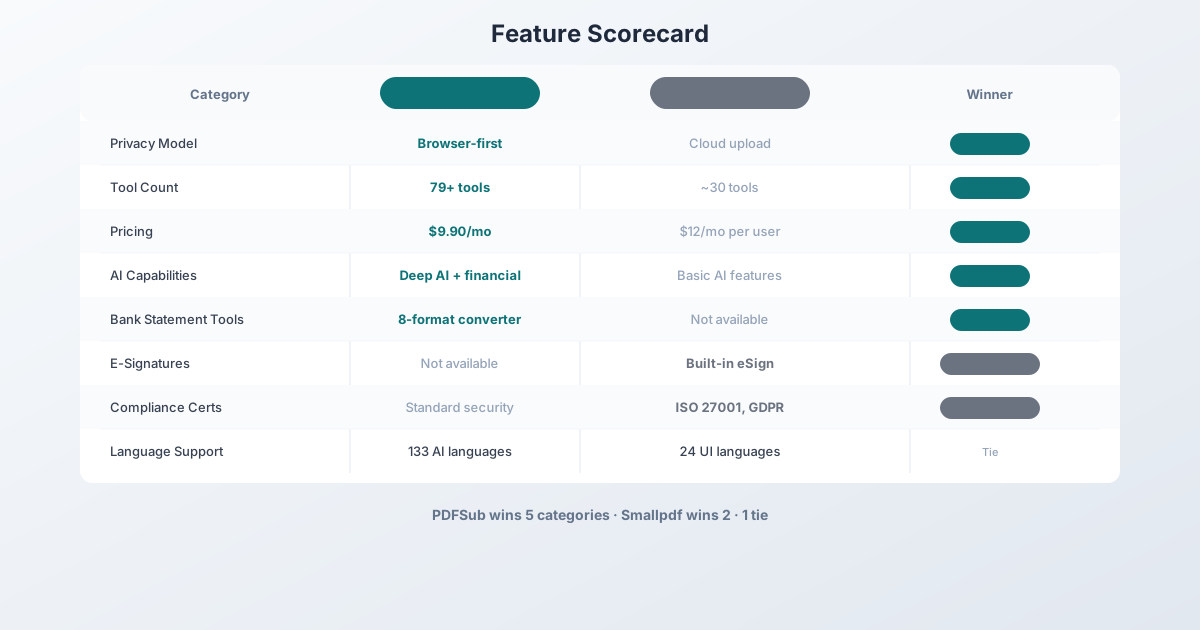
Winner: PDFSub for practical data privacy. Smallpdf compensates with strong certifications (ISO 27001, Swiss jurisdiction).
Document Tools
Both platforms offer core PDF tools, but with different scope:
| Tool Category | PDFSub | Smallpdf |
|---|---|---|
| Merge PDFs | Yes (browser-side) | Yes (cloud) |
| Split PDFs | Yes (browser-side) | Yes (cloud) |
| Compress PDFs | Yes (browser-side) | Yes (cloud) |
| PDF to Word | Yes | Yes |
| PDF to Excel | Yes | Yes |
| PDF to PowerPoint | Yes | Yes |
| Edit PDF | Yes | Yes |
| Sign PDF | Yes (no per-envelope fees) | Yes (eSign) |
| Protect/Unlock PDF | Yes | Yes |
| Rotate/Reorder | Yes | Yes |
| Watermark | Yes | Yes |
| Bank Statement Converter | Yes (8 formats) | No |
| Invoice Extractor | Yes (AI) | No |
| Receipt Scanner | Yes (AI) | No |
| Financial Report Analyzer | Yes (AI) | No |
| AI Summarize | Yes (130+ languages) | Yes (basic) |
| AI Chat with PDF | Yes (130+ languages) | Yes (basic) |
| AI Translate | Yes (130+ languages) | Yes (limited) |
| Total Tools | 98+ | ~30 |
Smallpdf covers the essentials well. PDFSub goes deeper with AI capabilities, adds an entire category of financial document tools that Smallpdf lacks entirely, and includes e-sign and form filling with no per-envelope fees.
Winner: PDFSub on breadth and depth. Smallpdf's eSign has more mature workflow features (templates, advanced routing), but PDFSub's e-sign has no per-envelope fees.
AI Capabilities
Both platforms now offer AI features, but at very different levels.
Smallpdf's AI adds basic summarization, translation, and chat-with-PDF features. These are useful for quick document queries and summaries. However, the AI features are limited to general document analysis -- there's no financial document specialization, no structured data extraction, and no multi-format output.
PDFSub's AI goes significantly deeper:
- Summarize PDF -- Context-aware summaries in 130+ languages
- Chat with PDF -- Conversational Q&A about document content
- Translate PDF -- Full document translation across 130+ languages
- Extract Data -- Structured data extraction from any document
- Extract Tables -- Intelligent table detection and extraction
- Invoice Extractor -- AI-powered invoice data extraction
- Receipt Scanner -- Automated receipt data capture
- Financial Report Analyzer -- Financial document analysis with AI
- Bank Statement Converter -- 4-tier extraction with AI fallback
PDFSub's AI tools are designed to produce structured, actionable output -- not just summaries. When you run a bank statement through PDFSub, you get clean Excel/CSV/QBO files. When you scan a receipt, you get structured data fields. Smallpdf's AI is more general-purpose.
Winner: PDFSub -- significantly deeper AI capabilities, especially for financial documents.
Language Support
| Capability | PDFSub | Smallpdf |
|---|---|---|
| Interface Languages | English | 24 languages |
| AI Languages | 133 | Limited |
| Document Translation | 130+ languages | Basic translation |
| Bank Statement Languages | 133 (auto-detected) | N/A |
| RTL Language Support | Yes (Arabic, Hebrew, etc.) | Limited |
Smallpdf has a more internationalized interface (24 languages), which is useful for non-English speakers navigating the tool. PDFSub supports 130+ languages for document processing -- meaning it can extract, translate, and analyze documents in those languages even though the interface is currently English.
Winner: Tie -- Smallpdf leads on interface localization; PDFSub leads on document processing language support.
Bank Statement Support
PDFSub is purpose-built for bank statement conversion with a 4-tier extraction waterfall, support for 20,000+ banks worldwide, automatic language/date/number/currency detection, and 8 output formats (XLSX, CSV, TSV, JSON, OFX, QBO, QFX, QIF). This is a core feature of the platform.
Smallpdf does not offer bank statement conversion. You can convert a bank statement PDF to Excel using their generic PDF-to-Excel tool, but it won't intelligently extract transaction data, categorize fields, handle multi-page statements, or output accounting formats like QBO or OFX.
Winner: PDFSub -- Smallpdf simply doesn't compete in this category.
Output Formats
For standard PDF operations, both platforms offer similar output formats (Word, Excel, PowerPoint, image formats). The difference emerges for financial documents:
PDFSub's bank statement converter exports to 8 formats: XLSX, CSV, TSV, JSON, OFX, QBO, QFX, and QIF. One conversion, all formats via "Download All."
Smallpdf's conversion is limited to standard document formats -- there's no accounting format output.
Winner: PDFSub for financial format support. Tie for general document conversion.
Pricing Comparison
PDFSub Pricing
| Plan | Price | What's Included |
|---|---|---|
| All-In-One (annual) | $20/user/mo ($240/yr per user, saves $60/yr) | 98+ tools, 500 AI credits/mo per user, 500 bank statement pages/mo per user, e-sign + form filling, 50 GB cloud storage per user, Google Drive + Dropbox; add unlimited team seats at the same per-user rate |
| All-In-One (monthly) | $25/mo | Same as annual, billed monthly |
| Add-ons | Stackable | 500 AI credits, 500 bank statement pages, 40 GB storage, priority support |
All plans include a 7-day free trial with full functionality.
Smallpdf Pricing
| Plan | Monthly Price | What's Included |
|---|---|---|
| Free | $0 | Limited daily uses, ads, basic tools |
| Pro | $12/user | Unlimited tool usage, no ads, desktop app |
| Team | $18/user | Team management, shared workspace |
| Business | $40/user | Custom roles, centralized billing, priority support |
Smallpdf offers a 7-day free trial on paid plans.
The Math
For a single user who needs PDF tools (including bank statement conversion):
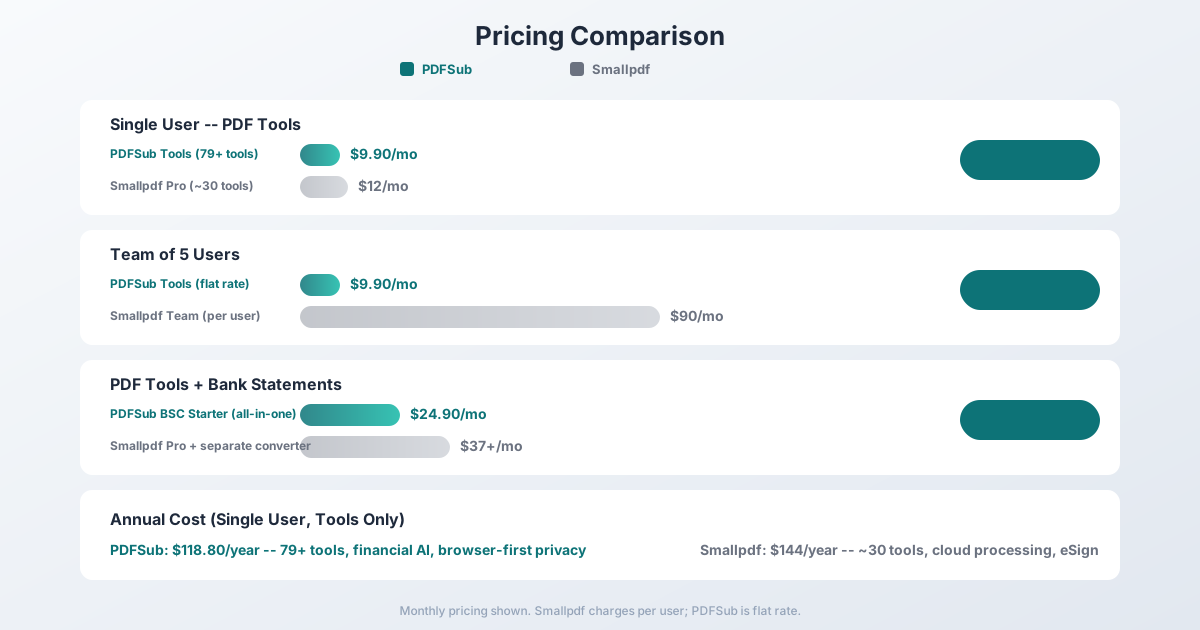
- PDFSub All-In-One: $20/user/month annual ($25/user/mo monthly) -- 98+ tools, AI features, e-sign with no per-envelope fees, 500 bank statement pages/mo per user, 50 GB cloud storage per user, Google Drive + Dropbox integration. Add as many team seats as needed; each user billed at the same per-user rate.
- Smallpdf Pro: $12/user/month -- ~30 tools, cloud processing, e-signatures, desktop app
For a single user, Smallpdf Pro is cheaper if you only need basic PDF operations and don't need bank statement conversion or AI extraction.
For a user who needs bank statement conversion:
- PDFSub All-In-One: $20/month annual -- includes 500 pages bank statement conversion every month
- Smallpdf Pro + separate converter: $12/mo + $24.95+/mo for a dedicated converter -- at least $37/mo for less functionality
For a team of 5+ users:
- PDFSub All-In-One: $20/user/month annual ($25/user/mo monthly); add unlimited team seats at the same per-user rate
- Smallpdf Team: $18/user/month - $90/mo at 5 users, $180/mo at 10 users
Winner: PDFSub -- better value for bank statement workflows and team usage; Smallpdf wins for single-user, no-financial-tools use cases.
Who Should Choose PDFSub
PDFSub is the better choice if:
- Privacy is important to you. Editing runs in your browser; conversions use the isolated PDFSub Engine with auto-deletion.
- You work with financial documents. Bank statement conversion, invoice extraction, receipt scanning, financial report analysis -- capabilities Smallpdf doesn't have.
- You need deep AI features. Structured data extraction, 133-language translation, conversational document chat with context awareness.
- You want more tools per user-dollar. 98+ tools plus AI extraction, e-sign, and bank statement conversion bundled at $25/user/mo annual vs. Smallpdf Pro's ~30 tools at $12/user/mo (no AI extraction, no bank statement conversion, e-sign on higher tiers).
- You process international documents. 133-language support for all AI and extraction features.
Who Should Choose Smallpdf
Smallpdf is the better choice if:
- You want a well-known, established platform. Smallpdf has been around since 2013 with over a billion users. It's a proven tool with broad industry recognition.
- You need a desktop or mobile app. Smallpdf offers native desktop and mobile applications on paid plans.
- You need advanced eSign workflows. Smallpdf's eSign has more mature template and routing features (PDFSub's e-sign is included with no per-envelope fees but is simpler).
- ISO 27001 certification matters. For organizations that require specific compliance certifications.
- You are a single user with simple PDF needs. $12/user/month for Smallpdf Pro is cheaper than PDFSub if you don't need bank statement conversion, AI extraction, or team seats.
Frequently Asked Questions
Is Smallpdf or PDFSub more secure?
They take different approaches. PDFSub runs editing tools in your browser. Conversions are powered by the PDFSub Engine - an isolated service with no internet access. Smallpdf uploads all files to their servers (encrypted, deleted after 2 hours) and holds ISO 27001 certification. For keeping files off external servers entirely, PDFSub is more secure. For formal compliance certifications, Smallpdf has more credentials.
Can PDFSub replace Smallpdf?
For most PDF tasks, yes. PDFSub covers merging, splitting, compressing, converting, editing, and more -- plus financial tools, deeper AI, e-sign with no per-envelope fees, and Google Drive + Dropbox integrations. The main gaps compared to Smallpdf are a native mobile app, a native desktop app, and ISO 27001 certification.
Does Smallpdf offer bank statement conversion?
No. Smallpdf can convert a PDF to Excel generically, but it doesn't intelligently extract transaction data, handle multi-page statements, or output accounting formats (QBO, OFX, QFX, QIF). For bank statement conversion, you'd need a separate tool.
Which is better for a small business?
It depends on your needs. If you handle any financial documents (bank statements, invoices, receipts), PDFSub's combined platform saves money versus subscribing to Smallpdf plus a separate financial tool. If your needs are strictly general PDF operations plus e-signatures, Smallpdf covers that well.
Does Smallpdf work offline?
Smallpdf offers a desktop app on paid plans that provides some offline functionality. PDFSub is browser-only and requires an internet connection to load, though many tools process files entirely in the browser without uploading. Neither tool works fully offline.
Is PDFSub cheaper than Smallpdf?
PDFSub's All-In-One at $20/user/month annual is roughly 67% more than Smallpdf Pro at $12/user/month for the same per-user count, but offers 98+ tools vs. approximately 30, plus 500 bank statement pages per user, AI extraction, and e-sign with no per-envelope fees. Both platforms charge per user; PDFSub's edge is the breadth of capability bundled into the per-user price - what Smallpdf adds via separate Team ($18/user) and Business ($40/user) tiers, PDFSub includes at the single $20/user/mo rate.
Which processes PDFs faster?
PDFSub's browser-first approach avoids upload/download time for most operations -- the file never leaves your device, so processing is instant. Smallpdf requires uploading to their servers, processing, and downloading the result. For large files on slower connections, PDFSub is noticeably faster for supported operations.
The Bottom Line
PDFSub and Smallpdf are both legitimate PDF platforms with different strengths.
PDFSub wins on privacy (browser-first processing), tool count (98+ vs. ~30), AI depth, financial document capabilities, e-sign with no per-envelope fees on top of the seat price, and language support for document processing. It's the better value for anyone who processes financial documents, runs a small team that values bundled capability, or cares about files not touching external servers.
Smallpdf wins on brand recognition, native desktop and mobile apps, advanced eSign workflow features, ISO 27001 certification, and interface localization. It's a safe, well-known choice for single users who need basic PDF operations.
The easiest way to decide? Browse PDFSub's 98+ tools and start a 7-day free trial -- it's full-featured with no caps. Process your most common PDFs and compare the experience.
Already decided to switch? This page covers neutral side-by-side facts. For a migration-focused walkthrough - what unlocks beyond Smallpdf's basics and switching FAQ - see the best Smallpdf alternative guide.