PDFSub vs Sejda: Honest Comparison (2026)
PDFSub vs Sejda compared on pricing, features, AI tools, and bank statements.
PDFSub is best for:
- Sejda users hitting the 3-task-per-hour free limit who want unlimited operations
- Professionals who need AI features (summarize, translate, chat, extract data) that Sejda lacks entirely
- Users who need 98+ tools vs Sejda's 30+, including bank statement conversion, financial extraction, and e-sign with no per-envelope fees
- Teams processing documents over 200 pages or 50 MB that exceed Sejda's free-tier caps
PDFSub is NOT best for:
- Users who primarily need direct inline PDF text editing - Sejda's editor is more polished for this
- Light users who only need 1-3 basic tasks per day and fit within Sejda's free tier
- Users who want a desktop app for offline PDF editing on Windows, Mac, or Linux
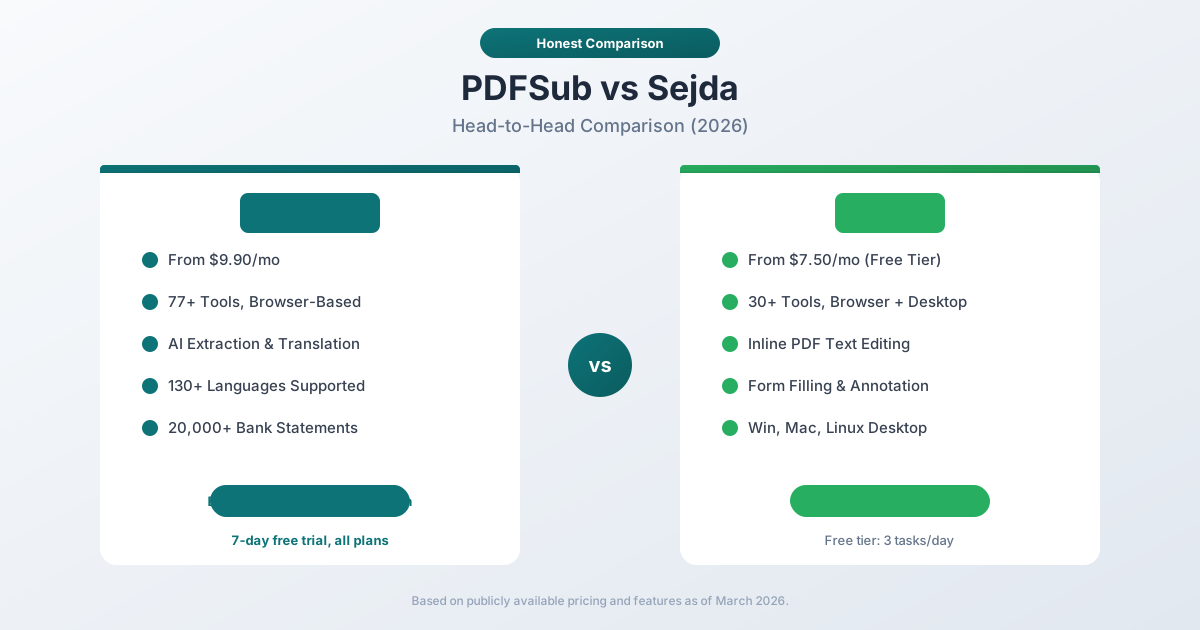
Sejda and PDFSub both offer browser-based PDF tools, but they target different workflows. Sejda is a lightweight PDF editor focused on direct text editing, form filling, and page manipulation - all in the browser. PDFSub is a document processing platform with 98+ tools, AI-powered features, and specialized bank statement conversion for 20,000+ institutions.
The question is whether you need a browser-based PDF editor or a browser-based document processing platform. They overlap on basic operations but diverge sharply on advanced capabilities.
Quick Verdict
The 30-second split.
Choose PDFSub if…
- You need AI document features daily - summarize, translate to 130+ languages, chat with PDFs, extract structured data - capabilities Sejda doesn't offer.
- You process bank statements, invoices, or receipts and need accounting-native exports (QBO, OFX).
- You also want a desktop app option - Sejda has Windows/Mac/Linux desktop versions, but you'd need PDFSub for the AI and financial extraction tooling.
- You want one $20/mo annual subscription instead of stacking Sejda + a separate financial tool + a separate AI tool.
Choose Sejda if…
- Your primary need is direct inline PDF text editing - Sejda does this well in a browser, better than PDFSub's annotation-based approach.
- You only need basic PDF operations (merge, split, compress, edit, fill forms) and Sejda's 3 tasks/day free tier covers your volume.
- Your budget is $7.50/mo (Sejda Web plan) and you don't need AI, financial extraction, or 130+ languages.
- You want Sejda's desktop application for offline editing on Windows, Mac, or Linux.
Sejda is a browser PDF editor with a desktop app option. PDFSub is a browser document platform with AI and financial extraction. The overlap is real, but the strengths diverge.
Company Overviews
PDFSub is a document platform offering 98+ tools for PDF processing, AI-powered document features (summarization, translation in 130+ languages, data extraction, document chat), and specialized bank statement conversion supporting 20,000+ financial institutions across 8 export formats. Editing tools run entirely in your browser. Conversions and advanced processing are powered by the PDFSub Engine - an isolated service with no internet access. Files are processed in an isolated environment and auto-deleted. It is designed for individuals, small businesses, accountants, and bookkeepers who need fast, practical PDF processing.
Sejda is a PDF software company offering both an online PDF editor and a desktop application. The company focuses on simplicity - clean interfaces with no unnecessary complexity. Sejda provides 30+ tools for PDF editing, conversion, merging, splitting, and form filling. The online version works entirely in the browser, while the desktop app runs on Windows, Mac, and Linux. Sejda's free tier limits users to 3 tasks per day, files up to 50MB or 200 pages, and combining up to 30 files.
Ease of Use & Setup
Both products prioritize browser-based access, and both do it well.
PDFSub offers 98+ tools in a unified browser interface. You select a tool, upload your document, and get your result. No installation, no ads - access all tools with a 7-day free trial.
Sejda also offers a clean, browser-based interface. Its online editor allows direct text editing inside PDFs - something most browser tools cannot do. The interface is intentionally minimal, which reduces the learning curve. Sejda also offers a desktop app for Windows, Mac, and Linux for offline use.
Both platforms are genuinely easy to use. Sejda's inline PDF editor is more polished for direct document editing. PDFSub's tool selection interface is better for finding the right tool across a larger catalog.
Winner: Tie - both offer excellent browser-based experiences with different strengths.
PDF Editing Capabilities
This is Sejda's strongest category.
Sejda provides direct PDF editing in the browser:
- Edit existing text directly in the document (change wording, fix typos)
- Add new text, images, shapes, and links
- Fill out PDF forms without flattening
- Add annotations, highlights, and comments
- Sign documents with drawn or typed signatures
- Whiteout (redact) content
- Add headers, footers, and page numbers
The inline editing experience is notably smooth for a browser tool. You click on text and edit it like a word processor. This is Sejda's core differentiation.
PDFSub provides practical PDF operations - merge, split, compress, rotate, reorder, watermark, convert to/from Word, Excel, and images. These cover the majority of everyday PDF tasks. PDFSub also handles text addition and annotation, but Sejda's inline text editing is deeper.
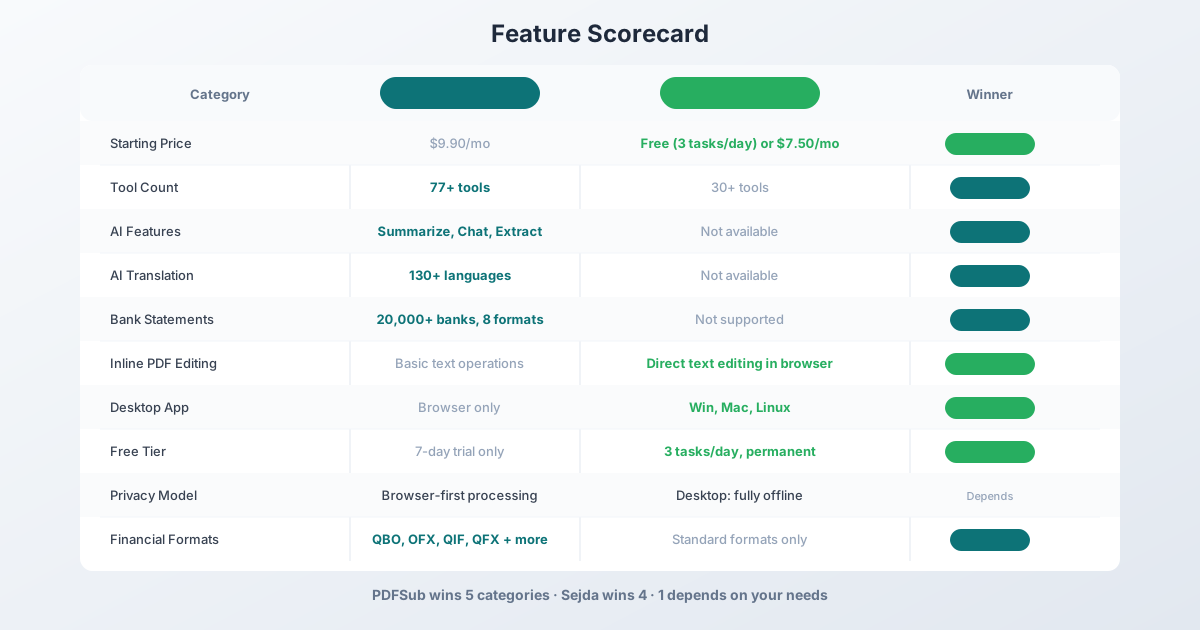
Winner: Sejda - direct inline PDF editing in the browser is a genuine advantage.
AI-Powered Features
This is where PDFSub separates itself completely.
PDFSub includes AI features in every plan at no additional cost:
- AI Summarize - Generate concise summaries of any PDF document
- AI Translate - Translate documents across 130+ languages with layout preservation
- AI Chat - Ask questions about your document and get contextual answers
- AI Data Extraction - Pull structured data from invoices, receipts, financial reports
- AI Table Extraction - Extract tables from PDFs into spreadsheet format
These features transform static documents into structured, actionable data. You can summarize a 50-page report in seconds, translate a contract into another language, or extract every line item from an invoice automatically.
Sejda does not offer AI-powered features. There is no summarization, no translation, no document chat, and no intelligent data extraction. Sejda's tools manipulate PDF files but do not analyze or understand document content.
Winner: PDFSub - comprehensive AI features versus none.
Bank Statement Conversion
PDFSub is a purpose-built bank statement converter supporting:
- 20,000+ financial institutions worldwide
- 8 export formats: XLSX, CSV, QBO, OFX, QIF, QFX, TSV, JSON
- 4-tier extraction waterfall: browser-based coordinate extraction, server-side extraction, OCR + AI, and AI vision
- Automatic detection of dates, amounts, descriptions, running balances
- Multi-currency and multi-language statement support
- Direct import into QuickBooks, Xero, and other accounting software
This is the feature that accountants and bookkeepers build their workflows around.
Sejda does not offer bank statement conversion. It can convert PDFs to other formats, but it does not have the specialized extraction logic that identifies financial transactions, separates debits from credits, or outputs accounting-ready formats.
Winner: PDFSub - Sejda has no comparable feature.
Conversion & Format Support
Both platforms handle PDF conversion, but with different breadth.
PDFSub supports:
- PDF to/from Word, Excel, PowerPoint, images (PNG, JPG, TIFF)
- PDF to/from HTML
- Image to PDF
- 8 financial export formats for bank statements
- Batch conversion across multiple files
Sejda supports:
- PDF to/from Word, Excel, JPG, PNG
- PDF to/from text
- HTML to PDF
- Image to PDF
- Word to PDF, Excel to PDF
Both cover the standard conversion use cases. PDFSub extends further with financial document formats (QBO, OFX, QIF) that Sejda does not support.
Winner: PDFSub - broader format support, especially for financial documents.
Free Tier Comparison
Sejda offers a functional free tier:
- 3 tasks per day
- Files up to 50MB or 200 pages
- Images up to 5MB
- Combine up to 30 files and 50 pages
- One file at a time
These limits are reasonable for occasional personal use. The 3-task-per-day limit is the main constraint - professional users will hit it quickly.
PDFSub offers a 7-day free trial with full access to all features and tools (credit card required to start). After the trial, a subscription is required. There is no free tier with limited functionality.
Winner: Sejda - a permanent free tier with daily limits versus a time-limited trial.
Pricing Comparison
Sejda Pricing
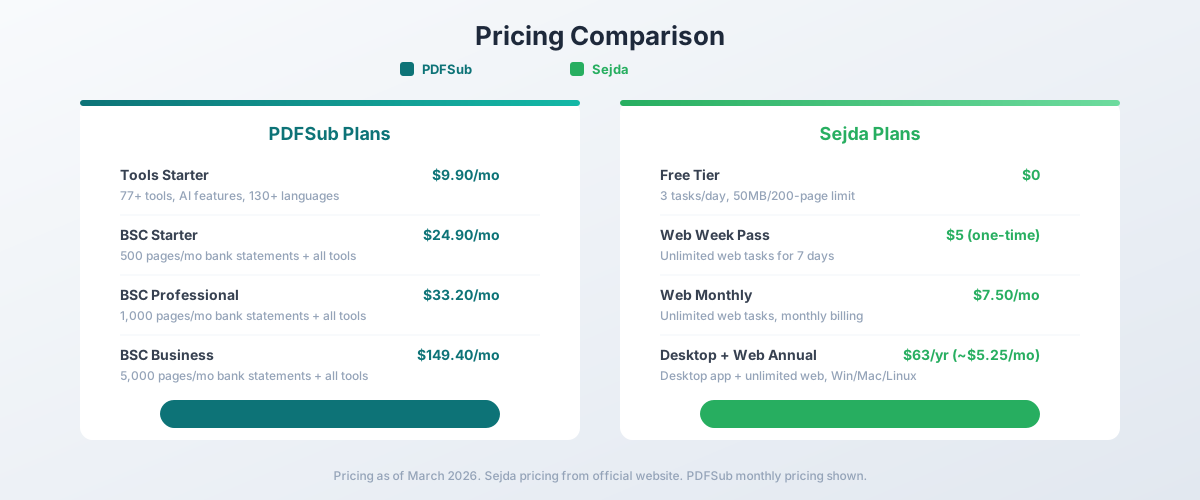
| Plan | Price | Key Features |
|---|---|---|
| Free | $0 | 3 tasks/day, 50MB/200-page limit |
| Web Week Pass | $5 (one-time, 7 days) | Unlimited web tasks for one week |
| Web Monthly | $7.50/mo | Unlimited web tasks |
| Desktop + Web Annual | $63/yr (~$5.25/mo) | Desktop app + unlimited web, all platforms |
PDFSub Pricing
| Plan | Price | Key Features |
|---|---|---|
| All-In-One (annual) | $20/mo ($240/yr) | 98+ tools, 500 AI credits/mo, 500 bank statement pages/mo, e-sign + form filling, 50 GB cloud storage, unlimited team seats (each billed at the same per-user rate) |
| All-In-One (monthly) | $25/mo | Same as annual, billed monthly |
| Add-ons | Stackable | 500 AI credits, 500 bank statement pages, 40 GB storage, priority support |
All plans include a 7-day free trial with full functionality. Cancel anytime.
Cost Analysis
Sejda is less expensive at every comparable tier. The Desktop + Web annual plan at $5.25/month is particularly competitive for users who want unlimited PDF editing and conversion.
However, the comparison is not apples-to-apples:
- PDFSub includes AI features that Sejda does not offer at any price
- PDFSub includes bank statement conversion that Sejda cannot do
- PDFSub offers 98+ tools versus Sejda's 30+
- PDFSub supports 130+ languages for translation
The price difference is really the cost of AI capabilities and financial document processing. If you do not need those features, Sejda offers strong value. If you do need them, PDFSub is the only option of the two that delivers.
Winner: Sejda for basic PDF operations on a budget. PDFSub for professional workflows requiring AI and financial features.
Language Support
PDFSub supports 130+ languages for AI translation, allowing full document translation with layout preservation. This is critical for international businesses and anyone processing multilingual documents.
Sejda offers its interface in English and processes documents in any language, but it does not offer translation capabilities. You can edit text in any language, but you cannot convert between languages.
Winner: PDFSub - 130+ language translation versus no translation.
Desktop & Offline Access
Sejda offers a desktop application for Windows, Mac, and Linux. The desktop version works offline, processes files locally, and is included in the annual plan. This is a genuine advantage for users who work without reliable internet or need guaranteed local processing.
PDFSub is browser-only. While most operations process in the browser (meaning files stay on your device), an internet connection is required to access the tools. There is no desktop application.
Winner: Sejda - native desktop app for three platforms with offline capability.
Privacy & Data Handling
Sejda states that files uploaded to its web service are stored for 2 hours and then permanently deleted. The desktop application processes everything locally. Sejda does not require account creation for the free tier.
PDFSub processes most operations in your browser without uploading files. For server-side processing (scanned PDFs, AI operations), files are uploaded temporarily and deleted after processing.
Both approaches are reasonable. Sejda's desktop app provides the strongest privacy guarantee (fully offline). PDFSub's browser-first model means most files never leave your device even without a desktop app.
Winner: Depends - Sejda desktop is fully offline. PDFSub browser-first keeps most files local without installation.
Who Should Choose PDFSub
PDFSub is the better choice if:
- You need AI document features. Summarization, translation (130+ languages), chat, data extraction - capabilities Sejda does not offer.
- You need bank statement conversion. 20,000+ banks, 8 export formats, QBO/OFX for accounting software.
- You process documents in multiple languages. 130+ languages for translation and processing.
- You are an accountant or bookkeeper. Bank statement conversion plus invoice/receipt extraction in one platform.
- You need a comprehensive tool set. 98+ tools versus Sejda's 30+.
- You want AI included in the price. No add-ons, no credit systems.
Who Should Choose Sejda
Sejda is the better choice if:
- You need inline PDF editing. Editing text directly inside PDFs is Sejda's core strength.
- Budget is your primary concern. Sejda's $7.50/month or $63/year pricing is lower than PDFSub.
- You need a free tier. Sejda's 3-tasks-per-day free plan works for occasional use.
- You want a desktop application. Sejda offers native apps for Windows, Mac, and Linux.
- You need offline processing. The desktop app works without internet.
- You do not need AI or financial features. If your workflow is basic PDF editing and conversion, Sejda covers it well at a lower price.
The Bottom Line
Sejda and PDFSub overlap on basic PDF operations but diverge on everything else. Sejda is a lean, affordable PDF editor with excellent inline editing - it does one thing well at a competitive price. PDFSub is a comprehensive document platform that extends far beyond basic PDF editing into AI-powered document intelligence and specialized financial processing.
If your daily work is editing text in PDFs, filling forms, and performing basic conversions, Sejda delivers at $5.25–$7.50/month with a functional free tier. If your work involves extracting data from documents, translating content, converting bank statements, e-signing without per-envelope fees, or using AI to process document content at scale, PDFSub's All-In-One at $20/month annual ($25/month monthly) unlocks capabilities that Sejda simply does not have.
Both are good products in their respective lanes. The right choice depends entirely on whether you need a PDF editor or a document platform. Browse PDFSub's 98+ tools and start a 7-day free trial to compare firsthand.
Frequently Asked Questions
Is Sejda really free?
Sejda offers a free tier limited to 3 tasks per day, files up to 50MB or 200 pages, and single-file processing. For more than occasional use, you will likely need a paid plan starting at $7.50/month.
Can Sejda convert bank statements?
No. Sejda can convert PDFs to Excel, but it does not have specialized bank statement extraction that identifies transactions, separates debits from credits, or exports to accounting formats like QBO and OFX. PDFSub supports 20,000+ banks with 8 export formats.
Does Sejda have AI features?
No. Sejda's tools handle PDF editing, conversion, and manipulation but do not include AI summarization, translation, chat, or data extraction. PDFSub includes all AI features in every plan.
Which is cheaper - PDFSub or Sejda?
Sejda is cheaper for basic PDF operations. The Desktop + Web annual plan is $63/year (~$5.25/month) compared to PDFSub's $20/month annual ($25/month monthly). However, PDFSub includes AI features, bank statement conversion, and e-sign with no per-envelope fees that Sejda does not offer at any price, making the comparison feature-dependent rather than purely price-based.
Can Sejda edit text directly in PDFs?
Yes. This is Sejda's core strength. You can click on text in a PDF and edit it directly in the browser - changing wording, fixing typos, and modifying content. PDFSub handles PDF processing operations but does not offer the same level of inline text editing.
Does PDFSub offer a free tier like Sejda?
No - PDFSub offers a 7-day free trial with full access to all features and tools (credit card required to start). After the trial, a subscription is required. Sejda offers a permanent free tier with daily limits (3 tasks/day, 50MB files).
Already decided to switch? This page covers neutral side-by-side facts. For a migration-focused walkthrough - what unlocks beyond Sejda's editing scope, and switching FAQ - see the best Sejda alternative guide.