PDFSub vs ProperSoft: Honest Comparison (2026)
Browser-based PDFSub vs desktop ProperSoft for bank statement conversion -- features, pricing, and use cases.
If you convert bank statements into formats like CSV, QBO, or OFX for accounting software, you have likely come across both PDFSub and ProperSoft. They solve the same core problem -- turning PDF bank statements into usable transaction data -- but they do it in fundamentally different ways.
PDFSub is a browser-based platform. ProperSoft is a desktop application. That architectural difference shapes everything from how you access the tool, to how many devices you can use it on, to how your data is handled.
This comparison lays out the actual differences so you can choose the right tool for your workflow.
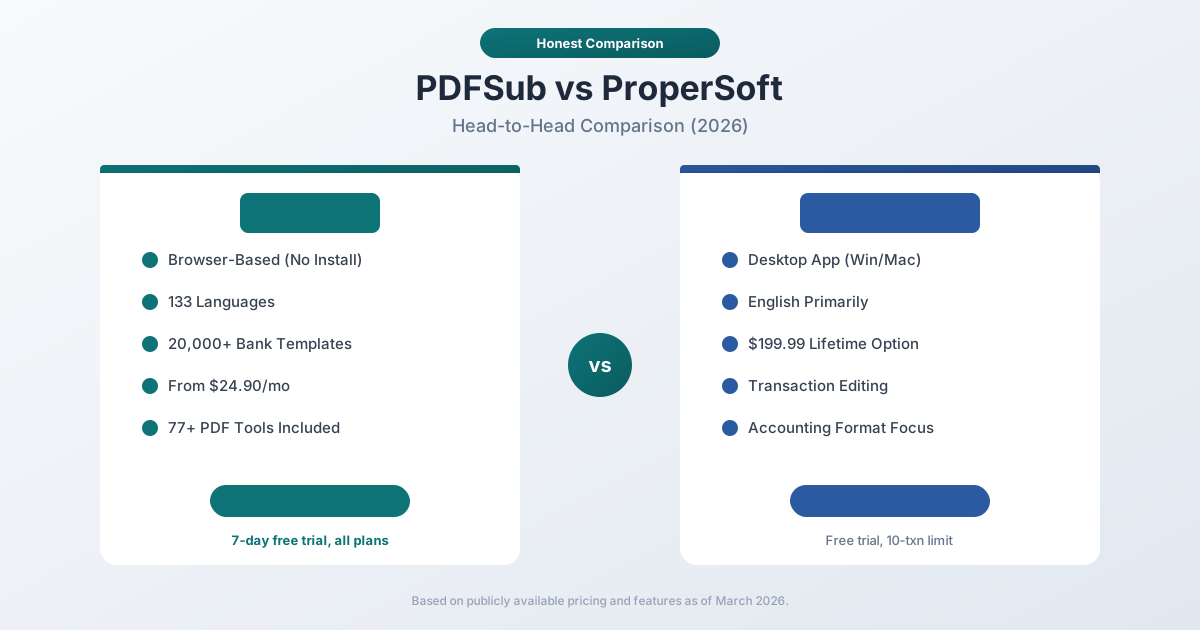
Quick Verdict
The 30-second split.
Choose PDFSub if…
- You work with international clients where 130+ language support and automatic date/currency detection matter.
- You want any-device browser access - Windows, Mac, Linux, Chromebook, iPad - without installing per-machine licenses.
- You also need invoices, receipts, financial reports, or general PDF tools in the same subscription.
- Flat $20/mo annual pricing with 500 BSC pages and 98+ general tools beats single-purpose desktop tools at this volume.
Choose ProperSoft if…
- You want a one-time perpetual license ($199.99) and find the subscription model philosophically wrong.
- You prefer desktop software that runs fully offline on your own machine for compliance or privacy reasons.
- You exclusively process English-language statements from major US and Canadian banks - ProperSoft's sweet spot.
- You need ProperConvert's pre-export transaction editing UI for manually cleaning up transactions before generating QBO/OFX.
Neither tool is universally "better." The right choice depends on whether you want a desktop specialist with a one-time license or a browser-based platform with international coverage and broader tooling.
Company Overviews
PDFSub is a document platform offering 98+ PDF and document tools alongside its bank statement converter. It supports 130+ languages, recognizes 20,000+ bank statement templates, and runs editing tools entirely in your browser. Conversions and advanced processing are powered by the PDFSub Engine - an isolated service with no internet access. Files are processed in an isolated environment and auto-deleted. Bank statement conversion is one part of a larger toolkit that includes PDF merging, splitting, AI summarization, translation, and more.
ProperSoft makes ProperConvert, a desktop application for Windows and macOS that converts bank and credit card statements from PDF, CSV, Excel, or scanned images into accounting formats. ProperSoft has been on the market for over a decade and focuses exclusively on transaction file conversion. It offers a straightforward desktop experience with a one-time purchase option that appeals to users who dislike subscriptions.
Platform & Accessibility
This is the most fundamental difference between the two tools.
PDFSub runs in your web browser. You open it on any computer, tablet, or device with a modern browser -- Windows, Mac, Linux, Chromebook, iPad. There is nothing to install, nothing to update, and no compatibility issues to troubleshoot. Your account works everywhere.
ProperSoft is a desktop application that runs on Windows and macOS. You download and install it locally. It runs on the machine it is installed on. If you work on multiple computers, you need the license to cover that (one user, but the app must be installed separately on each machine).
For a solo practitioner who always works from the same desk, this doesn't matter much. For anyone who works across devices -- or whose team members use different operating systems -- the browser-based approach removes friction.
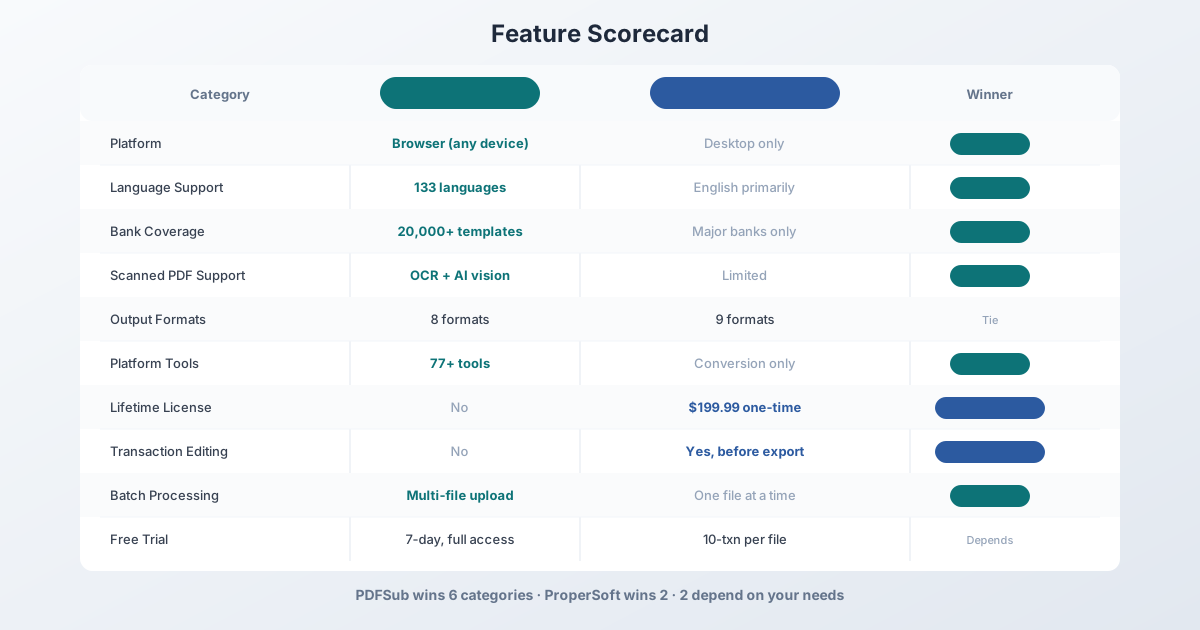
Winner: PDFSub for accessibility and cross-device flexibility. ProperSoft is fine if you always work from one machine.
Language & International Support
This is the largest capability gap between the two tools.
| Capability | PDFSub | ProperSoft |
|---|---|---|
| Languages | 133 (auto-detected) | English primarily |
| Date format detection | Auto (MM/DD, DD/MM, YYYY/MM/DD, CJK) | Manual configuration |
| Number format detection | Auto (US, European, Indian) | US/European with settings |
| Currency detection | Auto (any currency) | Major currencies |
| International banks | 20,000+ (template-agnostic) | Major banks, enhanced support for ~20 |
PDFSub auto-detects the language, date format, number format, and currency of any bank statement you upload. A statement from Deutsche Bank in German, ICBC in Chinese, or Banco Santander in Spanish just works. No configuration, no manual adjustment.
ProperSoft supports conversion from many PDF layouts, but its primary strength is English-language statements from well-known banks. ProperSoft lists "enhanced support" for about 20 major banks including Chase, Bank of America, Wells Fargo, HSBC, TD, and a handful of others. Statements from banks outside this list may require more manual adjustment.
If all your clients bank with US, UK, or Canadian institutions and every statement is in English, this difference doesn't affect you. But if you handle even one international client, PDFSub is the safer bet.
Winner: PDFSub -- 130+ languages and 20,000+ bank templates vs. English-focused with limited bank-specific support.
Output Formats
Both tools support a wide range of accounting output formats.
| Format | PDFSub | ProperSoft | Used For |
|---|---|---|---|
| XLSX | Yes | Yes | Excel analysis |
| CSV | Yes | Yes | Universal import |
| TSV | Yes | No | Tab-separated data |
| JSON | Yes | No | Developer integrations |
| OFX | Yes | Yes | Xero, Wave |
| QBO | Yes | Yes | QuickBooks Online/Desktop |
| QFX | Yes | Yes | Quicken |
| QIF | Yes | Yes | Legacy Quicken |
| IIF | No | Yes | QuickBooks Desktop (legacy) |
| MT940/STA | No | Yes (input/output) | Banking standard |
PDFSub offers 8 output formats. ProperSoft offers about 9 (including MT940 and IIF). ProperSoft also accepts a wider range of input formats, including MT940/STA files, which is useful if you receive statements in banking interchange formats.
PDFSub offers a "Download All" button that generates a ZIP containing all 8 formats at once -- convert once, import anywhere.
Winner: Roughly tied. ProperSoft has a slight edge with IIF and MT940 support. PDFSub has JSON and TSV. Both cover the major accounting formats.
Extraction Accuracy
Both tools handle clean digital PDFs well. The real differences emerge with complex layouts, scanned documents, and edge cases.
PDFSub uses a 4-tier extraction waterfall:
- Tier 1 -- Coordinate-based extraction runs entirely in your browser. No file upload.
- Tier 2 -- Server-side coordinate extraction for complex layouts.
- Tier 3 -- OCR + AI for scanned documents.
- Tier 4 -- AI vision for the most challenging formats.
This tiered approach means PDFSub applies the lightest and most accurate method first, escalating only when needed.
ProperSoft processes files locally on your machine. It handles digital (text-based) PDFs and also supports scanned PDFs, though reviewers note that scanned PDF support is more limited compared to dedicated OCR solutions. ProperSoft allows you to manually review and edit extracted transactions before exporting, which lets you catch and fix errors before they hit your accounting software.
ProperSoft's free trial limits output to 10 transactions per file, which makes it harder to evaluate accuracy on real-world statements before purchasing.
Honest assessment: Both tools work well on clean digital PDFs from major banks. PDFSub's multi-tier approach gives it an edge on scanned documents and unusual layouts. ProperSoft's pre-export editing lets you manually correct any errors.
Pricing Comparison
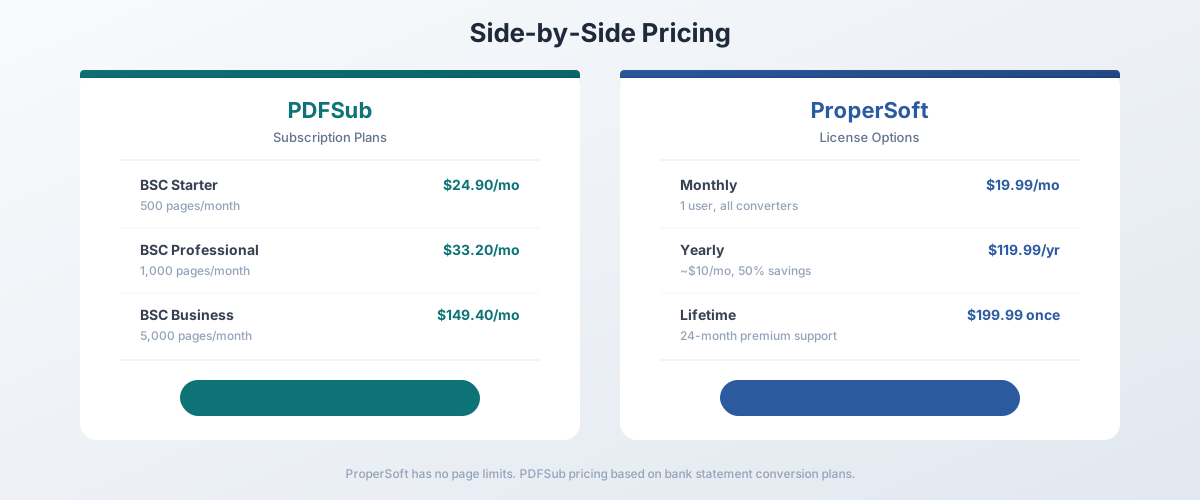
PDFSub Pricing (Bank Statement Conversion)
| Plan | Price | Bank Statement Pages |
|---|---|---|
| All-In-One (annual) | $20/mo ($240/yr) | 500 pages/mo included, 98+ tools, 500 AI credits/mo, e-sign + form filling, 50 GB cloud storage |
| All-In-One (monthly) | $25/mo | Same as annual, billed monthly |
| Add-ons | Stackable | 500 AI credits, 500 bank statement pages, 40 GB storage, priority support |
All plans include a 7-day free trial with full functionality -- no export caps, no transaction limits.
ProperSoft Pricing
| License | Price | Details |
|---|---|---|
| Monthly | $19.99/mo | 1 user, all converters |
| Yearly | $119.99/yr | ~$10/mo, 50% savings |
| Lifetime | $199.99 once | 24-month premium support |
ProperSoft has no page or document limits on any plan. Once you have a license, you can convert as many files as you want.
The Math
The pricing comparison depends heavily on your volume and time horizon.
Low volume (under 50 statements/month): ProperSoft's lifetime license at $199.99 pays for itself in about 10 months compared to PDFSub's $20/month annual (All-In-One, 500 pages included). If you plan to use the tool for more than a year, ProperSoft is cheaper in the long run -- assuming you only need conversion and nothing else.
High volume or growing needs: PDFSub's subscription includes 98+ additional tools, 130+ languages, e-sign with no per-envelope fees, and browser-based access from any device. If you need document translation, PDF merging, AI summarization, or other PDF tools alongside conversion, PDFSub's subscription replaces multiple separate tools.
Short-term use: ProperSoft's monthly plan at $19.99 is slightly cheaper than PDFSub's All-In-One at $20/month annual (which includes 500 bank statement pages plus 98+ tools). PDFSub's 7-day free trial with full access gives you more room to evaluate before committing.
Winner: Depends. ProperSoft wins on raw conversion cost (especially with the lifetime license). PDFSub wins on overall value if you need the broader platform.
Privacy & Data Handling
PDFSub processes most digital bank statements entirely in your browser. Your PDF never leaves your device for Tier 1 extraction. Only scanned documents that need OCR are uploaded temporarily for server-side processing.
ProperSoft processes everything locally on your desktop. Nothing is uploaded anywhere. All processing happens on your machine.
Both approaches keep your data private, but through different mechanisms. ProperSoft's is simpler -- desktop software with no internet component for processing. PDFSub achieves similar privacy for digital PDFs through browser-based processing, but scanned documents do go through server processing temporarily.
Winner: ProperSoft for absolute simplicity in data privacy (everything local, always). PDFSub is nearly equivalent for digital PDFs but has a server component for OCR.
Transaction Editing
This is a notable ProperSoft advantage.
ProperSoft lets you review, edit, and categorize transactions before exporting. You can change descriptions, correct dates, adjust amounts, and categorize transactions as deposits, checks, or payments. This is valuable when the extraction isn't perfect or when you want to clean up data before importing.
PDFSub extracts and exports transactions without a pre-export editing step. What you get from the extraction is what goes into the output file. You can review the data in the preview, but editing individual transactions before download is not available.
For users who process statements with frequent extraction errors or who want to categorize transactions during conversion, ProperSoft's editing capability saves time.
Winner: ProperSoft -- pre-export transaction editing is a genuine workflow advantage.
Batch Processing
PDFSub supports multi-file upload on paid plans. You can upload multiple bank statements and process them together, downloading results for each file.
ProperSoft processes one file at a time. You open a file, configure settings, review transactions, and export. Then you open the next file. There is no batch processing mode for handling multiple statements in one operation.
For a bookkeeper handling 20+ client statements per month, this difference adds up significantly.
Winner: PDFSub -- multi-file processing saves meaningful time at volume.
Additional Features
| Feature | PDFSub | ProperSoft |
|---|---|---|
| PDF merge/split/compress | Yes (98+ tools) | No |
| AI summarization | Yes | No |
| Document translation | Yes (130+ languages) | No |
| OCR scanned PDFs | Yes (Tiers 3-4) | Limited |
| Transaction categorization | No | Basic (deposit/check/payment) |
| Pre-export editing | No | Yes |
| Format conversion (non-bank) | Yes (file converters) | Yes (transaction formats) |
| Browser-based access | Yes | No (desktop only) |
PDFSub goes wide -- it is a full document platform. ProperSoft goes focused -- it does transaction conversion and does it with a desktop-native workflow that includes editing.
Who Should Choose PDFSub
PDFSub is the better choice if:
- You work with international clients. 130+ languages and 20,000+ bank templates make it the only realistic option for non-English statements.
- You need cross-device access. Browser-based means it works on any computer without installation.
- You want one platform. Bank statement conversion, PDF tools, AI features, and document translation in one subscription.
- You process statements in batch. Multi-file upload saves time at volume.
- You want a full-featured trial. 7-day free trial with no restrictions.
Who Should Choose ProperSoft
ProperSoft is the better choice if:
- You want a one-time purchase. The $199.99 lifetime license eliminates recurring costs.
- You prefer desktop software. Some users simply prefer applications that run locally without an internet connection.
- You need pre-export editing. Review and correct transactions before they hit your accounting software.
- You work with MT940/IIF formats. ProperSoft supports these banking interchange formats that PDFSub does not.
- All your work is in English. If every statement is from a major US, UK, or Canadian bank, ProperSoft handles it fine.
Final Verdict
PDFSub and ProperSoft represent two different philosophies for bank statement conversion.
PDFSub is a modern, browser-based platform that offers broader language support, more bank templates, batch processing, and a full suite of 98+ document tools. It is the better choice for accountants and bookkeepers with international clients, multi-device workflows, or needs beyond pure conversion.
ProperSoft is a focused, desktop-native conversion tool with an attractive lifetime license option and pre-export transaction editing. It is the better choice for users who work exclusively with English-language statements, prefer one-time purchases, and value the ability to edit transactions before export.
The easiest way to decide? Try both. PDFSub offers a 7-day free trial with full functionality. ProperSoft offers a free trial with a 10-transaction export limit per file. Test with your actual client statements.
Frequently Asked Questions
Is ProperSoft cheaper than PDFSub?
For pure bank statement conversion, ProperSoft's lifetime license ($199.99) is cheaper over time than PDFSub's subscription ($20/month annual for All-In-One, 500 pages included). However, PDFSub includes 98+ additional PDF tools, 130+ languages, e-sign with no per-envelope fees, and browser-based access. If you would otherwise pay for separate tools for those features, PDFSub may be the better overall value.
Does ProperSoft support international bank statements?
ProperSoft can process PDFs from international banks, but its primary strength is English-language statements. It lists "enhanced support" for about 20 major banks. PDFSub supports 130+ languages and 20,000+ bank templates with automatic language and format detection.
Can ProperSoft handle scanned bank statements?
ProperSoft does support scanned PDF conversion, but reviewers note it is less reliable than digital PDF processing. PDFSub uses dedicated OCR and AI vision tiers (Tiers 3 and 4) specifically designed for scanned documents.
Does PDFSub offer a lifetime license?
No. PDFSub operates on a subscription model - the All-In-One plan is $20/month annual ($25/month monthly). It does offer a 7-day free trial with full functionality on all plans.
Which tool has better output format support?
Both cover the major accounting formats (QBO, OFX, QFX, QIF, CSV, Excel). ProperSoft adds IIF and MT940/STA support. PDFSub adds JSON and TSV. For most accounting workflows, both have sufficient format coverage.
Can I use both tools together?
Yes. Some users use ProperSoft for day-to-day English-language conversion (with the lifetime license for low ongoing cost) and PDFSub for international statements, batch processing, or when they need additional PDF tools. There is no conflict in using both.
Which is better for a solo bookkeeper?
For a solo bookkeeper working exclusively with US bank statements, ProperSoft's lifetime license offers the lowest long-term cost. For a bookkeeper with diverse clients (international, multiple banks, varying document quality), PDFSub's broader capabilities and batch processing are worth the monthly cost.
Already decided to switch? This page covers neutral side-by-side facts. For a migration-focused walkthrough - what to test first, how to verify accounting-software imports, and switching FAQ - see the best ProperSoft alternative guide.