PDFSub vs PDF24: Honest Comparison (2026)
PDFSub vs PDF24 compared on features, AI tools, bank statements, and pricing.
PDFSub is best for:
- PDF24 users who want AI-powered document analysis (summarize, translate, chat) that PDF24 cannot do
- Professionals who need an ad-free interface for daily work and client presentations
- Users on Mac or Linux who want full-featured tools - PDF24's desktop app is Windows-only
- Financial professionals who need bank statement conversion and structured data extraction
PDFSub is NOT best for:
- Users with zero budget who are satisfied with PDF24's unlimited free PDF operations
- Occasional users who only need basic merge, split, or compress and tolerate ads
- Windows users who value PDF24 Creator's free offline desktop application
PDF24 and PDFSub both offer online PDF tools, but they occupy different positions in the market. PDF24 is a free, ad-supported PDF utility suite from Germany that covers basic PDF operations. PDFSub is a paid document processing platform with 98+ tools, AI-powered features, and specialized bank statement conversion.
The core question: Is free good enough for what you need, or does your workflow require capabilities that a free tool cannot deliver?
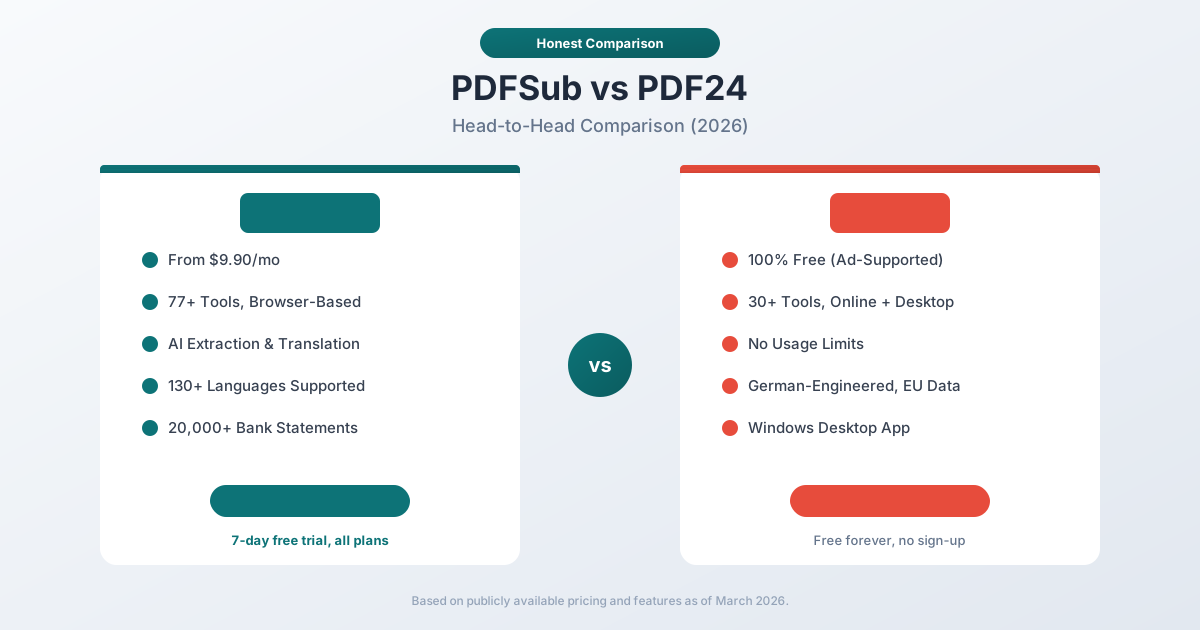
Quick Verdict
The 30-second split.
Choose PDFSub if…
- You need AI document features daily - summarize, translate to 130+ languages, chat with PDFs, extract structured data.
- You process bank statements, invoices, or receipts and need accounting-native exports (QBO, OFX, QIF, QFX).
- You want an ad-free professional experience with browser-first privacy and an isolated PDFSub Engine.
- You need e-sign with no per-envelope fees and 50 GB cloud storage included.
Choose PDF24 if…
- You only need basic PDF operations (merge, split, compress, convert) for free, and ads don't bother you.
- You're a Windows user who wants PDF24's free desktop application for offline processing.
- Your volume is occasional - a few files per week - and you don't need AI, financial extraction, or 130+ languages.
- Zero budget is non-negotiable - PDF24 is genuinely free with no time-limited trial.
PDF24 is a free utility. PDFSub is an ad-free professional document platform with AI and financial tools.
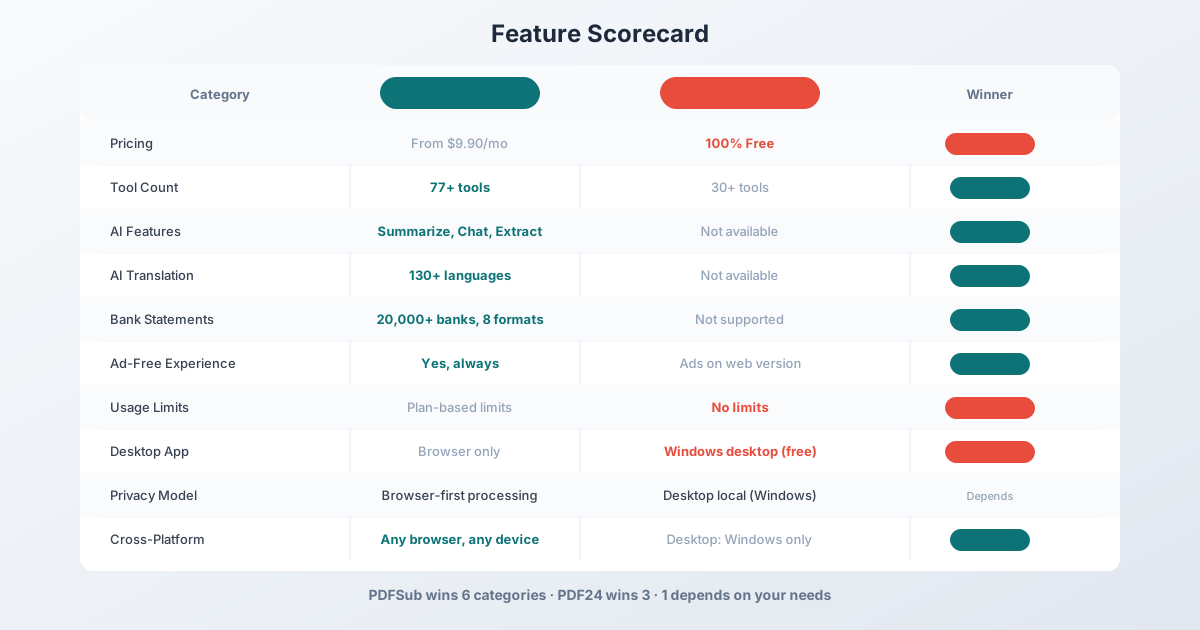
Company Overviews
PDFSub is a document platform offering 98+ tools for PDF processing, AI-powered document features (summarization, translation in 130+ languages, data extraction, document chat), and specialized bank statement conversion supporting 20,000+ financial institutions across 8 export formats. Editing tools run entirely in your browser. Conversions and advanced processing are powered by the PDFSub Engine - an isolated service with no internet access. Files are processed in an isolated environment and auto-deleted. It is designed for individuals, small businesses, accountants, and bookkeepers who need fast, practical PDF processing.
PDF24 is a free PDF tool suite developed by Geek Software GmbH, a German company founded in 2006. PDF24 offers online tools at pdf24.org and a desktop application called PDF24 Creator for Windows. The service is entirely free and monetized through advertisements on the web version. PDF24 covers basic PDF operations - merge, split, compress, convert, sign, protect, and annotate - with no artificial usage limits.
Ease of Use & Setup
Both products offer browser-based access, but the experience differs.
PDFSub provides a clean, ad-free interface. You select a tool, upload your document, and get your result. No distractions, no popups, no banner ads between steps. The interface is consistent across all 98+ tools with a unified design language.
PDF24 also works in the browser with no account required. However, the web version displays advertisements around the tools. The ads are not intrusive enough to prevent usage, but they add visual noise to the workflow. The desktop application (PDF24 Creator) is ad-free but only runs on Windows - macOS and Linux users are limited to the web version.
For occasional use, PDF24's ad-supported model works fine. For daily professional use where you process multiple documents per session, the ad-free experience matters.
Winner: PDFSub - ad-free professional interface with consistent design across all tools.
PDF Tool Coverage
Both platforms cover the basics, but PDFSub goes significantly deeper.
PDF24 offers approximately 30+ online tools covering core PDF operations:
- Merge, split, compress, rotate, and reorder pages
- Convert to/from PDF (Word, Excel, PowerPoint, images)
- Add watermarks and page numbers
- Protect PDFs with passwords
- Basic annotation and signing
- Compare two PDF documents
- OCR for scanned documents
These tools handle the majority of simple, everyday PDF tasks well.
PDFSub offers 98+ tools covering everything PDF24 does plus:
- AI-powered summarization, translation, and chat
- AI data extraction from invoices, receipts, and financial reports
- AI table extraction to spreadsheet format
- Bank statement conversion for 20,000+ institutions
- 8 financial export formats (XLSX, CSV, QBO, OFX, QIF, QFX, TSV, JSON)
- Advanced compression with quality controls
- Batch processing capabilities
The difference is not just in the number of tools - it is in the categories of work they enable. PDF24 handles PDF manipulation. PDFSub handles PDF manipulation plus document intelligence.
Winner: PDFSub - 98+ tools versus approximately 30, with AI and financial categories that PDF24 does not offer.
AI-Powered Features
This is where the gap becomes most significant.
PDFSub includes AI features in every plan at no additional cost:
- AI Summarize - Generate concise summaries of any PDF document
- AI Translate - Translate documents across 130+ languages with layout preservation
- AI Chat - Ask questions about your document and get contextual answers
- AI Data Extraction - Pull structured data from invoices, receipts, financial reports
- AI Table Extraction - Extract tables from PDFs into spreadsheet format
These features transform PDFs from static documents into sources of structured, actionable data.
PDF24 does not offer AI-powered features. There is no document summarization, no AI translation, no document chat, and no intelligent data extraction. PDF24's tools operate at the file level - they manipulate the PDF container but do not understand the content inside it.
For anyone who works with document content (not just document files), this is a fundamental difference.
Winner: PDFSub - comprehensive AI features versus none.
Bank Statement Conversion
PDFSub is a purpose-built bank statement converter supporting:
- 20,000+ financial institutions worldwide
- 8 export formats: XLSX, CSV, QBO, OFX, QIF, QFX, TSV, JSON
- 4-tier extraction waterfall: browser-based coordinate extraction, server-side extraction, OCR + AI, and AI vision
- Automatic detection of dates, amounts, descriptions, running balances
- Multi-currency and multi-language statement support
- Direct import into QuickBooks, Xero, and other accounting software
For accountants and bookkeepers processing client bank statements, this is the core workflow that justifies the subscription cost.
PDF24 does not offer bank statement conversion. It can convert a PDF to Excel, but the output is a raw table extraction - it does not identify transaction rows, separate debits from credits, calculate running balances, or export to accounting formats like QBO and OFX.
Winner: PDFSub - PDF24 has no comparable feature.
Language Support & Translation
PDFSub supports 130+ languages for AI translation, allowing you to translate entire PDF documents while preserving layout. This is particularly valuable for international businesses, legal professionals working with foreign documents, and anyone processing multilingual content.
PDF24 offers its interface in multiple languages (including German, English, French, Spanish, and others), but it does not offer document translation. The tools work with documents in any language, but they cannot convert content between languages.
Winner: PDFSub - 130+ language translation versus no translation capability.
Privacy & Data Handling
PDF24 Online Tools upload your documents to PDF24's servers for processing. Files are processed in Germany (compliant with EU data protection regulations) and the company states that files are deleted shortly after processing. However, your documents do leave your device.
PDF24 Creator (the desktop app) processes documents locally on your Windows PC. Files never leave your computer. This is the more privacy-conscious option, but it requires Windows.
PDFSub runs editing tools entirely in your browser. For bank statement Tier 1 extraction, files never leave your device. Conversions and advanced processing are powered by the PDFSub Engine - an isolated service with no internet access. Files are processed in an isolated environment and auto-deleted after processing.
Both platforms have reasonable privacy practices. PDFSub's browser-first model means most documents stay on your device without requiring a desktop application.
Winner: Depends - PDF24 Creator offers full local processing on Windows. PDFSub offers browser-first processing on any device. PDF24 online tools upload files to servers.
Pricing Comparison
The pricing models are fundamentally different - PDF24 is free, PDFSub is a paid subscription.
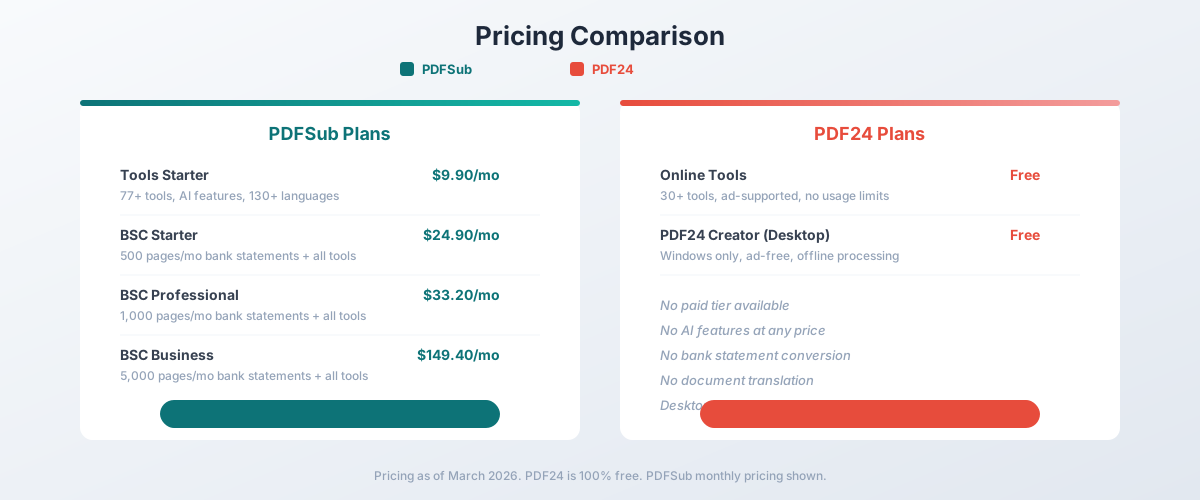
PDF24 Pricing
| Plan | Price | Key Features |
|---|---|---|
| Online Tools | Free (ad-supported) | 30+ tools, no usage limits, ads displayed |
| PDF24 Creator | Free | Windows desktop app, ad-free, offline processing |
PDF24 has no paid tier. Everything is free. The trade-off is advertisements on the web version and the absence of AI, financial, and advanced features.
PDFSub Pricing
| Plan | Price | Key Features |
|---|---|---|
| All-In-One (annual) | $20/mo ($240/yr) | 98+ tools, 500 AI credits/mo, 500 bank statement pages/mo, e-sign + form filling, 50 GB cloud storage, unlimited team seats (each billed at the same per-user rate) |
| All-In-One (monthly) | $25/mo | Same as annual, billed monthly |
| Add-ons | Stackable | 500 AI credits, 500 bank statement pages, 40 GB storage, priority support |
All plans include a 7-day free trial with full feature access. Annual billing saves $60/year. Cancel anytime in one click.
The Real Cost Question
PDF24 is free, which is hard to argue against for basic PDF operations. If all you need is to merge two PDFs or compress a file, PDF24 does the job at zero cost.
But free tools have hidden costs:
- Time cost: No AI means manually reading, translating, and extracting data from documents
- Capability cost: No bank statement conversion means using a separate (often expensive) tool or doing it manually
- Professional cost: Ads in client-facing workflows reduce perceived professionalism
- Platform cost: PDF24 Creator only works on Windows
For professional users, the question is whether $20/month annual in productivity gains from AI features, bank statement conversion, and e-sign without per-envelope fees saves more than that in time.
Winner: PDF24 for basic tasks where free is the priority. PDFSub for professional workflows where AI, bank statements, and ad-free operation justify the subscription.
Platform & Device Support
PDFSub works in any modern browser on any device - Windows, Mac, Linux, Chromebook, tablet, phone. No installation required, no platform restrictions.
PDF24 offers two options:
- Online tools: Work in any browser but display ads
- PDF24 Creator: Windows-only desktop application, ad-free
This means macOS and Linux users can only access PDF24 through the ad-supported web version. PDFSub provides a consistent, ad-free experience across all platforms.
Winner: PDFSub - full cross-platform access without ads. PDF24 Creator is Windows-only.
Who Should Choose PDFSub
PDFSub is the better choice if:
- You need AI document features. Summarization, translation (130+ languages), chat, data extraction - capabilities PDF24 does not offer.
- You need bank statement conversion. 20,000+ banks, 8 export formats, QBO/OFX for accounting software. PDF24 cannot do this.
- You want an ad-free experience. Professional interface without banner ads interrupting your workflow.
- You are an accountant or bookkeeper. Bank statement conversion plus invoice/receipt extraction in one platform.
- You work across multiple platforms. Same experience on Mac, Windows, Linux, and mobile without platform-specific limitations.
- You process documents in multiple languages. 130+ languages for translation and processing.
Who Should Choose PDF24
PDF24 is the better choice if:
- Free is your top priority. PDF24 offers basic PDF tools at zero cost with no usage limits.
- You only need basic PDF operations. Merging, splitting, compressing, and converting PDFs - tasks where AI is not needed.
- You are a Windows user who wants offline processing. PDF24 Creator processes documents locally on Windows.
- You use PDFs occasionally. For infrequent use, setting up a paid subscription may not be justified.
- You do not work with financial documents. If bank statements, invoices, and receipts are not part of your workflow, PDF24's free tools cover the basics.
The Bottom Line
PDF24 and PDFSub serve different segments of the PDF tool market. PDF24 is an excellent free utility for basic PDF operations - if you need to merge, split, or compress PDFs without paying anything, PDF24 delivers. Its German engineering and EU data hosting provide a trustworthy free option.
PDFSub is a professional document platform for users who need more than basic manipulation. AI features turn static PDFs into structured data. Bank statement conversion replaces expensive specialized tools. The ad-free browser-first interface works consistently across all devices.
The decision comes down to your workflow complexity. If your PDF tasks are simple and occasional, PDF24's free tools are hard to beat. If you process documents professionally - extracting data, translating content, converting bank statements, or using AI to work with document content - PDFSub's All-In-One plan at $20/month annual ($25/month monthly) delivers capabilities that no free tool can match. Browse PDFSub's 98+ tools and start a 7-day free trial to see the difference.
Frequently Asked Questions
Is PDF24 really free?
Yes. PDF24 offers all its tools for free with no usage limits. The online tools are ad-supported, and the PDF24 Creator desktop app is completely free and ad-free (Windows only). There is no paid tier or premium version.
Can PDF24 convert bank statements?
No. PDF24 can convert PDFs to Excel, but it performs a generic table extraction - it does not identify transaction rows, separate debits from credits, or export to accounting formats like QBO and OFX. PDFSub supports 20,000+ banks with 8 specialized export formats.
Does PDF24 have AI features?
No. PDF24's tools operate at the file level - merging, splitting, compressing, and converting. They do not offer AI summarization, translation, chat, or intelligent data extraction. PDFSub includes all AI features in every plan.
Does PDF24 work on Mac?
Only through the online tools (which display ads). The PDF24 Creator desktop application is Windows-only. PDFSub works on any device with a modern browser, including Mac, without ads.
Is PDFSub worth paying for if PDF24 is free?
It depends on your needs. If you only merge, split, and compress PDFs occasionally, PDF24's free tools are sufficient. If you need AI features (summarization, translation, data extraction), bank statement conversion, e-sign without per-envelope fees, an ad-free interface, or cross-platform support beyond Windows, PDFSub's All-In-One plan at $20/month annual covers capabilities that PDF24 does not offer at any price.
Which is more private - PDF24 or PDFSub?
Both offer reasonable privacy. PDF24 Creator processes files locally on Windows. PDFSub runs editing tools in the browser. Conversions use the PDFSub Engine - an isolated service with no internet access. Both online services (PDF24 online tools and PDFSub's server-side processing) upload files temporarily for processing and delete them afterward.
Already decided to switch? This page covers neutral side-by-side facts. For a migration-focused walkthrough - what unlocks beyond PDF24's free tools and switching FAQ - see the best PDF24 alternative guide.