PDFSub vs Nitro PDF Pro: Honest Comparison (2026)
PDFSub vs Nitro PDF Pro compared on pricing, features, AI tools, and bank statements.
PDFSub is best for:
- Nitro users paying $15/user/mo who want broader AI tools at a close per-user rate ($20/user/mo annual) with no desktop installation
- Small teams that want instant browser-based access without enterprise sales calls or IT procurement
- Users who need AI document analysis and bank statement conversion that Nitro does not offer
- Cross-platform teams replacing Nitro's Windows-centric desktop app with a tool that works on any device
PDFSub is NOT best for:
- Enterprises needing SSO, compliance dashboards, and centralized IT deployment controls
- Organizations requiring Nitro Sign's advanced eSignature workflow automation, bulk sends, and Salesforce/Microsoft 365 integrations
- Users who need deep desktop PDF text editing and offline document processing capabilities
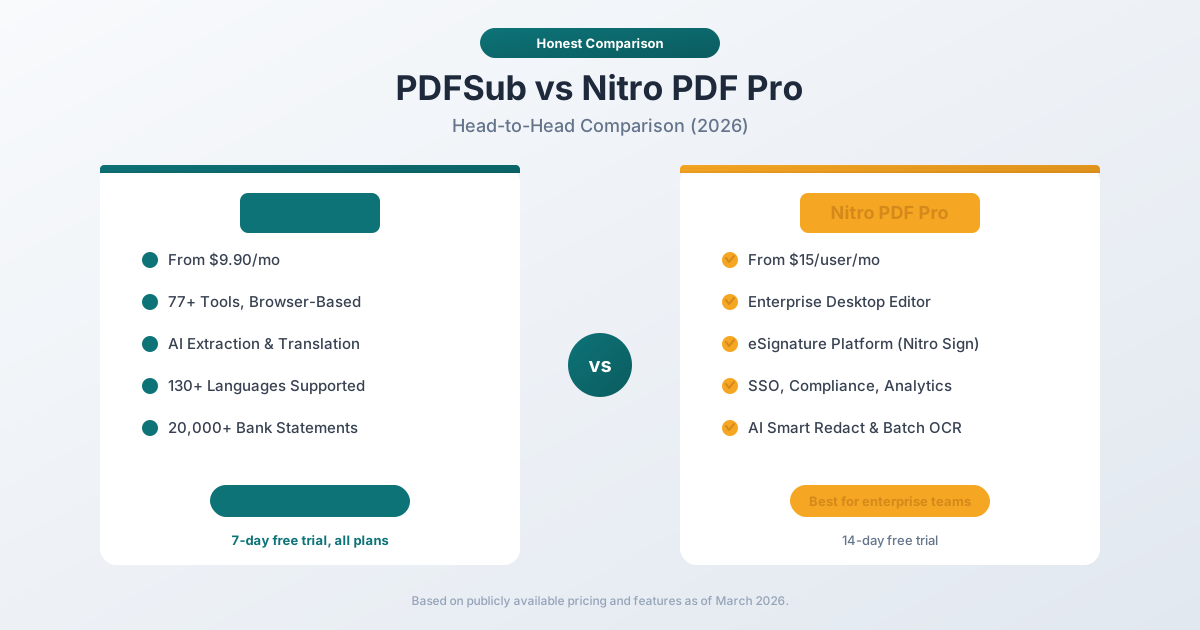
Nitro PDF Pro and PDFSub represent two fundamentally different approaches to working with PDF documents. Nitro is an enterprise-grade desktop PDF editor with advanced editing, eSignatures, analytics, and compliance features built for large organizations. PDFSub is a browser-based document processing platform with 98+ tools, AI-powered features, and specialized bank statement conversion built for individuals, small businesses, and financial professionals.
The question is whether you need an enterprise document platform or a practical document processing tool.
Quick Verdict
The 30-second split.
Choose PDFSub if…
- You want any-device browser access without installing or managing desktop PDF software on every machine.
- You need AI summarization, translation across 130+ languages, document chat, and structured data extraction - Nitro's AI is narrower.
- You process bank statements, invoices, or receipts to structured data - Nitro doesn't have these specialized financial extractors.
- You want transparent $20/user/mo annual pricing with no enterprise quoting and no per-envelope e-sign fees on top of the seat price.
Choose Nitro PDF Pro if…
- You need enterprise-grade inline PDF editing - text, images, layout - at the depth Acrobat power users expect.
- Your organization requires SSO, Azure Information Protection integration, IT admin controls, and audit-grade compliance from a single vendor.
- You need Nitro Sign's enterprise eSignature workflow with routing, templates, and legally binding audit trails as part of the same purchase.
- You're a medium-to-large enterprise with procurement processes and per-user licensing budgets - Nitro is built for that environment.
These are different categories of software. Nitro is an enterprise desktop document platform. PDFSub is a browser-based document processing platform.
Company Overviews
PDFSub is a document platform offering 98+ tools for PDF processing, AI-powered document features (summarization, translation in 130+ languages, data extraction, document chat), and specialized bank statement conversion supporting 20,000+ financial institutions across 8 export formats. Editing tools run entirely in your browser. Conversions and advanced processing are powered by the PDFSub Engine - an isolated service with no internet access. Files are processed in an isolated environment and auto-deleted. It is designed for individuals, small businesses, accountants, and bookkeepers who need fast, practical PDF processing.
Nitro PDF Pro is an enterprise PDF and eSign platform developed by Nitro Software, an Australian-founded company publicly listed on the ASX. Nitro serves over 14,000 business customers globally, including 68% of Fortune 500 companies. The platform includes full-featured PDF editing, legally binding eSignatures (Nitro Sign), AI-powered document tools, compliance and security features, and an analytics dashboard for tracking document ROI. Nitro targets medium-to-large enterprises with IT procurement processes and compliance requirements.
Ease of Use & Setup
The setup experience differs dramatically.
PDFSub requires zero installation. You open your browser, select a tool, upload your document, and get your result. No software to download, no license to activate, no IT department involvement. Anyone on the team can start using it in seconds.
Nitro PDF Pro requires downloading and installing a desktop application (approximately 300–500MB). For enterprise deployments, it involves IT procurement, license management, MSI/SCCM deployment, SSO configuration, and user provisioning. Individual users can download a 14-day trial, but the full enterprise experience involves a sales process.
For a solo professional or small team, PDFSub's browser-based approach is dramatically faster to adopt. For a 500-person enterprise with IT governance requirements, Nitro's deployment tools and admin controls are necessary.
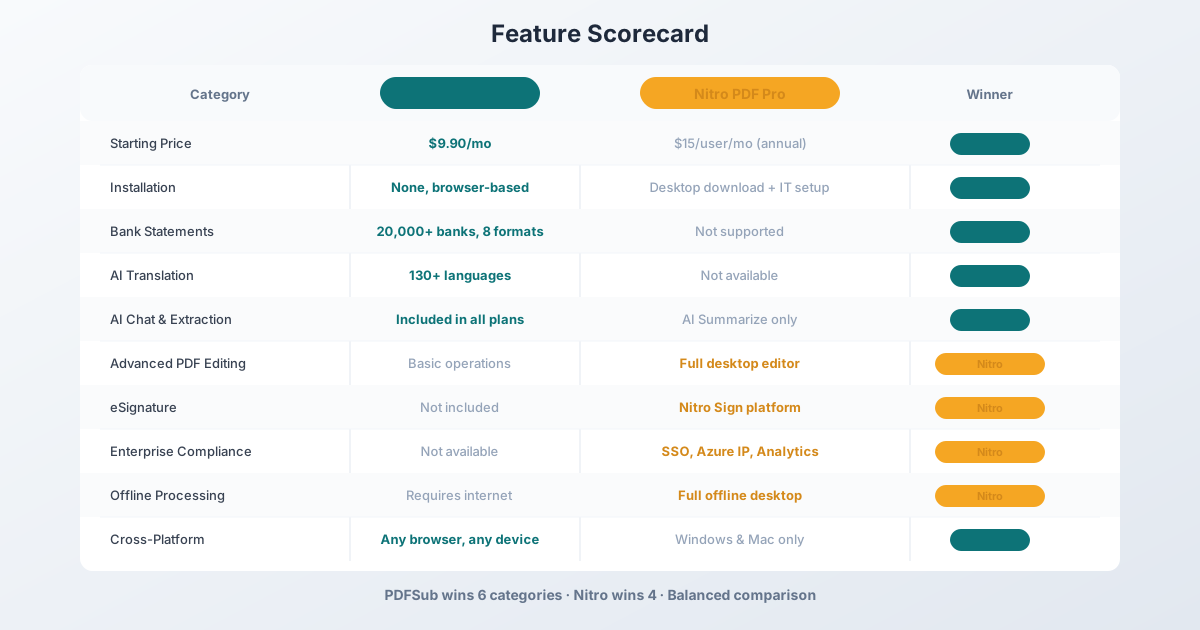
Winner: PDFSub - zero installation, instant access from any device. Nitro requires desktop installation and enterprise setup.
PDF Editing Capabilities
This is Nitro's core strength.
Nitro PDF Pro provides comprehensive desktop PDF editing:
- Edit text and images directly in PDFs with word-processor-level control
- Change fonts, colors, sizes, and text alignment
- Add, delete, move, and resize images
- Create and edit interactive forms with checkboxes, dropdowns, and calculations
- Apply OCR to scanned documents and edit the recognized text
- Redact sensitive information with AI-powered Smart Redact
- Batch process hundreds of documents at once
- Compare two versions of a document side by side
- Bates stamp documents for legal proceedings
The editing experience is polished and mature. Nitro has been refining its PDF editor for over a decade, and it shows.
PDFSub provides practical PDF operations - merge, split, compress, rotate, reorder, watermark, convert to/from Word, Excel, and images. These cover everyday PDF tasks efficiently. However, PDFSub does not offer the same depth of inline text editing, form creation, or batch processing that Nitro provides.
Winner: Nitro - enterprise-grade desktop PDF editing is a fundamentally different capability tier.
AI-Powered Features
Both platforms offer AI features, but the scope and pricing differ.
PDFSub includes AI features in every plan at no additional cost:
- AI Summarize - Generate concise summaries of any PDF document
- AI Translate - Translate documents across 130+ languages with layout preservation
- AI Chat - Ask questions about your document and get contextual answers
- AI Data Extraction - Pull structured data from invoices, receipts, financial reports
- AI Table Extraction - Extract tables from PDFs into spreadsheet format
All AI features work through the same browser interface. No add-ons, no credit systems, no separate purchases.
Nitro PDF Pro includes AI-powered features in its Standard and Plus plans:
- Smart Redact - AI detects and flags personally identifiable information (PII) for redaction
- AI Summarize - Summarize document content
- AI Data Extraction - Extract data from structured documents
- Batch OCR - Convert scanned documents to searchable, editable PDFs
Nitro's AI capabilities are built into the desktop workflow. Smart Redact, which claims 99% PII detection accuracy, is a standout feature for compliance teams.
The key differences: PDFSub supports 130+ languages for AI translation (Nitro does not offer document translation). PDFSub includes AI in all plans (Nitro's AI varies by tier). PDFSub offers AI Chat for querying document content (Nitro does not). Nitro's Smart Redact is enterprise-focused and has no PDFSub equivalent.
Winner: PDFSub - broader AI capabilities, 130+ languages, AI Chat, all included in base pricing. Nitro's AI is narrower but includes unique compliance features like Smart Redact.
Bank Statement Conversion
PDFSub is a purpose-built bank statement converter supporting:
- 20,000+ financial institutions worldwide
- 8 export formats: XLSX, CSV, QBO, OFX, QIF, QFX, TSV, JSON
- 4-tier extraction waterfall: browser-based coordinate extraction, server-side extraction, OCR + AI, and AI vision
- Automatic detection of dates, amounts, descriptions, running balances
- Multi-currency and multi-language statement support
- Direct import into QuickBooks, Xero, and other accounting software
For accountants, bookkeepers, and financial professionals, this is the feature that defines the platform.
Nitro PDF Pro does not offer bank statement conversion. It can convert PDFs to Excel, but without specialized extraction logic that identifies financial transactions, handles multi-currency formats, or exports to accounting-specific formats like QBO and OFX.
Winner: PDFSub - Nitro has no comparable feature.
eSignature & Document Workflows
This is one of Nitro's strongest differentiators.
Nitro Sign is a full-featured electronic signature platform:
- Legally binding eSignatures compliant with eIDAS, ESIGN Act, and UETA
- Signature workflows with routing, reminders, and deadlines
- Reusable templates for recurring signature requests
- Bulk signature sends for high-volume signing
- Real-time tracking and audit trails
- Integration with Salesforce, Microsoft 365, Google Workspace, and other platforms
- Signature analytics and completion rate reporting
Nitro Sign competes directly with DocuSign and Adobe Sign. It is included in Nitro PDF Plus plans or available as a standalone product.
PDFSub includes e-sign and form filling with no per-envelope fees on the All-In-One plan. There is no annual envelope cap and no per-document charge - sign and send as many documents as you need. PDFSub's e-sign is simpler than Nitro Sign's enterprise workflow features (routing, reminders, bulk sends, CRM integrations), but for teams that primarily need flat-rate signing, PDFSub eliminates the per-envelope cost entirely.
Winner: Depends - Nitro Sign for enterprise routing, bulk sends, and Salesforce/Microsoft 365 integrations; PDFSub for flat-rate signing with no per-envelope fees and unlimited team seats (each billed at the same per-user rate).
Enterprise & Compliance Features
Nitro is built for enterprise procurement and IT governance.
Nitro PDF Plus offers:
- Single Sign-On (SSO) via SAML
- Azure Information Protection integration
- Domain control for user management
- Nitro Analytics dashboard for usage tracking and ROI measurement
- Sustainability metrics (CO2 saved, trees saved through digital workflows)
- Centralized deployment (MSI, SCCM, GPO)
- Priority enterprise support
- Custom onboarding and training
These features are not relevant for individual users or small teams, but they are requirements for enterprise software procurement at large organizations.
PDFSub does not offer enterprise compliance features like SSO, domain control, or centralized deployment. It is designed for individual subscriptions and small team use.
Winner: Nitro - purpose-built for enterprise compliance and IT governance.
Pricing Comparison
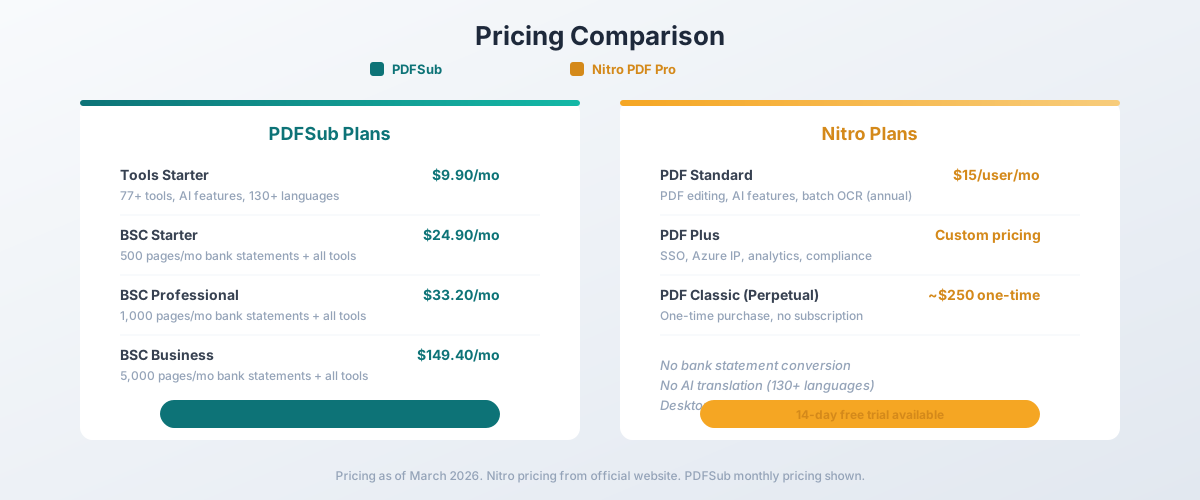
The pricing models reflect different target markets.
Nitro Pricing
| Plan | Price | Key Features |
|---|---|---|
| PDF Standard | $15/user/mo (billed annually) | PDF editing, AI features, batch OCR |
| PDF Plus | Custom pricing | SSO, Azure IP, analytics, compliance |
| PDF Classic | ~$250 one-time | Perpetual license, no subscription |
| Sign Standard | $15/user/mo | eSignature workflows |
| Sign Plus | Custom pricing | Advanced routing, bulk sends |
PDFSub Pricing
| Plan | Price | Key Features |
|---|---|---|
| All-In-One (annual) | $20/mo ($240/yr) | 98+ tools, 500 AI credits/mo, 500 bank statement pages/mo, e-sign + form filling, 50 GB cloud storage, unlimited team seats (each billed at the same per-user rate) |
| All-In-One (monthly) | $25/mo | Same as annual, billed monthly |
| Add-ons | Stackable | 500 AI credits, 500 bank statement pages, 40 GB storage, priority support |
All PDFSub plans include a 7-day free trial with full functionality. Cancel anytime.
Cost Analysis
Nitro's entry price of $15/user/month ($180/year per user) scales with team size, while PDFSub's All-In-One is a $20/user/month annual with unlimited team seats (each billed at the same per-user rate):
| Team Size | PDFSub (All-In-One annual) | Nitro PDF Standard |
|---|---|---|
| 1 user | $20/mo | $15/mo |
| 5 users | $100/mo | $75/mo |
| 10 users | $200/mo | $150/mo |
| 50 users | $1,000/mo | $750/mo |
However, these products serve different needs:
- Nitro provides enterprise PDF editing, eSignatures, and compliance features
- PDFSub provides AI document features, bank statement conversion, and 130+ language support
If you need enterprise-grade editing and eSignatures, Nitro's pricing reflects that value. If you need AI-powered document processing and financial features, PDFSub delivers more at a lower price point.
Winner: PDFSub for individual and small-team pricing. Nitro for enterprises that need the compliance and eSignature features that justify the cost.
Language Support & Translation
PDFSub supports 130+ languages for AI translation with layout preservation. You can translate an entire PDF document from English to Japanese, or from German to Spanish, while maintaining the visual structure. This is essential for international businesses and cross-border document workflows.
Nitro PDF Pro does not offer document translation. It supports multiple languages for OCR and interface localization, but it cannot translate document content between languages.
Winner: PDFSub - 130+ language translation versus no translation capability.
Privacy & Data Handling
Nitro PDF Pro processes documents locally on your desktop. Since it is installed software, your documents stay on your computer unless you choose to use Nitro's cloud features or eSignature workflows. For sensitive enterprise documents, this local processing model is a strong privacy advantage.
PDFSub processes most operations in your browser without uploading files. For server-side processing (scanned PDFs, AI operations), files are uploaded temporarily and deleted after processing. The browser-first model means most documents never leave your device.
Both approaches provide strong privacy. Nitro's desktop processing is fully offline. PDFSub's browser processing is mostly local without requiring software installation.
Winner: Nitro - fully offline desktop processing with enterprise security controls.
Who Should Choose PDFSub
PDFSub is the better choice if:
- You need AI document features. Summarization, translation (130+ languages), chat, data extraction - broader AI capabilities than Nitro.
- You need bank statement conversion. 20,000+ banks, 8 export formats, QBO/OFX for accounting software. Nitro cannot do this.
- You want browser-based access. No software to install, update, or maintain. Works on any device.
- You are a small or growing team. PDFSub's $20/user/mo (annual) is close to Nitro's $15/user/mo at the entry level but adds AI features, financial document tools, and e-sign with no per-envelope fees - value that grows with team size as you replace separate Nitro Sign or AI add-on subscriptions.
- You process multilingual documents. 130+ languages for translation that Nitro does not offer.
- You are an accountant or bookkeeper. Bank statement conversion plus invoice/receipt extraction in one platform.
Who Should Choose Nitro PDF Pro
Nitro is the better choice if:
- You need enterprise-grade PDF editing. Full desktop editing with advanced text manipulation, form creation, and batch processing.
- You need eSignatures. Nitro Sign is a full eSignature platform competing with DocuSign.
- You need enterprise compliance. SSO, Azure IP, domain control, analytics dashboards, and centralized deployment.
- You manage a large team. IT admin controls, user provisioning, and usage analytics for organizations.
- You need advanced redaction. AI-powered Smart Redact for PII detection and compliance.
- You need offline desktop processing. Fully offline document editing with no internet requirement.
The Bottom Line
Nitro PDF Pro and PDFSub serve fundamentally different market segments. Nitro is an enterprise document platform - it competes with Adobe Acrobat and Foxit at the enterprise level, offering deep editing, eSignatures, compliance, and IT management features. PDFSub is a practical document processing platform - it competes on AI capabilities, financial document processing, and accessibility.
If you work in a large organization with IT governance, compliance requirements, and enterprise software procurement processes, Nitro is the appropriate tool. If you need fast, AI-powered document processing with bank statement conversion and do not require enterprise infrastructure, PDFSub delivers more practical value at a lower price.
For individual users and small teams, PDFSub's All-In-One at $20/month annual is hard to beat - you get 98+ tools, AI features, e-sign without per-envelope fees, 500 bank statement pages every month; add unlimited team seats at the same per-user rate without enterprise overhead. For enterprise buyers, Nitro's $15/user/month includes the compliance, eSignature workflow, and IT management features that large organizations require. Try PDFSub's 7-day free trial to evaluate the fit.
Frequently Asked Questions
Is Nitro PDF Pro worth $15/user/month?
For enterprise teams that need full PDF editing, eSignatures with advanced workflow features, compliance features, and IT admin controls, Nitro delivers strong value at that price point. For individual users or small teams who primarily need document processing, AI features, and per-user e-sign with no per-envelope fees and unlimited team seats at $20/user/mo (annual), PDFSub offers more practical capabilities.
Does Nitro PDF Pro support bank statement conversion?
No. Nitro can convert PDFs to Excel, but it does not have specialized bank statement extraction that identifies transactions, separates debits from credits, or exports to accounting formats like QBO and OFX. PDFSub supports 20,000+ banks with 8 export formats.
Can I use Nitro PDF Pro in my browser?
Nitro's core PDF editing features require the desktop application. Nitro Sign (eSignatures) works through the browser. There is no browser-based PDF editor comparable to the desktop experience. PDFSub is entirely browser-based with all 98+ tools available without installation.
Does Nitro offer AI translation?
No. Nitro offers AI-powered features like Smart Redact and document summarization, but it does not offer document translation. PDFSub supports AI translation across 130+ languages with layout preservation.
Which is cheaper - PDFSub or Nitro?
PDFSub's All-In-One is $20/user/mo annual or $25/user/mo monthly (unlimited team seats at the same per-user rate) versus Nitro's $15/user/mo. Nitro is cheaper per seat; PDFSub adds AI features, financial document extraction, 130+ language support, and e-sign with no per-envelope fees at the per-user price. A 10-person team pays $200/mo on PDFSub versus $150/mo on Nitro - PDFSub costs $50/mo more for the team but bundles AI capabilities Nitro charges separately for. Nitro includes advanced enterprise eSignature workflow features (routing, bulk send, Salesforce integration), compliance certifications, and admin controls that PDFSub does not.
Can Nitro replace PDFSub for accountants?
Not directly. While Nitro handles general PDF editing and conversion, it lacks specialized bank statement conversion with 20,000+ bank templates, accounting-format exports (QBO, OFX, QIF), and AI-powered financial document extraction. Accountants would still need a separate tool for bank statement processing.
Already decided to switch? This page covers neutral side-by-side facts. For a migration-focused walkthrough - overlapping during the contract term, mapping Nitro workflows to PDFSub, and switching FAQ - see the best Nitro PDF alternative guide.