PDFSub vs Expensify: Honest Comparison (2026)
PDFSub vs Expensify - document processing vs expense management, pricing models compared.
PDFSub is best for:
- Users who need document processing - bank statements, PDF tools, AI extraction - not expense management
- Small firms preferring PDFSub's all-features-included per-user pricing at $20/user/mo (annual) versus Expensify's tier-based per-user billing
- Accountants processing client financial documents who don't need corporate card or reimbursement features
- Teams needing 130+ language support and AI document intelligence alongside receipt extraction
PDFSub is NOT best for:
- Companies needing employee expense tracking, corporate cards, and reimbursement workflows
- Organizations requiring expense policy enforcement and multi-level approval routing
- Teams needing integrated travel booking and per diem management
Expensify and PDFSub both handle financial documents, but they solve completely different problems. Comparing them requires understanding what each tool actually is - because despite the surface-level overlap in receipt scanning and financial data processing, these are fundamentally different products.
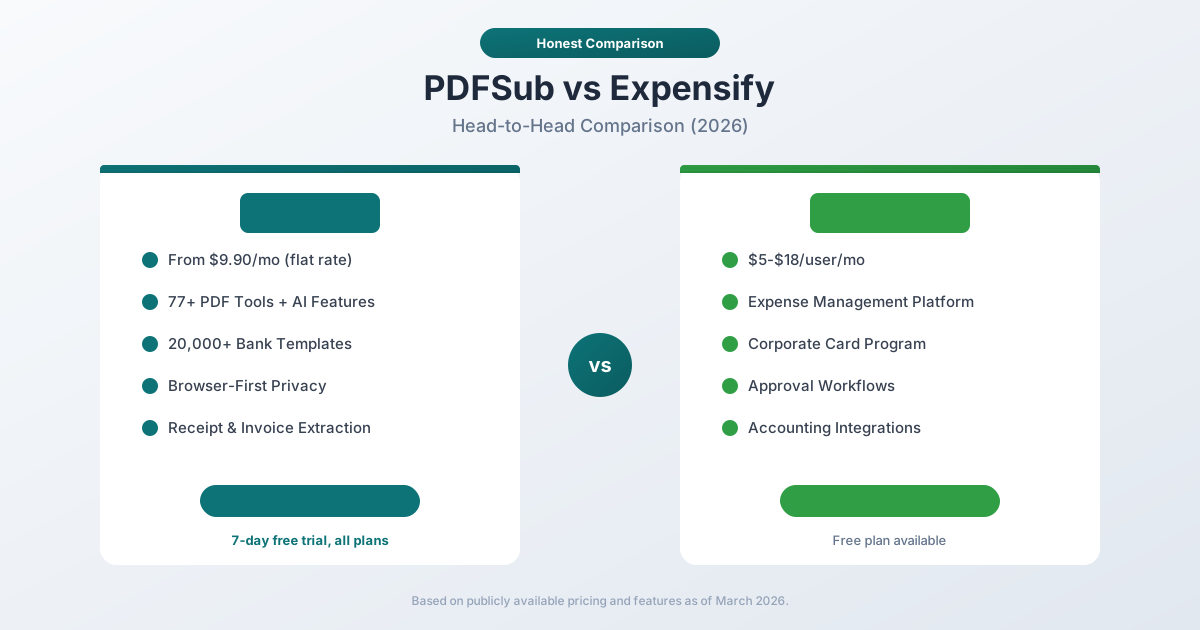
Expensify is an expense management platform built for teams. It tracks employee expenses, issues corporate cards, automates reimbursement workflows, and syncs with accounting software. Pricing is per-user: $5/user/month (Collect) or $18/user/month (Control).
PDFSub is a document processing platform with 98+ PDF tools, AI-powered features (summarization, translation, chat, data extraction), and specialized bank statement conversion supporting 20,000+ financial institutions. Pricing is per-user: $20/user/mo (annual) or $25/user/mo (monthly), with unlimited team seats at the same per-user rate, with unlimited team seats (each user billed at the same per-user rate).
This comparison breaks down where each tool genuinely excels and why many financial professionals use both.
Quick Verdict
The 30-second split - these two tools solve different problems, so the comparison is mostly about which problem you actually have.
Choose PDFSub if…
- Your core pain is bank statement conversion, PDF manipulation, or AI-powered data extraction - not expense tracking.
- You need to convert statements to QBO/OFX, extract structured data from invoices, merge or compress PDFs, or translate documents.
- You want predictable $20/user/mo annual pricing with no per-receipt or per-document fees on top (Expensify charges per active member with card-discount conditions).
- You manage documents for a few clients, not a workforce submitting expenses.
Choose Expensify if…
- Your core problem is employee expense management - receipt capture, mileage tracking, corporate cards, approval workflows, reimbursement.
- You need SmartScan for mobile receipt photography and automated categorization across a team.
- Your workflow centers on the Expensify Card, automated travel booking, or vendor bill pay.
- You're running expense policies and approval chains across dozens of submitters.
These tools complement each other more than they compete. Many firms use both - Expensify for the expense lifecycle, PDFSub for everything else that touches PDFs.
Company Overviews
PDFSub is a document platform offering 98+ tools for PDF processing, AI-powered document features (summarization, translation, data extraction, chat), and specialized bank statement conversion supporting 20,000+ financial institutions. Editing tools run entirely in your browser. Conversions and advanced processing are powered by the PDFSub Engine - an isolated service with no internet access. Files are processed in an isolated environment and auto-deleted. It is designed for individuals, small businesses, accountants, and bookkeepers who work with documents regularly.
Expensify is a publicly traded expense management company (NASDAQ: EXFY) founded in 2008 in San Francisco. The platform handles the full expense lifecycle: employees submit receipts and expenses, managers approve them, finance teams reconcile them, and the data flows into accounting systems. Expensify also offers corporate cards (the Expensify Card), travel booking, invoicing, and bill payment. The company serves small businesses through enterprises and has millions of users worldwide.
Core Purpose: Document Processing vs. Expense Management
This is the most important distinction in this comparison.
PDFSub is a document processing tool. You give it documents - PDFs, bank statements, invoices, receipts, financial reports - and it extracts data, converts formats, translates content, summarizes information, or performs other document operations. The output is structured data or transformed documents.
Expensify is a workflow management tool. You give it expenses - receipt photos, credit card transactions, mileage logs, per diem claims - and it manages the entire lifecycle from submission through approval to reimbursement and accounting sync. The output is approved, coded, reconciled expense data flowing into your general ledger.
These are complementary functions, not competing ones. An accountant might use PDFSub to convert bank statements and extract invoice data, then use Expensify to manage employee expense reports. The two tools operate in different parts of the financial workflow.
Receipt Scanning
Both tools scan receipts, but for different purposes.
PDFSub scans receipts to extract structured data: merchant name, date, total, tax, line items, and payment method. The extracted data is presented as structured output that you can download or use for your own purposes - reconciliation, audit, record-keeping, or import into any system you choose. PDFSub treats receipt scanning as a data extraction task.
Expensify scans receipts through SmartScan to create expense entries. When you photograph a receipt, Expensify extracts the merchant, date, amount, and currency - then creates an expense line item, matches it to a corporate card transaction (if applicable), applies expense coding categories, routes it for approval, and eventually pushes it to your accounting system. Expensify treats receipt scanning as the first step in an expense workflow.
The difference: PDFSub gives you extracted data. Expensify gives you a managed expense entry inside a workflow.
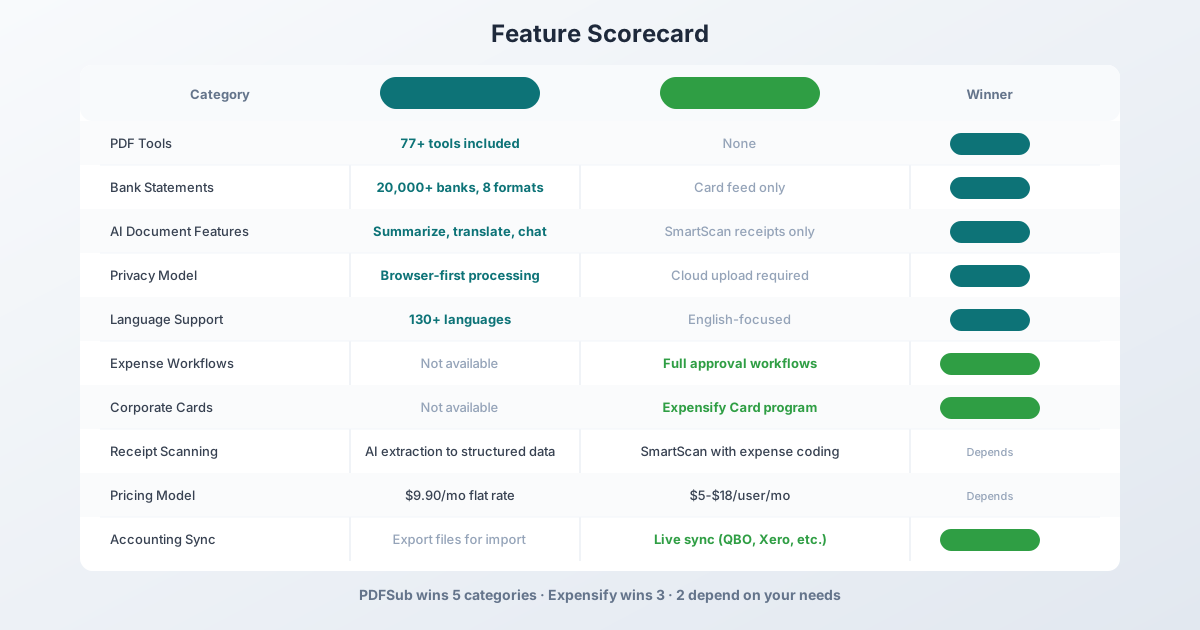
Winner: Depends - PDFSub for standalone data extraction. Expensify for receipt scanning integrated into expense management.
Bank Statement Processing
This is where PDFSub has no competition from Expensify.
PDFSub provides dedicated bank statement conversion:
- 20,000+ bank templates worldwide
- 8 output formats: XLSX, CSV, QBO, OFX, QIF, QFX, TSV, JSON
- 4-tier extraction: browser-based coordinate extraction, server-side extraction, OCR + AI, and AI vision
- Multi-language support: 130+ languages with automatic format detection
- Accounting integration: QBO files import directly into QuickBooks, OFX into most accounting software
Expensify does not convert bank statements. It connects to bank accounts and credit cards via direct feeds to import transactions in real-time. If your bank or card provider supports Expensify's direct feed, transactions flow in automatically. But if you have a PDF bank statement from a bank that is not connected - an international bank, a closed account, a client's statement - Expensify cannot process it.
For accountants and bookkeepers who process bank statements from multiple clients and multiple institutions, PDFSub handles what Expensify cannot.
Winner: PDFSub - comprehensive bank statement conversion versus no PDF statement processing.
Pricing Comparison
The pricing models are structurally different and reveal different target audiences.
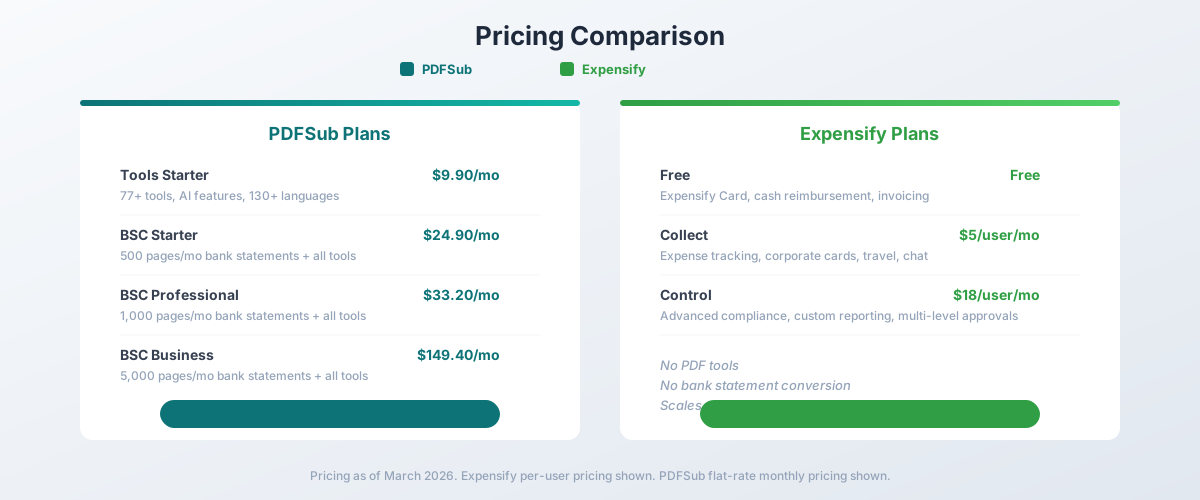
PDFSub Pricing (Flat Rate)
| Plan | Price | Key Features |
|---|---|---|
| All-In-One (annual) | $20/mo ($240/yr) | 98+ tools, 500 AI credits/mo, 500 bank statement pages/mo, e-sign + form filling, 50 GB cloud storage, unlimited team seats (each billed at the same per-user rate) |
| All-In-One (monthly) | $25/mo | Same as annual, billed monthly |
| Add-ons | Stackable | 500 AI credits, 500 bank statement pages, 40 GB storage, priority support |
PDFSub uses flat-rate pricing with unlimited team seats (each billed at the same per-user rate). Whether one person or ten people use the account, the price is the same. All plans include a 7-day free trial.
Expensify Pricing (Per User)
| Plan | Monthly Price | Key Features |
|---|---|---|
| Free | Free | Expensify Card, basic reimbursement, invoicing |
| Collect | $5/user/mo | Expense tracking, corporate cards, travel, chat |
| Control | $18/user/mo | Advanced compliance, custom reporting, multi-level approvals |
Expensify uses per-user pricing. A team of 10 on the Collect plan costs $50/month. A team of 50 on Control costs $900/month.
The Math for Teams
| Team Size | PDFSub (All-In-One annual) | Expensify (Collect) | Expensify (Control) |
|---|---|---|---|
| 1 user | $25/mo | $5/mo | $18/mo |
| 5 users | $25/mo | $25/mo | $90/mo |
| 10 users | $25/mo | $50/mo | $180/mo |
| 25 users | $25/mo | $125/mo | $450/mo |
PDFSub's per-user rate becomes increasingly favorable as team size grows. But this comparison is misleading because the tools serve different purposes - you would not replace Expensify's expense management with PDFSub's document processing.
Winner: Depends - PDFSub's per-user rate is better for document-focused teams. Expensify's per-user model includes expense management features that PDFSub does not offer.
PDF Tools & Document Processing
This category is entirely PDFSub's domain.
PDFSub includes 98+ PDF tools in every subscription:
- Merge, split, compress, rotate, reorder PDFs
- Convert PDF to Word, Excel, PowerPoint, images
- AI summarization, translation (130+ languages), chat with documents
- Invoice extraction, receipt scanning, financial report analysis
- Watermarks, page numbering, form filling, e-signatures
- PDF security: encrypt, decrypt, redact
- Bank statement conversion to 8 formats
Expensify has no PDF tools. It cannot merge PDFs, convert documents, translate files, summarize reports, or perform any general document operations. Expensify processes expense receipts and manages expense workflows - that is its scope.
Winner: PDFSub - 98+ document tools versus none.
Expense Workflows & Approval
This category is entirely Expensify's domain.
Expensify provides comprehensive expense management:
- Expense submission - employees photograph receipts, log mileage, submit per diems
- SmartScan - automatic receipt data extraction and expense coding
- Approval workflows - configurable multi-level approval chains
- Corporate cards - Expensify Card with real-time transaction tracking
- Policy enforcement - spending limits, category restrictions, duplicate detection
- Reimbursement - direct ACH reimbursement to employee bank accounts
- Travel booking - integrated travel search and booking
- Bill payment - vendor bill processing and payment
- Team chat - built-in messaging for expense-related communication
PDFSub has no expense management features. It cannot track expenses, route approvals, issue corporate cards, process reimbursements, or enforce spending policies. PDFSub processes documents - it does not manage business processes.
Winner: Expensify - complete expense lifecycle management versus none.
Accounting Integration
Expensify offers live, bidirectional sync with major accounting platforms:
- QuickBooks Online - automatic expense sync, category mapping
- Xero - real-time integration with expense coding
- Sage Intacct - enterprise-grade integration
- NetSuite - full ERP integration
- QuickBooks Desktop - sync via Web Connector
Expenses are coded, approved, and pushed to your accounting system automatically. No manual data entry. No export/import steps.
PDFSub generates export files in accounting-native formats (QBO, OFX, QIF) that you import into your accounting software. The process works - but it requires the manual step of downloading the file and importing it. There is no live sync or automatic push.
For day-to-day expense management, Expensify's live sync is more efficient. For bank statement data that needs to reach accounting software, PDFSub's accounting-format exports bridge the gap effectively.
Winner: Expensify - live accounting sync beats file-based import for ongoing workflows.
AI & Language Features
PDFSub offers AI-powered document features across its platform:
- AI Summarization - condense lengthy reports
- AI Translation - translate documents across 130+ languages
- AI Chat - ask questions about document content
- AI Data Extraction - extract structured data from any document
- 130+ language support with automatic detection
Expensify uses AI for SmartScan receipt processing and some expense coding automation. The AI is focused on expense data, not general document intelligence. Expensify's interface is available in multiple languages, but it does not offer document translation or multi-language document processing.
Winner: PDFSub - comprehensive AI document features versus expense-focused automation.
Privacy & Data Handling
PDFSub runs editing tools entirely in your browser. For bank statement Tier 1 extraction, files never leave your device. Conversions and advanced processing are powered by the PDFSub Engine - an isolated service with no internet access. Files are processed in an isolated environment and auto-deleted after processing.
Expensify is entirely cloud-based. All receipts, expenses, and financial data are stored on Expensify's servers. The platform is SOC 1 and SOC 2 compliant and uses bank-level encryption. However, all financial data resides in Expensify's cloud infrastructure.
The privacy models reflect different use cases: PDFSub processes transient documents (convert and discard). Expensify stores persistent financial data (expense records that need to be retained for audit purposes).
Winner: PDFSub - browser-first processing for document privacy. Though Expensify's cloud storage is appropriate for its expense management purpose.
Who Should Choose PDFSub
PDFSub is the better choice if:
- You process bank statements. 20,000+ banks with 8 output formats - a capability Expensify does not offer.
- You need PDF tools. Merge, split, compress, convert, translate, summarize - 98+ tools in one subscription.
- You extract data from invoices and receipts. AI-powered extraction to structured data for your own workflows.
- You work with multiple languages. 130+ languages with AI translation built in.
- You want flat-rate pricing. No per-user costs that scale with team size.
- Privacy matters. Editing runs in your browser; conversions use the isolated PDFSub Engine with auto-deletion.
- You are an accountant or bookkeeper. Document processing is your core workflow, not expense management.
Who Should Choose Expensify
Expensify is the better choice if:
- You manage employee expenses. Submission, approval, reimbursement - the full expense lifecycle.
- You want corporate cards. Expensify Card with real-time transaction tracking and automatic receipt matching.
- You need approval workflows. Multi-level approval chains with policy enforcement.
- You need live accounting sync. Automatic, bidirectional sync with QuickBooks, Xero, Sage, or NetSuite.
- You manage travel expenses. Integrated travel booking and per-diem management.
- Your team needs expense tracking. Per-user pricing makes sense when every employee submits expenses.
- You want a free tier. Expensify's Free plan covers basic expense management at no cost.
When to Use Both
Many financial professionals use both tools:
- Bookkeepers use PDFSub to convert client bank statements and extract invoice data, while their clients use Expensify for employee expense tracking.
- Small business owners use Expensify for team expense management and PDFSub for bank statement reconciliation and general PDF operations.
- Accountants use Expensify data as one input to their reconciliation workflow and PDFSub to process the bank statements and financial documents that complete the picture.
The Bottom Line
Expensify and PDFSub solve different problems in the financial workflow. Expensify manages the expense lifecycle - from receipt capture through approval to reimbursement and accounting sync. PDFSub processes documents - extracting data, converting formats, and providing 98+ PDF tools.
Choosing between them is usually not the right question. The real question is whether you need expense management, document processing, or both. Most financial professionals who handle both employee expenses and document-heavy workflows benefit from having both tools.
If your primary challenge is processing bank statements, extracting data from financial documents, or working with PDFs, PDFSub's 7-day free trial is the place to start. If your primary challenge is tracking and managing employee expenses, Expensify's free plan lets you evaluate that workflow.
Frequently Asked Questions
Can PDFSub replace Expensify?
No. PDFSub is a document processing platform. It does not track expenses, manage approvals, issue corporate cards, or process reimbursements. PDFSub and Expensify serve different purposes and are more complementary than competitive.
Can Expensify convert bank statements?
No. Expensify imports transactions via direct bank feeds, not from PDF bank statements. If you have a PDF bank statement that needs to be converted to Excel, CSV, QBO, or another format, Expensify cannot do this. PDFSub supports 20,000+ banks with 8 output formats.
Which tool is cheaper?
It depends on team size and use case. PDFSub's All-In-One plan is $20/month annual ($25/month monthly) per-user rate with unlimited team seats (each billed at the same per-user rate). Expensify starts at $5/user/month. For a single user, Expensify's Collect plan is cheaper. For a team of 5+, PDFSub's per-user rate becomes more economical - but they serve different purposes, so comparing raw price is misleading.
Does Expensify have PDF tools?
No. Expensify cannot merge, split, compress, convert, translate, or summarize PDFs. Its SmartScan extracts data from receipt photos and creates expense entries. For general PDF operations, you need a separate tool.
Can PDFSub scan receipts like Expensify?
PDFSub can extract data from receipt PDFs and images - merchant name, date, total, tax, line items. However, it does not create expense entries, route approvals, or integrate into an expense management workflow. PDFSub extracts data; Expensify manages the expense lifecycle.
Do accountants need both tools?
Many accountants benefit from both. PDFSub handles document processing - bank statement conversion, invoice data extraction, PDF manipulation, and AI features. Expensify handles expense management for clients whose employees submit expense reports. The tools address different parts of an accountant's workflow.
Does PDFSub integrate with QuickBooks?
PDFSub exports bank statement data in QBO format, which QuickBooks can import natively. However, this is a file-based export and import process, not a live bidirectional sync like Expensify offers. For ongoing, automated expense data flow, Expensify's QuickBooks integration is more seamless.
Is Expensify good for freelancers?
Expensify offers individual plans (Track and Submit) at $4.99/month for freelancers who need to track expenses and scan receipts. For freelancers who primarily need to process invoices, bank statements, and PDFs, PDFSub's $20/month annual All-In-One plan provides broader document capabilities including e-sign and 500 bank statement pages monthly.
Already decided to switch? This page covers neutral side-by-side facts. For a migration-focused walkthrough - what to test first, when to keep Expensify for its expense workflow, and switching FAQ - see the best Expensify alternative guide.