PDFSub vs DocuSign: Do You Need a $25/Month E-Sign Tool? (2026)
DocuSign is the gold standard for e-signatures - but at $25-65/month per user, it's overkill for simple document signing. Here's an honest comparison.
PDFSub is best for:
- Users who sign occasional contracts and don't need DocuSign's enterprise workflow features
- Freelancers and small businesses wanting e-sign included with 98+ PDF tools at $20/month annual ($25/month monthly)
- Teams needing document processing (AI extraction, translation, bank statements) alongside signing
- Budget-conscious users who can't justify $25-65/user/mo for simple document signing
PDFSub is NOT best for:
- Organizations needing multi-step sequential signing workflows with role-based routing
- Sales teams requiring CRM-integrated templates and bulk send for high-volume contracts
- Enterprises needing identity verification, SOC 2 audit trails, and HIPAA-compliant signing
You need to sign a PDF. Maybe it is a freelance contract, a lease agreement, or an NDA your client sent over. You open your email, see the document, and think: do I really need to pay $25 a month for this?
That is the question a lot of people ask when they first encounter DocuSign's pricing. And it is a fair question. DocuSign built the e-signature industry. They are the name that comes up in every enterprise RFP, every compliance checklist, every workflow automation discussion. But they also charge enterprise prices for what is sometimes a very simple task.
PDFSub takes a different approach. E-signing is one of 98+ tools included in a subscription that covers everything from merging and compressing PDFs to AI-powered document translation - and it carries no per-envelope fees. It is not trying to replace DocuSign for complex signing workflows. It is trying to make simple signing accessible without a separate subscription or per-document costs.
Here is an honest look at where each tool wins and where each falls short.
Quick Verdict
The 30-second split.
Choose PDFSub if…
- You sign documents you receive - contracts, NDAs, lease agreements - and don't need to send things out for someone else to sign through the platform.
- You want e-sign bundled with 98+ other PDF tools (merge, compress, translate, extract data, bank statement conversion) for one $20/mo annual subscription.
- You don't need DocuSign's workflow features: sequential routing, templates, bulk send, KBA identity verification, or CRM integration.
- You're a freelancer, small business, or internal team where a per-user enterprise e-sign platform is overkill.
Choose DocuSign if…
- You need to send documents to other people for them to sign - DocuSign's workflow routing, templates, and bulk send are purpose-built for this.
- You work in a regulated industry (healthcare, finance, government) where SOC 2 Type II certification, HIPAA support, and eIDAS-grade audit trails are non-negotiable.
- Your sales team needs CRM-integrated templates that auto-fire from Salesforce, HubSpot, or Microsoft Dynamics.
- You handle multi-party contracts (real estate closings, M&A) where sequential routing and certificate-of-completion legal standing matter.
For many teams, the answer is both - DocuSign for outbound signing workflows, PDFSub for everything else.
What DocuSign Does Well
Let's start with credit where it's due. DocuSign is not expensive by accident. They built a platform that handles signing at enterprise scale, and the feature list reflects that.
Advanced signing workflows. DocuSign lets you set up multi-step signing sequences where Document A goes to the legal team, then to the CFO, then to the external party -- in that specific order. Each signer gets reminded automatically. If someone declines, the workflow pauses and notifies the administrator. This kind of orchestration is genuinely difficult to build and genuinely useful for organizations that process hundreds of documents per month.
Templates and bulk send. If you send the same contract to 50 new clients per month, DocuSign's template system saves real time. Create the template once, define the signing fields, and send it to a list. Each recipient gets a personalized copy. For high-volume sales teams, this feature alone justifies the cost.
API and CRM integrations. DocuSign integrates with Salesforce, HubSpot, Microsoft Dynamics, and dozens of other platforms. Documents can be triggered automatically when a deal reaches a certain stage. The API is well-documented and widely used by developers building custom workflows.
Audit trails and compliance. Every action -- who opened the document, when they signed, their IP address, the certificate of completion -- is logged and legally defensible. DocuSign holds SOC 2 Type II certification, HIPAA compliance support, and meets eIDAS standards for electronic signatures in the EU.
Identity verification. DocuSign offers knowledge-based authentication, SMS verification, and integration with ID verification services. For high-value transactions where you need to confirm the signer's identity beyond their email address, these features matter.
DocuSign Pricing in 2026
DocuSign's pricing is structured per user, per month, with significant discounts for annual billing:
- Personal: $10/month (annual) or $15/month (monthly). Single user, 5 envelopes per month.
- Standard: $25/user/month (annual) or $45/user/month (monthly). Includes shared templates, real-time commenting, and reminders.
- Business Pro: $40/user/month (annual) or $65/user/month (monthly). Adds payment collection, signer attachments, bulk send, and advanced fields.
- Enterprise: Custom pricing. Includes everything plus SSO, advanced API access, and dedicated support.
The per-user pricing adds up fast. A five-person team on the Standard plan pays $125/month ($1,500/year). Move to Business Pro and that is $200/month ($2,400/year). For organizations that genuinely use the workflow features, that is reasonable. For teams that just need to sign things, it is a lot.
What PDFSub Does Differently
PDFSub's e-sign tool is straightforward. Open a PDF, add your signature by drawing it, typing it, or uploading an image, place it on the document, and download the signed PDF. There is no multi-party workflow. There is no sending the document to someone else for their signature through the platform. It is a tool for putting your signature on a document.
That sounds limited -- and it is, compared to DocuSign. But for a surprising number of use cases, it is exactly what you need.
Signing documents you received. Someone emails you a contract and says "sign and return." You do not need a workflow platform for this. You need to put your signature on page 7 and email it back.
Internal documents. You are approving an expense report, signing off on a project plan, or adding your signature to a company form. These do not need audit trails or multi-party routing. They need a signature and a timestamp.
Freelance and small business contracts. You send 3-5 contracts per month. You do not need templates or bulk send. You need to sign, download, and attach to an email.
One-time signatures. Lease agreements, permission forms, medical consent forms -- documents you sign once and file away. Paying $25/month for the privilege of signing one document is hard to justify.
PDFSub's Broader Value
Where PDFSub differs most significantly from DocuSign is that e-signing is one tool among many. A PDFSub All-In-One subscription at $20/month annual ($25/month monthly) includes:
- 98+ PDF tools (merge, split, compress, convert, watermark, redact, and more)
- E-sign and form filling with no per-envelope fees
- AI-powered features (summarize, translate to 130+ languages, chat with documents, extract data) - 500 AI credits/month included
- Bank Statement Converter (Excel, CSV, OFX, QBO) - 500 pages/month included
- 50 GB cloud storage with Google Drive and Dropbox integration
- Unlimited team seats with team management
- Browser-based processing for basic tools (files stay on your device)
- OCR for scanned documents
If your workflow involves PDFs beyond just signing them, the all-in-one approach means fewer subscriptions and a single interface for everything.
Honest Comparison Table
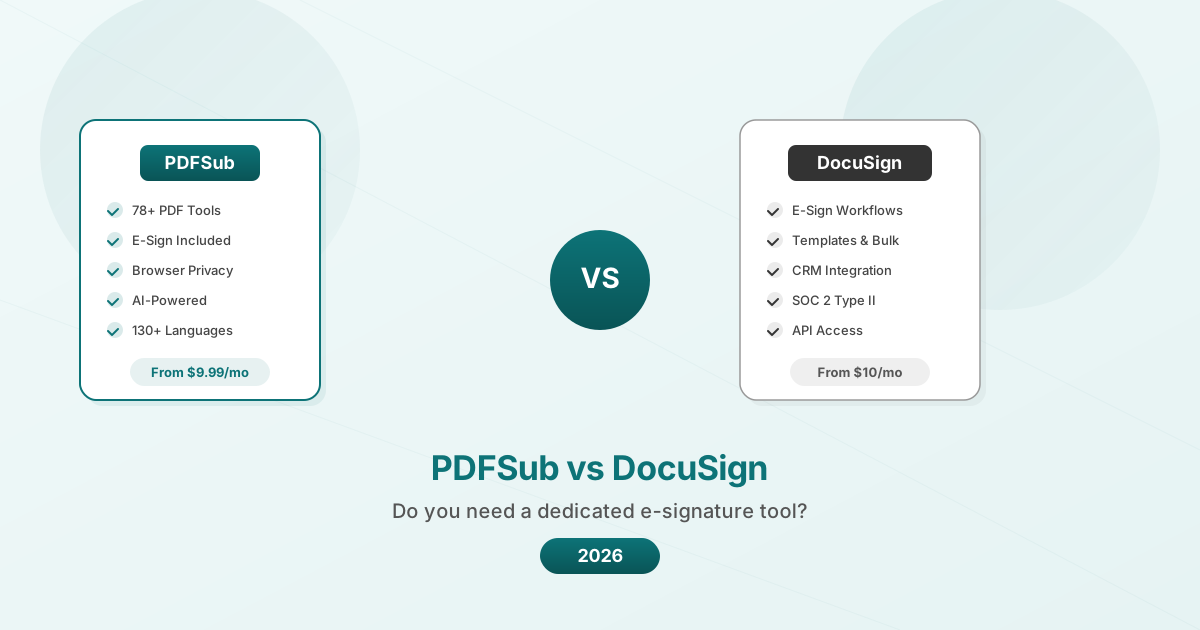
| Feature | PDFSub | DocuSign |
|---|---|---|
| Draw/type/upload signature | Yes | Yes |
| Multi-party signing workflow | No | Yes |
| Send for signature (routing) | No | Yes |
| Templates and bulk send | No | Yes |
| Audit trail with certificate | Basic | Comprehensive |
| Identity verification | No | Yes (KBA, SMS, ID check) |
| CRM integrations | No | Salesforce, HubSpot, etc. |
| API for developers | No | Yes (well-documented) |
| Additional PDF tools | 98+ tools included | Requires separate software |
| AI document features | Yes (summarize, translate, chat) | Limited |
| Browser-based privacy | Yes (basic tools) | No (cloud-based) |
| SOC 2 certification | SOC 2 Ready (not certified) | SOC 2 Type II certified |
| Starting price | $20/month annual (All-In-One) | From $10/month (Personal) |
| Per-user team pricing | Unlimited team seats included | $25-65/user/month |
Where DocuSign Wins Clearly
Regulated industries. If you work in healthcare, financial services, or government, DocuSign's compliance certifications and audit trails are not optional -- they are requirements. PDFSub is SOC 2 Ready but not SOC 2 Type II certified. For organizations that need certified compliance, DocuSign is the safer choice.
High-volume signing. If you send 50+ documents for signature per month and need to track which ones are pending, remind signers, and report on completion rates, DocuSign's workflow engine is purpose-built for this. Trying to do this manually with any basic e-sign tool would be painful.
Multi-party contracts. Real estate closings, M&A documents, partnership agreements -- anything where multiple parties need to sign in a specific order with legal enforceability. DocuSign's sequential routing and certificate of completion provide legal standing that a simple signature placement cannot.
Developer integrations. If you are building software that needs to trigger signing workflows programmatically, DocuSign's API is the industry standard. It is mature, well-documented, and supported by most CRM and workflow platforms.
Where PDFSub Wins Clearly
Simple signing needs. If you sign 1-10 documents per month and do not need routing, templates, or compliance certifications, paying for DocuSign is like renting a moving truck to buy groceries. PDFSub's e-sign tool handles this use case without a dedicated subscription.
Document work beyond signing. If you also need to merge PDFs, compress them for email, convert them to Word, translate them, or extract data from invoices, PDFSub bundles all of this into one subscription. With DocuSign, you still need separate tools for everything else.
Privacy-conscious users. PDFSub's basic PDF tools process files in your browser -- the document never leaves your device. DocuSign processes everything in the cloud. For sensitive documents where you want to minimize exposure, browser-based processing is a meaningful advantage. (Note: PDFSub's AI features do require server-side processing, with automatic deletion.)
Budget-conscious individuals and small teams. A solo freelancer who needs to sign contracts and occasionally merge, compress, or convert PDFs gets more value from a single PDFSub subscription than from a DocuSign Personal plan that only covers signing.
The Hybrid Approach
Here is something most comparison articles will not tell you: for many teams, the right answer is both.
If your sales team sends 200 contracts per month through a Salesforce-integrated workflow, they need DocuSign (or a comparable enterprise e-sign platform). But the marketing team that signs one vendor agreement per quarter and regularly merges PDF reports does not need a DocuSign seat. They need PDFSub.
Paying for the right tool at the right level for each team is almost always cheaper than putting everyone on the same enterprise platform.
Frequently Asked Questions
Is PDFSub's e-sign legally binding?
Electronic signatures are legally valid in most jurisdictions under laws like ESIGN (US) and eIDAS (EU). PDFSub lets you place a signature on a PDF document, which is a valid electronic signature for most everyday purposes. However, it does not provide the same level of audit trail, certificate of completion, or identity verification that DocuSign offers. For high-value contracts or regulated industries, consult your legal team about what level of e-signature compliance you need.
Can I send a document for someone else to sign through PDFSub?
No. PDFSub's e-sign tool is for adding your own signature to a PDF. If you need to send a document to someone else, have them sign it remotely, and track the status, you need a workflow platform like DocuSign, HelloSign, or PandaDoc.
What if I only sign a few documents per month?
This is exactly the use case where PDFSub makes more sense. If you sign 1-5 documents per month, the signing functionality is included in a subscription that also covers dozens of other PDF tasks. DocuSign's Personal plan at $10-15/month gives you 5 envelopes and nothing else.
Is DocuSign worth the price for a small business?
It depends on your signing volume and complexity. If you send contracts to external parties regularly and need tracking, reminders, and templates, DocuSign's Standard plan ($25/user/month annual) is genuinely useful and the time savings justify the cost. If you mostly sign documents yourself and occasionally send one for signature, the price is hard to justify when simpler alternatives exist.
Can I use PDFSub's other tools alongside DocuSign?
Absolutely. Many users keep DocuSign for their signing workflows and use PDFSub for everything else -- merging, compressing, converting, translating, and extracting data from PDFs. The two tools serve different purposes and complement each other well.
The Bottom Line
DocuSign is the best e-signature workflow platform available. If you need what it offers -- multi-party signing, templates, compliance certifications, CRM integration, and audit trails -- no simpler tool replaces it. It earned its reputation.
But most people do not need all of that. They need to sign a PDF. For that task, and for the dozens of other PDF tasks that come up in daily work, PDFSub offers a broader toolset at a lower price point. The e-sign feature is simpler, yes. But when "simple" means "sign this and move on," that is not a limitation -- it is the point.
Try the approach that fits your actual workflow. If you find yourself wishing for routing and templates, DocuSign is right there. If you find yourself wishing you could also merge, compress, and translate the documents you are signing, PDFSub is waiting.
Already decided to switch? This page covers neutral side-by-side facts. For a migration-focused walkthrough - what to test first, how to handle outbound signing workflows DocuSign covers, and switching FAQ - see the best DocuSign alternative guide.