PDFSub vs DocuClipper: Honest Comparison (2026)
A detailed head-to-head comparison of PDFSub and DocuClipper for bank statement conversion - accuracy, pricing, languages, and more.
PDFSub is best for:
- International firms needing 130+ languages vs DocuClipper's English-centric extraction
- Budget-conscious users - $20/month annual with 500 BSC pages included vs DocuClipper's $29-$159/mo for equivalent volume
- Privacy-first professionals who want browser-based processing for digital PDFs
- Users who need 98+ PDF tools (merge, split, compress, AI chat) alongside bank statement conversion
PDFSub is NOT best for:
- Teams that need DocuClipper's direct push-to-QuickBooks/Xero/Sage integrations
- Organizations requiring SOC 2 Type II certification for compliance audits
- Firms that need built-in fraud detection on extracted bank statement data
Two of the most talked-about bank statement converters in 2026 are PDFSub and DocuClipper. Both promise to turn your PDF bank statements into usable spreadsheets and accounting files. Both claim high accuracy. Both charge monthly subscriptions.
But they take fundamentally different approaches to the problem - and those differences matter depending on your workflow, your clients, and your budget.
This is a category-by-category breakdown of how they actually compare.
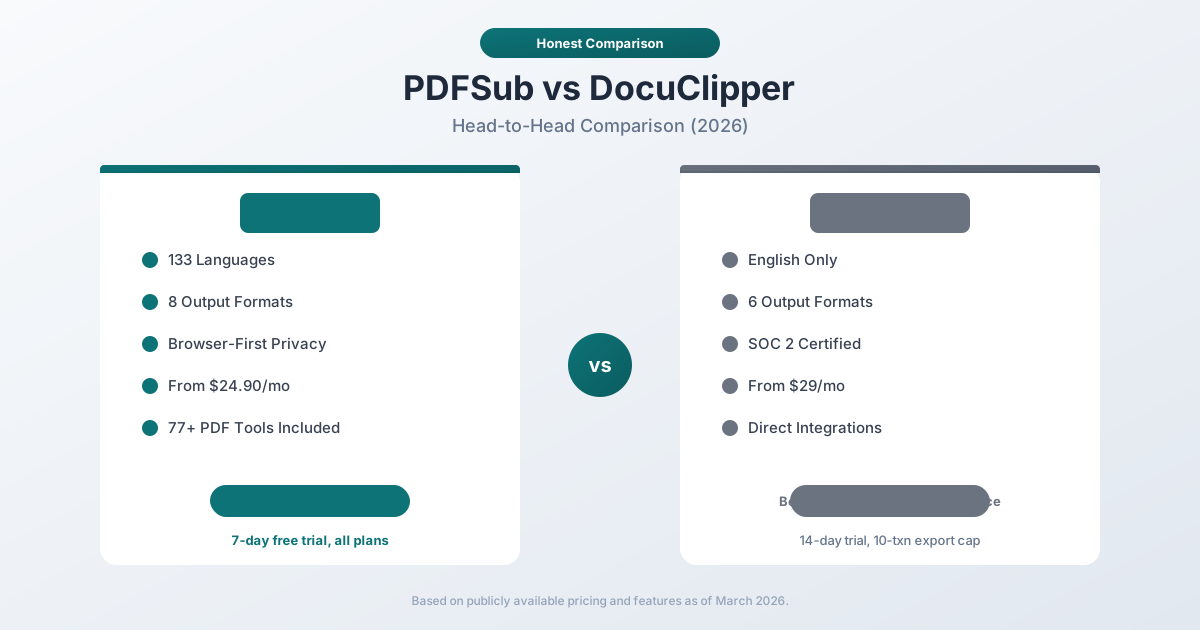
Quick Verdict
The 30-second split.
Choose PDFSub if…
- You process international bank statements where 130+ languages and automatic date/number/currency detection matter.
- You also work with general PDFs - merge, split, compress, convert, sign, translate - and want one $20/mo annual subscription instead of multiple tools.
- You need browser-first processing for digital PDFs so files don't leave the device.
- Your volume sits in the 500-1,000 pages/month range where PDFSub's flat pricing beats DocuClipper's tiered plans.
Choose DocuClipper if…
- You need direct push integrations with QuickBooks, Xero, Sage, or NetSuite that publish entries without file uploads - DocuClipper's API/sync model is more mature for this.
- Your firm requires SOC 2 Type II certification on the vendor itself for compliance audits.
- You want built-in fraud-detection signals on extracted bank statement data (DocuClipper flags inconsistencies that suggest tampering).
- Your workflow is exclusively financial documents (statements, credit cards, invoices, receipts, tax forms) and you don't need general PDF tooling.
Neither tool is universally "better." The right choice depends on whether you need a focused financial-document specialist or a broader document platform with strong international coverage.
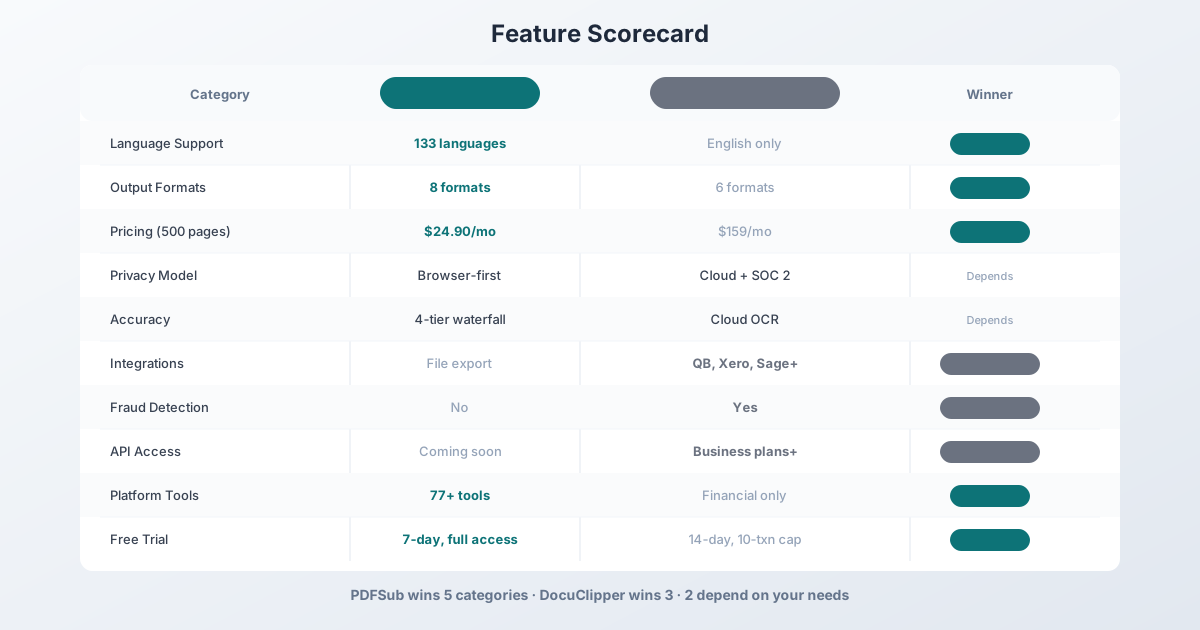
Company Overviews
PDFSub is a document platform offering 98+ PDF and document tools alongside its bank statement converter. It supports 130+ languages. Editing tools run entirely in your browser. Conversions and advanced processing are powered by the PDFSub Engine - an isolated service with no internet access. Files are processed in an isolated environment and auto-deleted. Bank statement conversion is one part of a larger toolkit that includes PDF merging, splitting, AI summarization, translation, and more.
DocuClipper is a specialized financial document extraction platform. It focuses exclusively on converting bank statements, credit card statements, invoices, receipts, and tax forms. It's cloud-based, SOC 2 certified, and offers direct integrations with major accounting software. DocuClipper has been on the market longer and holds the #1 spot on G2 for bank statement conversion with a 4.8/5 rating.
Extraction Accuracy
This is the category everyone cares about most - and the hardest to evaluate honestly.
DocuClipper claims 99.5–99.6% accuracy in their marketing materials. However, independent testing by StatementDesk found closer to 92% accuracy in practice. G2 reviewers also note "occasional data inaccuracies, such as incorrect dates and missed entries." The gap between marketed and real-world accuracy isn't unusual in this space - accuracy varies dramatically by bank, document quality, and whether the PDF is digital or scanned.
PDFSub uses a 4-tier extraction waterfall:
- Tier 1 - Coordinate-based extraction runs in your browser. No upload needed.
- Tier 2 - Server-side coordinate extraction for complex layouts.
- Tier 3 - OCR + AI for scanned documents.
- Tier 4 - AI vision for the most challenging formats.
This tiered approach means PDFSub applies the lightest (and most accurate) extraction method first, escalating only when necessary. For clean digital PDFs - which most bank statements are - Tier 1 handles extraction with high accuracy because it reads the actual text coordinates rather than interpreting pixels.
Honest assessment: Both tools achieve strong accuracy on clean digital PDFs from major banks. Accuracy drops for both when handling scanned documents, unusual layouts, or statements from smaller financial institutions. The only reliable way to compare accuracy for your specific banks is to test both tools with your actual statements.
Language & International Support
This is the biggest differentiator between the two tools.
| Capability | PDFSub | DocuClipper |
|---|---|---|
| Languages | 133 (auto-detected) | English only |
| Date format detection | Auto (MM/DD, DD/MM, YYYY/MM/DD, CJK) | Manual selection |
| Number format detection | Auto (US, European, Indian) | US format only |
| Currency detection | Auto (any currency) | USD/GBP/EUR primarily |
| International banks | 20,000+ (template-agnostic) | Template-based |
If every bank statement you'll ever process is in English from a US, UK, Canadian, or Australian bank, this doesn't matter. DocuClipper handles that just fine.
But if you have even one client with statements from Deutsche Bank (German), ICBC (Chinese), Banco Santander (Spanish), or BNP Paribas (French), DocuClipper can't process them. You'd need a second tool - which means a second subscription, a second workflow, and double the hassle.
PDFSub auto-detects the language, date format, number format, and currency. You upload a statement in Japanese and it just works. No manual configuration, no special request to support.
Winner: PDFSub - and it's not close. For international work, this is the single biggest reason to choose PDFSub.
Output Formats
The formats you can export to determine which accounting software and workflows your converter supports.
| Format | PDFSub | DocuClipper | Used For |
|---|---|---|---|
| XLSX | Yes | Yes | Excel analysis, manual review |
| CSV | Yes | Yes | Universal import |
| TSV | Yes | No | Avoids comma issues in descriptions |
| JSON | Yes | Yes | Developer integrations |
| OFX | Yes | No | Xero, Wave, generic accounting |
| QBO | Yes | Yes | QuickBooks Online/Desktop |
| QFX | Yes | No | Quicken |
| QIF | Yes | Yes | Legacy Quicken, some Xero |
| IIF | No | Yes | QuickBooks Desktop (legacy) |
PDFSub offers 8 formats. DocuClipper offers 6 (XLSX, CSV, JSON, QBO, QIF, IIF).
The most notable gap in DocuClipper's lineup is OFX - the standard format for Xero and Wave. If you use either of those platforms and want to import via file upload, PDFSub has a direct path; DocuClipper requires you to use their direct integration (available, but only on certain plans).
PDFSub also offers a "Download All" button that generates a ZIP containing all 8 formats at once. Convert once, import anywhere.
Winner: PDFSub on format breadth. DocuClipper compensates with direct integrations (covered below).
Privacy & Security
This is where the tools take fundamentally different architectural approaches.
PDFSub's approach: Browser-first processing. For most digital bank statements, PDFSub's Tier 1 extraction runs entirely in your browser. Your PDF file never leaves your device. No upload, no server processing, no storage. For scanned documents that require OCR, files are uploaded temporarily and deleted after processing.
DocuClipper's approach: Cloud-only processing. Every document you convert is uploaded to DocuClipper's servers. They're SOC 2 certified, encrypt data in transit and at rest, and offer data retention controls (30 days to 5 years depending on plan). Enterprise plans add SSO, audit logs, and IP whitelisting.
This creates an interesting tradeoff:
- If you value keeping files off external servers entirely: PDFSub wins. Most of your statements never leave your machine.
- If you need formal compliance certifications (SOC 2, audit logs, SSO): DocuClipper wins. These enterprise security features matter for regulated firms and larger organizations.
For a solo practitioner or small firm handling sensitive client data, PDFSub's approach of not uploading files at all may actually provide stronger practical privacy than DocuClipper's certified cloud processing.
For a larger firm that needs to demonstrate compliance to clients or auditors, DocuClipper's SOC 2 certification and audit trail carry more weight.
Winner: Depends. PDFSub for practical data privacy. DocuClipper for enterprise compliance.
Pricing Comparison
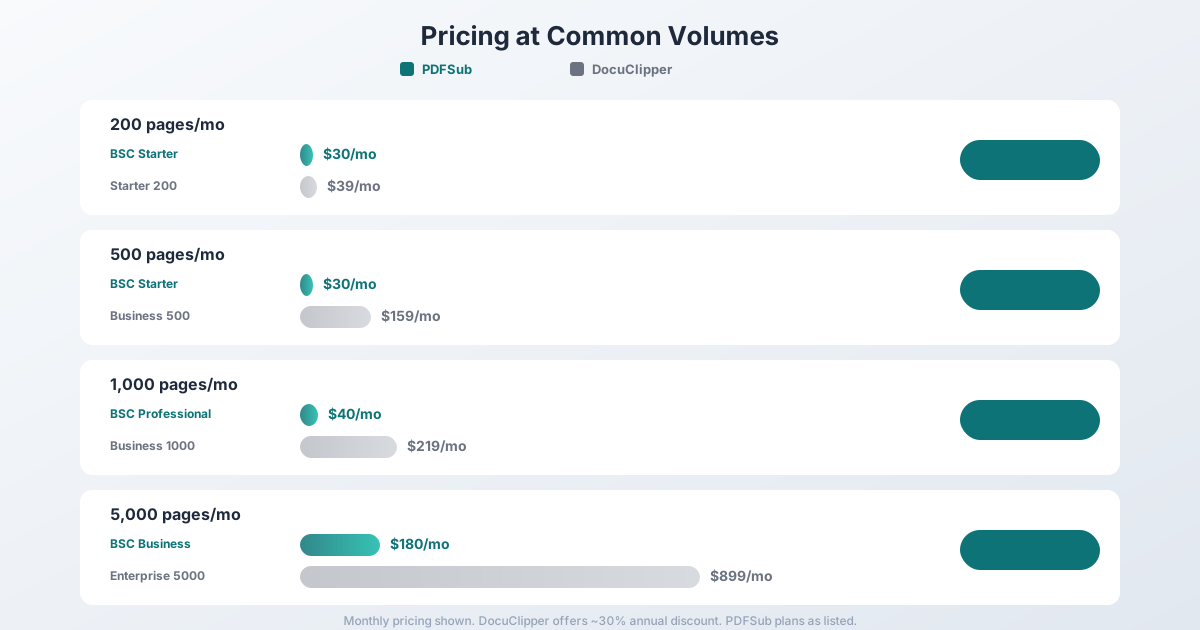
PDFSub Pricing (Bank Statement Conversion)
| Plan | Price | Pages/Month |
|---|---|---|
| All-In-One (annual) | $20/mo ($240/yr) | 500 pages/mo bank statement conversion included, 98+ tools, 500 AI credits/mo, e-sign + form filling, 50 GB cloud storage |
| All-In-One (monthly) | $25/mo | Same as annual, billed monthly |
| Add-ons | Stackable | 500 AI credits, 500 bank statement pages, 40 GB storage, priority support |
All plans include a 7-day free trial with full functionality - no export caps, no transaction limits.
DocuClipper Pricing (9 Tiers)
| Plan | Monthly Price | Annual Price | Pages/Month |
|---|---|---|---|
| Starter 60 | $29 | ~$20/mo | 60 |
| Starter | $39 | ~$27/mo | 200 |
| Starter 300 | $79 | ~$55/mo | 300 |
| Business | $159 | ~$111/mo | 500 |
| Business 1000 | $219 | ~$153/mo | 1,000 |
| Business 1500 | $299 | ~$209/mo | 1,500 |
| Enterprise | $399 | ~$279/mo | 2,000 |
| Enterprise 3000 | $599 | ~$419/mo | 3,000 |
| Enterprise 5000 | $899 | ~$629/mo | 5,000 |
DocuClipper offers a 14-day free trial with up to 200 pages, but exports are capped at 10 transactions per document. Unused monthly pages don't roll over.
The Math
Here's how costs compare at common usage levels:
| Monthly Volume | PDFSub Plan | PDFSub Cost | DocuClipper Plan | DocuClipper Cost |
|---|---|---|---|---|
| 200 pages | All-In-One (500 incl.) | $20/mo annual | Starter (200) | $39/mo |
| 500 pages | All-In-One (500 incl.) | $20/mo annual | Business (500) | $159/mo |
| 1,000 pages | All-In-One + 1 BSC add-on | ~$40/mo | Business 1000 | $219/mo |
| 5,000 pages | All-In-One + 9 BSC add-ons | ~$200/mo | Enterprise 5000 | $899/mo |
At every volume level, PDFSub costs significantly less. A firm processing 500 pages/month saves $1,668/year ($20 vs $159/mo).
DocuClipper's annual billing discounts narrow the gap somewhat, but PDFSub remains substantially cheaper across all tiers.
Winner: PDFSub - meaningfully lower prices at every volume level.
Integrations & Workflow
This is DocuClipper's strongest category.
DocuClipper offers direct integrations with:
- QuickBooks Online (listed on Intuit App Store)
- Xero
- Sage
- NetSuite
- Dynamics 365
- SAP
This means you can convert a statement and push transactions directly to your accounting software without downloading and uploading a file. For high-volume operations, this eliminates a manual step that adds up.
DocuClipper also provides API access on Business plans and above, allowing you to build automated document processing pipelines.
PDFSub exports files in the correct formats for each platform (QBO for QuickBooks, OFX for Xero, etc.), but you download the file and upload it manually. It's one extra step per statement - not a dealbreaker for most, but it adds up if you're processing hundreds of statements monthly.
PDFSub offers a separate developer API product with 10 first-party SDKs (Node, Python, PHP, Go, Ruby, Java, .NET, Rust, C, C++) - v1 focuses on HTML → PDF/image/text conversion, with bank statement and additional document tools planned for future phases. Direct accounting software integrations are on the roadmap.
Winner: DocuClipper - direct integrations and API access are genuine advantages for high-volume workflows.
Additional Features
Beyond core conversion, each tool offers different extras:
| Feature | PDFSub | DocuClipper |
|---|---|---|
| Fraud detection | No | Yes (document tampering, suspicious alterations) |
| Transaction categorization | No | Yes |
| Invoice/receipt conversion | Yes (separate AI tools) | Yes (included) |
| Invoice matching | No | Yes (smart matching, added July 2025) |
| Financial analysis | No | Yes (flow of funds, cash flow) |
| PDF tools (merge, split, compress) | Yes (98+ tools) | No |
| AI summarization | Yes | No |
| Document translation | Yes (130+ languages) | No |
| Batch processing | Yes (paid plans) | Yes (up to 500 documents) |
| Multi-step approval workflows | No | Yes (Business plans) |
DocuClipper goes deeper on financial document workflows - fraud detection, categorization, approval flows, and financial analysis. If you live inside a financial document processing workflow all day, these features save time.
PDFSub goes wider - it's a full document platform. If you also need to merge PDFs, compress files, summarize documents with AI, or translate content, one PDFSub subscription covers all of that. DocuClipper would require you to find separate tools for non-financial document tasks.
Customer Support & Policies
This deserves its own section because it's a recurring theme in user reviews.
PDFSub offers a standard refund policy and a 7-day free trial with full functionality on all plans.
DocuClipper has a no-refund policy - explicitly stating "we do not offer refunds for any reason, including dissatisfaction with the service, lack of use, or technical issues." Their free trial limits exports to 10 transactions per document.
Multiple Trustpilot reviewers report issues with DocuClipper:
- Being charged after cancellation
- Difficulty getting cancellations processed
- Being told advertised features "are not working at this time" after purchasing
- One reviewer (January 2026) described it as "absolute trash" after paying $219 for connectors that didn't function
DocuClipper's G2 reviews are much more positive (4.8/5), suggesting that users who have a good experience with the tool rate it highly. The negative experiences cluster around billing, cancellation, and non-functional features.
Winner: PDFSub on policies and trial quality. DocuClipper's no-refund policy and trial export cap are significantly more restrictive.
Who Should Choose PDFSub
PDFSub is the better choice if:
- You work with international clients. 130+ languages vs. English-only isn't a minor difference - it's a fundamental capability gap.
- You want lower costs. PDFSub costs 50–80% less than DocuClipper at equivalent page volumes.
- Privacy matters to you. Browser-first processing means most statements never leave your device.
- You need one platform for everything. Bank statements, PDF merging, AI tools, document translation - one subscription.
- You want a fair trial. 7-day free trial with full functionality, no export caps.
Who Should Choose DocuClipper
DocuClipper is the better choice if:
- You need direct accounting integrations. Push to QuickBooks, Xero, Sage, and NetSuite without downloading files.
- You need fraud detection. Document tampering and suspicious transaction flagging.
- You need SOC 2 compliance. Enterprise security certifications, audit logs, SSO.
- You need API access. Build automated document processing pipelines.
- All your work is in English. If you only process US/UK/Canadian/Australian bank statements, DocuClipper's English-only limitation doesn't affect you.
- You need financial analysis. Cash flow analysis, flow of funds, and invoice matching are built in.
Final Verdict
PDFSub and DocuClipper serve different needs despite solving the same core problem.
PDFSub wins on language support, pricing, privacy, output formats, and platform breadth. It's the better value for most accountants and bookkeepers, especially those with any international work.
DocuClipper wins on integrations, compliance certifications, fraud detection, and depth of financial analysis features. It's the better choice for larger firms with enterprise security requirements and high-volume automated workflows.
The easiest way to decide? Try both. PDFSub offers a 7-day free trial with full functionality. DocuClipper offers a 14-day trial (with the 10-transaction export cap). Test with your actual client statements and see which fits your workflow.
Frequently Asked Questions
Is PDFSub or DocuClipper more accurate?
Both tools achieve strong accuracy on clean digital PDFs from major banks. DocuClipper claims 99.5–99.6% accuracy, though independent testing has found lower real-world figures (~92% in one study). PDFSub uses a 4-tier extraction approach that applies the most accurate method for each document type. The most reliable way to compare is to test both with your specific bank statements.
Can I use PDFSub as a drop-in replacement for DocuClipper?
For core conversion - yes. PDFSub converts bank statements to all the same formats (Excel, CSV, QBO, QIF) plus additional ones (OFX, QFX, TSV). The main workflow difference is that DocuClipper can push directly to QuickBooks and Xero, while PDFSub exports files you upload manually.
Which is cheaper, PDFSub or DocuClipper?
PDFSub is significantly cheaper at every volume level. At 500 pages/month, PDFSub costs $20/month annual (All-In-One, 500 pages included) vs DocuClipper's $159/mo. Even with DocuClipper's annual billing discount, PDFSub remains substantially less expensive.
Does either tool handle scanned bank statements?
Both do. PDFSub uses OCR + AI vision (Tiers 3 and 4) for scanned documents. DocuClipper uses cloud-based OCR processing. Accuracy on scanned documents is lower for both tools compared to digital PDFs - that's a fundamental limitation of OCR technology, not a tool-specific issue.
Can PDFSub integrate directly with QuickBooks?
Not directly. PDFSub exports QBO files that import into QuickBooks via Banking → Upload from file. The QBO files include FITIDs for automatic duplicate detection. DocuClipper has a direct QuickBooks integration listed on the Intuit App Store that skips the manual upload step.
Which tool is better for a solo bookkeeper?
For most solo bookkeepers, PDFSub offers better value - lower pricing, a more generous free trial, and the bonus of 98+ PDF tools in one subscription. The manual file upload step (rather than direct integration) is a minor inconvenience at low volume. If you work exclusively with English-language statements and heavily depend on direct QuickBooks push, DocuClipper may be worth the premium.
Which tool is better for a large accounting firm?
It depends on priorities. DocuClipper's enterprise features (SOC 2, SSO, audit logs, API, direct integrations) are designed for larger operations. PDFSub's language support and pricing advantage scale well at high volumes - a firm processing 5,000 pages/month saves over $8,900/year compared to DocuClipper. Large firms with international clients will likely need PDFSub regardless.
Already decided to switch? This page covers neutral side-by-side facts. For a migration-focused walkthrough - what to test first, how to verify accounting-software imports, and switching FAQ - see the best DocuClipper alternative guide.