PDFSub vs Dext Prepare: Honest Comparison (2026)
PDFSub vs Dext Prepare compared on pricing, receipt capture, bank statements, and features.
PDFSub is best for:
- Accountants needing bank statement conversion (20,000+ banks) - Dext's biggest gap
- Firms wanting predictable $20/user/mo annual seat pricing instead of Dext's per-client volume billing
- Users who need AI translation, summarization, and 98+ PDF tools beyond receipt capture
- Practices processing financial reports, annual statements, and multi-page documents
PDFSub is NOT best for:
- Firms where automated receipt-to-ledger data entry is the primary workflow
- Practices needing direct push to Xero/QuickBooks/Sage with auto-categorization
- Teams requiring mobile receipt capture and supplier rule matching
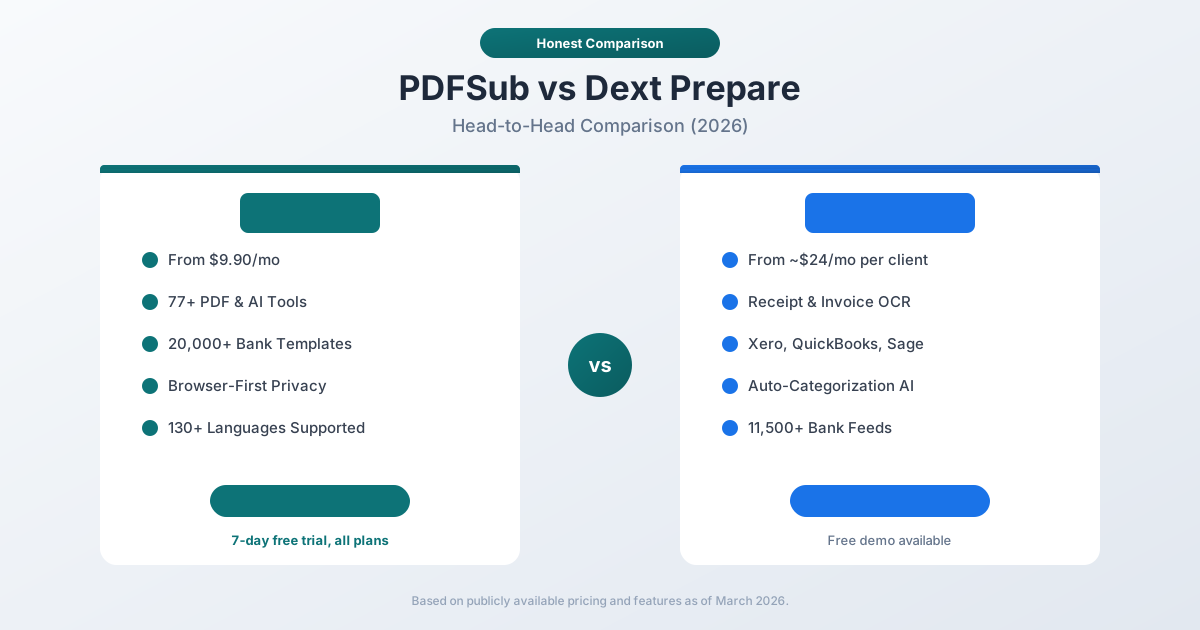
Dext Prepare and PDFSub both serve accountants and bookkeepers, but they approach the workflow from opposite ends. Dext is a receipt and invoice capture platform built to automate the data entry pipeline - scan a receipt, extract the data, categorize it, and push it directly into your accounting software. PDFSub is a document processing platform that combines 98+ PDF tools with bank statement conversion and AI-powered extraction.
The overlap exists in financial document processing. The difference is in scope, pricing model, and where each tool fits in the accounting workflow.
Quick Verdict
The 30-second split.
Choose PDFSub if…
- Bank statement conversion is the workflow that hurts most - 20,000+ banks and 8 accounting-native export formats (QBO, OFX, QIF, QFX, CSV, XLSX, TSV, JSON).
- You also need general PDF tools, AI translation across 130+ languages, document chat, and summarization in the same subscription.
- Flat $20/mo annual pricing fits your budget better than Dext's per-client subscription model.
- Your firm processes a mix of document types - financial reports, annual statements, contracts - not just receipts and invoices.
Choose Dext Prepare if…
- Automated receipt-to-ledger data entry with auto-categorization is the core pain point you're solving.
- You need direct, deep integrations with Xero, QuickBooks, or Sage that auto-publish entries with supplier rules and tax codes applied.
- Your team uses mobile receipt capture (snap-and-forget on the road) more than they upload PDFs at a desk.
- You manage many clients and need Dext's per-client dashboards, supplier rule libraries, and approval workflows.
These tools often complement each other rather than compete. Many firms use both - Dext for receipt capture and PDFSub for bank statement conversion and general PDF work.
Company Overviews
PDFSub is a document platform offering 98+ tools for PDF processing, AI-powered document features (summarization, translation in 130+ languages, data extraction, document chat), and specialized bank statement conversion supporting 20,000+ financial institutions across 8 export formats. Editing tools run entirely in your browser. Conversions and advanced processing are powered by the PDFSub Engine - an isolated service with no internet access. Files are processed in an isolated environment and auto-deleted. It serves individuals, small businesses, accountants, and bookkeepers who work with documents regularly.
Dext Prepare (formerly Receipt Bank) is a cloud-based bookkeeping automation platform owned by Dext, headquartered in London. Founded in 2010, Dext specializes in capturing data from receipts, invoices, and bank statements, then pushing that data directly into accounting software. It integrates with over 30 accounting platforms including Xero, QuickBooks, and Sage. Dext connects to 11,500+ banks for statement imports and claims 99.9% OCR accuracy on receipts and invoices. It primarily targets accounting and bookkeeping firms managing multiple clients.
Receipt & Invoice Capture
This is Dext's core strength - the feature the entire product is built around.
Dext Prepare provides industry-leading receipt and invoice capture:
- 99.9% OCR accuracy on receipts and invoices, including handwritten and crumpled documents
- Multiple submission methods: mobile app photo, email forwarding, drag and drop, WhatsApp, Dropbox, and direct feeds from Amazon, Shopify, Stripe, and PayPal
- Auto-categorization AI that learns your categorization rules over time - it remembers how you categorize each supplier, payment method, and tax code, then applies those rules automatically
- Line item extraction that pulls individual line items from invoices, not just header totals
- Supplier rules that auto-apply tax codes, categories, and payment methods based on the supplier
- Direct push to accounting software - extracted data flows directly into Xero, QuickBooks, or Sage without manual re-entry
This is a complete receipt-to-ledger automation pipeline. For a bookkeeping firm processing thousands of client receipts per month, Dext eliminates the bulk of manual data entry.
PDFSub offers AI-powered receipt scanning and invoice extraction that pulls key fields (date, vendor, amount, tax, line items) from receipt and invoice PDFs. The extraction is accurate, but PDFSub does not offer auto-categorization, supplier learning, or direct push to accounting software. You extract the data and then manually import it.
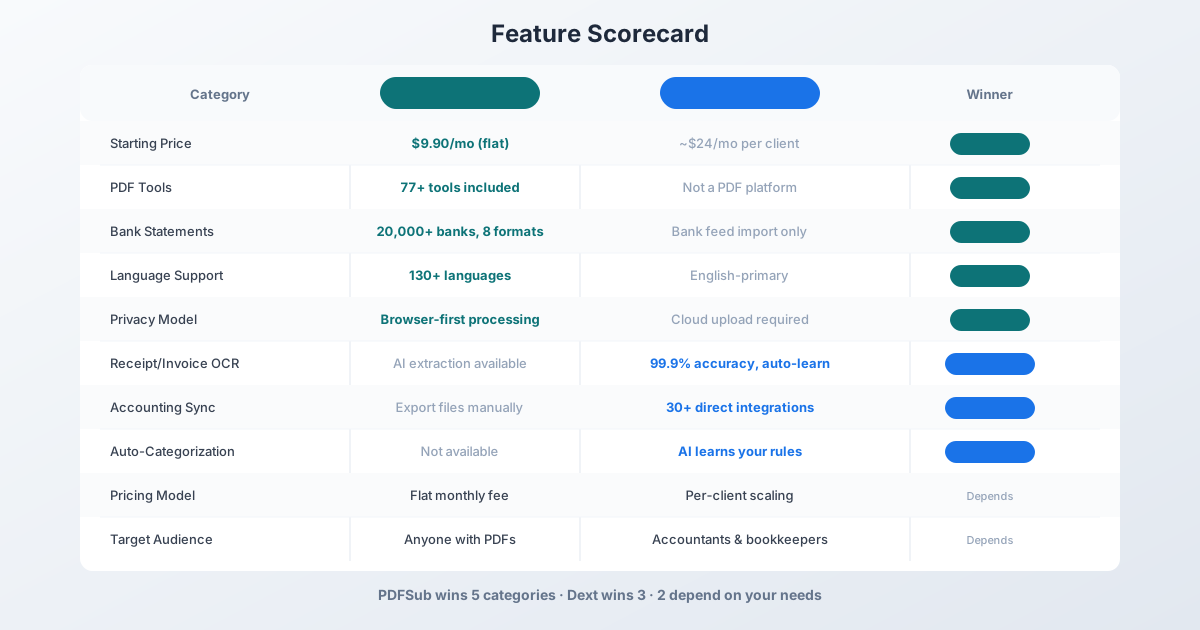
Winner: Dext - purpose-built receipt and invoice automation with auto-categorization and direct accounting software integration.
Bank Statement Conversion
This is where PDFSub has a commanding advantage.
PDFSub provides comprehensive bank statement conversion:
- 20,000+ financial institutions supported worldwide
- 8 export formats: XLSX, CSV, QBO, OFX, QIF, QFX, TSV, JSON
- 4-tier extraction waterfall: browser-based coordinate extraction, server-side extraction, OCR + AI, and AI vision
- Automatic field detection: dates, descriptions, amounts, running balances, debits, credits
- Multi-currency and multi-language support - process statements from Deutsche Bank in German, ICBC in Chinese, or Banco Santander in Spanish
- Browser-first privacy - clean digital statements are processed entirely in your browser
For accountants receiving PDF bank statements from clients who cannot provide direct bank feeds, PDFSub converts those statements into accounting-ready formats in seconds.
Dext Prepare offers bank statement extraction, but with important limitations:
- Bank statement extraction consumes credits from a separate allowance (not included in the base plan)
- Dext primarily works through bank feed imports (11,500+ connections) rather than PDF statement conversion
- The focus is on connecting directly to bank feeds, not on converting PDF statements that clients email you
- Export is through the accounting software integration, not standalone file formats like QBO or OFX
If your clients provide bank feeds, Dext handles them well. If your clients email you PDF bank statements (common for smaller businesses, international clients, or closed accounts), PDFSub is the significantly better tool.
Winner: PDFSub - 20,000+ banks with 8 export formats versus Dext's credit-based extraction and bank-feed-first approach.
Accounting Software Integration
Dext Prepare has deep, bidirectional integrations with accounting software:
- Direct connections to Xero, QuickBooks, Sage, and 30+ other platforms
- Data flows automatically from Dext into your accounting software
- Tax code mapping between Dext and your accounting software
- Client matching to ensure data goes to the correct client file
- Reconciliation support - extracted data maps to bank transactions
This is a genuine workflow advantage. When Dext extracts data from a receipt, it can push that data directly into the correct client's QuickBooks file with the correct category, tax code, and payment method. No export/import step needed.
PDFSub exports data in standard file formats (XLSX, CSV, QBO, OFX, QIF, QFX, TSV, JSON) that you then import into your accounting software. The QBO and OFX formats are designed for direct import into QuickBooks and other accounting tools. But the connection is one-directional - PDFSub exports files, and you import them. There is no live sync or auto-push.
Winner: Dext - direct bidirectional accounting software integration versus file-based export/import.
PDF Tools & General Features
This is PDFSub's structural advantage - it is a full document platform, not just a capture tool.
| Feature | PDFSub | Dext |
|---|---|---|
| Merge PDF | Yes | No |
| Split PDF | Yes | No |
| Compress PDF | Yes | No |
| Convert PDF | Yes (Word, Excel, images) | No |
| Rotate/Reorder | Yes | No |
| Watermark | Yes | No |
| AI Summarize | Yes | No |
| AI Translate | Yes (130+ languages) | No |
| AI Chat | Yes | No |
| PDF to Spreadsheet | Yes | Limited (data extraction) |
| Total Tools | 98+ | ~5 (capture-focused) |
Dext is not a PDF platform. It captures data from documents and pushes it to accounting software. If you need to merge client documents, compress files for email, convert PDFs to Word, translate a foreign-language invoice, or summarize a financial report, you need a separate tool.
PDFSub covers all of those workflows in a single subscription.
Winner: PDFSub - 98+ tools versus a capture-only platform.
Pricing Comparison
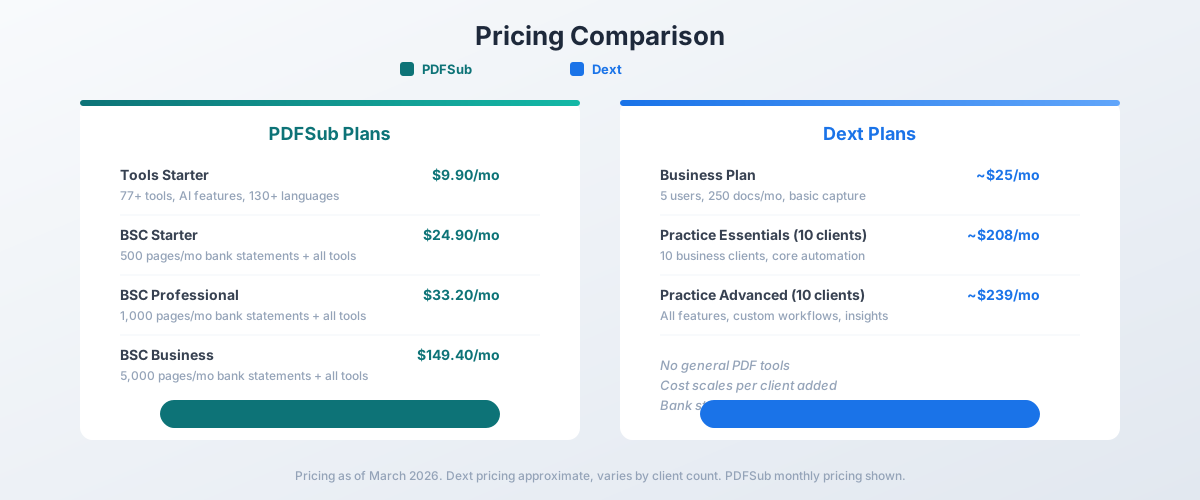
The pricing models are fundamentally different. PDFSub charges a flat monthly fee. Dext charges per client, with costs scaling as your firm grows.
PDFSub Pricing
| Plan | Price | Key Features |
|---|---|---|
| All-In-One (annual) | $20/mo ($240/yr) | 98+ tools, 500 AI credits/mo, 500 bank statement pages/mo, e-sign + form filling, 50 GB cloud storage, unlimited team seats (each billed at the same per-user rate) |
| All-In-One (monthly) | $25/mo | Same as annual, billed monthly |
| Add-ons | Stackable | 500 AI credits, 500 bank statement pages, 40 GB storage, priority support |
All plans include a 7-day free trial with full functionality. Annual billing saves $60/year.
Dext Pricing
Dext uses a per-client scaling model. Pricing is approximate because it varies by the number and type of clients:
| Plan | Approximate Monthly Price | Key Features |
|---|---|---|
| Business Plan | ~$25/mo | 5 users, 250 docs/mo, basic capture |
| Practice Essentials (10 clients) | ~$208/mo | 10 business clients, core automation |
| Practice Advanced (10 clients) | ~$239/mo | All features, custom workflows, insights |
Dext's Practice Plans start at 10 clients. The per-client cost decreases as you add more clients. Bank statement extraction uses a separate credit system with additional costs beyond the base plan.
The Math for a Small Firm
Consider a bookkeeping firm with 15 clients that processes bank statements and needs PDF tools:
| Need | PDFSub Cost | Dext Cost |
|---|---|---|
| Bank statements (500 pages/mo) | $20/mo annual (All-In-One, 500 pages included) | Credits required (extra) |
| PDF tools | Included | Not available (need separate tool) |
| AI translation | Included | Not available |
| Receipt/invoice capture | Basic extraction | Included |
| Practice management (15 clients, 1 user) | $20/mo annual (1 seat) | ~$260-350/mo (estimated) |
PDFSub's flat pricing means you pay the same whether you have 5 clients or 50 clients. Dext's per-client model means costs grow with your firm. For a 15-client firm, the difference can be $200+ per month.
However, Dext's receipt capture automation and accounting software integration save significant time on data entry. That time savings has monetary value. The right comparison is not just cost but cost-per-hour-saved.
Winner: PDFSub for smaller firms and flat-rate value. Dext may justify its higher cost for larger firms where receipt automation saves many hours per month.
Language & International Support
PDFSub supports 130+ languages for AI translation, document processing, and bank statement conversion. You can process statements from any country, translate foreign-language invoices, and work with documents in virtually any language. Date formats, number formats, and currencies are detected automatically.
Dext Prepare operates primarily in English, with support for a limited set of major languages. The platform is available in USD, GBP, EUR, CAD, AUD, and ZAR currencies. Receipt OCR handles common international formats, but the interface and categorization engine are English-focused.
For firms with international clients - processing statements from German banks, translating Chinese invoices, or handling multi-language documents - PDFSub provides significantly broader language support.
Winner: PDFSub - 130+ languages versus limited language support.
Privacy & Data Handling
PDFSub processes editing operations in your browser. For bank statement Tier 1 extraction, files never leave your device. Conversions and advanced processing are powered by the PDFSub Engine - an isolated service with no internet access. Files are processed in an isolated environment and auto-deleted after processing.
Dext Prepare is entirely cloud-based. Every receipt, invoice, and bank statement you submit is uploaded to Dext's servers for processing. Dext stores documents in the cloud and provides access through its web and mobile interfaces. This is necessary for its automation features - auto-categorization, accounting software sync, and multi-user access all require cloud processing.
For sensitive financial documents, PDFSub's approach keeps editing in your browser and processes conversions on the PDFSub Engine - an isolated service with no internet access. Dext's cloud model means all documents pass through their infrastructure.
Winner: PDFSub - browser-based editing and isolated service processing with auto-deletion. Dext requires cloud upload for all documents.
Who Should Choose PDFSub
PDFSub is the better choice if:
- Bank statement conversion is your primary need. 20,000+ banks, 8 export formats, browser-first processing. Dext's bank statement support is credit-based and secondary to receipt capture.
- You need PDF tools. Merge, split, compress, convert, watermark, translate - 98+ tools in one subscription.
- You work with international documents. 130+ languages for translation and processing.
- You want flat pricing. Pay the same whether you have 5 clients or 50 clients. No per-client scaling.
- Privacy matters. Editing runs in your browser; conversions use the isolated PDFSub Engine with auto-deletion.
- You are a solo practitioner or small firm. The all-in-one platform replaces multiple tools at a fraction of the cost.
- You receive PDF bank statements from clients. PDFSub converts them directly to accounting formats.
Who Should Choose Dext Prepare
Dext is the better choice if:
- Receipt and invoice capture is your primary pain point. Dext's 99.9% OCR, auto-categorization, and supplier learning are best-in-class.
- You need direct accounting software integration. Data flows automatically from Dext into Xero, QuickBooks, or Sage without export/import steps.
- You manage many clients. Dext's practice management features - client-level separation, team workflows, practice insights - are built for multi-client firms.
- Your clients use bank feeds. Dext connects to 11,500+ banks for direct feed import.
- Auto-categorization saves you significant time. If you process thousands of receipts per month, Dext's AI learning eliminates repetitive categorization.
- You need mobile capture. Dext's mobile app, email forwarding, and WhatsApp submission provide flexible capture methods.
- You can justify the per-client cost. Dext's pricing makes sense when the time saved on data entry exceeds the subscription cost.
The Bottom Line
Dext Prepare and PDFSub serve different parts of the accounting workflow, and the best choice depends on where your firm's biggest bottleneck lives.
If your bottleneck is receipt and invoice data entry - manually keying supplier names, amounts, tax codes, and categories into your accounting software - Dext automates that workflow with 99.9% accuracy, auto-categorization, and direct software integration. It is purpose-built for that problem and does it better than any general-purpose tool.
If your bottleneck is bank statement processing - converting PDF statements from clients into QBO, OFX, or CSV for import into accounting software - PDFSub handles 20,000+ banks with 8 export formats, and does it at a fraction of Dext's per-client cost. Add 98+ PDF tools, AI translation, and document summarization, and PDFSub becomes a comprehensive document platform.
Many firms have both bottlenecks. The practical answer may be using both tools: Dext for receipt capture and auto-categorization, PDFSub for bank statement conversion and general PDF processing. At $20/month annual for PDFSub (All-In-One, 500 pages included) alongside your existing Dext subscription, the combined cost is still less than what many firms spend on document processing inefficiency.
PDFSub's 7-day free trial is the fastest way to see if it fills the gap in your current workflow.
Frequently Asked Questions
Can PDFSub replace Dext Prepare?
For bank statement conversion and general PDF processing, yes. For automated receipt capture with auto-categorization and direct accounting software integration, no. PDFSub offers receipt and invoice extraction, but without the auto-learning categorization and direct push to Xero/QuickBooks that make Dext's receipt workflow so efficient.
Does Dext Prepare convert PDF bank statements?
Dext offers bank statement extraction, but it consumes credits from a separate allowance and is not its primary focus. Dext is optimized for bank feed connections (11,500+ banks). If your clients send PDF statements rather than providing bank feeds, PDFSub is the better tool for that specific workflow.
How does pricing compare for a 20-client firm?
PDFSub's All-In-One plan is $20/user/mo annual ($25/user/mo monthly), includes 500 bank statement pages per user, and the per-user rate stays the same regardless of client count. Dext's Practice plan for 20 clients would cost approximately $300-400/month depending on the plan tier and configuration. PDFSub bills per user, not per client - a single bookkeeper handling 20 clients pays $20/mo on PDFSub.
Can I use PDFSub and Dext together?
Yes, and many firms could benefit from the combination. Use Dext for receipt and invoice capture with auto-categorization and accounting software sync. Use PDFSub for bank statement conversion, PDF processing, document translation, and other document tasks. The two platforms serve different workflow stages.
Does Dext support as many banks as PDFSub?
Dext connects to 11,500+ banks for direct bank feeds. PDFSub supports 20,000+ banks for PDF statement conversion. These are different capabilities - Dext connects to live bank feeds, while PDFSub converts PDF statement documents. If your client cannot provide a bank feed (international bank, closed account, or institution not in Dext's network), PDFSub can still convert the PDF statement.
Which tool has better OCR accuracy?
For receipts and invoices specifically, Dext claims 99.9% accuracy with an AI that improves over time through use. PDFSub uses a 4-tier extraction waterfall that achieves 99%+ accuracy across bank statements and general document extraction. Both are highly accurate for their respective specialties.
Already decided to switch? This page covers neutral side-by-side facts. For a migration-focused walkthrough - what to bring over, how to verify accounting-software imports, and switching FAQ - see the best Dext alternative guide.