PDFSub vs ChatPDF: Honest Comparison (2026)
A detailed head-to-head comparison of PDFSub and ChatPDF - features, pricing, privacy, and more.
PDFSub is best for:
- Users who need chat plus bank statement conversion, invoice extraction, and 98+ PDF tools
- Financial document workflows where accurate table and number extraction matters
- Multilingual document processing across 130+ languages
- Teams wanting one $20/month annual subscription with 98+ tools instead of paying $19.99/mo for chat alone
PDFSub is NOT best for:
- Users who only need simple, focused PDF chat and nothing else
- Students who primarily want a free tier for occasional research paper Q&A
- Users who prefer ChatPDF's minimalist, single-purpose interface
ChatPDF launched in 2023 and quickly became one of the most popular "chat with your PDF" tools on the internet. The premise is simple: upload a PDF, ask questions about it, and get AI-generated answers with citations. PDFSub offers that same chat capability -- but it's one of 98+ tools in a much larger platform that includes financial document AI, bank statement conversion, and full PDF editing.
The question isn't really "which chat tool is better?" It's whether you need a single-purpose chat tool or a complete document platform that includes chat.
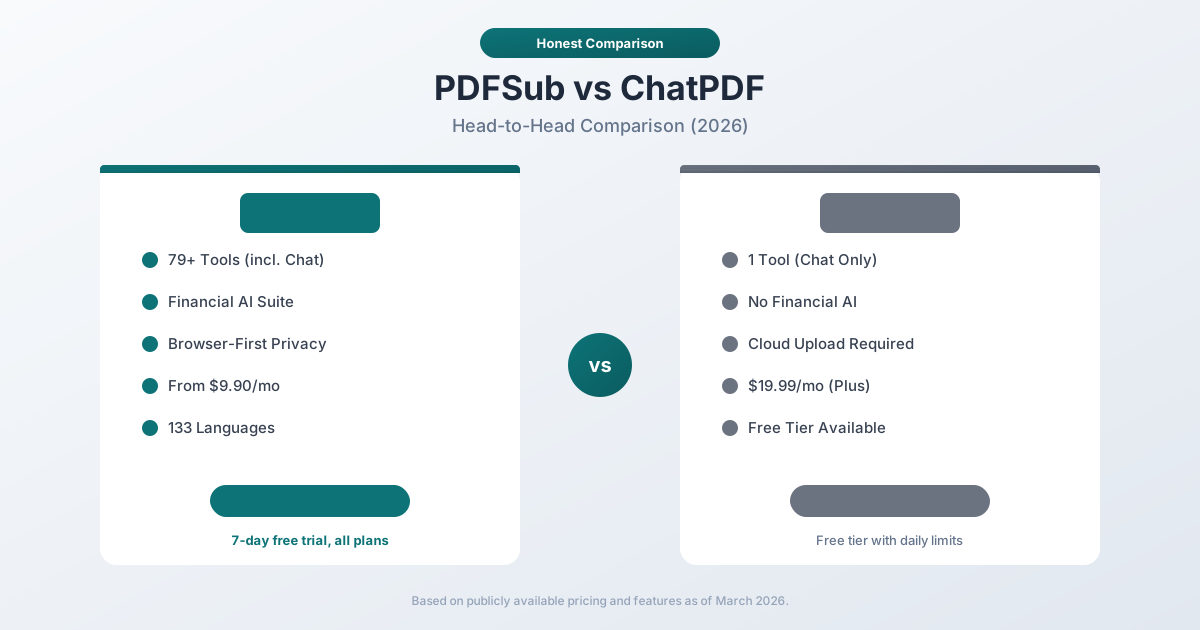
Quick Verdict
The 30-second split.
Choose PDFSub if…
- Chat is one of several things you do with PDFs - also merge, split, compress, convert, sign, translate, or extract financial data.
- You ask questions about bank statements, invoices, receipts, or financial reports, where accurate table parsing matters as much as the conversation.
- You need to translate documents across 130+ languages before or after asking questions.
- You want one $20/mo annual plan for 98+ tools instead of stacking ChatPDF + a separate PDF editor + a separate bank statement tool.
Choose ChatPDF if…
- Your only need is conversational Q&A with PDFs - students researching papers, professionals reading dense reports, lawyers reviewing contracts.
- You want a permanent free tier for occasional, low-volume use (ChatPDF's free plan covers basic study or research needs).
- You prefer ChatPDF's minimalist, single-purpose UI built specifically around the chat experience.
- You don't need PDF editing, conversion, signing, or financial-document extraction.
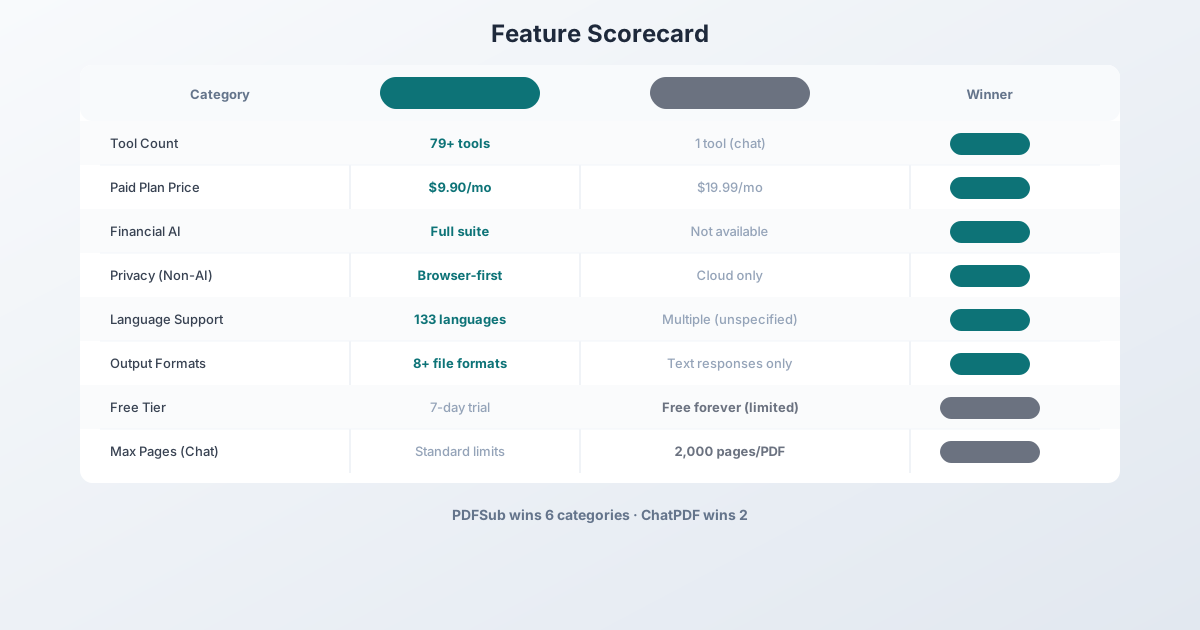
Company Overviews
PDFSub is a document platform with 98+ PDF and document tools. It supports 130+ languages, runs editing tools entirely in your browser. Conversions and advanced processing are powered by the PDFSub Engine - an isolated service with no internet access. It offers both general PDF operations (merge, split, compress, convert) and specialized AI features (summarize, translate, chat, extract data). Financial document tools -- bank statement conversion, invoice extraction, receipt scanning, financial report analysis -- are a core part of the platform.
ChatPDF is a single-purpose AI tool created by Mathis Lichtenberger that launched in early 2023. It does one thing: lets you upload a PDF and have a conversation with it using AI. You ask questions, and ChatPDF returns answers with references to specific pages in the document. It gained viral popularity on social media and attracted millions of users quickly. The focus is narrow by design -- ChatPDF does not offer PDF editing, merging, conversion, or any tools beyond conversational Q&A.
Feature-by-Feature Comparison
Privacy and Security
PDFSub processes most PDF operations entirely in your browser. For chat, summarization, and AI features, the document text is sent to AI models for processing -- but for standard PDF tools (merge, split, compress), files never leave your device. PDFSub offers a clear tiered approach: browser-first for privacy, server-side only when necessary.
ChatPDF uploads every PDF to their servers for processing. Files are stored on their servers to enable the chat session. Users can delete their files manually at any time. ChatPDF uses SSL encryption for transfers and stores documents securely, but every document you interact with passes through and is stored on their infrastructure.
Neither tool processes AI chat queries locally -- both send document content to AI models. The difference is that PDFSub's non-AI tools (merge, split, compress, etc.) keep files entirely in your browser, while ChatPDF has no non-AI features.
Winner: PDFSub -- browser-first processing for non-AI operations. For AI chat specifically, both require server-side processing.
Document Tools
This is where the comparison becomes almost unfair.
| Tool Category | PDFSub | ChatPDF |
|---|---|---|
| Chat with PDF | Yes | Yes |
| Summarize PDF | Yes | No |
| Translate PDF | Yes (130+ languages) | No |
| Extract Data | Yes (AI-powered) | No |
| Extract Tables | Yes (coordinate + AI) | No |
| Merge PDFs | Yes | No |
| Split PDFs | Yes | No |
| Compress PDFs | Yes | No |
| Convert PDF (Word, Excel, PPT) | Yes | No |
| Edit PDF | Yes | No |
| Watermark | Yes | No |
| Rotate/Reorder | Yes | No |
| Bank Statement Converter | Yes (8 formats) | No |
| Invoice Extractor | Yes | No |
| Receipt Scanner | Yes | No |
| Financial Report Analyzer | Yes | No |
| Total Tools | 98+ | 1 |
ChatPDF does one thing. PDFSub does that same thing plus 78 others. If you only need to chat with PDFs and nothing else, ChatPDF is fine. But the moment you need to merge two PDFs, convert a statement to Excel, extract invoice data, or compress a file for email, you need a second tool -- and a second subscription.
Winner: PDFSub -- 98+ tools vs. 1 tool.
AI Capabilities
Both tools offer AI-powered PDF chat, but their approaches differ.
ChatPDF's AI chat is its entire product. It breaks large documents into sections for faster processing, provides page-level citations, and allows conversational follow-up questions. The Plus plan supports PDFs up to 2,000 pages and 32 MB. ChatPDF has been optimized specifically for this one use case.
PDFSub's AI chat is one of many AI features. It provides conversational Q&A with document context, supports conversation history, and works in 130+ languages. Beyond chat, PDFSub offers:
- AI Summarization -- Generate structured summaries with key points
- AI Translation -- Translate entire documents across 130+ languages
- AI Data Extraction -- Pull structured data from any document
- AI Table Extraction -- Detect and extract tables intelligently
- AI Invoice Extraction -- Extract invoice fields automatically
- AI Receipt Scanning -- Capture receipt data into structured format
- AI Financial Analysis -- Analyze financial reports with AI
ChatPDF goes deep on one thing. PDFSub goes broad across many AI document tasks.
Winner: PDFSub on breadth. ChatPDF may edge ahead on the specific chat experience for very large documents (2,000 pages), but PDFSub's broader AI toolkit is far more versatile.
Language Support
| Capability | PDFSub | ChatPDF |
|---|---|---|
| AI Chat Languages | 133 | Multiple (unspecified) |
| Document Translation | 130+ languages | No |
| AI Summarization | 130+ languages | No |
| Bank Statement Languages | 133 (auto-detected) | N/A |
| RTL Support | Yes (Arabic, Hebrew, etc.) | Limited |
ChatPDF supports multiple languages for chat (the underlying LLM can handle many languages), but doesn't specify exactly which or how many. PDFSub explicitly supports 130+ languages across all AI features, including translation, summarization, and financial document extraction.
Winner: PDFSub -- explicit 130+ language support across all features.
Bank Statement Support
PDFSub offers a dedicated 4-tier bank statement extraction system: coordinate-based browser extraction, server-side coordinate extraction, OCR + AI, and AI vision. It supports 20,000+ banks worldwide, 8 output formats, and automatic language/date/number/currency detection.
ChatPDF cannot convert bank statements. You could upload a bank statement and ask questions about it in chat ("What was my total spending in February?"), but ChatPDF cannot extract structured transaction data, generate Excel spreadsheets, or output accounting formats like QBO or OFX.
Winner: PDFSub -- ChatPDF has no bank statement conversion capability.
Output Formats
PDFSub can output documents in dozens of formats: Word, Excel, PowerPoint, images, and for bank statements specifically: XLSX, CSV, TSV, JSON, OFX, QBO, QFX, QIF.
ChatPDF outputs text responses in the chat interface. You can copy the text. There's no document conversion, no file export, no structured data output.
Winner: PDFSub -- ChatPDF doesn't produce file outputs.
Pricing Comparison
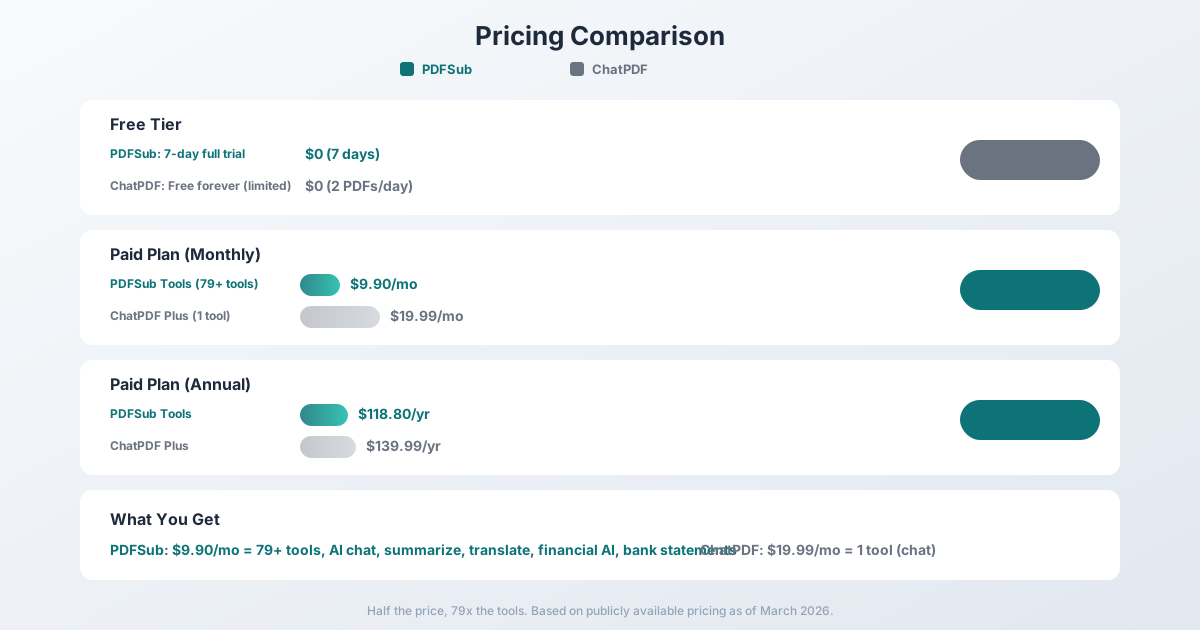
PDFSub Pricing
| Plan | Price | What's Included |
|---|---|---|
| All-In-One (annual) | $20/mo ($240/yr) | 98+ tools, 500 AI credits/mo, 500 bank statement pages/mo, e-sign + form filling, 50 GB cloud storage, unlimited team seats (each billed at the same per-user rate) |
| All-In-One (monthly) | $25/mo | Same as annual, billed monthly |
| Add-ons | Stackable | 500 AI credits, 500 bank statement pages, 40 GB storage, priority support |
PDFSub is subscription-only - every plan includes a 7-day free trial with full functionality. Cancel anytime in one click. Annual billing saves $60/year.
ChatPDF Pricing
| Plan | Monthly Price | What's Included |
|---|---|---|
| Free | $0 | 2 PDFs/day, 120 pages/PDF, 50 questions/day |
| Plus | $19.99 | Unlimited PDFs, 2,000 pages/PDF, 32 MB, unlimited questions |
ChatPDF Plus annual pricing is $139.99/year (~$11.67/month).
The Math
The core comparison:
- PDFSub All-In-One: $20/mo annual ($25/mo monthly) -- 98+ tools including AI chat, summarize, translate, data extraction, financial tools, e-sign with no per-envelope fees, 50 GB cloud storage
- ChatPDF Plus: $19.99/mo -- 1 tool (AI chat only)
PDFSub costs a few dollars more per month than ChatPDF but provides 98+ tools instead of one. ChatPDF's annual rate of $11.67/mo is cheaper but offers only the chat feature, whereas PDFSub's annual rate of $25/mo includes the entire document platform.
If you only use ChatPDF's free tier (2 PDFs/day, 50 questions), that's genuinely free and hard to beat on price. But the free tier's limits are restrictive enough that regular users outgrow it quickly.
For anyone paying for a subscription, PDFSub is the clear better value.
Winner: PDFSub -- dramatically more tools per dollar.
Who Should Choose PDFSub
PDFSub is the better choice if:
- You need more than just chat. If you ever merge, split, compress, convert, translate, or extract data from PDFs, PDFSub covers all of that in one subscription.
- You work with financial documents. Bank statement conversion, invoice extraction, receipt scanning -- capabilities ChatPDF doesn't have.
- You want better value. $20/month annual for 98+ tools vs. $19.99/mo for 1 tool.
- You need document translation. 130+ language translation that ChatPDF doesn't offer.
- Privacy matters for non-AI operations. Merging, splitting, compressing -- all done in your browser without uploading files.
Who Should Choose ChatPDF
ChatPDF is the better choice if:
- You only need to chat with PDFs and nothing else. If your sole use case is asking questions about PDF content, ChatPDF is purpose-built for that.
- The free tier is enough. 2 PDFs/day and 50 questions with no payment is genuinely useful for light, occasional use.
- You work with very large documents. ChatPDF Plus supports PDFs up to 2,000 pages and 32 MB, which may handle some edge cases better.
- You want the simplest possible interface. One tool, one purpose, no distractions.
Frequently Asked Questions
Is ChatPDF or PDFSub better for chatting with PDFs?
Both provide AI-powered chat with PDF documents. ChatPDF is dedicated entirely to this use case and has optimized its interface for it. PDFSub's chat feature is one of many tools and works across 130+ languages. For most users, the chat experience is comparable -- the deciding factor is whether you need any of PDFSub's other 83+ tools.
Can PDFSub replace ChatPDF?
Yes, for the chat feature. PDFSub's AI chat with PDF supports conversational Q&A, conversation history, and works in 130+ languages. If you're paying for ChatPDF Plus at $19.99/mo, switching to PDFSub at $20/month annual gives you the same chat capability plus 83+ additional tools.
Does ChatPDF handle bank statements?
Not in any meaningful way. You can upload a bank statement and ask questions about it conversationally, but ChatPDF cannot extract structured transaction data, produce Excel files, or output accounting formats. For bank statement conversion, PDFSub is the right tool.
Is ChatPDF free?
ChatPDF offers a free tier with daily limits: 2 PDFs per day, 120 pages per PDF, and 50 questions. For occasional use, this is genuinely useful. Regular users typically need the Plus plan at $19.99/month or $139.99/year.
Which is better for students?
ChatPDF's free tier is popular with students for studying and research -- uploading textbook chapters or papers and asking questions. PDFSub's All-In-One plan at $20/month annual (with a 7-day free trial) offers the same chat capability plus summarization, translation, and document tools that are also useful for academic work. Budget-conscious students who only need occasional Q&A may prefer ChatPDF's free tier; students who need more features get better value from PDFSub's full platform.
Does ChatPDF support OCR for scanned PDFs?
ChatPDF has limited OCR capabilities. Scanned documents may not be accurately parsed. PDFSub uses a 4-tier extraction approach with dedicated OCR and AI vision tiers for scanned documents, providing more reliable handling of non-digital PDFs.
Can I chat with multiple PDFs at once?
ChatPDF Plus allows chatting with multiple PDFs simultaneously. PDFSub's chat feature currently works with one document at a time, though you can open multiple sessions.
The Bottom Line
PDFSub and ChatPDF serve fundamentally different market positions. ChatPDF is a single-purpose tool that does one thing well. PDFSub is a comprehensive platform that includes that same capability alongside 83+ other tools.
PDFSub wins on value ($20/month annual for 98+ tools vs. $19.99/mo for one), tool breadth (98+ vs. 1), financial document capabilities, language support (130+ languages), privacy (browser-first for non-AI operations), and output formats. For anyone who does more with PDFs than just chat, PDFSub is the obvious choice.
ChatPDF wins on simplicity (one tool, zero learning curve) and offers a genuinely useful free tier for light, occasional use. If you strictly need conversational Q&A with PDFs and nothing else, ChatPDF's focused interface does that cleanly.
The value math is straightforward: PDFSub's $20/month annual buys 98+ tools, while ChatPDF Plus charges $19.99/mo for just one. Try PDFSub's Chat with PDF with a 7-day free trial -- use the chat feature, explore the other tools, and decide if paying for ChatPDF's single feature makes sense for your workflow.
Already decided to switch? This page covers neutral side-by-side facts. For a migration-focused walkthrough - how to transition your chat workflow and what the platform unlocks beyond chat - see the best ChatPDF alternative guide.