PDFSub vs CapyParse: Honest Comparison (2026)
PDFSub vs CapyParse compared on bank statement conversion, pricing, formats, and features.
PDFSub is best for:
- Accountants needing 20,000+ bank templates and proven extraction vs CapyParse's smaller template library
- Firms handling international statements in 130+ languages vs CapyParse's US-focused parsing
- Professionals who need invoices, receipts, AI chat, and 98+ PDF tools beyond just bank statements
- Teams wanting 8 export formats including QFX and TSV that CapyParse doesn't offer
PDFSub is NOT best for:
- Developers who want CapyParse's clean API-first design for building custom integrations
- Users who only convert a few pages monthly and prefer CapyParse's 10-page free tier
- Teams that value CapyParse's drag-and-drop simplicity and don't need a full document platform
CapyParse and PDFSub both convert bank statements from PDF to structured data. This is the core overlap. But the products are built with very different philosophies - CapyParse is a focused bank statement converter that does one thing well, while PDFSub is a comprehensive document platform that includes bank statement conversion alongside 98+ other PDF tools and AI features.
This comparison looks at where each tool genuinely excels for accountants, bookkeepers, and anyone who regularly processes bank statements.
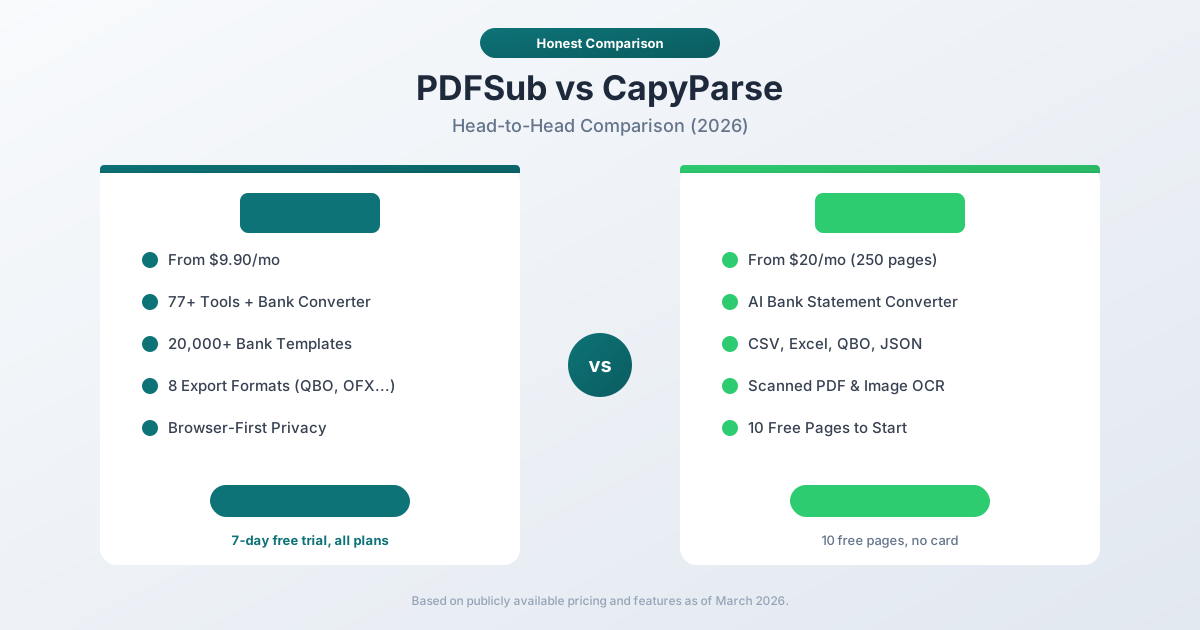
Quick Verdict
The 30-second split.
Choose PDFSub if…
- You need 20,000+ pre-built bank templates with a 4-tier extraction waterfall - Tier 1 runs in your browser for clean PDFs, with AI fallback for scanned or unusual layouts.
- You process invoices, receipts, financial reports, or general PDF tasks alongside statements - those live in the same subscription.
- You handle non-English statements where automatic date/number/currency detection and 130+ language support matter.
- You need accounting-native exports (QBO, OFX, QIF, QFX) plus TSV and JSON - not just CSV/Excel/JSON.
Choose CapyParse if…
- You want a focused, drag-and-drop converter with a generous 10-page free tier - useful for occasional users testing the workflow.
- Your statements come from a small set of common US banks and you don't need broader format coverage.
- You value CapyParse's lighter, single-purpose interface over a multi-tool platform.
- You only need CSV, Excel, QBO, or JSON output and don't process non-English statements regularly.
Both tools deliver strong extraction accuracy on well-supported formats. The question is whether you need just a converter or a complete document platform.
Company Overviews
PDFSub is a document platform offering 98+ tools for PDF processing, AI-powered document features (summarization, translation in 130+ languages, data extraction, document chat), and specialized bank statement conversion supporting 20,000+ financial institutions across 8 export formats. Editing tools run entirely in your browser. Conversions and advanced processing are powered by the PDFSub Engine - an isolated service with no internet access. Files are processed in an isolated environment and auto-deleted. It serves individuals, small businesses, accountants, and bookkeepers who work with documents regularly.
CapyParse is a newer cloud-based bank statement converter that uses AI-powered extraction to convert PDF statements from virtually any bank into CSV, Excel, QBO, or JSON files. The platform emphasizes simplicity - drag a file, get structured data. CapyParse supports scanned PDFs through OCR, handles multi-account consolidated statements, and offers a free tier with 10 pages to start. It targets accountants, bookkeepers, and small businesses that need straightforward bank statement conversion.
Bank Statement Conversion - Core Capability
Both platforms convert bank statements. The approaches differ.
PDFSub uses a 4-tier extraction waterfall:
- Tier 1 - Coordinate-based extraction in your browser (no upload needed for clean PDFs)
- Tier 2 - Server-side coordinate extraction for complex layouts
- Tier 3 - OCR + AI for scanned documents
- Tier 4 - AI vision for the most challenging formats
This approach uses deterministic pattern matching first (faster, cheaper, more private) and falls back to AI only when needed. PDFSub maintains 20,000+ bank templates that recognize specific statement layouts, enabling precise field extraction without relying solely on AI inference.
CapyParse uses an AI-first approach:
- AI-powered extraction that adapts to different bank formats automatically
- No pre-built templates - the AI interprets each statement on the fly
- Handles scanned PDFs and images through integrated OCR
- Automatically identifies and separates multi-account consolidated statements
CapyParse's AI-first approach means it can handle virtually any bank format without requiring a specific template. The tradeoff is that every conversion requires AI processing (cloud-based), whereas PDFSub can process many common bank formats entirely in your browser using coordinate-based extraction.
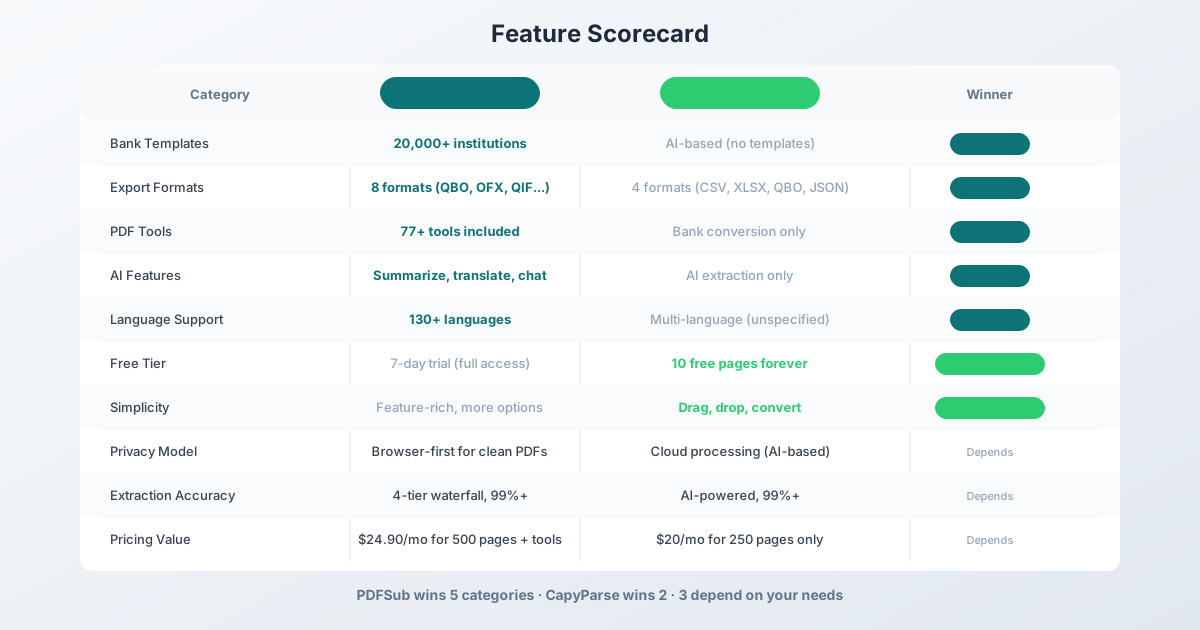
Winner: Depends - PDFSub has more bank templates and a privacy-preserving browser-first approach. CapyParse's AI-first method handles unusual formats without templates. Both claim 99%+ accuracy.
Export Formats
This is where PDFSub has a clear advantage.
PDFSub exports bank statement data in 8 formats:
- XLSX - Excel spreadsheet
- CSV - Comma-separated values
- QBO - QuickBooks (Web Connect)
- OFX - Open Financial Exchange
- QIF - Quicken Interchange Format
- QFX - Quicken Financial Exchange
- TSV - Tab-separated values
- JSON - Structured data format
The QBO, OFX, QIF, and QFX formats are purpose-built for direct import into accounting software. QuickBooks, Xero, Sage, and other platforms accept these formats natively, making the import process seamless.
CapyParse exports in 4 formats:
- CSV - Comma-separated values
- Excel - Spreadsheet format
- QBO - QuickBooks format
- JSON - Structured data format
CapyParse covers the most common formats, but lacks OFX, QIF, QFX, and TSV. If your accounting software or workflow requires OFX (used by many non-QuickBooks platforms), QIF (used by Quicken and some older systems), or QFX (Quicken financial exchange), PDFSub is the only option.
Winner: PDFSub - 8 export formats versus 4. The additional accounting formats (OFX, QIF, QFX) matter for workflows outside the QuickBooks ecosystem.
Beyond Bank Statements - Platform Breadth
This is PDFSub's structural advantage. CapyParse is a bank statement converter. PDFSub is a document platform.
| Feature | PDFSub | CapyParse |
|---|---|---|
| Merge PDF | Yes | No |
| Split PDF | Yes | No |
| Compress PDF | Yes | No |
| Convert PDF | Yes (Word, Excel, images) | No |
| Rotate/Reorder | Yes | No |
| Watermark | Yes | No |
| AI Summarize | Yes | No |
| AI Translate | Yes (130+ languages) | No |
| AI Chat | Yes | No |
| Invoice Extraction | Yes | No |
| Receipt Scanning | Yes | No |
| Financial Report Analysis | Yes | No |
| Total Tools | 98+ | 1 (bank statement conversion) |
If you convert a bank statement and then need to merge it with other client documents, compress the package for email, or translate a foreign-language receipt, PDFSub handles the entire workflow. With CapyParse, you need separate tools for everything beyond bank statement conversion.
For accountants and bookkeepers who handle diverse document tasks throughout the day, PDFSub eliminates the need for multiple subscriptions.
Winner: PDFSub - 98+ tools versus a single-purpose converter.
AI Features
PDFSub includes a full suite of AI-powered features in every plan:
- AI Summarize - Generate concise summaries of lengthy documents
- AI Translate - Translate PDFs across 130+ languages while preserving layout
- AI Chat - Ask questions about your document and get contextual answers
- AI Data Extraction - Pull structured data from invoices, receipts, financial reports
- AI Table Extraction - Extract tables from any PDF into spreadsheet format
These features work beyond bank statements. Summarize a 50-page contract, translate a German invoice, chat with a financial report to find specific figures - all within the same platform.
CapyParse uses AI exclusively for bank statement extraction. There are no summarization, translation, chat, or general data extraction capabilities. The AI is focused and effective for its purpose, but limited in scope.
Winner: PDFSub - full AI suite versus extraction-only AI.
Pricing Comparison
Both tools offer competitive pricing for bank statement conversion, but the value proposition differs significantly when you factor in the additional tools PDFSub includes.
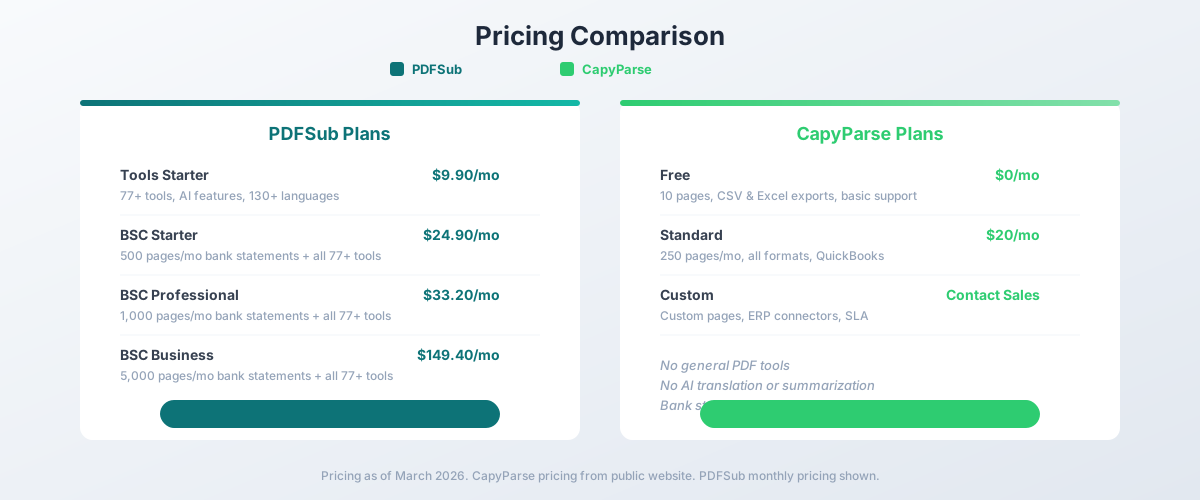
PDFSub Pricing
| Plan | Price | Key Features |
|---|---|---|
| All-In-One (annual) | $20/mo ($240/yr) | 98+ tools, 500 AI credits/mo, 500 bank statement pages/mo, e-sign + form filling, 50 GB cloud storage; unlimited team seats (each billed at the same per-user rate) available (each billed per-user); Google Drive + Dropbox |
| All-In-One (monthly) | $25/mo | Same as annual, billed monthly |
| Add-ons | Stackable | 500 AI credits, 500 bank statement pages, 40 GB storage, priority support |
PDFSub is subscription-only - every plan includes a 7-day free trial with full functionality. Cancel anytime in one click. Annual billing saves $60/year.
CapyParse Pricing
| Plan | Monthly Price | Key Features |
|---|---|---|
| Free | $0 | 10 pages, CSV & Excel exports, basic support |
| Standard | $20 | 250 pages/mo, all formats, QuickBooks integration, priority support |
| Custom | Contact sales | Custom page allocation, ERP connectors, SLA |
CapyParse includes 10 free pages with no credit card required.
Value Comparison
At first glance, CapyParse's Standard plan ($20/month for 250 pages) and PDFSub's All-In-One ($20/month annual, 500 pages included) cost the same. But the comparison requires context:
| Metric | PDFSub All-In-One (annual) | CapyParse Standard |
|---|---|---|
| Monthly cost | $20.00 | $20.00 |
| Pages included | 500 | 250 |
| Cost per page | $0.040 | $0.080 |
| Export formats | 8 | 4 |
| PDF tools | 98+ included | Not available |
| AI features | Full suite included | Not available |
| Languages | 130+ | Not specified |
PDFSub costs the same per month but includes twice the pages (500 vs 250), twice the export formats (8 vs 4), and 98+ additional PDF tools with AI features. On a per-page basis, PDFSub is 50% cheaper.
If you only convert a handful of statements per month and need nothing else, CapyParse's free tier or $20/month plan is a solid deal. If you process bank statements regularly and also need PDF tools, the value math favors PDFSub.
Winner: Depends - CapyParse wins on free tier and simplicity. PDFSub wins on per-page value and total platform capability.
Free Tier & Trial
CapyParse offers 10 free pages with no credit card required. This is a permanent free tier - you can always convert up to 10 pages. For someone who needs to convert a single statement once or twice, this is genuinely useful. No commitment, no payment details, no time limit.
PDFSub offers a 7-day free trial with full access to all features on your chosen plan. During the trial, you get the complete platform - all 98+ tools, AI features, and bank statement conversion. After 7 days, you need a paid subscription.
For trying a tool before committing, both approaches work. CapyParse's free tier is better for very occasional use. PDFSub's trial is better for evaluating the full platform capability.
Winner: CapyParse - a permanent free tier beats a time-limited trial for low-volume users.
Simplicity vs. Feature Depth
This is a genuine tradeoff, not a clearcut winner.
CapyParse is designed for simplicity. You visit the website, drag a PDF bank statement onto the page, wait a few seconds, and download your CSV, Excel, or QBO file. The interface is clean and focused. There are no sidebars with dozens of tools. No AI features to configure. No settings to adjust. For someone who just needs to convert a bank statement right now, the experience is streamlined.
PDFSub is designed for capability. The studio interface presents the bank statement converter alongside 98+ other tools. There are more options: 8 export formats, AI toggle, extraction tier selection, multi-page processing controls. For a power user who processes hundreds of statements per month and needs other PDF tools, the additional capability is valuable. For a first-time user who just needs one conversion, the interface has more to navigate.
Winner: CapyParse for first-time simplicity. PDFSub for ongoing professional use.
Privacy & Processing
PDFSub processes clean digital bank statements entirely in your browser using coordinate-based extraction (Tier 1). The PDF file never leaves your device for most common bank formats. Only scanned or unusual statements require server-side processing, and those files are deleted after extraction.
CapyParse uses cloud-based AI processing for all conversions. Every bank statement is uploaded to CapyParse's servers for AI-powered extraction. This is inherent to its AI-first approach - the model runs in the cloud.
For firms handling sensitive financial data, PDFSub provides strong privacy. Tier 1 extraction runs in your browser for clean digital PDFs - the file never leaves your device. Conversions use the PDFSub Engine - an isolated service with no internet access.
Winner: PDFSub - browser-first processing for clean PDFs versus mandatory cloud upload.
Language & International Support
PDFSub supports 130+ languages for translation and document processing. Bank statements from international institutions are processed with automatic date format, number format, and currency detection. You can convert a statement from Deutsche Bank (German), ICBC (Chinese), Banco Santander (Spanish), or any other institution worldwide.
CapyParse mentions multi-language support but does not specify the number of supported languages. The platform handles international bank formats, but there is no built-in translation capability - you get the extracted data in whatever language the statement was written in.
Winner: PDFSub - 130+ specified languages with translation capability.
Who Should Choose PDFSub
PDFSub is the better choice if:
- You need more than bank statement conversion. 98+ PDF tools, AI summarization, translation, chat, invoice extraction, and receipt scanning - all in one subscription.
- You process high volumes. 500 pages for $20/month (All-In-One annual) is better per-page value than CapyParse's 250 pages for $20/month.
- You need accounting-specific exports. 8 formats including OFX, QIF, and QFX that CapyParse does not offer.
- Privacy matters. Browser-first processing keeps clean digital statements on your device.
- You work with international documents. 130+ languages with automatic detection and translation.
- You are a professional accountant or bookkeeper. The comprehensive platform eliminates the need for multiple tool subscriptions.
- You want flat pricing. Same cost regardless of client count.
Who Should Choose CapyParse
CapyParse is the better choice if:
- You only need bank statement conversion. CapyParse does one thing and does it well. No extra complexity.
- You convert statements occasionally. The free tier (10 pages, no expiration) is perfect for infrequent use.
- You want the simplest possible experience. Drag a file, get your data. Minimal interface, minimal decisions.
- You are cost-sensitive at low volumes. $20/month for 250 pages is the cheapest paid option in this comparison.
- You do not need OFX, QIF, or QFX exports. CSV, Excel, QBO, and JSON cover your needs.
- You prefer a focused tool. You have separate tools for PDF editing, translation, and other tasks and just need a converter.
The Bottom Line
CapyParse and PDFSub both convert bank statements accurately. The difference is everything else.
CapyParse is a clean, focused bank statement converter. You upload a PDF, it gives you structured data in CSV, Excel, QBO, or JSON. If that is all you need, CapyParse does it with a simple interface and a useful free tier. It is the right tool for occasional conversion or for users who already have other tools covering their PDF needs.
PDFSub is a comprehensive document platform that includes bank statement conversion as one of 98+ tools. For the same or slightly higher price, you get twice the pages, twice the export formats, AI-powered summarization, translation in 130+ languages, document chat, invoice extraction, receipt scanning, and every common PDF operation. For anyone who works with documents beyond just bank statements, PDFSub is the better value.
The deciding question: Is bank statement conversion your only document need, or do you work with PDFs throughout the day? If the answer is "only bank statements, occasionally," try CapyParse's free tier. If you work with documents regularly, PDFSub's 7-day free trial shows you what a complete platform can do.
Frequently Asked Questions
Is CapyParse more accurate than PDFSub?
Both claim 99%+ accuracy for bank statement extraction. PDFSub uses a 4-tier extraction waterfall that starts with coordinate-based pattern matching and falls back to AI. CapyParse uses AI-first extraction. For most standard bank statements, both produce accurate results. Accuracy differences tend to appear with unusual formats - PDFSub's 20,000+ templates help with recognized banks, while CapyParse's AI may handle truly novel formats without a template.
Can I use CapyParse for free forever?
Yes. CapyParse includes a permanent free tier with 10 pages. There is no credit card required and no time limit. If you only need to convert a few pages per month, the free tier covers it indefinitely.
Does PDFSub have a free tier?
No. PDFSub is subscription-only with no free tier. Every plan includes a 7-day free trial with full access to all features (credit card required to start). After the trial, the All-In-One plan at $20/month annual ($25/month monthly) includes 98+ tools and 500 bank statement pages every month. Cancel anytime in one click.
How does PDFSub's per-page cost compare to CapyParse?
PDFSub's All-In-One ($20/month annual) matches CapyParse's Standard ($20/month) on monthly cost, but includes double the pages (500 vs 250), double the export formats (8 vs 4), and 98+ additional PDF tools with AI features. On a per-page basis, PDFSub is 50% cheaper.
Can CapyParse export to OFX or QIF format?
No. CapyParse exports to CSV, Excel, QBO, and JSON. If you need OFX (Open Financial Exchange), QIF (Quicken Interchange Format), QFX, or TSV, PDFSub is the option that supports those formats.
Which tool handles scanned bank statements better?
Both handle scanned PDFs through OCR. CapyParse processes all statements through its cloud AI, including scanned ones. PDFSub uses its Tier 3 (OCR + AI) and Tier 4 (AI vision) for scanned documents. Both claim strong accuracy on scanned documents. Real-world performance can vary depending on scan quality, bank format, and document condition.
Can I use both tools?
Yes. Some users use CapyParse's free tier for occasional one-off conversions and PDFSub for their regular workflow. There is no conflict between the two tools.
Already decided to switch? This page covers neutral side-by-side facts. For a migration-focused walkthrough - what to test first, how to verify QBO/OFX imports, and switching FAQ - see the best CapyParse alternative guide.