PDF Tools for Healthcare Administrators: HIPAA-Aware Document Workflows
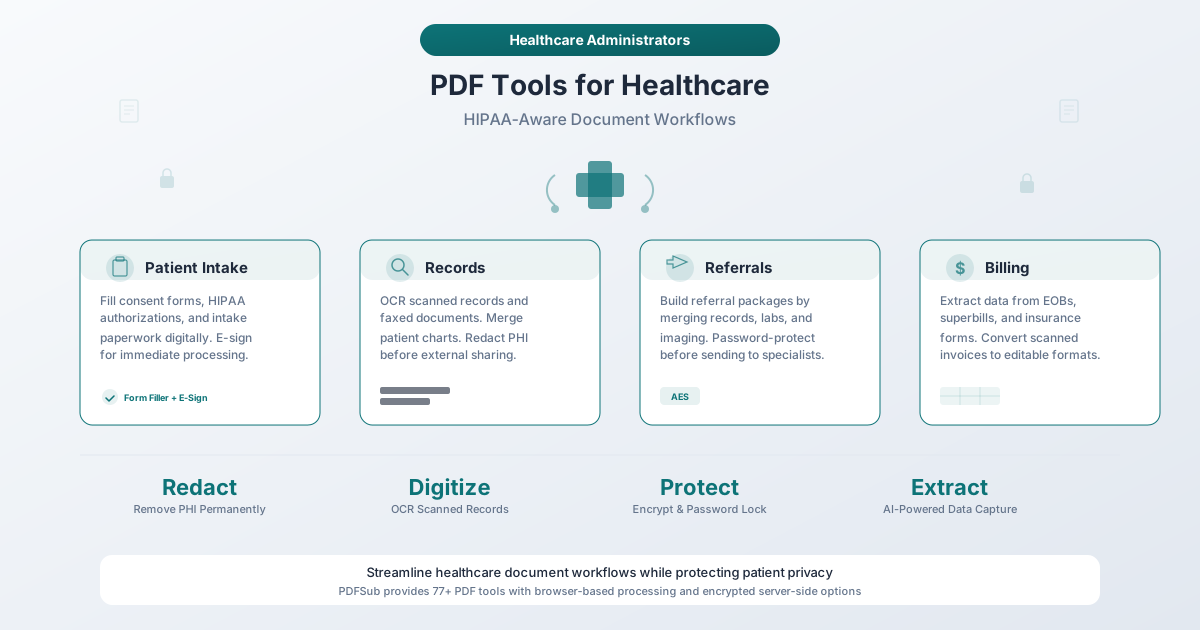
Healthcare generates mountains of paperwork - consent forms, referrals, insurance documents, medical records. Here's how to streamline document workflows while protecting patient privacy.
A patient walks into a hospital for a routine knee surgery. Before anyone touches a scalpel, that patient will have signed a general consent form, a surgical consent form, a HIPAA authorization, an advance directive acknowledgment, a financial responsibility agreement, and an insurance verification form. The anesthesiologist needs a separate consent. The physical therapy referral generates another packet. The post-op discharge instructions produce more pages. By the time the patient goes home, their single encounter has generated anywhere from 20 to 50 pages of documentation - and that is before the billing cycle even begins.
Multiply that by the thousands of patient encounters a typical hospital or clinic handles each month, and you begin to understand why healthcare administration has become one of the most document-intensive operations in any industry. Administrative costs now consume more than 40% of total hospital operating expenditures, according to Trilliant Health research - nearly double the amount spent on direct patient care. Physicians spend an average of 15 to 18 hours per week on paperwork and administrative tasks, and nurses report that approximately 40% of every shift goes to documentation rather than bedside care.
The documents themselves are overwhelmingly PDFs. Consent forms arrive as PDFs. Lab results are shared as PDFs. Insurance EOBs (Explanation of Benefits) come as PDFs. Referral letters, medical records requests, compliance audit files, policy manuals - all PDFs. And yet, much of healthcare still runs on fax machines and paper. Over 75% of healthcare providers still use fax to share patient records, with the U.S. healthcare industry alone accounting for more than 9 billion faxed documents in a recent year.
This guide maps the critical document workflows in healthcare administration to practical PDF tools that can reduce the paperwork burden - while addressing the privacy and compliance realities that make healthcare document handling uniquely demanding.
Why Healthcare Needs Specialized PDF Tools
The Volume Problem
Healthcare generates paperwork at a scale that few other industries can match. A single hospital admission can produce 50 to 100 pages of documentation. A primary care practice processing 25 patients per day creates hundreds of pages of intake forms, visit notes, referral letters, and lab result communications - every single day.
Consider the numbers:
| Metric | Data |
|---|---|
| Hospital administrative costs (2023) | $687 billion - nearly 2x direct patient care ($346 billion) |
| Physician paperwork hours | 15-18 hours per week on administrative tasks |
| Nurse documentation time | ~40% of every shift spent on documentation |
| Clinician admin hours | 28 hours per week on administrative duties |
| Fax usage | 75%+ of providers still share records via fax |
| Faxed documents | 9+ billion pages faxed in U.S. healthcare annually |
| Patient intake forms | 3-5 pages per new patient visit, 8-12 min to complete |
These numbers represent a staggering opportunity cost. Every hour a physician spends filling out paperwork is an hour not spent with patients. Every page manually re-entered from a faxed document into an EHR is a chance for transcription errors that could affect patient care. Every consent form printed, signed with a pen, scanned back in, and filed represents a workflow that could take 15 minutes but should take 2.
The Interoperability Challenge
Healthcare systems are notoriously fragmented. A patient's medical history is likely scattered across multiple EHR systems used by different providers - their primary care physician uses one system, their specialist uses another, and the hospital where they had surgery uses a third. Research from the Office of the National Coordinator for Health Information Technology (ONC) found that 48% of hospitals share data with other organizations but don't receive data in return.
When these systems can't talk to each other, PDFs become the lingua franca. A referral from a primary care physician to a specialist often arrives as a faxed or emailed PDF. Lab results from an external lab come as PDF attachments. Imaging reports from a radiology center arrive as - you guessed it - PDFs.
The problem is that many of these PDFs are flat scans with no searchable text. They are digital photographs of paper documents, impossible to search, impossible to extract data from, and impossible to integrate into structured EHR fields without manual re-entry. This is where OCR (Optical Character Recognition) and AI-powered data extraction become essential tools in the healthcare administrator's workflow.
The Compliance Dimension
Healthcare documents don't just carry information - they carry legal obligations. HIPAA (the Health Insurance Portability and Accountability Act) imposes strict requirements on how protected health information (PHI) is handled, stored, transmitted, and disclosed. The Security Rule mandates administrative, physical, and technical safeguards for electronic PHI. The Privacy Rule requires that disclosures of PHI be limited to the minimum necessary for the intended purpose.
These aren't abstract requirements. HIPAA violations carry penalties ranging from $100 to $50,000 per violation, with annual maximums reaching $2 million for willful neglect. A single improperly shared document - a referral letter with more patient information than the specialist needs, an insurance form emailed without encryption, a medical record with metadata revealing another patient's name - can trigger an investigation.
Every PDF tool in a healthcare workflow must be evaluated through this compliance lens. Where does the document go when you process it? Who has access to the data? Is the processing encrypted? Is the data retained after processing? These questions matter in ways they simply don't for most industries.
HIPAA Considerations for PDF Tools
What HIPAA Requires
HIPAA's three safeguard categories - administrative, physical, and technical - apply to any tool that touches electronic PHI:
Administrative safeguards require written policies defining who can access PHI, how it is stored, how long it is retained, and how it is disposed of. For PDF tools, this means understanding which staff members use which tools and for what purposes.
Physical safeguards require that PHI is accessed from secure locations and devices. For web-based PDF tools, this means understanding whether documents are processed on the user's device or uploaded to external servers.
Technical safeguards require access controls, encryption, audit trails, and automatic log-off. For PDF tools, this means evaluating whether documents are encrypted during transmission and processing, whether the tool provider retains copies, and whether access is logged.
What PDFSub Offers - And What It Doesn't
Let's be straightforward: PDFSub is not HIPAA certified and does not currently offer a Business Associate Agreement (BAA).
Organizations that require a formal BAA from every vendor in their document workflow should evaluate PDFSub accordingly. That said, PDFSub's architecture provides meaningful privacy protections that are worth understanding:
Browser-based tools (approximately 28 editing tools): These tools process documents entirely in your browser. The PDF file never leaves your device. No data is transmitted to any server - not to PDFSub, not to any third party, not anywhere. For tools like Redact PDF, Merge PDFs, E-Sign PDF, PDF Form Filler, Compress PDF, Password Protect, and Remove Metadata, the processing happens locally on the device where the file was opened.
From a privacy standpoint, browser-based processing eliminates an entire category of risk. If the document never leaves the device, there is no transmission to encrypt, no server-side storage to secure, no third-party access to audit, and no data retention policy to evaluate. The document stays exactly where it started - on your computer.
Server-side tools (OCR, AI extraction, translation, conversions): Some tools - particularly those requiring AI processing or complex document conversion - do transmit the document to PDFSub's servers for processing. These tools use:
- Encrypted transmission (TLS/HTTPS)
- Isolated processing environments via the PDFSub Engine
- Automatic file deletion after processing
- No data retention or use for model training
For organizations handling PHI, the distinction between browser-based and server-side tools matters. Administrators can choose to use only browser-based tools for documents containing PHI, reserving server-side tools for non-PHI documents or for documents where the PHI has already been redacted.
The Minimum Necessary Standard
HIPAA's minimum necessary standard requires that covered entities limit PHI disclosures to only what is necessary for the intended purpose. This standard directly affects how healthcare administrators should use PDF tools.
For example: when sending a patient's medical records to a specialist for a referral, the referring physician's office should not send the patient's entire chart. The referral package should include only the information relevant to the specialist's evaluation - the relevant diagnosis, recent lab results, imaging reports, and current medications.
PDFSub's Redact tool enables this workflow by allowing administrators to permanently remove PHI that isn't relevant to the disclosure before sending the document. And because the Redact tool is browser-based, the document never leaves the staff member's device during the redaction process.
PDF Tools by Healthcare Workflow
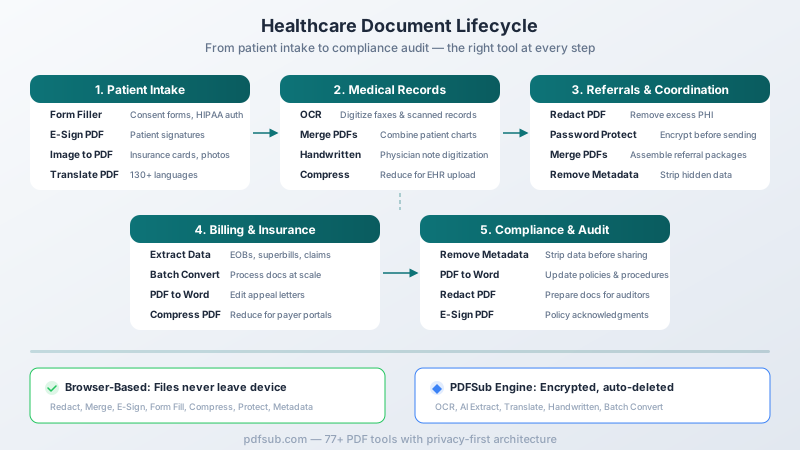
1. Patient Intake and Registration
Patient intake is where the paperwork avalanche begins. A new patient visit at a primary care practice typically involves 3 to 5 pages of forms. A hospital admission generates significantly more - general consent, procedure-specific consent, HIPAA Notice of Privacy Practices acknowledgment, advance directive questions, emergency contact information, insurance verification, medical history questionnaire, medication list, and allergy documentation.
Traditionally, this means handing a patient a clipboard with a stack of paper forms, waiting 10 to 15 minutes for them to fill everything out with a pen, and then having a staff member manually key the information into the EHR - a process that takes another 5 to 10 minutes and introduces transcription errors.
Relevant tools:
PDF Form Filler - Convert paper intake forms to fillable digital PDFs. Patients can complete forms on a tablet in the waiting room or on their own device before the appointment. The completed form is a structured PDF that staff can reference directly - no manual re-entry from handwritten paper forms. Form Filler runs entirely in the browser, so patient information never leaves the device.
E-Sign PDF - Collect patient signatures on consent forms, HIPAA authorizations, and financial agreements electronically. Instead of printing, signing, scanning, and filing, patients sign digitally and the document is immediately ready for the chart. E-Sign is browser-based - the consent form with the patient's signature stays on the local device.
Image to PDF - When patients bring photos of insurance cards, prior medical records on their phones, or printed documents that need to be added to their chart, Image to PDF converts those images into standard PDF format for consistent filing. This tool runs in the browser.
Workflow impact: Digital intake eliminates the paper-to-screen transcription step entirely. Staff spend less time on data entry and more time on patient interaction. Patients spend less time in the waiting room. And the risk of transcription errors - entering the wrong medication dose, misspelling a drug name, transposing digits in a phone number - drops significantly.
2. Medical Records Management
Medical records are the backbone of patient care, and managing them is one of the most labor-intensive tasks in healthcare administration. Records arrive from multiple sources in multiple formats - faxed referral letters, scanned paper charts from previous providers, emailed lab results, printed imaging reports. Many of these arrive as flat, unsearchable scanned PDFs that are essentially digital photographs of paper.
The 9 billion-plus faxed documents in U.S. healthcare each year represent a massive volume of information that arrives as unsearchable images. When a patient's records from a previous provider arrive as a 40-page faxed document, someone has to read through every page to find the relevant information - there is no Ctrl+F, no text search, no structured data extraction.
Relevant tools:
OCR / Make Searchable - Transform scanned medical records, faxed documents, and image-based PDFs into fully searchable text documents. Once a faxed record has been OCR-processed, staff can search for specific diagnoses, medication names, dates, and lab values instead of reading through pages manually. OCR uses server-side processing via the PDFSub Engine in an isolated environment with automatic file deletion.
Handwritten Conversion - Physician notes are notoriously difficult to read. Handwritten Conversion uses AI to digitize handwritten clinical notes, turning them into searchable, readable text. This is particularly valuable for practices transitioning from paper-based charting or processing records from providers who still handwrite notes. This tool uses server-side processing.
Merge PDFs - Combine a patient's scattered records into a single, organized document. When a patient's chart includes records from three previous providers, recent lab work from an external lab, and imaging reports from a radiology center, Merge PDFs brings them all into one file. Merge runs entirely in the browser - patient records never leave the device.
Compress PDF - Medical records that include high-resolution imaging (radiology reports with embedded images, photographs of wounds or conditions, pathology slides) can produce enormous PDF files. Many EHR systems have upload size limits. Compress PDF reduces file size without degrading the quality needed for clinical use. This tool runs in the browser.
Workflow impact: Searchable records change the fundamental economics of records management. Instead of a medical records clerk spending 20 minutes reading through a faxed chart to find a patient's medication list, they can search for "medications" and find it in seconds. Over thousands of records per year, the time savings are substantial.
3. Referrals and Care Coordination
Referrals are where healthcare's interoperability problems become most visible. When a primary care physician refers a patient to a specialist, the referral package typically includes clinical notes, relevant lab results, imaging reports, and the referral letter itself. This package needs to be assembled, reviewed for completeness, stripped of any PHI that isn't relevant to the specialist's evaluation (per the minimum necessary standard), and transmitted securely.
In many practices, this process still involves printing pages from the EHR, faxing them to the specialist's office, and hoping they arrive. The specialist's office receives a stack of faxed pages, scans them into their own EHR, and manually reviews them. Information gets lost. Pages arrive out of order. Fax quality degrades readability.
Relevant tools:
Redact PDF - Before sending patient records to a specialist, referring offices should remove any PHI that isn't necessary for the specialist's evaluation. If a patient is being referred to an orthopedic surgeon for a knee issue, the surgeon does not need to see the patient's psychiatric history, substance abuse treatment records, or unrelated diagnoses. Redact PDF permanently removes this information from the document - not by hiding it behind a black box, but by destroying the underlying data. The tool runs in the browser, so the patient's records never leave the staff member's device.
Password Protect - When transmitting referral packages electronically (email, secure messaging, patient portal), adding password encryption provides an additional layer of security. AES encryption ensures that even if the email is intercepted, the document contents remain inaccessible without the password. This tool runs in the browser.
Merge PDFs - Assemble complete referral packages by combining the referral letter, relevant clinical notes, lab results, and imaging reports into a single organized document. A well-organized referral package - with documents in logical order and a clear cover page - reduces back-and-forth between offices and speeds up the specialist's review. Browser-based processing.
Translate PDF - For patients who speak languages other than English, Translate PDF can convert patient education materials, discharge instructions, and consent forms into the patient's preferred language. With support for 130+ languages, this addresses a critical health equity issue - patients who can read their discharge instructions in their own language are more likely to follow treatment plans. Translation uses server-side AI processing.
Workflow impact: A streamlined referral workflow reduces the median referral processing time from days to hours. Digital referral packages that are searchable, complete, and properly redacted give the specialist everything they need without the back-and-forth calls requesting missing information.
4. Billing and Insurance Processing
Healthcare billing is one of the most document-intensive processes in any industry. A single patient encounter generates a superbill (the itemized list of services provided with CPT codes), which feeds into a claim submitted to the insurance company. The insurer responds with an EOB (Explanation of Benefits) or a remittance advice. If the claim is denied or underpaid, the appeals process generates another round of documentation - clinical notes justifying medical necessity, prior authorization records, and appeal letters.
Hospitals spent $43 billion in 2025 trying to collect payments that insurers owed for care already delivered. The average hospital employs roughly 64 staff dedicated to administrative and billing functions. Much of this work involves processing PDF documents - EOBs, denial letters, remittance advices, coordination of benefits forms, and patient billing statements.
Relevant tools:
Extract Data - AI-powered extraction pulls structured data from insurance EOBs, superbills, and claims documents. Instead of a billing specialist manually reading an EOB and keying each line item into the practice management system, Extract Data identifies the relevant fields - patient name, dates of service, CPT codes, amounts billed, amounts allowed, patient responsibility - and outputs them in a structured format. This tool uses server-side AI processing.
PDF to Word - Appeals letters, denial responses, and policy documents often need to be edited and resubmitted. PDF to Word converts these documents into editable format while preserving the original layout, so billing staff can modify and update documents without recreating them from scratch. This uses server-side processing.
Batch Convert - When processing high volumes of insurance documents, Batch Convert handles multiple files simultaneously. End-of-month reconciliation that involves processing dozens of EOBs becomes manageable when they can be converted and organized in bulk. Server-side processing.
Compress PDF - Insurance appeals often require attaching clinical documentation - chart notes, lab results, imaging reports. These attachments can create large files that exceed payer submission portals' upload limits. Compress PDF reduces file sizes for submission without degrading document quality. Browser-based.
Workflow impact: Automated data extraction from insurance documents can reduce the time spent on payment posting by 60 to 80% compared to manual entry. For a billing department processing hundreds of EOBs per week, this translates to significant labor savings and faster revenue cycle completion.
5. Compliance and Audit Documentation
Healthcare compliance is not optional, and it is not a one-time activity. HIPAA requires ongoing risk assessments, policy reviews, staff training documentation, and incident reporting. Accreditation bodies like The Joint Commission and CMS (Centers for Medicare and Medicaid Services) require extensive documentation during surveys. State health departments conduct their own inspections. And internal quality improvement programs generate their own documentation requirements.
Compliance documentation lives in PDFs: policy manuals, procedure documents, training records, incident reports, audit findings, corrective action plans, and committee meeting minutes. These documents must be maintained, updated, and produced on demand during inspections and surveys.
Relevant tools:
Remove Metadata - Before sharing compliance documents with external auditors, accreditation surveyors, or regulatory agencies, strip hidden metadata that could reveal internal revision history, author names, or editing timestamps that aren't relevant to the audit. Metadata removal reduces the risk of inadvertent disclosure of internal deliberations. Browser-based.
PDF to Word - Policy and procedure documents require regular updates as regulations change, as clinical practices evolve, and as incident reviews identify process improvements. Converting existing policy PDFs to editable Word format allows compliance officers to update specific sections without recreating entire documents. Server-side processing.
Redact PDF - When producing documents for regulatory inspections or legal proceedings, redaction removes information that is outside the scope of the request. If a surveyor requests infection control documentation, patient-identifying information in incident reports should be redacted before production. Browser-based.
E-Sign PDF - Annual policy acknowledgments, training completion records, and compliance attestations all require staff signatures. E-Sign enables electronic collection of these signatures, creating an auditable trail of who signed what and when. Browser-based.
Password Protect - Compliance and audit files often contain sensitive information - incident reports, risk assessments, investigation findings. Password protection ensures these documents are accessible only to authorized personnel. Browser-based.
Workflow impact: During a Joint Commission survey, the ability to instantly produce searchable, well-organized compliance documentation can mean the difference between a smooth survey and a findings-heavy one. Surveyors notice when an organization can produce requested documents quickly and in organized formats versus scrambling through filing cabinets.
Security Architecture for Healthcare Documents
For healthcare administrators evaluating any document processing tool, the fundamental question is: where does the data go?
Browser-Based Processing: The Privacy-First Option
PDFSub's browser-based tools - approximately 28 tools including Redact, Merge, E-Sign, Form Filler, Compress, Password Protect, and Remove Metadata - process documents entirely within the user's web browser. The technical architecture works like this:
- The user opens a PDF file in the browser
- All processing happens locally using the device's own computing resources
- The processed document is saved directly to the user's device
- No file data is transmitted to any external server at any point
For healthcare documents containing PHI, this architecture provides strong privacy characteristics. There is no server to breach, no transmission to intercept, no cloud storage to secure, and no vendor data retention to evaluate. The document's privacy posture is identical to working with the file in any local desktop application.
Server-Side Processing: Encrypted and Isolated
Tools that require more computational resources - OCR, AI data extraction, document translation, format conversions, and handwritten note conversion - process documents on PDFSub's servers using the PDFSub Engine. The security measures for server-side processing include:
- Encrypted transmission: All file uploads use TLS/HTTPS encryption
- Isolated processing: Each document is processed in an isolated environment separate from other users' documents
- Automatic deletion: Files are deleted from the server after processing completes
- No data retention: Processed documents are not stored, archived, or used for any purpose beyond the requested operation
- No training use: Document contents are never used to train AI models
Practical Guidance for Healthcare Organizations
Healthcare administrators can structure their PDFSub usage to match their organization's risk tolerance:
For documents containing PHI: Use browser-based tools exclusively. Redact, merge, sign, fill forms, compress, password-protect, and strip metadata - all without the document ever leaving the staff member's device.
For documents where PHI has been redacted: Server-side tools can be used safely after PHI has been removed. Redact the document first (browser-based), then use OCR, data extraction, or translation on the redacted version.
For non-PHI documents: Server-side tools can be used without restriction for policy documents, procedural manuals, training materials, blank form templates, and other administrative documents that contain no patient information.
Healthcare Document Types: A Quick Reference
| Document Type | Common Format Issues | Recommended Tools |
|---|---|---|
| Consent forms | Paper forms, need signatures | Form Filler, E-Sign |
| HIPAA authorizations | Require patient signatures | E-Sign, Form Filler |
| Referral letters | Often faxed, unsearchable | OCR, Merge, Redact |
| Lab results | Multi-page, from external labs | Merge, Compress |
| Insurance EOBs | Complex tables, data extraction needed | Extract Data, PDF to Word |
| Superbills | Structured data entry | Extract Data |
| Medical records requests | Require redaction before release | Redact, Remove Metadata |
| Imaging reports | Large file sizes | Compress |
| Discharge instructions | Need translation for non-English patients | Translate PDF |
| Policy manuals | Need regular updates | PDF to Word |
| Incident reports | Contain PHI, need redaction for audits | Redact, Password Protect |
| Training records | Need signatures and filing | E-Sign, Merge |
| Physician notes | Handwritten, hard to read | Handwritten Conversion |
| Insurance cards | Photos from patient phones | Image to PDF |
| Wound/condition photos | Need to be added to patient chart | Image to PDF |
| Appeal letters | Need editing and resubmission | PDF to Word |
Reducing the Administrative Burden: What the Numbers Say
The administrative burden in healthcare is not just an inconvenience - it is a crisis that directly affects patient care, staff burnout, and organizational finances. Here is what the most recent data shows:
Time stolen from patient care: Primary care physicians spend approximately 40% of their time on non-patient-facing work, including EHR documentation, insurance forms, and prior authorizations. Physical medicine and rehabilitation physicians spend up to 19 hours per week on paperwork alone.
Nurse documentation burden: A 2025 national survey found that 92% of nurses believe EHR documentation has negatively impacted their job satisfaction, with nearly 40% of each shift consumed by documentation tasks rather than direct patient care.
Financial costs: Hospitals spent $687 billion on administrative functions in 2023, compared to $346 billion on direct patient care - a ratio that has been steadily worsening. The average hospital employs about 64 staff dedicated specifically to administrative and billing functions.
"Pajama time": The American Medical Association reports that physicians spend an average of 22 minutes on work-related EHR tasks on days they see patients, and 2.8 hours on non-clinical days - work that follows them home and contributes to burnout.
PDF tools cannot solve every aspect of this crisis. But they can meaningfully reduce the time spent on specific document tasks that consume hours of staff time every day: filling out forms by hand, manually entering data from faxed documents, printing-signing-scanning consent forms, assembling referral packages from multiple sources, and searching through unsearchable scanned records.
If a healthcare organization can reduce the time spent on document processing by even 30 minutes per staff member per day, the cumulative impact across dozens or hundreds of staff members is substantial - both in labor costs and in time returned to patient care.
Frequently Asked Questions
Is PDFSub HIPAA compliant?
PDFSub does not currently hold HIPAA certification and does not offer a Business Associate Agreement (BAA). However, PDFSub's browser-based tools (approximately 28 tools including Redact, Merge, E-Sign, Form Filler, Compress, Password Protect, and Remove Metadata) process documents entirely on the user's device - no data is transmitted to any server. This means that for browser-based tools, no PHI is shared with PDFSub, which eliminates the primary compliance concern. For server-side tools (OCR, AI extraction, translation), documents are processed in isolated environments with no internet access and automatically deleted after processing. Organizations requiring a formal BAA should evaluate whether PDFSub's architecture meets their specific compliance requirements.
Can healthcare staff use PDFSub for documents containing PHI?
For browser-based tools, yes - the document never leaves the device, so no PHI is transmitted or stored externally. For server-side tools, organizations should assess their own risk tolerance. A practical approach is to use browser-based tools for PHI-containing documents and server-side tools only for documents where PHI has been redacted or that contain no PHI.
How does the Redact tool handle PHI removal?
PDFSub's Redact tool performs true redaction - the underlying text data is permanently destroyed, not just visually covered. This is the same standard required for legal document redaction. The redacted data cannot be recovered by copying, selecting, or examining the PDF's internal structure. The tool runs entirely in the browser, so the unredacted document is never transmitted anywhere.
Can PDFSub handle the volume of documents a hospital or clinic generates?
PDFSub supports batch processing for format conversions and data extraction. For browser-based tools, processing speed depends on the user's device capabilities. For server-side tools, PDFSub's infrastructure handles high-volume processing. Organizations processing thousands of documents per month can use subscription plans that include the volume needed.
What about faxed documents? Can PDFSub make them searchable?
Yes. This is one of the highest-impact use cases for healthcare. Faxed documents that arrive as flat image PDFs can be processed through PDFSub's OCR tool to create fully searchable text PDFs. Once searchable, staff can find specific diagnoses, medication names, dates, and lab values instantly instead of reading through pages manually. OCR uses server-side processing, so organizations should consider redacting PHI before OCR if their compliance policies require it - or apply OCR and then store the searchable version in their secured EHR system.
Can PDFSub translate patient materials into other languages?
Yes. PDFSub's Translate PDF tool supports 130+ languages. This is particularly valuable for translating patient education materials, discharge instructions, medication guides, and informational brochures for non-English-speaking patients. Translation uses server-side AI processing, so the same privacy considerations apply as with other server-side tools. For materials that don't contain individual patient PHI (general education brochures, facility information, generic care instructions), translation can be used without PHI concerns.
How does Password Protect work for healthcare documents?
PDFSub's Password Protect tool applies AES encryption to PDF files, requiring a password to open the document. This is useful for emailing referral packages, sharing documents via patient portals, or storing sensitive compliance documents. The encryption is applied entirely in the browser - the document and password are never transmitted to any server. Important: password-protected PDFs add a layer of security, but HIPAA compliance also requires evaluating the overall transmission method (encrypted email, secure portal, etc.).
What is the PDFSub Engine?
The PDFSub Engine is PDFSub's secure, server-side processing infrastructure for tools that require more computational resources than browser-based processing can provide. It handles OCR, AI-powered data extraction, document translation, format conversions, and handwritten note conversion. Documents are processed in isolated environments with no internet access and automatically deleted after processing.
Getting Started
Healthcare document workflows don't change overnight. The most effective approach is to identify the highest-friction document tasks in your organization and address them first.
Quick wins for most healthcare organizations:
-
Digital consent forms - Convert your most-used consent forms to fillable PDFs with Form Filler and add E-Sign capability. This eliminates the print-sign-scan cycle for every patient encounter.
-
Faxed document processing - Start running inbound faxes through OCR to create searchable records. The time saved searching through records compounds daily.
-
Referral package assembly - Use Merge to combine referral documents into organized packages and Redact to strip unnecessary PHI before sending.
-
Insurance document processing - Use Extract Data to pull structured information from EOBs and remittance advices instead of manual data entry.
PDFSub offers 98+ tools in a single platform. Many of the most privacy-sensitive operations - redaction, form filling, e-signatures, merging, compressing, password protection, and metadata removal - run entirely in the browser, with documents never leaving your device. For healthcare organizations navigating the tension between operational efficiency and patient privacy, that architecture matters.
Explore PDFSub's tools to see which ones map to your organization's document workflows.