PDF Tools for Construction and Contractors: From Bids to Closeout
Construction projects generate tens of thousands of documents - bids, contracts, submittals, daily reports, punch lists. Here's how to manage every document phase from preconstruction to closeout.
You just won a $4 million school renovation bid. The excitement lasts about fifteen minutes - right up until you realize what comes next.
Between the owner-contractor agreement, general conditions, supplementary conditions, technical specifications, drawings, addenda, subcontractor agreements, insurance certificates, performance bonds, payment bonds, permit applications, submittals, shop drawings, RFIs, daily reports, safety plans, inspection reports, change orders, pay applications, lien waivers, punch lists, as-built drawings, O&M manuals, warranties, and closeout documentation, that single project will generate thousands of documents before you hand over the keys.
And most of them will be PDFs.
A Navigant Construction Forum study of 1,362 projects found that projects ranging from $5 million to $5 billion averaged 796 RFIs each. Larger projects can have 500 or more individual submittals. The drawings alone can run thousands of pages. When you factor in every contract, report, application, certificate, and correspondence, a mid-size commercial project can easily produce tens of thousands of individual documents over its lifecycle.
Yet an industry report found that up to 30% of project data is lost by the end of the design and construction phases. Each project team member spends more than five and a half hours per week just hunting for project data. The U.S. construction industry loses more than $177 billion annually to rework, communication breakdowns, and poor data management - with 22% of rework caused by inaccurate or inaccessible information.
The paperwork isn't a side effect of construction. It is construction - or at least, it's the legal and financial backbone that holds every project together. The contractors who manage documents well finish on time and on budget. The ones who don't end up in disputes, eating rework costs, and chasing payments for months after substantial completion.
This guide maps every document workflow in a construction project to the right PDF tool, from the moment you download a bid package to the day you hand over the closeout binder.
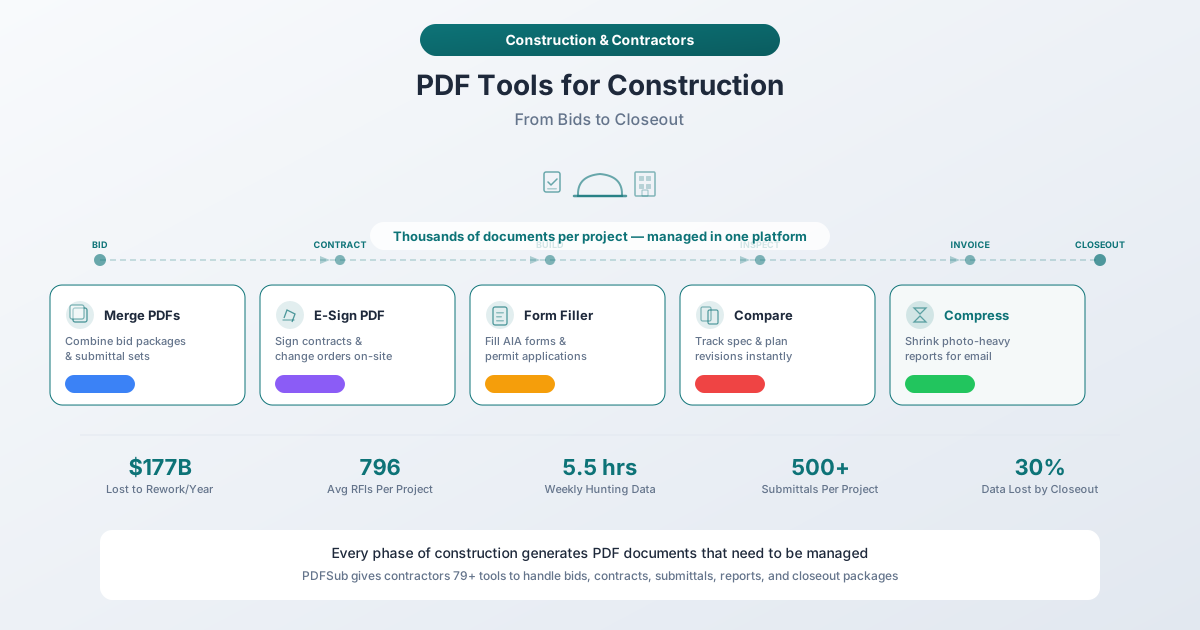
Why Construction Needs Better PDF Tools
Construction has a document problem that's different from any other industry. Three factors make it uniquely challenging.
Volume That Overwhelms Traditional Methods
A typical office worker might handle a few dozen documents per week. A construction project manager handles hundreds. When you're running multiple projects simultaneously - and most GCs are - you're managing thousands of active documents at any given time.
Roughly 10 RFIs are generated for every $1 million in project value. A $20 million project means 200 RFIs, each requiring tracking, response, and documentation. Add 500+ submittals, daily reports for every working day, weekly safety reports, monthly pay applications, and the constant flow of change orders, and you're dealing with a document volume that makes manual management impossible.
Field Access Is Non-Negotiable
Construction doesn't happen at a desk. Superintendents need to reference spec sections on a scaffold. Foremen need to review updated drawings at the point of installation. Safety managers need to complete inspection forms while standing on a concrete slab. Project engineers need to compare drawing revisions in a job trailer with spotty internet.
Any document tool that requires a desktop application, a specific operating system, or a reliable high-speed connection is useless for half the people who need it most. Browser-based tools that work on any device - phone, tablet, or laptop - aren't a nice-to-have in construction. They're a requirement.
Version Control Is a Legal Liability
In most industries, working from an outdated document is an inconvenience. In construction, it's a lawsuit. If a subcontractor installs electrical rough-in based on Revision A of the drawings when the architect issued Revision C two weeks ago, someone is paying for the tear-out and reinstallation. That someone is usually the contractor who can't prove they distributed the current revision.
Document management in construction isn't just about organization - it's about defensible project records. Every contract revision, every approved submittal, every signed change order needs to be tracked, compared, and archived so you can prove exactly what was agreed to and when.
PDF Tools by Construction Workflow
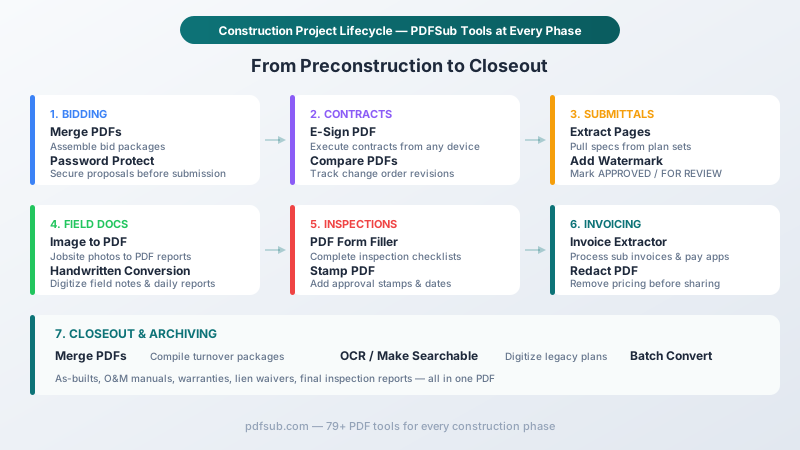
1. Bidding and Preconstruction
The bidding phase sets the tone for the entire project. You're downloading bid packages from planrooms, reviewing hundreds of pages of specs and drawings, soliciting subcontractor quotes, assembling your proposal, and submitting everything before a hard deadline.
The documents you're handling:
- Invitation to bid and instructions to bidders
- Project specifications (Division 1 through Division 33 of MasterFormat)
- Architectural and engineering drawings
- Addenda issued during the bid period
- Subcontractor and supplier quotes
- Bid forms, bid bonds, and unit price schedules
- Certificates of insurance and bonding capacity letters
- Qualification statements and reference lists
The tools that matter:
Merge PDFs - Bid packages arrive as dozens of separate files. Specs from the architect, drawings from the engineer, addenda from the owner's representative, and your own pricing sheets and qualifications all need to be combined into a single, organized submission. Merge lets you assemble everything in the right order, creating a professional bid package that makes it easy for the owner to evaluate your proposal.
Extract Pages - A Division 1 spec book might be 200 pages, but you only need Division 26 (Electrical) for your electrical subcontractor pricing. Extract the relevant sections and send only what each sub needs to price, instead of dumping the entire spec book on every trade.
Password Protect - Your bid pricing is confidential until the bid opening. If you're emailing your proposal or uploading it to a portal, password protection ensures that only authorized parties can access your numbers. This is especially important in competitive bidding where even a glimpse of your pricing could give a competitor an advantage.
Compress PDF - Bid packages with drawings, photos of past projects, and equipment spec sheets can easily exceed email attachment limits. Compress reduces file sizes while maintaining the quality needed for professional review. A 40 MB bid package that bounces back from an email server is a missed deadline - and in construction, a missed bid deadline is a missed opportunity.
Redact PDF - When sharing subcontractor pricing with an owner for value engineering discussions, you may need to remove markup percentages or overhead figures from sub quotes. Redaction permanently removes sensitive pricing data so you can share cost breakdowns without exposing your margins.
2. Contract Management and Change Orders
Once you win the bid, the real paperwork begins. Construction contracts are among the most complex documents in any industry, and the AIA (American Institute of Architects) alone publishes over 200 standard contract forms across six series. Managing these documents - and the inevitable changes that follow - is where projects succeed or fall apart.
The documents you're handling:
- Owner-contractor agreements (AIA A101, A102, A103, or custom)
- General conditions (AIA A201)
- Supplementary conditions
- Subcontractor agreements
- Change order proposals, change orders, and construction change directives
- Lien waivers (conditional and unconditional, progress and final)
- Performance and payment bonds
- Insurance certificates and endorsements
The tools that matter:
E-Sign PDF - Construction contracts need signatures from multiple parties, often when those parties are nowhere near the same office. The owner is downtown. The architect is across town. You're on-site. Your subcontractor is three states away. E-Sign lets everyone execute contracts and change orders from wherever they are, on whatever device they have. A change order that used to take a week to route for wet signatures can be fully executed in hours.
Change orders are particularly time-sensitive. Research shows that on major projects, change order costs can represent 10 to 15 percent of the contract value, and a higher frequency of changes can reduce productivity by 10 to 30 percent. The faster you can execute a change order, the faster you can mobilize the revised scope and avoid stacking trades.
Compare PDFs - When the architect issues a revised set of general conditions, you need to know exactly what changed. Did they modify the liquidated damages clause? Adjust the retainage percentage? Change the dispute resolution mechanism? Compare PDFs highlights every difference between two versions of a contract, so you can identify meaningful changes without reading 60 pages line by line.
This is equally valuable for specification revisions. When an addendum modifies Section 03 30 00 (Cast-in-Place Concrete), Compare shows you the exact paragraphs that changed - the ones that might affect your concrete subcontractor's price.
PDF Form Filler - AIA contract forms are interactive PDFs with fillable fields. Form Filler lets you complete these digitally instead of printing, handwriting, and scanning. Fill in the project name, contract sum, completion dates, retainage terms, and all the other blanks cleanly and accurately. This matters because handwritten contract documents are harder to read and more prone to disputes about what was actually agreed to.
PDF to Word - Sometimes you need to negotiate contract terms, and that means marking up the language. Converting a PDF contract to Word lets you redline clauses, propose alternative language, and track changes the same way attorneys do. Once the terms are finalized, the marked-up document becomes part of the contract record.
3. Submittals and RFIs
Submittals and RFIs are the circulatory system of a construction project. They're how information flows between the contractor, architect, engineer, and owner - and managing them poorly is one of the fastest ways to derail a schedule.
A submittal is a document the contractor provides to the architect for review and approval before installing a product or system. It proves that the proposed materials, equipment, or methods meet the specification requirements. An RFI is a formal question about something unclear or conflicting in the contract documents.
The documents you're handling:
- Product data submittals (cut sheets, spec sheets)
- Shop drawings
- Material samples and mock-up documentation
- Submittal transmittals and cover sheets
- RFI forms with questions, responses, and supporting documentation
- Submittal logs and RFI logs
The tools that matter:
Merge PDFs - Each submittal package typically includes a transmittal cover sheet, the relevant spec section, product data, shop drawings, and any supporting documentation. Merge lets you assemble these into a single, organized file that the architect can review without opening five separate attachments. When a project has 500+ submittals, this organization compounds into enormous time savings.
Extract Pages - Manufacturer product catalogs can be hundreds of pages. Your submittal needs three pages from a 400-page catalog. Extract pulls exactly the pages you need, keeping the file size manageable and the architect focused on the relevant information.
Add Watermark - Submittals move through a review cycle: submitted, reviewed, approved, approved as noted, revise and resubmit, or rejected. Watermarking documents with their current status - DRAFT, SUBMITTED, APPROVED, REJECTED - prevents the dangerous situation where someone installs material based on a submittal that was never approved. This is a simple safeguard that prevents expensive mistakes.
Stamp PDF - Beyond watermarks, stamps add approval marks, date stamps, and company logos to reviewed submittals. When an architect returns an approved submittal, stamping it with the approval date and your company's received stamp creates a clear record of what was approved and when. This documentation becomes critical if there's ever a dispute about whether a particular product was authorized.
Compress PDF - Shop drawings for structural steel, mechanical systems, or curtain wall assemblies can produce massive PDF files. When you need to email a 75 MB submittal package to the architect and copy three engineers, compression is essential. Reducing file sizes while maintaining drawing legibility keeps the review process moving.
4. Daily Reports and Field Documentation
Every day on a construction project generates data that needs to be captured, organized, and preserved. Daily reports, progress photos, safety inspections, weather conditions, manpower counts, equipment logs, and material deliveries all need to be documented. This field documentation serves as the project's daily diary - and in a claim or dispute, it's often the most important evidence available.
The documents you're handling:
- Daily construction reports (weather, manpower, equipment, activities)
- Progress photographs (foundation, framing, MEP rough-in, finishes)
- Safety toolbox talk sign-off sheets
- Material delivery tickets and receiving logs
- Concrete placement reports and batch tickets
- Soil compaction test reports
- Incident and accident reports
- Visitor logs
The tools that matter:
Image to PDF - Field workers capture hundreds of photos on their phones every week. Progress photos, safety violations, damage documentation, material deliveries, concealed conditions - these all need to be converted into organized PDF reports. Image to PDF lets a superintendent snap photos on their phone and immediately create a professional PDF report that can be attached to the daily log, emailed to the project manager, or filed with an incident report.
This is particularly valuable for documenting concealed conditions - the kind of thing that triggers change orders. When you open a wall and find unexpected asbestos, or excavate and hit rock instead of soil, photographic documentation in PDF format becomes your evidence that the condition existed and warranted a change order.
Handwritten Conversion - Field supervisors often take handwritten notes during the day: quantities installed, conversations with inspectors, observations about subcontractor work, material counts. Converting these handwritten field notes to searchable, editable text means they become part of the permanent project record instead of being lost in a notebook that gets left in a truck.
Batch Convert - At the end of a day, a superintendent might have 30 photos, a handwritten daily report, a delivery ticket scan, and a safety inspection form that all need to be converted and filed. Batch Convert handles multiple files at once, turning the end-of-day documentation process from a 30-minute chore into a 5-minute task.
OCR - Make Searchable - Delivery tickets, batch tickets, and test reports often arrive as scanned documents or faxes. Running OCR on these documents adds a searchable text layer, so when you need to find the concrete batch ticket from the third-floor pour on October 15th, you can search for it instead of scrolling through hundreds of pages.
5. Inspections, Punch Lists, and Safety Documentation
Inspections happen throughout a construction project: building department inspections for code compliance, third-party testing for structural systems, owner inspections for quality, and OSHA compliance inspections for safety. Each one generates documents that need to be completed, signed, distributed, and archived.
Punch lists - the itemized list of work that needs to be completed or corrected before final acceptance - are one of the most document-intensive phases of any project. A single punch list walkthrough on a large project can generate hundreds of items, each with photos, descriptions, and assignments.
The documents you're handling:
- Building department inspection reports and correction notices
- Third-party testing reports (structural, electrical, fire protection)
- Punch lists with photos and descriptions per item
- OSHA inspection documentation
- Safety plans and site-specific safety programs
- Job hazard analyses (JHAs)
- Toolbox talk records and attendance sheets
- Fire watch logs
- Confined space entry permits
The tools that matter:
PDF Form Filler - Inspection checklists, JHAs, and safety permits are typically standardized PDF forms with checkboxes, dropdown menus, and text fields. Filling them digitally on a tablet in the field is faster and more legible than handwriting on a clipboard. The completed form is immediately ready to email or file - no scanning step required.
Stamp PDF - When inspections pass, stamp the report with an APPROVED stamp and the date. When they fail, stamp with CORRECTIONS REQUIRED. This creates an immediate visual indicator of inspection status that anyone on the project can recognize at a glance. Stamping is faster than watermarking for point-in-time status marks.
Image to PDF - Punch list items need photo documentation: the cracked tile in Room 204, the paint drip on the stairwell handrail, the missing fire caulk at the electrical penetration. Converting photos to PDF creates a clean record that can be attached to the punch list item and forwarded to the responsible subcontractor.
Merge PDFs - Safety documentation for a project might include the site-specific safety plan, JHAs for every major activity, weekly toolbox talk records, equipment inspection logs, and OSHA training certificates for every worker on-site. Merging these into a single safety binder PDF creates a comprehensive record that's ready for any OSHA inspection or owner audit.
Add Watermark - Punch list documents move through a cycle: open, in progress, complete, verified. Watermarking punch list items with their status keeps the project team aligned on what's done and what's outstanding - critical when you're trying to reach substantial completion by a contractual deadline.
6. Invoicing and Pay Applications
Cash flow is the lifeblood of a construction business, and the payment process in construction is more complex than in almost any other industry. General contractors submit pay applications to owners (typically using AIA G702/G703 forms), while simultaneously receiving and processing invoices from dozens of subcontractors and suppliers. Each payment requires supporting documentation: schedules of values, stored materials documentation, lien waivers, and certified payroll.
Fewer than 30% of contractors finish projects on time and on budget, and payment delays are a major contributor to this problem.
The documents you're handling:
- AIA G702 Application and Certificate for Payment
- AIA G703 Continuation Sheet (schedule of values)
- Subcontractor pay applications and invoices
- Conditional and unconditional lien waivers
- Certified payroll reports
- Stored materials documentation
- Retention release requests
- Back-charge notices
The tools that matter:
Invoice Extractor - When you have 25 subcontractors each submitting monthly pay applications, manually entering invoice data is a productivity killer. Invoice Extractor uses AI to automatically pull vendor names, invoice numbers, amounts, dates, and line items from subcontractor invoices and pay applications. This data can then be cross-referenced against your schedule of values to verify billing accuracy.
PDF Form Filler - AIA G702 and G703 forms are the industry standard for pay applications. Filling them digitally ensures accuracy (no illegible handwriting, no missed fields) and creates a clean, professional submission that's easier for the owner and architect to review and approve. Faster approval means faster payment.
Redact PDF - When sharing subcontractor pricing breakdowns with an owner during a change order negotiation or value engineering exercise, you may need to remove your markup, overhead, and profit figures. Redaction permanently removes this sensitive financial information, allowing you to share cost data without exposing your margins.
E-Sign PDF - Lien waivers require signatures from every party in the payment chain. On a project with 20 subcontractors, collecting signed lien waivers every month is a logistical challenge. E-Sign lets subcontractors execute their lien waivers from their phones, accelerating the documentation that owners require before releasing payment.
Compress PDF - Pay applications with supporting documentation (backup schedules, stored materials photos, delivery tickets) can be enormous files. Compressing them before submission ensures they'll make it through email filters and upload portals.
7. Closeout and Archiving
Project closeout is where months or years of documentation need to be organized, compiled, and handed over to the owner. The closeout package is the permanent record of everything that was designed, specified, approved, built, tested, and warranted. A well-organized closeout package is a mark of professionalism - and it protects you legally for years after the project is complete.
The documents you're handling:
- As-built drawings (marked-up drawings reflecting actual construction)
- Operation and maintenance (O&M) manuals
- Equipment warranties and guarantees
- Final inspection reports and certificates of occupancy
- Punch list completion documentation
- Final lien waivers (unconditional) from all subcontractors and suppliers
- Certificate of Substantial Completion (AIA G704)
- Consent of Surety to Final Payment
- Commissioning reports
- Training documentation and videos
- Spare parts and attic stock inventories
- Key and access credential logs
The tools that matter:
Merge PDFs - The closeout package is the ultimate merge job. You're combining O&M manuals from every equipment manufacturer, warranty letters from every subcontractor, as-built drawings from every trade, and final inspection reports from every authority having jurisdiction into a single organized deliverable. A closeout package for a commercial project can easily exceed 1,000 pages, and merge is the tool that makes it possible to compile everything into a structured, bookmarked document.
OCR - Make Searchable - Historical plans, scanned warranties, and older inspection reports are often image-only PDFs with no searchable text. Adding an OCR layer means the building owner can search the entire closeout package by keyword. Ten years from now, when they need to find the warranty for the rooftop HVAC unit, they can search "RTU" instead of scrolling through 1,000 pages.
Batch Convert - Closeout documentation arrives in every format imaginable: Word documents for O&M narratives, Excel spreadsheets for equipment schedules, PowerPoint presentations from manufacturer training sessions, and image files from commissioning tests. Batch Convert turns everything into PDFs so the final closeout package is in a single, consistent format.
Add Watermark - Mark closeout documents as FINAL to distinguish them from draft versions that may still be circulating. This prevents confusion when an owner later pulls up the closeout package and sees a document that looks similar to a draft they received during construction.
Compress PDF - A 1,000-page closeout package with photos, drawings, and scanned documents can be hundreds of megabytes. Compression makes it practical to email, upload to the owner's document management system, or store without consuming excessive server space.
Mobile and Field Access: Why Browser-Based Tools Matter for Construction
Construction is a mobile industry. According to industry surveys, 93% of construction workers use smartphones on the job site and 65% of trade contractors use tablets. Yet many document tools still require desktop software with specific operating system requirements, installed fonts, and reliable broadband connections - none of which are available on a construction site.
Browser-based PDF tools solve this problem by running directly in the device's web browser. No software to install. No operating system restrictions. No dependence on high-speed connectivity for basic operations.
Here's what that means in practice:
- A superintendent can merge daily report documents on a tablet in the job trailer without waiting to get back to the office
- A project engineer can compare drawing revisions on a phone while standing in front of the work being installed
- A safety manager can fill an inspection form on a tablet during a walkthrough and immediately email it to the project manager
- A foreman can convert jobsite photos to a PDF report from their phone before they leave the site for the day
- A project manager can e-sign a change order from an airport on the way to another project, without delaying the approval by a day
PDFSub's editing and file manipulation tools process documents directly in the browser - the files don't need to be uploaded to a remote server for basic operations like merging, compressing, filling forms, or adding watermarks. This means they work even when the job trailer's internet connection is unreliable.
For operations that require more processing power - like AI-powered invoice extraction, OCR on scanned documents, or handwritten text conversion - PDFSub uses its secure server-side processing engine. The document is processed and the results are returned, with no permanent storage of your files.
The Cost of Getting Document Management Wrong
The numbers are stark. The U.S. construction industry loses more than $177 billion annually to inefficiencies caused by poor communication, rework, and bad data management. Here's how poor document management specifically contributes:
Rework from outdated documents. When a plumber installs a rough-in based on an outdated drawing because the updated version was sitting in someone's email inbox instead of being distributed to the field, the tear-out and reinstallation costs come directly out of the project's margin. Rework consumes 5 to 10 percent of total project costs on average.
Disputes from missing documentation. When a subcontractor claims they were never notified of a spec change, and the GC can't produce a transmittal log showing when the revision was distributed, the resulting dispute can cost far more than the original change. Missing lien waivers can hold up final payment for months.
Delays from slow approvals. When a change order sits unsigned for two weeks because the owner is traveling and the contractor printed the document expecting a wet signature, the work either stops (costing money in idle labor and equipment) or proceeds at risk (creating potential legal exposure). Every day of delay on a construction project has a real dollar cost.
Lost knowledge at closeout. When 30% of project data is lost by closeout - and industry studies show this happens routinely - the building owner inherits an incomplete record. Missing O&M manuals mean maintenance staff can't properly service equipment. Missing warranty documents mean repairs that should be covered by manufacturers are paid for by the owner. And the contractor who delivered an incomplete closeout package gets a reputation that follows them to the next bid.
Frequently Asked Questions
Can I use PDFSub for AIA contract forms?
Yes. AIA contract documents (A101, A201, G702, G703, and others) are typically distributed as interactive PDF forms with fillable fields. PDFSub's PDF Form Filler detects and fills these interactive fields, and E-Sign lets all parties sign digitally. You can also merge multiple AIA forms into a single contract package.
How does PDFSub handle large drawing sets?
Construction drawing sets can be hundreds of pages. PDFSub's Extract Pages lets you pull specific sheets from a large set - for example, extracting only the mechanical drawings from a full set to send to your HVAC subcontractor. Compress reduces file sizes for emailing, and Compare highlights differences between drawing revisions so you can identify what changed without reviewing every sheet.
Can I use these tools on a phone or tablet at the job site?
Yes. PDFSub is browser-based, meaning it works on any device with a web browser - smartphones, tablets, laptops, or desktops. No app installation or software download is required. Many of the editing tools process documents directly in your browser, so they work even with limited internet connectivity.
How do I handle sensitive bid pricing and financial documents?
PDFSub's Password Protect encrypts PDFs so only authorized parties can open them - useful for protecting bid pricing before submission. Redact permanently removes sensitive information like markup percentages and overhead costs when you need to share cost data without exposing margins. For documents processed in the browser, files never leave your device.
Can PDFSub process subcontractor invoices automatically?
Yes. The Invoice Extractor uses AI to extract vendor names, invoice numbers, amounts, dates, and line items from subcontractor invoices and pay applications. This is particularly useful during monthly billing cycles when you're processing invoices from dozens of subcontractors simultaneously.
What about converting handwritten field notes?
The Handwritten Conversion tool converts handwritten notes to editable, searchable text. This works for daily field notes, quantity counts, inspection observations, and any other handwritten documentation that needs to become part of the permanent project record.
How do I compile a closeout package?
Use Merge PDFs to combine all closeout documents - O&M manuals, warranties, as-built drawings, inspection reports, lien waivers - into a single organized file. Run OCR on any scanned documents to make the entire package searchable. Use Batch Convert to convert any non-PDF documents (Word, Excel, PowerPoint) to PDF format first. Then compress the final package to a manageable file size.
Is there a limit on file size or number of pages?
PDFSub handles large files that are common in construction - multi-hundred-page spec books, large drawing sets, and photo-heavy reports. Browser-based tools process files locally, so performance depends on your device's capabilities. Server-side tools like OCR and AI extraction handle large documents through the PDFSub Engine.
Stop Losing Documents. Start Closing Out Projects.
Construction generates more paperwork than almost any other industry. Every bid, contract, submittal, daily report, inspection, pay application, and closeout document is a PDF that needs to be created, reviewed, signed, distributed, and archived.
The contractors who do this well - who can assemble a bid package in minutes, execute change orders the same day, compile submittals that get approved on the first review, and deliver closeout packages that are complete, organized, and searchable - are the ones who win more work, get paid faster, and spend less time in disputes.
PDFSub gives you 98+ PDF tools in a single browser-based platform. No software to install on every field laptop. No per-seat licenses for every project engineer. No desktop application that doesn't work on the tablet your superintendent carries to every walkthrough.
Try PDFSub free and bring every document workflow - from preconstruction to closeout - into one platform that works wherever construction happens.