Which PDF Tools Process Files in Your Browser? (2026 Comparison)
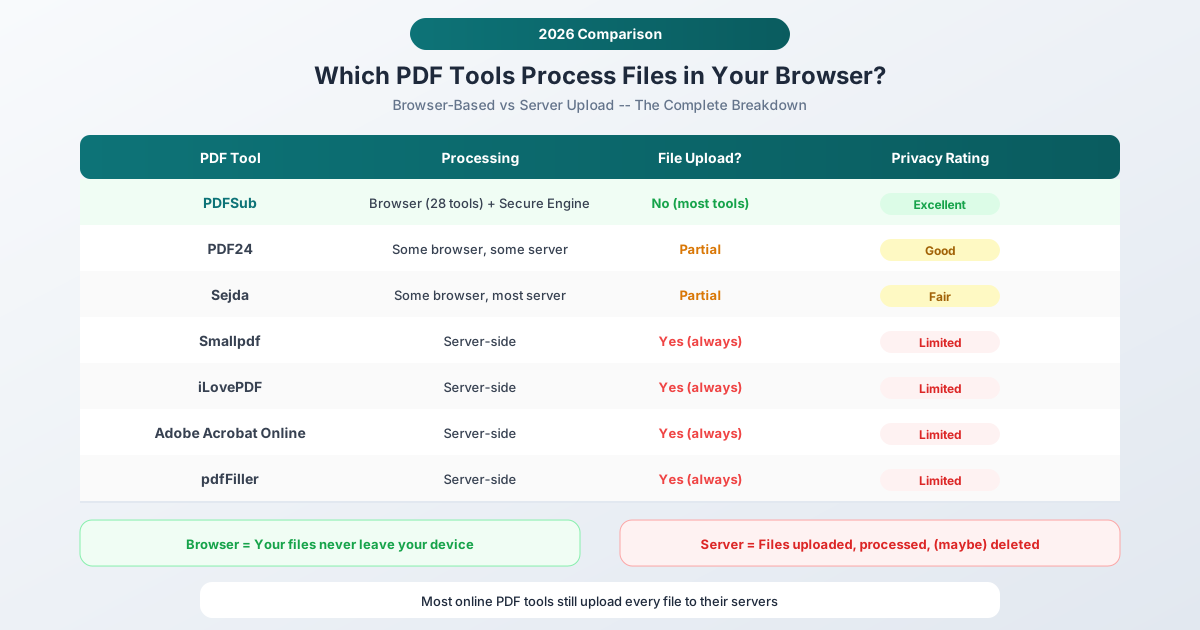
Most online PDF tools upload your files to their servers. A few process everything locally in your browser. Here's which is which - and why it matters.
Here's a question most people never think to ask: when you use an online PDF tool, does your file leave your computer?
For the vast majority of PDF tools, the answer is yes. You click "upload," your file travels over the internet to a server, gets processed, and the result gets sent back. The whole round trip takes seconds, so it feels instant and harmless. But your file was on someone else's computer, even if only briefly.
A small number of tools work differently. They run entirely in your browser - the processing code downloads to your device and does the work locally. Your file never leaves your machine. Same result, fundamentally different privacy profile.
This guide compares the major online PDF tools and tells you exactly which ones upload your files and which ones keep them on your device.
For the architectural deep-dive: Browser vs Cloud PDF Security walks through the data flow of each model with side-by-side diagrams and security tradeoffs. This page is the comparison shortlist; that page is the reference.
Why Processing Location Matters
Before the comparison, let's be clear about why this distinction matters.
Server-side processing means your file travels across the internet (encrypted, usually via HTTPS), gets stored temporarily on a remote server, gets processed, and the result is sent back. The original file typically sits on the server for some period - seconds, minutes, hours, or longer - before deletion. During that window, the file is subject to whatever security and retention policies the tool operator has in place.
Browser-based processing means the tool's code runs inside your web browser using JavaScript and WebAssembly. Your file is read from your local storage, processed in your browser's memory, and the result is saved back to your device. At no point does the file leave your machine. There's no upload, no server, and no retention period.
The practical implication: with browser-based tools, you get the same output with zero server-side risk. No breach can expose your file because your file was never on a server. No retention policy matters because there's nothing to retain. Privacy isn't a policy decision - it's an architectural guarantee.
That said, browser-based processing has genuine limitations. It relies on your device's processing power, which means very large files (hundreds of megabytes) or computationally intensive operations (like AI-powered analysis) may not be feasible client-side. This is why a hybrid approach - browser-based for most tools, secure server-side for complex operations - offers the best balance.
The 2026 Comparison
PDFSub
Processing model: Hybrid - browser-based for most core tools, server-side (PDFSub Engine) for AI and complex conversions.
Pricing: From $15/mo with a 7-day free trial.
What processes in the browser: Merge, Split, Compress, Rotate, delete pages, extract pages, reorder, Watermark, PDF to image, Image to PDF, Password Protect, unlock, Page Numbers, headers/footers, resize, Crop, auto-crop, stamp, metadata editing, Compare, PDF to text, create PDF, pages per sheet, PDF/A Conversion, clean scanned PDF, Batch Convert, and more.
What requires server-side: AI-powered tools (Summarize, Translate, Chat, Extract Data, Extract Tables, Financial Report Analyzer), OCR for scanned documents, Bank Statement Converter, and format conversions that need the PDFSub Engine (PDF to Word, PDF to PowerPoint, PDF to EPUB).
File retention: Browser-based tools have zero retention (files never leave your device). Server-side tools process files in isolated environments and delete them immediately after processing completes.
Privacy assessment: The strongest privacy position in this comparison. Most common operations never leave your device, and the distinction between browser and server tools is clearly communicated in the interface.
PDF24
Processing model: Mixed - some tools offer a browser-based option, most use server processing.
What processes in the browser: PDF24 offers a desktop application that processes files locally. Their online tools primarily use server-side processing, though some basic operations may run client-side.
What requires server-side: Most online tools upload files to servers located in Germany.
File retention: Files are processed on German servers and stated to be deleted after processing. Being in Germany means GDPR applies natively.
Privacy assessment: Better than average due to German data protection laws, but most operations still require uploading files to their servers. The desktop application avoids this, but that requires installation.
Sejda
Processing model: Mixed - some tools advertise browser-based processing, but many fall back to server-side.
What processes in the browser: Sejda advertises that some operations can run in the browser. However, their free tier is limited to 3 tasks per hour, 50 MB files, and 200-page documents. Beyond these limits, processing moves server-side.
What requires server-side: Most operations for free users, and many operations even for paid users, use server processing.
File retention: Files are stated to be deleted after 2 hours for free users, or 5 hours for premium users.
Privacy assessment: The partial browser-based approach is a step in the right direction, but the tight free tier limits push most real-world usage to server-side. The distinction between what runs locally and what doesn't is not always clear to the user.
Smallpdf
Processing model: Server-side.
All operations upload files to Smallpdf's servers. This includes basic operations like merging and splitting that are technically feasible in the browser.
File retention: Smallpdf states that files are encrypted during transfer and deleted after one hour. They obtained ISO 27001 certification and are SOC 2 Type II certified.
Privacy assessment: Good security practices for a server-side tool, but every file you process touches their infrastructure. For sensitive documents, this means trusting their retention and security claims - which are unverifiable from the outside, certifications notwithstanding.
Free tier: Limited to 2 tasks per day, which aggressively pushes users toward paid plans.
iLovePDF
Processing model: Server-side.
All operations upload files to iLovePDF's servers. Processing happens on their infrastructure.
File retention: iLovePDF states that files are automatically deleted after task completion, typically retained for no more than two hours. Servers are located in the EU.
Privacy assessment: Standard server-side approach with EU data residency. Their privacy policy includes broad language about data processing for "service improvement," which is common but worth noting.
Adobe Acrobat Online
Processing model: Server-side.
All online operations upload files to Adobe's cloud. This includes Adobe's free online tools and Acrobat Web.
File retention: Adobe's cloud infrastructure is enterprise-grade with strong security controls. Files are processed on Adobe's servers and subject to Adobe's privacy policy, which covers a wide range of data uses.
Privacy assessment: Enterprise-level security, but your files are on Adobe's infrastructure. Adobe's privacy policy is long and covers many products, making it difficult to understand exactly how your PDF data is handled in isolation.
pdfFiller
Processing model: Server-side.
All operations upload files to pdfFiller's servers. pdfFiller stores documents in user accounts for ongoing access.
File retention: Files are stored persistently in your account, not just during processing. This is by design - pdfFiller functions as a document management platform, not just a processing tool.
Privacy assessment: Intentionally stores your documents long-term. This is a feature for users who want cloud document management, but a significant privacy consideration for users who just want to process a file and move on.
Side-by-Side Comparison Table
| Tool | Browser Processing | Server Processing | Free Tier | File Retention |
|---|---|---|---|---|
| PDFSub | Most core tools (full browser) | AI + complex conversions | 7-day trial, then $20/user/mo annual | Zero (browser) / Immediate delete (server) |
| PDF24 | Limited (desktop app) | Most online tools | Unlimited (with ads) | Deleted after processing |
| Sejda | Some tools (limited) | Most tools | 3 tasks/hour, 50 MB, 200 pages | 2 hours (free) / 5 hours (paid) |
| Smallpdf | None | All tools | 2 tasks/day | 1 hour |
| iLovePDF | None | All tools | Limited features | Up to 2 hours |
| Adobe Acrobat Online | None | All tools | Limited features | Per Adobe policy |
| pdfFiller | None | All tools | Limited (trial) | Persistent storage |
What This Means for Different Users
Casual Users
If you're merging a couple of non-sensitive PDFs, the processing location probably doesn't matter much. Use whatever is convenient.
Professionals Handling Client Data
If you're a lawyer, accountant, consultant, or anyone handling confidential client documents, browser-based processing is a significant advantage. It eliminates the need to evaluate server security, justify tool choices under professional confidentiality obligations, or worry about data breaches at a third-party provider. Your files simply never leave your machine.
Regulated Industries
Healthcare, finance, government, and legal sectors face specific compliance requirements (HIPAA, GDPR, SOC 2, etc.) that govern how sensitive data can be processed and stored. Browser-based tools simplify compliance dramatically because there's no third-party data processing to audit or document in your compliance records.
International Users
If you're processing documents across borders, server location matters. A tool that uploads your files to servers in a different jurisdiction may subject your data to different privacy laws than your own. Browser-based tools avoid jurisdiction questions entirely because data never crosses a border.
How to Verify for Yourself
Don't take anyone's word for it - including ours. Here's how to verify whether a tool actually processes files in your browser:
- Open Developer Tools (F12 in most browsers)
- Click the Network tab
- Upload a file to the tool and perform an operation
- Watch the network requests
If you see a large outgoing request (matching your file's size), the tool uploaded your file. If you see only small requests (for page assets, fonts, etc.) and no file-sized upload, processing happened locally.
This test is definitive. You can run it on any tool, including PDFSub, to verify the privacy claims are real.
The Architecture Advantage
The trend toward browser-based processing is accelerating. Modern web technologies - WebAssembly, the File System Access API, Web Workers for parallel processing, and increasingly powerful JavaScript engines - make it possible to perform complex document operations entirely client-side.
PDFSub has invested heavily in this approach: most of its 98+ tools process everything in the browser. That number will continue to grow as web standards advance. For the operations that genuinely require server-side processing (AI analysis, OCR, complex format conversions), PDFSub uses isolated, ephemeral processing environments through PDFSub Engine - no persistent storage, no data sharing, immediate deletion.
The result is a hybrid model that maximizes both capability and privacy. You get the convenience of an online tool with the privacy of a desktop application - for the majority of PDF operations.
Frequently Asked Questions
Can browser-based tools handle large files?
It depends on your device. Modern browsers can handle files up to 100-200 MB comfortably on most laptops and desktops. Very large files (500+ MB) may cause performance issues on devices with limited RAM. For extremely large files, server-side processing with strong security practices is the practical choice.
Do browser-based tools work offline?
Once the tool's code is loaded in your browser, some operations may work without an internet connection (the code runs locally). However, most web-based tools require an initial connection to load the application. For true offline use, a desktop application is more reliable.
Is browser-based processing slower than server-side?
For most common operations (merge, split, compress, rotate), the difference is negligible. Your device handles these tasks in seconds. For computationally intensive operations like OCR on hundreds of pages or AI-powered analysis, server-side processing is typically faster because servers have more processing power and specialized hardware.
How do I know PDFSub isn't secretly uploading my files?
Verify it yourself using the Developer Tools method described above. Open the Network tab, use any of PDFSub's browser-based tools, and confirm that no file-sized data leaves your device. The code runs transparently in your browser - you can inspect exactly what it does.
What about tools that say "end-to-end encrypted"?
Encryption protects files during transit, but the tool still receives your file on their server. End-to-end encryption is better than no encryption, but it doesn't change the fundamental issue: your file is on someone else's infrastructure. Browser-based processing is a stronger privacy guarantee because the file never enters transit at all.
Conclusion
Most online PDF tools still upload every file to their servers. That's the reality in 2026, despite advances in browser technology that make local processing feasible for the majority of PDF operations.
The tools that have invested in browser-based processing - PDFSub being the most comprehensive example - offer a structurally different privacy model. Not "we promise to delete your files" but "your files never leave your device in the first place."
For sensitive documents, that architectural difference isn't a nice-to-have. It's the foundation of real privacy.
Try PDFSub's browser-based tools - start a 7-day free trial and verify the privacy yourself with Developer Tools.