How PDFSub Processes PDFs Without Uploading Your Files
Most online PDF tools upload your files to a remote server. PDFSub does things differently - processing documents directly in your browser so sensitive files never leave your device. Here's exactly how it works.
You need to convert a bank statement to Excel. Or merge two contracts into one PDF. Or compress a tax return before emailing it to a client.
So you Google "PDF converter," click the first result, and drag your file into the upload box. A progress bar fills. A spinner spins. Thirty seconds later, you download the result.
Simple. Fast. And your sensitive document just traveled across the internet, landed on a stranger's server, got processed by software you can't inspect, and was (hopefully) deleted afterward.
That's the privacy paradox of online document tools. The documents you most need to process - bank statements, tax returns, legal contracts, medical records, financial reports - are exactly the ones you should be most careful about sharing. Yet the standard workflow for every major PDF tool requires you to hand those files to a third party.
PDFSub was built to break that pattern. For most operations, your files never leave your device. This article explains exactly how that works, when server-side processing is genuinely necessary, and how you can verify every claim yourself.
How Most Online PDF Tools Work
Before explaining what PDFSub does differently, it helps to understand the standard approach. Nearly every online PDF tool - free or paid - follows the same pattern:
- You select a file on your device
- The file is uploaded to the provider's server over the internet
- The server processes the file (merge, compress, convert, extract data)
- The result is sent back to you as a download
- The original file sits on their server until it's (supposedly) deleted
This architecture makes sense from the provider's perspective. Server-side processing is easier to build, easier to scale, and gives the provider full control. But from your perspective, it means your document touches infrastructure you don't control.
Even if the provider uses HTTPS, even if they promise to delete files after processing, and even if they have a reassuring privacy policy - your file was on their server. It existed in their memory, on their disk, potentially in their backups and logs. Support staff may have access. Subprocessors may receive copies. And if their infrastructure is breached, your document could be exposed alongside millions of others.
This is true for almost every online PDF tool you've used. The big names, the free tools, the "privacy-focused" tools - nearly all follow this upload-process-download model.
What "Privacy-Focused" Usually Means
Some tools market themselves as privacy-conscious. But look closely at what that typically means:
- "Files are encrypted in transit" - This is just HTTPS. Every website uses it. It protects your file while traveling, not while sitting on their server.
- "Files are deleted after 2 hours" - Two hours is a long time for a sensitive document on a third-party server. And "deleted" doesn't always mean erased from backups.
- "We don't read your files" - Technically true - automated software processes them. But the file is still on their infrastructure, accessible to anyone with server access.
- "SOC 2 certified" - This certifies that security processes exist, not that breaches can't happen. Three of the Big Four accounting firms had SOC 2 when the MOVEit breach exposed 93.3 million people's data.
None of these measures are bad. They're just insufficient for documents that are genuinely sensitive. The safest approach isn't better encryption or shorter retention - it's not sending the file in the first place.
How PDFSub Is Different: Browser-Based Processing
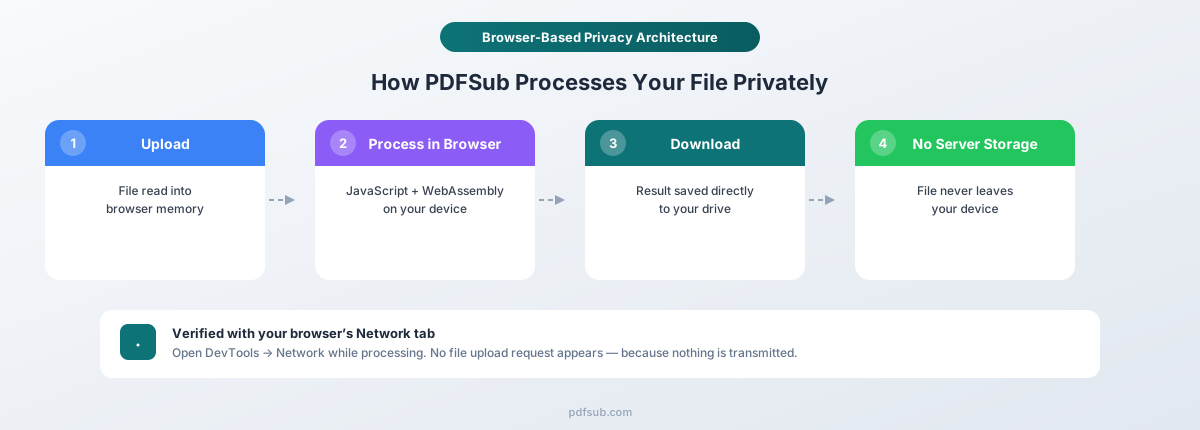
PDFSub takes a fundamentally different architectural approach. Instead of uploading your file to a server for processing, PDFSub runs the processing software directly in your web browser.
When you open PDFSub and load a PDF, the file is read from your device into your browser's memory. The processing code - written in JavaScript and WebAssembly - runs on your computer, using your processor and your RAM. The result is generated locally and downloaded directly from your browser to your hard drive.
The file never crosses the network. It never touches a remote server. There's no upload, no download of raw file data, no server-side storage, no retention period, and no third-party access.
This isn't a marketing claim that requires trust. It's a technical architecture you can verify yourself (more on that later).
How Browser-Based Processing Actually Works
You don't need to be a software engineer to understand this. Think of a traditional PDF tool like a photo printing kiosk. You hand your photo to the kiosk, it processes and prints it, and (hopefully) shreds your original. You have to trust the kiosk operator.
Browser-based processing is more like having a photo printer at home. The photo never leaves your house. The processing happens on your equipment, under your control.
When PDFSub loads in your browser, it downloads the processing software to your device. That software then runs entirely on your machine. Your browser provides a secure, sandboxed environment where the code can read and process your file without any ability to send the raw file data elsewhere.
Here's the step-by-step flow for a typical operation:
- You open PDFSub - Your browser downloads the application code (JavaScript, WebAssembly). This is the processing engine.
- You select a PDF file - Your browser reads the file from your hard drive into local memory. No network request is made.
- Processing happens locally - The JavaScript/WebAssembly code parses the PDF structure, extracts text, manipulates pages, or performs whatever operation you selected. All computation uses your device's processor.
- The result is generated in memory - The output file (merged PDF, Excel spreadsheet, compressed PDF, etc.) is created in your browser's memory.
- You download the result - The file is saved directly from browser memory to your hard drive. No server involved.
At no point does the original file - or its contents - leave your device. The browser's security model enforces this: JavaScript running in a web page cannot silently transmit data without making a network request, and you can monitor network requests in real time.
The Browser Security Model Protects You
Modern web browsers provide several layers of protection that make this architecture genuinely secure:
- Same-origin policy - Code from one website cannot access data from another. No other tab or website can read the file you're processing in PDFSub.
- Process isolation - Each browser tab runs in a separate sandboxed process. Other applications on your computer cannot access the data being processed.
- No persistent storage - When you close the tab, all data in memory is destroyed. Unlike server-side processing, there are no residual copies on disk, no backup snapshots, no log files containing your data.
- Auditable network activity - Every network request your browser makes is visible in the developer tools. You can verify in real time that no file data is being transmitted.
This isn't a proprietary security system that PDFSub built. It's the security model of the web platform itself, enforced by Chrome, Firefox, Safari, and Edge - browsers backed by billions of dollars in security investment.
It Even Works Offline
Once PDFSub's page has loaded, many operations work even if you disconnect from the internet. The processing code is already in your browser. The file is already in memory. No network connection is needed to merge PDFs, compress a document, or extract text.
Load PDFSub, turn on airplane mode, and process a file. It works - because the file was never going to be uploaded anyway.
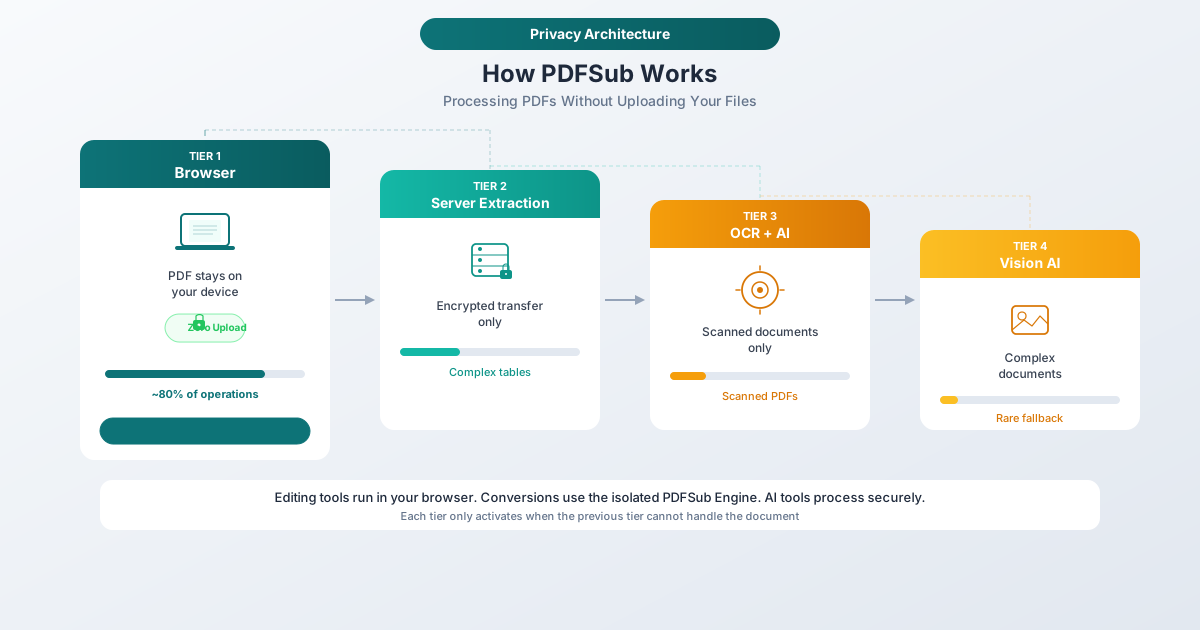
When Server-Side Processing Is Necessary
Transparency matters, so let's be direct: not every operation can happen in your browser. Some tasks require capabilities that browsers don't have, and for those, PDFSub does use server-side processing.
Here are the specific scenarios:
Scanned PDFs Requiring OCR
When a PDF is a scanned image - a photograph of a printed document - your browser can see the pixels but can't read the text. Extracting text from images requires optical character recognition (OCR), which in turn requires AI models that are too large and computationally intensive to run in a browser.
For scanned documents, the PDF is sent to PDFSub's server, where AI-powered OCR reads the text from the image, extracts the data, and returns the result.
AI-Powered Features
Features like AI summarization, AI translation, AI data extraction, and AI chat about documents require large language models that run on specialized hardware. These features cannot currently run in a browser - the models require significant computational resources that exceed what consumer devices can provide.
When you use an AI feature, the relevant document content is sent to the server for processing.
Complex Server-Side Parsing
Some PDF documents have unusual encoding, corrupted structure, or edge-case formatting that the browser-based parser can't handle. In these cases, PDFSub falls back to a server-side parser that has access to more robust parsing tools.
What Happens During Server-Side Processing
When server-side processing is required, here's exactly what happens:
- Encrypted transit - Your file is sent over TLS (the same encryption used by online banking) to PDFSub's servers
- Processing in memory - The file is processed immediately. It's held in server memory during processing, not written to permanent storage
- Result returned - The processed result is sent back to your browser
- Immediate deletion - The original file and any intermediate data are deleted from server memory as soon as processing completes
- No retention - PDFSub does not store your files, does not log file contents, and does not retain any document data after processing
- No AI training - Your documents are never used to train AI models. File content is processed and discarded
The key distinction from other tools: PDFSub uses server-side processing only when it's technically necessary, and only for the specific operations that require it. Most tools send every file to their servers regardless of whether it's needed.
What This Means for Your Documents
Different document types have different processing paths. Here's a practical breakdown:
Bank Statements (Digital PDFs)
If you download a bank statement from your online banking portal, it's a digital PDF - the text is actual text, not a scanned image. For these documents, PDFSub's extraction engine runs entirely in your browser.
Transaction dates, descriptions, amounts, and balances are parsed and structured locally. The output - whether Excel, CSV, QBO, OFX, or any other format - is generated on your device. Your bank statement, with its account numbers, transaction history, and balances, never leaves your computer.
This is the most common scenario for bank statement conversion, since the vast majority of bank statements today are downloaded digitally.
Bank Statements (Scanned)
If you're working with a physical statement that was photographed or scanned, the PDF contains images rather than text. These require server-side AI to read the text from the image. The file is sent to the server, processed, and deleted immediately after.
Invoices and Receipts
Text extraction from digital invoices and receipts happens in your browser. If you want AI-powered analysis - automatically identifying vendor names, line items, tax amounts, and totals - that requires server-side AI processing.
Contracts and Legal Documents
Merging contracts, compressing legal filings, extracting specific pages, adding watermarks, redacting content, and most other PDF manipulation operations happen entirely in your browser. The document stays on your device throughout.
Financial Reports
Converting a financial report's tables to Excel works browser-side for digital PDFs. AI-powered analysis - generating summaries, extracting key metrics, or asking questions about the content - requires server-side processing.
The General Rule
If the operation is structural (merging, splitting, compressing, rotating, extracting pages, converting formats, adding watermarks) - it happens in your browser.
If the operation requires AI understanding (summarization, translation, data extraction from complex or scanned documents, question answering) - it requires server-side processing.
PDFSub offers 98+ tools. The majority are browser-based operations that never touch a server.
For Regulated Industries
If you work in a field with strict data handling requirements, the distinction between browser-based and server-based processing has real compliance implications.
Healthcare (HIPAA)
HIPAA requires covered entities and business associates to protect patient health information (PHI). When you use a cloud-based tool to process a document containing PHI, that tool's provider becomes a business associate - requiring a signed Business Associate Agreement (BAA), documented security controls, and breach notification obligations.
When you process a PDF containing PHI using PDFSub's browser-based tools, the document never leaves your device. No PHI is shared, so no BAA is required for those operations. This simplifies compliance and eliminates a category of vendor risk.
For AI-powered features requiring server-side processing, standard HIPAA vendor evaluation applies.
Financial Services
Banks, investment firms, insurance companies, and financial advisors handle data governed by the Gramm-Leach-Bliley Act, SEC rules, FINRA requirements, and state-specific regulations. These require documented data handling procedures, vendor risk assessments, and limits on sharing client data with third parties.
Browser-based processing means client financial data stays on-premises for operations that don't require AI. This reduces third-party data processors in your compliance documentation and simplifies vendor risk assessments.
Legal
Attorneys handle documents protected by attorney-client privilege. Uploading a privileged document to a third-party server creates a risk that privilege could be challenged if the document is accessed, breached, or subpoenaed from the provider.
For basic PDF operations on privileged documents - merging discovery files, compressing exhibits, extracting pages - browser-based processing means the document never leaves the attorney's device. Privilege is maintained without question.
Accounting and Tax Preparation
The IRS requires all tax professionals to maintain a Written Information Security Plan (WISP). The AICPA restricts disclosure of confidential client information to third parties. Using cloud-based tools for client financial documents creates compliance obligations.
Browser-based processing eliminates these obligations for operations that don't require server-side AI. Your WISP becomes simpler, your vendor risk inventory shorter, and your compliance posture stronger.
How to Verify This Yourself
You don't have to take PDFSub's word for any of this. The browser-based architecture is fully auditable using tools already built into your web browser.
Step 1: Open Developer Tools
In any modern browser, press F12 (or right-click anywhere on the page and select "Inspect"). This opens the developer tools panel.
Step 2: Go to the Network Tab
Click the Network tab. This shows every network request your browser makes - every file downloaded, every API call, every data transmission. Nothing can be sent from your browser without appearing here.
Step 3: Clear the Log
Click the clear button (a circle with a line through it) to start with a clean slate.
Step 4: Process a Document
Load a PDF into PDFSub and run any browser-based operation - merge, compress, extract text, convert a bank statement.
Step 5: Inspect the Network Log
Look at the requests that appeared during processing. For browser-based operations, you'll see:
- No file upload request - There's no POST or PUT request carrying your PDF data to a server
- No document content in any request - The file bytes stay in your browser's memory
- Only small metadata requests - Things like usage analytics (page views, feature usage) that contain no document data
This is the same technique security researchers use to audit web applications. If PDFSub were secretly uploading your files, it would be immediately visible.
What About AI Operations?
If you use a feature that requires server-side AI, you will see a network request in the Network tab. This is expected - the content needs to reach the server for AI processing. The difference is that PDFSub is transparent about which operations require this, rather than silently uploading every file.
What PDFSub Collects vs. What It Doesn't
Complete transparency means being specific about what data PDFSub does and doesn't handle.
What PDFSub Collects
- Account information - Your email address, name, and subscription details if you create an account
- Usage analytics - Which tools you use, how often, page views, and feature interactions. This is standard web analytics that helps improve the product
- Error reports - If something goes wrong, anonymized error information (not your document content) helps diagnose and fix issues
- Payment information - Processed by the payment provider (not stored by PDFSub directly)
What PDFSub Does NOT Collect for Browser-Based Operations
- Your file contents - The bytes of your PDF are never transmitted to PDFSub's servers for browser-based operations
- Extracted text - Transaction descriptions, names, amounts, dates - none of this data leaves your device for local operations
- Document metadata - File names, author fields, creation dates within the PDF stay on your device
- Processed output - The Excel file, CSV, merged PDF, or compressed document is generated in your browser and saved to your device
For Server-Side Operations
When an operation requires server-side processing (AI features, scanned document OCR), the document content is sent to the server for processing and deleted immediately after. It is not stored, logged, indexed, or used for any purpose other than completing the operation you requested.
Comparison With Other Approaches
To put PDFSub's approach in context, here's how it compares to the common alternatives:
| Approach | Where Processing Happens | File Upload Required | Data Retention | Privacy Level |
|---|---|---|---|---|
| PDFSub (browser-based tools) | Your device | No | None | Highest - file never leaves |
| PDFSub (AI features) | PDFSub server | Yes (when needed) | None - deleted immediately | High - minimal exposure |
| Typical cloud PDF tool | Provider's server | Yes, always | Hours to days | Moderate - depends on provider |
| Enterprise cloud tool | Provider's server | Yes, always | Per retention policy | Moderate - documented controls |
| Desktop software | Your device | No | Local files | High - but requires installation |
Desktop software is the closest comparison in terms of privacy - both process locally. The advantage of browser-based: no installation, works on any device with a browser, always up to date, and accessible from Chromebooks and tablets that can't run desktop software.
The Honest Tradeoffs
No approach is perfect, and being trustworthy means being honest about limitations.
Browser-based processing can be slower for very large files. Dedicated servers with optimized hardware can be faster for extremely large documents (100+ pages). For typical documents, the difference is imperceptible.
AI features require server-side processing. If you need AI summarization, translation, or OCR for scanned documents, the content must reach the server. PDFSub minimizes this by using local processing first and only escalating when necessary.
Browser capabilities have limits. Edge cases - corrupted PDFs, unusual encodings, extremely complex layouts - may need the server-side fallback. PDFSub handles this gracefully, but the file does leave your device in those cases.
The philosophy: process locally whenever possible, use server-side only when genuinely required, be transparent about which is which, and delete everything immediately when server processing is needed.
Why This Architecture Matters
The trend in software is toward more cloud processing, more data collection, more server-side computation. For sensitive documents - bank statements, tax returns, legal contracts, medical records, and financial reports - that trend is exactly backwards.
The safest file is the one that never leaves your device. The most secure server is the one that never receives your data. The strongest privacy policy is the one that doesn't need to exist because there's nothing to protect on the provider's end.
PDFSub's browser-based architecture isn't a marketing differentiator. It's a fundamental design decision that shapes how every tool is built. When a new feature can be implemented client-side, it is. Server-side processing is the exception, not the default.
For privacy-conscious professionals, compliance officers, and IT managers - the question isn't just "does this tool have a good privacy policy?" It's "does this tool need access to my files at all?"
For most of what PDFSub does, the answer is no.
Try It Yourself
The best way to evaluate PDFSub's privacy architecture is to experience it firsthand.
Start your 7-day free trial - browse all 98+ tools, process a document with the Network tab open and see for yourself. No file upload. No server-side processing. Your document stays on your device.
For bank statement conversion, PDF merging, compression, text extraction, and dozens of other operations - your files never leave your browser. That's not a promise. It's an architecture you can verify.