Convert Japanese Bank Statements to Excel (MUFG, SMBC, Mizuho, and More)
Japanese bank statements combine kanji descriptions, Shift_JIS encoding, half-width katakana, and Japanese era dates that break in non-Japanese Excel. Here's how to convert them correctly.
Your 取引明細 (transaction statement) from MUFG looks perfectly structured in the PDF. But open it in Excel outside Japan and the problems cascade: kanji characters turn into garbled mojibake (文字化け), the Reiwa era date "令和8年3月2日" means nothing to your English spreadsheet, half-width katakana sender names like "ヤマダ タロウ" become unreadable symbols, and full-width numbers "123,456" won't calculate because they're different Unicode characters from their half-width equivalents.
Here's the core issue: Japanese banking runs on character encoding and formatting conventions that assume a Japanese-locale system. The Zengin interbank payment network - which processes approximately 6.5 million transactions and 12 trillion yen daily - historically required half-width katakana for all names, a legacy that still shows up on modern bank statements. When you move that data to a non-Japanese computer, encoding breaks are almost guaranteed.
Whether you're a foreign resident in Tokyo processing MUFG statements for home-country tax filing, a zeirishi (tax accountant) importing client data into freee or Money Forward, an international business consolidating data from a Japanese subsidiary, or a freelancer managing Blue Return (青色申告) bookkeeping - the core problem is identical: extracting structured, spreadsheet-ready data from Japanese bank statement PDFs.
This guide covers the specific formatting challenges of Japanese statements, the major banks you'll encounter, and how to convert them accurately.
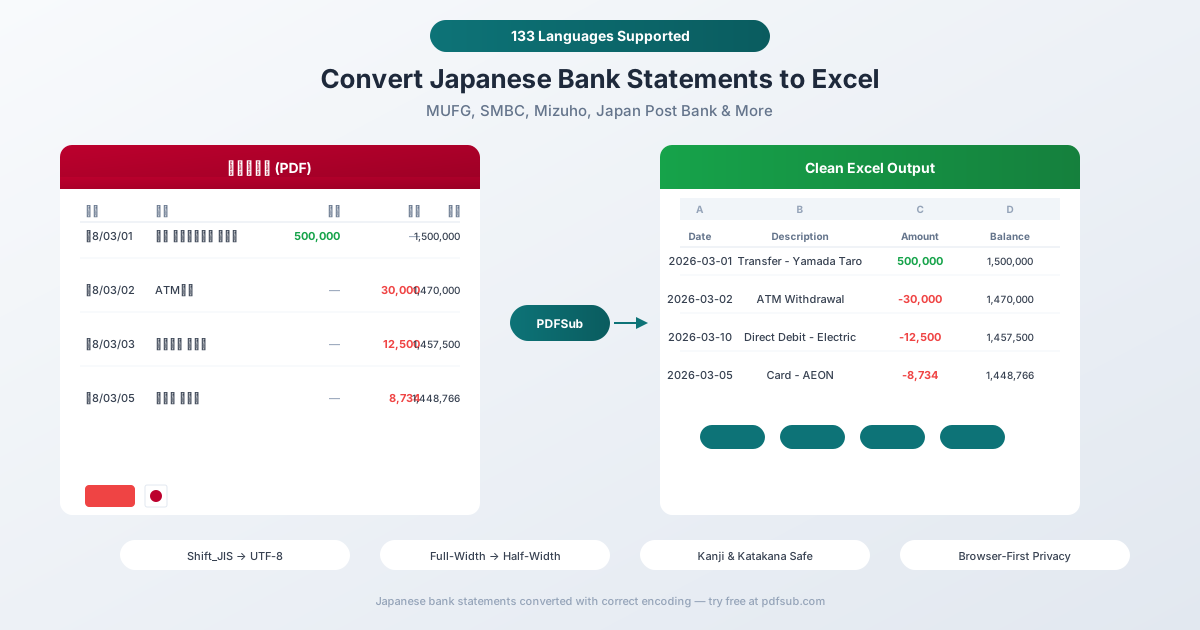
Why Japanese Bank Statements Break in Excel
Japanese bank statements create a unique set of challenges that go beyond simple number formatting. The problems span character encoding, numbering systems, date conventions, and legacy interbank formats.
1. Shift_JIS vs. UTF-8 Encoding (Mojibake)
This is the single biggest problem for anyone processing Japanese financial data outside Japan.
Most Japanese banks export CSV files in Shift_JIS (code page 932) - an encoding standard that predates UTF-8 and only covers Japanese characters. When you open a Shift_JIS file on a system expecting UTF-8, every Japanese character becomes garbled. The Japanese have a word for this: 文字化け (mojibake), literally "character transformation."
| What You Should See | What UTF-8 Displays |
|---|---|
| 振込 カ)ヤマダ タロウ | 振込 カ)ヤマダ |
| 三菱UFJ銀行 | 三è±UFJ銀行 |
| 口座振替 電気代 | å£åº§æŒ¯æ›¿ é›»æ° - 代 |
The reverse is also true: UTF-8 files opened on Japanese-locale Excel may produce different garbled output.
The problem is compounded by the fact that Shift_JIS files have no Byte Order Mark (BOM) - there's no header telling software which encoding to use. Auto-detection is unreliable, especially when the file contains a mix of Japanese characters and Latin text (which all bank statements do).
2. Full-Width vs. Half-Width Characters (全角 vs. 半角)
This is uniquely Japanese and catches virtually every non-Japanese developer off guard.
Japanese computing uses two widths for many characters. Full-width characters (全角) occupy the space of two Latin characters; half-width characters (半角) occupy one.
| Full-Width (全角) | Half-Width (半角) | Same Character? |
|---|---|---|
| 123,456 | 123,456 | Same number, different bytes |
| カード | カード | Same word ("card"), different encoding |
| ,(コンマ) | , (comma) | Same punctuation, different bytes |
| (スペース) | (space) | Same space, different bytes |
A cell containing "123,456" (full-width) looks identical to "123,456" on screen but Excel treats the full-width version as text, not a number. You can't SUM it, sort it, or use it in formulas. Standard find-and-replace for commas won't match full-width commas either.
Bank statements can mix widths: amounts might be half-width while descriptions use full-width characters. The converter must normalize everything to consistent half-width for calculations.
3. Half-Width Katakana from the Zengin System
The Zengin interbank payment clearing system - Japan's domestic payment backbone - historically required that all names be transmitted in half-width katakana (半角カナ) within a 20-character limit.
This creates a specific problem: on your bank statement, the sender name for a transfer appears as something like ヤマダ タロウ instead of 山田 太郎 (Yamada Taro). Even native Japanese readers find half-width katakana harder to read.
Worse: in half-width katakana, voiced consonant marks (dakuten) are separate characters. The character ガ (ga) in full-width is a single character, but in half-width it becomes two: ガ (ka + voiced mark). This doubles the apparent length of names containing voiced sounds and breaks any text processing that counts character positions.
4. Japanese Era Dates (和暦)
Japan uses its own era-based calendar alongside the Gregorian calendar. The current era is Reiwa (令和), which began May 1, 2019.
| Japanese Era Date | Gregorian Equivalent |
|---|---|
| 令和8年3月2日 | March 2, 2026 |
| R8.03.02 | March 2, 2026 |
| 令和7年12月15日 | December 15, 2025 |
English Excel has no concept of Japanese eras. It can't parse "令和8年" as 2026. Even the abbreviated format "R8.03.02" is unrecognizable.
The good news: Japan uses Year-Month-Day order (largest to smallest), which is ISO 8601 compliant. When statements use Western dates, they appear as 2026/03/02 - less ambiguous than the European DD/MM/YYYY format. The challenge is purely when era dates are used.
Era boundary issue: Historical statements from 2019 may span the Heisei-to-Reiwa transition (Heisei ended April 30, 2019). The same year, 2019, is both Heisei 31 and Reiwa 1. A converter must handle both eras correctly.
5. Whole-Number Currency (No Decimals)
The yen has no subunit - there are no cents. All amounts on Japanese bank statements are whole numbers: ¥1,234,567 means exactly 1,234,567 yen.
This actually simplifies one aspect of conversion (no decimal handling needed) but introduces others:
- Large numbers are normal. A typical salary is ¥300,000-500,000 per month. Rent might be ¥80,000-200,000. Numbers frequently reach six or seven digits.
- 10,000-unit thinking. Japanese people think in units of 万 (man, 10,000). A salary of ¥3,000,000 is mentally "300万円." But bank statements show the full number.
- Commas every 3 digits on statements - even though the Japanese number system groups by 4 digits (万 = 10,000, 億 = 100,000,000). Financial documents follow international convention.
6. Separate Deposit and Withdrawal Columns
Unlike Western bank statements that use a single amount column (positive for credits, negative for debits), Japanese statements typically use two separate columns:
- 入金 (nyūkin) - Deposits/credits
- 出金 (shukkin) - Withdrawals/debits
One column is always empty for each transaction. When converting to Excel, you need to decide: keep the two-column format, or merge into a single signed amount column? Either choice requires the converter to understand the Japanese column structure.
Major Japanese Banks and Their Statements
MUFG (三菱UFJ銀行)
Japan's largest bank by assets (~$2.9 trillion) with approximately 57 million individual deposit accounts. Part of the Mitsubishi UFJ Financial Group. Offers PDF statements and CSV export through online banking (BizSTATION for corporate, 三菱UFJダイレクト for retail). CSV exports use Shift_JIS encoding.
SMBC (三井住友銀行)
Japan's second-largest commercial bank with approximately 27 million retail customers. Part of Sumitomo Mitsui Financial Group. Online banking (SMBCダイレクト) provides PDF and CSV downloads.
Mizuho (みずほ銀行)
Third megabank with approximately 24 million retail customers and 12.6 million online banking subscribers. Online banking (みずほダイレクト) offers transaction downloads.
Japan Post Bank (ゆうちょ銀行)
The largest by account count with approximately 120 million customer accounts and over 205 trillion yen in total assets. Operates through roughly 24,000 branches (mostly contracted post offices). Reaches virtually every municipality in Japan. The "Yucho Tsucho" app provides digital passbook access. Unique account numbering system that differs from standard Japanese bank account numbers.
Rakuten Bank (楽天銀行)
Japan's largest online bank with 17.6+ million accounts and deposits exceeding 13 trillion yen. Deposits have grown at 16.5% annually compared to 3.8% for megabanks. Fully digital with CSV export capability.
Regional Banks (地方銀行)
Japan has approximately 97 regional banks - 61 first-tier banks and 36 second-tier banks. Each prefecture typically has at least one regional bank headquartered in its capital city. Examples: Yokohama Bank (横浜銀行), Chiba Bank (千葉銀行), Shizuoka Bank (静岡銀行). Statement formats vary significantly across regional banks.
SBI Shinsei Bank / Sony Bank
SBI Shinsei Bank and Sony Bank are notable for offering English-language online banking - rare in Japan. Popular with foreign residents for this reason. Both provide PDF and CSV exports.
Method 1: Use PDFSub (Recommended)
PDFSub handles Japanese bank statements natively - including all the encoding and formatting challenges above.
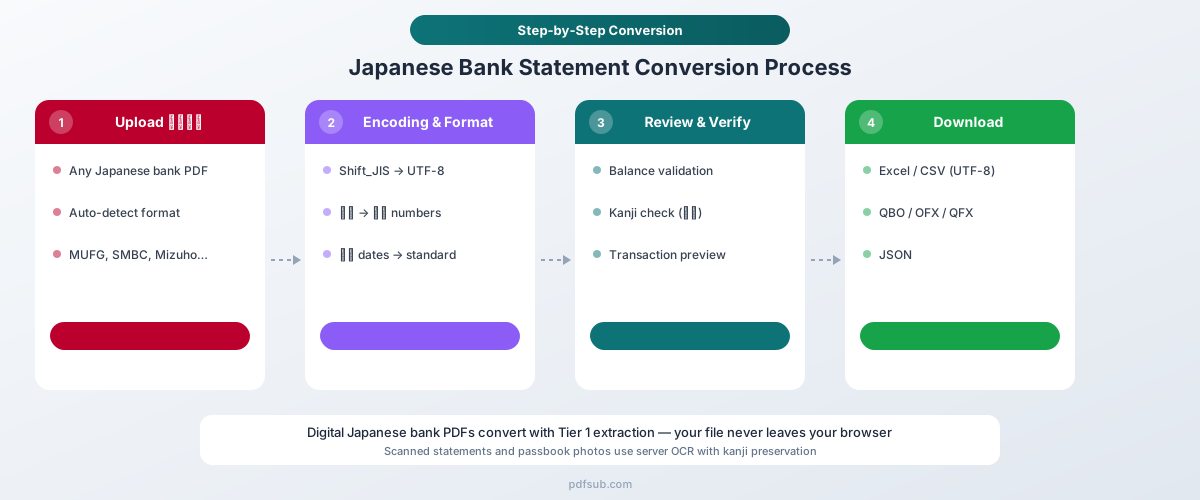
How It Works
-
Upload your 取引明細書 - Drag and drop the PDF from any Japanese bank. PDFSub auto-detects the bank format from the 20,000+ supported templates.
-
Automatic format handling - The converter automatically:
- Detects and converts Shift_JIS encoding to UTF-8
- Normalizes full-width numbers (123) to half-width (123) for calculation
- Converts full-width commas, spaces, and punctuation to standard characters
- Parses Japanese era dates (令和8年3月2日) to standard dates (2026-03-02)
- Translates half-width katakana sender names to readable full-width
- Merges deposit/withdrawal columns or preserves them as separate columns
- Recognizes Japanese banking terminology (振込, 振替, 口座振替, etc.)
-
Review and verify - Check the extracted transactions in the preview. Balances are validated against the statement's opening and closing 残高 (balance).
-
Download - Export as Excel (.xlsx), CSV (UTF-8), QBO (QuickBooks), OFX (Xero, Wave), QFX (Quicken), or JSON.
Why PDFSub Works for Japanese Statements
130+ languages including Japanese. The extraction engine understands Japanese banking terminology - 振込, 振替, 入金, 出金, 口座振替, 手数料, 利息 - and maps them to structured fields.
Encoding handled automatically. No need to manually detect or convert between Shift_JIS and UTF-8. PDFSub identifies the encoding and normalizes everything to UTF-8 with proper handling of kanji, hiragana, katakana, and mixed-width characters.
Every major Japanese bank supported. From the three megabanks (MUFG, SMBC, Mizuho) to Japan Post Bank's 120 million accounts, Rakuten Bank, regional banks across all 47 prefectures, and English-friendly banks like SBI Shinsei and Sony Bank.
Browser-first privacy. For digital PDFs from online banking, text extraction happens entirely in your browser. The file never leaves your device. Server-side processing is only used for scanned documents or passbook photos.
Full-width normalization. Numbers, commas, spaces, and punctuation are all normalized from full-width to half-width automatically - ensuring amounts are treated as numbers, not text, in your spreadsheet.
Method 2: Your Bank's CSV Export
Most major Japanese banks offer CSV transaction downloads through online banking. Here's what to expect:
What You'll Get
- Encoding: Almost always Shift_JIS (not UTF-8)
- Delimiter: Standard comma (,)
- Date format: Usually YYYY/MM/DD (Western) in CSV, though some banks use era dates
- Columns: Typically 日付 (Date), 摘要 (Description), 入金額 (Deposit), 出金額 (Withdrawal), 残高 (Balance)
Limitations
Shift_JIS encoding. Opening the CSV on any non-Japanese system produces garbled text. You need to explicitly set the encoding when importing: In Excel, use Data → Get Data → From Text/CSV → Select "Japanese (Shift-JIS)" encoding.
Half-width katakana names. Sender/recipient names will appear in half-width katakana from the Zengin system. These are difficult to read even for native Japanese speakers and impossible for non-speakers.
Limited history. Online banking CSV exports typically cover 3-12 months. Longer history requires downloading statements for each period separately.
No standardized format. Unlike the German CAMT.053/MT940 or French CAMT.053/FEC standards, Japanese bank CSVs have no universal format. Each bank uses its own column order, naming, and structure.
Full-width characters in descriptions. Transaction descriptions may contain full-width numbers and punctuation that need normalization before analysis.
Method 3: Manual Copy-Paste (Not Recommended)
The problems are severe with Japanese statements:
- Kanji and katakana characters may not paste correctly between applications
- Encoding conversion fails silently - characters that look correct may be the wrong Unicode codepoints
- Full-width numbers paste as text that can't be calculated
- Half-width katakana names paste but are unreadable on non-Japanese systems
- Era dates have no automatic conversion to Gregorian dates in English Excel
- Separate deposit/withdrawal columns require manual merging
- No validation against opening/closing balances
For any volume of transactions, this approach is impractical.
Japanese Financial Systems You Should Know
Zengin System (全銀システム)
Japan's core domestic interbank payment clearing network, established in 1973. Connects virtually all private banks in Japan, processing approximately 6.5 million transactions per day totaling around 12 trillion yen.
The Zengin file format uses fixed-width 120-byte records with half-width katakana encoding for names. This legacy format is why sender/recipient names on bank statements appear in half-width katakana rather than kanji. The newer ZEDI (Zengin EDI) system supports full kanji and is moving toward ISO 20022-compliant XML messaging, but the legacy formatting persists on many statements.
Blue Return (青色申告) vs. White Return (白色申告)
Japanese tax filing has two levels:
| Feature | Blue Return (青色申告) | White Return (白色申告) |
|---|---|---|
| Application | Must apply in advance | Default status |
| Bookkeeping | Detailed double-entry | Simple income/expense |
| Special deduction | Up to ¥650,000 (with e-Tax) | None |
| Loss carryover | Yes, up to 3 years | No |
Blue Return filers - who receive the larger tax deduction - are required to maintain detailed financial records, making accurate bank statement conversion essential for their bookkeeping.
Qualified Invoice System (インボイス制度)
Launched October 1, 2023, this system requires businesses to register as "qualified invoice issuers" to issue valid invoices for consumption tax credits. Previously, businesses with annual taxable sales under 10 million yen were exempt from consumption tax. This change has significantly increased the need for accurate financial record-keeping among small businesses and freelancers.
Japanese Accounting Software
| Software | Key Stats | Target |
|---|---|---|
| freee | ~600,000 subscribers | SMEs, freelancers, startups |
| Money Forward | 27.96 billion yen SaaS ARR | SMEs, individuals |
| Yayoi (弥生) | #1 desktop accounting for 24 consecutive years | SMEs, sole proprietors |
| TKC | Serves ~11,500 tax accountant firms | Tax accountant firms |
All three major cloud platforms (freee, Money Forward, Yayoi Online) support CSV import of bank transaction data. PDFSub's Excel and CSV exports can be imported directly into these tools.
Who Needs Japanese Bank Statement Conversion?
Tax accountants (税理士). Japan has approximately 82,276 registered tax accountants (as of December 2025). They process client bank statements for bookkeeping, tax filing, and audit preparation. The TKC National Federation alone has 11,500 member firms.
Foreign residents. As of June 2025, 3.96 million foreign residents live in Japan - nearly double the 2012 figure. Most bank statements are entirely in Japanese with no English option. Foreign residents need converted statements for home-country tax filing, visa renewals, and sending financial documentation to overseas institutions.
Freelancers filing Blue Returns. Self-employed workers and freelancers maintaining Blue Return (青色申告) status must keep detailed double-entry bookkeeping records. Converting bank statements to Excel is the starting point for categorizing business expenses and calculating the ¥650,000 special deduction.
International businesses. Companies with Japanese subsidiaries need to consolidate Japanese banking data with global accounting systems. The three megabanks collectively serve as the main bank for 19.3% of Japanese companies, and corporate banking typically runs through MUFG's BizSTATION or similar portals.
Students and working holiday visa holders. Japan saw over 30 million international visitors in 2024. Long-term students and working holiday visa holders open Japanese bank accounts (often at Japan Post Bank, the most accessible) and need to process statements when managing finances or filing taxes in their home countries.
Tips for Working with Japanese Financial Data in Excel
Check for mojibake first. If any Japanese text appears as garbled characters (ä, â€, é, etc.), the file was opened with the wrong encoding. Re-import using Shift_JIS encoding or use PDFSub's UTF-8 Excel export to avoid the issue entirely.
Verify number types. After import, test that amounts are actual numbers: click a cell and check if Excel shows a number in the formula bar, or try =SUM() on a column. If SUM returns 0 but cells show numbers, the values are full-width text masquerading as numbers.
Understand the two-column format. Japanese statements use separate 入金 (deposit) and 出金 (withdrawal) columns. If your analysis needs a single signed amount, create a formula: =IF(deposit_cell<>"", deposit_cell, -withdrawal_cell).
Convert era dates. If you receive era dates: Reiwa year + 2018 = Gregorian year. So 令和8年 = 2026, 令和7年 = 2025. For Heisei dates (pre-May 2019): Heisei year + 1988 = Gregorian year.
Keep the original PDF. Japanese tax law requires retention of financial records. For Blue Return filers, the original bank statement (or passbook) is required documentation. Always keep the PDF alongside your converted Excel file.
Watch for mixed-width characters. If sorting or filtering produces unexpected results, check for mixed full-width and half-width characters in the same column. A single full-width space in an otherwise half-width cell will cause mismatches.
Frequently Asked Questions
Can I convert MUFG (三菱UFJ銀行) statements to Excel?
Yes. MUFG is Japan's largest bank with approximately 57 million individual accounts. PDFSub handles MUFG PDF statements natively, converting the Japanese formatting - including Shift_JIS encoding, half-width katakana sender names, and separate deposit/withdrawal columns - to clean, UTF-8 encoded spreadsheet data.
How do I fix garbled Japanese characters (mojibake)?
Mojibake occurs when a Shift_JIS encoded file is opened as UTF-8 (or vice versa). PDFSub avoids this entirely by detecting the encoding automatically and exporting in UTF-8. If you're working with raw CSV files, specify "Japanese (Shift-JIS)" encoding when importing into Excel: Data → Get Data → From Text/CSV → select the encoding.
Do Japanese bank PDFs have OCR issues?
Statements downloaded from online banking are native digital PDFs with selectable text - extraction is fast and accurate. OCR is needed for scanned paper statements or passbook photos (通帳の写真). Japan's passbook culture means many users photograph their passbook pages rather than downloading PDFs. PDFSub handles both digital PDFs and scanned documents.
What about passbook (通帳) entries?
Physical passbooks are still common in Japan, though usage is declining as banks charge fees for new passbooks (MUFG charges ¥550/year). Passbook entries are typically more abbreviated than online statement PDFs, showing only shortened descriptions. If you photograph passbook pages, PDFSub's OCR mode can extract the transactions.
Can I export Japanese bank data into freee or Money Forward?
PDFSub exports to Excel, CSV (UTF-8), QBO, OFX, QFX, and JSON. For Japanese accounting software (freee, Money Forward, Yayoi), export to CSV and import using the software's built-in bank transaction import feature. The properly encoded, normalized data from PDFSub ensures clean import without mojibake or formatting issues.
How do I handle Japanese era dates (令和)?
PDFSub automatically converts Japanese era dates to standard Gregorian dates. For manual conversion: Reiwa year + 2018 = Gregorian year (令和8年 = 2026). Heisei year + 1988 = Gregorian year (平成31年 = 2019). The eras changed on May 1, 2019.
How many Japanese banks does PDFSub support?
PDFSub supports 20,000+ bank formats globally, including all major Japanese banks: the three megabanks (MUFG, SMBC, Mizuho), Japan Post Bank, Rakuten Bank, regional banks across all 47 prefectures, and English-friendly banks like SBI Shinsei and Sony Bank.
Can I convert multiple Japanese statements at once?
Yes. Upload multiple 取引明細書 (transaction statements) and PDFSub processes them sequentially. Each statement is auto-detected and converted independently, even if they're from different banks with different layouts and encoding conventions.
Try PDFSub Free - full access to the Bank Statement Converter and 98+ other PDF tools on the All-In-One plan ($20/user/mo annual). Cancel anytime.