Convert German Bank Statements to Excel (Sparkasse, Deutsche Bank, and More)
German bank statements use comma decimals, DD.MM.YYYY dates, and multi-line Verwendungszweck fields that break in Excel. Here's how to convert them cleanly.
Your German Kontoauszug looks perfectly organized - until you try to open it in Excel. The comma decimals turn into text. The DD.MM.YYYY dates flip to January instead of March. The Verwendungszweck field, which held the entire payment reference on the PDF, now spans four rows and breaks your transaction table.
This isn't a small formatting quirk. German bank statements use number, date, and text conventions that are fundamentally incompatible with English-locale spreadsheets. Copy-paste doesn't work. Even CSV exports from German banks use semicolons instead of commas, which English Excel doesn't parse correctly.
Whether you're an expat accountant processing statements from Deutsche Bank, a Steuerberater importing Sparkasse Kontoauszüge into DATEV, or a multinational finance team consolidating data from a German subsidiary - the problem is the same: getting clean, structured data out of a German bank statement PDF and into a spreadsheet that actually works.
This guide covers the specific challenges of German statements, the banks you'll encounter, and the fastest way to convert them accurately.
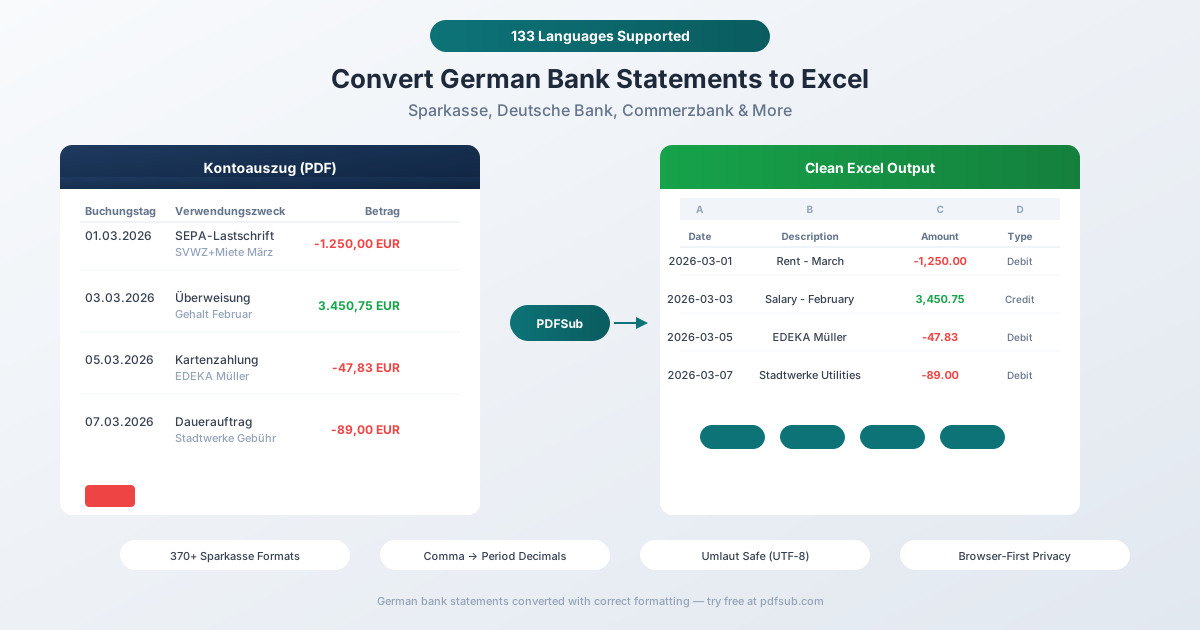
Why German Bank Statements Break in Excel
Before jumping to solutions, it helps to understand exactly what makes German statements different. There are six major formatting issues that trip up every generic PDF converter.
1. Comma Decimals and Period Thousands
German numbers use the opposite convention from English:
| German Format | English Equivalent | What Excel Sees |
|---|---|---|
| 1.234,56 EUR | 1,234.56 EUR | Text (unrecognized) |
| 15.000,00 EUR | 15,000.00 EUR | Text or 15.0 |
| -347,89 EUR | -347.89 EUR | Text |
English-locale Excel treats "1.234,56" as a text string - it can't parse a number with both periods and commas in the "wrong" positions. Simple find-and-replace (swap commas for periods) fails because you need to handle the thousands separator and decimal separator simultaneously, in the right order.
Some German statements make this harder by using "H" (Haben/credit) and "S" (Soll/debit) instead of plus and minus signs. So "1.234,56 H" means a credit of €1,234.56, and "347,89 S" means a debit of €347.89.
2. DD.MM.YYYY Date Format
German dates use day-month-year with period separators: 01.03.2026 means March 1, 2026.
In English-locale Excel, this gets interpreted as January 3, 2026 (MM/DD/YYYY). Worse, dates like "15.03.2026" might be recognized correctly (no 15th month), creating a mix of correctly and incorrectly parsed dates in the same column - a nightmare for sorting and filtering.
Some German statements only show DD.MM. (without the year) on individual transaction lines, with the year only in the header. A converter needs to infer the full date from context.
3. Multi-Line Verwendungszweck
The Verwendungszweck (payment reference/purpose) is the most complex field on a German bank statement. SEPA allows up to 140 characters, which wraps across 2-4 lines on the PDF. A single transaction might look like:
15.03.  15.03.  SEPA-Lastschrift
                EREF+2026-03-001 MREF+M-2024-123456
                CRED+DE98ZZZ09999999999
                SVWZ+Miete März 2026 Wohnung 4B
                                                    -1.250,00
That's one transaction spread across five lines. A naive PDF parser creates five separate rows. A good converter recognizes the continuation pattern and merges them into a single transaction with a clean description.
The structured SEPA prefixes (EREF+, MREF+, CRED+, SVWZ+) contain machine-readable data that most users don't need in their spreadsheet. The actual human-readable purpose ("Miete März 2026 Wohnung 4B") is buried after the reference codes.
4. Umlaut and Special Characters
German text contains characters outside basic ASCII: ä, ö, ü, ß (and their uppercase variants Ä, Ö, Ü). These appear in:
- Payee names: "Müller GmbH", "Bürostühle König"
- Bank names: "Städtische Sparkasse", "Kreissparkasse Böblingen"
- Description fields: "Überweisung", "Gebühren", "Kontoführung"
Encoding mismatches turn "Überweisung" into "überweisung" or "Uberweisung". This happens when a PDF uses Windows-1252 encoding but the converter reads it as UTF-8 (or vice versa).
Additionally, the SEPA character set doesn't allow umlauts - banks may replace "Müller" with "Mueller" or "Muller" on SEPA transactions. The same payee can appear with different spellings across different transaction types on the same statement.
5. Two Date Columns
German statements typically show two dates per transaction:
- Buchungstag (posting date) - when the bank processed the transaction
- Wertstellung or Valuta (value date) - when the transaction affects your balance for interest calculations
These are often different dates. A Saturday card payment might have a Buchungstag of Monday but a Wertstellung of Saturday. Your converter needs to correctly identify which column is which, because for accounting (Buchhaltung) purposes, the Buchungstag is usually the relevant date.
6. 370+ Sparkasse Layout Variations
Germany's banking system is built on three pillars: commercial banks (Deutsche Bank, Commerzbank), savings banks (Sparkasse network), and cooperative banks (Volksbank/Raiffeisenbank). The Sparkasse network alone has roughly 342 independent institutions - each with potentially different PDF layouts.
Column positions, font sizes, header structures, and page formats vary across Stadtsparkasse, Kreissparkasse, and Landesbank branches. Some use standard A4, others use the compact A4/3 format (historically printed at Kontoauszugsdrucker machines). A converter handling "German bank statements" needs to handle not one format but hundreds.
The Volksbank/Raiffeisenbank network adds another 645 independent institutions with their own variations.
Major German Banks and Their Statements
Here's what you'll encounter from Germany's most common banks:
Deutsche Bank
Germany's largest commercial bank. Provides digital statements via the "Digitales Postfach" in online banking. Clean digital PDFs with selectable text. Business clients can access CAMT.053 exports via EBICS.
Commerzbank
Second-largest private bank. Statements available via electronic Postfach, stored for 10 years. Offers both PDF and CSV export from online banking. Has migrated from MT940 to CAMT format for business clients.
Sparkasse Network (~342 Institutions)
The most common bank for German individuals. Each local Sparkasse (Stadtsparkasse, Kreissparkasse) has slightly different PDF layouts. Statement formats include A4, A4/3 (compact), and A6. Digital statements available via online banking and the Sparkasse app.
Volksbank/Raiffeisenbank (~645 Institutions)
Germany's cooperative banking network. Similar to Sparkasse in that each institution operates independently with its own statement format. Collectively part of the BVR umbrella.
DKB (Deutsche Kreditbank)
Major direct bank. Exports transactions as CSV from the web portal - but the CSV format is DKB-proprietary and semicolon-delimited, which doesn't open correctly in English Excel without manual configuration.
ING-DiBa
Large direct bank. Provides PDF statements (Kontoauszug) through online banking. CSV transaction export available but limited in date range.
N26
Berlin-based digital bank. Exports statements in both PDF and CSV through the web app. CSV export is only available via web - not the mobile app.
Postbank
Now a Deutsche Bank subsidiary. Offers export in Standard, DATEV, and Lexware-compatible formats - making it one of the more accounting-friendly options.
Method 1: Use PDFSub (Recommended)
PDFSub handles German bank statements natively, including all the formatting challenges described above.
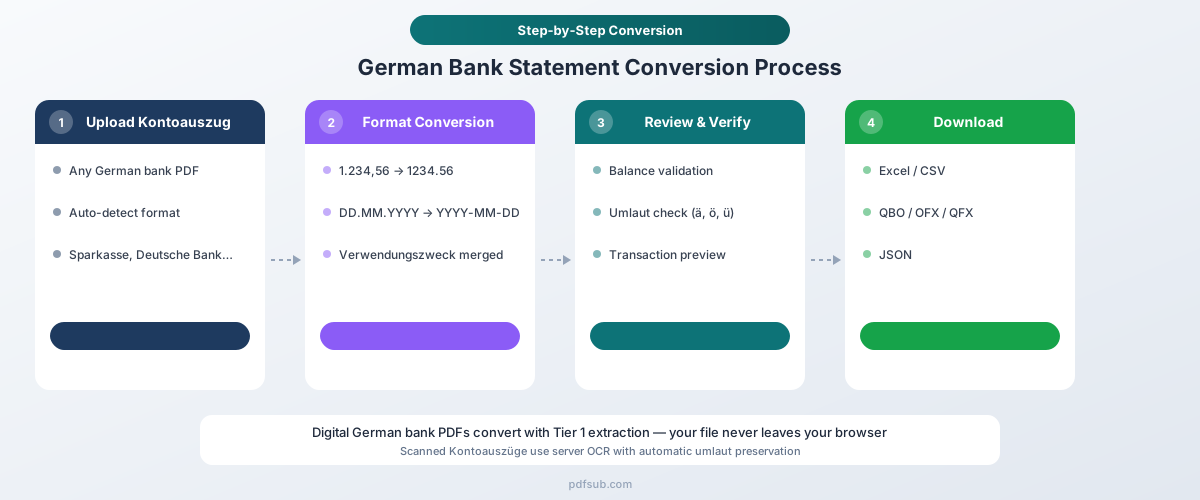
How It Works
-
Upload your Kontoauszug - Drag and drop the PDF from any German bank. PDFSub auto-detects the bank format from the 20,000+ supported templates.
-
Automatic format handling - The converter automatically:
- Converts DD.MM.YYYY dates to your preferred format
- Transforms comma decimals (1.234,56) to standard numbers (1234.56)
- Merges multi-line Verwendungszweck into a single clean description
- Cleans SEPA reference codes (EREF+, MREF+, CRED+) from descriptions
- Preserves umlauts (ä, ö, ü, ß) with correct UTF-8 encoding
- Maps Buchungstag and Wertstellung to separate columns
-
Review and verify - Check the extracted transactions in the preview. Balances are validated against the statement's opening and closing Saldo.
-
Download - Export as Excel (.xlsx), CSV, QBO (QuickBooks), OFX (Xero, Wave), QFX (Quicken), or JSON.
Why PDFSub Works for German Statements
130+ languages including German. The extraction engine understands German banking terminology - Überweisung, Lastschrift, Gutschrift, Dauerauftrag - and maps them to structured fields.
370+ Sparkasse formats. Instead of relying on a single template, PDFSub uses AI-assisted extraction that adapts to layout variations across the entire Sparkasse and Volksbank networks.
Browser-first privacy. For digital PDFs from online banking (which is most German bank statements), text extraction happens entirely in your browser. The file never leaves your device. Server-side processing is only used for scanned documents.
Correct number handling. The converter doesn't just swap commas and periods - it understands German number formatting rules, including negative amounts marked with "S" (Soll) and credits marked with "H" (Haben).
SEPA-aware parsing. Multi-line Verwendungszweck fields with SEPA reference codes are merged into clean, single-line descriptions. The actual payment purpose is extracted and separated from machine-readable mandate and creditor references.
Method 2: Your Bank's Native CSV Export
Most German banks offer some form of CSV transaction download from online banking. Here's what to expect:
How to Get It
- Deutsche Bank: Online banking → Konto → Umsätze → Export as CSV
- Commerzbank: Online banking → Kontobewegungen → Download as CSV
- DKB: Online banking → Kontoumsätze → Umsätze als CSV exportieren
- N26: Web app → Download → CSV (not available in mobile app)
- Sparkasse: Online banking → Umsatzanzeige → Export (varies by institution)
Limitations
Semicolon-delimited. German CSV files use semicolons (;) as the column delimiter because commas are already used for decimals. English-locale Excel expects comma-delimited CSV and will dump the entire row into column A.
Fix: Open Excel → Data → From Text/CSV → Select the file → Choose "Semicolon" as delimiter → Set the correct encoding (Windows-1252 or UTF-8).
Limited history. Most banks only offer CSV export for 90 days to 24 months of transactions. Official Kontoauszüge (PDF statements) cover a much longer period.
Not an official statement. A CSV export of transactions is not the same as a Kontoauszug. It lacks opening/closing balances, account details, and the legal standing of an official bank statement. For tax authorities (Finanzamt) or auditors, you need the actual Kontoauszug.
No DATEV compatibility. Unless your bank specifically offers a DATEV-format export (Postbank and Targobank do), you'll need additional conversion to work with German accounting software.
German number format preserved. The CSV will contain German-format numbers (comma decimals) that still need conversion for English-locale tools.
Method 3: Manual Copy-Paste (Not Recommended)
You can try copying transaction data from the PDF and pasting into Excel. The problems:
- Multi-line Verwendungszweck fields create extra rows
- Table structure is lost - columns merge into a single text block
- Dates and numbers paste as text, not formatted values
- Umlauts may be corrupted depending on the copy method
- No validation against opening/closing balances
For more than a handful of transactions, this approach costs more time than it saves.
German Banking Formats You Should Know
CAMT.053 (Current Standard)
As of November 2025, all German banks must use CAMT.053 (ISO 20022 XML) for electronic account statements, replacing the legacy MT940 format. CAMT.053 is richer and more structured, but it's primarily used by business customers via EBICS (Electronic Banking Internet Communication Standard) - not by individuals downloading PDF statements.
If you receive CAMT.053 files from your bank, accounting software like DATEV, Lexware, or SAP can import them directly. PDFSub focuses on the PDF Kontoauszug path, which is what most individuals and small businesses work with.
MT940 (Discontinued)
SWIFT's MT940 format was the standard for decades but was officially discontinued by the German Banking Industry Committee in November 2025. Legacy systems that still rely on MT940 will need to migrate to CAMT.053.
DATEV
Not a bank format per se, but Germany's dominant accounting data exchange format. Nearly all German Steuerberater and accounting firms use DATEV software. When converting bank statements, DATEV-compatible output is often the ultimate goal for German businesses.
Who Needs German Bank Statement Conversion?
Steuerberater and accounting firms. Germany has nearly 89,000 certified tax advisors and 62,000 accounting firms - many processing client bank statements daily. Converting PDF Kontoauszüge to structured data for DATEV import is a core workflow.
Expats in Germany. With 12.4 million foreign nationals living in Germany, many need to share financial documentation with home-country authorities, accountants, or lenders who don't understand German formats.
International businesses. Germany is Europe's largest economy. Companies with German subsidiaries need to consolidate German banking data with headquarters systems that expect English number and date formats.
Freelancers and small business owners. Germany's growing freelancer economy (Freiberufler and Einzelunternehmer) often needs statement data for tax returns (Steuererklärung) and bookkeeping. Many use simpler tools than DATEV and need Excel/CSV output.
Tips for Working with German Financial Data in Excel
Even after conversion, keep these tips in mind:
Verify date formatting. After import, sort by date and check that dates are sequential. Any January dates that should be March (or vice versa) indicate a DD.MM vs MM.DD parsing error.
Check negative amounts. German statements may mark debits with "S" (Soll) or "−" or parentheses. Verify that debits and credits are correctly signed after conversion.
Preserve the Verwendungszweck. The full reference text may be useful for matching payments to invoices. Keep the complete field even if it's long - you can always filter or search within it later.
Keep the original PDF. The Kontoauszug is a legal document. Always retain the original PDF alongside your converted spreadsheet. German tax law (Abgabenordnung) requires retention of financial records for 10 years.
Watch for encoding. If umlauts appear as garbled characters (ä instead of ä), the file was opened with the wrong encoding. In Excel: Data → Get Data → From Text/CSV → Select UTF-8 encoding.
Frequently Asked Questions
Can I convert Sparkasse statements to Excel?
Yes. PDFSub supports statements from all Sparkasse institutions - Stadtsparkasse, Kreissparkasse, and Landesbank formats. The AI-assisted extraction adapts to the layout variations across the 342+ independent Sparkasse banks.
How do I handle comma decimals in Excel?
PDFSub converts German comma decimals (1.234,56) to standard format (1234.56) automatically during extraction. If you're working with raw German CSV files, you'll need to change Excel's locale settings or use Find & Replace (first remove period thousands separators, then replace comma with period).
Do German digital bank statements have OCR issues?
Generally no. Statements downloaded from German online banking portals are native digital PDFs with selectable text, which means text extraction is accurate and fast. OCR is only needed for older paper statements that were scanned. PDFSub handles both - browser-based extraction for digital PDFs and server-side OCR for scans.
What's the difference between Buchungstag and Wertstellung?
Buchungstag (posting date) is when the bank recorded the transaction. Wertstellung (value date) is when the transaction affects your balance for interest calculations. They're often different - a Friday card payment might post on Monday (Buchungstag) but have a Saturday value date (Wertstellung). For accounting purposes, Buchungstag is typically the relevant date.
Can I export German bank statements to DATEV format?
PDFSub exports to Excel, CSV, QBO, OFX, QFX, and JSON. For DATEV-specific import, export to CSV and use DATEV's import assistant (Importschnittstelle) to map the columns. Some banks like Postbank offer direct DATEV-format exports from online banking.
Is PDFSub GDPR compliant and SOC 2 Ready for German financial data?
For digital PDFs, PDFSub's Tier 1 extraction runs entirely in your browser - the file never leaves your device. When server-side processing is needed for scanned documents, the PDFSub Engine handles it - an isolated service with no internet access. Files are processed in an isolated environment and auto-deleted. This is a strong privacy model for handling sensitive German financial data. PDFSub is GDPR and CCPA compliant, and SOC 2 Ready.
How many German banks does PDFSub support?
PDFSub supports 20,000+ bank formats globally, including all major German banks (Deutsche Bank, Commerzbank, Sparkasse network, Volksbank/Raiffeisenbank network, DKB, ING-DiBa, N26, Postbank, HypoVereinsbank, Targobank) and hundreds of regional institutions.
Can I convert multiple German statements at once?
Yes. Upload multiple Kontoauszüge and PDFSub processes them sequentially. Each statement is auto-detected and converted independently, even if they're from different banks with different formats.
Try PDFSub Free - full access to the Bank Statement Converter and 98+ other PDF tools on the All-In-One plan ($20/user/mo annual). Cancel anytime.