Convert French Bank Statements to Excel (BNP Paribas, Crédit Agricole, and More)
French bank statements use space-separated thousands, comma decimals, and DD/MM/YYYY dates that silently break in English Excel. Here's how to convert them correctly.
Your relevé de compte from BNP Paribas looks clean on paper. But try to work with it in Excel and the problems start immediately: "1 234,56" becomes text that can't be summed, "05/03/2026" gets silently parsed as May 3 instead of March 5, and a single prélèvement SEPA entry spans six lines of reference codes that your spreadsheet turns into six separate rows.
Here's the deeper issue: BNP Paribas - France's largest bank by assets - doesn't even offer CSV or Excel export from online banking. Your only option is a PDF relevé de compte. The same is true for many French banks.
Whether you're a British expat in the Dordogne processing Crédit Agricole statements, an American in Paris filing FBAR reports with French bank data, an expert-comptable importing client statements into Cegid Quadra, or a multinational consolidating data from a French subsidiary - the core problem is identical: extracting structured, spreadsheet-ready data from French bank statement PDFs.
This guide covers the specific formatting challenges of French statements, the major banks you'll encounter, and how to convert them accurately.
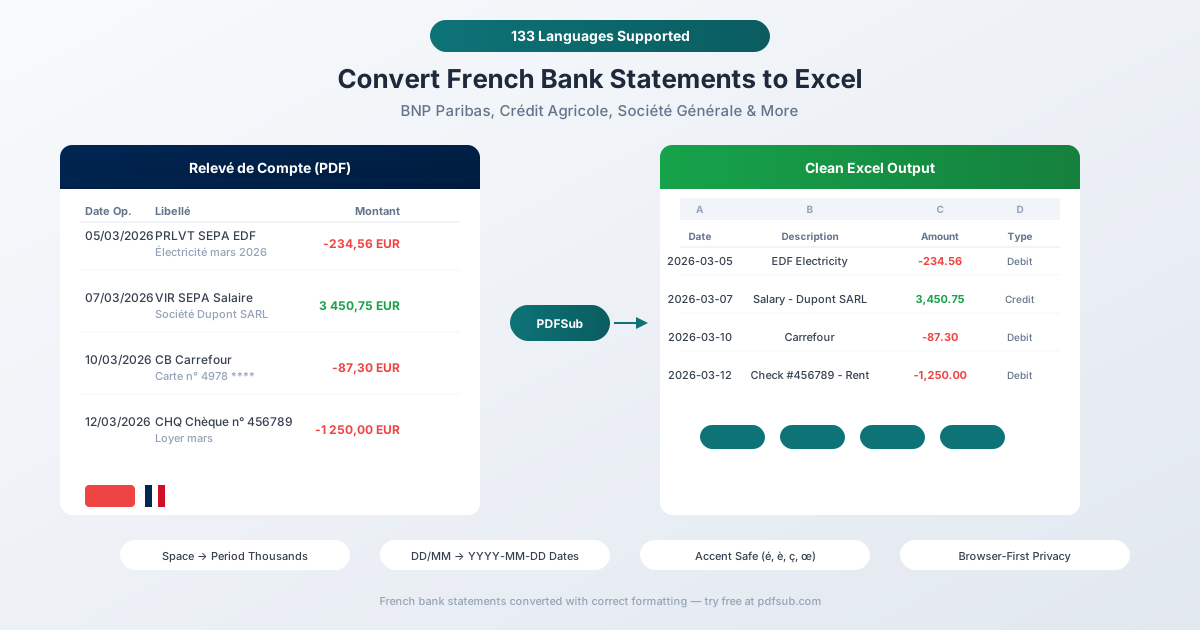
Why French Bank Statements Break in Excel
French financial formatting differs from English conventions in several critical ways. Each one causes a different kind of breakage in English-locale spreadsheets.
1. Space as Thousands Separator
This is the single biggest problem - and it's worse than the German equivalent.
French numbers use spaces to separate thousands: 1 234,56 EUR means €1,234.56.
| French Format | English Equivalent | What English Excel Does |
|---|---|---|
| 1 234,56 | 1,234.56 | Treats as text (space + comma = unrecognizable) |
| 15 000,00 | 15,000.00 | Treats as text |
| 125 347,89 | 125,347.89 | Treats as text |
English Excel immediately classifies any number containing a space as text. You can't SUM it, AVERAGE it, or sort it numerically. It just sits there, looking like a number but behaving like a word.
It gets worse: the "space" in French numbers isn't always a regular space (Unicode U+0020). Many French systems and PDFs use a non-breaking space (U+00A0) or a thin space (U+202F). Standard find-and-replace for spaces won't catch these Unicode variants. You'd need to know exactly which invisible character your PDF used - and it can vary between banks.
After stripping the thousands separator, you still need to convert the comma decimal to a period. That's a two-step conversion most manual approaches get wrong.
2. DD/MM/YYYY - The Silent Date Trap
French dates use day-month-year with slashes: 05/03/2026 means March 5, 2026.
This is more dangerous than the German format (DD.MM.YYYY) because French dates use the exact same slash separator as American dates (MM/DD/YYYY). There's no visual cue that the format is different.
The result: silent misinterpretation. English Excel reads "05/03/2026" as May 3, 2026 - no error, no warning. Dates where the day is 12 or below get parsed as the wrong month. Dates where the day is above 12 get parsed correctly. You end up with a column where some dates are right, some are wrong, and the spreadsheet gives no indication which is which.
For a 3-month bank statement, roughly 40% of dates have day ≤ 12 and will be misinterpreted - enough to destroy any analysis that depends on chronological ordering.
3. Multi-Line SEPA Transaction Descriptions
French SEPA transactions produce notoriously verbose entries. A single prélèvement (direct debit) might look like this on a statement:
05/03  PRLVT SEPA  EDF COMMERCE
       N° émetteur: FR12ZZZ123456
       Réf mandat: MAND-2024-789012
       SIRET: 12345678901234
       Électricité mars 2026
       Réf client: CLI-456789
That's one transaction across six lines. A naive PDF parser creates six rows in your spreadsheet. The actual meaningful description - "Électricité mars 2026" - is buried on line 5.
The structured SEPA references (émetteur, mandat, SIRET) are machine-readable metadata that most users don't need in their Excel file. A good converter merges these into a single row and extracts the human-readable purpose.
4. Accented Characters
French text is accent-heavy: é, è, ê, ë, à, â, ù, û, ç, î, ô, œ. These appear constantly in:
- Transaction types: "Prélèvement", "Virement", "Chèque", "Échéance"
- Payee names: "Société Générale", "Électricité de France", "Réseau Ferré"
- Description fields: "Référence", "Numéro", "Opération"
Encoding mismatches turn "Prélèvement" into "Prélèvement" or "Pr\xe9l\xe8vement". The œ ligature (used in words like "cœur") is particularly problematic - many PDF extraction libraries don't handle it at all, since it's a separate Unicode character (U+0153) that doesn't exist in basic Latin encodings.
5. Check-Heavy Statements
France remains one of Europe's highest check-using countries - roughly 2.4% of all transactions are still checks, well above the eurozone average. Your French bank statement likely contains multiple entries like:
CHQ  Chèque n° 4567890                          -250,00
CHQ  Chèque n° 4567891                          -180,50
REM CHQ  Remise de 3 chèques                   1 450,00
Check deposits may be grouped as a single "remise de chèques" with individual check numbers and amounts listed as sub-items. The converter needs to handle both individual check entries and batched deposits correctly.
6. Deferred Debit Cards (Carte à Débit Différé)
This is uniquely French. Most French bank cards default to débit différé - meaning all card payments during the month are batched and debited as a single lump sum, usually on the first business day of the following month.
On your statement, you'll see individual "CB" (carte bancaire) entries throughout the month showing when you made each purchase, but the actual account debit is a single large entry at month-end. This creates a reconciliation puzzle: the running balance doesn't match what you'd expect from summing individual transactions unless you understand the deferred debit mechanism.
7. Two Date Columns
Like German statements, French relevés show two dates per transaction:
- Date d'opération (or "Date Op.") - when the transaction occurred
- Date de valeur (or "Valeur") - when it affects interest calculations
For checks, French law limits the value date difference to 1 business day from the operation date. For deferred debit cards, the dates can differ by weeks. Your converter needs to identify which column is which and export both correctly.
Major French Banks and Their Statements
BNP Paribas
France's largest bank by assets (~€2.8 trillion). Does not offer CSV or Excel export - only PDF e-statements via online banking. This makes PDF conversion tools essential for BNP clients. Statements feature dense multi-line SEPA descriptions. Business clients can access CAMT.053 via EBICS.
Crédit Agricole (~54 Million Customers)
France's largest bank by customer count. Operates as 39 regional banks (caisses régionales), each with slightly different PDF layouts. Digital statements available via "Mes documents." Some regions offer CSV, QIF, or OFX export. The Britline subsidiary specifically serves British expats.
Crédit Mutuel (~37.8 Million Customers)
Cooperative bank structure. Includes CIC (Crédit Industriel et Commercial) as a subsidiary. Statements via online banking portal.
Groupe BPCE (~35 Million Customers)
Umbrella group containing Banque Populaire (12 regional cooperative banks) and Caisse d'Épargne (15 regional savings banks). Caisse d'Épargne offers CSV export from online banking.
Société Générale (~25 Million Customers)
Offers both PDF and CSV export from online banking ("Comptes et relevés > Relevés format CSV"). Parent company of BoursoBank.
La Banque Postale (~10+ Million Customers)
Banking arm of La Poste. Offers both PDF and CSV download. Commonly used by lower-income and rural populations.
LCL (Le Crédit Lyonnais)
Subsidiary of Crédit Agricole. Urban-focused retail bank with digital statement access.
BoursoBank (Formerly Boursorama)
France's leading neobank with 6.3 million customers. Subsidiary of Société Générale. Fully digital with PDF and CSV exports.
Fortuneo
Online-only bank owned by Crédit Mutuel Arkéa. Digital statements via online portal.
Revolut / N26
Popular with younger French users and expats. Both offer PDF and CSV exports, though N26's CSV is web-only.
Method 1: Use PDFSub (Recommended)
PDFSub handles French bank statements natively - including all the formatting challenges above.
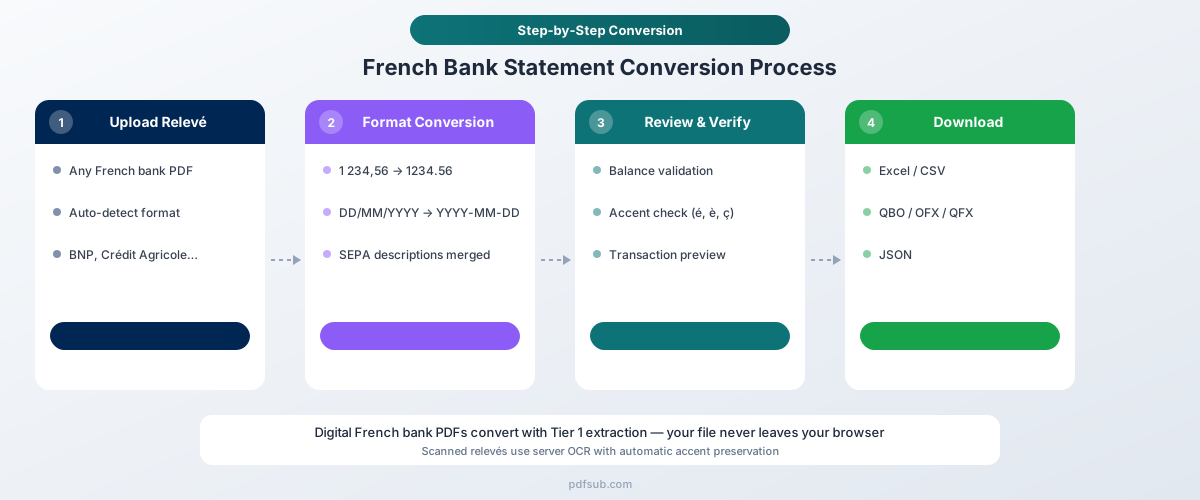
How It Works
-
Upload your relevé de compte - Drag and drop the PDF from any French bank. PDFSub auto-detects the bank format from the 20,000+ supported templates.
-
Automatic format handling - The converter automatically:
- Strips space-based thousands separators (regular, non-breaking, and thin spaces)
- Converts comma decimals (1 234,56) to standard numbers (1234.56)
- Parses DD/MM/YYYY dates correctly (not as MM/DD/YYYY)
- Merges multi-line SEPA descriptions into single clean entries
- Preserves accented characters (é, è, ê, ç, œ) with correct UTF-8 encoding
- Maps Date d'opération and Date de valeur to separate columns
- Handles check entries and batched deposits (remise de chèques)
-
Review and verify - Check the extracted transactions in the preview. Balances are validated against the statement's Ancien solde and Nouveau solde.
-
Download - Export as Excel (.xlsx), CSV, QBO (QuickBooks), OFX (Xero, Wave), QFX (Quicken), or JSON.
Why PDFSub Works for French Statements
130+ languages including French. The extraction engine understands French banking terminology - Virement, Prélèvement, Chèque, Carte bancaire, Échéance - and maps them to structured fields.
Every major French bank supported. From BNP Paribas (which has no CSV export) to the 39 regional Crédit Agricole caisses, Banque Populaire network, and Caisse d'Épargne network. The AI-assisted extraction adapts to layout variations across France's fragmented banking system.
Browser-first privacy. For digital PDFs from online banking, text extraction happens entirely in your browser. The file never leaves your device. Server-side processing is only used for scanned documents - important for compliance-conscious French businesses.
Correct space-number handling. The converter identifies and strips all Unicode space variants (U+0020, U+00A0, U+202F) used as thousands separators, then converts the comma decimal - handling the two-step conversion that manual approaches get wrong.
SEPA-aware parsing. Multi-line SEPA blocks with émetteur, mandat, SIRET, and client references are merged into clean, single-line descriptions. The actual payment purpose is extracted and separated from machine-readable references.
Method 2: Your Bank's Native Export
Some French banks offer CSV or OFX transaction downloads. Here's what to expect:
Which Banks Offer Exports
- Société Générale: CSV export via "Comptes et relevés > Relevés format CSV"
- Caisse d'Épargne: CSV export from online banking
- La Banque Postale: PDF and CSV download options
- BoursoBank: PDF and CSV exports
- BNP Paribas: PDF only - no CSV/Excel export available
- Crédit Agricole: Varies by regional caisse - some offer CSV/QIF/OFX, others don't
Limitations
Semicolon-delimited. Like German banks, French CSV files use semicolons (;) as delimiters because commas are already used for decimals. English Excel won't parse them correctly.
French number formatting preserved. The CSV still contains French-format numbers with space thousands and comma decimals. You'll need to convert them for English-locale tools.
Limited history. Most banks offer CSV export for 90 days to 12 months. Official relevés de compte (PDF statements) cover longer periods.
Not an official statement. A CSV export lacks the legal standing of a relevé de compte. For tax audits (contrôle fiscal) or generating FEC files, you need the official statement.
Not all banks offer it. Most notably, BNP Paribas - France's largest bank by assets - has no CSV export option at all.
Method 3: Manual Copy-Paste (Not Recommended)
The problems are amplified with French statements:
- Multi-line SEPA descriptions create 3-6 extra rows per transaction
- Space-separated numbers paste as text that can't be calculated
- Dates silently get parsed as the wrong month (no error displayed)
- Accented characters may be corrupted - "Prélèvement" becomes garbled
- Check entries and remise de chèques batches lose their grouping
- No validation against Ancien solde / Nouveau solde balances
For anything beyond a few transactions, this approach introduces more errors than it saves time.
French Financial Systems You Should Know
FEC (Fichier des Écritures Comptables)
Legally mandatory since January 1, 2014. Every French company must produce accounting entries in FEC format during tax audits. Key requirements:
- Tab or pipe-delimited text file with 18 mandatory fields
- Chronologically ordered and timestamped
- Must be produced within 15 days of receiving an audit notice
- Penalty of up to €5,000 for non-compliance
Bank statement data is a primary input for generating FEC-compliant entries. Experts-comptables need structured, accurate bank data to feed into accounting software that produces FEC files.
French Accounting Software Landscape
French accountants use specialized tools that differ from the US/UK ecosystem:
- Sage - Market leader. Sage 50, Sage 100, Sage X3.
- Cegid Quadra - The most popular tool among experts-comptables. Thousands of accounting firms use it daily.
- EBP - Popular with micro-enterprises and solo practitioners.
- Pennylane - French accounting unicorn serving 6,000+ accounting firms and 800,000 companies. Cloud-based.
For importing bank data, the key format is XIMPORT - a generic accounting data exchange format supported by Ciel, EBP, Sage, Cegid, and Quadratus. PDFSub's CSV export can be mapped to XIMPORT fields using your accounting software's import assistant.
The e-Invoicing Mandate (2026-2027)
France is implementing mandatory electronic invoicing: large and mid-sized companies in 2026, SMEs in 2027. This will further increase the need for digital financial data processing and integration between banking data and accounting systems.
Who Needs French Bank Statement Conversion?
Experts-comptables. France has approximately 21,600 registered chartered accountants and 19,500 accounting firms employing 186,000+ people. They process client bank statements daily, importing structured data into Cegid, Sage, or EBP for bookkeeping and FEC compliance.
British expats in France. An estimated 148,000-400,000 British nationals live in France, concentrated in Nouvelle-Aquitaine, Occitanie, and Provence. Post-Brexit, many navigate both UK and French financial systems. Crédit Agricole's Britline subsidiary exists specifically for this market.
American expats. Over 30,000 US-born residents live in France, with 13,000+ receiving first residency cards in 2024 alone. US tax law requires worldwide income reporting - FBAR filings need French bank data in a format American accountants can work with.
French expats abroad. An estimated 1.6-2.5 million French nationals live abroad. They need to share French financial documents with foreign banks, accountants, and tax authorities who can't read French-formatted statements.
International businesses. France is the world's 7th largest economy. BNP Paribas has 98% market penetration among large corporations. Companies with French subsidiaries need to consolidate French banking data with global systems that expect English formatting.
Non-French speakers in France. 6 million foreigners lived in France in 2024 - many from non-Francophone countries. Processing French bank statements without speaking French is a common challenge.
Tips for Working with French Financial Data in Excel
Verify date order. After conversion, sort by date and check that dates are chronological. Any date that looks out of sequence (March 5 appearing between March 14 and March 16) indicates a DD/MM vs MM/DD parsing error. This is the most critical check for French statements because the error is silent.
Understand débit différé. If your statement shows many "CB" (carte bancaire) entries throughout the month but one large debit at month-end, that's the deferred debit card mechanism. The individual entries show purchase dates; the lump-sum entry is the actual account debit.
Keep check numbers. French check transactions include the check number (Chèque n° XXXXXXX). Preserve this field - it's essential for reconciliation and for responding to any banking disputes.
Save the original relevé. The relevé de compte is a legal document. French tax law requires retention of financial records, and the FEC audit requirement means you may need to trace individual entries back to the original bank statement. Always keep the PDF.
Watch for encoding. If accented characters appear garbled (é instead of é, or ç instead of ç), the file was opened with the wrong encoding. In Excel: Data → Get Data → From Text/CSV → Select UTF-8 encoding.
Frequently Asked Questions
Can I convert BNP Paribas statements to Excel?
Yes. This is one of the most common use cases because BNP Paribas - France's largest bank by assets - does not offer CSV or Excel export from online banking. PDFSub handles BNP Paribas PDF statements natively, converting the French formatting to clean spreadsheet data.
How do I handle the space-separated numbers?
PDFSub automatically strips all Unicode space variants (regular spaces, non-breaking spaces, and thin spaces) used as thousands separators in French numbers, then converts comma decimals to period decimals. If you're working with raw French data manually, you'll need to: 1) Find and replace non-breaking spaces (which standard find-replace misses), 2) Remove regular spaces from numbers, 3) Replace commas with periods for decimals.
Do French digital bank statements have OCR issues?
Generally no. Statements downloaded from French online banking portals are native digital PDFs with selectable text, meaning extraction is fast and accurate. OCR is only needed for older paper statements or physical relevés. PDFSub handles both - browser-based extraction for digital PDFs and server-side OCR for scans.
What's the difference between Date d'opération and Date de valeur?
Date d'opération is when the transaction occurred (when you wrote the check, made the card payment, or initiated the transfer). Date de valeur is when the transaction affects your balance for interest calculations. For checks, French law limits the difference to 1 business day. For deferred debit cards, the dates can differ by weeks. For accounting purposes, Date d'opération is typically the relevant date.
Can I export French bank statements for use with Cegid or Sage?
PDFSub exports to Excel, CSV, QBO, OFX, QFX, and JSON. For French accounting software (Cegid Quadra, Sage, EBP), export to CSV and use your software's import assistant to map columns to the XIMPORT or proprietary format. The clean, properly formatted data from PDFSub makes this mapping straightforward.
Is PDFSub compliant with French data protection requirements?
For digital PDFs, PDFSub's Tier 1 extraction runs entirely in your browser - the file never leaves your device. When server-side processing is needed for scanned documents, the PDFSub Engine handles it - an isolated service with no internet access. Files are processed in an isolated environment and auto-deleted. This is a strong privacy model for handling French financial data. PDFSub is GDPR and CCPA compliant, and SOC 2 Ready.
How many French banks does PDFSub support?
PDFSub supports 20,000+ bank formats globally, including all major French banks (BNP Paribas, Crédit Agricole and all 39 regional caisses, Crédit Mutuel/CIC, Société Générale, Banque Populaire, Caisse d'Épargne, La Banque Postale, LCL, BoursoBank, Fortuneo) and dozens of regional institutions.
Can I convert multiple French statements at once?
Yes. Upload multiple relevés de compte and PDFSub processes them sequentially. Each statement is auto-detected and converted independently, even if they're from different banks with different layouts.
Try PDFSub Free - full access to the Bank Statement Converter and 98+ other PDF tools on the All-In-One plan ($20/user/mo annual). Cancel anytime.