How to Convert Bank Statements for Mortgage Pre-Approval
Mortgage lenders need 2-3 months of bank statements. Here's how to convert, organize, and prepare your PDF statements for a smooth pre-approval process.
You're ready to buy a house. You've found a lender, run the numbers, and submitted your pre-approval application. Then your loan officer asks for "2-3 months of bank statements for all accounts."
Sounds simple. It isn't.
Your checking account statements are 8 pages each. Your savings is another 4. You've got a joint account, a money market, and maybe a brokerage account. That's potentially 40+ pages of PDF statements across multiple accounts and multiple months. And every page matters - mortgage underwriters are thorough.
This guide covers what lenders actually look for in your bank statements, how to prepare and organize your PDF files, common reasons applications get delayed by statement issues, and how to handle the conversion process if your lender needs statements in a specific format.
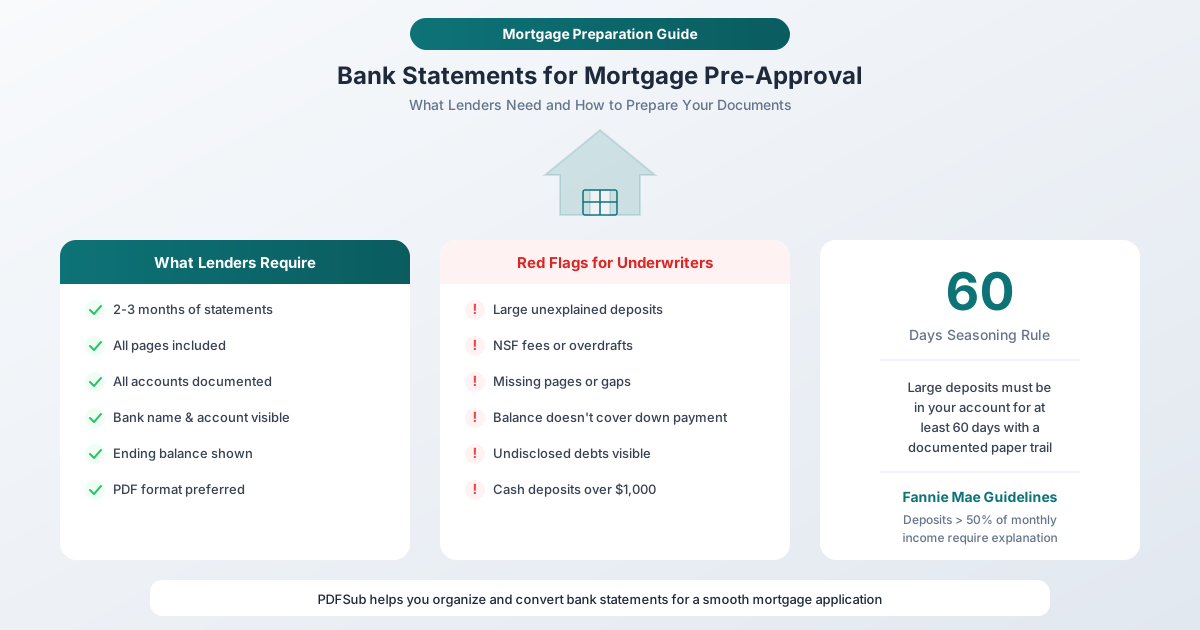
What Mortgage Lenders Look For in Bank Statements
Understanding what underwriters are evaluating helps you prepare better documents and avoid surprises that delay closing.
Proof of Down Payment Funds
The primary purpose of bank statements in a mortgage application is to verify that you actually have the money you say you have. The underwriter needs to see the down payment amount - and ideally more - sitting in your account for the most recent 2-3 statement periods.
This isn't just about the current balance. Lenders want to see that the funds have been in your account consistently, not deposited in a lump sum the week before you applied.
Income Verification Through Deposit Patterns
While pay stubs and W-2s are the primary income verification documents, bank statements provide a cross-check. Regular direct deposits that match your stated salary give the underwriter confidence that your income claims are accurate.
Self-employed borrowers face extra scrutiny here. Without regular W-2 income, bank deposits are a primary income verification method. Some lenders offer "bank statement loans" specifically for self-employed borrowers, requiring 12-24 months of statements instead of the standard 2-3.
Financial Stability Assessment
Underwriters look at your spending patterns to assess whether you can handle a mortgage payment. They're looking for:
- Consistent cash flow - more coming in than going out
- Responsible spending patterns - not draining the account every month
- No overdrafts or NSF fees - these suggest you're living beyond your means
- Manageable debt payments - auto loans, student loans, and credit card payments visible in your statements are cross-checked against your debt-to-income ratio
Large Deposit Scrutiny
This is where many applicants get tripped up. Under Fannie Mae guidelines, any single deposit that exceeds 50% of your total monthly qualifying income is flagged as a "large deposit" and requires written explanation with documentation.
The concern is borrowed funds. If someone lent you money for the down payment, the lender needs to know - because borrowed down payments change the risk calculation.
The 60-day seasoning rule: Large deposits need to be in your account for at least 60 days before application. Deposits that appear within the 60-day window require a paper trail: where the money came from, documentation proving it (gift letter, sale proceeds, tax refund receipt, etc.), and confirmation that it's not a loan.
Common large deposits that need documentation:
- Tax refund deposits
- Cash gifts from family members
- Proceeds from selling a vehicle, investment, or other property
- Bonus payments outside regular pay schedule
- Insurance claim payouts
- Transfers from other personal accounts (still need explanation)
How to Prepare Your Bank Statements
Step 1: Identify All Accounts
List every financial account that holds assets you'll use for the mortgage:
- Checking accounts (personal and joint)
- Savings accounts
- Money market accounts
- Certificate of deposit (CD) accounts
- Brokerage/investment accounts (may need separate statements)
- Retirement accounts (if using for down payment - special rules apply)
Lenders typically want statements for all accounts, not just the one holding the down payment. If you move money between accounts, they'll want to see both sides of the transfer.
Step 2: Download Complete Statements
For each account, download the most recent 2-3 monthly statements as PDFs. Critical points:
- Download complete statements - every page, including the cover page, transaction detail pages, and summary pages
- Don't skip pages - a missing page raises questions
- Use official bank PDFs - downloaded directly from your bank's website
- Don't use screenshots - lenders need official statements, not screen captures
Most banks let you download statements from their online banking portal. Look for Statements, Documents, or eStatements in your account menu. Download the PDF directly - don't try to print-to-PDF from the transaction view, as this creates an unofficial document that some lenders reject.
Step 3: Verify Statement Completeness
Before submitting, verify each statement includes:
- Bank name and logo - clearly visible on the statement
- Your name and address - matching your mortgage application
- Account number - at least the last 4 digits (full number is fine)
- Statement period - start and end dates clearly shown
- Opening and closing balance - both must be visible
- All transactions - every deposit, withdrawal, and transfer
- Page numbers - showing "Page X of Y" so the lender knows if pages are missing
Step 4: Organize Your Files
Name your files consistently:
BankName_AccountType_YYYY-MM.pdfExamples:
Chase_Checking_2026-01.pdfChase_Checking_2026-02.pdfChase_Checking_2026-03.pdfWellsFargo_Savings_2026-01.pdf
This naming convention makes it immediately clear what each file contains and helps your loan officer process your application faster.
Step 5: Merge Multi-Account Statements (Optional)
Some borrowers prefer to merge all statements into a single PDF for easier submission. If your lender accepts merged files:
- Use PDFSub's Merge PDFs tool to combine statements
- Organize by account, then by date (most recent first or oldest first - ask your lender's preference)
- Add bookmarks or a table of contents for long compilations
PDFSub's merge tool runs in your browser - your financial documents never leave your device during the merge.
When You Need to Convert Formats
Some lenders and mortgage portals have specific requirements:
PDF to Excel for Verification
Occasionally, a lender or financial advisor needs your transaction data in a spreadsheet for analysis - for instance, to verify income patterns, calculate average monthly deposits, or prepare documentation for an underwriter.
PDFSub's Bank Statement Converter can extract transactions from your PDF statements into Excel, CSV, or other tabular formats. This gives you structured data that's easy to filter, sort, and analyze.
Combining Paper and Digital Statements
If some of your statements are paper-only (older accounts, foreign banks), you'll need to scan them into PDFs. Tips for scanning bank statements for mortgage applications:
- Scan at 300 DPI minimum - legible is non-negotiable
- Scan in color, not grayscale - bank logos and watermarks should be visible
- Scan complete pages - no cut-off edges
- Save as PDF, not image files
PDFSub's Clean Scanned PDF tool can enhance readability of scanned documents, and OCR can make them text-searchable if needed.
Compressing Large Files
Mortgage portals often have upload limits (5-25 MB per file). If your combined statements exceed the limit:
- Use PDFSub's Compress PDF tool to reduce file size
- Aim for a balance between file size and readability - lenders need to read the text clearly
- If compression isn't enough, split into multiple files by account or month
Common Reasons Mortgage Applications Get Delayed by Statement Issues
Missing Pages
The most common issue. Your statement is 6 pages. You submitted 5. The underwriter sends a condition request for the missing page, which adds days to your timeline.
Prevention: Always verify page counts before submitting. If the statement shows "Page 4 of 6," make sure you have all 6 pages.
Unexplained Large Deposits
A $5,000 deposit with no explanation triggers a condition request. The underwriter needs a letter of explanation and supporting documentation (deposit receipt, gift letter, sale agreement, etc.).
Prevention: Before applying, review your statements for any deposit that exceeds 50% of your monthly income. Prepare explanations and documentation proactively.
Overdrafts and NSF Fees
Non-sufficient funds fees or overdraft charges suggest financial instability. A single occurrence can be explained, but a pattern may require additional documentation or even delay approval.
Prevention: If you have overdrafts in your recent statements, be prepared to explain them. Avoid new overdrafts during the application period.
Statements Too Old
Statements must be recent. Most lenders want the two or three most recent complete statement periods. A statement from six months ago doesn't satisfy the requirement.
Prevention: Wait until your most recent statement has been generated, then submit. Don't apply with pending statement periods.
Name or Address Mismatch
Your bank statement says "Robert Smith" but your mortgage application says "Bob Smith." Or your bank statement shows an old address. These discrepancies require explanation.
Prevention: Verify that names and addresses on your bank statements match your mortgage application exactly. If they don't, contact your bank to update the information or prepare a letter of explanation.
Statement Preparation Checklist
Before submitting bank statements for a mortgage application, verify:
- All requested accounts are included (checking, savings, money market, etc.)
- 2-3 most recent complete statement periods for each account
- Every page of every statement is included (no missing pages)
- Bank name, your name, and account number are visible on each statement
- Opening and closing balances are shown
- Files are named clearly and organized by account and date
- Large deposits (>50% of monthly income) have prepared explanations
- No pages are cut off, blurry, or illegible
- File sizes are within your lender's upload limits
- Names and addresses match your mortgage application
Frequently Asked Questions
How many months of bank statements do I need?
Most conventional lenders require 2 months (two complete statement periods). FHA and VA loans may also require 2 months. Bank statement loans for self-employed borrowers typically require 12-24 months. Your loan officer will specify the exact requirement. When in doubt, provide 3 months - it's better to have too many than too few.
Can I use bank statement PDFs downloaded from my bank's website?
Yes - in fact, official PDF statements downloaded from your bank's online portal are the preferred format for most lenders. They're considered official bank documents. Avoid screenshots, print-to-PDF from transaction views, or manually created documents.
What if my bank doesn't offer PDF statements?
Some smaller banks or international banks don't provide downloadable PDF statements. In that case, request paper statements from the bank and scan them to PDF (300 DPI minimum, color, complete pages). Some lenders may also accept statements mailed directly from the bank to the lender.
Do I need to show all accounts, or just the one with my down payment?
Most lenders want to see all accounts where you hold significant assets. Even if your down payment is in one account, the underwriter may want to verify other account activity - especially if there are transfers between accounts. Disclose all accounts upfront to avoid delay.
What counts as a "large deposit" that needs explanation?
Under Fannie Mae guidelines, a large deposit is any single deposit that exceeds 50% of your total monthly qualifying income. For example, if your qualifying income is $6,000/month, any deposit over $3,000 that isn't a regular payroll deposit will need documentation. Some lenders set lower thresholds. The documentation typically includes a letter explaining the source and supporting documents (gift letter, sale receipt, tax refund notice, etc.).
Summary
Preparing bank statements for a mortgage doesn't require special software or complicated conversion. It requires completeness, organization, and awareness of what underwriters scrutinize. Download complete statements, organize them clearly, explain any anomalies proactively, and submit everything your lender asks for.
When you need to merge statements, compress files for upload limits, or convert PDF statements to Excel for analysis, PDFSub handles it - with browser-based processing that keeps your financial documents on your device throughout the process.
Prepare bank statements for mortgage - merge, compress, and convert without uploading your financial documents.