Browser-Based vs. Cloud-Based PDF Processing: A Security Comparison
Two fundamentally different architectures power online PDF tools - one uploads your files to remote servers, the other keeps them on your device. Here's what that means for security, compliance, and your data.
You open a browser tab, drag in a PDF, and click "Convert." Thirty seconds later you have a spreadsheet. Simple.
But what happened to your file during those thirty seconds? Did it stay on your device? Or did it travel across the internet, land on a server in another country, get processed by code you can't inspect, and then - maybe - get deleted?
The answer depends entirely on the architecture of the tool you used. And for anyone handling sensitive documents - financial records, medical files, legal contracts, government forms - that architectural difference isn't a technical footnote. It's the single most important security decision you'll make about your document workflow.
This guide breaks down the two fundamentally different approaches to online PDF processing, compares their security profiles, and explains why a hybrid model may offer the best of both worlds.
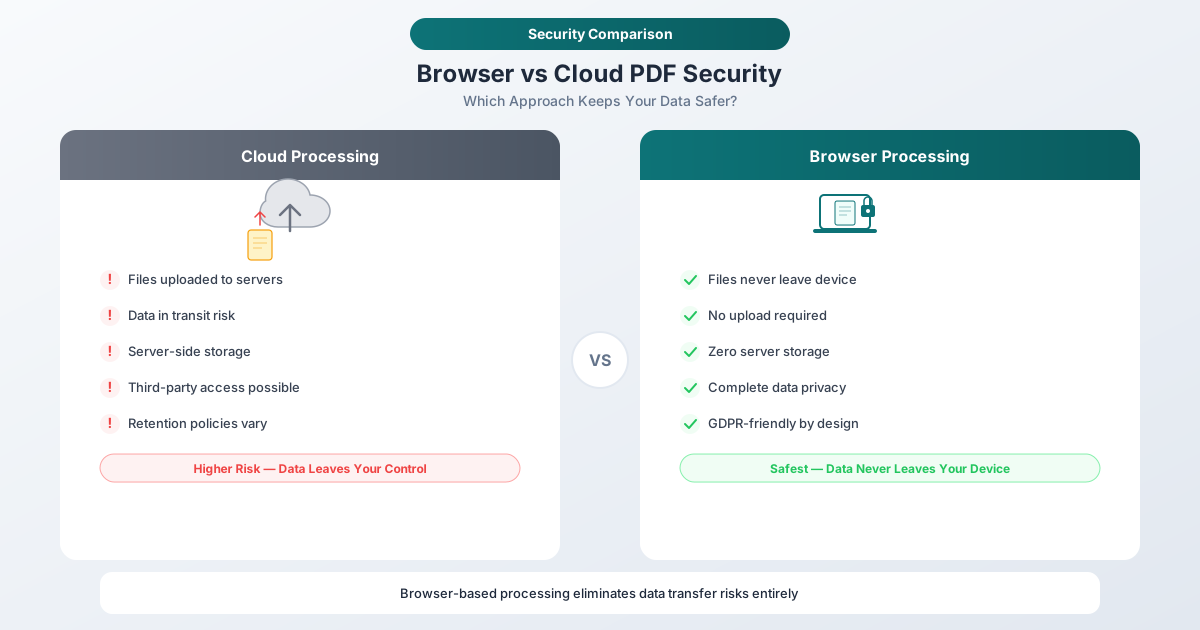
Side-by-Side: Where Does Your File Actually Go?
Before walking through the architectures in detail, here is the single-image version. Left side: file uploads to a remote server, gets processed, result downloads back. Right side: file is processed inside the browser sandbox and never leaves the device.

Want to use this comparison on your blog? Copy this embed code:
Two Architectures, Two Security Models
Every online PDF tool falls into one of two categories based on where file processing happens: on a remote server (cloud-based) or inside your web browser (browser-based). The distinction sounds simple, but it creates vastly different security profiles.
Think of it this way: cloud-based processing is like mailing your documents to a service bureau. Browser-based processing is like having that bureau's equipment delivered to your office - the work happens on your premises, and the documents never leave the building.
Cloud-Based PDF Processing: How It Works
The majority of online PDF tools use cloud-based processing. When you upload a file, here's what happens:
- Your browser reads the file from your local storage
- The file is encrypted and transmitted over HTTPS to a remote server
- Server-side code processes the file - parsing, converting, compressing, or analyzing it
- The result is generated on the server
- The result is sent back to your browser for download
- The original file is stored temporarily (or permanently, depending on the provider's retention policy)
This is the traditional model and the default architecture for online PDF editors, converters, compressors, and document management platforms.
Advantages of Cloud-Based Processing
Cloud processing offers genuine advantages:
- More processing power. Servers can allocate significant CPU, memory, and GPU resources. Operations like OCR on a 500-page scanned document or AI-powered analysis complete in seconds on dedicated infrastructure.
- Handles very large files. A 200 MB PDF with thousands of pages won't crash a server. Your browser may run out of memory.
- Supports complex operations. Some tasks require server infrastructure: running machine learning models, accessing databases for validation, or orchestrating multi-step processing pipelines.
- Cross-device consistency. The result is the same whether you're on a powerful desktop or a budget smartphone.
Security Concerns with Cloud-Based Processing
Here's where it gets complicated. Every advantage of cloud processing comes with a corresponding security exposure:
Data in transit. Your file crosses the public internet. HTTPS encrypts the connection, but the file must be decrypted on the server for processing. TLS protects against eavesdropping during transit, not against the server itself accessing your data.
Data at rest. Once your file reaches the server, it's stored - at minimum in memory, often on disk. Many services retain uploaded files for hours, days, or indefinitely. Even services that claim to "delete files immediately" may have copies persisting in server logs, temporary directories, backup snapshots, or CDN caches.
Server vulnerabilities. Every server is a potential target. Unpatched software, misconfigured access controls, zero-day exploits - a single vulnerability in the processing pipeline could expose every document uploaded by every user.
Insider access. Server administrators, DevOps engineers, and support staff may have access to uploaded files. A malicious insider or a compromised employee account can exfiltrate documents without triggering traditional security alerts.
Third-party and subprocessor risk. Cloud providers often use subprocessors - separate companies that handle storage, OCR, AI analysis, or other pipeline stages. Each subprocessor introduces a new link in the chain of trust. Your document may traverse infrastructure operated by three or four different companies before the result reaches you.
Government and legal requests. Files stored on servers are subject to subpoenas, court orders, and government data requests in the server's jurisdiction. Under the US CLOUD Act, even data stored overseas by US-headquartered companies can be compelled.
According to the IBM 2025 Cost of a Data Breach Report, the global average cost of a data breach is $4.44 million, with US breaches averaging over $10 million. The financial sector, which relies heavily on document processing, faces an average breach cost of $5.56 million.
Browser-Based PDF Processing: How It Works
Browser-based processing flips the model entirely. Instead of sending your file to a server, the processing code is sent to your browser:
- You open the web application - JavaScript and/or WebAssembly code is downloaded to your browser
- You select a file - your browser reads it from local storage
- Processing happens locally - the code runs on your device's CPU and memory
- The result is generated locally - the output file is created in your browser's memory
- You download the result - the file is saved to your device
- No upload occurs - the file content never leaves your machine
Modern browsers are remarkably powerful computing environments. JavaScript engines have been optimized over decades, and WebAssembly now allows near-native performance for compute-heavy tasks. Chrome and Firefox achieve 95% or more of native performance for compute-intensive workloads.
Advantages of Browser-Based Processing
- Your file never leaves your device. No upload, no server storage, no transit risk. The data path between your device and any external system is physically interrupted.
- No upload latency. Processing begins immediately - especially significant for users on slow or metered connections.
- Works offline. Once the application code is cached, many browser-based tools work without an internet connection.
- No server breach risk. If there's no server holding your data, there's nothing to breach.
- No data retention. When you close the browser tab, the data is gone. No logs, no backups, no residual copies.
- Verifiable privacy. Unlike server-side claims of "we delete your files," browser-based processing can be independently verified. (More on this below.)
Limitations of Browser-Based Processing
Browser-based processing isn't a universal solution. It has real constraints:
- Device resources. Processing is limited by your device's CPU and memory. A budget Chromebook with 4 GB of RAM will struggle with operations a workstation handles easily.
- Very large files. Browsers impose memory limits. A 200 MB PDF with complex graphics may cause the tab to crash.
- Some operations need a server. AI-powered analysis, OCR on scanned documents, and machine learning models typically require server-side infrastructure.
- Initial code download. The processing code must be downloaded to your browser. Large WebAssembly modules can mean a significant initial load time (though subsequent visits use cached code).
Security Comparison: Side by Side
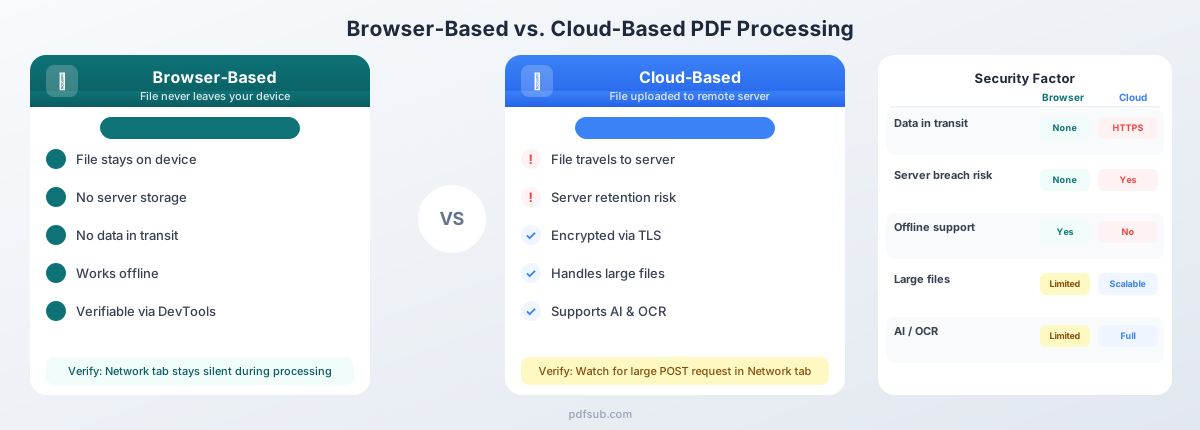
Here's how the two architectures compare across the factors that matter most to security and compliance teams:
| Security Factor | Browser-Based | Cloud-Based |
|---|---|---|
| Data in transit | None - file stays local | Encrypted via TLS, but decrypted on server |
| Data at rest on server | None | Depends on retention policy (hours to years) |
| Server breach risk | None - no server holds your data | Yes - servers are persistent targets |
| Insider threat | None - no staff access to files | Depends on access controls and monitoring |
| Processing power | Limited by device hardware | Scalable server resources |
| Compliance burden | Minimal - no DPA or BAA needed for basic ops | Significant - DPAs, certifications, audits |
| Offline capability | Yes (once code is cached) | No - requires internet connection |
| Third-party/subprocessor risk | None | Yes - storage, CDN, AI, OCR subprocessors |
| Government data requests | Not applicable - no server data to compel | Subject to jurisdiction of server location |
| Audit trail | Local only (browser history) | Server logs capture file metadata and more |
| Verifiable by user | Yes (DevTools network inspection) | No - requires trust in provider claims |
Browser-based processing eliminates entire classes of risk by removing the server from the data path. Cloud-based processing manages those risks through encryption, access controls, and compliance certifications - but cannot eliminate them.
Attack Surface Comparison
Security professionals evaluate tools by their attack surface - the total number of points where an attacker could gain unauthorized access. The difference between these architectures is dramatic.
Cloud-Based Attack Surface
- Network attacks: Man-in-the-middle (despite TLS), DNS hijacking, BGP route manipulation
- Server vulnerabilities: Unpatched OS, application bugs, dependency vulnerabilities, container escapes
- Credential theft: Stolen API keys, compromised service accounts, leaked database credentials
- Supply chain attacks: Compromised dependencies, malicious packages in the build pipeline
- Insider threats: Rogue administrators, compromised employee accounts, social engineering
- Infrastructure misconfigurations: Open S3 buckets, exposed management ports, overly permissive IAM roles
- Subprocessor compromise: Breach at any vendor in the processing chain
Browser-Based Attack Surface
- Cross-site scripting (XSS): If the web application has an XSS vulnerability, an attacker could potentially access files loaded in the browser session
- Malicious browser extensions: Extensions with broad permissions could intercept file data
- Compromised browser or OS: If the user's device is already compromised, local processing provides no additional protection
- Supply chain attacks on client code: If the JavaScript/WebAssembly code itself is compromised (e.g., via a CDN hijack), it could exfiltrate data
The browser-based attack surface is dramatically smaller - limited to client-side vectors that typically require the attacker to have already compromised the user's device or browser, at which point any application on that device is vulnerable.
Server-side attacks, by contrast, can expose data from thousands or millions of users in a single incident. The 2023-2025 period saw a rise in attacks targeting document-processing SaaS platforms specifically, as attackers recognized that these services aggregate high-value documents from many organizations.
The Hybrid Approach: Best of Both Worlds
Pure browser-based processing handles the majority of PDF operations, but some tasks genuinely require server-side infrastructure. The question is: how do you get the benefits of both without the worst security tradeoffs of either?
The answer is a tiered architecture that defaults to browser-based processing and escalates to server-side only when necessary.
How PDFSub Implements the Hybrid Model
PDFSub uses a browser-first architecture with clear boundaries:
Browser-based (most operations):
- Merge, split, rotate, reorder pages
- Compress files
- Convert between formats (PDF to image, image to PDF)
- Extract text and tables from digital PDFs
- Basic bank statement conversion (digital, text-based PDFs)
- Redact, watermark, encrypt, flatten
For these operations, your file never leaves your device. The processing happens entirely in your browser using client-side code. No upload. No server storage. No data retention.
Server-based (when necessary):
- AI-powered document analysis (summarization, Q&A, data extraction)
- OCR on scanned or image-based PDFs
- Advanced bank statement processing for scanned documents
When server processing is required, PDFSub follows a strict protocol:
- Encrypt the file before transmission
- Process using isolated, ephemeral containers
- Return the result immediately
- Delete the source file - no retention, no backups, no logs of file content
The key difference from purely cloud-based tools: PDFSub clearly labels which processing tier each operation uses, so you always know whether your file stays local or requires server involvement. There are no hidden uploads.
Industry-Specific Implications
The choice between browser-based and cloud-based processing has different stakes depending on your industry's regulatory environment.
Healthcare (HIPAA)
Under HIPAA, any entity that processes protected health information (PHI) on behalf of a covered entity is a "business associate" and must sign a Business Associate Agreement (BAA). This creates a chain: the covered entity signs a BAA with the processor, who must sign downstream BAAs with any subprocessors.
Browser-based processing sidesteps this chain entirely for basic document operations. If a hospital employee merges two PDF patient records using a browser-based tool, no PHI leaves the hospital's network. No BAA is needed. No covered entity-to-business associate relationship is created.
For operations that require server processing (like OCR on scanned medical records), the full BAA chain applies - but the exposure is limited to the specific files that need server-side handling, not every document the organization processes.
The penalty for unauthorized PHI transmission can reach $1.5 million per incident. Avoiding unnecessary server uploads is a direct risk reduction strategy.
Finance
Financial institutions handle account numbers, transaction histories, balances, and personally identifiable information. Regulatory frameworks like SOX, GLBA, and PCI DSS impose strict controls on how this data is transmitted and stored.
Browser-based processing keeps sensitive financial data within the institution's security perimeter. When an analyst converts a bank statement to Excel using a browser-based tool, the data never traverses an external network. The institution's existing endpoint security, DLP controls, and access management cover the operation without requiring additional vendor risk assessments.
Legal
Attorney-client privilege is one of the strongest protections in law - but it can be waived if privileged communications are shared with third parties without adequate confidentiality protections. Uploading a privileged document to a cloud-based processing service introduces a third party into the chain of custody.
Browser-based processing preserves privilege by keeping documents on the attorney's device. No third-party access, no disclosure risk, no privilege waiver argument for opposing counsel.
Government and Defense
Government agencies face supply chain risk requirements under frameworks like FedRAMP, NIST 800-171, and CMMC. Every cloud vendor in the processing chain must be assessed, authorized, and continuously monitored.
Browser-based processing reduces the supply chain to the web application code itself - which can be audited, verified, and even hosted on internal infrastructure if required. For classified or sensitive-but-unclassified (SBU) documents, the ability to process without any external data transmission is a significant operational advantage.
Performance Comparison: When Each Architecture Wins
Security isn't the only consideration. Performance matters, and the two architectures have different sweet spots.
Browser-Based Is Faster When:
- Files are small to medium (under 50 MB). No upload/download latency means processing starts immediately.
- Operations are straightforward. Merge, split, rotate, compress, and basic conversion are fast on modern hardware.
- The user has a decent device. Any computer built in the last five years can handle typical PDF operations in the browser.
- Internet connection is slow. On a 5 Mbps connection, uploading a 20 MB PDF takes 32 seconds before processing even begins. Browser-based processing starts instantly.
Cloud-Based Is Necessary When:
- Files are very large (100+ pages, 100+ MB). Server infrastructure can allocate memory dynamically; browsers have fixed limits.
- AI analysis is required. Machine learning models for document understanding, summarization, and data extraction are typically too large and compute-intensive for browser execution.
- OCR on scanned documents. High-quality optical character recognition benefits from GPU acceleration and large language models that exceed browser capabilities.
- Batch processing. Converting hundreds of documents in parallel requires server-scale resources.
How to Verify Where Your Files Are Processed
One of the strongest advantages of browser-based processing is that you can verify it yourself. You don't have to trust marketing claims - you can inspect the network traffic.
Step-by-Step Verification Using Browser DevTools
- Open the PDF tool in your browser (Chrome, Firefox, Edge, or Safari)
- Open DevTools - press
F12orCtrl+Shift+I(Windows/Linux) orCmd+Option+I(Mac) - Navigate to the Network tab
- Clear the existing log by clicking the clear button (circle with a line through it)
- Load your file into the tool and start the operation
- Watch the Network tab during processing
What you should see for browser-based tools:
- No large outgoing requests during file processing
- No requests containing your file data
- The only network activity should be routine page resources (scripts, stylesheets, fonts)
What you'll see for cloud-based tools:
- A large POST request containing your file (often to an
/uploador/api/endpoint) - The request payload size will approximately match your file size
- A subsequent response containing the processed result
This verification method is definitive. Network traffic doesn't lie. If your file is being uploaded, you'll see it. If it's being processed locally, the Network tab will be silent during the operation. Filter to XHR/Fetch requests and sort by size to quickly identify any large outgoing transfers.
The Future: WebAssembly Is Closing the Gap
The capabilities gap between browser-based and cloud-based processing is shrinking every year, primarily thanks to WebAssembly.
WebAssembly allows code written in languages like C, C++, Rust, and Go to run in the browser at near-native speed. An image processing algorithm that takes two seconds in JavaScript runs in 0.3 seconds with WebAssembly. Streaming compilation, now standard across major browsers, reduces parse-and-compile time by 40%.
What this means for PDF processing:
- More complex operations will move to the browser. Tasks that currently require server processing - advanced text extraction, format conversion, and even some AI inference - are becoming feasible client-side.
- WebAssembly threading enables parallel processing, making multi-page operations significantly faster.
- Smaller, specialized AI models are being optimized for browser execution. Basic document understanding and OCR may soon run entirely client-side.
- WebGPU will give browser-based tools access to GPU acceleration, further closing the performance gap with server-side processing.
The trajectory is clear: the set of operations that genuinely require server-side processing is shrinking. Browser-based tools will handle increasingly complex tasks while maintaining their fundamental security advantage.
Frequently Asked Questions
Is browser-based processing always more secure than cloud-based?
For the file itself, yes - browser-based processing eliminates server-side risks entirely. However, browser-based tools are still subject to client-side risks: XSS vulnerabilities in the web application, malicious browser extensions, or a compromised operating system. The overall security posture depends on both the processing architecture and the security of the user's device. That said, the attack surface is objectively smaller with browser-based processing.
What about browser security vulnerabilities?
Browsers are among the most heavily audited and frequently patched software in existence. Browser sandboxing isolates web application code from the operating system, limiting the impact of any vulnerability. The risk is real but manageable - and critically, a browser vulnerability exposes the data of one user, while a server vulnerability can expose the data of every user.
Can my employer or network administrator monitor browser-based processing?
If your device is managed by your employer, they may have endpoint monitoring software that can observe local file operations. Browser-based processing doesn't protect against monitoring by someone who controls your device. However, it does prevent the data from being exposed to the PDF tool's servers and their subprocessors. For most threat models, the relevant adversary is external - and browser-based processing eliminates that external exposure.
How does PDFSub decide which processing tier to use?
PDFSub defaults to browser-based processing for every operation where it's technically feasible. Server-side processing is reserved for operations that genuinely require it: AI-powered analysis using large language models, OCR on scanned or image-based documents, and advanced document understanding tasks. The interface clearly indicates when an operation will use server processing, so you can make an informed decision before proceeding. You can start a 7-day free trial to see the tiered system in action.
Does browser-based processing work on mobile devices?
Yes. Modern mobile browsers support the same JavaScript and WebAssembly capabilities as desktop browsers. Performance will be slower on mobile hardware, but basic operations - merge, split, compress, convert - work reliably on recent smartphones and tablets.
What if I need to process a very large file securely?
For files exceeding browser memory limits, server-side processing may be necessary. Evaluate the provider's encryption, data retention policy, subprocessor list, and compliance certifications. The goal is to use cloud processing only when browser-based processing genuinely cannot handle the task.
Can I use browser-based tools in an air-gapped environment?
Some browser-based tools work offline once the application code is cached. This depends on the tool's implementation - service workers, pre-cached WebAssembly modules, and no runtime external dependencies. For truly air-gapped environments, desktop applications are typically more appropriate, but browser-based tools with offline support can bridge the gap.
Conclusion: Match the Architecture to the Sensitivity
The choice between browser-based and cloud-based PDF processing isn't binary - it's about matching the architecture to the sensitivity of the data and the complexity of the operation.
For routine document operations on sensitive files - merging, splitting, compressing, converting, extracting data from digital PDFs - browser-based processing offers a categorically stronger security posture. Your files never leave your device, eliminating server-side risks entirely.
For advanced operations that require server-side infrastructure - AI analysis, OCR on scanned documents, large-scale batch processing - cloud-based processing is the practical choice. The key is choosing a provider that minimizes retention, encrypts aggressively, and is transparent about which operations require server involvement.
PDFSub's hybrid approach - browser-first with server escalation only when necessary - gives you the security of local processing for most tasks and the power of cloud processing when you need it, with clear labeling at every step. Browse PDFSub's 98+ tools and try it free for 7 days to verify the architecture yourself using the DevTools Network tab.
The best security isn't about choosing one architecture over the other. It's about knowing exactly where your data goes - and making sure it only goes where it needs to.