Best Veryfi Alternative for Receipt & Invoice OCR (2026)
Compare Veryfi vs PDFSub for receipt and invoice extraction. See per-document costs and simpler options.
PDFSub is best for:
- Small teams needing receipt and invoice extraction at $20/user/mo (annual) instead of Veryfi's $500/mo minimum
- Non-technical users who want a browser-based UI instead of integrating an OCR API
- Users needing broader document coverage - bank statements, financial reports, and 98+ PDF tools
- Teams wanting flat-rate pricing instead of Veryfi's per-document billing
PDFSub is NOT best for:
- Developers building mobile apps that need a real-time receipt OCR SDK
- Teams needing 3-5 second API response times for automated receipt processing pipelines
- Organizations requiring on-device processing for offline receipt capture
Veryfi is a real-time OCR API platform built for extracting data from receipts, invoices, purchase orders, W-2s, and other financial documents. Their standout claim is processing speed - invoice OCR in 3-5 seconds - combined with mobile SDKs that let users snap photos of receipts and get structured data back instantly. Veryfi markets itself as an "AI Bookkeeper" and targets developers building expense management, accounts payable, and financial automation workflows.
For development teams building automated receipt and invoice processing pipelines, Veryfi's API-first approach and mobile SDK make it a strong integration candidate. But the per-document pricing model (with a $500/month minimum on premium plans), the requirement for developer resources to implement, and the narrow focus on receipts and invoices leave many teams looking for alternatives.
If you've been evaluating Veryfi but find the per-document costs unpredictable, the developer requirement a barrier, or the scope too narrow for your full document workflow, this guide compares alternatives and helps identify where you get better value.
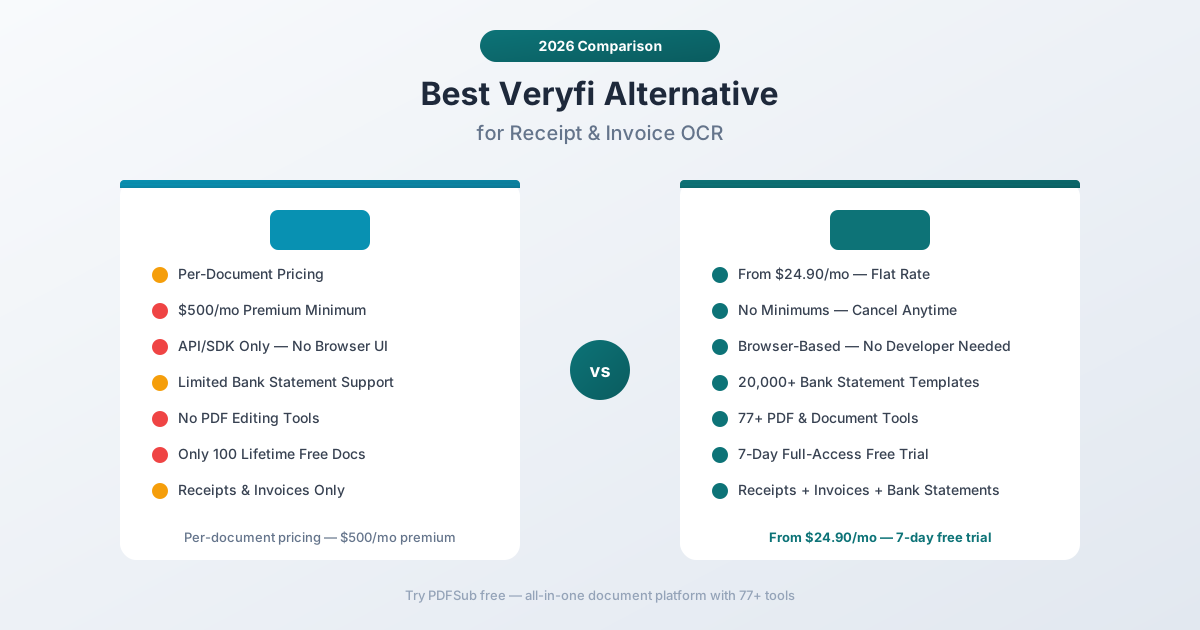
Why People Look for Veryfi Alternatives
Veryfi gets praise for its processing speed and accuracy on receipts and invoices. Their 3-5 second OCR benchmark is impressive, and the mobile SDK is a genuine differentiator for app developers. But friction points emerge around cost, scope, and accessibility.
Per-Document Pricing Adds Up Quickly
Veryfi charges per document processed through their API. The pricing structure includes:
- Free plan: 100 documents total (not per month - total)
- Pay-as-you-go: Per-document charges that vary by document type
- Premium: $500/month minimum, including 6,250 receipts or 3,125 invoices
- Volume discounts: Available at 10,000+ documents per month
For a small accounting practice processing a few hundred receipts and invoices per month, the per-document model can work. But costs become unpredictable as volume fluctuates - a busy tax season or a client onboarding a backlog of expenses can spike your bill unexpectedly.
PDFSub's All-In-One plan is $20/month annual ($25/month monthly) - 500 AI credits and 500 bank statement pages included, with no per-document charges, no volume tiers, and no surprise bills. Process bank statements, invoices, and receipts at a predictable cost regardless of volume.
$500/Month Minimum for Premium Features
Veryfi's premium plan has a $500/month minimum commitment. For that, you get 6,250 receipt extractions or 3,125 invoice extractions per month. If you need fewer documents than that, you're overpaying for capacity you don't use. If you need more, you're into custom pricing territory.
PDFSub starts at $20/month for AI features (All-In-One) - about 20 times less than Veryfi's premium floor. For the vast majority of accounting practices and small businesses, that price point covers the full extraction workload.
Developer-Only Access
Veryfi is an API platform. Period. To use it, you need:
- Developer expertise to integrate the API or SDK
- Understanding of REST APIs, webhooks, and JSON parsing
- Infrastructure to handle API responses and map data to your systems
- Ongoing maintenance of the integration code
There's no browser-based interface where an accountant can upload an invoice and get an Excel file back. If you don't have a developer on staff or the budget to hire one, Veryfi's capabilities are effectively locked behind a technical wall.
PDFSub is entirely browser-based. Drag, drop, extract, export. The person who needs the data can get the data - no developer middleman required.
Narrow Document Type Focus
Veryfi specializes in financial transaction documents - receipts, invoices, purchase orders, bills of lading, W-2s, W-9s, and business cards. It's excellent at what it covers, but it doesn't handle bank statements with the depth that dedicated bank statement tools provide, and it doesn't offer general PDF operations.
PDFSub covers bank statement conversion (20,000+ templates), invoice extraction, receipt scanning, plus 98+ PDF tools. One platform handles the complete financial document workflow from extraction to document manipulation.
No PDF Tools
Veryfi extracts data from documents. It doesn't merge PDFs, split multi-page files, compress documents for email, convert between formats, or any of the other PDF operations that accounting practices perform daily. You need Veryfi plus a separate PDF tool subscription to cover your full workflow.
PDFSub includes extraction and 98+ PDF tools in a single subscription - merge, split, compress, convert, watermark, encrypt, translate, summarize, and more.
What to Look for in a Veryfi Alternative
Predictable monthly pricing. Per-document charges create cost uncertainty. A predictable per-user monthly subscription with included document allocations lets you budget accurately and process documents without counting every page.
No developer required. The tool should work for the people who actually need the extracted data - accountants, bookkeepers, finance teams - not just developers.
Bank statement support. If you process bank statements alongside receipts and invoices, the tool should handle all three with dedicated support for each.
Complete document platform. Beyond extraction, you need PDF merge, split, compress, convert, and other daily document operations.
Browser-based privacy. Financial documents contain sensitive data. Browser-first processing keeps documents on your device when possible.
PDFSub: The Best Veryfi Alternative
PDFSub replaces Veryfi's per-document API with a flat-rate, browser-based platform - AI extraction for receipts, invoices, and bank statements, plus 98+ PDF tools, all with predictable monthly pricing and zero developer requirements.
Flat-Rate Pricing vs. Per-Document Charges
PDFSub's pricing is published and predictable:
- All-In-One: $20/month annual ($240/year, saves $60 vs monthly; or $25/month billed monthly) - every PDF tool (98+), 500 AI credits, 500 bank statement pages, e-sign with no per-envelope fees, 50 GB storage, 365-day retention, unlimited team seats (each billed at the same per-user rate)
- Stackable add-on packs available for higher volume: 500 AI Credits, 500 Bank Statement Conversion Pages, 40 GB Storage, Priority Support
Veryfi's pricing scales with volume: free for 100 lifetime documents, per-document charges on pay-as-you-go, and $500/month minimum for premium access. The gap between "free" and "$500/month" is steep, with no intermediate tier that serves small-to-mid-sized practices.
PDFSub's $20/month All-In-One plan covers the extraction workload that most accounting practices need, without per-document counting or $500 minimums.
Browser-Based Interface vs. API Integration
PDFSub's workflow is designed for non-developers:
- Sign up (2 minutes)
- Upload a receipt, invoice, or bank statement (drag and drop)
- Review extracted data on screen
- Export to Excel, CSV, QBO, OFX, or other formats (one click)
Veryfi's workflow requires technical implementation:
- Sign up and obtain API credentials
- Choose SDK (iOS, Android, Python, Node.js, etc.)
- Integrate the API into your application
- Handle document upload, processing, and response parsing
- Build UI or export logic on top of the API responses
Veryfi's mobile SDKs are impressive for developers building expense management apps. But if you just need to extract data from a stack of invoices and export to QuickBooks, building an API integration is the wrong approach. PDFSub gives you a ready-made interface.
20,000+ Bank Statement Templates
Veryfi's strength is receipts and invoices - not bank statements. PDFSub includes a dedicated bank statement converter with 20,000+ pre-built templates for banks worldwide. Upload a statement from Chase, HSBC, Barclays, ANZ, DBS, Commonwealth Bank, or thousands of other banks, and PDFSub auto-detects the format and extracts all transactions.
Export formats include Excel, CSV, TSV, JSON, QBO (QuickBooks), OFX (Xero and other accounting software), QFX, and QIF. Each format is optimized for direct import into its target accounting platform.
This is a significant gap in Veryfi's offering. If bank statement conversion is part of your workflow, Veryfi doesn't cover it with the same depth, and adding a separate bank statement tool creates additional cost and workflow complexity.
98+ PDF Tools Included
Veryfi focuses exclusively on data extraction via API. PDFSub includes extraction plus a comprehensive document operations platform:
- Merge and split PDFs for client document packages
- Compress large files for email or storage
- Convert between PDF, Word, Excel, PowerPoint, and image formats
- Watermark and stamp documents for confidential marking
- Encrypt and decrypt PDFs for security
- Translate documents across 130+ languages with AI
- Summarize long documents for quick review
- Compare two documents side by side
One subscription replaces both Veryfi and whatever PDF tool you currently use separately.
130+ Languages with Auto-Detection
PDFSub supports 130+ languages with automatic detection - including all non-Latin scripts (Chinese, Japanese, Korean, Arabic, Hindi, Thai, Cyrillic). Veryfi supports multiple languages for receipt and invoice processing, but their primary optimization is for English-language documents with growing international support.
For international accounting practices handling documents from multiple countries and in multiple languages, PDFSub's comprehensive language support is a meaningful advantage.
Browser-First Privacy
PDFSub's Tier 1 extraction runs entirely in your browser - your document never leaves your device. For most digital bank statements, invoices, and receipts, all processing happens client-side.
Veryfi processes all documents on their cloud servers via API. While they emphasize data security and compliance, every document you process is uploaded to their servers. PDFSub's browser-first approach means financial documents with sensitive data stay on your device for the majority of operations.
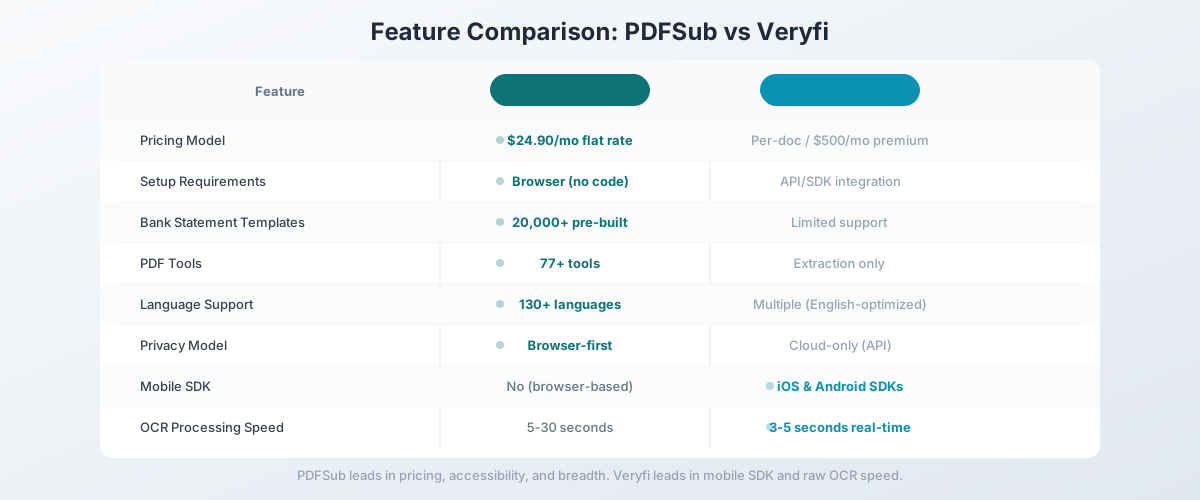
Side-by-Side Feature Comparison
| Feature | PDFSub | Veryfi |
|---|---|---|
| Pricing | $20/user/mo annual ($25/user/mo monthly); no per-document charges within included 500 pages/mo per user | Per-document + $500/mo premium |
| Setup time | Minutes (browser-based) | Hours-days (API integration) |
| Developer required | No | Yes (API/SDK only) |
| Bank statement templates | 20,000+ pre-built | Limited bank statement support |
| PDF tools | 98+ (merge, split, compress, etc.) | Extraction only |
| Languages | 130+ (auto-detected) | Multiple (receipt/invoice focused) |
| Privacy model | Browser-first (Tier 1) | Cloud-only (API) |
| Mobile SDK | No (browser-based) | Yes (iOS, Android) |
| Real-time OCR speed | 5-30 seconds | 3-5 seconds |
| Expense categorization | No | Yes (built-in) |
| Contract required | No (cancel anytime) | Volume commitments on premium |
| Free trial | 7-day full access | 100 lifetime documents |
When Veryfi Is Still the Right Choice
Being honest: Veryfi does things PDFSub doesn't. If these features are critical to your workflow, Veryfi might still be the right tool:
You're building a mobile expense app. Veryfi's mobile SDKs (iOS, Android) let users snap photos of receipts and get structured data back in seconds. If you're a developer building an expense management mobile app, Veryfi's SDK is purpose-built for that integration. PDFSub is a browser-based platform, not a mobile SDK.
You need API-first automation. If your document processing workflow is fully automated - documents arrive via email, get processed by API, and flow into accounting systems without human intervention - Veryfi's API-first architecture is designed for exactly that. PDFSub is designed for browser-based manual processing.
You process high volumes of receipts only. If your workload is exclusively receipts (not bank statements, not multi-page invoices), Veryfi's receipt-optimized OCR and automatic expense categorization deliver specialized value. For receipt-only workflows at volume, Veryfi's per-document pricing may make sense.
You need automatic expense categorization. Veryfi automatically categorizes expenses (meals, travel, supplies, etc.) during extraction. PDFSub extracts the raw data - dates, amounts, descriptions - but doesn't auto-categorize expenses.
Processing speed is your top priority. Veryfi's 3-5 second OCR benchmark is genuinely fast. If sub-5-second processing is critical for your application (real-time mobile capture, high-throughput automation), Veryfi's speed optimization is a genuine advantage.
Other Alternatives Worth Considering
PDFSub is our recommendation for the broadest value at an accessible price point, but other tools may fit specific needs:
Dext Prepare - Receipt and invoice capture with direct accounting software integration (QuickBooks, Xero, Sage). Purpose-built for accounting practices with per-client pricing ($25-55/month per client). No bank statement conversion.
Expensify - Expense management platform with receipt scanning and corporate card integration. Better suited as a full expense management system than a standalone OCR tool. Plans start at $5/user/month.
Nanonets - AI document extraction with pre-trained models for invoices, receipts, and more. More accessible than Veryfi with a visual model builder. Good middle ground between API platforms and consumer tools.
Hubdoc - Receipt and invoice capture integrated with Xero and QuickBooks. Included free with Xero subscriptions. Limited in scope but zero additional cost if you already use Xero.
Klippa DocHorizon - Enterprise IDP platform with fraud detection and 50+ document types. Custom pricing. Overkill for most practices but comprehensive for enterprise needs.
How to Switch from Veryfi to PDFSub
If you're currently using Veryfi or evaluating it alongside PDFSub, here's how to make the transition:
Step 1: Start a Free Trial
Go to PDFSub's pricing page and start a 7-day free trial. All plans include full functionality.
Step 2: Test Your Core Document Types
Process the document types that drive your workflow:
- Receipts: Upload receipts in various formats - paper scans, digital receipts, email receipts
- Invoices: Test with invoices from your primary vendors - check header data and line item extraction
- Bank statements: Convert statements from your most common banks - this is a capability Veryfi likely doesn't cover as well
- International documents: Test with non-English documents to verify language support
Step 3: Compare Per-Document vs. Flat-Rate Costs
Calculate your current Veryfi spend: total documents processed per month at your per-document rate. Compare that to PDFSub's per-user All-In-One plan at $20/month (annual). Factor in the bank statement conversion capability that PDFSub includes but Veryfi doesn't.
Step 4: Evaluate Scope Match
If your Veryfi usage is primarily receipts and invoices processed through a browser interface, PDFSub covers that workflow at a fraction of the cost. If you rely on Veryfi's mobile SDK, API automation, or expense categorization, those specific features won't be available in PDFSub.
Step 5: Transition Gradually
Since Veryfi offers pay-as-you-go pricing, you can run both platforms in parallel. Process documents through PDFSub's browser interface while maintaining Veryfi for any automated API pipelines. Shift volume as you validate quality and coverage.
Frequently Asked Questions
Is PDFSub as accurate as Veryfi for receipt OCR?
For receipts and invoices, PDFSub's accuracy is competitive. Veryfi benchmarks 3-5 second processing with strong accuracy. PDFSub's multi-tier extraction uses pattern matching for standard formats and AI for scanned or complex documents. The best comparison is testing your actual documents during PDFSub's 7-day free trial.
Does PDFSub have a mobile app?
PDFSub is browser-based and works on mobile browsers, but it doesn't offer native mobile SDKs like Veryfi. If you need camera-to-data mobile receipt capture for a custom app, Veryfi's SDK is the better choice.
Can PDFSub process documents via API?
Yes. PDFSub ships a Developer API with 10 official SDKs (Node, Python, PHP, Go, Ruby, Java, .NET, Rust, C, C++). The v1 surface focuses on HTML-input rendering (HTML → PDF/PNG/JPEG/WEBP, HTML → text/markdown) with cloud delivery to Google Drive, Dropbox, S3, GCS, and Cloudflare R2. Extraction endpoints for the AI tools (receipts, invoices, bank statements) are planned for a follow-up phase. If your workflow needs API-first receipt/invoice extraction today, Veryfi's extraction API is the more direct fit; for HTML rendering plus the in-browser AI extraction suite, PDFSub covers it.
Does PDFSub categorize expenses automatically?
PDFSub extracts raw financial data - dates, amounts, descriptions, vendors - but doesn't automatically categorize expenses into categories like meals, travel, or supplies. If expense categorization is essential, you'd handle that in your accounting software after importing the extracted data.
How does PDFSub handle scanned receipts?
PDFSub's Tier 1 extraction works with digital PDFs. For scanned receipts and photos, the system escalates to server-side processing (Tier 2) and AI-powered extraction (Tiers 3-4) with OCR. Quality depends on scan clarity, but the multi-tier system handles most standard scanned financial documents.
Is Veryfi's $500/month premium plan worth it?
For high-volume operations processing thousands of receipts and invoices monthly through automated API pipelines, Veryfi's premium plan can be cost-effective on a per-document basis. For small-to-mid-sized practices that process hundreds (not thousands) of documents through a manual workflow, PDFSub at $20/month provides the same extraction capability at a fraction of the cost.
The Bottom Line
Veryfi is a fast, accurate receipt and invoice OCR API - but its per-document pricing, $500/month premium floor, developer-only access, and narrow document type focus make it a poor fit for teams that need affordable, accessible financial document processing.
PDFSub delivers AI-powered extraction for receipts, invoices, and bank statements with per-user pricing at $20/user/mo (annual), zero setup, and 98+ PDF tools included. Add 130+ language support, 20,000+ bank statement templates, and browser-first privacy, and you get a platform that handles the complete financial document workflow without per-document costs or developer requirements.
Try PDFSub's bank statement converter free with a 7-day trial and process your actual financial documents. Compare the extraction quality and the total cost. For receipt and invoice processing without API complexity, the value is clear.