Best Rossum Alternative for Document Extraction (2026)
Compare Rossum vs PDFSub for AI document extraction. See pricing, accuracy, and simpler options.
PDFSub is best for:
- Small firms needing AI extraction at $20/user/mo (annual) instead of Rossum's $18,000/year minimum
- Users who want month-to-month pricing without annual contract lock-in
- Self-serve teams who need same-day setup without a multi-week enterprise sales process
- Accountants needing bank statement conversion and PDF tools alongside document extraction
PDFSub is NOT best for:
- Enterprises needing deep ERP integrations with SAP, NetSuite, or Microsoft Dynamics
- Organizations requiring multi-step AP approval workflows with validation rules
- Teams processing millions of invoices per year that need dedicated account management
Rossum is an enterprise intelligent document processing (IDP) platform built by a Czech Republic-based team that uses a proprietary AI engine called Rossum Aurora. It processes invoices, purchase orders, delivery notes, and other transactional documents with zero-template extraction - meaning you don't need to configure layouts before the AI can read a document. Rossum claims support for 276 languages and handles handwriting in 30 of those languages. For large organizations processing thousands of documents per month with complex approval workflows and ERP integrations, Rossum is a powerful choice.
But Rossum starts at $18,000 per year (that's $1,500/month), requires annual contracts, and is designed for enterprise procurement cycles. If you're a bookkeeper, accountant, or small business that needs to extract data from bank statements, invoices, and receipts without a five-figure annual commitment, Rossum's pricing and complexity are a mismatch.
If you've been evaluating Rossum but find the $18,000+ annual cost, sales-driven onboarding, or enterprise-only positioning mismatched with your actual needs, this guide compares alternatives and identifies where you get the best value.
Why People Look for Rossum Alternatives
Rossum earns praise for its AI accuracy, template-free extraction, and deep ERP integrations with SAP, Microsoft Dynamics, NetSuite, and QuickBooks. The complaints center on cost, accessibility, and the gap between what small teams need and what Rossum delivers.
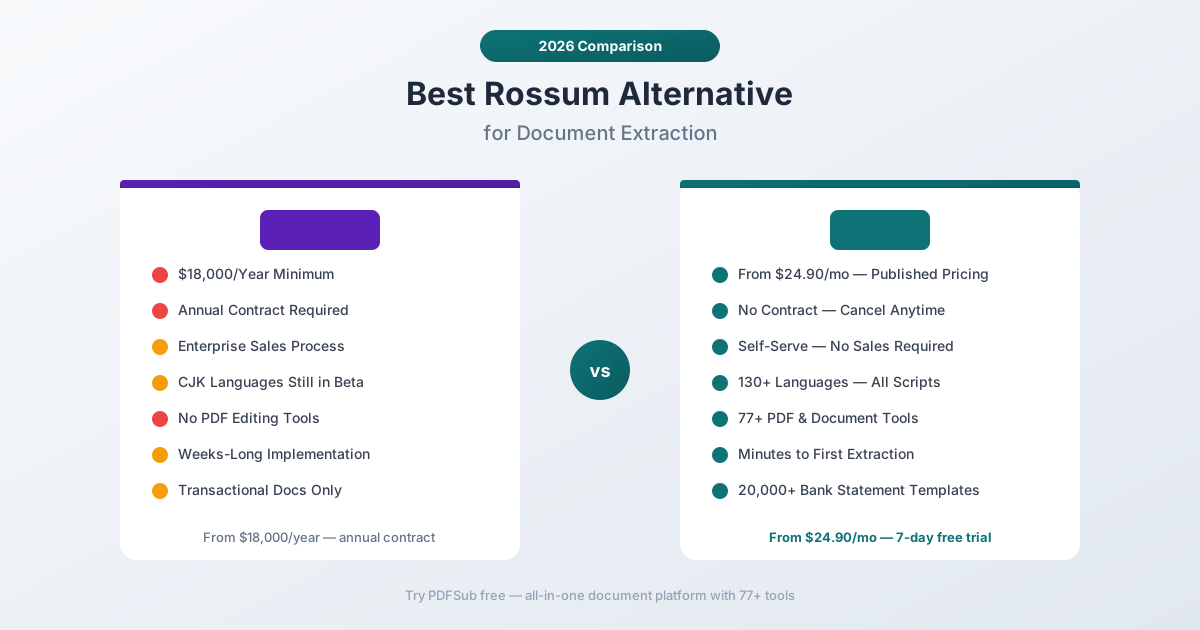
$18,000/Year Minimum Price
The Starter plan begins at $18,000 per year - and that's the entry point for scale-ups, not full enterprise. Business and Enterprise tiers cost more based on document volume, custom workflows, and additional modules like master data matching, document translation, and sandbox environments.
For context, $18,000/year means you're paying $1,500/month before you process a single document. That's a serious commitment for any organization, and it's prohibitive for individual practitioners, small accounting firms, and SMBs.
PDFSub publishes all pricing on its pricing page. Plans start at $25/month (All-In-One), $20/month (All-In-One) for full AI features, or $25/month (All-In-One) with 500 bank statement pages and 500 AI credits included. The annual cost of PDFSub's All-In-One plan ($300) is about 1.7% of Rossum's annual minimum.
Annual Contract Lock-In
Rossum's minimum contract length is one year. While they offer a 14-day free trial, moving from trial to paid means committing to at least 12 months. If the tool doesn't deliver the expected ROI after month three, you're still paying for the remaining nine months.
PDFSub has no annual contracts. Subscribe monthly, cancel anytime. If the tool doesn't work for your documents, you stop paying. The 7-day free trial includes full functionality so you can validate extraction quality before committing any money.
Enterprise Sales Process
Getting started with Rossum means engaging their sales team. You'll describe your use case, receive a tailored demo, negotiate pricing based on volume and features, and sign an annual agreement. For enterprise IT procurement teams, this is standard operating procedure. For a bookkeeper who needs to convert a bank statement to Excel today, it's a weeks-long detour.
PDFSub is self-serve. Sign up, upload a document, get results. No sales calls, no demos, no negotiations.
Limited Non-Latin Language Support
While Rossum claims 276 languages, most of those use Latin scripts. Japanese and Chinese document support is still in beta. If you regularly process documents in CJK (Chinese, Japanese, Korean) scripts, Arabic, Hindi, Thai, or other non-Latin writing systems, Rossum's language coverage has gaps.
PDFSub supports 130+ languages with full auto-detection, including all major non-Latin scripts - Chinese (Simplified and Traditional), Japanese, Korean, Arabic, Hindi, Thai, Hebrew, Cyrillic, and more. Language support works identically across all document types.
Focused on Transactional Documents Only
Rossum is purpose-built for transactional business documents: invoices, purchase orders, delivery notes, credit notes. It doesn't offer general-purpose PDF tools - no merging, splitting, compressing, converting, watermarking, or other document operations. If your workflow includes both document extraction and document manipulation, you need two separate tools.
PDFSub combines AI extraction with 98+ PDF and document tools in a single platform.
What to Look for in a Rossum Alternative
Affordable pricing. Enterprise pricing is appropriate for enterprise use cases. If your document volume doesn't justify a five-figure annual commitment, the alternative should offer per-month pricing you can evaluate quickly.
No annual lock-in. Monthly billing with no commitment lets you evaluate tools without financial risk.
Broader document operations. Beyond extraction, daily workflows need merge, split, compress, convert, and other PDF operations.
Strong non-Latin language support. International clients and multi-language documents need a tool that handles all scripts, not just Latin-based ones.
Bank statement specialization. If financial documents are your primary use case, the tool should have deep bank format coverage, not just generic document AI.
PDFSub: The Best Rossum Alternative
PDFSub replaces Rossum's enterprise document extraction with an accessible, affordable platform - AI extraction for bank statements, invoices, and receipts, plus 98+ PDF tools, all with transparent pricing and zero setup.
$240/Year vs. $18,000/Year
The pricing difference is stark:
- PDFSub All-In-One: $20/user/mo (annual; $240/year per user) or $25/user/mo monthly - 98+ PDF tools, 500 AI credits, 500 bank statement pages, and e-sign with no per-envelope fees, all in one plan
- Stackable add-on packs: $20/month per 500 BSC pages and $7/month per 500 AI credits (annual rates) when you need more than the base allocation
Rossum's Starter plan is $18,000/year ($1,500/month). Business and Enterprise tiers are priced higher with custom quotes. Even Rossum's cheapest plan costs more per month than an entire year of PDFSub's AI extraction.
For small-to-mid-sized businesses, the math is straightforward: PDFSub's annual cost at the All-In-One plan is $240 per user (includes 500 bank statement pages) versus Rossum's minimum of $18,000. That's a 98%+ cost reduction for document extraction capabilities, even at 5–10 seats.
Minutes to Value vs. Weeks of Implementation
PDFSub's onboarding:
- Sign up (2 minutes)
- Upload a document (30 seconds)
- Get extracted data (5-30 seconds depending on document type)
- Export to Excel, CSV, QBO, OFX, or other formats (10 seconds)
Rossum's onboarding:
- Contact sales and schedule demo
- Receive tailored proposal and pricing
- Negotiate annual contract
- Implementation and API/integration setup
- Configure document queues and workflows
- Set up validation screens and business rules
- Train team on the platform
- Begin production processing
Rossum's implementation timeline assumes dedicated IT resources and a structured rollout. PDFSub delivers extraction results in under 5 minutes from sign-up.
20,000+ Bank Statement Templates
Rossum is designed primarily for transactional documents (invoices, POs, delivery notes) rather than bank statements. PDFSub specializes in financial document extraction with its bank statement converter, offering pre-built support for 20,000+ bank statement formats worldwide.
Upload a statement from virtually any bank - Chase, HSBC, DBS, Barclays, Bank of India, Deutsche Bank, Commonwealth Bank, and thousands more - and PDFSub auto-detects the format and extracts all transactions with date, description, amount, and running balance.
Export to 8 formats: Excel, CSV, TSV, JSON, QBO (QuickBooks), OFX (Xero/other accounting), QFX, and QIF. Each format is optimized for its target platform.
98+ PDF Tools Included
Rossum is an extraction platform - it processes documents and outputs structured data. It doesn't include document manipulation tools. PDFSub includes extraction plus a comprehensive document operations platform:
- Merge and split PDFs for client document packages
- Compress large files for email or storage
- Convert between PDF, Word, Excel, PowerPoint, and image formats
- Watermark and stamp documents for confidential marking
- Encrypt and decrypt PDFs for security
- Translate documents across 130+ languages with AI
- Summarize long documents for quick review
- Compare two documents side by side
Having extraction and document operations in a single platform eliminates the need for separate tool subscriptions.
Browser-First Privacy
PDFSub's Tier 1 extraction runs entirely in your browser - your document never leaves your device. For most digital bank statements, invoices, and receipts, all processing happens client-side.
Rossum processes all documents on their cloud servers. Documents are uploaded to Rossum's infrastructure for AI processing. PDFSub's browser-first approach means financial documents with sensitive data stay on your device for the majority of processing operations.
130+ Languages with Full Script Support
PDFSub supports 130+ languages with automatic detection - including all non-Latin scripts (Chinese, Japanese, Korean, Arabic, Hindi, Thai, Cyrillic). Rossum supports 276 languages but primarily those using Latin scripts, with CJK support still in beta.
For accounting practices serving international clients, PDFSub's production-ready support for non-Latin scripts is a practical advantage.
Side-by-Side Feature Comparison
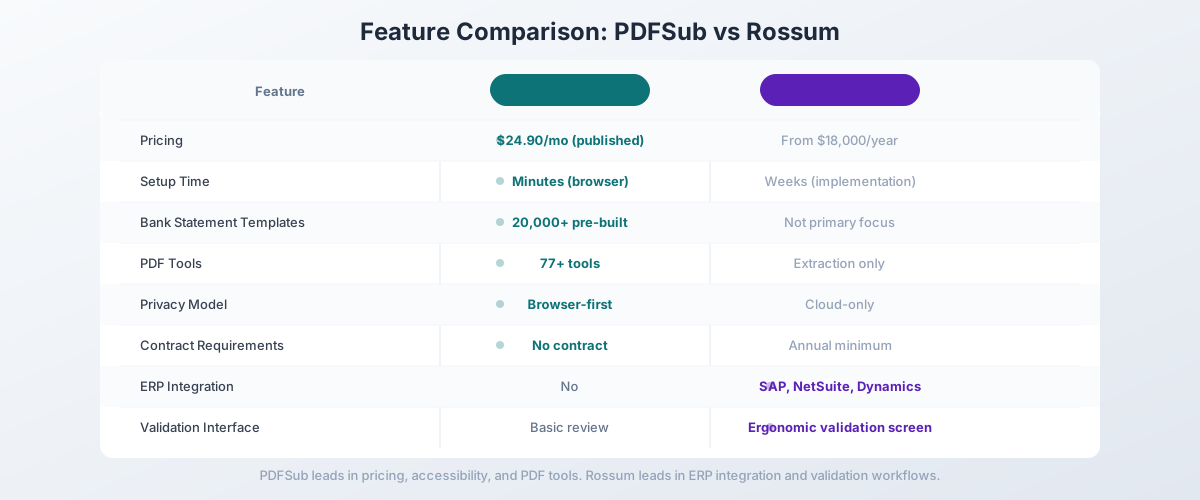
| Feature | PDFSub | Rossum |
|---|---|---|
| Pricing | $20/mo (annual; $25/mo monthly) (published) | From $18,000/year |
| Setup time | Minutes (browser-based) | Weeks (implementation) |
| Bank statement templates | 20,000+ pre-built | Not primary focus |
| PDF tools | 98+ (merge, split, compress, etc.) | Extraction only |
| Languages | 130+ (all scripts) | 276 (Latin-focused, CJK beta) |
| Privacy model | Browser-first (Tier 1) | Cloud-only |
| Contract requirements | No contract (cancel anytime) | Annual minimum |
| Template-free AI | Yes (multi-tier) | Yes (Rossum Aurora) |
| ERP integrations | No | SAP, NetSuite, Dynamics |
| Validation UI | Basic review | Ergonomic validation screen |
| Free trial | 7-day full access | 14-day trial |
When Rossum Is Still the Right Choice
Being honest: Rossum does things PDFSub doesn't. If these features are critical to your workflow, Rossum might still be the right tool:
You need deep ERP integration. Rossum connects directly to SAP, Microsoft Dynamics, NetSuite, QuickBooks, and other enterprise platforms. If your document extraction feeds directly into an ERP system and you need automated data flow without manual export/import steps, Rossum's integration layer is a genuine advantage.
You need zero-template AI for diverse document types. Rossum Aurora processes unfamiliar document layouts without pre-configured templates. If you receive invoices and purchase orders from thousands of different suppliers with unpredictable formats, Rossum's template-free AI is designed specifically for this scenario.
You process high-volume transactional documents. If your organization processes tens of thousands of invoices, purchase orders, and delivery notes per month, Rossum's enterprise-scale processing, validation workflows, and bulk handling justify the enterprise pricing.
You need an ergonomic validation screen. Rossum's validation interface lets human reviewers verify and correct extracted data efficiently. If your workflow requires human-in-the-loop validation before data enters your systems, Rossum's validation UI is purpose-built for this task.
You need custom business logic and master data matching. Rossum's Business and Enterprise plans include custom functions, webhooks, duplicate detection, and master data matching (verifying extracted vendor/PO data against your database). These workflow automation features are beyond what PDFSub offers.
Other Alternatives Worth Considering
PDFSub is our recommendation for the broadest value at an accessible price point, but other tools may fit specific needs:
ABBYY Vantage - Enterprise IDP platform with deep OCR technology. Similar pricing range to Rossum. If you need the most advanced OCR engine for degraded scans and complex layouts, ABBYY's OCR heritage is unmatched.
Nanonets - AI document extraction with more accessible pricing than Rossum. Pre-trained models for invoices, receipts, and tables. Good middle ground for teams that want AI extraction without enterprise pricing.
Docsumo - AI document extraction starting around $500/month. Less expensive than Rossum but still enterprise-oriented. Good for custom model training on specific document types.
Klippa DocHorizon - Dutch IDP platform with fraud detection and ID verification. Custom pricing, enterprise-focused. Good if you need compliance and verification features alongside extraction.
Google Document AI - Google Cloud's document processing API. Pay-per-page pricing. Requires Google Cloud infrastructure and development resources, but avoids annual commitments.
How to Switch from Rossum to PDFSub
If you're currently using Rossum or evaluating it alongside PDFSub, here's how to make the transition:
Step 1: Start a Free Trial
Go to PDFSub's pricing page and start a 7-day free trial. All plans include full functionality during the trial period.
Step 2: Test Your Core Financial Documents
Process the document types that drive your workflow:
- Bank statements: Convert statements from your most common banks - verify transaction accuracy and export format compatibility
- Invoices: Test with invoices from your primary vendors - check header data and line item extraction
- Receipts: Upload receipts in various formats and languages
- International documents: Test with non-English documents to verify language support
Step 3: Evaluate Scope Match
If your Rossum usage is primarily financial document extraction (bank statements, invoices, receipts), PDFSub covers that workflow at a fraction of the cost. If you rely on Rossum's ERP integrations, validation workflows, or high-volume batch processing, those enterprise features won't be available in PDFSub.
Step 4: Compare Total Cost
Rossum's $18,000+ annual cost versus PDFSub's $240/year (All-In-One annual; includes 500 BSC pages and 500 AI credits). Even at PDFSub's highest tier ($20/month = $240/year), the annual savings exceed $17,700. Factor in the eliminated implementation costs and you see why the switch makes financial sense for non-enterprise users.
Step 5: Plan the Transition
If you're on a Rossum annual contract, plan the switch for contract renewal. Start using PDFSub for financial documents while Rossum handles any remaining ERP-integrated workflows. Gradually shift volume as you validate PDFSub's quality and coverage.
Frequently Asked Questions
Is PDFSub as accurate as Rossum for document extraction?
For financial documents (bank statements, invoices, receipts), PDFSub's multi-tier extraction delivers strong accuracy. Rossum Aurora is trained on millions of transactional documents and claims zero hallucinations. The accuracy comparison depends on your specific document types - the best test is to process your actual documents during PDFSub's 7-day free trial and compare the results.
Does PDFSub support ERP integrations?
PDFSub is designed as a browser-first platform. Extracted data exports to Excel, CSV, QBO, OFX, and other formats that can be imported into accounting software. It doesn't offer direct API-based ERP integration like Rossum's connections to SAP, Dynamics, and NetSuite.
Can PDFSub process purchase orders and delivery notes?
PDFSub's AI extraction is optimized for financial documents - bank statements, invoices, and receipts. For other transactional document types (POs, delivery notes, credit notes), Rossum's broader document type coverage is more comprehensive.
Does PDFSub offer a validation interface?
PDFSub displays extracted data in the browser for review before export. It's not as feature-rich as Rossum's dedicated validation screen, which includes field highlighting, confidence scores, and keyboard-driven correction workflows. For high-volume processing with human review requirements, Rossum's validation UI is more mature.
How does PDFSub handle scanned documents?
PDFSub uses a multi-tier extraction architecture. Tier 1 (browser-based) handles digital PDFs. Tiers 2-4 use server-side parsing and AI for scanned documents, image-based PDFs, and complex layouts. Rossum's AI engine also handles scanned documents, with particular strength in handwriting recognition (30 languages).
Is $18,000/year worth it for Rossum?
It depends on your scale and requirements. For organizations processing thousands of documents monthly with ERP integration needs and complex approval workflows, Rossum's enterprise capabilities can deliver ROI. For individual practitioners, small firms, and businesses focused on financial document extraction, the same extraction results are available from PDFSub at 98% lower cost.
The Bottom Line
Rossum is a capable enterprise IDP platform, but its $18,000/year minimum, annual contracts, and enterprise-focused design make it inaccessible for most small-to-mid-sized businesses. You shouldn't need a five-figure annual commitment to extract transactions from a bank statement or line items from an invoice.
PDFSub delivers AI-powered extraction for bank statements, invoices, and receipts with transparent pricing starting at $25/month, zero setup, and 98+ PDF tools included. Add 130+ language support, 20,000+ bank statement templates, and browser-first privacy, and you get a platform that handles the full financial document workflow without enterprise overhead.
Try PDFSub's bank statement converter free with a 7-day trial and process your actual financial documents. Compare the extraction quality and the total cost. For financial document processing without a $18,000 annual price tag, the value proposition is clear.