Best PDF.ai Alternative for Document Processing (2026)
Compare PDF.ai vs PDFSub for AI PDF tools. See chat-only limits vs full extraction and 98+ tools.
PDFSub is best for:
- Users who need structured data extraction from documents - not just conversational answers
- Financial professionals who want invoice parsing, receipt scanning, and bank statement conversion
- Teams needing a complete document platform (98+ PDF tools) instead of a chat-only interface
- Users frustrated by PDF.ai's monthly message caps and manual re-upload requirements
PDFSub is NOT best for:
- Users who only need lightweight document Q&A and prefer PDF.ai's minimalist chat interface
- Teams needing a dedicated mobile app for on-the-go document chat
- Users who want a free tier for occasional document conversations
PDF.ai is a consumer-focused AI tool that lets you chat with your PDF documents. Upload a PDF, ask questions about its contents, and get AI-generated answers based on the document text. It's a simple, clean interface that does one thing well - turning a PDF into a conversational knowledge base. For students, researchers, and anyone who needs to quickly interrogate a long document without reading every page, PDF.ai is an intuitive solution.
But PDF.ai's scope is narrow. It's a chat interface, not a document processing platform. It doesn't extract structured data from invoices, convert bank statements to Excel, or provide the 70+ PDF operations that accounting practices and businesses need daily. The per-plan message caps, manual re-upload requirements, and lack of financial document extraction make it insufficient for professional document workflows.
If you've been using PDF.ai for chatting with PDFs but need structured data extraction, bank statement conversion, or a broader document toolkit, this guide compares alternatives and identifies where you get more value.
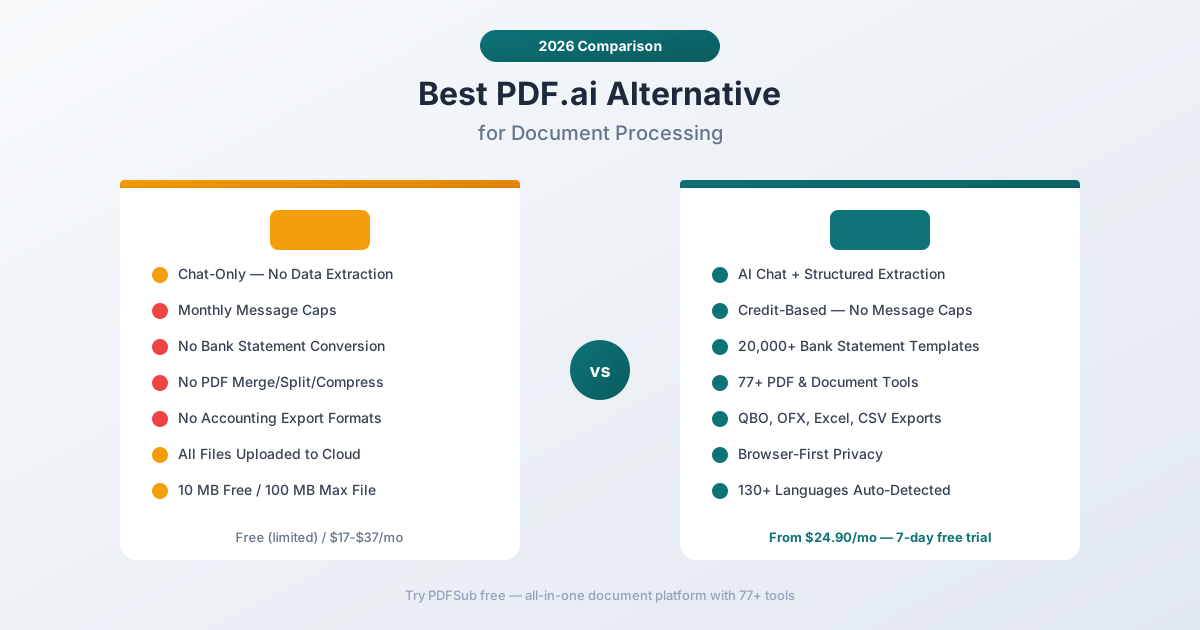
Why People Look for PDF.ai Alternatives
PDF.ai earns positive reviews for its simplicity - the chat interface is intuitive, and the AI responses are generally helpful for understanding document contents. But users hit walls when their needs extend beyond simple Q&A.
Chat-Only - No Structured Data Extraction
PDF.ai's core feature is conversational: you ask questions, the AI answers based on the PDF content. This is useful for understanding a document's contents, but it doesn't produce structured, exportable data.
If you upload an invoice and ask "What's the total amount?", PDF.ai will give you a text answer. What it won't do is extract all line items, vendor details, tax amounts, and payment terms into a structured Excel file that you can import into your accounting software.
PDFSub's AI extraction produces structured output: invoices are parsed into header fields and line item tables, receipts produce vendor/date/amount/category data, and bank statements become full transaction tables with date, description, debit, credit, and balance columns. All exportable to Excel, CSV, QBO, OFX, and other formats.
The difference is fundamental: PDF.ai answers questions about your document. PDFSub extracts actionable data from your document.
Monthly Message Caps
PDF.ai's paid plans impose monthly message limits on how many questions you can ask across your documents. Once you hit the cap, you wait until the next billing cycle. For power users processing multiple documents per day, the message cap becomes a frustrating bottleneck.
PDFSub's plans are based on AI credits rather than arbitrary message counts, and the credit system is tied to actual document processing operations - extracting data, translating documents, summarizing content - rather than simple chat messages. The All-In-One plan at $20/month annual ($25/month monthly) includes 500 AI credits per month; stackable 500-credit add-on packs are available for higher volume.
Manual Re-Upload for Updated Documents
PDF.ai requires you to manually re-upload new versions of documents to keep the information fresh. There's no version tracking or automatic update when a document changes. For teams working with regularly updated financial reports, monthly bank statements, or evolving contracts, the manual re-upload process adds friction.
PDFSub processes documents on demand - upload, extract, export. There's no persistent document state to maintain, no re-upload process to manage. Each extraction is independent, which is simpler for financial document workflows where you process a new statement each month.
Small File and Page Limits
PDF.ai's free plan limits you to one PDF file of 10 MB maximum. Paid plans increase these limits, but even the top tier caps files at 100 MB with 100 OCR pages per file. For large financial reports, multi-page bank statements, or document collections, these limits can be restrictive.
PDFSub handles multi-page financial documents without arbitrary page caps on extraction. Upload a 50-page bank statement and extract all transactions - the system processes the complete document.
No PDF Tools
PDF.ai is a chat interface, not a document operations platform. It doesn't merge PDFs, split multi-page files, compress documents, convert between formats, add watermarks, encrypt files, or any of the other PDF operations that businesses perform daily.
PDFSub includes 98+ PDF and document tools alongside AI capabilities - merge, split, compress, convert, watermark, encrypt, translate, summarize, compare, and more. One subscription covers both AI document understanding and practical document operations.
Limited Integration with Business Systems
PDF.ai is designed as a standalone consumer tool. It doesn't integrate with accounting software, doesn't export to accounting formats (QBO, OFX), and doesn't connect to business workflows. For personal document Q&A, this is fine. For professional financial document processing, the lack of business system integration is a significant gap.
PDFSub exports to 8 formats including QBO (QuickBooks), OFX (Xero and other accounting software), QFX, and QIF - each optimized for direct import into its target platform. The extraction results are designed for business use, not just information retrieval.
What to Look for in a PDF.ai Alternative
Structured data extraction. Beyond answering questions about a document, the tool should produce structured, exportable data - tables, fields, and values that import directly into spreadsheets and accounting software.
Financial document specialization. If you process invoices, receipts, and bank statements, the tool should handle those specific document types with optimized extraction, not just generic AI chat.
PDF tools included. Document operations like merge, split, compress, and convert should be part of the same platform rather than requiring separate subscriptions.
Accounting format exports. The tool should export to QBO, OFX, and other accounting formats for direct import into business software.
Browser-based privacy. Financial documents contain sensitive data. Browser-first processing keeps documents on your device when possible.
PDFSub: The Best PDF.ai Alternative
PDFSub goes beyond PDF.ai's chat interface with structured AI extraction for financial documents, 98+ PDF tools, and accounting-ready exports - all with transparent pricing and browser-first privacy.
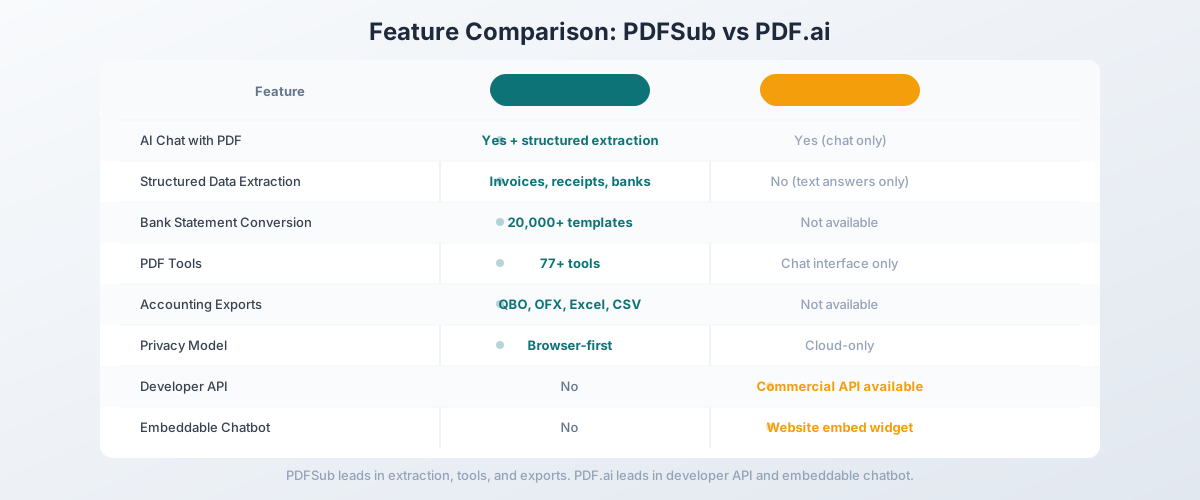
Structured Extraction vs. Chat Responses
This is the core difference. PDF.ai gives you conversational answers about a document. PDFSub gives you structured data you can act on:
Invoice extraction:
- PDF.ai: "The total amount is $1,234.56" (text answer to a question)
- PDFSub: Complete invoice data - vendor name, invoice number, date, line items with descriptions/quantities/prices, subtotal, tax, total - exported as an Excel spreadsheet
Bank statement conversion:
- PDF.ai: "The ending balance is $5,432.10" (text answer)
- PDFSub: Full transaction table - every date, description, debit, credit, and running balance - exported to Excel, CSV, QBO, or OFX for direct accounting software import
Receipt scanning:
- PDF.ai: "This receipt is from Store X for $45.67" (text answer)
- PDFSub: Structured receipt data - vendor, date, items, amounts, tax, total - ready for expense reporting
The distinction matters for professional use. You don't need a chatbot to tell you what's on a bank statement - you need a tool that extracts the transactions into a format your accounting software can import.
Competitive Pricing with Far More Capability
PDFSub's pricing is published and transparent:
- All-In-One: $20/month annual ($240/year, saves $60 vs monthly; or $25/month billed monthly) - every PDF tool (98+), 500 AI credits, 500 bank statement pages, e-sign with no per-envelope fees, 50 GB storage, 365-day retention, unlimited team seats (each billed at the same per-user rate)
- Stackable add-on packs available for higher volume: 500 AI Credits, 500 Bank Statement Conversion Pages, 40 GB Storage, Priority Support
PDF.ai's pricing:
- Hobby (Free): 1 PDF, 10 MB limit
- Pro: $17/month
- Ultimate: $27/month
- Enterprise: $37/user/month
At a lower price point ($15 vs. $27), PDFSub provides structured data extraction, 98+ PDF tools, 20,000+ bank statement templates, and 130+ language support. PDF.ai provides a chat interface with message caps. The value per dollar isn't close.
20,000+ Bank Statement Templates
PDF.ai doesn't extract bank statement data into structured tables. PDFSub includes dedicated bank statement conversion with 20,000+ pre-built templates for banks worldwide - Chase, HSBC, Barclays, Commonwealth Bank, ANZ, DBS, Deutsche Bank, and thousands more.
Upload a statement, and PDFSub auto-detects the bank format and extracts all transactions with date, description, amount, and running balance. Export to 8 formats: Excel, CSV, TSV, JSON, QBO, OFX, QFX, and QIF.
For accounting practices, this is the most valuable capability that PDF.ai simply doesn't offer. You can't chat your way to a QuickBooks-importable transaction file.
98+ PDF Tools Included
PDF.ai is a chat interface. PDFSub is a document operations platform:
- Merge and split PDFs for client document packages
- Compress large files for email or storage
- Convert between PDF, Word, Excel, PowerPoint, and image formats
- Watermark and stamp documents for confidential marking
- Encrypt and decrypt PDFs for security
- Translate documents across 130+ languages with AI
- Summarize long documents for quick review
- Compare two documents side by side
- Chat with PDF - yes, PDFSub includes AI chat too
PDFSub's AI chat feature provides the same conversational document understanding that PDF.ai offers, plus all the structured extraction and document tools that PDF.ai doesn't. You get everything PDF.ai does, and much more.
130+ Languages with Auto-Detection
PDFSub supports 130+ languages with automatic detection - including all non-Latin scripts (Chinese, Japanese, Korean, Arabic, Hindi, Thai, Cyrillic). PDF.ai supports multiple languages through its AI model, but the primary optimization is for English-language documents.
For international document workflows - foreign bank statements, invoices in multiple languages, translated contracts - PDFSub's comprehensive language support with dedicated document translation tools provides a significant advantage.
Browser-First Privacy
PDFSub's Tier 1 extraction runs entirely in your browser - your document never leaves your device. For most digital bank statements, invoices, and receipts, all processing happens client-side.
PDF.ai uploads all documents to their cloud servers for AI processing. Every PDF you chat with is stored on their servers. PDFSub's browser-first approach means financial documents with sensitive data stay on your device for the majority of operations.
Side-by-Side Feature Comparison
| Feature | PDFSub | PDF.ai |
|---|---|---|
| Pricing | $20/mo (annual; $25/mo monthly) | Free / $17-$37/mo |
| AI chat with PDF | Yes (included) | Yes (core feature) |
| Structured data extraction | Yes (invoices, receipts, bank statements) | No (chat answers only) |
| Bank statement conversion | 20,000+ templates | No |
| PDF tools | 98+ (merge, split, compress, etc.) | No |
| Accounting exports | QBO, OFX, QFX, QIF, Excel, CSV | No |
| Languages | 130+ (auto-detected) | Multiple (AI-dependent) |
| Privacy model | Browser-first (Tier 1) | Cloud-only |
| Developer API | No | Yes (add-on) |
| Embeddable chatbot | No | Yes (website embed) |
| OCR for scanned docs | Yes (multi-tier) | Yes (plan-dependent) |
| Free plan | 7-day trial | Yes (1 PDF, 10 MB) |
When PDF.ai Is Still the Right Choice
Being honest: PDF.ai does some things PDFSub doesn't optimize for. If these features are critical to your workflow, PDF.ai might still be the right tool:
You need a developer API for PDF chat. PDF.ai offers a commercial API that lets developers build PDF chat capabilities into their own applications. If you're building a product that needs embedded PDF Q&A functionality, PDF.ai's API and embeddable chatbot are purpose-built for that use case. PDFSub ships a Developer API focused on HTML-input rendering (HTML → PDF/images/text), but doesn't offer programmatic PDF chat endpoints in v1.
You want an embeddable PDF chatbot. PDF.ai lets you embed a chatbot trained on your PDF directly onto your website - useful for product manuals, FAQ documents, or knowledge bases. This is a unique capability that PDFSub doesn't offer.
Your needs are purely conversational. If you genuinely only need to ask questions about document contents and don't need structured data extraction, accounting exports, or PDF tools, PDF.ai's focused chat interface is simpler. Sometimes the simplest tool for a simple task is the right choice.
You want a permanent free tier for occasional use. PDF.ai's free Hobby plan lets you chat with one PDF at a time. If your usage is truly occasional - one document at a time, no extraction needed - the free plan covers it. PDFSub offers a 7-day free trial (credit card required to start) rather than a permanent free tier.
Other Alternatives Worth Considering
PDFSub is our recommendation for the broadest value combining AI capabilities with document tools, but other options exist:
ChatPDF - Similar to PDF.ai but with a more generous free plan (3 PDFs/day, 50 questions/day). Same chat-only limitation - no structured extraction. Good for casual document Q&A without paying.
Adobe Acrobat - The industry standard for PDF operations with AI Assistant features added. Strong PDF tools but expensive ($22.99/month for Pro) and the AI features are more limited than dedicated AI tools. No financial document extraction.
Smallpdf - Online PDF tool suite with 20+ PDF operations. Good for document manipulation but no AI extraction or bank statement conversion. Plans from $9/month.
Nanonets - AI document extraction with structured output for invoices and receipts. Closer to PDFSub's extraction capabilities but without PDF tools. Developer-oriented with API access.
AskYourPDF - Another AI PDF chat tool similar to PDF.ai. Offers plugins for ChatGPT and a knowledge base feature. Same chat-only limitations for financial document workflows.
How to Switch from PDF.ai to PDFSub
If you're currently using PDF.ai and need more than chat capabilities, here's how to expand your toolkit:
Step 1: Start a Free Trial
Go to PDFSub's pricing page and start a 7-day free trial. All plans include full functionality including AI chat, extraction, and PDF tools.
Step 2: Test AI Chat Alongside Extraction
Try PDFSub's AI chat feature with the same documents you use in PDF.ai - verify the conversational experience meets your needs. Then test structured extraction: upload an invoice and get a full Excel export, convert a bank statement and download QBO for QuickBooks.
Step 3: Explore the PDF Tools
Try the document operations you currently handle with separate tools: merge multiple PDFs, compress a large file, convert a Word document to PDF, translate a document. Having these in the same platform as AI capabilities eliminates tool-switching.
Step 4: Compare Value Per Dollar
At PDFSub's $20/month All-In-One plan vs. PDF.ai's $27/month Ultimate plan, you're paying about the same for dramatically more capability - structured extraction, 98+ PDF tools, 20,000+ bank templates, and 130+ language support on top of AI chat.
Step 5: Cancel PDF.ai
Once you've validated that PDFSub covers your chat needs and adds the extraction and document tools you've been missing, cancel your PDF.ai subscription. PDFSub is the single platform for the complete workflow.
Frequently Asked Questions
Does PDFSub have AI chat like PDF.ai?
Yes. PDFSub includes AI-powered document chat as one of its AI features. You can upload a PDF and ask questions about its contents, just like PDF.ai. The difference is that PDFSub also provides structured data extraction, 98+ PDF tools, and accounting exports - capabilities PDF.ai doesn't offer.
Is PDFSub's AI chat as good as PDF.ai's?
Both use large language models to understand and answer questions about document contents. PDFSub's AI is powered by Google's Gemini models and optimized for financial document understanding. For general document Q&A, both deliver comparable quality. For financial documents specifically, PDFSub's financial document training provides an edge.
Does PDFSub have a free plan like PDF.ai?
PDFSub offers a 7-day free trial with full access to all features. PDF.ai offers a permanent free Hobby plan limited to one 10 MB PDF. If you need ongoing free access for very occasional use, PDF.ai's free tier is available. If you need to evaluate the full platform, PDFSub's trial gives you complete access for a week.
Can PDFSub embed a chatbot on my website?
No. PDFSub ships a Developer API (10 SDKs, HTML-input rendering), but it doesn't include an embeddable PDF chatbot widget like PDF.ai's. If you need to drop a "chat with this document" widget onto your own website, PDF.ai's embeddable widget is purpose-built for that use case.
How does PDFSub handle large documents?
PDFSub processes multi-page documents without the page limits that PDF.ai imposes on some plans. Upload a 50-page bank statement or a 100-page financial report - the multi-tier extraction system handles the complete document. File size limits depend on the plan tier but are generous for typical financial documents.
Is PDF.ai better for students and researchers?
For pure document Q&A - asking questions about academic papers, textbooks, or research documents - PDF.ai's focused chat interface is well-suited. If you also need PDF tools (merge sources, convert formats, translate papers), PDFSub covers both chat and document operations. The choice depends on whether you need more than just chat.
The Bottom Line
PDF.ai is a clean, simple tool for chatting with PDFs - but chatting with a document and extracting actionable data from it are fundamentally different tasks. When your workflow requires structured invoice data, bank statement transaction tables, accounting-format exports, or practical PDF operations, a chat interface isn't enough.
PDFSub includes AI chat plus structured extraction for bank statements, invoices, and receipts, 98+ PDF tools, and accounting-ready exports - all starting at $20/month. Add 130+ language support, 20,000+ bank statement templates, and browser-first privacy, and you get a complete document platform that does everything PDF.ai does and much more.
Try PDFSub's Chat with PDF tool free with a 7-day trial and compare the capabilities directly. Upload a document, chat with it, then extract structured data and export to Excel. The difference between a chat tool and a document platform becomes immediately clear.