Best Nitro PDF Alternative for Document Processing (2026)
Nitro PDF Pro is expensive and desktop-bound. Compare features and see why teams switch to PDFSub.
PDFSub is best for:
- Nitro users switching from $16.50/user/mo desktop licenses to $20/user/mo (annual) browser-based access with AI features built in
- Teams that need AI document intelligence and financial extraction that Nitro lacks
- Organizations replacing Windows-only desktop installs with cross-platform browser tools
- Small businesses that want self-service signup instead of enterprise sales calls and custom quotes
PDFSub is NOT best for:
- Enterprises needing SSO, Azure Information Protection, and IT admin deployment controls
- Users who require deep desktop PDF text editing and offline document processing
- Organizations needing eSignature workflow automation with compliance audit trails
Nitro PDF Pro has positioned itself as the enterprise alternative to Adobe Acrobat for over a decade. With a one-time purchase option (now branded as Nitro PDF Classic at $270 for a 3-year license) and subscription plans starting at $16.50/user/month, Nitro targets organizations that want professional PDF editing without Adobe's ecosystem lock-in.
Nitro's strengths are real: solid PDF editing, integrated e-signatures, good Microsoft 365 integration, and the appeal of avoiding monthly Adobe subscriptions. For enterprises managing hundreds of desktop licenses, Nitro has been a legitimate cost-saving choice.
But the document landscape has evolved faster than Nitro has adapted. Browser-based tools have replaced the need for desktop installations. AI has transformed document processing from manual editing to intelligent extraction. Financial document workflows - bank statements, invoices, receipts - now demand specialized tools, not generic PDF editors. And Nitro's pricing, once its competitive advantage, has crept upward while its feature set has stayed focused on traditional PDF editing.
If you've been evaluating Nitro PDF Pro or looking to replace an existing Nitro deployment, this guide covers what's changed and what the better options look like in 2026.
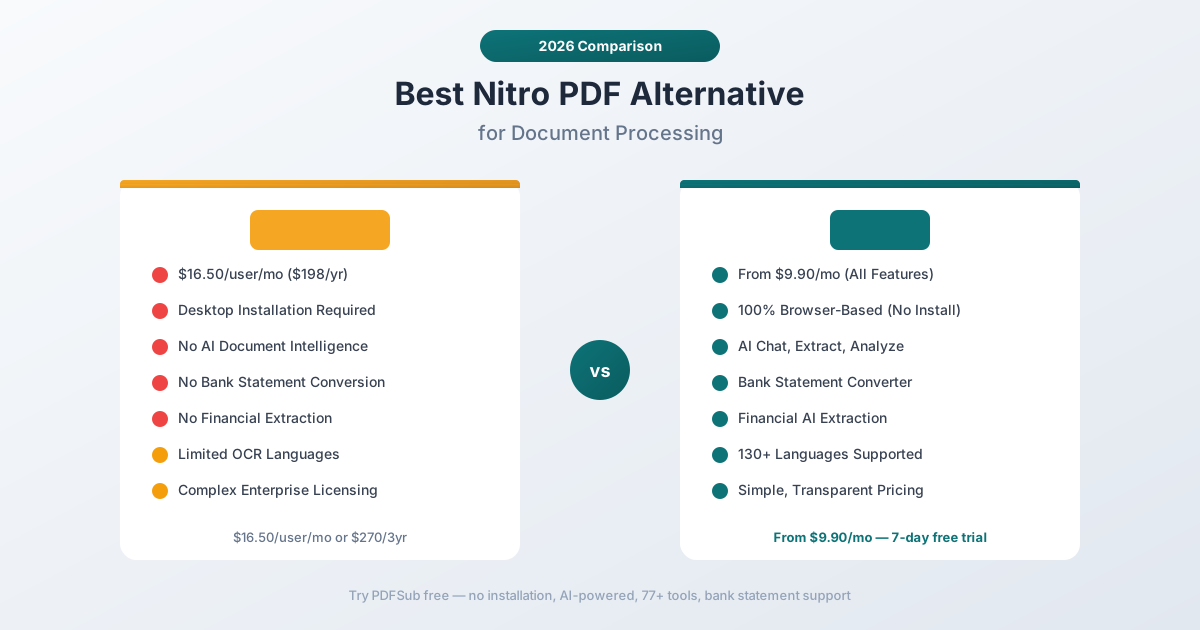
Why People Look for Nitro PDF Alternatives
Nitro's value proposition made sense when the choice was between Acrobat's expensive subscription and Nitro's one-time purchase. That equation has changed:
The "One-Time Purchase" Isn't What It Seems
Nitro PDF Classic is marketed as a one-time purchase, but it's actually a 3-year fixed-term license for $270. After three years, you need to purchase again or lose access to updates and support. This isn't a perpetual license in the traditional sense - it's a prepaid subscription with a longer billing cycle.
The subscription plans (Nitro PDF Standard at $16.50/user/month billed annually, or $198/user/year) are comparable to Adobe Acrobat's pricing. The cost advantage that once drove Nitro adoption has largely evaporated.
For organizations with 50+ users, Nitro Plus and Enterprise plans require custom quotes, adding procurement complexity and making it harder to compare costs directly.
Desktop-First Architecture
Nitro PDF Pro is primarily a Windows desktop application. While Nitro has expanded to include web-based features through Nitro Workspace, the core PDF editing capabilities still require a desktop installation.
This creates familiar problems:
- IT deployment overhead. Each workstation needs installation, updates, and license management.
- Windows-centric. Core features are Windows-only. macOS support exists but has historically lagged behind.
- Device-locked licenses. Users can't easily switch between devices or work from shared machines.
- Update management. Desktop apps need regular patches, and major version upgrades often require new license purchases.
In an era when work happens across devices, operating systems, and locations, desktop-first PDF tools create administrative burden that browser-based alternatives eliminate entirely.
No AI Document Intelligence
Nitro's feature set is focused on traditional PDF operations: editing, converting, signing, and securing. It has no AI capabilities for:
- Chatting with documents to ask questions about content
- Extracting structured data from tables and forms
- Analyzing financial documents with automated calculations
- Translating documents while maintaining formatting
- Summarizing long documents intelligently
As AI has become the defining feature in document processing, Nitro's absence of any AI capability makes it increasingly difficult to justify, especially at enterprise price points.
No Financial Document Tools
Nitro cannot convert bank statements to structured data. It cannot extract invoice line items. It cannot scan receipts and parse merchant information. It has no accounting format exports (QBO, OFX, QIF).
For organizations that process financial documents - accounting firms, bookkeepers, financial advisors, banks - Nitro's lack of financial tooling means maintaining additional software subscriptions alongside Nitro.
Complex Enterprise Licensing
Nitro's tiered licensing (Standard, Plus, Enterprise) with per-user pricing, custom quotes for larger deployments, and separate pricing for desktop vs. cloud features creates procurement complexity. Comparing the actual cost of a Nitro deployment against alternatives requires navigating multiple plan pages and potentially engaging with sales teams.
What to Look for in a Nitro PDF Alternative
Organizations evaluating Nitro replacements typically need:
Browser-based deployment. Zero IT overhead for installation, updates, and license management. Users log in through a browser and start working immediately.
AI document intelligence. The ability to understand document content, not just manipulate PDF structure. Extraction, analysis, and comprehension built into the platform.
Financial document specialization. Dedicated tools for the financial documents that drive business workflows: bank statements, invoices, receipts, and financial reports.
Simple, predictable pricing. One plan, one price, all features. No per-user licensing tiers, no custom quotes, no surprise costs for additional modules.
Multi-language support. Real-world organizations process documents in multiple languages. The replacement should handle 100+ languages natively.
PDFSub: The Best Nitro PDF Alternative
PDFSub replaces Nitro's desktop-centric PDF editing with a browser-first platform that adds AI intelligence, financial document tools, and multi-language support - all at a simpler, more predictable price point.
Zero-Deployment Browser Platform
PDFSub runs entirely in the browser. There's no software to install, no desktop clients to manage, no platform restrictions. Users on Windows, macOS, Linux, ChromeOS, tablets, and phones all get the same experience.
For IT teams managing Nitro deployments, the switch to PDFSub eliminates:
- Desktop installation and update management
- Per-device license tracking
- Platform compatibility issues
- Version fragmentation across the organization
Users log in, open a browser tab, and have immediate access to every tool. New employees are productive on day one without waiting for IT provisioning.
AI-Powered Document Processing
PDFSub's AI features transform document workflows:
- Chat with PDF - Ask natural-language questions about any document. The AI understands table relationships, column headers, and data hierarchies. Instead of reading a 50-page report, ask specific questions and get grounded answers.
- Extract Data - Pull structured data from any document. Tables maintain column relationships, forms preserve field structure, and the output is clean, usable data.
- Financial Report Analyzer - Analyze balance sheets, income statements, and cash flow documents. Automated ratio calculations, trend identification, and structured output.
- Summarize - Generate intelligent summaries of any document length, maintaining key facts and structure.
- Translate - Translate documents across 130+ languages while preserving formatting.
The extraction pipeline uses 4 tiers: browser text extraction, server text extraction, server OCR, and vision AI. Every document automatically gets the best method - from clean digital PDFs to scanned documents with complex layouts.
Bank Statement Conversion
PDFSub's bank statement converter is the capability Nitro has never offered. It recognizes 20,000+ bank formats worldwide and exports structured data to:
- Excel (.xlsx) - Clean columns for date, description, debit, credit, balance
- CSV and TSV - Universal import format for any spreadsheet or database
- QBO - Direct import to QuickBooks Online
- OFX - Open Financial Exchange for accounting software
- QIF - Legacy QuickBooks interchange format
- JSON - For developers and automated data pipelines
For accounting firms and financial teams that currently use Nitro for general PDF tasks and a separate tool for bank statement processing, PDFSub consolidates both into a single platform.
Invoice and Receipt Extraction
Purpose-built extractors for financial documents:
- Invoice Extractor - Vendor name, invoice number, PO number, line items with descriptions and quantities, subtotals, tax amounts, totals, payment terms, and due dates
- Receipt Scanner - Merchant name, date, individual items with prices, tax breakdown, payment method, tip amount, and total
- Financial Report Analyzer - Balance sheet components, income statement lines, cash flow items, with automated ratio calculations
These tools understand document semantics, not just visual layout. An invoice extracted through PDFSub produces structured data ready for accounting software import, not a spreadsheet that roughly mirrors the PDF layout.
98+ Tools with Full Coverage
PDFSub's 98+ tools cover all standard PDF operations:
- Document manipulation: Merge, split, reorder, rotate, delete pages, extract pages
- Conversion: PDF to/from Word, Excel, PowerPoint, images, HTML
- Editing: Annotations, text additions, shapes, stamps, watermarks, redaction
- Security: Password protection, permissions, encryption, digital signatures
- Optimization: Compression, repair, linearization
- Financial: Bank statements, invoices, receipts, financial reports
- AI: Chat, extract, summarize, translate, analyze
Every tool Nitro offers for PDF manipulation is covered, plus the entire AI and financial category that Nitro lacks.
130+ Languages
PDFSub supports over 130 languages for translation, OCR, and document processing, including full support for right-to-left languages, CJK scripts, and South Asian languages. For multinational organizations processing documents across languages, this eliminates the need for separate translation tools or manual processing.
Privacy-First Processing
PDFSub processes files in the browser whenever possible. Merge, split, compress, edit, and other operations happen locally - the file never leaves the user's device. Server processing is reserved for AI analysis and OCR, where server resources are genuinely needed.
For financial documents with sensitive data, this architectural choice provides stronger privacy protection than desktop applications that may sync to cloud services or Nitro Workspace's cloud-based features.
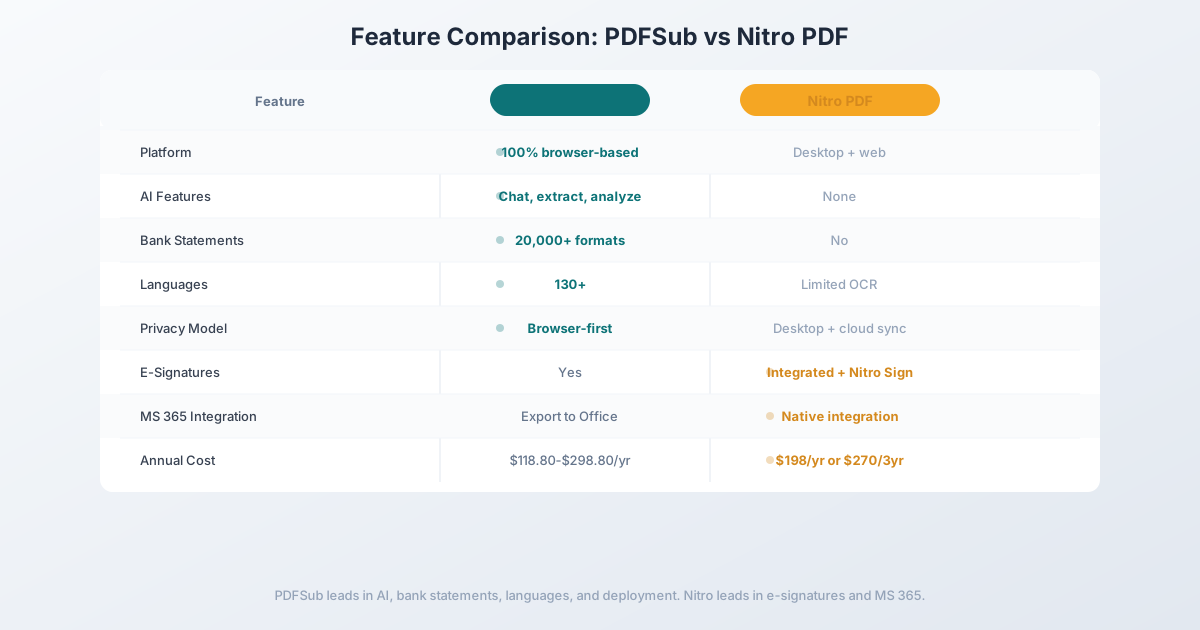
Head-to-Head: PDFSub vs Nitro PDF
| Feature | PDFSub | Nitro PDF Pro |
|---|---|---|
| Platform | 100% browser-based | Desktop (Windows/Mac) + web |
| AI features | Chat, extract, analyze, translate | None |
| Bank statement conversion | 20,000+ formats | No |
| Invoice/receipt extraction | Dedicated tools | No |
| Languages | 130+ | Limited OCR languages |
| Privacy model | Browser-first processing | Desktop + cloud sync |
| E-signatures | Yes | Yes (integrated) |
| Microsoft 365 integration | Export to Office formats | Native integration |
| Total tools | 98+ | Standard PDF suite |
| IT deployment | Zero (browser-based) | Desktop installation |
| Pricing | $20/mo (annual; $25/mo monthly) (all features) | $16.50/user/mo or $270/3yr |
| Free trial | 7-day full access | 14-day trial |
Where PDFSub wins: AI document intelligence, financial document tools, bank statement conversion, browser-based deployment (zero IT overhead), multi-language support, simpler pricing, and privacy-first architecture. For organizations that need document processing capabilities beyond traditional PDF editing, PDFSub delivers significantly more value.
Where Nitro wins: Native desktop PDF editing experience. Nitro's desktop application provides a familiar, responsive editing experience for users who work with PDFs all day. The Microsoft 365 integration is tighter than browser-based alternatives, and the e-signature workflow is mature. For organizations deeply invested in Windows-based desktop workflows, Nitro's editing experience is polished.
The value calculation: Nitro PDF Standard costs $198/user/year. PDFSub's All-In-One plan costs $240/year for all features including AI. For a single user, Nitro is cheaper if you only need basic PDF editing. But the moment you add financial document processing, AI extraction, or bank statement conversion needs, PDFSub eliminates the need for additional specialized tools - making the total cost of ownership lower despite a higher line-item price.
Other Alternatives Worth Considering
Adobe Acrobat Pro - $19.99/month
The incumbent enterprise PDF editor:
- Strengths: Most comprehensive PDF editing capabilities, strong enterprise ecosystem, wide format support, mature form creation
- Weaknesses: Expensive ($239.88/year), desktop-centric, complex licensing, basic AI only (extra cost), no financial document tools
- Best for: Organizations that need the most advanced PDF editing capabilities and are willing to pay premium pricing
Foxit PDF Editor - $149/year
The traditional Acrobat alternative:
- Strengths: Strong editing, lighter than Acrobat, good collaboration features, cross-platform desktop support
- Weaknesses: Desktop application, no AI extraction, no financial tools, complex licensing tiers
- Best for: Desktop users who want solid PDF editing at a lower price than Acrobat or Nitro
Smallpdf Business - $18/user/month
A browser-based PDF tool suite:
- Strengths: Clean web interface, good basic tool selection, easy team management, no installation
- Weaknesses: No AI extraction, no financial document tools, no bank statement conversion, limited advanced features
- Best for: Teams that want to move from desktop PDF tools to browser-based but don't need AI or financial features
Frequently Asked Questions
Is Nitro PDF Pro a one-time purchase?
The current "one-time purchase" option (Nitro PDF Classic) is actually a 3-year fixed-term license for $270. After three years, you need to repurchase. The subscription plans (Nitro PDF Standard) cost $16.50/user/month billed annually ($198/user/year). Neither option is a true perpetual license anymore.
Can Nitro PDF convert bank statements?
No. Nitro can export a PDF to Excel using generic conversion, but it has no bank statement-specific features. The resulting Excel file mirrors the PDF layout without understanding transaction structure, dates, or debit/credit columns.
Is Nitro PDF better than Adobe Acrobat?
For organizations looking to reduce PDF software costs, Nitro offers similar core editing capabilities at a lower price than Acrobat Pro. However, both are desktop-centric tools without AI document intelligence or financial specialization. The choice between them is primarily about price and ecosystem preference.
Does PDFSub work for teams?
Yes. PDFSub's browser-based architecture means no desktop deployment. Team members log in through a browser and have immediate access to all features. There's no per-device licensing, no IT provisioning, and no platform restrictions.
Can I replace Nitro PDF with PDFSub?
For document processing, AI extraction, financial document conversion, and general PDF operations (merge, split, compress, convert), PDFSub is a direct replacement with additional capabilities. For advanced in-place PDF text editing or complex form creation, PDFSub covers essential editing but may not match Nitro's desktop editing depth for specialized use cases.
Switching from Nitro PDF - What to Expect
Migrating off Nitro is mostly about replacing the desktop habit. Nitro doesn't store your documents centrally - you've been working on PDFs that live on disk. Here's the typical 4-step path:
Step 1 - Day 1: Sign up for PDFSub while keeping Nitro installed. Start the 7-day PDFSub trial. Don't uninstall Nitro yet - overlap is fine and you'll want both available for side-by-side comparison.
Step 2 - Days 1-3: Map your common workflows. Most Nitro users land on a small set of recurring tasks: convert PDFs to Office formats, sign documents, fill forms, merge/split. Run those through PDFSub. If you do deep inline text editing of existing PDFs, test that specifically - PDFSub covers annotations and overlays but doesn't match Nitro's byte-level paragraph rewriting.
Step 3 - Days 3-5: Try the capabilities Nitro doesn't have. Convert a bank statement at the bank statement converter, translate a foreign-language PDF, or extract structured data from an invoice. Each of these would require additional software on top of Nitro.
Step 4 - End of trial: Plan the cancel. Nitro's "one-time" Classic license is actually a 3-year term - check your renewal date and don't auto-renew. For Nitro Standard subscribers, cancel at the next billing cycle. If parts of your team genuinely need Nitro Sign's enterprise workflow features, keep a smaller seat count and use PDFSub for everything else.
Most users find they stop opening Nitro within the first week - except for the occasional deep edit.
The Bottom Line
Nitro PDF Pro built its reputation as the cost-effective alternative to Adobe Acrobat. For years, the value proposition was clear: similar desktop editing capabilities at a lower price. But the document processing landscape has shifted decisively toward browser-based tools, AI intelligence, and financial document specialization - areas where Nitro has no presence.
If your organization's primary need is traditional desktop PDF editing with Microsoft 365 integration, Nitro remains a solid choice. But if your workflows involve extracting data from documents, processing financial files, working across languages, or deploying to users without IT overhead, Nitro's desktop-centric approach creates more problems than it solves.
PDFSub provides the modern alternative: browser-based deployment, AI-powered extraction, financial document tools, and 130+ language support. Everything organizations actually need from a document processing platform in 2026.
Still evaluating, not yet switching? This page is written for teams ready to leave Nitro. For a neutral feature-by-feature breakdown and pricing side-by-side, see the PDFSub vs Nitro comparison.
Try PDFSub Free - full access to all 98+ tools, AI extraction, bank statement conversion, and browser-first privacy. No installation required. Cancel anytime.