Best Nanonets Alternative for Document Processing (2026)
Looking for a Nanonets alternative? Compare features, pricing, and capabilities. See why teams switch to PDFSub.
PDFSub is best for:
- Accountants and small firms who need AI extraction at $20/user/mo (annual) instead of $499+/mo
- Users who want instant results without training custom ML models on 50-100 sample documents
- Teams needing bank statement conversion, invoice extraction, and PDF tools in one platform
- Non-technical users who want browser-based extraction without developer involvement
PDFSub is NOT best for:
- Enterprise teams building automated document pipelines with API-first integration
- Organizations needing SOC 2/HIPAA-certified processing with dedicated compliance support
- High-volume workflows requiring custom-trained models for proprietary document formats
Nanonets is a well-known AI document extraction platform. It uses machine learning to pull structured data from invoices, receipts, purchase orders, and other business documents. For enterprises with dedicated engineering teams and six-figure document processing budgets, it works.
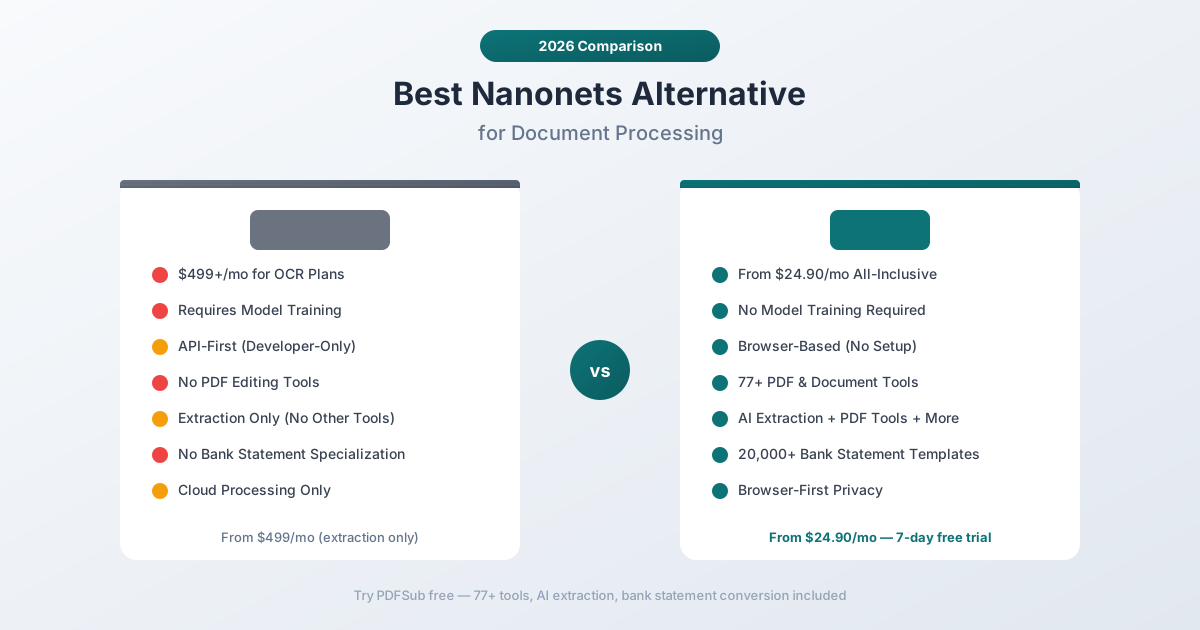
But Nanonets was built for a very specific buyer: companies that can afford $499+/month, have developers available to train custom models, and need API-first automation pipelines. If you don't fit that profile - if you're an accountant, a small business owner, a bookkeeper, or a freelancer who just needs to extract data from financial documents - Nanonets is overkill in both complexity and cost.
This guide breaks down where Nanonets falls short for everyday document processing, what to look for in an alternative, and which tools deliver better value for teams that don't need enterprise-grade automation.
Why People Look for Nanonets Alternatives
Nanonets has strong reviews from enterprise users - 4.7 stars on G2, positive marks for extraction accuracy once models are trained. But the complaints from smaller teams and individual professionals follow a consistent pattern:
Enterprise Pricing That Excludes Small Teams
Nanonets' pricing starts at $499/month for their Pro plan, which includes OCR capabilities and API access. Their Starter plan is technically cheaper but severely limited in features and document volume. For most real-world use cases, you're looking at $500-$2,000/month.
That pricing makes sense if you're processing tens of thousands of documents per month through automated pipelines. It makes no sense if you're an accountant converting 50 bank statements during tax season, or a small business extracting data from a few dozen invoices each month.
For comparison, tools like PDFSub have a single All-In-One plan at $20/month annual ($240/year, saves $60) or $25/month billed monthly - and include AI extraction (500 AI credits), bank statement conversion (500 pages included, with stackable add-on packs), and 98+ PDF tools - the kind of all-in-one value that Nanonets doesn't attempt to offer at any price point.
Model Training Is Required
This is the most common frustration from non-technical users. Nanonets doesn't work out of the box for custom document types. You need to:
- Upload training samples - typically 50-100 annotated documents
- Label fields manually - draw bounding boxes around the data you want extracted
- Train the model - wait for processing (minutes to hours)
- Test and iterate - accuracy improves with more samples, but initial results can be rough
For standard documents like invoices, Nanonets offers pre-trained models that skip some of this. But for bank statements, financial reports, or any document format that doesn't match their templates, you're back to training. That's a significant barrier for anyone who isn't a developer.
PDFSub and similar tools use template-agnostic extraction that works on any document layout without training. Upload a PDF, get structured data. No annotation, no bounding boxes, no waiting.
API-First Design Is Developer-Only
Nanonets is fundamentally an API product. Yes, there's a web dashboard for uploading documents and viewing results. But the real power - batch processing, automated workflows, integrations with business systems - lives in the API.
If you're comfortable writing Python scripts to hit REST endpoints, this is fine. If you're an accountant who wants to drag a bank statement into a browser window and get an Excel file back, Nanonets' API-first approach is the wrong tool entirely.
The web interface exists, but it's clearly secondary. Users report it's functional but not polished - designed as a testing sandbox rather than a primary workflow tool.
No PDF Tools Whatsoever
Nanonets does one thing: extract structured data from documents. It doesn't merge PDFs. It doesn't compress files. It doesn't convert between formats. It doesn't split documents, add watermarks, or do any of the everyday PDF operations that professionals need.
If you use Nanonets for extraction, you still need separate tools for everything else - a PDF editor, a compression tool, a format converter. That means multiple subscriptions, multiple logins, and a fragmented workflow.
No Bank Statement Specialization
Nanonets can extract data from bank statements if you train a custom model. But it doesn't have the specialized understanding of bank statement formats that purpose-built converters offer: opening/closing balance detection, running balance verification, multi-currency handling, continuation row parsing, or standardized output formats like QBO and OFX.
Generic AI extraction treats a bank statement as "a document with tables." Specialized bank statement converters understand the semantic structure - they know that the first column is a date, that negative numbers are debits, that a row spanning two lines is a continuation of the previous transaction.
Cloud-Only Processing
Every document you process through Nanonets is uploaded to their cloud servers. For standard business documents, this is fine. For sensitive financial data - client bank statements, tax documents, personal financial records - some users and organizations require processing that doesn't involve third-party uploads.
Nanonets doesn't offer any client-side or on-premise processing option on standard plans. Enterprise customers can negotiate dedicated infrastructure, but that pushes the price even higher.
What to Look for in a Nanonets Alternative
Before comparing specific tools, here's what separates a good document extraction tool from a great one for non-enterprise users:
Zero-setup extraction. The tool should work on any document format without model training, annotation, or setup. Upload a document, get structured data. If you need to spend hours training a model before getting useful results, the tool is built for engineers, not end users.
Financial document understanding. Generic extraction treats every document the same. The best alternatives understand financial documents specifically - bank statements, invoices, receipts, financial reports - and can extract structured data with field-level accuracy (dates, amounts, descriptions, balances).
Broad platform capabilities. Extraction is important, but it's one task among many. Look for tools that also handle PDF editing, merging, splitting, compression, conversion, and other everyday document operations. One subscription should cover your entire document workflow.
Reasonable pricing. $500/month is justified for enterprise automation processing 50,000 documents/month. For individual professionals and small teams processing hundreds or low thousands, pricing should be in the $25-$50/month range.
Privacy options. Ideally, the tool should offer browser-first processing where documents never leave your device for routine operations, with server-side AI available as a fallback for complex documents.
Language support. If you work with international documents, the tool needs to handle non-English text, non-Latin scripts, and international date/number formats without special configuration.
PDFSub: The Best Nanonets Alternative
PDFSub is an all-in-one document platform that combines AI extraction, bank statement conversion, and 98+ PDF tools in a single subscription - replacing not just Nanonets, but the collection of separate tools most people use alongside it.
No Training Required - Ever
This is the fundamental difference. PDFSub uses a 4-tier extraction waterfall that works on any document layout without training:
- Tier 1 - Browser-based coordinate extraction. Analyzes the PDF's internal structure (text positions, column alignments, table boundaries) entirely in your browser. Your file never leaves your device.
- Tier 2 - Server-side coordinate extraction for more complex layouts that need additional parsing logic.
- Tier 3 - AI-powered OCR for scanned or image-based documents.
- Tier 4 - Vision AI for the most challenging documents where text extraction fails entirely.
The system automatically escalates through tiers based on extraction quality. You upload a document, and the platform figures out the best extraction path. No model training, no annotation, no developer required.
For bank statements specifically, PDFSub recognizes layouts from 20,000+ banks worldwide and applies format-specific parsing logic automatically.
98+ PDF Tools in One Platform
Nanonets does extraction. PDFSub does extraction plus 77 other document operations:
- PDF editing: Merge, split, rotate, compress, watermark, number pages
- Format conversion: PDF to Word, Excel, PowerPoint, images, and back
- AI tools: Summarize, translate (130+ languages), chat with documents, compare documents
- Financial tools: Bank statement converter, invoice extractor, receipt scanner, financial report analyzer
- Security: Encrypt, decrypt, redact, flatten, sign
One subscription replaces your extraction tool, PDF editor, file converter, and document AI assistant. For most professionals, that consolidation alone justifies the switch from Nanonets.
25x Lower Starting Price
PDFSub's All-In-One plan is $20/month annual ($240/year, saves $60) or $25/month billed monthly - roughly 25x less than Nanonets' Pro plan at $499/month. And PDFSub's plan includes 500 AI credits, 500 bank statement pages, full access to all 98+ tools, e-sign with no per-envelope fees; add unlimited team seats at the same per-user rate.
Here's the pricing in context:
| Feature | PDFSub ($20/user/mo annual) | Nanonets ($499/mo) |
|---|---|---|
| AI extraction | Yes | Yes |
| Bank statement conversion | Yes (20,000+ banks) | Custom model only |
| PDF tools (merge, split, etc.) | 98+ tools | None |
| Document translation | 130+ languages | No |
| Model training required | No | Yes |
| Browser-first processing | Yes | No |
Nanonets' higher price buys you API access and enterprise automation features. If you need those, the price makes sense. If you need document extraction, PDF tools, and bank statement conversion, PDFSub delivers more capability at a fraction of the cost.
Browser-First Privacy
PDFSub's Tier 1 extraction runs entirely in your browser. For most digital (text-based) PDFs - including the majority of bank statements, invoices, and financial reports - your document never leaves your device. No upload, no server processing, no third-party access.
Only scanned or image-based documents that need OCR or vision AI are sent to the server, and those files are processed in isolation and deleted after processing.
Nanonets processes every document on their cloud servers. There's no client-side option on standard plans.
130+ Languages Out of the Box
PDFSub supports 130+ languages with automatic detection. Upload a document in German, Chinese, Arabic, Hindi, or any other supported language, and the platform automatically identifies the language, applies appropriate OCR models, and extracts data correctly.
Nanonets supports multiple languages, but accuracy varies significantly by model and training data. For less common languages, you may need to train a custom model - which brings you back to the annotation and training loop.
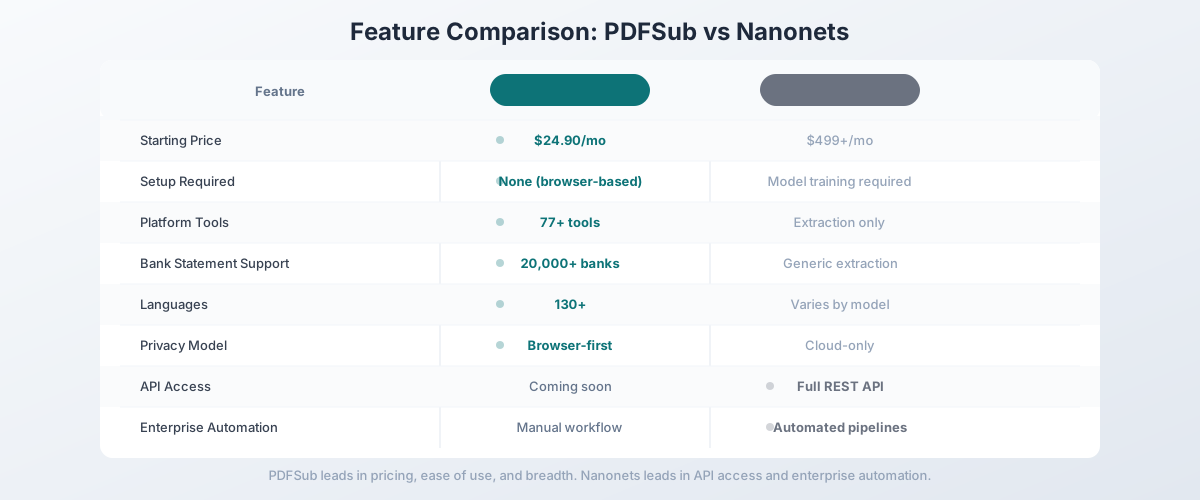
Side-by-Side Feature Comparison
| Feature | PDFSub | Nanonets |
|---|---|---|
| Starting price | $20/user/mo (annual) | $499/mo |
| Setup required | None | Model training |
| Bank statements | 20,000+ banks, 8 output formats | Custom model needed |
| PDF tools | 98+ (merge, split, compress, convert, etc.) | None |
| Languages | 130+ (auto-detected) | Varies by model |
| Privacy | Browser-first (Tier 1 never uploads) | Cloud-only |
| OCR | 4-tier waterfall (auto-escalation) | Included |
| API access | Coming soon | Full REST API |
| Enterprise automation | Manual workflow | Automated pipelines |
| Free trial | 7-day full access | Free tier (limited) |
| Target user | Professionals, small teams | Enterprise developers |
| Accounting formats | QBO, OFX, QFX, QIF | JSON/CSV (custom) |
When Nanonets Is Still the Right Choice
Being honest: Nanonets does some things that PDFSub can't match. If these capabilities are critical to your workflow, Nanonets might still be the right tool:
You need extraction-specific API endpoints today. Nanonets' REST API has mature, well-documented endpoints for invoice/receipt/document extraction, custom model training, and webhook callbacks. PDFSub ships a Developer API with 10 official SDKs (Node, Python, PHP, Go, Ruby, Java, .NET, Rust, C, C++), but the v1 surface area focuses on HTML-input rendering - extraction endpoints for the AI tools land in a later phase. If you need API-first extraction automation today, Nanonets is the better fit.
You process 50,000+ documents per month. At enterprise scale, Nanonets' per-document pricing can actually be more economical than subscription-based tools. The automated pipeline eliminates manual work, and the model training investment pays off across thousands of documents.
You need custom extraction models. Nanonets lets you train models for completely custom document types - forms, contracts, or industry-specific documents with unique layouts. PDFSub's extraction works on standard financial and business documents but doesn't support custom model training.
You need workflow automation. Nanonets integrates with Zapier, Make, and other automation platforms. Documents can flow from email to extraction to database without human intervention. PDFSub is a manual tool - you upload documents and download results.
You have engineering resources. If you have developers who can build and maintain extraction pipelines, Nanonets' flexibility is an advantage. The API-first approach means unlimited customization.
Other Alternatives Worth Considering
PDFSub is our recommendation for professionals and small teams, but other tools may fit specific use cases:
Rossum - AI-powered document extraction focused on invoices and purchase orders. Strong automation features with a visual workflow builder. More accessible than Nanonets (no model training for standard documents) but still enterprise-priced at $500+/month. Better for accounts payable automation than general document processing.
Docsumo - Document extraction platform with pre-trained models for invoices, bank statements, and insurance documents. More affordable than Nanonets ($250+/month) with a better web interface. Good middle ground between Nanonets' flexibility and PDFSub's simplicity, but still lacks PDF tools.
DocuClipper - Bank statement converter specifically. Much cheaper ($39-$399/month, page-based pricing) and focused on the accounting workflow. Good choice if bank statements are your only need, but English-only and no other document types.
Google Document AI - Google Cloud's document extraction service. Pay-per-document pricing (starting at $0.001-$0.01 per page depending on the processor). Excellent accuracy and pre-trained models for common document types. Requires Google Cloud setup and API integration - similar developer requirements to Nanonets but potentially cheaper at moderate volumes.
Switching from Nanonets - What to Expect
Switching off Nanonets is mostly about workflow, not data. Your trained models live in Nanonets, and there's no portable export - if you stop paying, the models stop working. Here's the typical 4-step path:
Step 1 - Day 1: Audit which extraction tasks you actually run. List the document types Nanonets currently extracts and the destinations the data flows to (ERP, CRM, accounting software, spreadsheet). If your list is "invoices, bank statements, receipts → accounting software," PDFSub covers all three with no model training. If your list includes custom forms or industry-specific layouts, you may need to keep Nanonets or evaluate Rossum/Docsumo instead.
Step 2 - Days 1-3: Run the same documents through PDFSub's trial. Start the 7-day trial and upload the documents you currently process through Nanonets. PDFSub gives you results in seconds - no annotation, no training. Compare accuracy on real samples.
Step 3 - Days 3-5: Replace the automation with manual upload OR keep what API automation you need. PDFSub is a web-app workflow - you upload documents and download structured results. If you previously had Nanonets auto-pulling documents from email or cloud storage and pushing to your ERP, you'll lose that automation when you switch. For most accountants and bookkeepers, the manual workflow is faster than maintaining Nanonets' pipeline. For high-volume API-driven extraction today, Nanonets remains the better fit.
Step 4 - End of trial: Cancel Nanonets (or downgrade). Once you've validated that PDFSub covers your real workflow, cancel Nanonets at the end of the billing cycle. Export any historical extraction data you need first - once the contract ends, you lose access to your trained models and processing history.
The savings are dramatic at small-team scale: Nanonets starts at $499/mo, PDFSub is $20/mo annual. The trade is API automation and model training for browser-based simplicity and 98+ general PDF tools.
Frequently Asked Questions
Is PDFSub as accurate as Nanonets for document extraction?
Accuracy depends on the document type and complexity. For standard financial documents (bank statements, invoices, receipts), PDFSub's specialized extraction is highly accurate - it understands financial document structure and applies format-specific parsing. Nanonets can match or exceed this accuracy, but only after training a custom model. For pre-trained standard document types (invoices, receipts), both tools deliver strong results. The best approach is to test both with your actual documents - PDFSub offers a 7-day free trial with full functionality.
Can PDFSub replace Nanonets for invoice processing?
Yes. PDFSub includes an AI invoice extractor that pulls vendor name, invoice number, dates, line items, totals, and tax amounts from invoice PDFs. It works on any invoice layout without training. The difference is that PDFSub processes invoices through a browser interface (upload, extract, download), while Nanonets can process them through an automated API pipeline.
Does PDFSub have an API?
Yes. PDFSub ships a Developer API with 10 official SDKs - Node, Python, PHP, Go, Ruby, Java, .NET, Rust, C, and C++. The v1 surface area focuses on HTML-input rendering (HTML → PDF/PNG/JPEG/WEBP, HTML → text/markdown) with cloud delivery to Google Drive, Dropbox, S3, GCS, and Cloudflare R2. Extraction endpoints for the AI tools (bank statements, invoices, receipts) are planned for a follow-up phase. If you need API-first AI extraction automation today, Nanonets or Google Document AI are better fits for that specific workflow.
Can PDFSub handle scanned documents?
Yes. PDFSub's 4-tier extraction waterfall includes OCR (Tier 3) and Vision AI (Tier 4) for scanned and image-based documents. Digital PDFs with embedded text are processed in your browser (Tier 1) without uploading. Scanned documents require server-side processing.
How does PDFSub's bank statement extraction compare to training a Nanonets model?
PDFSub's bank statement converter is purpose-built with recognition for 20,000+ bank formats worldwide. It auto-detects dates, amounts, currencies, and balance fields without any training. Nanonets can achieve similar results, but you need to train a custom model for each bank format - which means annotating 50-100 sample documents per bank. For accountants working with statements from dozens of different banks, PDFSub's template-agnostic approach is dramatically more practical.
What if I need both extraction and PDF tools?
This is exactly PDFSub's value proposition. One subscription covers AI extraction, bank statement conversion, PDF editing, format conversion, document translation, and 70+ other tools. With Nanonets, you get extraction only - you need separate subscriptions for PDF tools, format conversion, and everything else.
The Bottom Line
Nanonets is a powerful enterprise extraction platform - but it's enterprise in both capability and cost. For individual professionals, accountants, small businesses, and teams that don't need API automation or custom model training, it's significant overkill.
PDFSub delivers AI extraction, bank statement conversion, and 98+ PDF tools in a single All-In-One plan at $20/month annual ($240/year) or $25/month billed monthly - no model training, no API setup, no engineering resources required. Upload a document, get structured data. Process a bank statement, download Excel. Merge three PDFs, compress the result, translate it to Spanish - all in the same platform.
Try PDFSub free with a 7-day trial and test it with your actual documents. If you're switching from Nanonets, you'll notice the difference in the first sixty seconds: no training, no setup, just results.
Still evaluating, not yet switching? This page is written for teams ready to leave Nanonets. For a neutral feature-by-feature breakdown and pricing side-by-side, see the PDFSub vs Nanonets comparison.