Best Free E-Sign Tools (2026): Sign PDFs Without Paying for DocuSign
Electronic signatures are legally binding - and you don't need a $25/month subscription to use them. Here are the best free e-sign tools, with honest comparisons of what each actually offers.
PDFSub is best for:
- Users who want e-sign bundled with 98+ PDF tools at $20/user/mo (annual) - try free for 7 days
- Freelancers and small businesses who sign contracts, NDAs, and leases without needing multi-party routing
- Teams who also need AI summarization, translation, and document extraction alongside signing
- Privacy-focused users who prefer browser-based PDF signing
PDFSub is NOT best for:
- Users who need a completely free e-sign tool with no subscription (PDFSub is subscription-only after the 7-day trial)
- Teams requiring sequential multi-party signing workflows with automated reminders
- Organizations needing e-signature templates, bulk send, or a signing API
DocuSign charges $10-$25/month for electronic signatures. Adobe Acrobat Sign starts at $12.99/month. These tools are powerful, but most people signing a lease, freelance contract, or permission form don't need multi-party routing, CRM integrations, or bulk sending.
They need to sign a PDF and send it back. That's it.
The good news: you can do that for free, and your signature is just as legally binding as one from a $300/year platform. The bad news: "free" means wildly different things depending on which tool you pick. Some give you unlimited signatures with no account. Others cap you at three documents - total, not per month - then lock you into a subscription.
This guide covers what's actually free, what the catches are, and which tool fits your situation.
Are Free E-Signatures Legally Binding?
Yes. In the United States, two federal and state laws make electronic signatures legally equivalent to handwritten ones:
The ESIGN Act (2000) is a federal law that applies across all 50 states. It establishes that electronic signatures and records cannot be denied legal effect solely because they are in electronic form.
UETA (Uniform Electronic Transactions Act) is a state-level framework adopted by 48 states (all except New York and Illinois, which have their own equivalent laws). It provides the same core protection: electronic signatures carry the same legal weight as ink-on-paper signatures.
For an e-signature to be valid under these laws, four conditions must be met:
- Intent to sign. The signer must intend to sign the document - clicking "I agree" or drawing a signature demonstrates intent.
- Consent to do business electronically. Both parties must agree to conduct the transaction electronically.
- Association of signature with the record. The signature must be connected to the specific document being signed.
- Record retention. Both parties must be able to access and retain the signed document.
Every tool in this guide meets these requirements. The legal validity of your signature does not depend on which platform you use or how much you pay for it.
What e-signatures don't cover: Wills, codicils, testamentary trusts, certain family law documents (adoption, divorce), powers of attorney, and do-not-resuscitate orders typically require wet ink signatures or notarization, depending on state law.
E-Signature vs. Digital Signature: What's the Difference?
These terms sound interchangeable, but they refer to different things:
An electronic signature (e-signature) is any electronic indication of intent to sign - a typed name, a drawn signature, a clicked checkbox. All the tools in this guide create e-signatures.
A digital signature is a specific type of e-signature that uses PKI (Public Key Infrastructure) and a certificate issued by a Certificate Authority to cryptographically verify the signer's identity and guarantee the document hasn't been tampered with after signing. If someone alters a single byte of the document, the digital signature becomes invalid.
For everyday contracts, freelance agreements, permission forms, and business documents, e-signatures are sufficient and legally binding. Digital signatures are used in high-security environments - government filings, regulated industries, and high-value financial transactions where cryptographic proof of integrity is required.
Every tool in this guide provides e-signatures. If you specifically need certificate-based digital signatures, you'll need a dedicated solution like Adobe Acrobat Sign or a qualified trust service provider.
What to Look for in a Free E-Sign Tool
Not all "free" is created equal. Here's what actually matters:
Document limits. Some tools offer unlimited signing. Others cap you at 3-5 documents per month - or worse, 3 documents total before requiring a paid plan. Know the limit before you're stuck mid-workflow.
Signup requirements. Do you need to create an account, verify an email, and provide a credit card? Or can you sign immediately with no registration? For one-off signatures, tools that require no account have a meaningful advantage.
Privacy and document storage. This is the most overlooked factor. Most cloud-based e-sign tools upload your document to their servers for processing. Your signed lease, employment contract, or financial agreement lives on a third-party server. Tools that process documents locally in your browser never see your files.
Multi-signer support. If you need to send a document to someone else for their signature, you need a tool with send-for-signature capabilities. Simple self-signing tools let you sign and download, but they don't route documents to other parties.
Audit trail. For business documents, an audit trail - a record of who signed, when, from what IP address - adds legal defensibility. Most free tiers from cloud platforms include basic audit trails. Local-processing tools typically don't.
The 10 Best Free E-Sign Tools in 2026
1. PDFSub - Best Privacy-First Self-Signing (7-Day Free Trial)
PDFSub bundles e-signing with 98+ PDF and AI tools on a single subscription, at $20/user/mo (annual). Every plan includes a 7-day free trial with full feature access - no charge until the trial ends. The signing tool runs entirely in your browser, so your PDF never leaves your device.
What you get on the trial (and any paid plan):
- Unlimited self-signing during the trial and afterward on a paid plan
- Draw, type, or upload an image of your signature
- Browser-based processing - your PDF is never uploaded to a server
- Download the signed PDF immediately
- Bundled access to the full suite (merge, compress, OCR, AI summarize, translate, extract data, etc.)
Limitations:
- Subscription required after the 7-day free trial (credit card required to start) - PDFSub does not have a free tier
- Self-signing only - no multi-party routing or send-for-signature workflows
- Simple signature placement - no form field creation or template saving
- No audit trail (the signed PDF is your record)
Pricing: The All-In-One plan is $20/user/mo (annual) or $25/user/mo (monthly). Annual billing saves $60/year per user. Cancel anytime in one click.
Privacy: Your document is processed entirely in your browser. No upload, no cloud storage, no third-party access to your files. This is the strongest privacy position of any tool on this list.
Best for: Freelancers, individuals, and small businesses who sign documents regularly and want browser-based privacy plus a full PDF and AI toolkit on one subscription - without paying for separate apps for editing, conversion, OCR, and signing.
2. Apple Preview - Best for Mac Users
Preview comes pre-installed on every Mac. It's not a web tool or a SaaS product - it's a desktop application built into macOS.
What's free:
- Unlimited signatures - no caps of any kind
- Create signatures via trackpad, camera, or iPhone/iPad
- Signatures are saved and reusable across documents
- No internet connection required
Limitations:
- Mac only - no Windows, no Chromebook, no mobile web
- Self-signing only - no send-for-signature workflow
- No audit trail
- Basic placement - drag the signature to position it, but no precise field snapping
Privacy: Fully local. Your document never touches a server.
Best for: Mac users who need to sign documents regularly and want zero friction.
3. Smallpdf - Best Free Cloud E-Sign
Smallpdf offers one of the more generous free e-signature plans among cloud-based tools.
What's free:
- Unlimited self-signing
- Send for signature to up to 2 recipients per document
- No watermarks on signed documents
- Basic audit trail
Limitations:
- Account required
- Limited daily free uses across Smallpdf's broader toolset
- Documents are uploaded to Smallpdf's servers for processing
- No templates on the free plan
Privacy: Cloud-based. Your documents are uploaded to Smallpdf's servers. They state documents are encrypted and deleted after processing, but they do pass through third-party infrastructure.
Best for: Users who need to send documents to others for signing but don't want to pay for it.
4. BoldSign - Best Free Tier for Small Businesses
BoldSign offers the most generous document cap on a free plan: 25 documents per month.
What's free:
- 25 signature requests per month (single user)
- Audit trail for legal compliance
- Mobile-responsive signing
- SMS and email-based signer authentication
- Basic custom branding
Limitations:
- Account required
- Single user only on free plan
- Cloud-based processing
- Limited template storage
Privacy: Cloud-based with SOC 2 Type 2 compliance. Documents are stored on their servers with encryption.
Best for: Small business owners who send contracts regularly and need a proper audit trail without paying for DocuSign.
5. PandaDoc - Best for Occasional Business Use
PandaDoc provides a forever-free plan that balances e-signature capability with document management.
What's free:
- 5 documents per month
- Unlimited e-signatures on those documents
- Mobile app access
- Payment collection
Limitations:
- Account required
- PandaDoc branding/watermark on documents
- 100MB storage cap
- No CRM integrations
- No bulk sending or automation
- No custom branding
Privacy: Cloud-based. Documents are stored on PandaDoc's servers.
Best for: Freelancers and consultants who send a handful of contracts per month and don't mind the PandaDoc branding.
6. Zoho Sign - Best for Zoho Ecosystem Users
Zoho Sign offers a free plan that integrates with Zoho's broader suite of business tools.
What's free:
- 5 envelopes per month (single user)
- Signature workflows and reminders
- Audit trail
- Cloud storage import/export
- Mobile and desktop apps
Limitations:
- Account required (Zoho account)
- Single user only
- 5-document monthly cap is tight for regular use
- Full value requires other Zoho products
Privacy: Cloud-based. Documents processed and stored on Zoho's servers. Zoho has a strong privacy reputation and is GDPR-compliant.
Best for: Users already in the Zoho ecosystem (Zoho CRM, Zoho Books, etc.) who want e-signatures integrated with their existing tools.
7. Dropbox Sign - Best Audit Trail on a Free Plan
Dropbox Sign (formerly HelloSign) offers a clean, simple signing experience with a solid free tier.
What's free:
- 3 signature requests per month
- Unlimited self-signing
- Full audit trail with timestamps
- Reminders and notifications
Limitations:
- Account required
- 3 outbound requests per month is restrictive
- Cloud-based processing
- No templates on free plan
Privacy: Cloud-based. Documents stored on Dropbox infrastructure with encryption.
Best for: Users who need the credibility and audit trail of an established e-sign platform for occasional document signing.
8. SignWell - Best for Simple Contracts
SignWell focuses on simplicity, offering a straightforward free plan for light users.
What's free:
- 3 documents per month
- Basic templates
- Document tracking
- Encryption and tamper protection
Limitations:
- Account required
- 3-document monthly cap
- Extra user fees if you need team access
- Limited template storage
Privacy: Cloud-based. SOC 2 Type II certified, HIPAA and GDPR compliant. Documents are encrypted and locked after signing.
Best for: Freelancers who send the same type of contract repeatedly and benefit from basic template support.
9. DigiSigner - Best for Quick One-Off Signatures
DigiSigner offers a lightweight free plan with a focus on getting documents signed quickly.
What's free:
- 3 documents per month
- Drag-and-drop signature placement
- Email notifications
- Mobile access
Limitations:
- Account required
- 3-document monthly cap
- No custom branding
- No multi-factor authentication
- $1 per extra document if you exceed the cap
Privacy: Cloud-based. They state that connections are encrypted and files are automatically deleted after completion.
Best for: Users who rarely need e-signatures but want a simple, no-nonsense option when they do.
10. DocuSign - The Incumbent (Barely Free)
DocuSign is the name most people think of when they hear "e-signature." But its free offering is the most restrictive on this list.
What's free:
- 3 signature requests - total, not per month
- Signing documents sent to you is always free (as a recipient)
Limitations:
- After 3 sent documents, you must upgrade to a paid plan ($10-$25/month)
- No integrations on free tier
- The "free" plan is functionally a trial, not an ongoing tier
- SMS notifications carry per-use fees ($0.40-$2.50) even on paid plans
Privacy: Cloud-based. Enterprise-grade security, SOC 2 certified, but documents are stored on DocuSign's servers.
Best for: Signing documents other people send you via DocuSign (which is free and always will be). Not recommended as your primary sending tool on the free plan.
Feature Comparison Table
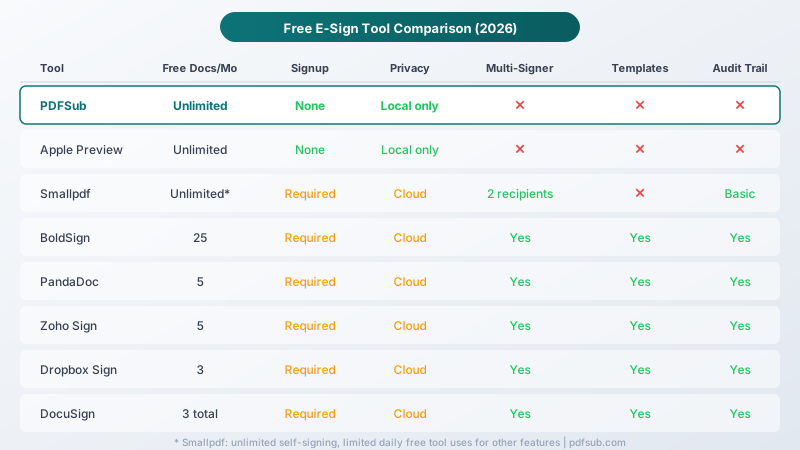
| Tool | Free Docs/Month | Signup Required | Processing | Multi-Signer | Audit Trail |
|---|---|---|---|---|---|
| PDFSub | 7-day trial, then $20/user/mo annual | Yes | Browser (local) | No | No |
| Apple Preview | Unlimited | No | Desktop (local) | No | No |
| Smallpdf | Unlimited* | Yes | Cloud | Yes (2 recipients) | Basic |
| BoldSign | 25 | Yes | Cloud | Yes | Yes |
| PandaDoc | 5 | Yes | Cloud | Yes | Yes |
| Zoho Sign | 5 | Yes | Cloud | Yes | Yes |
| Dropbox Sign | 3 | Yes | Cloud | Yes | Yes |
| SignWell | 3 | Yes | Cloud | Yes | Yes |
| DigiSigner | 3 | Yes | Cloud | Yes | Basic |
| DocuSign | 3 total | Yes | Cloud | Yes | Yes |
*Smallpdf: unlimited self-signing; broader toolset has daily free usage limits.
Privacy Comparison: Who Sees Your Documents?
This is the part most comparison articles skip, and it's arguably the most important factor when signing sensitive documents.
When you use a cloud-based e-sign tool, your document is uploaded to that company's servers. For a freelance contract, that's probably fine. For a lease with your Social Security number on it, an employment agreement with salary details, or a financial document with account numbers - you should think carefully about where that file goes.
Local processing (your files never leave your device)
- PDFSub - Browser-based. Your PDF is processed in JavaScript running in your browser tab. No upload, no server-side processing, no storage on any third-party system. (Subscription required after 7-day free trial.)
- Apple Preview - Desktop application. Fully offline capable. No network activity involved in signing.
Cloud processing (your files are uploaded)
- Smallpdf, BoldSign, PandaDoc, Zoho Sign, Dropbox Sign, SignWell, DigiSigner, DocuSign - All of these upload your document to their servers for processing. Most encrypt documents in transit and at rest, and many delete files after a retention period. But the document does pass through - and temporarily reside on - third-party infrastructure.
For the majority of documents, cloud-based signing is perfectly safe. These are reputable companies with strong security practices. But if you're handling documents with sensitive personal information and want to guarantee that no third party ever sees the content, local-processing tools are the only option that provides that assurance.
When You Need a Paid E-Sign Solution
Free tools cover simple signing. Paid platforms earn their price when your needs go beyond that:
Multi-party routing. You need a contract signed by three people in a specific order - first the employee, then the manager, then HR. Free tools don't support sequential signing workflows.
Templates at scale. You send the same NDA to every new client, pre-populated with their name and date. Template libraries with merge fields save hours when you're sending dozens of documents per month.
Compliance and audit requirements. Regulated industries (healthcare, finance, real estate) may require certificate-based digital signatures, detailed audit trails, and signer identity verification beyond what free tiers provide.
Team management. Multiple people on your team need to send documents for signature, and you need centralized billing, permissions, and document management.
API and integrations. You want signatures embedded in your app, triggered by your CRM, or connected to your document management system.
If these describe your situation, platforms like DocuSign ($10-$25/month), Dropbox Sign ($15/month), or Adobe Acrobat Sign ($12.99/month) are designed for you. The subscription cost is justified by the workflow automation and compliance features.
For everyone else - signing a lease, returning a freelance contract, approving a school form - a free tool does the job.
Frequently Asked Questions
Can I use a free e-sign tool for business contracts?
Yes. The ESIGN Act and UETA make no distinction between free and paid e-signature platforms. A signature created with a free tool has the same legal standing as one from DocuSign or Adobe Sign. What matters is intent to sign, consent to electronic transactions, and record retention - not the software used.
Is a typed name a valid e-signature?
Yes. Under U.S. law, a typed name qualifies as an electronic signature if there is clear intent to sign. However, a drawn or uploaded signature image provides stronger evidence of intent and is generally recommended for important documents.
Do I need to keep the signed PDF?
Yes. Both the ESIGN Act and UETA require that both parties be able to access and retain the signed document. Always save a copy of the signed PDF for your records. Cloud-based tools usually store a copy, but local-processing tools rely on you to save the file.
Can someone forge my e-signature?
The risk of forgery exists with any signature method, including handwritten ones. E-signature platforms mitigate this with audit trails (IP addresses, timestamps, email verification). For high-stakes documents, consider platforms that offer signer identity verification or certificate-based digital signatures.
Are e-signatures valid outside the United States?
Most countries recognize electronic signatures. The EU's eIDAS regulation, Canada's PIPEDA, and the UK's Electronic Communications Act all provide legal frameworks for e-signatures. However, requirements vary by country - some require qualified electronic signatures (similar to digital signatures) for certain document types.
What about notarized documents?
E-signatures and notarization are different things. Notarization requires a notary public to verify signer identity in person (or via remote online notarization). An e-signature alone doesn't replace notarization when it's required by law.
The Bottom Line
You don't need a $300/year subscription to legally sign a PDF. The ESIGN Act settled that question in 2000.
For free unlimited self-signing on Mac, Apple Preview is hard to beat - it's already installed and processes everything locally. On any platform, PDF24 offers free signing without per-document caps.
For sending documents to others for signature, Smallpdf and BoldSign offer the most generous free tiers. For the absolute lightest use, Dropbox Sign and SignWell provide 3 free documents per month with proper audit trails.
If you also need a full PDF and AI toolkit alongside signing - merging, compressing, OCR, summarization, translation, data extraction - PDFSub bundles everything on one subscription at $20/user/mo (annual), with a 7-day free trial and browser-based processing so your documents never touch a server.
DocuSign is worth paying for if you need enterprise workflows. It's not worth using on the free tier - 3 lifetime documents is a trial, not a plan.
Pick the tool that matches your actual needs: privacy, volume, and whether you need someone else to sign. For most occasional signers, a free tool is more than enough.