5 Best AI PDF Tools for Financial Documents in 2026
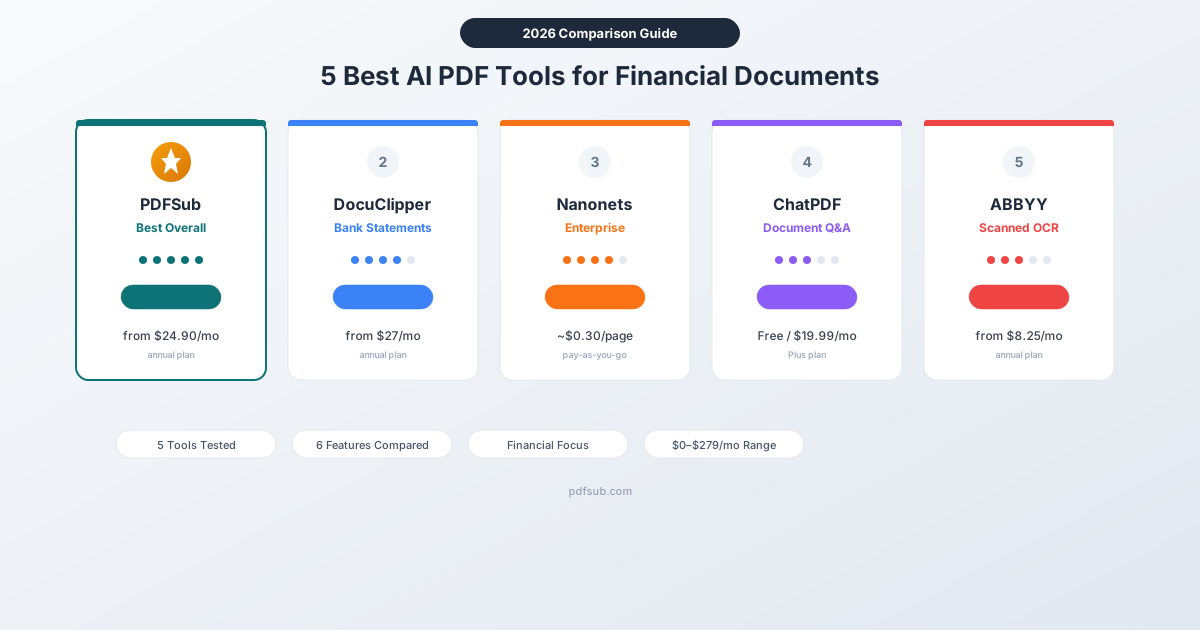
We tested the top AI PDF tools for bank statements, invoices, and receipts. Here's which ones actually work for financial data.
PDFSub is best for:
- Accountants and bookkeepers who process bank statements, invoices, and receipts in one platform
- Users needing export to accounting formats (QBO, OFX, CSV, Excel) without per-page charges
- Small firms wanting AI financial extraction plus 98+ PDF tools at $20/user/mo (All-In-One annual)
- Browser-based privacy for sensitive financial documents
PDFSub is NOT best for:
- Enterprises needing direct live sync with QuickBooks, Xero, or Sage (PDFSub exports files for manual import)
- Teams requiring automated AP workflows with approval routing and PO matching
- Organizations needing forensic-grade transaction verification for audit engagements
Your accountant needs last year's bank statements in Excel. Your bookkeeper wants invoices extracted into QuickBooks. And you've got a filing cabinet full of PDFs that might as well be printed on stone tablets for all the good they do in a spreadsheet.
General-purpose PDF tools can rotate pages and merge files. But financial documents need something more: AI that understands dates, amounts, transaction descriptions, and account numbers - and can pull them out accurately.
We tested the leading AI PDF tools specifically for financial document processing. Here's what actually works, what falls short, and which tool fits your workflow.
Why Financial Documents Need Specialized AI
Regular PDF tools treat every document the same - a page of text and images. Financial documents are different:
- Structured data matters. A bank statement isn't just text - it's a table of dates, descriptions, and amounts that need to stay in the right columns.
- Accuracy is non-negotiable. A misread digit turns a $1,234 payment into $1,243. One wrong decimal throws off your entire reconciliation.
- Format variety is enormous. Chase statements look nothing like Deutsche Bank statements. Credit card statements differ from checking accounts. Each needs different parsing logic.
- Output format matters. Getting text out of a PDF is easy. Getting it into QBO for QuickBooks, properly formatted CSV, or structured Excel - that's the hard part.
A general PDF editor won't handle this. You need tools built for financial data.
How We Evaluated Each Tool
| Criteria | What We Looked For |
|---|---|
| Financial accuracy | Correct amounts, dates, descriptions - not just readable text |
| Document types | Bank statements, invoices, receipts, credit card statements |
| Output formats | CSV, Excel, QBO, OFX, JSON - not just text dumps |
| AI capabilities | Intelligent extraction, not just OCR |
| Pricing value | Cost per page at realistic volumes |
| Ease of use | Web-based UI, no coding required |
1. PDFSub - Best Overall for Financial Documents
Best for: Accountants, bookkeepers, and small businesses who process bank statements, invoices, and receipts regularly.
PDFSub combines 98+ PDF tools with specialized AI extraction for financial documents. It's not just a converter - it's a complete document platform with bank statement extraction, invoice parsing, receipt scanning, AI-powered summarization, and translation across 130+ languages.
What Sets It Apart
The biggest differentiator is PDFSub's tiered extraction system. For digital bank statements (the kind you download from online banking), Tier 1 runs entirely in your browser using coordinate-based extraction - no file upload, no AI credits consumed, near-perfect accuracy. If the quality gate detects issues, it automatically escalates to server-side parsing (Tier 2) or AI-powered extraction (Tiers 3-4).
This means you get the fastest, cheapest extraction path that produces accurate results. Most digital PDFs never leave your browser.
AI Financial Tools
PDFSub includes dedicated AI tools for financial documents:
- Bank Statement Converter - Extracts transactions with dates, descriptions, amounts, and running balances
- Invoice Extractor - Pulls vendor info, line items, totals, and tax amounts
- Receipt Scanner - Extracts merchant, date, items, and total from receipt images
- Financial Report Analyzer - Summarizes P&L statements, balance sheets, and cash flow reports
- AI Document Chat - Ask questions about any financial document in natural language
- Data Extractor - Pulls structured data from any PDF into JSON format
Output Formats
Eight export formats cover every accounting workflow:
- XLSX (Excel) and CSV for spreadsheets
- QBO for QuickBooks
- OFX and QFX for multi-platform financial software
- QIF for legacy accounting tools
- TSV and JSON for data processing
QBO and OFX exports include FITID transaction identifiers for automatic duplicate detection in QuickBooks and Xero.
Pricing
| Plan | Monthly | Annual | Includes |
|---|---|---|---|
| All-In-One (annual) | $20/user/mo | $240/yr per user | 98+ tools, 500 AI credits, 500 BSC pages |
| BSC Add-on (stackable) | +$20/mo | +$240/yr | +500 BSC pages/mo per pack |
| AI Credits Add-on | +$7/mo | +$84/yr | +500 AI credits/mo per pack |
| Storage Add-on | +$5/mo | +$60/yr | +50 GB storage |
All plans include a 7-day free trial.
Pros
- Browser-first extraction preserves privacy (digital PDFs never leave your device on Tier 1)
- 8 output formats including QBO, OFX, and QFX
- 130+ languages and 20,000+ bank formats
- Tiered extraction maximizes accuracy while minimizing cost
- Dedicated AI tools for invoices, receipts, and financial reports
- $20/user/mo annual price is competitive for the feature set
Cons
- Newer to the market than established enterprise tools
- No SOC 2 certification yet
- AI credits are separate from bank statement page allowance
2. DocuClipper - Best for High-Volume Bank Statements
Best for: Accounting firms processing hundreds of bank statements monthly who need QuickBooks and Xero integrations.
DocuClipper focuses exclusively on financial document conversion. It doesn't try to be a general PDF tool - bank statements, credit card statements, and invoices are its entire product.
What It Does Well
DocuClipper's strength is volume processing with direct accounting software integration. It connects to QuickBooks, Xero, Sage, NetSuite, and Dynamics 365, sending extracted data straight into your accounting platform. The Business plan adds fraud detection and financial analysis features like cash flow and fund flow analysis.
Their claim of 99.6% accuracy across 1,000,000+ processed statements suggests a mature extraction engine. Support for 20,000+ bank formats globally means it handles international statements well.
Where It Falls Short
DocuClipper is a one-trick pony - and that's by design. There are no general PDF tools, no AI chat, no document summarization. If you need to merge PDFs or extract invoice line items alongside bank statement conversion, you'll need a second tool.
The free trial is limited to 200 pages with only 10 transaction exports, which barely gives you enough to evaluate accuracy across different bank formats.
Pricing
| Plan | Monthly | Annual | Pages |
|---|---|---|---|
| Starter | $39/mo | $27/mo | 120-300 |
| Business | $159/mo | $99/mo | 500-1,500 |
| Enterprise | $399/mo | $279/mo | 2,000-5,000 |
Pros
- Purpose-built for financial documents - deep specialization
- Direct integrations with major accounting software
- Fraud detection and financial analysis (Business plan)
- Claims 99.6% accuracy trained on 1M+ statements
- 20,000+ bank formats supported
Cons
- No general PDF tools - bank statements and invoices only
- Expensive at higher volumes ($279/month for 2,000 pages)
- Free trial limits transaction exports to just 10
- 30-day data retention on Starter plan
3. Nanonets - Best for Enterprise Workflow Automation
Best for: Companies with complex document workflows who need AI extraction integrated into automated business processes.
Nanonets is an intelligent document processing (IDP) platform that goes beyond extraction into full workflow automation. Upload a bank statement, extract the data, trigger a Slack notification, update a CRM record, and file the document - all without manual steps.
What It Does Well
The workflow automation is Nanonets' killer feature. Pre-trained models handle invoices, bank statements, receipts, purchase orders, and more. You can train custom models for proprietary document formats with just a few dozen samples. Integrations with QuickBooks, Xero, Sage, and Salesforce mean extracted data flows directly into your business systems.
For enterprises processing thousands of documents daily across multiple types, the automation layer saves significant time beyond just the extraction step.
Where It Falls Short
Nanonets' pay-as-you-go pricing at roughly $0.30 per page makes it expensive for financial document extraction compared to purpose-built tools. A 10-page bank statement could cost $3+ to process - add multiple banks and months, and costs escalate quickly.
The platform requires more setup than simpler tools. You're building workflows, not just uploading PDFs. For small teams processing a few dozen statements monthly, it's overkill.
Pricing
| Model | Cost | Notes |
|---|---|---|
| Pay-as-you-go | ~$0.30/page | AI extraction per page |
| Formatting ops | ~$0.02/run | Additional per operation |
| Enterprise | Custom | Volume discounts available |
Free tier includes $200 in credits to start.
Pros
- Workflow automation beyond simple extraction
- Pre-trained models for multiple financial document types
- Custom model training with small sample sets
- Strong integrations (QuickBooks, Xero, Sage, Salesforce)
- Handles both structured and unstructured documents
Cons
- Expensive per page (~$0.30) compared to subscription tools
- Complex setup - not just "upload and convert"
- Pricing model is hard to predict with multiple block types
- Overkill for teams with simple extraction needs
4. ChatPDF - Best for Quick Financial Document Q&A
Best for: Individuals who need to ask questions about financial reports, contracts, or statements without extracting structured data.
ChatPDF takes a fundamentally different approach. Instead of extracting data into spreadsheets, you upload a PDF and ask questions about it in natural language. "What was the total of all deposits in March?" "Which vendor had the highest invoice amount?" "Summarize the key findings in this audit report."
What It Does Well
The conversational interface is genuinely useful for quick analysis. Upload a 50-page annual report and ask specific questions instead of reading the whole thing. ChatPDF cites its sources within the document, so you can verify answers against the original text.
For financial professionals reviewing documents rather than processing them - reading audit reports, analyzing contracts, reviewing prospectuses - the Q&A approach saves time. Multi-language support means it works with international financial documents.
Where It Falls Short
ChatPDF cannot extract structured data. Period. You cannot get a CSV of transactions, an Excel file of invoice line items, or a QBO file for QuickBooks. It answers questions about financial documents - it doesn't convert them.
Accuracy degrades noticeably on documents longer than 10 pages. It cannot perform calculations (it won't add up a column of numbers for you). And it struggles with scanned PDFs since it relies on text being embedded in the document.
Pricing
| Plan | Cost | Limits |
|---|---|---|
| Free | $0 | 2 PDFs/day, 120 pages max, 50 questions/day |
| Plus | $19.99/mo | Unlimited PDFs, 2,000 pages, unlimited questions |
Pros
- Conversational interface - no learning curve
- Citations link answers to specific PDF locations
- Useful for reviewing reports, contracts, and statements
- Free tier is functional for light use
- Multi-language support
Cons
- Cannot extract structured data (no CSV, Excel, QBO export)
- No table extraction or financial data parsing
- Accuracy drops on documents over 10 pages
- Cannot perform calculations
- No batch processing
- Struggles with scanned PDFs
5. ABBYY FineReader - Best for Scanned Financial Documents
Best for: Organizations with physical paper archives - scanned bank statements, faxed invoices, or photographed receipts - that need OCR-first processing.
ABBYY FineReader is an industry-standard OCR tool that converts scanned documents to editable, searchable formats. It isn't built specifically for financial documents, but its OCR engine is among the most accurate available - critical when working with scanned or photographed financial papers.
What It Does Well
ABBYY's OCR accuracy on scanned documents is consistently rated among the highest in the industry. The desktop application processes sensitive financial documents locally - no cloud upload required. The Corporate plan adds batch processing via HotFolder (up to 5,000 pages/month) and document comparison for reviewing changes across statement versions.
For organizations digitizing paper archives, ABBYY converts scanned statements and invoices into searchable PDFs or editable Excel files. It's the bridge between physical documents and digital workflows.
Where It Falls Short
ABBYY converts document layouts, not financial data. Converting a scanned bank statement to Excel gives you the visual layout reproduced in cells - not a clean table of dates, descriptions, and amounts ready for import. You still need to clean up the data manually or run it through a financial extraction tool.
There's no QBO export, no accounting software integrations, and no AI-powered field extraction. For structured financial data, you'd need to pair ABBYY with a tool like PDFSub or DocuClipper.
Pricing
| Plan | Monthly | Annual | Notes |
|---|---|---|---|
| Standard | $16/mo | $99/yr | Windows only, basic OCR |
| Corporate | $24/mo | $165/yr | Adds batch processing, document comparison |
| Mac | - | $69/yr | Limited features vs. Windows |
7-day free trial available.
Pros
- Industry-leading OCR accuracy on scanned documents
- Desktop processing - no cloud upload for sensitive data
- Batch processing via HotFolder (Corporate plan)
- Document comparison feature
- Well-established enterprise brand
- Affordable for OCR-only needs
Cons
- Converts layouts, not structured financial data
- No QBO, OFX, or accounting software integration
- No AI-powered financial field extraction
- Mac version has significantly limited features
- Separate enterprise product (Vantage) needed for structured extraction
Side-by-Side Comparison
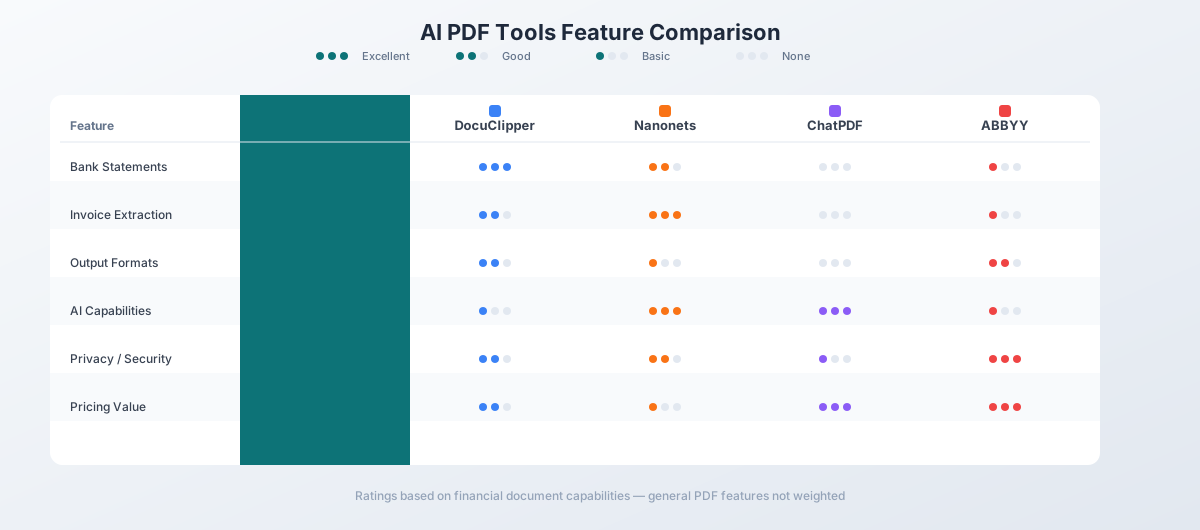
| Feature | PDFSub | DocuClipper | Nanonets | ChatPDF | ABBYY |
|---|---|---|---|---|---|
| Bank statements | Yes (8 formats) | Yes (4 formats) | Yes (API) | No | Layout only |
| Invoice extraction | Yes (AI) | Yes | Yes | No | Layout only |
| Receipt scanning | Yes (AI) | No | Yes | No | Layout only |
| QBO/OFX export | Yes | Yes (QBO) | No | No | No |
| AI document chat | Yes | No | No | Yes (core) | No |
| General PDF tools | 98+ tools | No | No | No | Yes (OCR/edit) |
| Scanned PDFs | Yes (Tiers 3-4) | Yes | Yes | Limited | Yes (core) |
| Languages | 133 | Limited | Multiple | Multiple | 190+ |
| Bank formats | 20,000+ | 20,000+ | Multiple | N/A | N/A |
| Browser privacy | Tier 1 (yes) | No | No | No | Desktop only |
| Starting price | $20/mo | $27/mo | ~$0.30/page | Free | $8.25/mo |
| Free trial | 7 days | 14 days (limited) | $200 credit | Free tier | 7 days |
Which Tool Should You Choose?
The right tool depends on what you're actually doing with financial documents:
-
Processing bank statements regularly? PDFSub or DocuClipper. PDFSub wins on output formats (8 vs. 4) and includes 98+ general PDF tools. DocuClipper wins on direct accounting software integrations and fraud detection at higher tiers.
-
Running an enterprise with complex document workflows? Nanonets. The automation layer justifies the higher per-page cost when you're processing thousands of documents across multiple types and triggering downstream workflows.
-
Need to quickly review financial reports without extracting data? ChatPDF. It's the fastest way to get answers from a financial document you just need to understand, not process.
-
Digitizing paper archives of financial documents? ABBYY FineReader. Get the scanned documents into searchable, editable format first, then use a financial extraction tool for the structured data.
-
Want one tool that handles everything? PDFSub. It's the only option that combines bank statement extraction, invoice parsing, receipt scanning, AI document chat, and 98+ general PDF tools in a single platform - the All-In-One plan is $20/user/mo (annual) or $25/user/mo (monthly), including 500 AI credits and 500 bank statement pages per user.
Try PDFSub's bank statement converter free for 7 days - all AI financial tools included with every plan.
Frequently Asked Questions
Can AI really extract financial data accurately?
Yes - on digital PDFs (downloaded from online banking), coordinate-based extraction achieves near-perfect accuracy because it reads embedded text directly. For scanned documents, AI-powered OCR reaches 96-99% accuracy. The key is verification: tools like PDFSub use balance reconciliation to mathematically confirm extracted data matches the original statement.
What's the difference between OCR and AI extraction?
OCR converts images of text into actual text characters. AI extraction goes further - it understands that "03/15" is a date, "$1,234.56" is an amount, and "AMAZON MARKETPLACE" is a description. OCR gives you raw text; AI extraction gives you structured, usable data.
Do I need separate tools for bank statements and invoices?
Not necessarily. PDFSub handles both with dedicated AI tools for each document type. DocuClipper covers both bank statements and invoices. Some tools like ChatPDF and ABBYY are better suited for one type of task than another.
Is it safe to upload financial documents to these tools?
Security varies by tool. PDFSub's Tier 1 extraction runs entirely in your browser - digital PDFs never leave your device. ABBYY FineReader processes locally on your desktop. Cloud-based tools like ChatPDF, DocuClipper, and Nanonets upload documents to their servers. Check each tool's privacy policy and SOC 2 certification status.
How much does it cost to convert 500 bank statement pages monthly?
Costs vary significantly:
- PDFSub: $20/user/mo (All-In-One, annual) - includes 500 bank statement pages + 500 AI credits + all 98+ tools per user
- DocuClipper: $27-99/month depending on plan tier
- Nanonets: ~$150/month at $0.30/page
- ChatPDF: Cannot convert bank statements
- ABBYY: Cannot extract structured financial data
Can these tools handle international bank statements?
PDFSub supports 130+ languages and 20,000+ bank formats - the broadest coverage of the tools tested. DocuClipper also supports 20,000+ banks but with more limited language support. Nanonets handles multiple languages but coverage varies by document type. ABBYY's OCR supports 190+ languages for text recognition, but this doesn't mean it can parse financial data in those languages.