Bank Statement PDF vs CSV: Understanding the Difference
Your bank gives you both PDF statements and CSV downloads. They contain different data, cover different time periods, and serve different purposes. Here's what you need to know.
Your bank offers two ways to get transaction data: a PDF statement and a CSV download. Most people assume they contain the same information in different wrappers. They don't.
The PDF is the official statement --- the legal document your bank produces at the end of every statement period. The CSV is a transaction feed --- a filtered export of recent account activity pulled from your bank's online portal. They look similar at first glance, but the PDF contains substantially more information, covers a much longer history window, and carries legal weight that a CSV download doesn't have. Understanding this difference saves accountants hours of confusion --- and prevents costly mistakes during reconciliation, audits, and tax preparation.
The Fundamental Difference
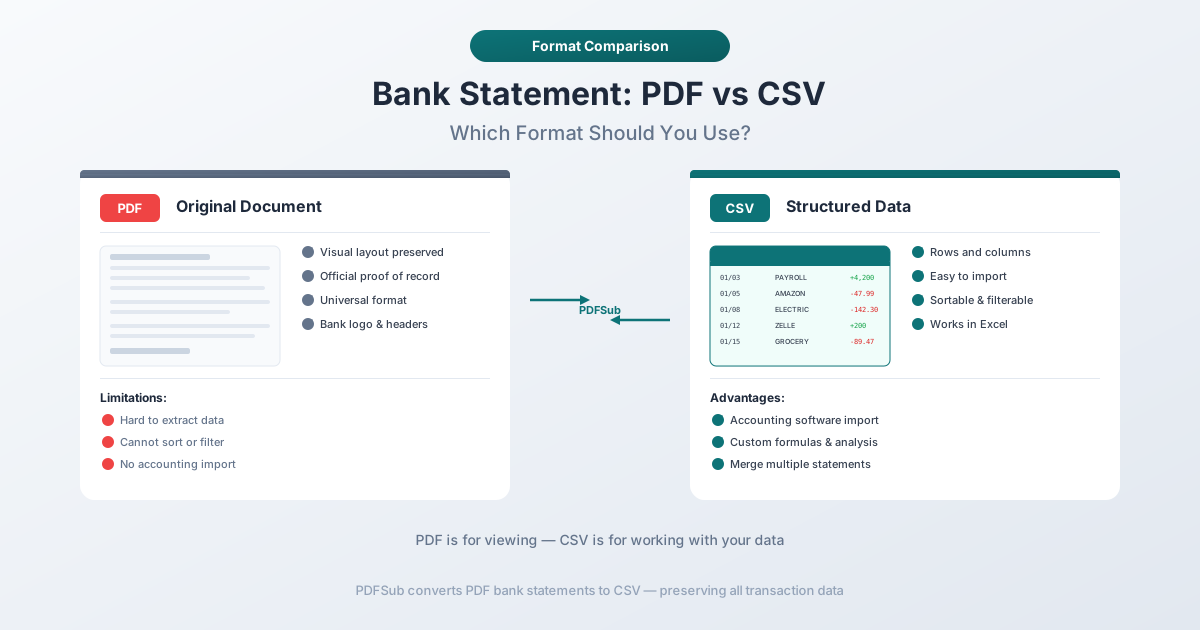
Think of it this way: a PDF bank statement is a document. A CSV download is a data feed.
PDF = Official Bank Statement
The PDF statement is what your bank formally issues at the close of each statement period --- usually monthly. It's a complete snapshot of your account for that window. It includes opening and closing balances, every transaction with full descriptions, fee breakdowns (maintenance fees, overdraft charges, wire fees), interest earned or charged with APY details, daily balance tables (at many banks), an account summary section, statement period dates, and account holder information.
This is the document you submit to the IRS during an audit. It's what your mortgage lender wants when you apply for a loan. It's what your attorney subpoenas in litigation. The PDF statement is your bank's official record of what happened in your account.
CSV = Transaction Data Export
The CSV download is a convenience feature your bank offers through its online portal. You select a date range, click "Download," and get a file you can open in Excel. It contains a flat list of transactions --- usually just date, description, and amount.
That's it. No opening balance. No closing balance. No fee summaries. No interest breakdowns. No daily balance table. No account summary. No statement period header. It's raw transaction data, stripped of all the context that makes a bank statement a statement.
The CSV is useful for quick analysis, but it's not a bank statement. It's a filtered slice of your transaction history.
What the PDF Contains That CSV Doesn't
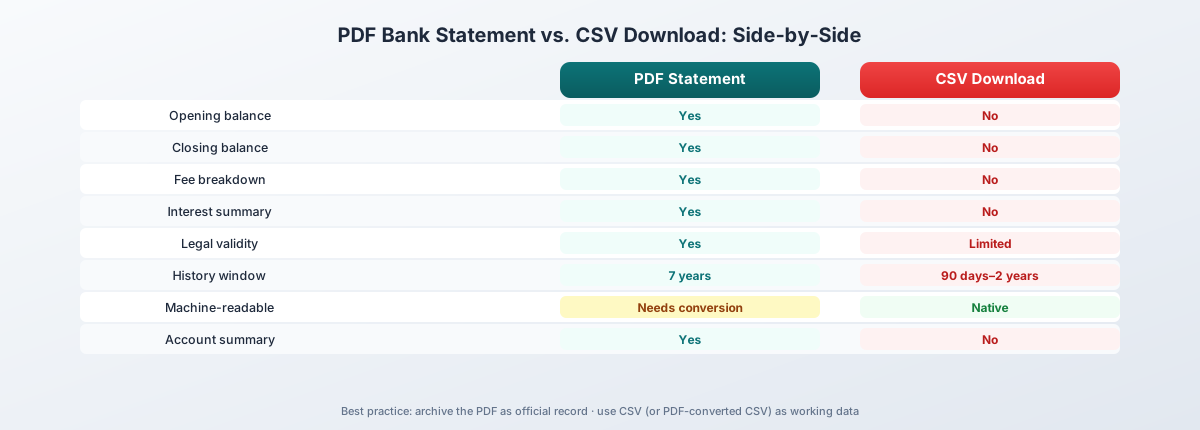
Here's a side-by-side comparison of what you get from each format:
| Feature | PDF Statement | CSV Download |
|---|---|---|
| Opening balance | Yes | No |
| Closing balance | Yes | No |
| Fee breakdown | Yes | No |
| Interest summary | Yes | No |
| Daily balance table | Yes (some banks) | No |
| Statement period header | Yes | No |
| Account summary | Yes | No |
| Legal validity | Yes | Limited |
| Multi-line descriptions | Yes (full detail) | Abbreviated |
| Transaction data | Yes | Yes |
| Machine-readable format | No (requires conversion) | Yes (native) |
The missing balances matter more than most people realize. When you're reconciling in QuickBooks or Xero, you need the opening and closing balance to verify every transaction has been captured. Without those bookend numbers, you're trusting the CSV blindly --- and if the bank silently truncated your export (Chase caps CSV downloads at 1,000 rows with no warning), you won't know transactions are missing until the numbers don't add up.
The fee and interest breakdowns matter for tax preparation. Bank fees are deductible business expenses. Interest income is reportable. The PDF organizes this into clearly labeled summary sections. With a CSV, you'd have to categorize every transaction yourself to reconstruct those totals.
What CSV Does Better
Let's be fair to CSV. It has real advantages for certain workflows.
CSV is already structured for spreadsheets. Open it in Excel and the data lands in columns automatically. No conversion, no parsing, no extraction. It just works.
CSV is machine-readable. Scripts, accounting software, and automation tools can process it directly. PDFs require specialized software to extract the same data.
CSV is lightweight and fast. A year of transactions might be 30--50KB. Download, open, done --- no conversion step.
But here's the catch: CSV is "dumb data." No context, no structure beyond its columns, and no metadata about the account or statement period. You can't verify completeness because you don't know what the totals should be. You can't confirm the date range is correct because there's no statement period header. You can't check for missing transactions because there's no running balance to follow.
For quick personal expense tracking, that's fine. For professional accounting work, it's a liability.
History Availability: PDF Wins by a Landslide
This is one of the most important practical differences. Banks keep PDF statements available for far longer than CSV transaction data.
| Bank | PDF History | CSV History |
|---|---|---|
| Chase | 7 years | ~24 months |
| Bank of America | 7 years | ~18 months |
| Wells Fargo | 7 years | ~18 months |
| Capital One | 7 years | ~90 days |
| TD Bank | 7 years | ~18 months |
| PNC | 7 years | ~90 days |
| US Bank | 7 years | ~90 days |
Every major bank keeps PDF statements accessible for seven years --- matching the IRS's recommended record retention period. CSV transaction history ranges from a mere 90 days to about two years.
For anything older than the CSV window, the PDF is your only option. Need transactions from three years ago for a tax amendment? PDF. Auditor asks for 36 months of account activity? You'll need PDFs for most of that range. This is why experienced accountants download and archive PDF statements monthly --- the PDF is the long-term record, the CSV is the short-term convenience.
When You Need the PDF
There are scenarios where only the official PDF statement will do:
- Tax preparation --- the IRS wants the official document with opening/closing balances and account holder information, not a CSV you could have edited
- Audit documentation --- auditors expect original bank statements with the bank's formatting and period-specific summaries that establish authenticity
- Historical data beyond 18 months --- most banks only keep 18--24 months of CSV data; for anything older, the PDF is the only digital record
- Closed accounts --- CSV downloads are disabled when accounts close, but PDF statements remain accessible for seven years
- Fee and interest analysis --- the PDF's summary sections give you totals directly, while CSV requires categorizing every transaction manually
- Legal proceedings --- courts and attorneys expect official bank statements with inherent proof of origin
- Loan applications --- mortgage lenders and SBA loan officers require official bank statements, not CSV files
- Reconciliation verification --- opening and closing balances let you verify your books match the bank's records exactly
When CSV Is Sufficient
CSV isn't the lesser format --- it's the different format. For certain workflows, it's genuinely the better choice.
Quick personal finance tracking. If you're categorizing your own expenses for budgeting, a CSV download into a spreadsheet is fast and effective. You don't need opening balances or fee summaries for personal expense tracking.
Recent expense categorization. Sorting last month's transactions by category, merchant, or amount is straightforward with CSV. Filter, sort, pivot --- standard spreadsheet operations.
Simple bookkeeping for the current period. For a small business that just needs to import this month's transactions into QuickBooks, the bank's native CSV export is often the fastest path. No conversion needed.
Data analysis in Excel. If you're building charts, running formulas, or creating financial models from transaction data, CSV is your starting point. It's already in the format Excel expects.
Quick import into accounting software. Most accounting platforms --- QuickBooks, Xero, Sage, FreshBooks, Wave --- have CSV import features. For straightforward, recent transaction imports, the bank's CSV export feeds directly into these tools.
The common thread: CSV works well for recent, routine, non-official tasks. The moment you need historical depth, legal standing, or complete account context, you need the PDF.
The Problem: Getting PDF Data into a Spreadsheet
Here's the dilemma accountants face daily. You need the PDF for its completeness, legal standing, and historical depth. But you need spreadsheet-formatted data to actually work with the transactions.
PDFs are designed for viewing, not data extraction. There are no rows, columns, or cells --- just characters positioned at x,y coordinates on a virtual canvas. Copy-paste from a PDF into Excel produces a jumbled mess: merged columns, numbers as text, and multi-line descriptions split into phantom rows.
This is where bank statement converters come in. PDFSub's Bank Statement Converter extracts structured transaction data from PDF bank statements and outputs it in eight formats: CSV, Excel, TSV, JSON, QBO, OFX, QFX, and QIF. It handles statements from over 20,000 banks worldwide, in 130+ languages, and processes digital PDFs entirely in your browser --- the file never leaves your device.
You get the completeness of the PDF plus the machine-readable structure of CSV. The All-In-One plan is $20/user/mo (annual) or $25/user/mo (monthly), including 500 bank statement pages per user. All paid plans include a 7-day free trial.
CSV Formatting Pitfalls
Even when you have a CSV file --- whether from your bank's native export or converted from a PDF --- the format itself introduces headaches. Bank CSVs are not standardized. Every bank does it differently.
Column order varies by bank. Chase puts date first, then description, then amount. Another bank might reverse that order or add extra columns. When the layout doesn't match what your accounting software expects, the import fails --- or worse, silently maps data to the wrong fields.
Date formats are inconsistent. US banks use MM/DD/YYYY. European banks use DD/MM/YYYY. Some use ISO 8601 (YYYY-MM-DD). When Excel encounters an ambiguous date like 03/04/2026, it guesses --- and March 4th may become April 3rd without warning.
Amount columns differ in structure. Some banks use a single signed column (positive for deposits, negative for withdrawals). Others use separate "Debit" and "Credit" columns. Some use parentheses for negative numbers. Your accounting software may only accept one format.
Delimiters aren't always commas. European banks frequently use semicolons because commas serve as decimal separators (e.g., 1.234,56 instead of 1,234.56). Open a semicolon-delimited file in US Excel and everything lands in a single column.
Description truncation. CSVs often shorten descriptions. A PDF might show "ONLINE TRANSFER TO CHECKING ACCT ****4521 REF# 8834721" while the CSV shows "ONLINE TRANSFER TO CHE." Reference numbers and context disappear.
Encoding issues. International bank names and accented characters can corrupt when a CSV uses the wrong character encoding. UTF-8 is the standard, but some exports use Windows-1252 or ISO-8859-1.
These pitfalls mean you can't download and import blindly. Every bank's CSV export requires inspection before it's ready for your accounting software.
For Accountants: Which to Use When
Here's a practical decision framework for choosing between PDF and CSV in your daily workflow.
Need official records for tax filing, audits, or legal purposes? Use the PDF. Always. CSV files can be trivially edited and carry no evidentiary weight.
Need a quick import of recent transactions? Use the CSV if the bank's export covers your date range and the column layout matches your software's requirements.
Need historical data older than 18--24 months? Use the PDF. Most banks purge CSV data after 18--24 months, while PDF statements remain available for seven years.
Need to verify opening and closing balances? Use the PDF. CSV exports don't include balance information.
Need fee and interest totals? Use the PDF. Summary sections give you these numbers directly. CSV requires manual categorization.
Need data from a closed account? Use the PDF. CSV downloads are disabled when accounts close.
Processing international or non-English statements? Use the PDF and convert it with a tool like PDFSub that supports multilingual extraction.
Building a financial model in Excel? Use CSV for speed --- but cross-reference against the PDF to verify completeness.
The best practice for most accounting firms: download both. Archive the PDF as your official record. Use the CSV (or a converted version of the PDF) for working data. When the two don't match, the PDF is the source of truth.
Frequently Asked Questions
Can I use a CSV file as proof of income for a loan application?
Generally, no. Lenders require official bank statements --- which means PDFs. A CSV can be edited in any text editor, so it carries no inherent authenticity. The PDF statement is always the primary requirement.
Why does my bank's CSV download show different transactions than the PDF statement?
They may cover different date ranges. PDF statements use fixed statement periods (e.g., January 1--31). CSV exports use whatever date range you select. Additionally, some banks exclude certain transaction types (like fee reversals or interest postings) from CSV exports.
Is a bank PDF statement legally admissible as evidence?
Yes. Bank statements are generally admissible as business records under the hearsay exception (Federal Rule of Evidence 803(6) in the US). The PDF from your bank's secure portal is treated the same as a mailed paper statement. A CSV file is harder to authenticate because it lacks the bank's formatting and account details.
Can I convert a PDF bank statement to CSV without uploading it to a server?
Yes. PDFSub processes digital PDF bank statements entirely in your browser using client-side extraction. The file never leaves your device. For scanned or image-heavy PDFs, server-side processing is used with encryption and immediate file deletion.
My bank's CSV export only goes back 90 days. How do I get older transaction data in spreadsheet format?
Download the PDF statements for the months you need (most banks offer seven years of history), then convert them to CSV or Excel using a bank statement converter.
Why do some bank CSV files open incorrectly in Excel?
Common causes: delimiter mismatches (semicolons vs. commas), encoding issues (UTF-8 vs. Windows-1252), and date format ambiguity. The fix: use Excel's "Import from Text/CSV" wizard (Data tab > From Text/CSV) instead of double-clicking the file, which lets you specify the delimiter, encoding, and column types manually.
Should I keep both the PDF and CSV versions of my bank statements?
Yes. Archive the PDF as your official record --- it's the legally valid document. Use the CSV as your working file for imports and reconciliation. If you only keep one, keep the PDF. You can always convert it to CSV later, but you can't reconstruct a PDF from a CSV.
How long should I retain bank statements for tax purposes?
The IRS recommends at least three years from the filing date, or seven years if you filed a claim for worthless securities or bad debt deduction. Most accountants advise the seven-year standard. Since banks provide seven years of PDF history online, downloading and archiving annually ensures you're covered. CSV exports, with their shorter retention windows, can't be relied on for long-term record keeping.
The Bottom Line
PDF bank statements and CSV transaction downloads serve fundamentally different purposes. The PDF is the official record --- complete, legally valid, and available for seven years. The CSV is the quick data export --- convenient, machine-readable, and limited to recent history.
For professional accounting work, the PDF is non-negotiable. It's the document you reconcile against, the record you submit to auditors, and the archive you maintain for tax compliance. The CSV is a shortcut for routine tasks, but it can't replace the PDF's completeness or authority.
The practical challenge is bridging the gap: getting the PDF's comprehensive data into a spreadsheet-ready format. That's exactly what bank statement converters are designed to do --- and it's why accountants who process statements regularly find them indispensable. The combination of PDF-level completeness with CSV-level usability is what makes modern bank statement processing work.
Keep the PDF. Convert when you need to. And when the numbers don't match, trust the statement.