AI vs. Template-Based Document Extraction: Which Is Better?
Template-based extraction is fast and predictable - until the layout changes. AI adapts to any format without setup. Here's how to decide which approach fits your workflow.
Your accounts payable team processes 4,000 invoices a month. The extraction system works flawlessly - until a top vendor updates their invoice layout. Suddenly, the amount field is two centimeters lower, the due date moved to the right side of the page, and every single invoice from that vendor fails to parse.
Someone spends half a day rebuilding the template. The backlog grows. The AP manager wonders, for the third time this quarter, whether there's a better way.
There is. But the answer depends on what you're extracting, how many document formats you handle, and how much time you want to spend maintaining the system versus using it.
This guide breaks down the two fundamental approaches to document data extraction - template-based and AI-powered - with honest assessments of where each one shines and where each one falls apart.
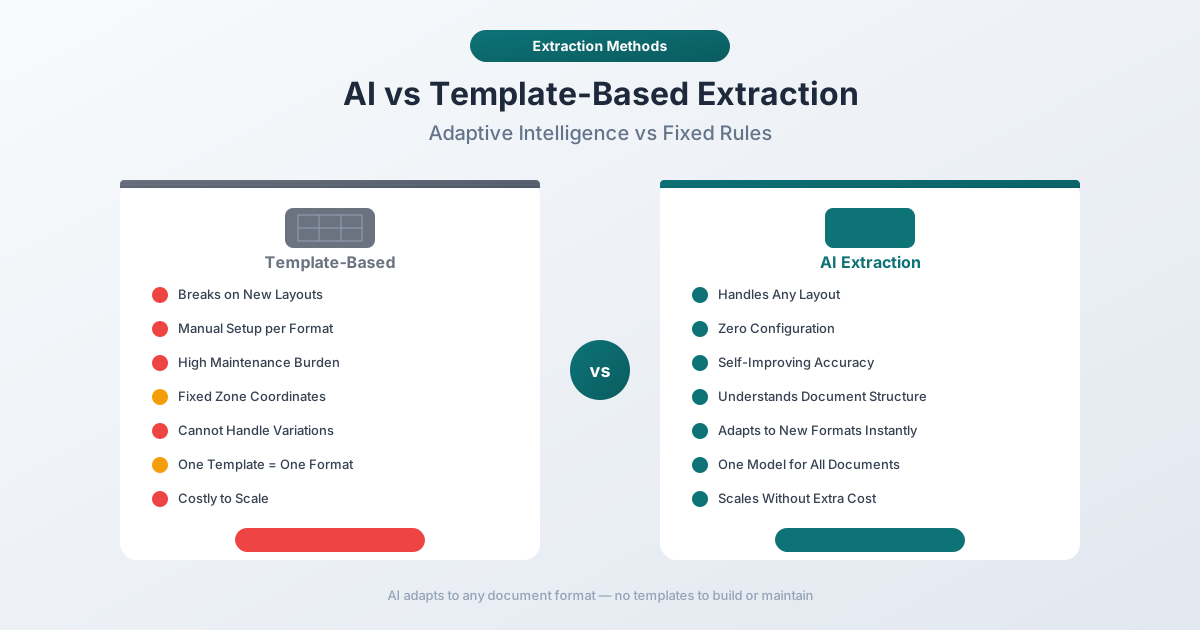
Two Philosophies, One Goal
Both approaches share the same objective: take unstructured data locked inside PDFs, images, or scanned documents and turn it into structured, usable data - rows and columns, key-value pairs, or JSON that your systems can actually work with.
How they get there is fundamentally different.
Template-based extraction says: "Tell me exactly where the data is on the page, and I'll grab it."
AI-based extraction says: "Show me the document, and I'll figure out where the data is."
That single difference drives every tradeoff between the two approaches - setup time, maintenance burden, flexibility, accuracy, and total cost of ownership.
How Template-Based Extraction Works
Template-based extraction (sometimes called zone-based or rule-based extraction) requires a human to define the exact location of every field on a specific document layout. You draw rectangles around the invoice number, the vendor name, the total amount, and each line item. The system then looks at those exact pixel coordinates on every subsequent document and extracts whatever text falls within those zones.
The Setup Process
- Acquire a sample document for each unique layout you need to process.
- Define extraction zones by drawing bounding boxes around fields like date, amount, vendor name, and line items.
- Map each zone to a data field in your output schema - zone A maps to "invoice_number," zone B maps to "total_amount," and so on.
- Configure validation rules - the date field must match a date format, the amount field must be numeric, the invoice number follows a specific pattern.
- Test and refine on a batch of real documents until accuracy meets your threshold.
- Repeat for every document type - each vendor, each bank, each statement format needs its own template.
Systems like ABBYY FlexiCapture, Kofax (now Tungsten Automation), and many legacy enterprise platforms use this approach. It's been the industry standard for two decades.
Where Template-Based Extraction Excels
High accuracy on matching documents. When the document layout perfectly matches the template, extraction accuracy approaches 100%. The system isn't guessing - it's reading text from predefined coordinates. For clean digital PDFs with consistent formatting, this is hard to beat.
Predictable, deterministic output. Given the same document and the same template, you get the same output every time. There's no variability, no probabilistic reasoning, no confidence scores to evaluate. This makes testing and validation straightforward.
Fast processing speed. Template matching is computationally simple. There's no model inference, no neural network forward pass. The system reads coordinates and extracts text. Processing times are measured in milliseconds, not seconds.
Easy to audit. Because the extraction rules are explicit and human-defined, you can trace exactly why a particular field was extracted from a particular location. Regulatory compliance teams appreciate this transparency.
Where Template-Based Extraction Breaks Down
Fragility with layout changes. This is the fatal flaw. A single design change - a new logo, a shifted table, an added line of text - can break the template entirely. The invoice number that used to sit at coordinates (450, 120) is now at (450, 145) because the vendor added a new address line. Extraction fails silently or returns the wrong data.
One template per document type, and maintenance scales linearly. Every unique layout needs its own template. If you process invoices from 200 vendors, you need 200 templates to build, test, and maintain - and any one of them can break without warning when a vendor updates their layout.
Cannot handle semi-structured or unstructured documents. Templates assume fixed positions. Documents with variable-length line items, free-form text fields, or flexible layouts (like receipts where the number of items varies) defeat the zone-based approach. You can build increasingly complex rules to handle variations, but complexity compounds quickly.
International documents are a nightmare. A German invoice has a fundamentally different layout than an American one. Date formats change (DD.MM.YYYY vs. MM/DD/YYYY). Number formats change (1.234,56 vs. 1,234.56). Currency symbols and positions vary. Each locale requires its own set of templates, often multiplying your template count.
How AI-Based Extraction Works
AI-based extraction uses machine learning models - typically a combination of computer vision, natural language processing, and large language models - to understand the semantic meaning of a document rather than relying on fixed coordinates.
Instead of being told "the invoice total is at position (450, 680)," the AI model understands that the number next to the word "Total" at the bottom of a list of line items is the invoice total - regardless of where it sits on the page.
The Processing Pipeline
- Document intake - the system accepts a PDF, image, or scanned document.
- Text extraction - OCR (for scanned documents) or direct text extraction (for digital PDFs) converts the document into machine-readable text with positional metadata.
- Document understanding - the AI model analyzes the layout, identifies structural elements (headers, tables, key-value pairs), and classifies the document type.
- Field extraction - the model locates and extracts specific data fields based on semantic understanding, not coordinates.
- Validation and confidence scoring - each extracted field receives a confidence score. Low-confidence fields can be flagged for human review.
- Output formatting - extracted data is structured into the desired output format (JSON, CSV, Excel, accounting software formats).
Modern AI extractors like PDFSub, Google Document AI, and AWS Textract follow variations of this pipeline.
Where AI-Based Extraction Excels
Handles layout variations gracefully. The same AI model can process invoices from 200 different vendors without 200 different templates. Whether the total appears in the top right, bottom left, or center of the page, the model finds it by understanding context - not by memorizing coordinates.
No template setup required. You don't draw zones. You don't configure field mappings. You upload a document and get structured data back. For teams that process documents from dozens or hundreds of sources, this eliminates weeks of template creation.
Works across document types. A well-trained AI model handles invoices, bank statements, receipts, purchase orders, and financial reports with the same core technology. You don't need separate systems for separate document categories.
Adapts to format changes automatically. When a vendor updates their invoice layout, AI extraction keeps working. The model doesn't care that the logo moved or the font changed - it cares that the text says "Total Due" and the number next to it is a dollar amount.
Handles international documents natively. AI models trained on multilingual data can process documents in any language and recognize date formats, number formats, and currency conventions automatically. A German bank statement gets the same treatment as an American one.
Improves over time. Many AI systems use feedback loops where corrected extractions improve future accuracy. The more documents processed, the better the model gets - the opposite of template-based systems, which stay exactly as good as their last manual update.
Where AI-Based Extraction Has Limitations
Lower accuracy ceiling on highly consistent documents. For a single document type with a perfectly consistent layout processed at high volume (think: the same utility bill format, thousands of times per month), a well-built template can be marginally more accurate than AI extraction. The template has zero ambiguity about field locations; the AI model has a small probability of misinterpreting layout elements.
Confidence thresholds require tuning. AI models output confidence scores, and setting the right threshold - where to auto-accept results versus flag for review - takes experimentation. Too low and you accept errors; too high and you create unnecessary manual review work.
Processing cost per document is higher. Running neural network inference costs more compute than template coordinate lookup. For extremely high-volume, single-format processing, the per-document cost difference can matter.
Sensitivity to document quality. While AI handles layout variations better than templates, it shares the same vulnerability to poor scan quality, faded text, and damaged documents. Scanned PDFs with low resolution or heavy noise challenge both approaches equally.
The Hybrid Approach: Best of Both Worlds?
The emerging consensus in the document processing industry is that neither approach alone is optimal. The most robust systems combine AI for detection and extraction with deterministic rules for validation.
Here's what a hybrid architecture looks like in practice:
- AI handles classification and extraction. The model identifies the document type, locates fields, and extracts values - no templates needed.
- Rule-based validation catches errors. Deterministic business rules verify that extracted data makes sense: invoice line items sum to the total, dates fall within reasonable ranges, currency codes match the expected format, account numbers pass checksum validation.
- Confidence-based routing directs edge cases. Fields extracted with high confidence proceed automatically. Low-confidence extractions get flagged for human review, and those corrections feed back into the system to improve future accuracy.
This hybrid strategy matters because, as industry analysis has shown, generative AI alone has numerical hallucination rates of 1-3% that disqualify it as a standalone solution for financial documents. But combined with validation rules, the system catches those hallucinations before they corrupt your data.
The practical result: AI provides the flexibility and zero-setup experience, while rules provide the auditability and precision that financial workflows demand.
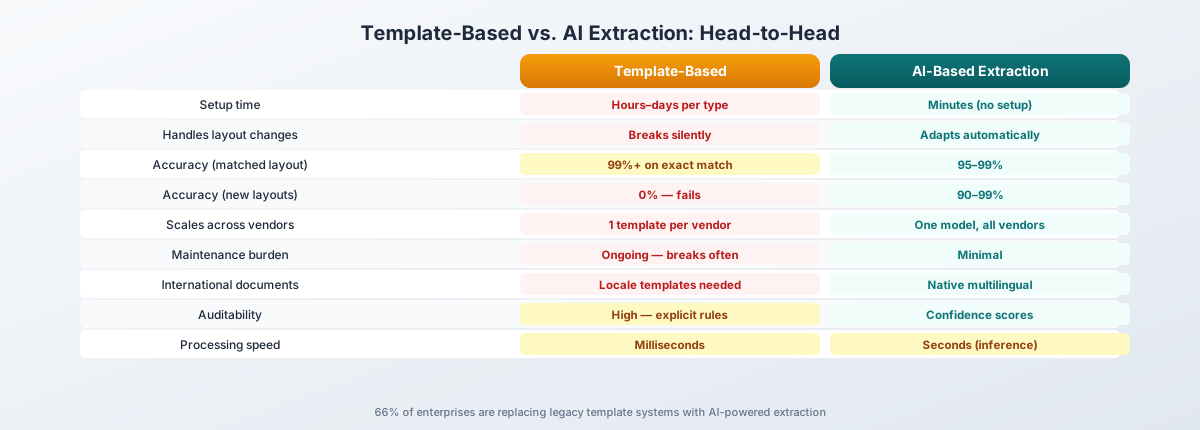
Head-to-Head Comparison
| Factor | Template-Based | AI-Based |
|---|---|---|
| Setup time | Hours to days per document type | Minutes - no template creation needed |
| Maintenance | Ongoing - breaks when layouts change | Minimal - adapts automatically |
| Accuracy (matched layout) | 99%+ on exact template match | 95-99% with confidence scoring |
| Accuracy (new layouts) | 0% - fails without a template | 90-99% depending on document quality |
| Flexibility | Single layout per template | Handles variations within document type |
| Processing speed | Milliseconds | Seconds (model inference required) |
| Cost per document | Low (compute-efficient) | Higher (GPU/model inference) |
| Scalability (document types) | Poor - linear template growth | Excellent - one model, many formats |
| International support | Requires locale-specific templates | Native multilingual handling |
| Auditability | High - explicit rules | Moderate - confidence scores + validation |
| Error handling | Silent failures common | Confidence flagging for review |
When Template-Based Extraction Wins
Template-based extraction remains the right choice in specific scenarios:
Single vendor, consistent format
If you process thousands of identical documents from a single source that never changes its layout - say, a utility company bill or a government form with a mandated format - a template will give you the highest possible accuracy with the lowest per-document cost.
Regulatory environments with audit requirements
Some compliance frameworks require deterministic, fully explainable extraction logic. If you need to demonstrate exactly why a particular value was extracted from a particular location on every document, template-based systems provide that transparency out of the box.
Extreme volume, zero tolerance for latency
When processing millions of documents per day and every millisecond of latency matters, the computational simplicity of template matching (coordinate lookup vs. neural network inference) can justify the maintenance overhead.
Legacy system integration
If your existing workflow depends on a template-based system and the document formats haven't changed in years, the migration cost to AI extraction may not justify the benefits. "Don't fix what isn't broken" applies - but only until it breaks.
When AI-Based Extraction Wins
AI extraction is the better choice - often by a wide margin - in these scenarios:
Multiple vendors or document sources
The moment you process documents from more than a handful of sources, template maintenance becomes unsustainable. AI extraction handles the variety without per-vendor setup.
Varying or evolving layouts
If your vendors update their document formats periodically (and they will), AI extraction absorbs those changes without intervention. No broken templates, no emergency fixes, no backlog of failed documents.
International or multilingual documents
Processing bank statements from Deutsche Bank (German), BNP Paribas (French), ICBC (Chinese), and Bank of America (English) with a single system requires AI. Building locale-specific templates for each is impractical.
Growing document types
If your organization keeps adding new document types - receipts last quarter, purchase orders this quarter, contracts next quarter - AI extraction scales without proportional setup work. Template-based systems require a new batch of template work for every new document type.
Small or medium teams without template expertise
Template creation and maintenance is a specialized skill. If you don't have (or don't want to hire) template engineers, AI extraction removes that dependency entirely.
The "Template Tax": The Hidden Cost Nobody Talks About
Beyond the direct time spent building templates, there's a compounding cost that rarely appears in vendor comparisons: the template tax.
Reactive maintenance cycles. Templates don't fail during testing - they fail in production, on real documents, often silently. A vendor changes their invoice layout and the first sign of trouble is a batch of incorrectly extracted data already imported into your accounting system. The fix cycle - detect, diagnose, rebuild, reprocess - costs far more than the original template creation.
Vendor onboarding friction. Adding a new vendor means creating a new template before you can process their first document. With AI extraction, new vendor documents work from day one.
Version control complexity. When a vendor's layout changes, you need to maintain both the old template (for historical documents) and the new template (for current ones). Over time, you accumulate multiple template versions per vendor.
Institutional knowledge risk. Template logic often lives in the heads of one or two people on your team. When they leave, the organization loses the ability to maintain or extend the extraction system.
McKinsey research has found that financial institutions spend between $150 and $300 per new customer on document processing and KYC verification, with 30-50% of that cost attributed to manual handling of exceptions - many of which stem from template failures on unfamiliar document formats.
How PDFSub Approaches Document Extraction
PDFSub takes an AI-first approach to document extraction - no template setup, no zone drawing, no per-vendor configuration.
Zero Template Configuration
Upload a bank statement, invoice, or receipt and PDFSub extracts the data automatically. Whether the document comes from Chase, Deutsche Bank, ICBC, or a local credit union you've never heard of, the extraction works out of the box. There are no templates to create, no zones to draw, and no vendor-specific setup.
Tiered Extraction for Maximum Accuracy
For digital bank statements (the kind downloaded from online banking), PDFSub uses coordinate-based extraction that runs entirely in your browser - no file upload needed, no AI credits consumed. The system only escalates to server-side parsing or AI-powered extraction when the document quality requires it.
This means you get the fastest, most accurate, and most private extraction path that each document allows.
Purpose-Built Financial Tools
PDFSub includes specialized tools for the document types that matter most to financial professionals:
- Bank Statement Converter - Extracts transactions with dates, descriptions, amounts, and running balances from statements in any language. Exports to Excel, CSV, QBO, OFX, and more.
- Invoice Extractor - Pulls vendor information, line items, totals, tax amounts, and payment terms from invoices of any format.
Both tools handle international documents natively, supporting 130+ languages and recognizing locale-specific date, number, and currency formats automatically.
Try It Risk-Free
PDFSub offers a 7-day free trial so you can test AI extraction on your actual documents before committing. Upload your most challenging documents and see the results for yourself. Cancel anytime.
Migrating from Template-Based to AI Extraction
If you're currently using a template-based system and considering a move to AI extraction, here's a practical migration path:
Step 1: Audit your current template inventory
Count your templates. Count how many have been updated in the last six months. Count how many have broken in the last year. This gives you a concrete measure of your template tax - the ongoing maintenance cost you're paying today.
Step 2: Identify your highest-maintenance templates
Which templates break most often? Which document types generate the most manual exception handling? These are your best candidates for AI extraction - the types where AI's flexibility delivers the largest immediate payoff.
Step 3: Run a parallel pilot
Process a batch of real documents through both your template-based system and an AI extraction tool. Compare accuracy, processing time, and exception rates side by side. Use your actual production documents, not cherry-picked samples.
Step 4: Migrate incrementally by document type
Don't flip a switch. Move one document type at a time, starting with the highest-maintenance templates. Validate output quality at each step before proceeding to the next document type.
Step 5: Keep templates for edge cases (temporarily)
If you have a handful of extremely consistent, high-volume document types where your templates work perfectly, keep them running while you migrate everything else. Over time, as AI accuracy improves on those specific formats, you can retire the last templates.
Step 6: Establish validation rules
Whether you use template-based or AI extraction, downstream validation rules are essential. Verify that extracted totals match line item sums, dates fall within expected ranges, and required fields are present. These rules work with any extraction method and catch errors regardless of their source.
The Verdict: AI Is the Future, Templates Are the Past
Template-based extraction earned its place in document processing history. For two decades, it was the only reliable way to automate data extraction from structured documents. And in narrow use cases - single format, consistent layout, massive volume - it still holds an edge in raw accuracy and processing speed.
But the world doesn't send you documents in a single format. Vendors change layouts. Banks update statement designs. International documents arrive in unfamiliar scripts. New document types appear in your workflow every quarter.
AI extraction handles all of this without per-document-type setup, without breaking when layouts change, and without a team of template engineers to keep the system running. The 66% of enterprises that are already replacing legacy document processing systems with AI-powered solutions aren't chasing a trend - they're eliminating a maintenance burden that scales with every new document type they need to process.
The question isn't whether AI extraction works - it does, with accuracy that rivals or exceeds template-based systems on all but the most standardized documents. The question is how long you can afford to pay the template tax before making the switch.
Key Takeaways
- Template-based extraction works well for single-format, high-volume processing where layouts never change - but breaks when they do.
- AI-based extraction handles multiple formats, layout variations, and international documents without per-type setup or ongoing template maintenance.
- Hybrid approaches combine AI flexibility with rule-based validation for the highest reliability.
- The template tax - the hidden cost of maintaining, troubleshooting, and version-controlling templates - compounds over time and scales linearly with document variety.
- Migration is incremental - start with your highest-maintenance document types and expand from there.
- PDFSub offers AI-first extraction with no template setup for bank statements and invoices, with a 7-day free trial to test on your real documents.