Why AI Outperforms OCR for Financial Documents
OCR can read text from a scanned page, but it can't tell a transaction amount from a running balance. Here's why AI-powered extraction delivers dramatically better results for bank statements, invoices, and receipts.
You scan a bank statement, run it through OCR, and get back a wall of text. The characters are mostly right. The numbers look correct. But when you try to import that data into Excel or your accounting software, everything falls apart. Dates are just strings. Amounts have no sign. Descriptions bleed into the next column. And the running balance somehow ended up merged with the transaction amount.
This is the OCR gap - the distance between recognizing characters on a page and actually understanding what those characters mean.
For decades, Optical Character Recognition has been the standard approach to digitizing paper documents. And for simple tasks - reading a single line of text from a clean scan - it works well enough. But financial documents are not simple. They are dense, structured, multi-column layouts packed with numbers that look identical but mean completely different things. A running balance is not a transaction amount. A section header is not a payee name. A subtotal is not a line item.
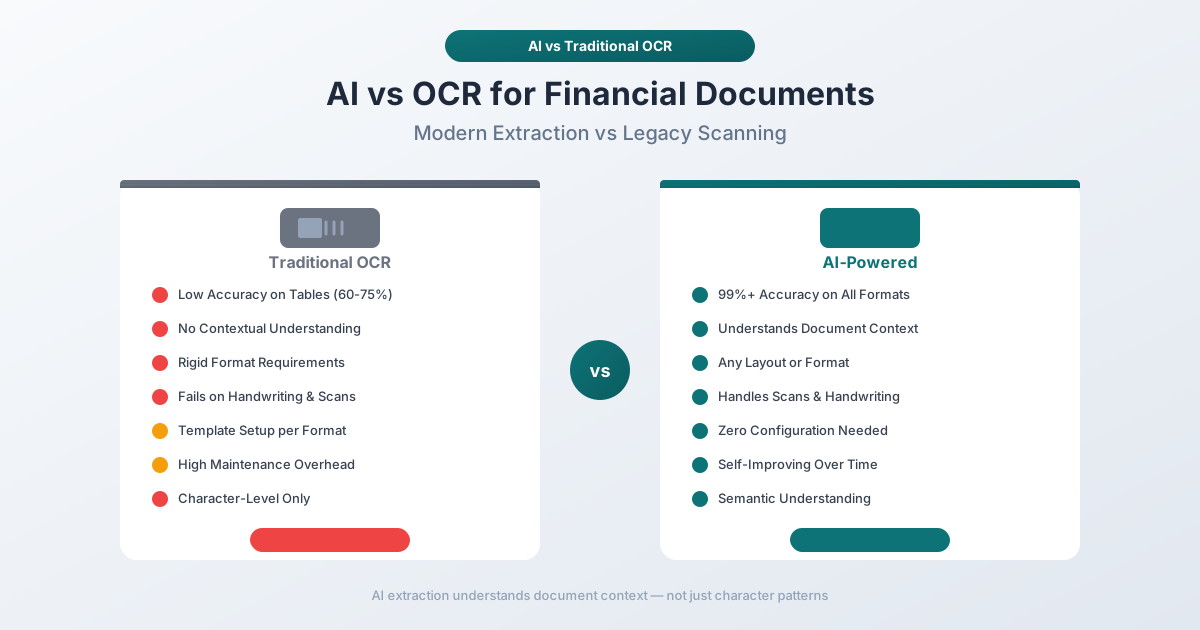
AI-powered document extraction closes this gap. Instead of just recognizing characters, it understands document structure, field relationships, and financial context. The difference in accuracy and usability is not marginal - it is transformative.
This guide explains exactly what OCR does, where it falls short on financial documents, what AI adds on top, and how to choose the right approach for your workflow.
What OCR Actually Does (And What It Doesn't)
OCR stands for Optical Character Recognition. At its core, it does one thing: converts images of text into machine-readable text. You give it a picture of a page, and it gives you back the characters it sees.
That is genuinely useful. Before OCR, the only way to get data from a scanned document was to type it manually. OCR automates the "reading" step - identifying letters, numbers, and symbols from pixel patterns.
How Traditional OCR Works
Traditional OCR engines follow a predictable pipeline:
- Image preprocessing - Adjust contrast, remove noise, deskew the image, and normalize resolution.
- Character segmentation - Divide the image into blocks, then lines, then individual characters.
- Pattern matching - Compare each character against a library of known shapes using template matching or statistical classifiers.
- Post-processing - Apply language models or dictionary checks to correct obvious errors (e.g., "0" vs "O", "1" vs "l").
- Text output - Return a string of characters with approximate position coordinates.
Notice what is missing: any understanding of what those characters represent. OCR sees "12/15/2025" as a sequence of digits and slashes - not as a date. It sees "$4,521.30" as a dollar sign followed by digits, commas, and a period - not as a monetary amount. It sees "Beginning Balance" as two English words - not as a field label marking the start of a financial summary.
OCR is a character recognition system, not a document understanding system. This distinction is the root of every problem that follows.
The OCR Accuracy Ceiling: Numbers You Should Know
OCR vendors like to advertise accuracy rates in the high 90s. And in controlled conditions - clean prints, standard fonts, single-column layouts - those numbers are real. But the way accuracy is measured matters enormously.
Character-Level vs. Field-Level Accuracy
Most published OCR accuracy rates measure character-level accuracy: the percentage of individual characters correctly recognized. A 97% character accuracy rate sounds excellent until you do the math on a financial document.
A typical bank statement page contains roughly 2,000–3,000 characters. At 97% accuracy, that is 60–90 characters wrong per page. Now consider that a single wrong digit in a transaction amount - say "$1,523.40" read as "$1,523.10" - makes the entire data point useless for reconciliation.
Field-level accuracy - whether an entire data field (date, amount, description) is extracted correctly - drops significantly below character-level accuracy. Industry research shows that a 2% character error rate can translate into 15–20% information extraction errors when processing complex financial documents. That is the difference between "mostly right" and "unusable without manual review."
Accuracy Benchmarks by OCR Engine
Here is how the major OCR engines perform on financial documents in real-world conditions (not marketing claims based on clean test images):
| OCR Engine | Character Accuracy (Clean Print) | Character Accuracy (Financial Docs) | Effective Field-Level Accuracy |
|---|---|---|---|
| Tesseract (Open Source) | 95%+ (with preprocessing) | 85–92% | 60–75% |
| ABBYY FineReader | 99.3–99.8% | 94–97% | 80–90% |
| Google Cloud Vision | 98%+ | 95–98% | 82–92% |
| Amazon Textract | 97%+ | 93–97% | 80–90% |
| Azure AI Document Intelligence | 97%+ | 93–96% | 78–88% |
A few things stand out:
Tesseract, the most widely used open-source OCR engine, struggles with financial documents. Its accuracy drops from 95%+ on clean prints to 85–92% on bank statements and invoices with complex layouts. One financial institution reported initial accuracy as low as 70% on varied fonts and layouts, reaching 92% only after extensive image preprocessing.
Commercial engines (ABBYY, Google, Amazon, Azure) perform significantly better, but even at 97% character accuracy, the effective field-level extraction rate hovers around 80–90%. That means 1 in 5 to 1 in 10 extracted fields may have errors. For a bank statement with 50 transactions, that is 5 to 10 transactions needing manual correction.
The Hidden Cost of OCR Errors
Industry analysis puts the real-world cost of OCR errors in context. For enterprises processing large volumes of financial documents, a 3% error rate in data extraction leads to significant downstream costs - each error requiring $50–$150 to find and correct through manual reconciliation. Over 50% of OCR-processed financial documents still require some form of human verification before the data can be trusted.
Why OCR Alone Fails on Financial Documents
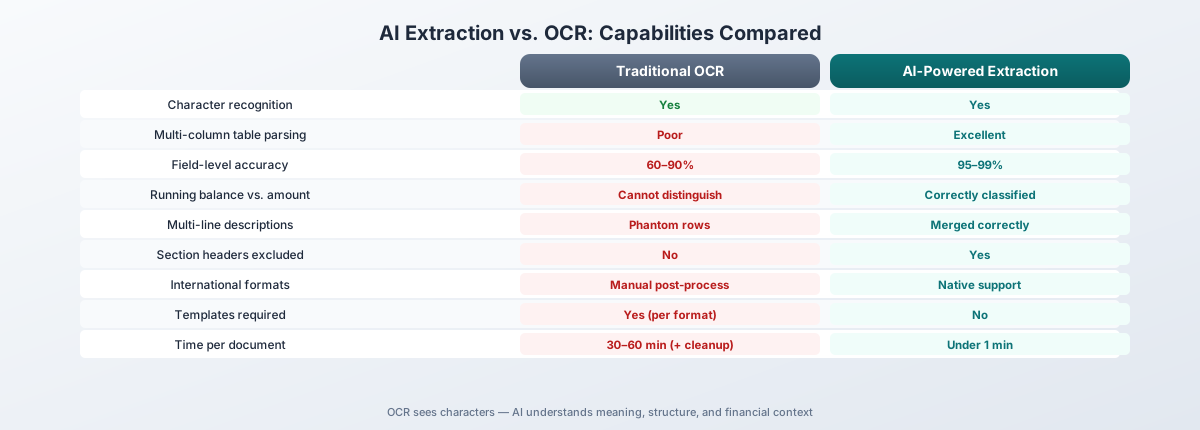
The accuracy numbers above tell part of the story. But the deeper problem is not that OCR gets characters wrong - it is that OCR has no concept of what those characters mean in context. Here are the specific challenges that break traditional OCR on financial documents.
1. Multi-Column Layouts
Bank statements are almost always multi-column. A typical statement has columns for date, description, withdrawals, deposits, and running balance. OCR engines process text left to right, top to bottom - which means they often merge data from adjacent columns into a single line.
What the statement shows:
12/15/2025  Amazon Purchase    -$45.99              $2,341.67
12/16/2025  Direct Deposit               $3,200.00  $5,541.67
What OCR often outputs:
12/15/2025 Amazon Purchase -$45.99 $2,341.67
12/16/2025 Direct Deposit $3,200.00 $5,541.67
The spaces between columns are gone. There is no way to tell which number is a debit, which is a credit, and which is a balance. A human can figure it out from context. OCR cannot.
2. Running Totals vs. Transaction Amounts
Every bank statement contains both transaction amounts and running balances. These are numbers that look identical in format but mean completely different things. OCR sees "$2,341.67" twice on a page and treats both instances the same way. It has no concept of "this number is a balance" versus "this number is a payment."
If your extraction process grabs the balance column instead of the transaction column - or worse, merges both - your reconciliation is immediately wrong.
3. Multi-Line Descriptions
Transaction descriptions frequently span multiple lines:
12/15/2025  AMAZON.COM*RT4K2
            AMZN.COM/BILL WA
            Card ending in 4521       -$45.99    $2,341.67
OCR treats each physical line as a separate entity. It has no way of knowing that lines 1–3 are all part of the same transaction description. The result is phantom rows - three "transactions" where there should be one, with the amount only appearing on the third line.
4. Section Headers vs. Data Rows
Financial documents are full of section headers, subtotals, and summary rows:
CHECKING ACCOUNT - ACCOUNT ENDING IN 7234
Statement Period: 12/01/2025 - 12/31/2025

Beginning Balance                              $1,234.56
  12/01  Transfer from Savings      $500.00    $1,734.56
  12/03  Electric Company          -$142.30    $1,592.26
Ending Balance                                 $1,592.26
OCR reads "Beginning Balance $1,234.56" and "Ending Balance $1,592.26" the same way it reads the actual transactions. It does not know these are summary rows that should be excluded from the transaction list. Without semantic understanding, these phantom entries pollute your data.
5. Currency Symbols and International Number Formats
Financial documents use wildly different number formats depending on the country:
| Format | Used In | Example |
|---|---|---|
| 1,234.56 | US, UK, Australia, Japan | $1,234.56 |
| 1.234,56 | Germany, France, Brazil, Spain | 1.234,56 EUR |
| 1 234,56 | Sweden, Norway, Poland | 1 234,56 kr |
| 12,34,567.89 | India | Rs 12,34,567.89 |
OCR returns the raw characters - "1.234,56" - and leaves it to you to figure out whether the period is a thousands separator or a decimal point. Get this wrong and your amount is off by a factor of 1,000.
6. Negative Numbers and Debit Indicators
Financial documents represent negative amounts in at least six different ways:
- Minus sign: -$45.99
- Parentheses: ($45.99)
- "DR" suffix: $45.99 DR
- Red text (lost in OCR)
- Separate debit column
- "CR" on opposite side: $45.99 CR means credit, absence means debit
OCR captures the characters but does not interpret the accounting convention. It cannot tell you whether "$45.99" is money in or money out without understanding the document layout and conventions.
What AI Adds on Top of OCR
AI-powered document extraction does not replace OCR - it builds on top of it. The text still needs to be read from the page. The difference is what happens after the characters are recognized.
Where OCR stops at "here are the characters I found," AI continues with:
Semantic Understanding
AI models understand that "12/15/2025" is a date, "$4,521.30" is a monetary amount, and "Amazon Purchase" is a transaction description. This is not just pattern matching on format - the model understands meaning from context.
If "12/15" appears in a date column, it is a date. If it appears in a description field, it might be a reference number. AI makes this distinction; OCR cannot.
Document Type Classification
Before extracting a single field, AI identifies what kind of document it is looking at: bank statement, invoice, receipt, tax form, or financial report. This matters because the extraction rules are completely different for each type. An invoice has vendor information, line items, subtotals, tax, and a total. A bank statement has transactions with dates, descriptions, debits, credits, and running balances. AI applies the right extraction model for the right document type.
Field Classification by Meaning
AI does not just extract text from a column - it classifies what that text represents. On an invoice, "Acme Corp" might appear in three places: as the billing company, the shipping address, or a line item description. AI understands which is which based on position, context, and document structure.
For bank statements, AI distinguishes between:
- Transaction dates vs. posting dates
- Transaction amounts vs. running balances
- Primary descriptions vs. continuation lines
- Section headers vs. data rows
- Opening balances vs. closing balances
Table Structure Recognition
This is where the gap between OCR and AI is most dramatic. OCR sees a grid of characters. AI sees a table with headers, rows, columns, and relationships between cells. It understands that the first row defines column meaning, that a blank date cell means "same date as above," that indented text is a continuation of the previous description, and that bold text spanning all columns is a section header - not a data row.
Relationship Extraction
Financial documents are full of mathematical relationships. On an invoice, line item totals should sum to the subtotal. The subtotal plus tax should equal the total. AI validates these relationships during extraction, catching errors that pure OCR would miss entirely.
On bank statements, AI validates that each transaction amount, when applied to the previous balance, produces the next balance. This running validation catches extraction errors in real time, allowing the system to self-correct.
Layout Adaptation Without Templates
Traditional OCR-based extraction systems rely on templates - predefined rules that map specific page regions to specific fields. This works until the bank changes its statement format, or you receive a statement from a bank you have never seen before.
AI understands document layout semantically. It recognizes that a column of values formatted as MM/DD/YYYY, positioned to the left of a description column, represents transaction dates - regardless of exact pixel position. This means AI works across thousands of different bank statement formats without custom templates.
The Accuracy Gap in Practice
The difference between OCR-only extraction and AI-powered extraction is not a few percentage points. It is the difference between data that requires extensive manual cleanup and data that is ready to use.
OCR + Manual Cleanup Workflow
- Scan or upload the document
- OCR engine extracts raw text (2–5 minutes per page)
- Manual review to fix character errors (5–10 minutes per page)
- Manual column alignment - separate amounts from balances (10–15 minutes per statement)
- Manual identification and removal of headers, footers, summary rows (5–10 minutes)
- Manual sign assignment - determine which amounts are debits vs credits (5–10 minutes)
- Final reconciliation check (5–10 minutes)
Total time per statement: 30–60 minutes of skilled human labor.
AI-Powered Extraction Workflow
- Upload the document
- AI extracts structured, classified data (seconds to minutes)
- Quick review of flagged items (2–5 minutes)
- Export to desired format
Total time per statement: 3–10 minutes, most of which is optional review.
Accuracy Comparison
| Metric | OCR Only | OCR + Manual Cleanup | AI-Powered Extraction |
|---|---|---|---|
| Character accuracy | 85–98% | 99%+ (after human review) | 97–99%+ |
| Field-level accuracy | 60–90% | 95%+ (after human review) | 95–99% |
| Table structure correct | 40–60% | 90%+ (after manual alignment) | 92–98% |
| Time per document | 2–5 min (OCR only) | 30–60 min (with cleanup) | Under 1 min |
| Requires templates | Yes (for structured extraction) | Yes | No |
| Handles new formats | No (needs new templates) | Partially (with manual work) | Yes |
The key insight: OCR alone gives you raw text that is 60–90% correct at the field level. To reach 95%+ accuracy, you need either extensive manual cleanup or AI-powered extraction. One costs 30–60 minutes of human time per document. The other costs seconds.
PDFSub's Approach: Skip OCR When You Can, Use AI When You Must
Most bank statements, invoices, and receipts that accountants and bookkeepers work with are digital PDFs - downloaded from online banking portals, emailed by vendors, or exported from financial systems. Digital PDFs already contain machine-readable text embedded directly in the file. Running OCR on a digital PDF is not just unnecessary - it can actually introduce character recognition errors where none existed.
PDFSub takes a fundamentally different approach based on this reality.
For Digital PDFs: Direct Text Extraction
When you upload a digital PDF to PDFSub's bank statement converter, invoice extractor, or receipt scanner, the first thing the system does is check whether the PDF contains embedded text.
If it does - and the vast majority of modern financial documents do - PDFSub extracts the text directly from the PDF structure. No OCR. No image processing. No character recognition errors. The text comes out exactly as it was encoded in the file, with precise position coordinates that enable accurate table detection and column alignment.
This direct extraction happens entirely in your browser. The PDF never leaves your device. There is no upload, no server processing, no data retention.
For Scanned Documents: AI-Powered Extraction
When the PDF is a scanned image - or when embedded text extraction does not produce clean results - PDFSub falls back to AI-powered server-side processing. The AI model analyzes the full page layout simultaneously: identifying columns, recognizing table structure, classifying fields, and extracting data with context. It understands the document as a whole rather than converting to text first and trying to impose structure after.
Multi-Tiered Extraction
PDFSub uses a tiered approach that chooses the optimal extraction method for each document:
- Browser-side direct extraction - For digital PDFs with good embedded text. Fastest, most private, most accurate (no character recognition needed).
- Server-side structured extraction - For PDFs where browser-side parsing needs reinforcement. Uses layout analysis to handle complex table structures.
- AI-powered extraction - For scanned documents or complex layouts that resist rule-based parsing. Brings semantic understanding to bear.
Each tier passes validation checks before returning results. If a tier cannot produce clean, reconciled data, the system automatically escalates to the next tier.
The Result
This approach delivers:
- 99%+ accuracy on digital PDFs - because there are no OCR errors to begin with
- 95–99% accuracy on scanned documents - because AI understands structure, not just characters
- Support for 20,000+ banks worldwide - because there are no per-bank templates to maintain
- 130+ languages - because the system handles international date formats, number formats, and character encodings natively
- Browser-first privacy - because most documents never need to leave your device
Cost Comparison: The Real Economics
The cost difference between OCR + manual correction and AI-powered extraction is substantial, especially at scale.
Per-Document Cost Breakdown
| Cost Factor | OCR + Manual Cleanup | AI-Powered Extraction |
|---|---|---|
| Software cost | $0.01–$0.10/page (OCR API) | $0.05–$0.50/page (AI processing) |
| Labor cost | $8–$25/document (30–60 min at $15–$25/hr) | $1–$4/document (3–10 min review) |
| Error correction | $5–$15/document (finding and fixing errors) | $0–$2/document (minimal errors) |
| Total per document | $13–$40 | $1–$7 |
The software cost for AI is higher than raw OCR. But the labor savings more than compensate. When you factor in error correction - finding wrong amounts, fixing misaligned columns, removing phantom rows - OCR-based workflows cost 3 to 10 times more than AI-powered extraction.
At Scale
For a bookkeeping firm processing 500 bank statements per month:
- OCR + manual cleanup: 500 x $25 average = $12,500/month
- AI-powered extraction: 500 x $4 average = $2,000/month
That is over $125,000 per year in savings. Industry data backs this up - organizations adopting intelligent document processing report 40%+ cost reductions, with payback periods of 3–6 months and first-year ROI of 200–400%.
When Traditional OCR Is Still Sufficient
AI-powered extraction is not always necessary. There are scenarios where traditional OCR does the job well enough:
Simple, single-page documents. A receipt with a merchant name, a few line items, and a total. Documents with minimal structure where the goal is just to get the text - not to extract structured data from complex tables.
Consistent, known formats. If you process the same document layout every time - say, a specific form from a single vendor - template-based OCR extraction can achieve high accuracy. You map the fields once, and the template handles the rest. This breaks down when the format changes or you add a new vendor.
Text-only PDFs. If your goal is full-text search or simple archiving - not structured data extraction - OCR is sufficient. You just need the characters, not the meaning.
Low-volume, high-oversight workflows. If you process a handful of documents per week and have time to manually review every output, OCR with manual correction is viable. The economics shift toward AI when volume increases or time pressure mounts.
The Decision Framework
| Scenario | Recommended Approach |
|---|---|
| Digital PDF, need structured data | Direct text extraction (no OCR needed) |
| Scanned document, simple layout | Traditional OCR may suffice |
| Scanned document, complex layout | AI-powered extraction |
| Multi-column financial document | AI-powered extraction |
| International documents (non-English) | AI-powered extraction |
| High volume (50+ documents/month) | AI-powered extraction |
| Low volume, single format | Template-based OCR |
The Bottom Line
OCR was a breakthrough technology when it first appeared. The ability to convert images of text into machine-readable characters transformed how businesses handle paper documents. But for financial documents - with their complex layouts, multi-column tables, running balances, and format variations - character recognition is only the first step.
The real challenge is not reading the characters. It is understanding what they mean.
AI-powered extraction closes this gap by adding semantic understanding, field classification, table structure recognition, and relationship validation on top of character recognition. The result is structured, accurate, ready-to-use data - not a wall of text that needs hours of manual cleanup.
If you are still manually correcting OCR output from bank statements, invoices, or receipts, the technology has moved past that workflow. AI-powered extraction is faster, more accurate, and dramatically cheaper at scale.
Ready to see the difference? Try PDFSub Free and test it on your own financial documents. Upload a bank statement to the bank statement converter, run an invoice through the invoice extractor, or scan a receipt with the receipt scanner. Compare the results to what your current OCR workflow produces.
The characters are the same. The understanding is not.