How Accurate Is AI Bank Statement Extraction?
AI extraction hits 99%+ field accuracy on digital PDFs - but what does that actually mean for your books? We break down the numbers.
You've just converted 200 pages of bank statements. The tool says "99% accuracy." Sounds great - until you realize that means roughly two errors per page that could throw off your reconciliation.
Accuracy claims in bank statement extraction are everywhere. But what do they actually measure? And more importantly, when can you trust the output without manually checking every single line?
Let's cut through the marketing and look at what the numbers really mean.
What "99% Accuracy" Actually Means
Here's the thing most vendors won't tell you: there are three very different ways to measure accuracy, and they paint very different pictures.
Character accuracy measures individual characters. If "Chase Bank" becomes "Chase 8ank," that's 90% character accuracy - one wrong character out of ten. Most OCR tools report this number because it sounds impressive.
Field accuracy measures entire data fields. That same "Chase 8ank" error means the description field is wrong - 0% field accuracy for that field, even though 90% of the characters were correct. This is what actually matters for your bookkeeping.
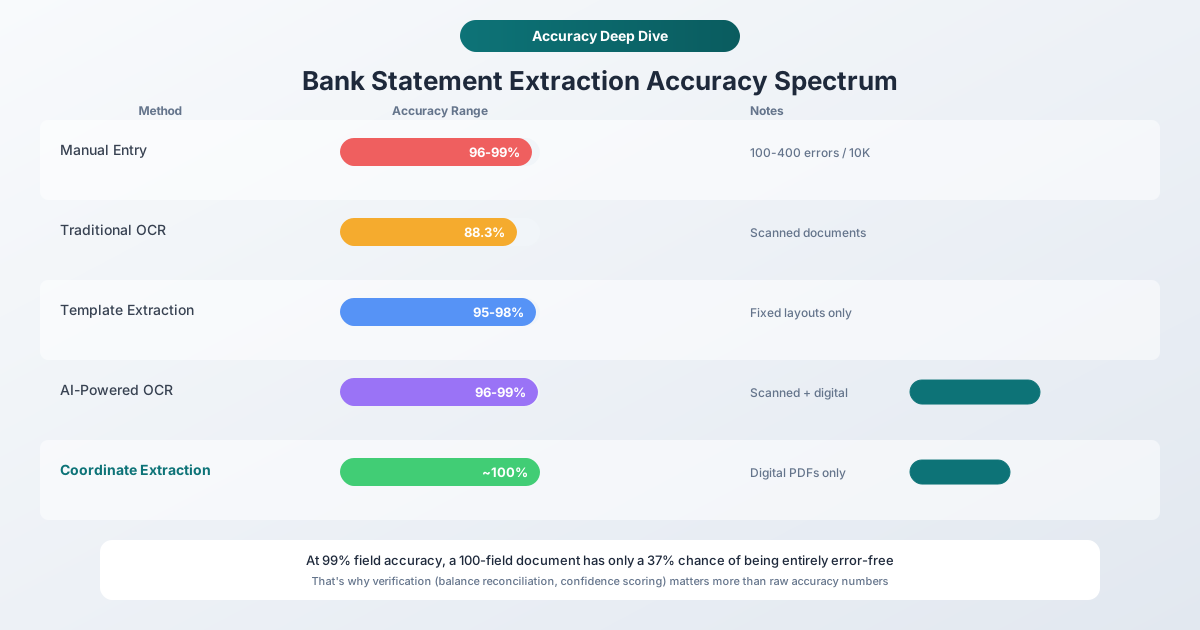
Document accuracy is where it gets sobering. If you have 100 fields on a statement and each field has 99% accuracy, the probability of the entire document being error-free is 0.99^100 = 36.6%. That means roughly two out of three statements will have at least one error somewhere.
This is why a tool claiming "99% accuracy" can still produce documents that need manual review.
Digital vs. Scanned: The Accuracy Gap
The single biggest factor in extraction accuracy isn't the AI model or the algorithm - it's whether your PDF contains actual text or just a picture of text.
Digital PDFs (downloaded from online banking) have text embedded directly in the file. The extraction tool reads the exact characters, coordinates, and formatting the bank put there. There's no guessing. For well-structured digital PDFs, character-level accuracy is effectively 100%.
Scanned PDFs (photographed or scanned paper statements) require OCR - optical character recognition - to convert pixel patterns into text. Even the best OCR introduces errors:
- The number "0" becomes the letter "O"
- "$1,234.56" becomes "$1,234.S6"
- Faded ink or creases create gaps in text
- Multi-column layouts confuse the reading order
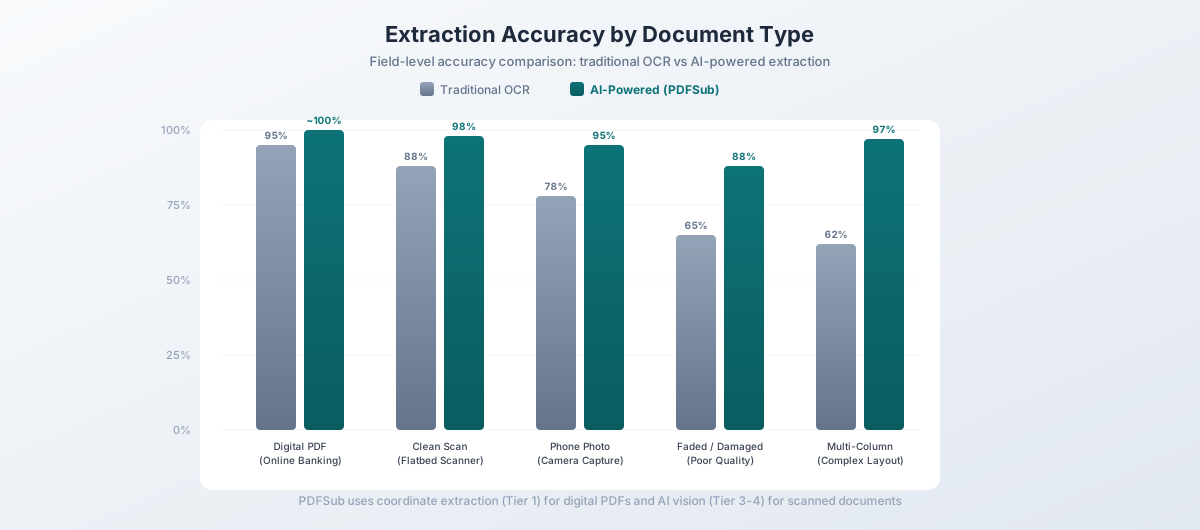
Traditional OCR on scanned documents averages around 88% accuracy. AI-powered OCR pushes that to 96-99%, but the gap between digital and scanned remains significant.
The takeaway: If you can download statements directly from online banking as PDFs, always do that instead of scanning paper copies. You'll get dramatically better results regardless of which extraction tool you use.
Where AI Extraction Struggles (Even on Digital PDFs)
Digital PDFs aren't always a walk in the park, either. Here are the most common failure points:
Multi-line descriptions. When a transaction description wraps to two or three lines, simpler tools treat each line as a separate transaction. You end up with phantom entries that have descriptions but no amounts.
Merged cells and spanning headers. Bank statements love to use section headers like "DEPOSITS AND ADDITIONS" that span the full width. If the extractor doesn't recognize these as headers, they show up as transactions with $0 amounts.
Date ambiguity. Is "01/02/2026" January 2nd or February 1st? US banks use MM/DD/YYYY, but international statements use DD/MM/YYYY. Without context, even AI can't always tell the difference on edge cases like "06/07/2026."
Amount sign detection. Bank statements don't always use negative signs for debits. Some use parentheses: (1,234.56). Others put debits and credits in separate columns. Some use "DR" and "CR" suffixes. The extractor needs to understand the statement's layout to get the signs right.
Running balances vs. transaction amounts. Many statements include both a transaction amount and a running balance column. Confusing the two means every number in your export is wrong.
How AI Beats Traditional Extraction
Traditional extraction tools use rigid templates: "The date is always in column A, the amount is always in column E." This works perfectly - until a bank changes their statement layout, or you process a statement from a different bank.
AI-powered extraction takes a fundamentally different approach. Instead of looking for data in fixed positions, it understands the meaning of the data:
| Challenge | Traditional Extraction | AI-Powered Extraction |
|---|---|---|
| New bank format | Needs manual template | Adapts automatically |
| Merged cells | 62% success rate | 98.7% success rate |
| Multi-line descriptions | Often splits incorrectly | Recognizes continuation lines |
| Date format changes | Requires configuration | Auto-detects format |
| Currency formats | Template-specific | Handles $, €, £, ¥ and more |
The biggest advantage is handling variety. If you process statements from multiple banks - or if a bank updates their PDF layout - template-based tools break. AI extraction handles the variation without manual intervention.
The "Last Mile" Problem
Getting from 95% to 99% accuracy is exponentially harder than getting from 80% to 95%. This is the "last mile" problem in bank statement extraction.
At 95% field accuracy, you have roughly 5 errors per 100 transactions. That's clearly noticeable and requires manual cleanup.
At 99% accuracy, you have 1 error per 100 transactions. Better, but still means a 500-transaction statement likely has 5 errors hiding somewhere.
At 99.9% accuracy, you have 1 error per 1,000 transactions. Now you're in territory where most individual statements are clean - but across a year of statements, errors still accumulate.
The practical solution isn't chasing the last 0.1% of accuracy. It's building verification into the workflow.
How Smart Tools Verify Their Own Output
The best extraction tools don't just convert data - they check their work. Here's what to look for:
Balance Reconciliation
This is the gold standard. If a statement shows:
- Opening balance: $5,000.00
- Credits (deposits): $3,200.00
- Debits (withdrawals): $2,800.00
- Closing balance: $5,400.00
Then Opening + Credits - Debits should equal Closing. If it doesn't, something was extracted incorrectly. This single check catches the majority of meaningful errors.
Confidence Scoring
Modern AI extractors assign confidence scores to each transaction. A practical workflow looks like:
- 90%+ confidence: Auto-accept. The data is almost certainly correct.
- 70-90% confidence: Flag for quick review. Usually fine, but worth a glance.
- Below 70% confidence: Requires manual verification.
In practice, about 80% of transactions in digital PDFs hit the auto-accept threshold, 15% need a quick look, and only 5% require careful manual review.
Cross-Field Validation
Smart tools check whether extracted data makes internal sense:
- Do dates fall within the statement period?
- Are transaction amounts reasonable (no $999,999 coffee purchases)?
- Do running balances match when recalculated?
- Are there duplicate entries that might indicate a parsing error?
How PDFSub Handles Accuracy
PDFSub uses a tiered extraction approach designed to maximize accuracy while minimizing cost:
Tier 1 - Browser-based coordinate extraction. For digital PDFs (the majority of bank statements), PDFSub's bank statement converter reads the exact text coordinates embedded in the PDF. No OCR, no AI, no file upload. This runs entirely in your browser and produces near-perfect results on well-structured statements.
A quality gate scores the extraction output. If the score meets the threshold - checking for issues like truncated descriptions, contaminated fields, impossible amounts, and date range consistency - the result is accepted. Most digital PDFs pass on this tier.
Tier 2 - Server-side extraction. If the quality gate catches issues, PDFSub tries alternative parsing libraries server-side. Different parsers handle different PDF structures better, so this tier catches edge cases that Tier 1 misses.
Tier 3 & 4 - AI-powered extraction. For scanned documents or complex layouts that resist coordinate-based parsing, PDFSub uses AI models that understand document structure. Tier 3 uses OCR-processed text with AI interpretation. Tier 4 sends the document image directly to a vision model for the most accurate results on difficult documents.
This tiered approach means you get the fastest, cheapest extraction path that produces accurate results - and more expensive AI processing only kicks in when it's actually needed.
Output formats. PDFSub exports to 8 formats - XLSX, CSV, TSV, JSON, OFX, QBO, QFX, and QIF - so your converted data goes directly into whatever software you use. QBO and OFX formats include FITID transaction identifiers for automatic duplicate detection in QuickBooks and Xero.
How Accurate Is Manual Data Entry, Really?
Here's a useful comparison point: how accurate are humans at typing in bank transactions?
Research consistently shows that skilled data entry operators make between 100 and 400 errors per 10,000 entries. That's an error rate of 1-4% - and these are trained professionals, not your average bookkeeper copying numbers from a PDF.
Common human errors include:
- Transposed digits (1,234 becomes 1,243)
- Skipped transactions (especially in long statements)
- Misread amounts (an 8 looks like a 6 on a bad printout)
- Copy-paste errors when transferring between documents
Automated extraction at 99%+ accuracy is already more reliable than manual entry. And unlike humans, automated tools don't get tired, distracted, or rush through the last 20 pages before lunch.
What to Look For in an Extraction Tool
When evaluating accuracy claims, ask these questions:
-
What type of accuracy? Character, field, or document level? Field accuracy is what matters for bookkeeping.
-
Digital or scanned PDFs? Most impressive numbers come from digital PDF tests. If you work with scanned documents, ask specifically about scanned accuracy.
-
Does it verify its own output? Balance reconciliation and confidence scoring are more valuable than a slightly higher raw accuracy number.
-
How does it handle errors? A tool that flags uncertain extractions is more useful than one that silently outputs incorrect data with high confidence.
-
Does it support your banks? Universal extraction that works across banks is more practical than high accuracy on a single bank format.
Frequently Asked Questions
Is AI extraction accurate enough to skip manual review entirely?
For digital PDFs with balance reconciliation, yes - in most cases. If the opening balance plus all credits minus all debits equals the closing balance, the extraction is mathematically verified. PDFSub's quality gate catches structural issues before you even see the output.
Why do scanned PDFs produce worse results?
Scanned PDFs are images, not text. The tool must first convert pixels to characters (OCR), then interpret those characters as financial data. Each step introduces potential errors - especially with faded ink, creases, stamps, or handwritten notes.
How does PDFSub's accuracy compare to competitors?
On digital PDFs, coordinate-based extraction is effectively 100% character-accurate because it reads embedded text directly - no interpretation needed. This approach, used in PDFSub's Tier 1, matches or exceeds the claimed accuracy of any competitor for digital bank statements. For scanned documents, PDFSub's multi-tier approach automatically escalates to AI processing when simpler methods fall short.
Can I trust extracted data for tax preparation?
Extracted data is a starting point, not a final tax document. Always reconcile extracted totals against your bank's official totals. With proper balance reconciliation - which PDFSub performs automatically - the data is reliable for categorization and bookkeeping. Your accountant should still review final tax figures.
What's the most common extraction error?
Multi-line transaction descriptions that get split into separate entries. This is why PDFSub uses continuation-line detection - if a line has a description but no amount or date, it's merged with the previous transaction rather than treated as a standalone entry.
Does accuracy vary by bank?
Yes. Banks with clean, consistent PDF formatting (like Chase and Bank of America) produce excellent results. Banks with unusual layouts, merged cells, or non-standard date formats may require AI-assisted extraction. PDFSub supports 20,000+ bank formats across 130+ languages.
The Bottom Line
AI bank statement extraction in 2026 is genuinely accurate - but "accurate" means different things depending on what you measure and what kind of documents you process.
For digital PDFs downloaded from online banking, coordinate-based extraction produces near-perfect results. For scanned documents, AI-powered OCR has narrowed the gap dramatically but still benefits from human spot-checking.
The practical approach isn't obsessing over the last fraction of a percent. It's using a tool that verifies its own output through balance reconciliation and confidence scoring, so you know which transactions to trust and which to double-check.
If you're still manually typing transactions from PDF statements, the accuracy argument is already settled: automated extraction is faster, cheaper, and more accurate than human data entry. The only question is which tool fits your workflow.
Try PDFSub's bank statement converter free for 7 days - the All-In-One plan is $20/user/mo (annual) or $25/user/mo (monthly), including 500 bank statement pages per user with all 8 output formats and support for 20,000+ bank formats.