Convert Dutch Bank Statements to Excel (ING, ABN AMRO, Rabobank, and More)
Dutch bank statements use comma decimals, DD-MM-YYYY dates, and iDEAL/Tikkie transaction codes that break in English-locale Excel. Here's how to convert them cleanly.
The Netherlands has 18.13 million people, roughly 99% of them have a bank account, and 95% use online banking -- one of the highest digital banking adoption rates in the world. Dutch consumers made over 1.3 billion iDEAL payments last year alone, totaling more than EUR 141 billion. This is a country that runs on electronic payments.
So you'd think exporting a Dutch rekeningafschrift (bank statement) into Excel would be straightforward. It is not. The moment you open an ING or ABN AMRO statement in an English-locale spreadsheet, comma decimals turn into text, DD-MM-YYYY dates silently flip to the wrong month, the "Af Bij" column confuses every formula you write, and iDEAL and Tikkie transaction codes fragment across multiple rows.
Whether you're an expat accountant processing ING statements, a multinational finance team consolidating data from a Dutch subsidiary, a boekhouder importing Rabobank rekeningafschriften into Exact Online, or an international auditor working with ABN AMRO data -- the problem is the same: getting clean, structured data out of Dutch bank statement PDFs and into a spreadsheet that works.
This guide covers the formatting challenges of Dutch statements, the banks you'll encounter, the payment systems you need to understand, and the fastest way to convert everything accurately.
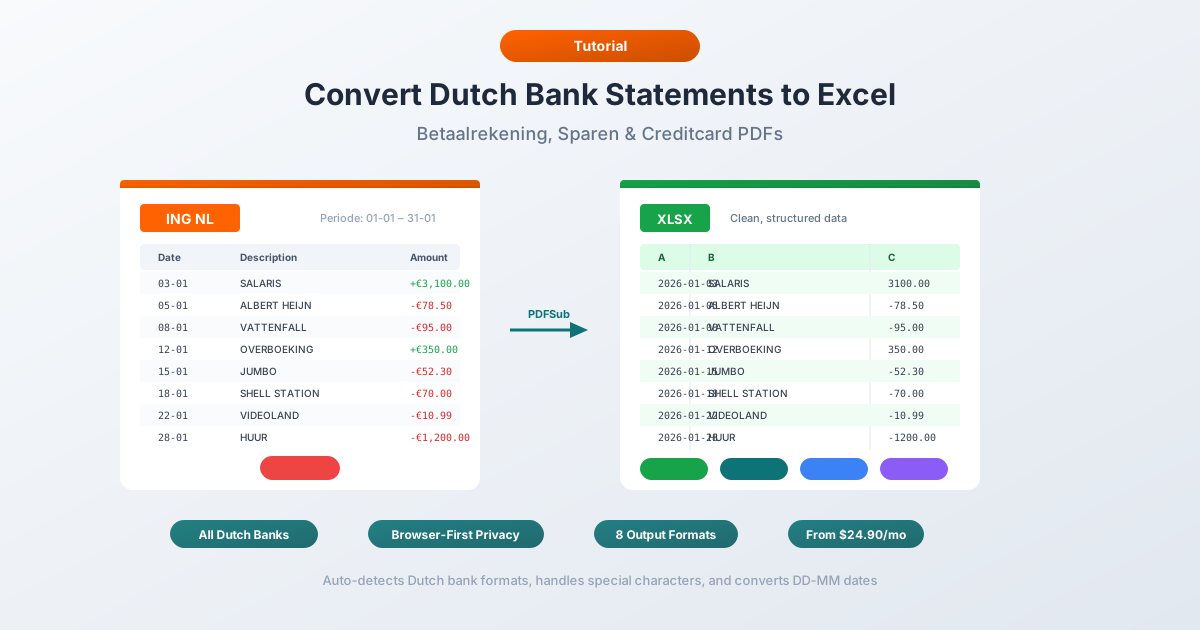
Why Dutch Bank Statements Break in Excel
Dutch financial formatting shares some traits with German conventions -- comma decimals, day-first dates -- but adds its own complications. There are six major issues that trip up every generic converter.
1. Comma Decimals and Period Thousands
Dutch numbers use the Continental European convention:
| Dutch Format | English Equivalent | What Excel Sees |
|---|---|---|
| 1.234,56 EUR | 1,234.56 EUR | Text (unrecognized) |
| 15.000,00 EUR | 15,000.00 EUR | Text or 15.0 |
| -347,89 EUR | -347.89 EUR | Text |
English-locale Excel treats "1.234,56" as a text string. It cannot parse a number with both periods and commas in the "wrong" positions. A simple find-and-replace -- swapping commas for periods -- fails because you need to handle the thousands separator and the decimal separator simultaneously, in the correct order.
This is the single most common source of broken formulas when working with Dutch financial data in English spreadsheets.
2. DD-MM-YYYY Date Format
Dutch dates use day-month-year with hyphen separators: 15-03-2026 means March 15, 2026.
In English-locale Excel, dates with hyphens may be parsed as text or -- worse -- silently misinterpreted. A date like "05-03-2026" could be read as May 3 instead of March 5. Dates where the day exceeds 12 (like "15-03-2026") are sometimes parsed correctly, creating a column where some dates are right, some are wrong, and the spreadsheet gives no indication which is which.
Some Dutch statements abbreviate dates further, showing only DD-MM on transaction lines with the year appearing only in the statement header.
3. The ING "Af Bij" Column
ING -- the Netherlands' largest bank -- uses a unique column called "Af Bij" that contains the text values "Af" (debit) or "Bij" (credit) instead of using positive and negative numbers. This means the amount column always contains a positive number, and the direction of the transaction is determined entirely by a separate text field.
Datum    Af Bij    Bedrag (EUR)    Omschrijving
15-03    Af        1.234,56        Huur maart 2026
16-03    Bij       2.500,00        Salaris
17-03    Af        47,50           Albert Heijn
Most generic CSV parsers and PDF extractors have no idea what to do with "Af" and "Bij." They'll import every amount as positive and lose the debit/credit distinction entirely -- making the statement useless for reconciliation. A proper converter needs to negate amounts where the Af Bij column says "Af."
4. iDEAL and Tikkie Transaction Codes
Dutch statements are filled with payment method codes that don't exist in other countries:
- ID -- iDEAL payment (online bank transfer, 70-73% of Dutch e-commerce)
- GT -- Geldtransactie (online banking transfer)
- BA -- Betaalautomaat (POS/card terminal payment)
- OV -- Overschrijving (bank transfer)
- IC -- Incasso (SEPA direct debit)
- GA -- Geldautomaat (ATM withdrawal)
Tikkie payments -- the P2P payment app built by ABN AMRO, handling 157 million transactions and EUR 7.4 billion in 2024 -- appear as iDEAL transactions with "Tikkie" embedded in the description field. The description often wraps across multiple lines, mixing the Tikkie reference with SEPA metadata.
5. Multi-Line Descriptions with SEPA Metadata
Dutch SEPA transactions produce verbose entries. A single incasso (direct debit) might look like this on a statement:
15-03  IC   Incasso
            Machtigingskenmerk: MAND-2024-789012
            Incassant-ID: NL12ZZZ123456789000
            KvK-nummer: 12345678
            Energierekening maart 2026
                                                    -185,00
That's one transaction across five lines. The machtigingskenmerk (mandate reference) and Incassant-ID (creditor identifier) are SEPA-mandated metadata that most users don't need in their spreadsheet. The actual human-readable purpose -- "Energierekening maart 2026" -- is buried on line 5.
A naive PDF parser creates five separate rows. A proper converter recognizes the continuation pattern, merges the lines into a single transaction, and extracts the meaningful description.
6. Bank-Specific CSV Quirks
Unlike many European countries where banks offer broadly similar export formats, each major Dutch bank has idiosyncratic CSV output:
- ING uses the Af/Bij text column instead of signed amounts
- ABN AMRO TAB-delimited exports have no header row
- Rabobank splits descriptions across three separate columns (Omschrijving-1, Omschrijving-2, Omschrijving-3)
- Knab CSVs include an extraneous "KNAB EXPORT" header line that breaks automated parsing
These quirks mean that even if you download a CSV directly from your bank's online portal, you still need bank-specific handling to get clean data.
The Major Banks and Their Statement Formats
The Dutch banking market is concentrated. The "Big Three" -- ING, Rabobank, and ABN AMRO -- control roughly 75% of banking assets. Here's what you'll encounter from each.
ING
The Netherlands' largest bank by assets and customer count. ING offers multiple export formats from online banking: CSV, MT940 (being phased out), and CAMT.053. PDF statements are available through the "Mijn ING" portal.
Key quirk: The CSV export uses the "Af Bij" text column described above. The amount is always positive, with "Af" or "Bij" indicating debit or credit. Date format in CSVs is YYYYMMDD (compact, no separators), which is different from the DD-MM-YYYY shown on PDF statements.
Rabobank
The Netherlands' second-largest bank. Cooperative structure with strong agricultural roots. Offers CSV, MT940, and CAMT.053 exports. PDF statements available via "Mijn Rabobank."
Key quirk: Descriptions are split across three columns -- Omschrijving-1, Omschrijving-2, and Omschrijving-3 -- in the CSV export. You need to concatenate these columns to reconstruct the full transaction description. MT940 export will be discontinued in November 2026.
ABN AMRO
Third-largest Dutch bank. Offers the widest range of export formats: PDF, TXT (TAB-delimited), XLS, MT940, and CAMT.053 through online banking.
Key quirk: The TAB-delimited export contains no header row. You have to know the column order (date, counter-account, direction, amount, description, etc.) or guess based on the data. This is the only major Dutch bank that offers a native XLS download, though the formatting still uses Dutch conventions.
ASN Bank
Formerly part of de Volksbank (previously SNS Bank), ASN Bank rebranded in July 2025. Known for ethical and sustainable banking. Offers PDF statements and CSV export.
Key quirk: ASN Bank has already discontinued MT940 exports, making it one of the first Dutch banks to fully migrate to CAMT.053. If your accounting software depends on MT940, you'll need a conversion step.
bunq
Mobile-first digital bank popular with freelancers and tech workers. Offers PDF, CSV, MT940, and CAMT.053 exports through both the app and web interface.
Key quirk: bunq's CSV format is relatively clean compared to the traditional banks, with signed amounts (negative for debits) and ISO date formatting. However, multi-currency accounts may produce CSVs with mixed currency entries.
Triodos Bank
Ethical bank focused on sustainable investment. Offers PDF statements and CSV exports via online banking.
Knab
Online bank originally launched by Aegon, now part of ASR. Popular with ZZP'ers (Dutch freelancers/sole proprietors).
Key quirk: CSV exports include an extraneous "KNAB EXPORT" line at the top of the file. Most CSV parsers treat this as the header row, which shifts all subsequent data into the wrong columns. You need to strip this line before importing.
Method 1: Use a Bank Statement Converter (Recommended)
PDFSub handles Dutch bank statements natively -- including all the formatting challenges and bank-specific quirks described above. The All-In-One plan is $20/user/mo (annual) or $25/user/mo (monthly), including 500 bank statement pages per user and a 7-day free trial.
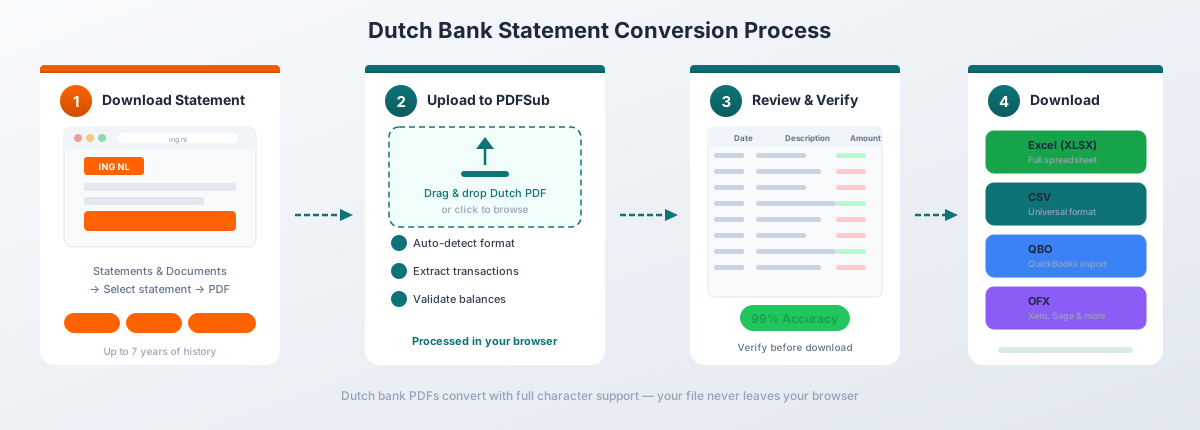
How It Works
-
Upload your rekeningafschrift -- Drag and drop the PDF from any Dutch bank. PDFSub auto-detects the bank format from 20,000+ supported templates.
-
Automatic format handling -- The converter automatically:
- Converts DD-MM-YYYY dates to your preferred format
- Transforms comma decimals (1.234,56) to standard numbers (1234.56)
- Interprets ING's "Af Bij" column and correctly signs amounts
- Merges multi-line descriptions into single clean entries
- Cleans SEPA reference codes (machtigingskenmerk, Incassant-ID) from descriptions
- Identifies iDEAL, Tikkie, and incasso transaction types
- Maps Dutch column headers (Datum, Bedrag, Omschrijving) to English equivalents
-
Review and verify -- Check the extracted transactions in the preview. Balances are validated against the statement's opening and closing saldo.
-
Download -- Export as Excel (.xlsx), CSV, QBO (QuickBooks), OFX (Xero, Wave), QFX (Quicken), or JSON.
Why PDFSub Works for Dutch Statements
130+ languages including Dutch. The extraction engine understands Dutch banking terminology -- Overschrijving, Incasso, Betaalautomaat, Geldautomaat, Tegenrekening -- and maps them to structured fields.
All major Dutch banks supported. From ING's Af/Bij format to ABN AMRO's headerless exports to Rabobank's split descriptions. The AI-assisted extraction adapts to layout variations across every Dutch bank.
Browser-first privacy. For digital PDFs from online banking (which is the vast majority of Dutch statements, given 95% online banking adoption), text extraction happens entirely in your browser. The file never leaves your device. Server-side processing is only used for scanned documents.
Correct number handling. The converter doesn't just swap commas and periods -- it understands Dutch number formatting rules, including the Af/Bij direction indicator and unsigned amounts.
SEPA-aware parsing. Multi-line SEPA blocks with machtigingskenmerk, Incassant-ID, and IBAN references are merged into clean, single-line descriptions. The actual payment purpose is extracted and separated from machine-readable references.
Method 2: Bank-Provided Downloads
Dutch banks offer some of the best digital export options in Europe. If you need raw transaction data rather than statement PDFs, here's what each bank provides:
Export Formats by Bank
| Bank | CSV | MT940 | CAMT.053 | XLS | |
|---|---|---|---|---|---|
| ING | Yes | Yes (phasing out) | Yes | No | Yes |
| Rabobank | Yes | Yes (until Nov 2026) | Yes | No | Yes |
| ABN AMRO | TAB-delimited | Yes | Yes | Yes | Yes |
| ASN Bank | Yes | Discontinued | Yes | No | Yes |
| bunq | Yes | Yes | Yes | No | Yes |
| Knab | Yes | No | No | No | Yes |
| Triodos | Yes | Yes | Yes | No | Yes |
How to Get It
- ING: Mijn ING --> Af- en bijschrijvingen --> Downloaden --> Choose format
- Rabobank: Mijn Rabobank --> Transacties --> Downloaden --> Choose CSV, MT940, or CAMT.053
- ABN AMRO: Internetbankieren --> Rekeningen --> Mutaties downloaden --> Choose format
- bunq: App or web --> Transactieoverzicht --> Export --> Choose format
Limitations
Semicolon-delimited. Like German banks, Dutch CSV files use semicolons (;) as column delimiters because commas are already used for decimals. English-locale Excel expects comma-delimited CSV and will dump the entire row into column A.
Fix: Open Excel --> Data --> From Text/CSV --> Select the file --> Choose "Semicolon" as delimiter --> Set encoding to UTF-8.
Bank-specific formatting. As detailed above, each bank has its own quirks -- ING's Af/Bij column, ABN AMRO's missing headers, Rabobank's split descriptions. There's no single "Dutch CSV" format.
Limited history. Most banks offer CSV export for 13 to 18 months of transactions. Official rekeningafschriften (PDF statements) cover longer periods, and banks are legally required to provide statements for the past 7 years.
Not an official statement. A CSV export is not the same as a rekeningafschrift. It lacks opening/closing balances, account holder details, and the legal standing of an official bank statement. For the Belastingdienst (Dutch tax authority) or auditors, you need the actual rekeningafschrift.
Dutch number format preserved. The CSV contains Dutch-format numbers (comma decimals, period thousands) that still need conversion for English-locale tools.
Method 3: Copy-Paste (Not Recommended)
You can try copying transaction data from the PDF and pasting into Excel. The problems:
- Multi-line descriptions with SEPA metadata create extra rows
- Table structure is lost -- columns merge into a single text block
- Dates and numbers paste as text, not formatted values
- ING's Af/Bij column pastes as plain text with no formula connection to amounts
- No validation against opening/closing saldo
- IBAN numbers (18 characters for Dutch accounts) may be truncated or reformatted
For more than a handful of transactions, this approach costs more time than it saves.
Dutch Payment Systems
Understanding Dutch payment systems helps you make sense of what appears on your statements. The Netherlands has one of Europe's most distinctive payment ecosystems.
iDEAL (Becoming "iDEAL | Wero" in 2026)
iDEAL dominates Dutch e-commerce, handling 70-73% of all online payments -- over 1.3 billion transactions per year totaling more than EUR 141 billion. It's a real-time bank transfer system where the buyer authenticates directly through their bank's online portal.
On statements, iDEAL payments appear with the transaction code ID and include the merchant name and a reference number. In 2026, iDEAL is transitioning to "iDEAL | Wero" as part of the European Payments Initiative, though the underlying statement formatting remains the same.
Tikkie
Tikkie is a P2P payment app built and operated by ABN AMRO, though it works with accounts from any Dutch bank. In 2024, users sent 157 million Tikkies totaling EUR 7.4 billion. Think of it as the Dutch equivalent of Venmo or Zelle.
On statements, Tikkie payments appear as iDEAL transactions (code ID) with "Tikkie" embedded in the description field. The recipient's name and a Tikkie reference number are usually included, but they may wrap across multiple description lines. A bookkeeper reconciling Tikkie payments needs the converter to merge these multi-line entries and preserve the Tikkie reference.
Incasso (SEPA Direct Debit)
Incasso -- SEPA Direct Debit -- is the standard method for recurring payments like utilities, insurance, and subscriptions. Dutch statements mark these with the code IC and include two pieces of SEPA-mandated metadata:
- Machtigingskenmerk -- The mandate reference. A unique identifier linking the direct debit to the signed authorization (machtiging) between the consumer and the creditor.
- Incassant-ID -- The creditor identifier. A Europe-wide unique ID for the organization collecting the payment.
Acceptgiro (Discontinued)
The acceptgiro -- the Netherlands' traditional paper payment slip -- was discontinued on June 1, 2023. However, if you're converting older Dutch statements (pre-2023), you may encounter transaction codes AC or AN referencing acceptgiro payments. These are legacy entries that won't appear on any statement dated after mid-2023.
The MT940 to CAMT.053 Migration
If you work with Dutch bank data in accounting software, you need to know about the ongoing migration from MT940 to CAMT.053.
What's Changing
MT940 is SWIFT's legacy text-based format for account statements -- the backbone of automated bank statement processing in the Netherlands for decades. Virtually every Dutch accounting package (Exact Online, Twinfield, Afas, Snelstart, e-Boekhouden) supports MT940 import.
CAMT.053 (ISO 20022 XML) is the replacement. It's richer, more structured, and supports more transaction detail. But the migration creates a transition period where some banks have already dropped MT940 while others still support it.
Bank Timelines
| Bank | MT940 Status | CAMT.053 Available |
|---|---|---|
| ASN Bank | Already discontinued | Yes |
| Rabobank | Available until November 2026 | Yes |
| ING | Available (phasing out) | Yes |
| ABN AMRO | Available (phasing out) | Yes |
| bunq | Available | Yes |
| Triodos | Available | Yes |
What This Means for You
If your workflow depends on MT940 files, check your bank's timeline. ASN Bank customers already need CAMT.053-compatible software. Rabobank customers have until November 2026.
For PDF-to-Excel conversion, the MT940/CAMT.053 migration is largely irrelevant. These formats are for automated machine-to-machine exchange, not human-readable statements. Your PDF rekeningafschrift will look the same regardless of which back-end format your bank uses.
Bank-Specific CSV Quirks
If you're working with CSV downloads from Dutch banks rather than PDF statements, here's a detailed breakdown of what to expect and how to handle it.
ING: The Af Bij Problem
ING's CSV format is the most unusual of any major Dutch bank:
"Datum";"Naam / Omschrijving";"Rekening";"Tegenrekening";"Code";"Af Bij";"Bedrag (EUR)";"Mutatiesoort";"Mededelingen"
"20260315";"Albert Heijn 1234";"NL91INGB0001234567";"NL20INGB0007654321";"BA";"Af";"47,50";"Betaalautomaat";"Pasvolgnr: 001"
The date is YYYYMMDD (no separators). The amount is always positive. The "Af Bij" column determines debit or credit. To get this into Excel properly, you need to: (1) parse the compact date format, (2) convert comma decimals, (3) negate amounts where "Af Bij" equals "Af."
ABN AMRO: No Headers
ABN AMRO's TAB-delimited export contains no header row. The first line is already a transaction:
NL91ABNA0417164300 EUR 20260315 1234,56 8765,43 20260315 -47,50 NL20ABNA0453127865 ALBERT HEIJN 1234 ...You have to know the column order or guess based on values. The columns are: account IBAN, currency, transaction date, start balance, end balance, interest date, amount (signed), counter-account IBAN, description, and several additional fields.
Rabobank: Split Descriptions
Rabobank splits the transaction description across three columns:
"IBAN";"Munt";"BIC";"Volgnr";"Datum";"Rentedatum";"Bedrag";"Saldo na trn";"Tegenrekening IBAN";"Naam tegenpartij";"Naam uiteindelijke partij";"Naam initiërende partij";"BIC tegenpartij";"Code";"Batch ID";"Transactiereferentie";"Machtigingskenmerk";"Incassant ID";"Betalingskenmerk";"Omschrijving-1";"Omschrijving-2";"Omschrijving-3";"Reden retour";"Oorspr bedrag";"Oorspr munt";"Koers"To reconstruct the full description, concatenate Omschrijving-1, Omschrijving-2, and Omschrijving-3 with spaces.
Knab: Extraneous Header Line
Knab CSVs start with a "KNAB EXPORT" line before the actual header row:
KNAB EXPORT
"Rekeningnummer";"Transactiedatum";"Valutacode";"CreditDebet";"Bedrag";"Tegenrekening";"Tegenrekeninghouder";"Valutadatum";"Betaalwijze";"Omschrijving";"Type betaling";"Machtigingsnummer";"Incassant ID";"Adres"
Skip the first line before parsing. In Excel's import wizard, this line will be treated as the header row, causing every column to be mislabeled.
Importing into Accounting Software
Once you have clean data from your Dutch bank statements, the next step is getting it into your accounting software.
QuickBooks Online
QuickBooks accepts QBO, OFX, and CSV imports for bank transactions. PDFSub exports directly to QBO format, which maps dates, amounts, and descriptions into QuickBooks' expected structure. For a detailed walkthrough, see our QuickBooks bank statement import guide.
Dutch-specific note: QuickBooks expects US or ISO formatting. Make sure date format and decimal separators are converted before import.
Xero
Xero supports OFX, QIF, and CSV bank statement imports. PDFSub's OFX export works directly with Xero's bank feed import. For step-by-step instructions, see our Xero bank statement import guide.
Dutch-specific note: Xero's CSV import requires dates in DD/MM/YYYY or YYYY-MM-DD format and amounts with period decimals. PDFSub handles this conversion automatically.
Dutch Accounting Software
The Netherlands has a strong ecosystem of local accounting software:
- Exact Online -- Market leader for Dutch SMBs. Supports CAMT.053 and MT940 import natively.
- Twinfield -- Popular with Dutch accountants. Supports MT940 and CAMT.053.
- Afas -- Enterprise-grade Dutch ERP. Supports CAMT.053 import.
- Snelstart -- Popular with Dutch ZZP'ers (freelancers). Supports MT940 import and manual CSV upload.
- e-Boekhouden -- Online bookkeeping for small businesses. Supports MT940, CAMT.053, and CSV import.
For Dutch accounting packages that support MT940 or CAMT.053, consider downloading those formats directly from your bank -- they'll import with less manual mapping. For PDF statements, convert to CSV with PDFSub and use the software's import wizard to map columns.
Frequently Asked Questions
Can I convert ING statements to Excel?
Yes. PDFSub supports ING statements in both PDF and CSV formats. The converter correctly handles ING's unique "Af Bij" column, negating amounts where "Af" indicates a debit. The compact YYYYMMDD date format in ING CSVs is also parsed automatically.
How do I handle Dutch comma decimals in Excel?
PDFSub converts Dutch comma decimals (1.234,56) to standard format (1234.56) automatically during extraction. If working with raw Dutch CSV files, you need to: (1) remove the period thousands separators, (2) replace the comma decimal with a period. Do this in the correct order -- reversing the steps corrupts your data.
What's the IBAN format for Dutch bank accounts?
Dutch IBANs follow the pattern: NL + 2 check digits + 4-letter bank code + 10-digit account number = 18 characters total. For example: NL91INGB0001234567. The 4-letter bank code identifies the institution (INGB = ING, ABNA = ABN AMRO, RABO = Rabobank). Excel may strip leading zeros from the account number portion if it interprets the IBAN as a number -- always format IBAN columns as text.
Do Dutch digital bank statements require OCR?
Generally no. Statements downloaded from Dutch online banking portals are native digital PDFs with selectable text, which means extraction is fast and accurate. The Netherlands' 95% online banking adoption rate means the vast majority of statements you'll encounter are digital. OCR is only needed for older paper statements that were scanned. PDFSub handles both -- browser-based extraction for digital PDFs and server-side AI for scans.
What happened to acceptgiro payments on Dutch statements?
The acceptgiro was discontinued on June 1, 2023. If you're converting older Dutch statements (pre-2023), you may see transaction codes AC or AN referencing acceptgiro payments. These won't appear on any statement dated after mid-2023. All recurring payments have since migrated to SEPA Direct Debit (incasso).
Is PDFSub GDPR compliant and SOC 2 Ready for Dutch financial data?
PDFSub uses browser-first processing -- for digital PDFs, the file is processed entirely in your browser and never uploaded to a server. This is the strongest possible privacy model for handling sensitive Dutch financial data. Server processing is only used when client-side extraction can't handle the document (scanned or image-based PDFs). The Netherlands' Autoriteit Persoonsgegevens (data protection authority) enforces strict GDPR standards, and browser-first processing eliminates the primary data transfer risk. PDFSub is GDPR and CCPA compliant, and SOC 2 Ready.
How many Dutch banks does PDFSub support?
PDFSub supports 20,000+ bank formats globally, including all major Dutch banks (ING, Rabobank, ABN AMRO, ASN Bank, bunq, Triodos, Knab) and regional institutions. The AI-assisted extraction adapts to layout variations across different banks without requiring pre-built templates.
Can I convert multiple Dutch statements at once?
Yes. Upload multiple rekeningafschriften and PDFSub processes them sequentially. Each statement is auto-detected and converted independently, even if they're from different banks with different formats.
What's the difference between MT940 and CAMT.053?
MT940 is SWIFT's legacy text-based format for account statements -- compact, widely supported, but limited in the detail it can carry. CAMT.053 (ISO 20022 XML) is the replacement -- richer, more structured, and the future standard. Dutch banks are migrating from MT940 to CAMT.053 on different timelines (ASN Bank has already stopped MT940; Rabobank stops in November 2026). If your accounting software only supports MT940, check whether your bank still offers it and plan for migration.
How do I handle Tikkie payments in my bookkeeping?
Tikkie payments appear on statements as iDEAL transactions (code ID) with "Tikkie" in the description. PDFSub extracts the full description including the Tikkie reference and recipient name. For bookkeeping, categorize Tikkie payments the same way as any other bank transfer -- the payment method is a channel, not a separate expense category.