Convert Arabic Bank Statements to Excel (Emirates NBD, Al Rajhi, QNB, and More)
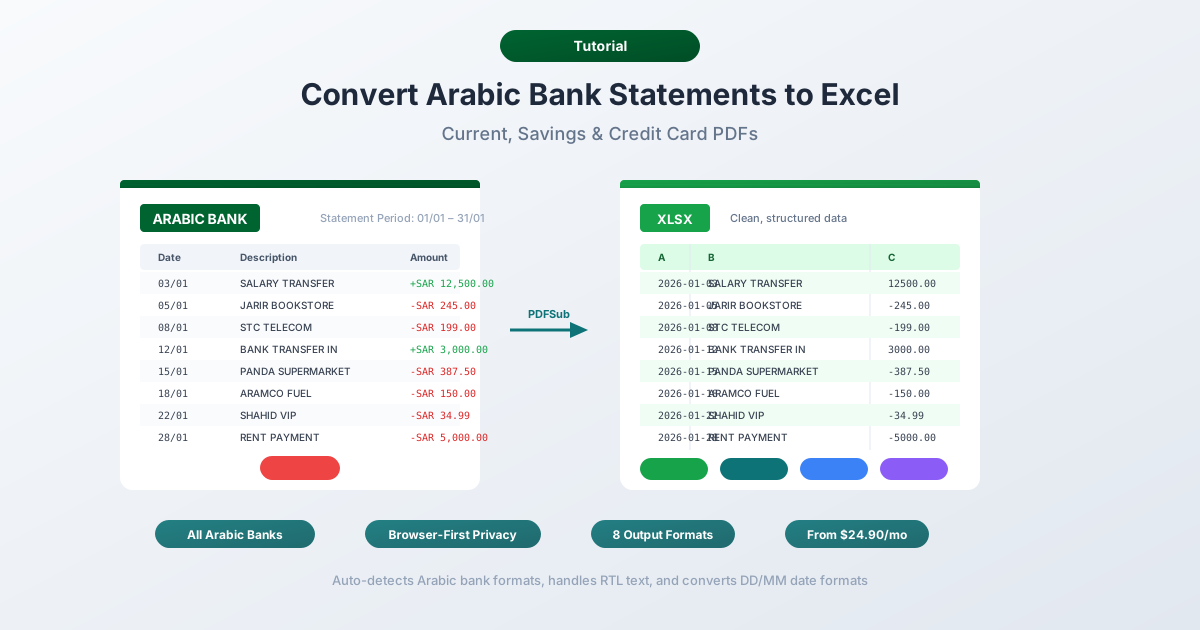
Arabic bank statements have right-to-left text, bilingual layouts, and Hijri dates that break in generic converters. Here's how to convert them cleanly.
Your Emirates NBD statement looks perfectly organized in the PDF -- Arabic headers on the right, English equivalents on the left, transaction amounts neatly aligned. But try to extract that data into Excel and everything falls apart. The Arabic text reverses word order. Bilingual columns double your row count. The converter can't tell whether "1,234.567" is a formatting error or a perfectly valid amount in Kuwaiti dinar. And if the statement includes a Hijri date like 3/9/1447, your spreadsheet has no idea what to do with it.
This isn't an edge case. Over 110 million Arabic-speaking bank customers across the Gulf Cooperation Council states, Egypt, and Jordan generate PDF bank statements every month. The GCC digital banking market hit $12.7 billion in 2025 and is projected to reach $47.6 billion by 2032. Yet nearly every bank in the region -- with one notable exception -- offers statements only as PDF downloads. No CSV. No Excel export. Just a PDF containing some of the most technically challenging text extraction problems in any language.
The core problem is bidirectional text. Arabic reads right-to-left, but numbers -- including every transaction amount on your statement -- flow left-to-right. A single line of a bank statement contains text running in two directions simultaneously. PDF extractors that don't handle this correctly produce garbled output where Arabic words appear in reverse order, amounts land in the wrong columns, and descriptions become unreadable.
Whether you're an accountant in Dubai processing Emirates NBD statements, a bookkeeper in Riyadh converting Al Rajhi transactions, a finance team in Doha consolidating QNB data into a multinational ERP, or an auditor anywhere in the world making sense of a Gulf bank statement -- the fundamental challenge is the same: extracting structured, spreadsheet-ready data from Arabic bank statement PDFs.
Why Arabic Bank Statements Break in Excel
Arabic bank statements create a unique set of extraction challenges that go well beyond what converters deal with in Latin-script languages. The problems span text direction, character rendering, numeral systems, bilingual layouts, calendar systems, and currency precision.
1. Right-to-Left Text Reversal
This is the single biggest problem -- and it's invisible until you see the output.
Arabic is a right-to-left (RTL) script. When a PDF extractor pulls text from an Arabic bank statement, it reads the underlying character stream, which is stored in logical order (first character typed to last). But without proper bidirectional (bidi) processing, the extracted text displays in the wrong visual order.
A description like "تحويل إلى حساب التوفير" (transfer to savings account) might extract as "ريفوتلا باسح ىلإ ليوحت" -- every word reversed and the word order flipped. The characters are all there, but they're in the wrong sequence.
The challenge compounds because Arabic bank statements contain bidirectional text on every single line. A typical transaction row has Arabic (right-to-left), English (left-to-right), a date (left-to-right), and a number (left-to-right) all in the same row. The PDF renderer handles the visual layout correctly on screen, but raw text extraction scrambles the directional context.
Proper extraction requires post-processing with bidirectional text algorithms that reconstruct the correct visual order from the logical character stream. Most generic PDF converters skip this step entirely.
2. Arabic Ligatures and Contextual Forms
Arabic is not like Latin script where each letter has one shape regardless of position. Arabic has 28 base letters, and each letter can take up to four contextual forms -- isolated, initial, medial, and final -- depending on where it appears in a word.
| Position | Form | Example (ب) |
|---|---|---|
| Isolated | Standalone | ب |
| Initial | Start of word | بـ |
| Medial | Middle of word | ـبـ |
| Final | End of word | ـب |
When letters connect, they form ligatures -- visual combinations that look like a single glyph but represent multiple characters. The most common is "لا" (lam-alef), which appears constantly in Arabic text.
PDF fonts may store these as pre-composed ligature glyphs rather than individual characters. A converter that doesn't decompose ligatures correctly will skip characters or produce text that looks right but searches and sorts incorrectly in Excel.
3. Two Numeral Systems
Gulf banking predominantly uses Western Arabic numerals (0, 1, 2, 3, 4, 5, 6, 7, 8, 9) -- the same digits used in English. But some documents, particularly from Egyptian banks and older systems, use Eastern Arabic numerals:
| Western | 0 | 1 | 2 | 3 | 4 | 5 | 6 | 7 | 8 | 9 |
|---|---|---|---|---|---|---|---|---|---|---|
| Eastern Arabic | ٠ | ١ | ٢ | ٣ | ٤ | ٥ | ٦ | ٧ | ٨ | ٩ |
These are entirely different Unicode code points. Excel treats "١٢٣٤" as text, not as the number 1234. A converter needs to detect which numeral system the statement uses and normalize to Western digits for spreadsheet compatibility. Some statements mix both systems -- Western numerals for amounts and Eastern Arabic for dates or reference numbers -- on the same page.
4. Bilingual Doubled Rows
Most Gulf banks issue bilingual statements by default, with Arabic and English appearing side by side or stacked. This creates a unique parsing problem: every transaction appears twice.
A typical bilingual layout might look like:
تحويل محلي - راتب شهر مارس
Local Transfer - March Salary
01/03/2026          12,500.00          AED
A naive extractor sees three rows. A correct parser recognizes this as one transaction with a bilingual description. Without language detection and row-merging logic, your spreadsheet ends up with twice the expected number of rows -- half of them duplicates in a different language.
The challenge intensifies because banks use different bilingual layouts. Some place Arabic on the right and English on the left of the same row. Others stack Arabic above English. Some mix approaches across different sections of the same statement.
5. Hijri Calendar Dates
The Islamic (Hijri) calendar runs approximately 11 days shorter than the Gregorian calendar per year. The current Hijri year is 1447 AH, corresponding to parts of 2025-2026 CE. Some Arabic bank statements display Hijri dates alongside or instead of Gregorian dates.
Saudi Arabia officially switched to the Gregorian calendar for financial purposes in October 2016, so modern Saudi statements use Gregorian dates. But Hijri dates still appear as secondary references, in header/footer text, or on older archived statements. A converter encountering "3/9/1447" needs to recognize this as a Hijri date (3 Ramadan 1447 AH, approximately February 26, 2026 CE) rather than treating it as a malformed Gregorian date.
6. Three-Decimal Currencies
This is a critical parsing detail that most converters get wrong.
Three currencies commonly seen on Arabic bank statements use three decimal places instead of the standard two:
| Currency | Code | Country | Example Amount |
|---|---|---|---|
| Kuwaiti Dinar | KWD | Kuwait | 1,234.567 |
| Bahraini Dinar | BHD | Bahrain | 1,234.567 |
| Jordanian Dinar | JOD | Jordan | 1,234.567 |
A converter that assumes two decimal places will truncate the last digit or misparse the amount entirely. An amount of "1,234.567 KWD" is not "1,234.57" -- the third decimal represents a real monetary unit (one fils). Rounding or dropping it introduces errors that compound across hundreds of transactions.
AED, SAR, QAR, and EGP all use two decimal places. A single statement from a Kuwaiti bank with multi-currency transactions might contain both two-decimal and three-decimal amounts on the same page.
7. Arabic-Specific Number Separators
While Gulf banking generally uses the same number format as English (1,234.56 with comma thousands and period decimal), some Arabic documents use Unicode Arabic number separators:
- Arabic decimal separator (U+066B): ٫ -- looks similar to a comma but is a different character
- Arabic thousands separator (U+066C): ٬ -- looks similar to a period but is a different character
These characters look identical to standard commas and periods but are different Unicode code points. Excel and accounting software won't recognize them as numeric separators, causing the entire amount to be treated as text.
The Major Banks and Their Statement Formats
United Arab Emirates
Emirates NBD -- the UAE's largest bank by assets. Provides bilingual (Arabic/English) PDF statements through online banking. eStatements are typically password-protected using the middle 8 digits of the customer's CIF (Customer Information File) ID. Clean digital PDFs with selectable text. No CSV or Excel export option.
First Abu Dhabi Bank (FAB) -- the only major Gulf bank that offers direct Excel and CSV export from online banking. FAB is the notable exception in the region. If you bank with FAB, you may not need a converter at all for basic transaction data -- though the exported format still requires cleanup for accounting software import.
Abu Dhabi Commercial Bank (ADCB) -- PDF statements via online and mobile banking. Similar bilingual layout to Emirates NBD. Password-protected eStatements.
Saudi Arabia
Al Rajhi Bank -- the largest Islamic bank globally by market capitalization. Provides PDF statements in Arabic (with English option) through the Tahweel app and online banking. Statements follow Gregorian dates for financial data. One of the highest-volume statement generators in the region.
Saudi National Bank (SNB) -- the largest bank in Saudi Arabia by total assets, formed from the 2021 merger of National Commercial Bank and Samba Financial Group. PDF statements are emailed with passwords sent separately.
Qatar
Qatar National Bank (QNB) -- the largest bank in the Middle East and Africa by total assets. Operates across 28 countries. PDF statements available through QNB Online and the mobile app. Bilingual format with amounts in QAR (two decimal places).
Kuwait
Kuwait Finance House (KFH) -- one of the earliest Islamic banks in the world, founded in 1977. PDF statements use KWD with three decimal places. Islamic banking terminology throughout -- transactions labeled as "Murabaha profit" rather than "interest."
National Bank of Kuwait (NBK) -- the country's oldest and largest conventional bank. PDF statements in bilingual format. KWD amounts require three-decimal handling.
Bahrain
Bahrain has the highest mobile penetration in the GCC at 137%, making digital statement access nearly universal. BHD uses three decimal places. Major banks include Bank of Bahrain and Kuwait (BBK), National Bank of Bahrain (NBB), and Ahli United Bank. All provide PDF-only statement downloads.
Egypt
With a population of 105 million and financial inclusion reaching 76.3%, Egypt represents the largest Arabic-speaking banking market by customer count. Major banks include National Bank of Egypt (NBE), Banque Misr, and Commercial International Bank (CIB). Egyptian statements are more likely to use Eastern Arabic numerals (٠١٢٣٤٥٦٧٨٩) than Gulf statements. Amounts use EGP with two decimal places.
Jordan
Arab Bank -- headquartered in Amman -- is one of the largest Arab banking institutions globally. Jordanian statements use JOD with three decimal places. The banking sector serves as a financial hub connecting the Levant region.
Method 1: Use a Bank Statement Converter (Recommended)
PDFSub handles Arabic bank statements natively, including all the RTL, bilingual, and multi-decimal challenges described above.
How It Works
-
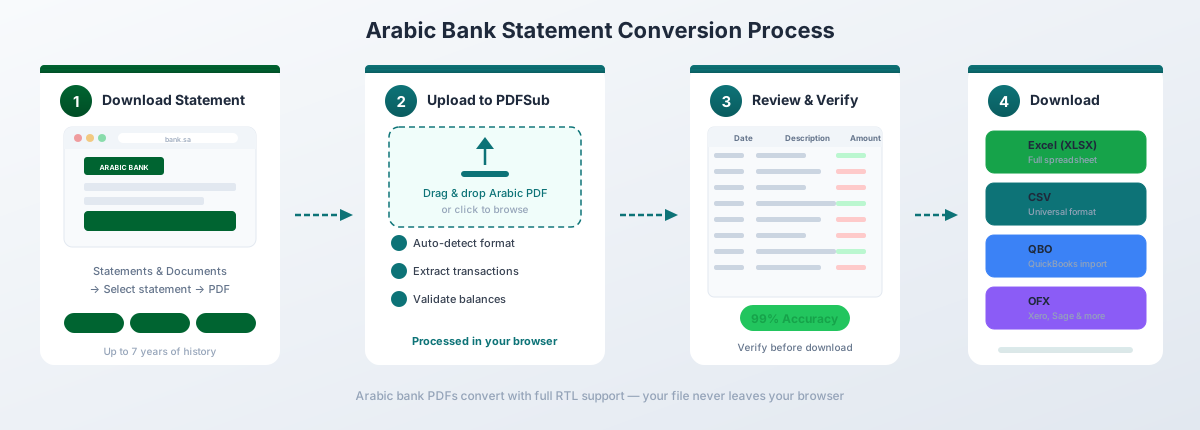
Upload your statement -- Drag and drop the PDF from any Arabic bank. PDFSub auto-detects the bank format and language from the 20,000+ supported templates.
-
Automatic format handling -- The converter automatically:
- Processes bidirectional text correctly, preserving Arabic word order
- Detects and normalizes Eastern Arabic numerals (٠١٢٣٤٥٦٧٨٩) to Western digits
- Merges bilingual rows into single transactions with clean descriptions
- Handles three-decimal currencies (KWD, BHD, JOD) without rounding
- Converts Arabic-specific Unicode separators (U+066B, U+066C) to standard format
- Recognizes Hijri dates and converts to Gregorian where needed
- Maps Islamic banking terminology to structured transaction categories
-
Review and verify -- Check the extracted transactions in the preview. Balances are validated against the statement's opening and closing balance.
-
Download -- Export as Excel (.xlsx), CSV, QBO (QuickBooks), OFX (Xero, Wave), QFX (Quicken), or JSON.
Why PDFSub Works for Arabic Statements
130+ languages including Arabic. The extraction engine handles right-to-left text with full bidirectional processing. Arabic descriptions extract in correct visual order, not reversed.
Bilingual statement support. The parser detects Arabic/English bilingual layouts -- whether side-by-side or stacked -- and merges duplicate descriptions into single transaction rows with the language you prefer.
Browser-first privacy. For clean digital PDFs from online banking (which is most Gulf bank statements), text extraction happens entirely in your browser. The file never leaves your device. Server-side processing is only used for scanned documents or complex layouts that require AI-powered extraction.
Three-decimal currency handling. KWD, BHD, and JOD amounts are parsed with full three-decimal precision. No rounding, no truncation, no precision loss.
Islamic banking aware. Transaction descriptions containing Murabaha, Ijara, Sukuk, and other Islamic finance terms are correctly parsed and categorized -- not flagged as unrecognized text.
Pricing
PDFSub's All-In-One plan is $20/user/mo (annual) or $25/user/mo (monthly), including 500 bank statement pages per user. All paid plans include a 7-day free trial with full functionality. See current pricing for details.
Method 2: Bank-Provided Downloads
Almost every major bank in the GCC, Egypt, and Jordan provides statements exclusively as PDF downloads. No CSV button. No "Export to Excel" option. You get a PDF, and that's it.
The one exception is First Abu Dhabi Bank (FAB), which offers Excel and CSV export from online banking. If you bank with FAB, this is the fastest path to spreadsheet data -- though the export still needs cleanup for English-locale accounting software. For every other major bank in the region, your only option is converting the PDF.
What You Get From Online Banking
| Bank | Export Options | Notes |
|---|---|---|
| Emirates NBD | PDF only | Password-protected (middle 8 of CIF ID) |
| FAB | PDF, Excel, CSV | Only Gulf bank with spreadsheet export |
| ADCB | PDF only | Password-protected |
| Al Rajhi | PDF only | Arabic or English language option |
| SNB | PDF only | Password emailed separately |
| QNB | PDF only | Bilingual by default |
| KFH | PDF only | KWD three-decimal amounts |
| NBK | PDF only | KWD three-decimal amounts |
Limitations of FAB's Export
Even FAB's Excel/CSV export has issues:
- Date format: DD/MM/YYYY which English Excel silently misinterprets for days 1-12
- Currency format: May include currency symbols mixed with numbers
- Transaction descriptions: Often truncated compared to the full PDF statement
- Limited history: Export may be restricted to recent months; the PDF archive goes back years
- Not an official statement: The Excel export lacks the legal standing of the official PDF statement for auditing or regulatory purposes
Method 3: Copy-Paste (Not Recommended)
Copying text from an Arabic bank statement PDF and pasting it into Excel produces some of the worst results of any language. The problems are severe:
- RTL text reversal: Arabic descriptions paste in reversed word order. "تحويل إلى حساب التوفير" becomes unreadable character soup.
- Bidi mixing: Numbers that were correctly positioned in the PDF end up on the wrong side of the Arabic text.
- Column destruction: The bilingual layout collapses into a single column with Arabic and English fragments interleaved randomly.
- Ligature decomposition: Connected Arabic letters may decompose into isolated forms, creating visual gibberish even if the characters are technically present.
- Three-decimal truncation: Pasted numbers may lose the third decimal place if Excel applies default two-decimal formatting.
For Arabic statements, copy-paste is not viable. Even a single transaction requires manual correction. A full monthly statement would take hours of character-by-character repair.
Country-Specific Formatting
Arabic bank statements are not monolithic. Each country has distinct conventions that affect how statement data should be parsed and converted.
| Country | Currency | Decimals | Numerals | Language | Key Notes |
|---|---|---|---|---|---|
| UAE | AED | 2 | Western | Bilingual standard | 5% VAT on fees; IBAN: AE + 21 digits |
| Saudi Arabia | SAR | 2 | Western | Arabic primary | Gregorian since Oct 2016; IBAN: SA + 22 digits |
| Qatar | QAR | 2 | Western | Bilingual standard | IBAN: QA + 27 digits |
| Kuwait | KWD | 3 | Western | Bilingual standard | Highest-valued currency; 1 KWD = 1,000 fils |
| Bahrain | BHD | 3 | Western | Bilingual standard | 137% mobile penetration |
| Egypt | EGP | 2 | Eastern Arabic possible | Arabic primary | 105M population; 76.3% financial inclusion |
| Jordan | JOD | 3 | Western (Eastern in dates) | Arabic primary | IBAN: JO + 28 digits |
The critical takeaway: most Gulf states use Western numerals and English-style number separators (comma thousands, period decimal), which simplifies parsing. Egypt is the outlier where Eastern Arabic numerals may appear. And three countries -- Kuwait, Bahrain, and Jordan -- use three decimal places, which breaks any converter that assumes two-decimal precision.
Islamic Banking Terminology
If you're processing statements from Islamic banks -- Al Rajhi, KFH, Dubai Islamic Bank, Abu Dhabi Islamic Bank, or the Islamic banking divisions of conventional banks -- you'll encounter specialized terminology that doesn't appear on conventional bank statements. Understanding these terms is essential for correct transaction categorization.
| Arabic Term | English | What It Means on a Statement |
|---|---|---|
| مرابحة (Murabaha) | Cost-plus financing | Bank buys an asset and sells it to you at a markup; installment payments appear as "Murabaha payment" |
| إجارة (Ijara) | Lease financing | Similar to a lease; monthly payments labeled "Ijara rental" |
| صكوك (Sukuk) | Islamic bonds | Investment income from Sharia-compliant bonds; appears as "Sukuk profit distribution" |
| تكافل (Takaful) | Islamic insurance | Insurance premium debits labeled "Takaful contribution" |
| وكالة (Wakala) | Agency investment | Investment deposits; returns labeled "Wakala profit" |
| مشاركة (Musharaka) | Partnership financing | Joint venture returns; "Musharaka profit share" |
| مضاربة (Mudaraba) | Profit-sharing investment | Savings/investment returns; "Mudaraba profit" |
| زكاة (Zakat) | Islamic alms tax | Charitable deductions, sometimes auto-debited by banks |
The key distinction: Islamic banking statements never use the word "interest" (فائدة). Where a conventional bank shows "Interest earned: 45.00 SAR," an Islamic bank shows "Mudaraba profit: 45.00 SAR" or "Wakala profit: 45.00 SAR." These are economically similar but legally and structurally different.
For accountants, correctly categorizing these terms in your chart of accounts matters. Murabaha payments contain both principal and profit components (analogous to principal and interest). Ijara payments may include rental and service charges. A good converter preserves these labels in the transaction description rather than stripping them.
Handling Password-Protected Statements
Most Gulf banks password-protect their eStatements. This adds a step before any conversion can begin. The password schemes vary by bank:
Common Password Formats
| Bank | Password Scheme |
|---|---|
| Emirates NBD | Middle 8 digits of CIF (Customer Information File) ID |
| ADCB | Last 4 digits of account number + date of birth (DDMM) |
| SNB (Saudi) | Emailed separately from the statement |
| Al Rajhi | National ID number or Iqama number |
| QNB | Customer-set password or last 4 digits of card number |
How to Unlock
-
Check your bank's FAQ or help center -- most banks document the password format in their eStatement enrollment page.
-
Look for a separate email. Some banks (like SNB) send the password in a separate email from the one containing the statement.
-
Try common combinations: Date of birth (DDMMYYYY or MMDDYYYY), national ID number, account number, CIF number, or last four digits of your debit card.
-
Contact the bank. Customer service can confirm the password format -- they won't give you the password itself, but they'll tell you what it's based on.
-
Upload to PDFSub. PDFSub accepts password-protected PDFs -- enter the password when prompted. The password is used locally to decrypt the file and is never stored or transmitted.
Importing into Accounting Software
Once your Arabic bank statement is converted to a structured format, the next step is importing it into your accounting platform.
QuickBooks
Export to QBO format for the cleanest import. QBO files map directly to QuickBooks' bank feed import, preserving dates, amounts, and descriptions. For a detailed walkthrough, see our guide to importing bank statements into QuickBooks.
Xero
Export to OFX format. Xero's bank statement import accepts OFX files and automatically maps transaction fields. Arabic descriptions in the memo field are preserved as UTF-8 text. See our guide to importing bank statements into Xero.
Zoho Books
Export to CSV or Excel. Zoho Books' bank statement import accepts both formats with configurable column mapping. Map date, description, debit, and credit columns during import.
Multi-Currency Consolidation
If you're consolidating statements from multiple Gulf countries, pay special attention to decimal precision. A spreadsheet mixing AED (two decimals) with KWD (three decimals) needs consistent decimal handling. Set your Excel column format to three decimal places for the entire amount column to prevent silent rounding of KWD/BHD/JOD amounts.
Frequently Asked Questions
Can I convert Emirates NBD statements to Excel?
Yes. PDFSub supports Emirates NBD statements, including password-protected eStatements. Enter the password (typically the middle 8 digits of your CIF ID) when prompted, and the converter extracts all transactions with correct Arabic text, bilingual descriptions, and AED amounts.
How does the converter handle right-to-left Arabic text?
PDFSub uses bidirectional text processing that preserves correct Arabic word order during extraction. Arabic descriptions are extracted in their proper visual sequence -- not reversed -- and stored as UTF-8 text that renders correctly in Excel, Google Sheets, and accounting software.
Do I need to set my Excel to Arabic locale?
No. PDFSub normalizes all formatting during conversion. Dates are converted to standard format, numbers use Western digits with standard separators, and amounts are stored as numeric values. The resulting file works in any locale. Arabic text in description fields displays correctly as long as your system has an Arabic font installed (most modern systems do by default).
How are three-decimal currencies (KWD, BHD, JOD) handled?
PDFSub detects the statement currency and parses amounts with the correct decimal precision. KWD, BHD, and JOD amounts retain all three decimal places -- no rounding or truncation. An amount of 1,234.567 KWD in the PDF appears as 1234.567 in the spreadsheet.
Can I convert statements with Eastern Arabic numerals?
Yes. PDFSub detects and converts Eastern Arabic numerals (٠١٢٣٤٥٦٧٨٩) to Western digits (0123456789) during extraction. This is most relevant for Egyptian bank statements, which are more likely to use Eastern Arabic numerals than Gulf statements.
What about bilingual statements with Arabic and English?
PDFSub detects bilingual layouts -- whether side by side or stacked -- and merges them into single transaction rows. Both Arabic and English descriptions can be preserved in separate columns, or you can choose the language you prefer for the output.
Is my bank statement data secure?
For clean digital PDFs (which is most Gulf bank eStatements), PDFSub processes the file entirely in your browser. The PDF never leaves your device. Server-side processing is only used for scanned or image-heavy PDFs, where the file is processed in an isolated environment and deleted after processing.
How many Arabic banks does PDFSub support?
PDFSub supports 20,000+ bank formats globally, covering all major banks across the UAE, Saudi Arabia, Qatar, Kuwait, Bahrain, Egypt, and Jordan. The template-agnostic parser also handles regional and specialized banks.
Can I convert Islamic bank statements?
Yes. PDFSub correctly parses Islamic banking terminology -- Murabaha, Ijara, Sukuk, Takaful, Wakala, Musharaka, and Mudaraba -- preserving these labels in the transaction description rather than stripping or modifying them.
What if my statement is password-protected?
Enter the password when prompted during upload. PDFSub decrypts the file locally in your browser -- the password is never stored, logged, or transmitted. Check your bank's help center for the password format, which is typically based on your CIF number, national ID, or date of birth.