Best Practices for Financial Data Management: A Complete Framework
The average small business loses 24 days per year to financial admin. 82% of small businesses that fail cite cash flow problems - problems rooted in poor data management. Here's how to build a system that prevents errors, passes audits, and saves hundreds of hours.
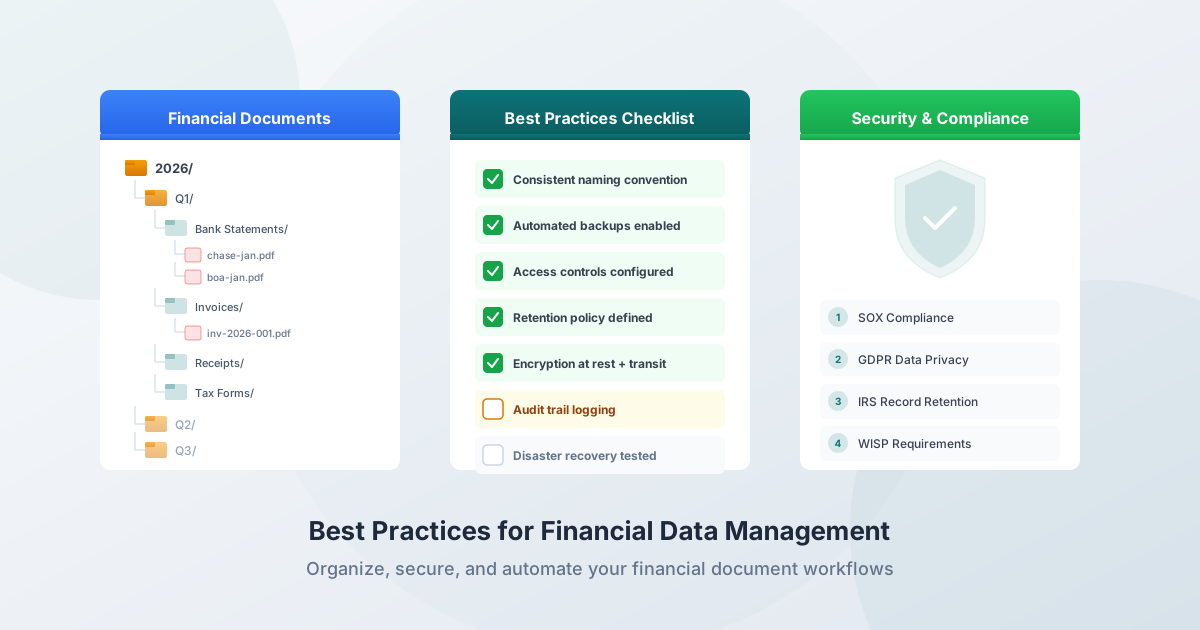
The average small business loses 24 days per year to financial administration - the equivalent of working 13 months but only getting paid for 12. Meanwhile, 82% of small businesses that fail cite cash flow problems as the primary cause. And those cash flow problems? They're almost always rooted in poor financial data management: late reconciliations, missing records, inconsistent categorization, and manual processes riddled with errors.
Financial data management isn't glamorous. Nobody starts a business because they're excited about folder naming conventions or backup strategies. But the difference between a business that survives an IRS audit and one that faces penalties - between a bookkeeper who serves 30 clients smoothly and one drowning in year-end chaos - comes down to these systems.
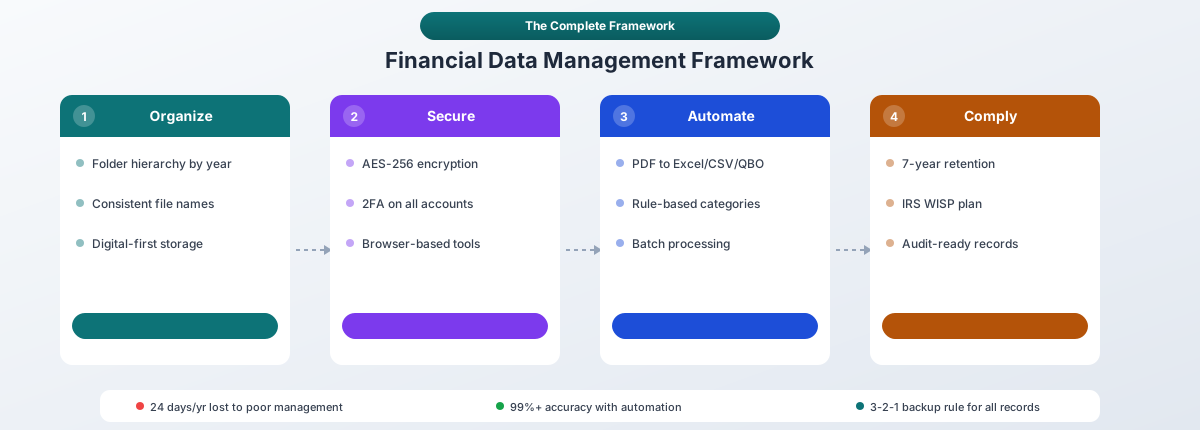
This guide covers the complete framework: document organization, data accuracy, security, compliance, automation, and the lifecycle from creation to destruction.
The Cost of Getting It Wrong
Before diving into best practices, here's what poor financial data management actually costs:
| Metric | Impact |
|---|---|
| Manual data entry error rate | 1–4% (10–40 errors per 1,000 transactions) |
| Cost of bad data per organization | $12.9 million/year (Gartner) |
| Manual data entry cost per employee | $28,500/year |
| Small businesses with financial errors from manual bookkeeping | 40% |
| Business owners who find bookkeeping complex | 89% |
| Small businesses that interfere with core business due to bookkeeping | 39% |
These aren't abstract statistics. A 1% error rate on 10,000 annual transactions means 100 errors. At $50 per correction (the typical cost of identifying, investigating, and fixing a financial data error), that's $5,000 per year in avoidable costs - before considering the downstream impact on tax filings, audits, and business decisions based on inaccurate data.
Organize Your Financial Documents
Good organization is the foundation of everything else. You can't reconcile what you can't find, you can't back up what isn't structured, and you can't pass an audit if your records are scattered across email attachments, desktop folders, and paper piles.
Build a Folder Structure
Create a hierarchy that scales with your needs:
/Financial Records
  /2026
    /Bank Statements
      /Chase Checking
      /Chase Savings
      /BofA Business
    /Credit Card Statements
      /AmEx Business
      /Chase Visa
    /Tax Returns
      /Federal
      /State
    /Receipts
      /Office Supplies
      /Travel
      /Software
    /Invoices
      /Accounts Payable
      /Accounts Receivable
    /Reconciliation Reports
    /Payroll
  /2025
    [same structure]
The key principle: organize by year first, then by document type, then by account or category. This structure maps directly to how you'll retrieve documents during tax preparation, audits, or monthly reconciliation.
Use Consistent File Names
Name files so they sort chronologically and are instantly identifiable:
2026-01_BankStatement_Chase_Checking.xlsx
2026-01_BankStatement_BofA_Business.csv
2026-Q1_Reconciliation_AllAccounts.xlsx
2025_TaxReturn_Federal_Final.pdf
The pattern: [Date]_[DocumentType]_[Institution]_[Account].[ext]
Rules:
- Use YYYY-MM date format for automatic chronological sorting
- Avoid spaces and special characters - use underscores or hyphens
- Include version numbers for documents that go through revisions:
2026-01_FinancialReport_v03.xlsx - Be consistent - document your naming convention so every team member follows the same standard
Digital Over Physical
Digital storage is strongly preferred for searchability, backup capability, and space efficiency. Keep physical originals only when legally required (certain signed contracts, some government filings).
When digitizing paper documents:
- Use searchable PDFs (OCR-processed) rather than flat image scans
- Verify the OCR quality before discarding the original
- Include the digitization date in the filename
Maintain Data Accuracy
Reconcile Early and Often
30% of companies have errors in their financial records due to lack of proper bank reconciliation. The longer you wait, the harder errors are to find and fix.
Monthly reconciliation is the minimum standard. For businesses with high transaction volume (100+ per month), weekly reconciliation catches errors before they compound:
- Compare bank statement transactions against your accounting records line by line
- Investigate discrepancies immediately - don't leave "I'll figure it out later" notes
- Verify opening and closing balances match between the bank statement and your books
- Check for missing transactions - bank charges, automatic payments, and pending deposits are commonly missed
- Document any adjustments with a clear explanation of what was corrected and why
Automated reconciliation reduces errors by 95% and saves 20+ hours per month compared to manual processes. Finance teams report 70–80% faster reconciliation with automation.
Validate Converted Data
When converting PDF bank statements to Excel, CSV, or QBO format, always verify the output before importing into accounting software:
- Spot-check 5–10 transactions against the original PDF
- Verify totals - the sum of all debits and credits should match the statement's summary
- Check opening and closing balances - these are calculated from your transactions and should match the statement
- Look for split or merged transactions - multi-line descriptions sometimes get incorrectly separated into multiple rows
This 30-second review catches the rare conversion edge case before it propagates through your accounting system.
Track Corrections
Keep a log of every manual correction you make to financial data:
- What was corrected
- Why (source of the error)
- When the correction was made
- Who made it
This audit trail is invaluable during IRS audits and external reviews. It demonstrates that your processes include error detection and correction - a positive signal to auditors.
How Long to Keep Financial Records
The IRS provides specific guidance on document retention, and the consequences of not having records when asked can be severe.
IRS Retention Requirements
| Document Type | Keep For | Why |
|---|---|---|
| Tax returns and supporting documents | 3 years from filing date | Standard statute of limitations |
| Returns with unreported income (>25% of gross) | 6 years | Extended statute for substantial underreporting |
| Worthless securities or bad debt deductions | 7 years | Extended claim window under IRC Section 6511 |
| Employment tax records | 4 years after tax is due or paid | IRS payroll record requirement |
| Property records (cost basis) | Until you sell + 3 years | Need basis records for capital gains |
| Unfiled returns | Indefinitely | No statute of limitations |
| Fraudulent returns | Indefinitely | No statute of limitations for fraud |
Bank Statements Specifically
- Keep for at least 3 years if they support tax return items
- Keep for 7 years if they document business deductions that could be questioned
- Keep indefinitely if they relate to property cost basis (purchase price of real estate, equipment, investments)
Practical Recommendation
When in doubt, keep records for 7 years. The cost of storing digital files is negligible - a year's worth of bank statements in PDF format takes up less than 50 MB. The cost of not having records during an audit is substantial: the IRS can reconstruct your income using their own methods if you can't provide documentation, and their reconstruction is rarely in your favor.
State requirements sometimes exceed federal minimums. California and Montana, for example, allow audit lookback periods of up to 8 years in certain circumstances.
Security: Protecting Financial Data
Financial data is a prime target. The financial services sector experiences data breaches averaging $5.56 million per incident (IBM 2025). Accounting firms have seen cyberattacks surge 300% since 2020, and 3.4 billion phishing emails are sent daily - with financial services accounting for 27.7% of all phishing attacks globally.
Encryption
AES-256 encryption is the standard for financial data, both at rest and in transit. Over 78% of global cyber insurers require AES-256 or TLS 1.3 encryption to qualify for coverage.
Practical steps:
- Enable full-disk encryption on all devices storing financial data (FileVault on Mac, BitLocker on Windows)
- Use encrypted cloud storage - verify your provider encrypts data at rest, not just in transit
- Never email unencrypted financial documents - use encrypted file sharing or secure portals
- Password-protect Excel files containing sensitive financial data
Two-Factor Authentication
67% of companies now have 2FA deployed across their systems. 2FA stopped 42% of cyberattacks in 2024, preventing an estimated $14.7 billion in losses.
Enable 2FA on:
- All accounting software (QuickBooks, Xero, Sage, FreshBooks)
- Cloud storage (Google Drive, Dropbox, OneDrive)
- Banking portals
- Email accounts
Use authenticator apps (Google Authenticator, Authy, Microsoft Authenticator) over SMS-based verification when possible - SMS can be intercepted through SIM swapping.
Password Management
- Use a password manager (1Password, Bitwarden, LastPass) instead of reusing passwords
- Generate unique, strong passwords for every financial service
- Never share passwords via email or text
- Rotate passwords immediately if a breach is suspected
Privacy-First Tool Selection
When choosing financial data tools, prioritize privacy architecture:
- Browser-based processing (no upload required) eliminates server exposure entirely - PDFSub processes digital bank statements entirely in your browser
- Look for no data retention policies - the service shouldn't store your files after processing
- Verify SOC 2 Type II compliance for any cloud service handling financial data
- Review the vendor's privacy policy for data sharing provisions
Backup Strategy
The 3-2-1 Rule
The industry-standard backup strategy:
- 3 copies of your data (original + 2 backups)
- 2 different storage media types (e.g., local SSD + cloud)
- 1 copy stored offsite (e.g., cloud data center in a different geographic region)
Evolving Standards
The 3-2-1 rule is increasingly seen as a starting point due to rising ransomware threats. The 3-2-1-1-0 framework adds:
- 1 offline or air-gapped copy (not connected to the network - immune to ransomware)
- 0 errors (verified through regular recovery testing)
Recovery Testing
Having backups you've never tested is almost as risky as having no backups at all. Test your backup recovery at least quarterly:
- Select a random backup set
- Restore it to a test location
- Verify the files are complete, uncorrupted, and usable
- Document the test results
Version Control for Financial Documents
Maintain version history for documents that undergo revision (financial models, budgets, forecasts):
- Use cloud storage with built-in versioning (Google Drive keeps 30 days, Dropbox keeps 180 days on Plus plans)
- For critical documents, save explicit versions:
Budget_2026_v01.xlsx,Budget_2026_v02.xlsx - Never overwrite the previous version - always create a new copy
Compliance Frameworks You Should Know
IRS WISP (Written Information Security Plan)
Required for all tax return preparation firms regardless of size, under the Gramm-Leach-Bliley Act. Since 2023, PTIN renewal asks explicitly whether you have a WISP.
Your WISP must include:
- Risk assessment - identify what data you hold and where it's stored
- Employee training - how staff should handle sensitive financial data
- Incident response plan - what to do when a breach occurs
- Data safeguards - encryption, access controls, physical security
IRS Publication 5708 provides a 28-page template for creating your WISP.
GLBA (Gramm-Leach-Bliley Act)
Three main requirements:
- Privacy Rule: Inform customers about your information-sharing practices
- Safeguards Rule: Develop, implement, and maintain an information security program
- Pretexting Rule: Prohibit obtaining financial information through false pretenses
The FTC Safeguards Rule (amended, effective June 2023) now requires:
- Multi-factor authentication
- Encrypted data storage and transmission
- Annual penetration testing (for larger firms)
- Biannual vulnerability assessments
- Breach reporting within 30 days when incidents affect 500+ individuals
AICPA Professional Standards
CPAs and enrolled agents must:
- Maintain a WISP
- Not disclose confidential client information without specific consent (Rule 1.700.001)
- Stay updated on regulatory requirements and emerging threats
- Develop internal data protection policies
SOX (Sarbanes-Oxley)
Applies to publicly traded companies, but private companies often adopt SOX principles as best practice:
- Section 302: Officers must personally certify financial report accuracy
- Section 404: Annual testing of internal controls over financial reporting
Even if SOX doesn't apply to your organization, the principles - documented controls, separation of duties, audit trails - are worth implementing.
GDPR, CCPA, and SOC 2
If you process financial data for EU or California residents:
- GDPR fines can reach EUR 20 million or 4% of worldwide annual turnover (whichever is greater). As of 2025, over 2,245 fines have been issued totaling approximately EUR 5.65 billion.
- CCPA penalties range from $2,663 to $7,988 per violation (2025 adjusted amounts).
- SOC 2 compliance demonstrates that your data handling meets rigorous trust service criteria for security, availability, and confidentiality.
Browser-based processing eliminates most GDPR data processor obligations for financial document conversion - since no personal data is collected or transmitted, there's nothing to regulate. PDFSub is GDPR and CCPA compliant, and SOC 2 Ready.
Automate Your Financial Workflows
Bank Statement Conversion
The most immediate automation opportunity: stop typing transaction data from PDF bank statements. Converting a PDF statement to Excel, CSV, or QBO takes seconds versus 20–60 minutes of manual entry, with 99%+ accuracy versus the 1–4% error rate of manual entry.
Convert to the format that matches your accounting software:
- QBO for QuickBooks (includes transaction IDs for automatic duplicate detection)
- OFX for Xero (auto-maps columns without manual configuration)
- CSV as a universal fallback for any system
Rule-Based Categorization
Set up categorization rules in your accounting software for recurring transactions:
- Rent payments → Rent expense
- AWS charges → Cloud infrastructure
- Recurring SaaS subscriptions → Software expense
Over time, rules-based matching handles the majority of transactions automatically, leaving only exceptions for manual review.
Batch Processing
If you manage multiple clients or accounts, batch process statements rather than converting one at a time:
- Upload all statements for the period at once
- Use consistent output formats across all conversions
- Import in bulk rather than file by file
- Reconcile by batch after import
A bookkeeper processing 1,080 statements per year (30 clients × 3 accounts × 12 months) saves 360 hours annually by automating conversion - nine full work weeks redirected from data entry to higher-value advisory work.
Scheduled Workflows
Build recurring workflows on a fixed schedule:
| Frequency | Task |
|---|---|
| Weekly | Download and convert bank statements; quick reconciliation |
| Monthly | Full reconciliation; categorization review; backup verification |
| Quarterly | Comprehensive financial review; tax estimate preparation; retention policy check |
| Annually | Archive prior year; destroy expired records; update WISP; review insurance |
The Financial Data Lifecycle
Every piece of financial data follows a lifecycle from creation to destruction. Managing each stage properly prevents both data loss and data exposure.
1. Creation
Financial data originates from transactions: bank deposits, purchases, invoices, payroll. Capture data digitally at the point of origin whenever possible - downloading a PDF bank statement from your bank's portal is always better than scanning a paper copy.
2. Processing
Convert raw data into usable formats. PDF bank statements become Excel spreadsheets or QBO files. Invoices get entered into accounts payable. Receipts get categorized and attached to expense reports.
Use automated tools to minimize human error during processing. Manual data entry has a 1–4% error rate; automated extraction achieves 99%+ accuracy.
3. Active Storage
Keep current-year and prior-year records readily accessible:
- Encrypted storage (AES-256)
- Access controls (only authorized personnel)
- Consistent organization (the folder structure and naming conventions above)
- Regular backups (3-2-1 rule)
4. Archival
Move records past their active use period to archival storage:
- Maintain searchability (don't zip files into unsearchable archives)
- Label clearly with retention dates
- Follow your retention schedule (3–7 years for most financial documents)
- Verify archived files are readable and uncorrupted annually
5. Destruction
When records reach the end of their retention period:
Physical documents: Cross-cut shred at DIN 66399 security level P-4 or higher. Standard strip-cut shredding can be reassembled.
Digital files: Follow NIST SP 800-88 guidelines:
- Clear: Overwrite data on media being reused
- Purge: Cryptographic erasure for sensitive data
- Destroy: Physical destruction for storage media being decommissioned
Document all destruction with a certificate of destruction recording what was destroyed, when, by whom, and using what method. This is both a compliance requirement and an audit trail.
Common Mistakes (and How to Avoid Them)
Mixing Personal and Business Finances
More than 25% of small businesses don't have separate business bank accounts. This creates tax complications, makes audit defense nearly impossible, and prevents accurate measurement of business performance.
Fix: Open a dedicated business bank account and business credit card. Run every business transaction through business accounts.
Inconsistent Categorization
Without a standardized chart of accounts and categorization rules, financial reports become unreliable. The most common error: over-categorizing by vendor name ("Amazon expenses," "Staples expenses") instead of expense type ("Office Supplies").
Fix: Define your chart of accounts before you start. Map vendors to categories with rules in your accounting software.
Delayed Reconciliation
When you reconcile quarterly instead of monthly (or monthly instead of weekly), small errors compound into large discrepancies. Undetected duplicate transactions, missing deposits, and unacknowledged bank charges accumulate until the numbers are nearly impossible to untangle.
Fix: Reconcile at least monthly. Automate the conversion step so reconciliation isn't bottlenecked by manual data entry.
No Backup Strategy
A single hardware failure, ransomware attack, or natural disaster can wipe out years of financial records. 65% of financial services organizations fell victim to ransomware in 2024, with average recovery costs of $2.73 million.
Fix: Implement the 3-2-1 backup rule at minimum. Test recovery quarterly.
Using Unsecured Tools
Emailing unencrypted bank statements, storing financial data on personal email accounts, using online converters that upload your files to unknown servers - these are common and dangerous practices.
Fix: Choose tools with browser-based processing for financial documents. Enable encryption on all devices. Use secure file sharing instead of email attachments.
Accounting Software Integration Tips
Choosing the Right Import Format
| Software | Best Format | Why |
|---|---|---|
| QuickBooks Desktop | QBO | Native format with transaction IDs; auto-duplicate detection |
| QuickBooks Online | QBO or OFX | Both support auto-matching; QBO has richer metadata |
| Xero | OFX | Auto-maps columns; no manual field mapping required |
| Sage | OFX | Standard format with broad support |
| Wave | OFX or CSV | OFX preferred; CSV requires manual column mapping |
| FreshBooks | CSV | Customizable column mapping for flexible imports |
Avoiding Duplicate Imports
- Use QBO/OFX over CSV whenever possible - built-in transaction IDs prevent duplicates automatically
- Never upload the same statement file twice
- Define clear date ranges to avoid overlap with existing transactions
- Test imports on a small batch first before committing to full historical imports
- Reconcile totals against source statements after every import
After Import
- Review auto-categorized transactions - fix any mismatches
- Run a reconciliation report - verify imported totals match the bank statement
- Check for duplicates - especially when importing for the first time or importing overlapping date ranges
- Apply bank rules for recurring transactions to speed up future categorization
Audit Readiness
The overall IRS audit rate is 0.5% (1 in 200 returns), but business returns are audited at 1–3%, and incomes over $5 million face a 3.1% audit rate. Being audit-ready doesn't mean expecting an audit - it means having systems that produce reliable records regardless.
What Auditors Look For
- Complete records - every transaction has a source document
- Consistent categorization - expenses are classified the same way across periods
- Reconciled accounts - bank statements match your books
- Audit trail - corrections are documented, not hidden
- Timely processing - records were maintained contemporaneously, not reconstructed after the fact
How to Stay Ready
- Maintain the organization, naming, and filing systems described above
- Reconcile monthly and document the process
- Keep all source documents (original PDF bank statements) alongside converted files
- Log all manual corrections with explanations
- Review your chart of accounts annually for consistency
Start Building Your System
You don't need to implement everything at once. Start with the highest-impact changes:
- Set up your folder structure and naming convention - 30 minutes, one-time
- Automate bank statement conversion - convert your first PDF and see the time savings immediately
- Enable 2FA on all financial accounts - 15 minutes per account
- Start reconciling monthly - build the habit before optimizing further
- Implement 3-2-1 backups - cloud storage with versioning covers two of the three requirements
The goal isn't perfection on day one. It's building systems that compound: each month's work is faster and more reliable than the last, errors are caught earlier, and audit preparation becomes a non-event rather than a crisis.
Try PDFSub Free - convert bank statements to Excel, CSV, QBO, or OFX with browser-based processing that keeps your financial data on your device.