Best iLovePDF Alternative for PDF Processing (2026)
Looking for an iLovePDF alternative? Compare features, pricing, and privacy. See why teams switch to PDFSub.
PDFSub is best for:
- iLovePDF users tired of ads who want a professional, ad-free interface at $20/user/mo (annual)
- Users who need AI features (summarize, translate, chat, extract data) that iLovePDF lacks entirely
- Professionals handling sensitive documents who want browser-based privacy instead of cloud uploads
- Accountants and bookkeepers who need bank statement conversion alongside standard PDF tools
PDFSub is NOT best for:
- Users with zero budget who are fine with iLovePDF's ad-supported free tier
- Casual users who only need basic merge/split/compress a few times per month
- Users who prefer iLovePDF's massive brand recognition and established workflow integrations
iLovePDF is one of the most visited websites on the internet. With 221 million monthly visits, it's the go-to free PDF tool for students, freelancers, and anyone who needs to quickly merge, split, or compress a PDF without installing software.
The appeal is obvious: go to the website, drag and drop your file, get your result. No account required for basic operations. The tools work and they're fast.
But there's a reason "free" has quotation marks. The experience comes with tradeoffs - ads plastered around the interface, file size limits that stop you mid-workflow, every file uploaded to servers you don't control, and a feature ceiling that tops out at basic PDF manipulation.
If you've hit any of these walls - ads interrupting a client presentation, a 100MB file rejected, or the realization that iLovePDF simply can't extract data from your invoices - this guide walks through what to look for in an alternative and how the top options compare.
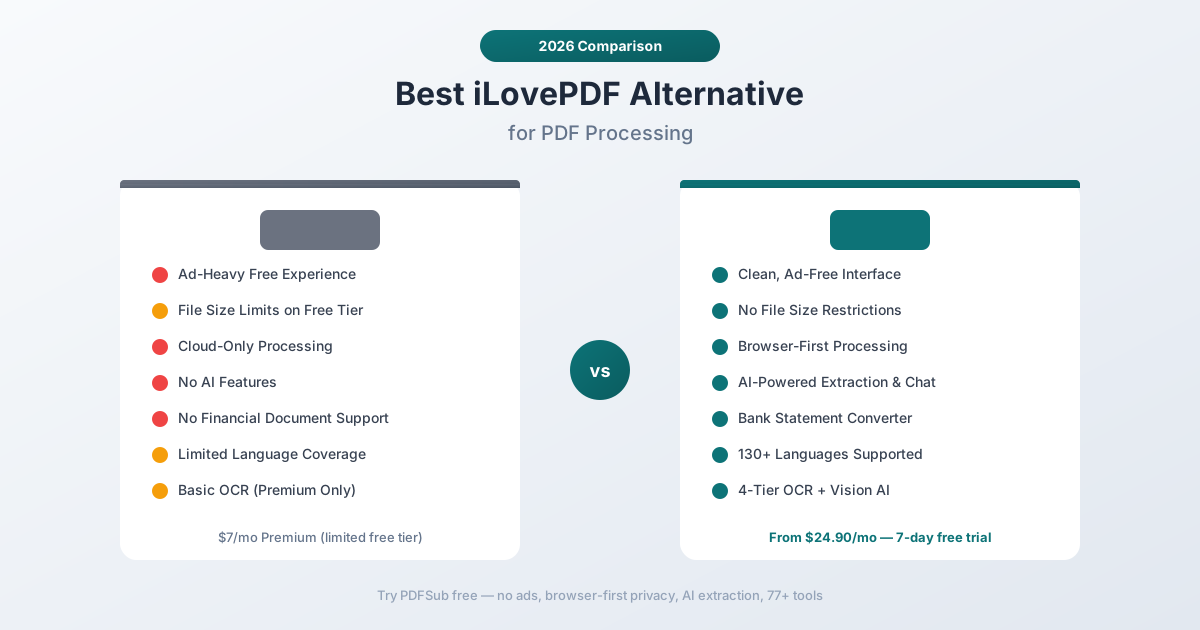
Why People Look for iLovePDF Alternatives
iLovePDF has earned its traffic through accessibility and simplicity. The pain points emerge when users need more than what a free tool was designed to provide:
The Ad Experience
iLovePDF's free tier is ad-supported, and it shows. Display ads surround the workspace, banner ads appear between operations, and interstitial ads occasionally interrupt the workflow. For personal use, this is the price of free. For professional use - sharing your screen in a meeting, working alongside clients, or processing documents in a corporate environment - it's distracting and unprofessional.
The Premium plan ($7/month) removes ads, but at that point you're paying for a tool that still lacks AI features and financial document support.
File Size Limits Create Workflow Interruptions
The free tier limits file sizes depending on the operation. Try to compress a 200MB PDF or merge several large documents, and you'll hit the wall. This isn't documented clearly upfront - you discover it after selecting your files and starting the operation.
Premium increases these limits but doesn't eliminate them entirely. For users working with large document sets (financial reports, construction plans, medical imaging PDFs), size restrictions are a recurring frustration.
Cloud-Only Processing for Every File
Like most legacy PDF tools, iLovePDF processes every file on their servers. Whether you're merging two blank PDFs or compressing a document full of Social Security numbers, the file gets uploaded to iLovePDF's infrastructure.
Their privacy policy covers data handling, but the architectural reality is that your files travel through third-party servers for every operation. For financial documents, legal files, or anything containing personally identifiable information, this creates risk that many organizations aren't comfortable with.
No AI Features
iLovePDF was built before the AI era and hasn't meaningfully caught up. There's no way to:
- Chat with a PDF and ask questions about its content
- Extract structured data from invoices, receipts, or financial documents
- Analyze financial reports or bank statements
- Summarize long documents
- Translate documents with layout preservation
These aren't niche features anymore - they're core capabilities that modern document platforms provide. iLovePDF remains a collection of file-manipulation tools without any document-understanding layer.
No Financial Document Support
This is the gap that matters most for professional users. iLovePDF can convert a PDF to Excel, but it does so generically - it has no understanding of bank statement layouts, invoice fields, receipt structures, or financial table relationships.
The result of a generic PDF-to-Excel conversion on a bank statement is typically a messy spreadsheet with merged cells, misaligned columns, and no separation between transaction fields. You'll spend more time cleaning the output than you would have spent manually entering the data.
What to Look for in an iLovePDF Alternative
When evaluating alternatives, think about what iLovePDF gets right and what it's missing:
Ad-free experience. If you're paying for a tool, ads should disappear completely. Some alternatives include ads even on paid tiers or upsell aggressively within the interface.
Privacy model. Browser-first processing keeps files on your device for operations that don't require server resources. This is the modern approach - your file should stay local unless there's a technical reason to upload it.
AI capabilities. Document understanding is the differentiator. Can the tool extract structured data, answer questions about content, and analyze financial documents? Or is it just rearranging pages and converting formats?
Financial document tools. If you work with bank statements, invoices, receipts, or financial reports, dedicated extraction tools will save hours compared to generic PDF-to-Excel conversion.
Language breadth. iLovePDF works with major European languages but struggles with CJK scripts, Arabic, and other complex writing systems. A global alternative should handle 100+ languages natively.
No arbitrary limits. File size restrictions, daily operation caps, and feature gating create workflow interruptions. The best alternatives include all features in the base subscription.
PDFSub: The Best iLovePDF Alternative
PDFSub is a document AI platform that provides everything iLovePDF offers - merge, split, compress, convert - plus 50+ additional tools including AI extraction, financial document processing, and browser-first privacy.
Clean, Ad-Free Interface
PDFSub never shows ads. Not on the free trial, not on any paid plan. The interface is designed for professional use - clean, focused, and distraction-free. No banners between operations, no interstitials, no upsell popups.
Browser-First Privacy
PDFSub processes files in your browser whenever possible. Merge, split, compress, rotate, extract pages, add watermarks, and dozens of other operations happen entirely on your device. The file never leaves your browser.
Server processing is reserved for operations that genuinely need it: OCR for scanned documents, AI analysis, and multi-tier extraction for complex layouts. When files do go to the server, they're processed and not retained.
For anyone working with sensitive documents - financial data, legal files, medical records - this architecture eliminates the privacy concern for the majority of operations.
AI-Powered Document Understanding
This is the fundamental capability gap between iLovePDF and PDFSub. iLovePDF manipulates PDF files. PDFSub understands PDF content.
- Chat with PDF - Upload any document and ask questions in natural language. "What was the total revenue in Q4?" "List all transactions over $5,000." "Summarize the key findings."
- Extract Data - Pull structured data from unstructured documents. Tables, forms, and embedded data get extracted with column relationships preserved.
- Summarize - Generate structured summaries of any length document.
- Translate - Translate documents across 130+ languages while preserving formatting.
These features use a 4-tier processing pipeline: browser text extraction first, server text extraction second, server OCR third, and vision AI fourth. Every document gets the best extraction method automatically.
Financial Document Specialization
Where iLovePDF's generic PDF-to-Excel conversion produces unusable spreadsheets from financial documents, PDFSub provides dedicated tools:
- Bank Statement Converter - Recognizes 20,000+ bank formats worldwide and exports clean, structured data to Excel, CSV, TSV, JSON, QBO, OFX, QIF, and QFX. Transactions are properly separated into date, description, debit, credit, and balance columns.
- Invoice Extractor - Automatically identifies and extracts vendor name, invoice number, date, line items, subtotal, tax, and total.
- Receipt Scanner - Pulls merchant name, items, quantities, prices, tax, and total from any receipt format - printed, digital, or handwritten.
- Financial Report Analyzer - Analyzes balance sheets, income statements, and cash flow statements with ratio calculations.
98+ Tools in One Subscription
iLovePDF offers approximately 25 tools (many of which are conversion variants). PDFSub includes 98+ tools covering:
- All standard PDF operations (merge, split, compress, rotate, reorder, extract pages)
- AI tools (chat, extract, summarize, translate)
- Financial tools (bank statements, invoices, receipts, financial reports)
- Conversion tools (40+ format conversions including Word, Excel, PowerPoint, EPUB, ODT, ODS, SVG)
- Editing tools (annotate, redact, watermark, e-sign, form fill, stamps)
- Advanced tools (batch convert, OCR, page numbers, headers/footers, repair)
One subscription covers the entire document workflow.
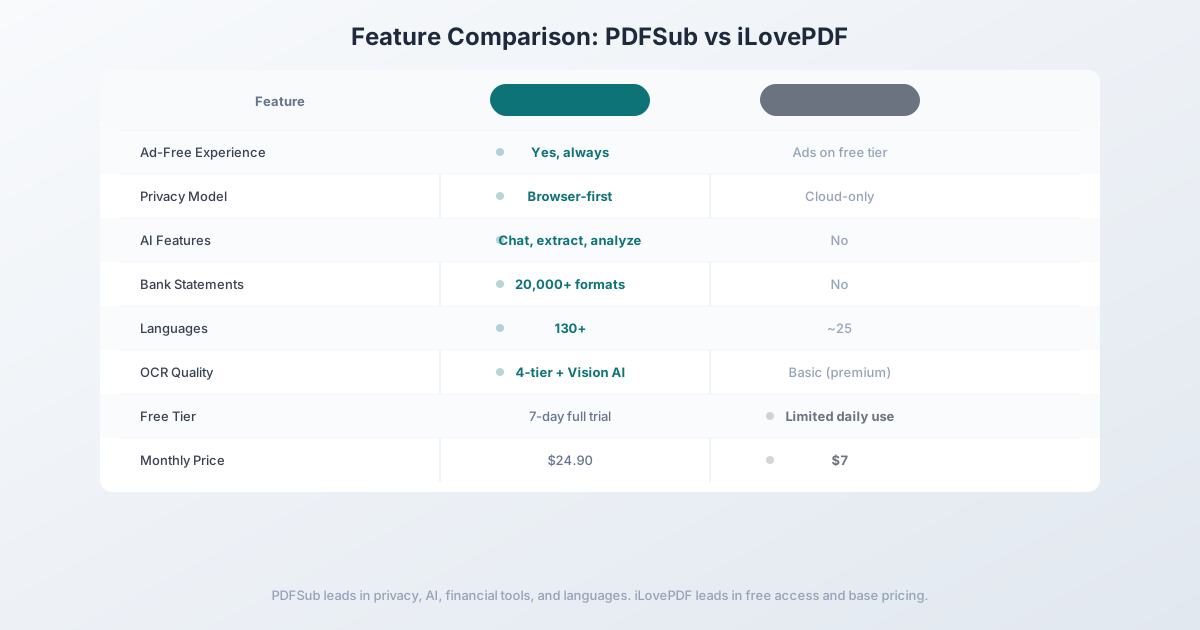
Head-to-Head: PDFSub vs iLovePDF
| Feature | PDFSub | iLovePDF |
|---|---|---|
| Ad-free experience | Always ad-free | Ads on free tier |
| Privacy model | Browser-first processing | Cloud-only |
| AI features | Chat, extract, analyze | No |
| Bank statement conversion | 20,000+ formats | No |
| Invoice/receipt extraction | Dedicated tools | No |
| OCR quality | 4-tier + Vision AI | Basic (premium only) |
| Languages | 130+ | ~25 |
| File size limits | None | Yes (varies by operation) |
| Total tools | 98+ | ~25 |
| Free tier | 7-day full access trial | Limited daily use with ads |
| Price | $20/mo (annual) | $7/mo Premium |
Where PDFSub wins: Privacy, AI capabilities, financial document tools, OCR quality, language support, tool breadth, and ad-free experience. For any professional document workflow, PDFSub provides significantly more capability.
Where iLovePDF wins: Price and free access. At $7/month (or free with ads and limits), iLovePDF is the cheapest option for basic PDF manipulation. If you only need to merge or compress a PDF once a week, iLovePDF's free tier handles it.
The value calculation: The $17.90/month price difference buys you 50+ additional tools, AI extraction, financial document support, browser-first privacy, and 130+ languages. For anyone processing documents regularly, the per-document cost of PDFSub is trivial compared to the time saved by AI extraction and financial tools.
Other Alternatives Worth Considering
Smallpdf - $12/month
Smallpdf sits between iLovePDF and PDFSub in both pricing and features:
- Strengths: Clean interface, ~21 tools, basic AI assistant added recently, well-known brand
- Weaknesses: Cloud-only processing, no financial document tools, limited AI capabilities, basic OCR
- Best for: Users who want a step up from iLovePDF in polish and reliability without jumping to a full platform
PDF24 - Free
PDF24 is the best free alternative with no strings attached:
- Strengths: Completely free, 30+ tools, no daily limits, no registration for basic use, desktop app available
- Weaknesses: Cloud processing for web tools, no AI features, no financial tools, less polished interface
- Best for: Users who want a free tool without ads and don't need AI or financial features
Sejda - $7.50/month
Sejda focuses on browser-based PDF editing:
- Strengths: Many operations process in the browser, 30+ tools, clean interface, good PDF editing
- Weaknesses: No AI features, no financial document tools, limited language support, free tier caps at 3 operations per day
- Best for: Users who prioritize browser-based processing but don't need AI or financial features
Frequently Asked Questions
Is iLovePDF actually free?
iLovePDF has a free tier that allows limited daily use with ads and file size restrictions. Many users discover these limits mid-workflow. The Premium plan at $7/month removes ads and increases limits but still doesn't include AI or financial document features.
Is iLovePDF safe for confidential documents?
iLovePDF processes all files on their servers. Their privacy policy states files are encrypted and deleted after processing, but every document is uploaded to the cloud regardless of the operation. For highly sensitive financial or legal documents, consider a tool with browser-first processing.
Can iLovePDF extract data from bank statements?
iLovePDF can convert a PDF to Excel using generic conversion, but it doesn't understand bank statement structure. The output will require significant manual cleanup. For structured bank statement extraction, you need a dedicated tool that recognizes financial document formats.
Why switch from iLovePDF if it's free?
Free tools have costs: ads, file size limits, cloud-only processing, and the time spent on manual data extraction that an AI tool could automate. If you process documents regularly for work, the time savings from AI extraction and financial tools typically outweigh the subscription cost within the first week.
Does PDFSub have a free tier?
No - PDFSub offers a 7-day free trial with full access to all 98+ tools, AI features, and financial document tools (credit card required to start). Cancel anytime. After the trial, the All-In-One plan is $20/month annual ($240/year, saves $60) or $25/month billed monthly with 500 AI credits, 500 bank statement pages, e-sign; add unlimited team seats at the same per-user rate.
Switching from iLovePDF - What to Expect
There's nothing to migrate - iLovePDF stores nothing about you, and you'll just stop visiting the site. The transition is about replacing the habit. Here's the typical 4-step path:
Step 1 - Day 1: Bookmark PDFSub and start the 7-day trial. Start the trial. For the first day, force yourself to use PDFSub for anything you'd normally do on iLovePDF - even the simple merge-two-files tasks. Building the habit matters more than feature parity.
Step 2 - Days 1-2: Test the AI tools you couldn't access before. Run a long PDF through summarization, translate something to a target language, and try Chat with PDF on a contract or report. This is where the subscription cost stops feeling like a price increase and starts feeling like new capability.
Step 3 - Days 2-5: Try the financial extractors. Upload a bank statement to the bank statement converter, an invoice to the invoice extractor, or a receipt to the receipt scanner. If you're an accountant or bookkeeper, this alone usually justifies the switch.
Step 4 - Days 5-7: Commit or walk away. If your day-to-day fits within iLovePDF's free tier and you don't value AI or financial extraction, walk away - there's no point paying $20/mo for tools you don't need. If the AI and extraction tools earned their keep, lock in the $20/mo annual price.
This is one of the few "switches" that's really a tool-replacement rather than a migration.
The Bottom Line
iLovePDF deserves its popularity. For quick, one-off PDF operations, the free tier is genuinely useful. The tools work, the interface is accessible, and you can get in and out fast.
But the moment you need privacy for sensitive documents, AI-powered extraction, financial document processing, or support for non-European languages, iLovePDF's limitations become blockers. It's a file manipulation tool in a world that increasingly needs document understanding.
Try PDFSub Free - no ads, browser-first privacy, AI extraction, financial document tools, and 98+ tools. See the difference between manipulating PDFs and understanding them.
Still evaluating, not yet switching? This page is written for teams ready to leave iLovePDF. For a neutral feature-by-feature breakdown and pricing side-by-side, see the PDFSub vs iLovePDF comparison.