PDFSub vs iLovePDF: Honest Comparison (2026)
A detailed head-to-head comparison of PDFSub and iLovePDF - features, pricing, privacy, and more.
PDFSub is best for:
- iLovePDF users upgrading from free who want AI features and 98+ tools instead of basic ops with ads
- Professionals who need browser-based privacy - PDFSub processes locally, iLovePDF uploads everything
- Users who need bank statement conversion, invoice extraction, and financial tools iLovePDF lacks
- Teams that want an ad-free, professional interface for screen-sharing and client-facing work
PDFSub is NOT best for:
- Users who need free PDF tools with zero budget - iLovePDF's free tier covers basic tasks
- Casual users who only merge or compress PDFs a few times per month
- Users who prefer iLovePDF's massive ecosystem and established third-party integrations
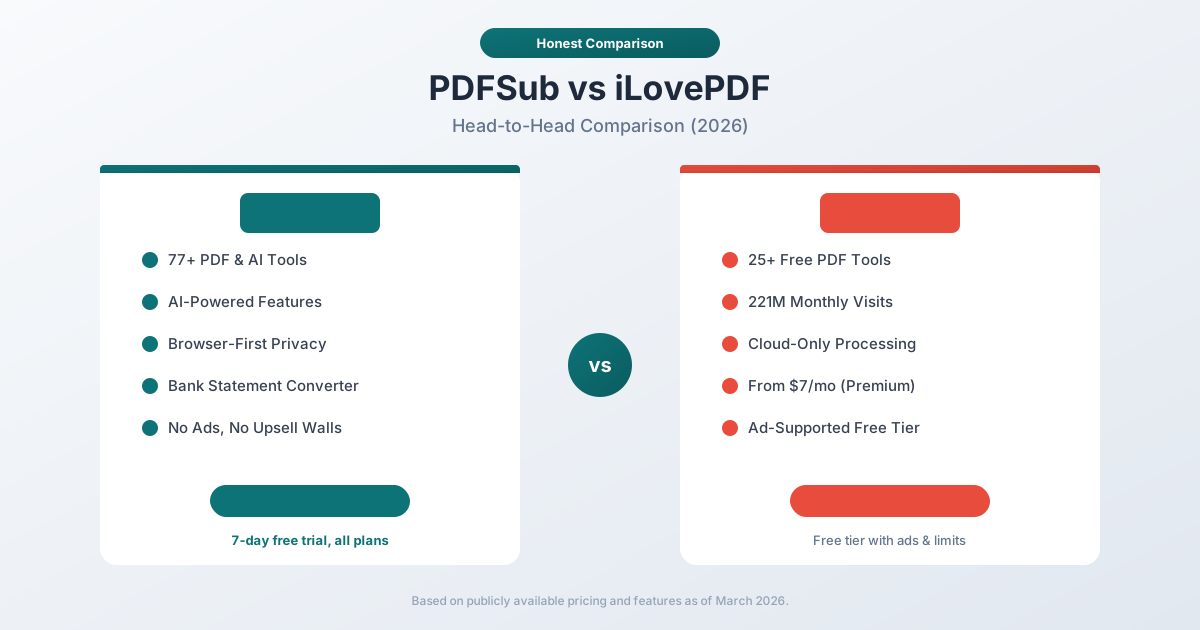
iLovePDF is one of the most visited websites on the internet. With 221 million monthly visits, it has become the default free PDF tool for millions of people worldwide. If you have ever searched "merge PDF" or "compress PDF," you have almost certainly landed on iLovePDF.
PDFSub takes a fundamentally different approach. Instead of building a free, ad-supported tool suite, PDFSub offers a paid platform with AI-powered features, browser-first privacy, bank statement conversion, e-sign with no per-envelope fees, and 98+ document tools without a single advertisement.
These are two very different products solving overlapping problems. This comparison breaks down where each one excels and where it falls short.
Quick Verdict
The 30-second split.
Choose PDFSub if…
- You need AI features daily - summarize, translate to 130+ languages, chat with PDFs, extract structured data.
- You process bank statements, invoices, or receipts and need accounting-native exports (QBO, OFX).
- You want browser-first privacy with an isolated PDFSub Engine for the work that needs server processing - no ads, no upsells.
- You need e-sign with no per-envelope fees and 50 GB cloud storage included.
Choose iLovePDF if…
- You only need basic PDF operations (merge, split, compress, convert) and they fit in iLovePDF's free file-size limit.
- You're a casual or occasional user processing a handful of files per month, where free + ads is acceptable.
- Your team is on iLovePDF Business or Premium ($9-15/mo) and the existing workflow works fine.
- You don't need AI, financial-document extraction, or 130+ languages.
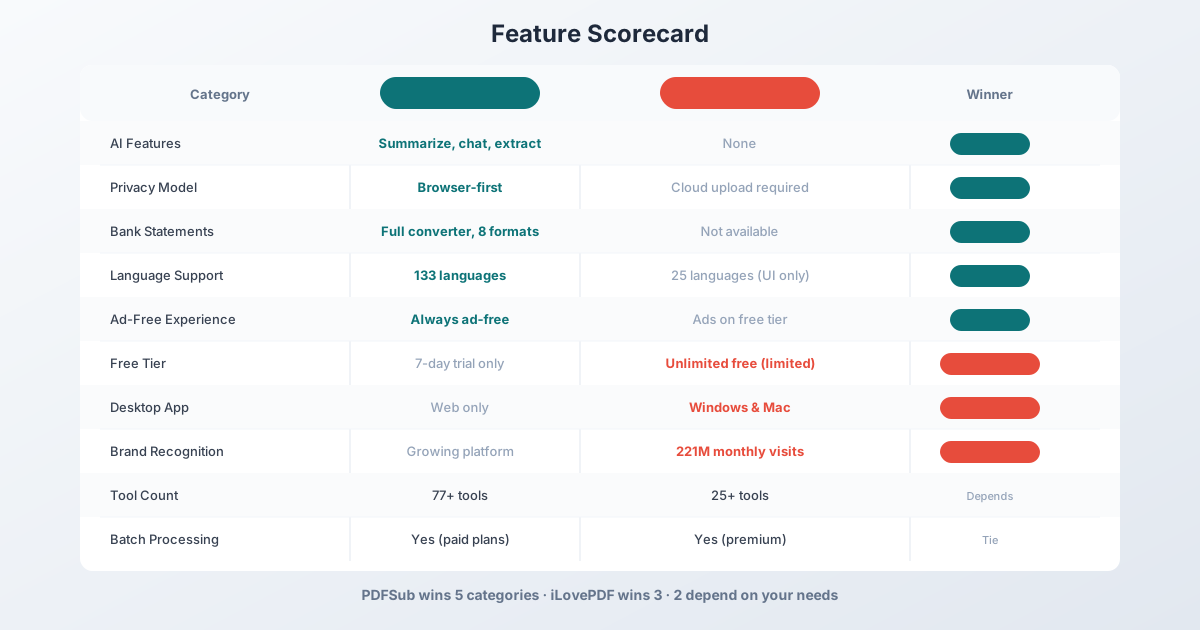
Neither tool is universally "better." iLovePDF is a free/affordable consumer PDF utility; PDFSub is an ad-free professional document platform with AI. The decision usually comes down to whether you need AI and financial extraction.
Company Overviews
PDFSub is a document platform offering 98+ PDF and document tools alongside specialized features like bank statement conversion, AI summarization, AI translation (130+ languages), data extraction, and more. Editing tools run entirely in your browser. Conversions and advanced processing are powered by the PDFSub Engine - an isolated service with no internet access. Files are processed in an isolated environment and auto-deleted. It is a paid platform with no free tier - only a 7-day free trial (credit card required to start).
iLovePDF is a Barcelona-based company (part of the iLove ecosystem alongside iLoveIMG) that offers 25+ free online PDF tools. Founded in 2010, it has grown into one of the most trafficked document tool sites in the world. Revenue comes primarily from ads on the free tier and premium subscriptions ($7/month) that unlock batch processing, larger file sizes, and an ad-free experience.
Tool Coverage
Both platforms cover the core PDF operations, but with very different depth.
| Category | PDFSub | iLovePDF |
|---|---|---|
| Merge PDF | Yes | Yes |
| Split PDF | Yes | Yes |
| Compress PDF | Yes | Yes |
| PDF to Word | Yes | Yes |
| PDF to Excel | Yes | Yes |
| Rotate PDF | Yes | Yes |
| Watermark | Yes | Yes |
| Page Numbers | Yes | Yes |
| AI Summarize | Yes | No |
| AI Translate | Yes (130+ languages) | No |
| AI Chat | Yes | No |
| AI Data Extraction | Yes | No |
| Bank Statement Converter | Yes (8 formats) | No |
| Invoice/Receipt Scanner | Yes | No |
| Total Tools | 98+ | 25+ |
iLovePDF covers the basics thoroughly. If all you need is to merge a few PDFs or compress a file before emailing it, iLovePDF does that perfectly well.
PDFSub covers those same basics but adds an entire layer of AI-powered features and financial document tools that iLovePDF simply does not offer. If you need to summarize a 50-page report, translate a contract into Japanese, extract structured data from invoices, or convert bank statements into QBO files for QuickBooks, iLovePDF cannot help you. PDFSub can.
Winner: PDFSub on tool breadth and depth. iLovePDF covers the basics; PDFSub covers the basics plus specialized AI and financial tools.
Privacy & Data Handling
This is a fundamental architectural difference between the two platforms.
PDFSub's approach: Editing tools run entirely in your browser. For bank statement Tier 1 extraction, files never leave your device. Conversions and advanced processing are powered by the PDFSub Engine - an isolated service with no internet access. Files are processed in an isolated environment and auto-deleted after processing.
iLovePDF's approach: Cloud-only processing. Every file you work with is uploaded to iLovePDF's servers. Files are stored temporarily (typically 2 hours for free users), but during that window your documents sit on their infrastructure. iLovePDF is GDPR-compliant and encrypts files in transit, but the fundamental model requires uploading everything.
For basic PDF operations like merging or compressing - tasks that PDFSub handles entirely in-browser - iLovePDF forces an unnecessary upload. If you are working with sensitive client documents, financial records, or confidential business files, this matters.
Winner: PDFSub - browser-based editing plus isolated service processing with auto-deletion.
Ad Experience & User Interface
This is where the business model differences become most visible.
iLovePDF free tier is heavily ad-supported. Banner ads, interstitial ads between operations, and upsell prompts are woven throughout the experience. You can use the tools for free, but the experience is cluttered. Premium ($7/month) removes ads and adds batch processing.
PDFSub has no ads on any plan. The interface is clean and task-focused. You select a tool, upload your file, and get your result. No banners, no interstitials, no third-party tracking scripts from ad networks.
This matters more than it might seem. Ad-supported tools load third-party scripts that track your browsing behavior and slow down page loads. For a tool that handles your documents, running ad network JavaScript alongside your files is a legitimate privacy concern - even if iLovePDF itself is trustworthy, the ad networks have their own data collection practices.
Winner: PDFSub - no ads, no tracking scripts, no upsell walls.
Pricing Comparison
PDFSub Pricing
| Plan | Price | Key Features |
|---|---|---|
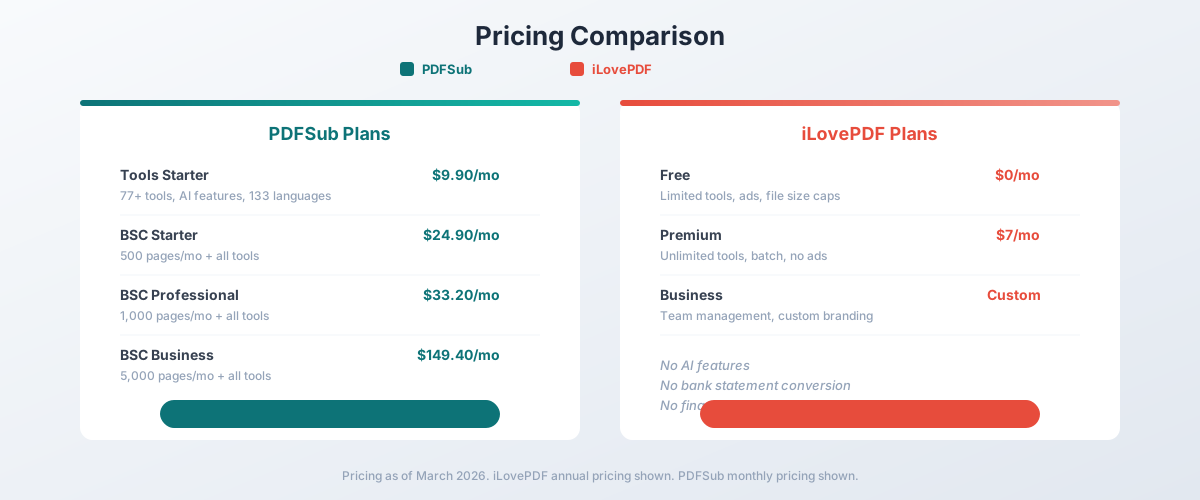
| All-In-One (annual) | $20/mo ($240/yr) | 98+ tools, 500 AI credits/mo, 500 bank statement pages/mo, e-sign + form filling, 50 GB cloud storage, unlimited team seats (each billed at the same per-user rate) |
| All-In-One (monthly) | $25/mo | Same as annual, billed monthly |
| Add-ons | Stackable | 500 AI credits, 500 bank statement pages, 40 GB storage, priority support |
All plans include a 7-day free trial with full functionality.
iLovePDF Pricing
| Plan | Monthly Price | Key Features |
|---|---|---|
| Free | $0 | Basic tools, ads, file size caps, limited daily use |
| Premium | $7/mo | No ads, batch processing, larger files |
| Business | Custom | Team management, custom branding |
The Value Question
On pure price, iLovePDF wins - you cannot beat free. And for occasional PDF merging or compression, the free tier is genuinely useful.
But the comparison is not apples-to-apples. iLovePDF Premium at $7/month gives you basic PDF tools without ads. PDFSub All-In-One at $20/month annual gives you 98+ tools plus AI summarization, AI translation, AI data extraction, document chat, e-sign with no per-envelope fees, and 500 bank statement pages every month.
If you need bank statement conversion, the gap widens further. iLovePDF has no equivalent feature at any price. You would need to subscribe to a separate service like DocuClipper ($39–$899/month) alongside iLovePDF.
Winner: iLovePDF on pure cost for basic tasks. PDFSub on value per dollar for professional use.
Language Support
PDFSub supports 130+ languages for AI translation, summarization, and document processing. Auto-detection identifies the document language, date formats, number formats, and currency conventions automatically.
iLovePDF supports approximately 25 languages for its user interface, but this is just UI translation - the tools themselves do not translate documents or adapt to different language conventions. There is no document translation feature.
If you work with multilingual documents or international clients, this is a significant gap.
Winner: PDFSub - 130+ language document processing versus UI-only localization.
Desktop & Mobile Apps
iLovePDF offers desktop apps for Windows and Mac, plus mobile apps for iOS and Android. This means offline access and native performance for basic PDF operations.
PDFSub is web-only. It works in any modern browser on any device, but there is no dedicated desktop or mobile app. Browser-first processing means the tool works well on mobile browsers, but you need an internet connection to access the interface (even though file processing happens locally).
For users who need offline PDF editing or prefer native desktop applications, iLovePDF has a clear advantage here.
Winner: iLovePDF - desktop and mobile apps provide offline access and native performance.
Batch Processing
iLovePDF supports batch processing on Premium plans - merge multiple files, compress a batch of PDFs, or convert several documents at once.
PDFSub supports batch processing on paid plans as well. For bank statement conversion specifically, you can process multiple statements in a single session.
Both tools handle batch operations, though the specific capabilities differ by task. This one is a tie.
Winner: Tie - both support batch processing on paid plans.
Financial Document Features
This is PDFSub's most distinctive advantage over iLovePDF.
| Feature | PDFSub | iLovePDF |
|---|---|---|
| Bank Statement Converter | Yes (20,000+ banks, 8 formats) | No |
| Invoice Scanner | Yes (AI-powered) | No |
| Receipt Scanner | Yes (AI-powered) | No |
| Financial Report Analyzer | Yes | No |
| QBO/OFX/QIF Export | Yes | No |
iLovePDF is a general-purpose PDF tool - it can merge, split, and compress your bank statements, but it cannot extract transaction data from them. If you are an accountant, bookkeeper, or financial professional, iLovePDF does not serve your specialized needs.
PDFSub converts bank statements from 20,000+ financial institutions into Excel, CSV, QBO, OFX, QIF, QFX, TSV, and JSON formats. One subscription covers both your general PDF needs and your financial document processing.
Winner: PDFSub - iLovePDF has zero financial document features.
Who Should Choose PDFSub
PDFSub is the better choice if:
- You need AI-powered features. Summarization, translation, data extraction, and document chat are not available on iLovePDF at any price.
- Privacy matters to you. Editing runs in your browser; conversions use the isolated PDFSub Engine with auto-deletion.
- You process financial documents. Bank statements, invoices, and receipts require specialized extraction that iLovePDF cannot do.
- You want an ad-free experience. No ads, no tracking scripts, no upsell walls.
- You work with international documents. 130+ language translation and processing versus iLovePDF's English-focused tools.
Who Should Choose iLovePDF
iLovePDF is the better choice if:
- You have zero budget. The free tier genuinely works for basic PDF tasks.
- You only need basic operations. Merge, split, compress, and convert cover 90% of casual PDF needs.
- You need desktop/mobile apps. Native apps for Windows, Mac, iOS, and Android.
- You use PDFs infrequently. If you merge one PDF a month, paying for a subscription makes no sense.
- You are comfortable with ads. If banner ads and interstitials don't bother you, the free tier is a fair trade.
The Bottom Line
PDFSub and iLovePDF are not really direct competitors - they target different audiences.
iLovePDF is the McDonald's of PDF tools: massive reach, free or cheap, good enough for basic needs, and available everywhere. If you need to merge two PDFs right now and never think about document tools again, iLovePDF is the obvious choice.
PDFSub is a professional document platform. It covers the same basic PDF operations but adds AI intelligence, financial document conversion, multi-language support, and privacy-first processing. If documents are a regular part of your work - especially if you handle financial documents, multilingual content, or sensitive client files - PDFSub pays for itself quickly.
The easiest way to decide? If you have never needed to summarize a document, translate a PDF, or convert a bank statement, iLovePDF is probably fine. If you have, PDFSub is worth the 7-day free trial.
Frequently Asked Questions
Is PDFSub a replacement for iLovePDF?
For basic PDF operations (merge, split, compress, convert), yes - PDFSub handles all of those. But PDFSub goes significantly further with AI features, financial document tools, and 130+ language support. If you are currently using iLovePDF Premium ($7/month), PDFSub All-In-One at $20/month annual gives you 98+ tools including AI features and 500 bank statement pages/month.
Does iLovePDF have AI features?
No. As of March 2026, iLovePDF does not offer AI summarization, AI translation, AI data extraction, or document chat. These are PDFSub-exclusive features.
Is iLovePDF safe to use?
iLovePDF is GDPR-compliant and encrypts files in transit. However, all files must be uploaded to their servers for processing, and the free tier runs third-party ad network scripts. PDFSub runs editing tools in your browser. Conversions use the PDFSub Engine - an isolated service with auto-deletion.
Can iLovePDF convert bank statements?
No. iLovePDF can convert a PDF bank statement to a Word document or image, but it cannot extract transaction data into structured formats like Excel, CSV, QBO, or OFX. You would need a separate service for that.
Which is cheaper, PDFSub or iLovePDF?
iLovePDF is cheaper for basic PDF tasks - the free tier costs nothing, and Premium is $7/month. PDFSub's All-In-One plan is $20/month annual ($25/month monthly) but includes AI features, financial tools, e-sign with no per-envelope fees, and 98+ tools that iLovePDF doesn't offer at any price. For professional use, PDFSub provides significantly more value per dollar.
Does iLovePDF work offline?
Yes, through its desktop apps (Windows and Mac) and mobile apps (iOS and Android). PDFSub is browser-only but processes most files locally in your browser even though the interface requires an internet connection.
Can I use both together?
Yes, but there is little reason to. PDFSub covers all the basic PDF operations that iLovePDF offers, plus AI and financial features. The only scenario where you might want both is if you need iLovePDF's desktop app for occasional offline use while primarily using PDFSub for your daily workflow.
Already decided to switch? This page covers neutral side-by-side facts. For a migration-focused walkthrough - what to test first, how the workflow changes when you leave a free tier, and switching FAQ - see the best iLovePDF alternative guide.