Best ChatPDF Alternative for Financial Documents (2026)
ChatPDF pioneered chat-with-PDF, but it struggles with financial documents, scanned files, and long PDFs. Here are the best alternatives - and which one fits your workflow.
PDFSub is best for:
- Users who need AI chat that actually works on financial tables - not just narrative text
- Professionals who also need bank statement conversion, invoice extraction, and receipt scanning
- Scanned document workflows where OCR is required before chatting
- Teams wanting chat plus 98+ PDF tools and 130+ language support at $20/mo (annual)
PDFSub is NOT best for:
- Users who only need dead-simple chat on text-heavy PDFs (ChatPDF's focused UI is hard to beat)
- Students on a tight budget who just need free Q&A on research papers
- Users who want unlimited chat messages without any credit-based system
ChatPDF made talking to PDFs mainstream. Upload a document, ask questions in natural language, and get answers pulled directly from the text. For students summarizing research papers and professionals skimming reports, it was a revelation.
But ChatPDF was built for a specific use case: extracting information from text-heavy, well-structured documents. Step outside that comfort zone - financial statements with complex tables, scanned PDFs without selectable text, or documents in languages other than English - and the experience degrades quickly.
If you've found yourself re-asking the same question three different ways, getting hallucinated numbers from a bank statement, or staring at a "file not supported" error on a scanned invoice, you're not alone. These are the exact pain points driving people to look for alternatives.
This guide breaks down where ChatPDF falls short, what to look for in a replacement, and how the top alternatives compare on the features that actually matter for professional document work.
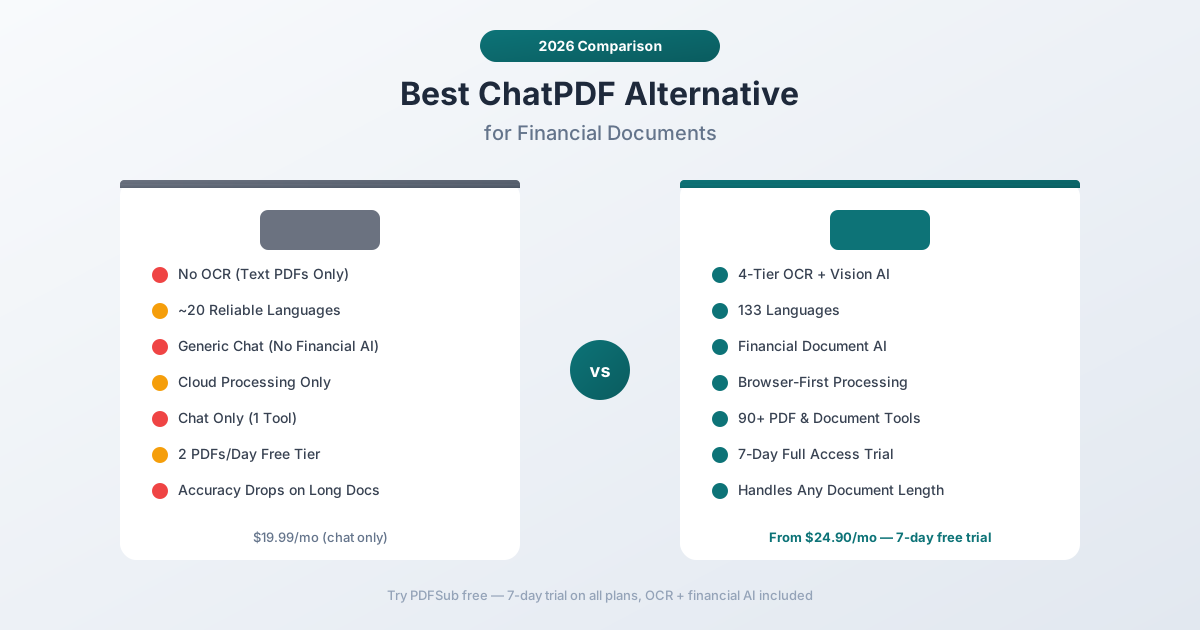
Why People Switch from ChatPDF
ChatPDF has 4.4 stars on Product Hunt and genuinely works well for its core use case. The complaints aren't about quality - they're about boundaries. Here's what users consistently report:
No OCR for Scanned Documents
This is the most common surprise. ChatPDF only works with PDFs that have selectable, embedded text. If your document is a scan - a photographed receipt, a faxed bank statement, a scanned contract - ChatPDF returns nothing useful.
There's no OCR layer to extract text from images. You either have text-based PDFs or you don't have a tool. For anyone working with older financial records, government documents, or anything that started life as paper, this is a hard stop.
Financial Document Accuracy Problems
ChatPDF uses large language models to answer questions, which means it's fundamentally a text comprehension tool, not a data extraction tool. The difference matters enormously for financial documents.
Ask ChatPDF "What's the total deposit amount?" on a bank statement, and it might:
- Hallucinate a number that looks plausible but doesn't appear anywhere in the document
- Confuse columns - pulling from the withdrawal column instead of deposits
- Miss continuation pages - answering based only on the first page when transaction tables span multiple pages
- Ignore table structure - treating a multi-column financial table as linear text, jumbling the data
These aren't edge cases. They're inherent limitations of using a general-purpose chat interface for structured financial data. The model sees text; it doesn't understand that row 15 in a table has specific column relationships.
Long Document Degradation
ChatPDF's free tier limits you to 2 PDFs per day with a 120-page cap. Even on the Plus plan ($19.99/month), users report that accuracy drops significantly on documents longer than 30-40 pages.
This is a known limitation of retrieval-augmented generation (RAG) systems - the model chunks your document into segments and searches for relevant pieces. As documents get longer, the chunks become less precise. For a 200-page annual report, the model might retrieve the wrong section entirely.
Limited Conversation Memory
ChatPDF maintains conversation context within a single session, but the memory is shallow. Ask a follow-up question that references something from 10 messages ago, and the model often loses the thread. Complex multi-step analysis - "Find all transactions over $1,000, then categorize them by vendor" - tends to break down.
Pricing for Professional Use
ChatPDF's free tier is deliberately restrictive:
- 2 PDFs per day
- 120 pages per PDF
- 50 questions per day
- No priority support
The Plus plan at $19.99/month (or $11.50/month billed annually) removes these limits but still doesn't add OCR, improve financial accuracy, or extend language support beyond what the underlying model provides.
For comparison, that $19.99/month gets you one tool - PDF chat. It doesn't include extraction, conversion, or any other document processing capability.
What to Look for in a ChatPDF Alternative
Before comparing specific tools, here's what separates a good PDF chat tool from a great one, especially for professional and financial document work:
OCR capability. Can it handle scanned documents? This is non-negotiable for anyone working with real-world financial records. The best tools use multi-layer extraction: browser-based text parsing first, server-side OCR second, and vision AI for the worst cases.
Structured data understanding. Does the tool understand tables, columns, and row relationships? Generic chat models treat everything as paragraphs. Tools built for financial documents preserve table structure and can answer column-specific questions accurately.
Multi-turn conversation. Can you have a genuine back-and-forth? Ask a question, get an answer, then drill deeper based on what you learned. The tool should maintain context across at least 10-15 exchanges.
Language support. Documents come in every language. If you work internationally, your PDF chat tool needs to handle non-English documents natively, not just translate them first.
Privacy model. Where does your document go? Cloud-only processing means your sensitive financial data hits a third-party server. Browser-first processing keeps files on your device whenever possible.
Platform breadth. Chat is rarely the only thing you need to do with a PDF. Consider whether the tool also handles extraction, conversion, merging, splitting, and other common PDF operations - or whether you'll need three subscriptions to cover your workflow.
PDFSub: The Best ChatPDF Alternative
PDFSub is a document AI platform with a chat-with-PDF tool that's specifically designed to handle the documents ChatPDF struggles with - scanned files, financial statements, multi-language documents, and long reports.
4-Tier Document Processing
This is PDFSub's core technical advantage. Instead of relying on a single text extraction method, PDFSub uses a cascading approach:
- Browser text extraction - If the PDF has selectable text, it's extracted instantly in your browser. No upload needed.
- Server-side text extraction - For more complex layouts, server processing handles multi-column and table-heavy documents.
- Server OCR - Scanned documents get optical character recognition to extract text from images.
- Vision AI - For severely degraded documents (faded thermal receipts, poor scans), vision AI directly reads the image content.
This means every document gets the best extraction method automatically. A clean digital PDF processes instantly in your browser. A 1990s faxed bank statement still gets accurate extraction through the AI vision fallback.
Financial Document Specialization
PDFSub isn't a generic chat tool with a PDF wrapper. It includes dedicated extractors for:
- Bank statements - Understands transaction tables, account numbers, balances, and date ranges across 20,000+ bank formats
- Invoices - Extracts vendor details, line items, totals, tax amounts, and payment terms
- Receipts - Pulls merchant names, item lists, totals, tax, and payment methods from any format
- Financial reports - Handles balance sheets, income statements, cash flow statements, and ratio analysis
When you chat with a financial document on PDFSub, the system understands the document's structure. Ask "What were the total deposits in February?" and it queries the actual transaction table - not a paragraph of text that happens to mention the word "deposits."
130+ Languages
ChatPDF's language support depends entirely on the underlying model's training data. For common languages like Spanish or French, it works reasonably well. For less common languages - Thai, Vietnamese, Hebrew, Urdu - accuracy drops sharply.
PDFSub supports 130+ languages natively, including right-to-left scripts (Arabic, Hebrew), CJK characters (Chinese, Japanese, Korean), and complex scripts (Hindi, Thai, Bengali). This isn't just OCR language support - the chat responses understand the document content in its original language.
Privacy-First Processing
ChatPDF processes everything in the cloud. Every PDF you upload goes to their servers for processing and chat.
PDFSub uses browser-first processing. When your PDF has extractable text, it's parsed entirely in your browser - the file never leaves your device. Server processing is only used when client-side extraction can't handle the document (scans, complex layouts, vision AI needed).
For financial documents containing account numbers, SSNs, transaction histories, and other sensitive data, this architecture matters.
98+ Tools in One Subscription
ChatPDF does one thing: chat with PDFs. That's it.
PDFSub includes 98+ PDF and document tools in every subscription - merge, split, compress, convert, extract tables, bank statement converter, invoice extractor, receipt scanner, OCR, watermarking, translation, and more.
Instead of subscribing to ChatPDF for chat, another tool for extraction, another for conversion, and another for bank statements, PDFSub covers the entire workflow. One subscription, one interface.
Head-to-Head: PDFSub vs ChatPDF
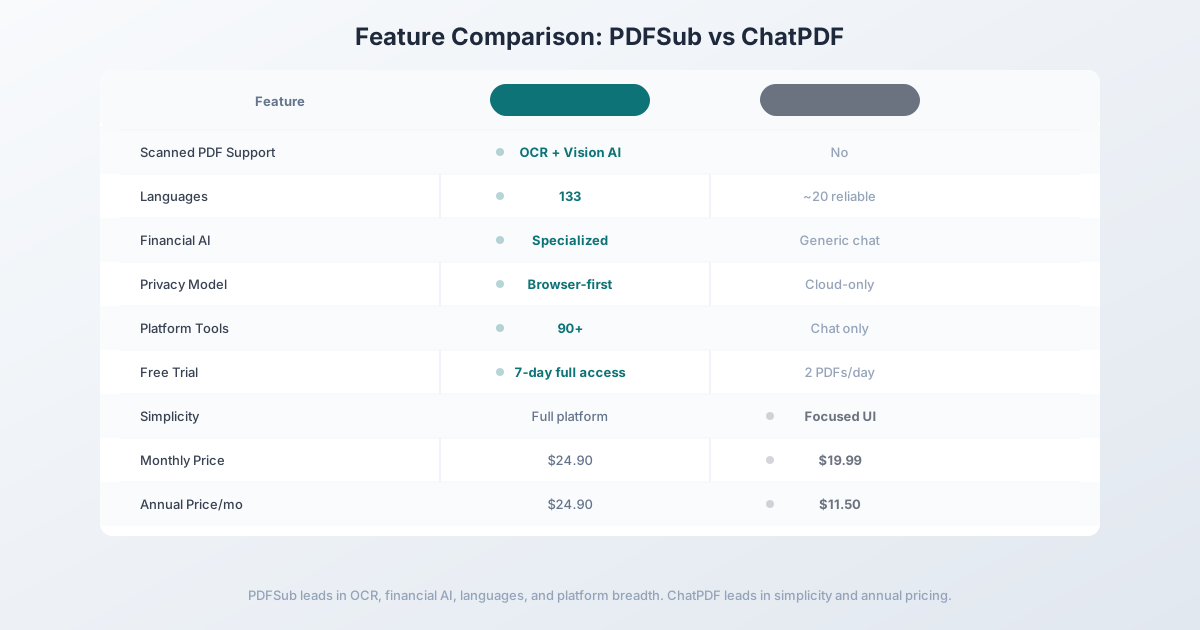
Here's how the two tools compare across the categories that matter most:
| Feature | PDFSub | ChatPDF |
|---|---|---|
| Scanned PDF support | Yes (OCR + Vision AI) | No |
| Languages | 130+ | Model-dependent (~20 reliable) |
| Financial document AI | Specialized extractors | Generic chat only |
| Bank statement parsing | 20,000+ bank formats | No structured extraction |
| Invoice/receipt extraction | Dedicated tools | No |
| Conversation depth | Up to 10 multi-turn messages | Session-based (degrades) |
| Privacy model | Browser-first | Cloud-only |
| Page limit | Unlimited | 2,000 pages (Plus) |
| PDF tools included | 98+ | Chat only |
| Free trial | 7-day full access (subscription required after) | 2 PDFs/day, 50 questions |
| Price | $20/mo (annual) (7-day free trial) | $19.99/mo (or $11.50/yr) |
Where PDFSub wins: Scanned documents, financial accuracy, language coverage, privacy, and platform breadth. If you work with bank statements, invoices, or any non-English documents, PDFSub handles them natively where ChatPDF can't.
Where ChatPDF wins: Simplicity. If all you need is to ask questions about text-based English PDFs, ChatPDF's interface is streamlined and focused. ChatPDF's annual rate ($11.50/month) is cheaper than PDFSub's All-In-One plan ($20/month annual; $25/month billed monthly) - though PDFSub bundles 98+ tools, AI extraction, and bank statement conversion at that price.
The value calculation: PDFSub costs roughly $8.50/month more than ChatPDF's annual price - but includes 83+ additional tools beyond chat, OCR support, financial document AI, and 130+ languages. If you'd otherwise need even one additional tool subscription, PDFSub is the better deal.
Other ChatPDF Alternatives Worth Considering
ChatPDF and PDFSub aren't the only options. Here's how the broader market stacks up:
PDF.ai - $15/month
PDF.ai is the closest direct competitor to ChatPDF. Similar interface, similar approach, with a few key differences:
- Strengths: Clean UI, solid conversation memory, good at synthesizing information across long documents
- Weaknesses: No OCR for scanned documents, no structured extraction for financial data, limited language support
- Best for: Users who want a ChatPDF-like experience with a slightly different feature set
Smallpdf - $12/month
Smallpdf is primarily a PDF editing platform that added AI chat as a feature:
- Strengths: Unlimited AI chat on paid plans, 20+ PDF editing tools, well-designed interface
- Weaknesses: AI chat quality is secondary to editing tools, no financial document specialization, no OCR in chat
- Best for: Users who need basic PDF editing plus occasional chat, and want a single subscription
Adobe Acrobat AI - $22.99/month
Adobe added AI Assistant to Acrobat in 2024:
- Strengths: Tight integration with the Acrobat ecosystem, handles long documents better than most, citation links to source content
- Weaknesses: Expensive, requires Acrobat subscription, AI features still maturing, limited financial document support
- Best for: Teams already paying for Adobe Creative Cloud or Acrobat who want AI without another subscription
Humata - $9.99/month
Humata targets researchers and technical users:
- Strengths: Good at handling academic papers, can process up to 10,000 pages, citation support
- Weaknesses: No OCR, limited financial document understanding, smaller feature set
- Best for: Academic researchers who need to process large volumes of papers and technical documents
AskYourPDF - $11.99/month
AskYourPDF focuses on knowledge management across document collections:
- Strengths: Chat across multiple PDFs simultaneously, API access for developers, Chrome extension
- Weaknesses: No OCR, accuracy drops on financial tables, limited export options
- Best for: Developers needing API access, or users who want to chat across multiple documents at once
PDFGear - Free
PDFGear is a desktop application with built-in AI chat:
- Strengths: Completely free, works offline, no upload required (local processing), decent basic chat
- Weaknesses: Desktop-only (no web), AI quality below cloud-based tools, no OCR, limited language support, no financial features
- Best for: Users who want a free solution and don't need OCR or financial document support
Quick Comparison Matrix
| Tool | Price/mo | OCR | Languages | Financial AI | PDF Tools | Privacy |
|---|---|---|---|---|---|---|
| PDFSub | $20/user/mo annual (7-day trial) | Yes (4-tier) | 130+ | Specialized | 98+ | Browser-first |
| ChatPDF | $19.99 | No | ~20 | No | Chat only | Cloud |
| PDF.ai | $15 | No | ~15 | No | Chat only | Cloud |
| Smallpdf | $12 | No (in chat) | ~30 | No | 20+ | Cloud |
| Adobe Acrobat | $22.99 | Basic | ~25 | No | Full suite | Cloud |
| Humata | $9.99 | No | ~15 | No | Chat only | Cloud |
| AskYourPDF | $11.99 | No | ~20 | No | Chat + API | Cloud |
| PDFGear | Free | No | ~10 | No | Desktop suite | Local |
When ChatPDF Is Still the Right Choice
To be fair, ChatPDF is perfectly adequate for specific use cases:
- Students summarizing text-heavy research papers and textbooks in English
- Quick lookups when you need one answer from one clean, text-based PDF
- Casual users who interact with PDFs a few times a month and don't need extraction or conversion
- Budget-constrained users who need the cheapest possible option and work exclusively with English text PDFs
If your PDFs are always English, always text-based, and you never need to extract structured data, ChatPDF at $11.50/month (annual) does the job.
When You Need Something Better
Switch to a ChatPDF alternative when:
- Your documents are scanned. No amount of re-phrasing your question will make ChatPDF read an image-based PDF. You need OCR.
- You work with financial documents. Bank statements, invoices, receipts, and financial reports need structured extraction, not generic text chat.
- You need multiple languages. If even 10% of your documents are non-English, you need native multi-language support.
- Privacy matters. Cloud-only processing means your financial data lives on someone else's server.
- You need more than chat. If you also convert, merge, split, extract, or translate PDFs, a platform like PDFSub replaces multiple subscriptions.
How to Switch from ChatPDF to PDFSub
The migration is straightforward since ChatPDF doesn't store your documents long-term:
- Start your 7-day free trial at pdfsub.com/signup - 7 days with full access to all tools, no export caps. PDFSub is subscription-only ($20/mo annual, $25/mo monthly) after the trial ends.
- Upload any PDF to the Chat with PDF tool - scanned, text-based, any language
- Ask the same questions you'd ask ChatPDF - you'll notice the difference on financial documents and scans immediately
- Try the specialized tools - upload a bank statement to the bank statement converter, an invoice to the invoice extractor, or a receipt to the receipt scanner
- Check the other 98+ tools - merging, splitting, compressing, converting, watermarking, and more
There's no data migration needed. ChatPDF conversations don't transfer, but you'll have your source PDFs to start fresh conversations with better extraction.
Frequently Asked Questions
Is ChatPDF free?
ChatPDF has a free tier: 2 PDFs per day, 120 pages per PDF, 50 questions per day. It's usable for very light, occasional use but impractical for any professional workflow. The Plus plan is $19.99/month or $138/year.
Can ChatPDF read scanned PDFs?
No. ChatPDF only processes PDFs with embedded, selectable text. Scanned documents, photographed pages, and image-based PDFs are not supported. You need a tool with OCR capabilities like PDFSub.
Why does ChatPDF give wrong numbers from financial documents?
ChatPDF uses a general-purpose language model that treats your document as text. It doesn't understand table structure - column relationships, row groupings, or running totals. When it "answers" a numerical question, it's predicting what text should come next, not calculating from a structured table. This is why financial document-specific tools outperform generic chat tools on accuracy.
Can I use ChatPDF for bank statements?
Technically yes, but with significant caveats. ChatPDF can read text-based bank statement PDFs and answer basic questions, but it cannot accurately extract transaction tables, calculate balances, or handle multi-page statement continuation. For actual bank statement data extraction, use a dedicated converter that understands bank statement formats.
Is ChatPDF safe for sensitive documents?
ChatPDF processes all documents on their servers. Their privacy policy states they don't use documents for training, but the files are uploaded and processed in the cloud. If you work with financial documents containing account numbers, SSNs, or transaction histories, consider a tool with browser-first processing that keeps files on your device.
What's the best free ChatPDF alternative?
PDFGear is completely free and processes documents locally on your computer. However, it lacks OCR, has limited AI quality compared to cloud tools, and doesn't support financial document extraction. For a 7-day free trial of a full-featured tool, PDFSub gives you complete access to all 98+ tools - though PDFSub is subscription-only ($20/mo annual, $25/mo monthly) after the trial ends.
Can I chat with multiple PDFs at once?
ChatPDF supports single-document chat. AskYourPDF is the strongest option for multi-document chat with its knowledge base feature. PDFSub focuses on deep single-document analysis with specialized extraction for financial documents.
Does ChatPDF work on mobile?
ChatPDF has a web-based interface that works in mobile browsers but doesn't offer a native mobile app. PDFSub is also web-based and works across all devices and browsers without installation.
Still evaluating, not yet switching? This page is written for teams ready to leave ChatPDF. For a neutral feature-by-feature breakdown and pricing side-by-side, see the PDFSub vs ChatPDF comparison.