Best CapyParse Alternative for Bank Statement Parsing (2026)
Looking for a CapyParse alternative? Compare features, pricing, and capabilities. See why teams switch to PDFSub.
PDFSub is best for:
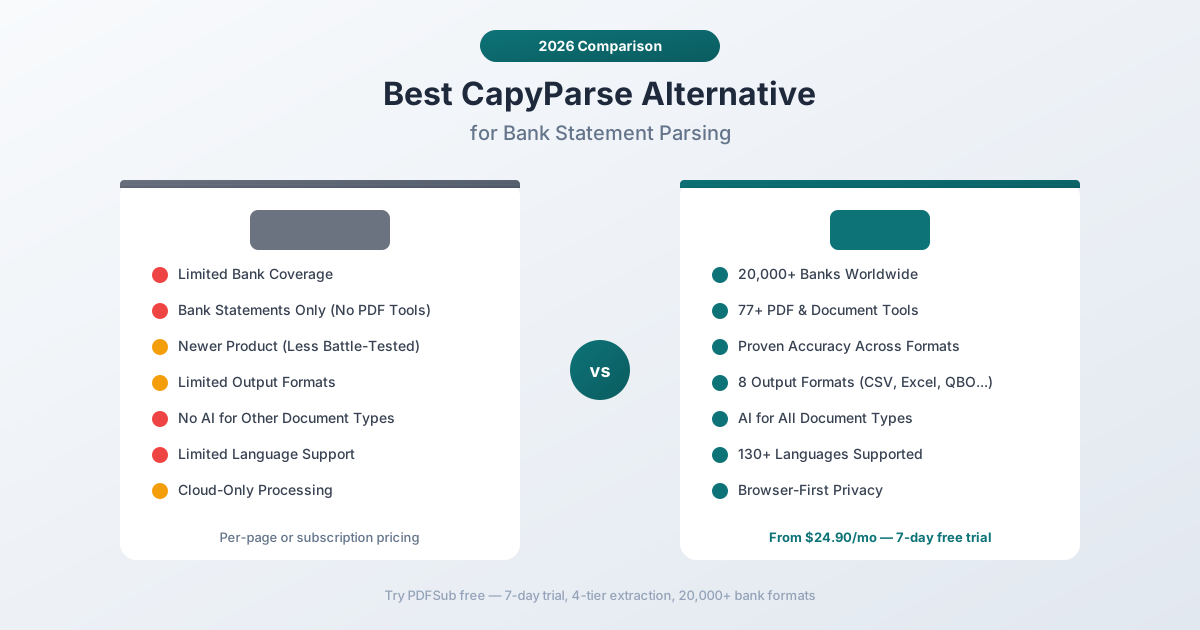
- Firms needing 20,000+ pre-built bank templates vs CapyParse's limited bank coverage
- Accountants who need invoices, receipts, financial reports, and 98+ PDF tools beyond just bank statements
- International users needing 130+ languages vs CapyParse's US-focused parsing
- Teams who want a battle-tested extraction engine vs a newer tool with less production history
PDFSub is NOT best for:
- Developers who prefer CapyParse's API-first design for custom integrations
- Occasional users who only need a handful of pages and want CapyParse's 10-page free tier
- Teams that need only a lightweight, single-purpose converter with minimal setup
CapyParse entered the bank statement parsing market as a newer, developer-friendly option for extracting transaction data from PDF bank statements. Its straightforward API and clean output attracted early adopters who needed to automate statement processing in their applications.
But newer doesn't always mean better. As teams scale their statement processing, CapyParse's limitations come into focus: limited bank coverage that fails on less common formats, a narrow feature set that only handles bank statements, output format restrictions, and language support that doesn't extend far beyond English.
If you've outgrown CapyParse or you're evaluating it against alternatives before committing, this guide compares the options and explains what to prioritize when choosing a bank statement parser in 2026.
Why People Look for CapyParse Alternatives
CapyParse is a focused tool with a specific target audience. The reasons people look elsewhere tend to be about the boundaries of that focus:
Limited Bank Coverage
This is the most impactful limitation. CapyParse works well with the bank statement formats it knows, but the total number of supported formats is significantly smaller than established competitors.
Bank statement parsing depends heavily on knowing each bank's specific layout: where the date column is, how transactions are formatted, whether running balances appear, how continuation pages work, and how the statement header identifies the bank and account. Every bank - and sometimes every account type within a bank - has its own layout.
When CapyParse encounters a statement format it hasn't been trained on, the extraction quality drops noticeably. Transactions may be missed, columns may be misaligned, or the parser may fail entirely. For accounting firms processing statements from diverse banks, this creates a reliability problem: the tool works great on Monday's Chase statement and fails on Tuesday's regional credit union statement.
Bank Statements Only
CapyParse parses bank statements. That's the product boundary.
Accounting professionals rarely work with bank statements in isolation. A typical workflow involves:
- Bank statements - Transaction extraction for reconciliation
- Invoices - Vendor payment details for AP/AR
- Receipts - Expense documentation and categorization
- Financial reports - Period-end analysis and review
- General PDFs - Contracts, correspondence, regulatory documents
Using CapyParse for bank statements means you need separate tools for everything else. That's multiple subscriptions, multiple logins, multiple learning curves, and multiple places where data lives.
Newer Product with Less Track Record
CapyParse is a newer entrant in a market where reliability matters enormously. Financial data extraction has zero tolerance for silent errors - a misread transaction amount or a dropped transaction can cascade into reconciliation failures, incorrect tax filings, or audit problems.
Established tools have processed millions of statements across thousands of bank formats over years of production use. They've encountered and fixed edge cases that newer products haven't seen yet: unusual transaction descriptions with embedded pipe characters that break CSV parsing, continuation transactions that span page breaks, statements where the bank changed their layout mid-year.
This isn't to say CapyParse is unreliable - it's that any newer product has inherently fewer battle scars, and battle scars are what make a bank statement parser robust.
Limited Output Formats
CapyParse primarily outputs to CSV and Excel formats. For developers building custom pipelines, JSON output is typically available through the API.
But professional accounting workflows need more:
- QBO - Direct import into QuickBooks Online without manual field mapping
- OFX - Open Financial Exchange standard for cross-platform compatibility
- QIF - Quicken Interchange Format for legacy accounting systems
- MT940 - SWIFT banking message standard for enterprise treasury management
Each missing format means an additional conversion step in your workflow - and each conversion step is a potential error point.
Limited Language Support
CapyParse's parsing engine is primarily optimized for English-language bank statements. Statements in other languages - German, French, Chinese, Arabic, Japanese, Hindi - may not parse correctly or at all.
This isn't just about character recognition. Multilingual bank statement parsing requires understanding:
- Number formatting - Is "1.234,56" the number 1,234.56 or 1.23456? German and American conventions differ.
- Date formatting - Is "03/02/2026" March 2nd or February 3rd? Depends on the country.
- Transaction type keywords - "Abbuchung" (German for debit), "Virement" (French for transfer), and hundreds of other terms need to be recognized.
- Right-to-left layouts - Arabic and Hebrew statements have mirrored column layouts.
- Character encodings - CJK characters, Devanagari, Thai script, and other complex writing systems.
A parser built primarily for English statements will get some of these wrong, producing output that requires manual correction.
Cloud-Only Processing
CapyParse processes statements on their cloud servers. Every bank statement PDF is uploaded, processed, and the results returned. For documents containing account numbers, routing numbers, transaction histories, and personal financial data, this architecture means sensitive data always transits through third-party infrastructure.
There's no option for local or in-browser processing that keeps files on your device when the statement format allows it.
What to Look for in a CapyParse Alternative
Before comparing specific tools, here's what makes a bank statement parser production-ready:
Bank format coverage. The single most important factor. If a parser can't handle a format you need, accuracy on other formats is irrelevant. Look for tools supporting thousands of formats, not hundreds.
Multi-tier extraction. No single extraction method handles every document. The best parsers cascade through multiple approaches: browser text extraction, server-side OCR, and AI-powered fallback for the toughest documents.
Output format variety. CSV and Excel are the minimum. Professional workflows need QBO, OFX, QIF, MT940, and JSON. The more native formats available, the fewer manual conversion steps required.
Language support. International bank statements are a reality for any firm with global clients. Broad language support - including RTL scripts, CJK characters, and varied number/date formatting - is essential.
Platform breadth. Does the tool handle more than bank statements? Invoices, receipts, financial reports, and general PDF operations in a single platform eliminate multiple subscriptions.
Proven accuracy. How long has the tool been in production? How many statements has it processed? Track record matters for financial data where errors have real consequences.
Privacy architecture. Can the tool process statements in-browser when possible? Browser-first processing keeps sensitive data local.
PDFSub: The Best CapyParse Alternative
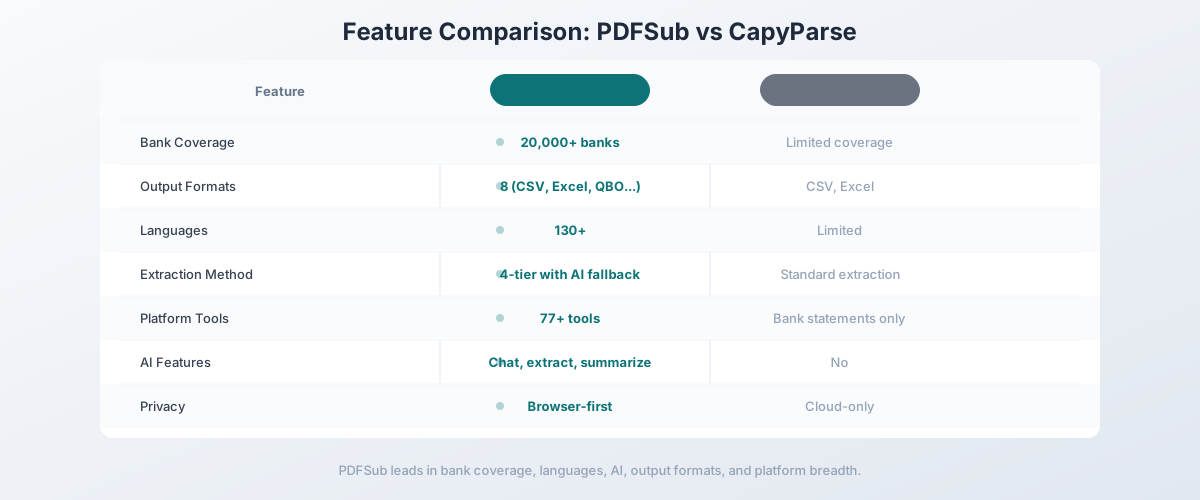
PDFSub is a document platform with a bank statement converter supporting 20,000+ bank formats, 4-tier extraction with AI fallback, 8 output formats, and 130+ languages - plus 83 additional PDF and document tools.
20,000+ Bank Formats
This is PDFSub's most significant advantage over CapyParse. With coverage spanning over 20,000 bank formats worldwide, PDFSub handles:
- Major international banks - Chase, Bank of America, HSBC, Deutsche Bank, BNP Paribas, ICBC, Barclays, and hundreds more
- Regional banks and credit unions - Community banks, regional credit unions, building societies, cooperative banks
- Digital banks and neobanks - Revolut, N26, Monzo, Chime, Wise, Cash App
- International institutions - Banks across Asia, Middle East, Africa, Latin America, and Europe
- Historical formats - Older statement layouts from banks that have since changed their templates
When a statement from an unknown bank arrives, PDFSub's AI extraction layer analyzes the document structure and intelligently identifies transaction tables, dates, amounts, and descriptions - even without a pre-built template for that specific bank.
This means you never have to tell a client "sorry, we can't process your bank's statements." The tool handles it.
Proven 4-Tier Extraction
PDFSub's cascading extraction system has been tested across millions of document variations:
-
Browser text extraction (Tier 1) - For clean digital PDFs, transactions are extracted directly in your browser using coordinate-based column detection. This is the fastest and most private method - the file never leaves your device.
-
Server text extraction (Tier 2a) - Complex layouts with overlapping elements, unusual spacing, or multi-column designs get server-side processing with advanced text layout analysis.
-
Server OCR (Tier 2b) - Scanned bank statements, photographed pages, and image-based PDFs get optical character recognition optimized for financial document formats.
-
AI extraction (Tiers 3/4) - For statements that resist all conventional extraction - unusual layouts, severely degraded scans, non-standard formatting - AI analyzes the visual document structure and extracts transactions using document understanding models.
Each tier automatically engages when the previous one can't achieve reliable extraction. A clean Chase digital statement processes in Tier 1 (browser, instant). A photocopied statement from a small regional bank processes through Tier 4 (AI, slower but still accurate).
This cascading approach is the key difference between PDFSub and simpler parsers like CapyParse. When CapyParse's extraction fails, you're stuck. When PDFSub's first tier struggles, three more tiers catch it.
8 Output Formats
PDFSub supports every format that professional accounting workflows need:
| Format | Use Case |
|---|---|
| CSV | Universal spreadsheet import, custom processing |
| Excel (.xlsx) | Formatted spreadsheet with proper column types and headers |
| QBO | Direct QuickBooks Online import - no field mapping required |
| OFX | Open Financial Exchange - standard for financial software |
| QIF | Quicken Interchange Format - for Quicken and legacy systems |
| MT940 | SWIFT banking message - enterprise treasury systems |
| JSON | Structured data for developers and API integrations |
| Clean, reformatted transaction report |
Export once in the format your software needs. No secondary conversion tools, no manual field mapping, no copy-paste between formats.
130+ Languages
PDFSub processes bank statements in over 130 languages with full understanding of language-specific formatting:
- Number formatting is handled automatically - German "1.234,56" is correctly parsed as 1,234.56
- Date formats are recognized by language context - DD/MM/YYYY for European, MM/DD/YYYY for American, YYYY-MM-DD for ISO
- Transaction type keywords are understood in the statement's language - debits, credits, transfers, fees in dozens of languages
- RTL layouts - Arabic and Hebrew statements with right-to-left column ordering are parsed correctly
- CJK characters - Chinese, Japanese, and Korean bank statements are fully supported
- Complex scripts - Hindi, Thai, Bengali, Tamil, and other Indic/Southeast Asian scripts
This isn't bolt-on language support where you run the statement through translation first. The extraction engine natively understands each language's financial formatting conventions.
Browser-First Privacy
PDFSub's privacy architecture processes documents in your browser whenever possible:
- Digital statements with selectable text - Processed entirely in your browser. The file never uploads to any server. Account numbers and transaction data stay on your device.
- Scanned or image-based statements - Uploaded to PDFSub's servers only when OCR or AI processing is required. Files are processed and immediately discarded.
For bank statements containing account numbers, routing numbers, and detailed transaction histories, this is a meaningful security improvement over cloud-only tools that upload every document regardless of type.
98+ Tools in One Subscription
PDFSub includes the bank statement converter as part of a complete document platform with 98+ tools:
- Invoice extractor - Automated extraction of vendor, line items, totals, tax, and payment terms
- Receipt scanner - Merchant, items, totals, tax, and payment method from any receipt format
- Financial report analyzer - AI analysis of balance sheets, income statements, and cash flow statements
- Chat with PDF - Ask questions about any document in natural language
- Extract tables - Pull structured table data from any document type
- Merge, split, compress - Standard PDF operations
- Translate PDF - Document translation across 130+ languages
- Convert - Between PDF, Word, Excel, PowerPoint, and image formats
- OCR - Make scanned documents searchable and extractable
One subscription, one login, one platform. No juggling multiple tools for different document types.
Head-to-Head: PDFSub vs CapyParse
| Feature | PDFSub | CapyParse |
|---|---|---|
| Bank format coverage | 20,000+ | Limited |
| Output formats | 8 (CSV, Excel, QBO, OFX, QIF, MT940, JSON, PDF) | CSV, Excel, JSON |
| Languages | 130+ | English-focused |
| Extraction method | 4-tier with AI fallback | Standard extraction |
| Scanned statements | OCR + Vision AI | Limited |
| Privacy model | Browser-first | Cloud-only |
| Other PDF tools | 98+ | None |
| Invoice extraction | Yes | No |
| Receipt scanning | Yes | No |
| AI features | Chat, summarize, analyze | No |
| API access | HTML rendering API + 10 SDKs (bank statement endpoints in follow-up phase) | Yes (bank statement focused) |
| Pricing | $20/mo (annual) / $25/mo | Per-page/subscription |
| Free trial | 7-day full access | Limited free tier |
Where PDFSub wins: Bank coverage, output formats, language support, extraction reliability, platform breadth, privacy, and proven accuracy. For any production use case processing diverse bank formats, PDFSub is the more reliable choice.
Where CapyParse wins: Developer API simplicity. If you're building a custom integration and only need to parse a narrow set of well-known bank formats, CapyParse's API is clean and focused. The learning curve for API integration is lower when the scope is limited.
The value calculation: PDFSub's All-In-One subscription ($20/user/mo annual; $25/user/mo monthly) includes 500 bank statement pages and 500 AI credits monthly, plus 83 additional PDF and document tools. CapyParse's pricing for equivalent volume typically exceeds PDFSub's cost - and you still need separate tools for invoices, receipts, and other documents.
Other Alternatives Worth Considering
The bank statement parsing space has several established players:
DocuClipper - $27.99/month
DocuClipper is one of the most popular options for accounting firms:
- Strengths: QuickBooks and Xero direct integration, batch processing, established market position, good accuracy on English statements
- Weaknesses: English-only, page-based pricing tiers, no AI fallback, no other document tools, user complaints about pricing changes
- Best for: English-only accounting firms using QuickBooks or Xero who need direct integration with their accounting software
MoneyThumb - $24.95/month
MoneyThumb offers desktop and cloud bank statement conversion:
- Strengths: Desktop version available, multiple output formats including QBO and OFX, long track record in the market
- Weaknesses: Desktop version interface feels dated, limited language support, no AI features, accuracy inconsistencies on non-standard layouts
- Best for: Users who prefer desktop software and work primarily with US bank statements
BankStatementConverter.com - Per-statement pricing
The exact-match domain name option:
- Strengths: Simple interface, no subscription required for occasional use, straightforward conversion
- Weaknesses: Per-statement pricing scales poorly, limited output formats, English-focused, basic extraction, no fallback tiers
- Best for: Very occasional, low-volume conversion of English bank statements where per-statement pricing is cheaper than a monthly subscription
Sensible.so - Custom pricing
Developer-focused document extraction platform:
- Strengths: Powerful API with custom extraction configurations, handles complex layouts, configurable for any document type
- Weaknesses: Requires significant developer effort to configure, not end-user friendly, custom pricing that scales with volume, no pre-built bank templates
- Best for: Engineering teams building custom document processing pipelines who have the resources to configure extraction for each bank format
Tabula - Free (Open Source)
Open-source table extraction from PDFs:
- Strengths: Completely free, runs locally, open source, no data leaves your machine
- Weaknesses: Manual table selection (not automated), no bank statement-specific logic, no accounting format output, no OCR for scanned documents, requires technical comfort
- Best for: Technical users willing to manually select tables and post-process the output, or as a free starting point before investing in a paid tool
Quick Comparison Matrix
| Tool | Price/mo | Banks | Formats | Languages | AI Fallback | Other Tools |
|---|---|---|---|---|---|---|
| PDFSub | $25 (annual) | 20,000+ | 8 | 130+ | Yes (3-tier) | 98+ |
| CapyParse | Varies | Limited | CSV, Excel, JSON | English | No | None |
| DocuClipper | $27.99+ | English banks | 5+ | English | No | None |
| MoneyThumb | $24.95 | US-focused | 4+ | English | No | None |
| BankStatementConverter | Per-statement | Limited | CSV, Excel | English | No | None |
| Sensible.so | Custom | Custom | Custom | Custom | Via config | API only |
| Tabula | Free | Manual | CSV | Manual | No | None |
When CapyParse Is Still the Right Choice
CapyParse works well in specific scenarios:
- Simple API integration - If you need a lightweight API to parse a small set of known bank formats and your development team values simplicity over breadth
- Narrow bank coverage - If 100% of your statements come from a handful of banks that CapyParse handles well
- Early-stage projects - If you're prototyping a document processing feature and need to get something working quickly before scaling to a more comprehensive solution
- Budget exploration - If you're testing whether bank statement parsing fits your workflow before investing in a broader platform
For a focused, small-scale use case with limited bank format diversity, CapyParse's simpler scope can be an advantage rather than a limitation.
When You Need Something Better
Switch to a CapyParse alternative when:
- Bank coverage gaps appear. The first time a client's statement fails to parse, you need broader coverage. Waiting for CapyParse to add support for a specific bank costs you time and client trust.
- You need accounting formats. QBO, OFX, QIF, and MT940 are standard requirements for professional accounting workflows. CSV-only output creates manual work.
- International clients arrive. Any non-English bank statements require a parser with multi-language understanding, not just character recognition.
- Volume grows. As statement processing volume increases, you need extraction that reliably handles diverse formats without manual intervention.
- You need more than parsing. When your workflow includes invoices, receipts, financial reports, and other document types, a single platform subscription replaces a collection of single-purpose tools.
- Reliability becomes critical. For production workflows where extraction failures have real business consequences, proven accuracy across 20,000+ bank formats matters more than API simplicity.
How to Switch from CapyParse to PDFSub
The switch is straightforward since bank statement parsers are stateless:
- Start a free trial at pdfsub.com/signup - 7 days with full access to all 98+ tools
- Test with familiar statements - Upload bank statements that work well on CapyParse and compare output quality
- Test with difficult statements - Upload statements that CapyParse fails on or produces poor results for
- Try multiple output formats - Export as QBO, OFX, CSV, and Excel to test compatibility with your accounting software
- Try non-English statements - If you have international clients, test statements in other languages
- Explore the platform - Process an invoice with the invoice extractor, scan a receipt with the receipt scanner, or ask a financial document a question with Chat with PDF
If you're using CapyParse's API, note that PDFSub's Developer API (10 SDKs) currently covers HTML-input rendering - programmatic bank statement endpoints are scheduled for a follow-up phase. The web UI remains the primary path for statement conversion today.
Frequently Asked Questions
What is CapyParse?
CapyParse is a bank statement parser that extracts transaction data from PDF bank statements and outputs it in structured formats like CSV and Excel. It's a newer entrant in the bank statement conversion market, primarily targeting developers and small teams who need to automate statement processing.
How does CapyParse compare to PDFSub?
CapyParse is focused exclusively on bank statement parsing with a limited set of bank formats. PDFSub supports 20,000+ bank formats, 8 output formats, 130+ languages, 4-tier extraction with AI fallback, and includes 83 additional PDF and document tools in one subscription.
Is CapyParse good for international bank statements?
CapyParse is primarily optimized for English-language bank statements. For international statements in other languages - especially those using non-Latin scripts like Arabic, Chinese, or Hindi - PDFSub's 130+ language support with native financial formatting understanding produces significantly better results.
What output formats does CapyParse support?
CapyParse primarily outputs to CSV, Excel, and JSON. PDFSub supports 8 formats: CSV, Excel, QBO (QuickBooks Online), OFX (Open Financial Exchange), QIF (Quicken), MT940 (SWIFT banking), JSON, and formatted PDF.
Can CapyParse handle scanned bank statements?
CapyParse has limited capability with scanned documents. PDFSub's 4-tier extraction system includes dedicated OCR and AI vision tiers specifically designed to handle scanned, photographed, and degraded bank statement documents.
Is CapyParse secure for bank statements?
CapyParse processes documents on their cloud servers, which means bank statement files are uploaded for processing. PDFSub's browser-first architecture processes text-based statements entirely in your browser - the file never leaves your device - and only uses server processing when OCR or AI is needed for scanned documents.
Which bank statement parser has the best accuracy?
Accuracy depends on the specific bank format and document quality. For well-known formats, most parsers produce similar results. The difference emerges on less common formats, non-English statements, and scanned documents - where PDFSub's 20,000+ format database and 4-tier extraction system consistently outperform narrower tools.
Can I use PDFSub's bank statement converter via API?
PDFSub ships a Developer API with 10 official SDKs (Node, Python, PHP, Go, Ruby, Java, .NET, Rust, C, C++). The v1 surface focuses on HTML-input rendering (HTML → PDF/PNG/JPEG/WEBP, HTML → text/markdown) with cloud delivery to Google Drive, Dropbox, S3, GCS, and Cloudflare R2. Programmatic endpoints for the bank statement converter are planned for a follow-up phase - until they ship, the bank statement converter runs through the web UI. If API-first bank statement automation is the deciding factor today, CapyParse's API is the more direct fit.
Still evaluating, not yet switching? This page is written for teams ready to leave CapyParse. For a neutral feature-by-feature breakdown and pricing side-by-side, see the PDFSub vs CapyParse comparison.