Understanding Bank Statement Formats: The Technical Guide
PDF isn't a data format - it's a display format. That's why extracting transaction data from bank statements is surprisingly difficult. This guide explains what's actually inside a bank statement PDF, the 12 sections every statement contains, the output formats available (Excel, CSV, QBO, OFX, QFX, JSON), and how to choose the right one.
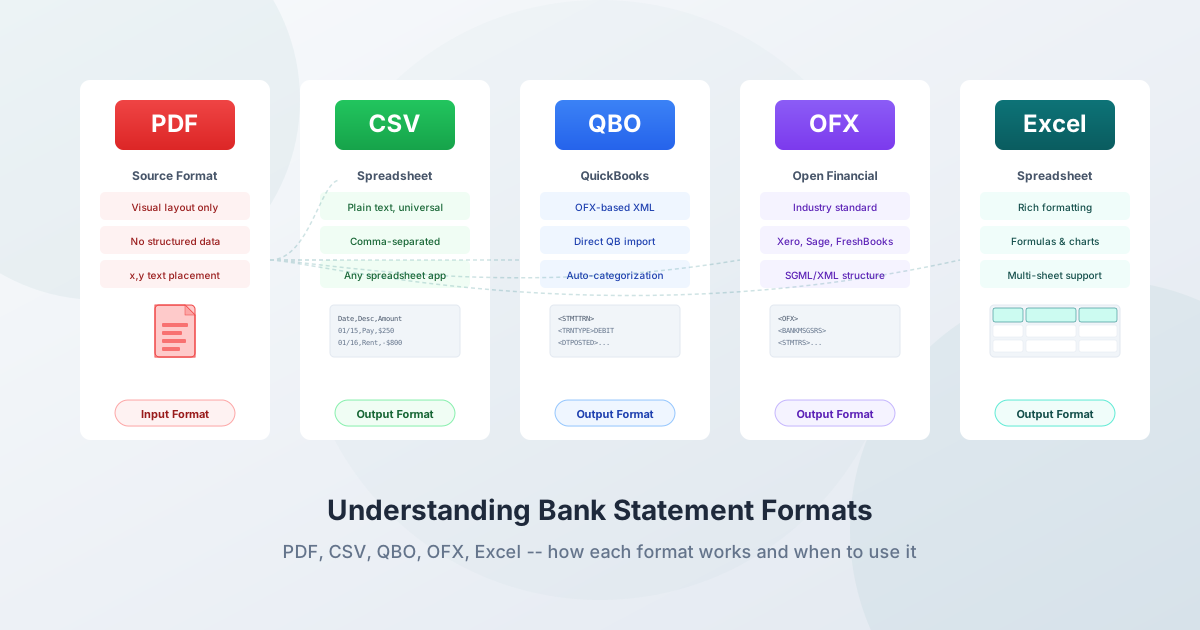
A bank statement PDF looks simple: dates, descriptions, amounts, balances in neat columns. But behind that appearance lies a document format (PDF) that was never designed to store structured data - and a conversion process that requires understanding both the input format and the many output formats available.
This guide covers the 12 sections that appear on every bank statement (regardless of bank), the technical reality of bank statement PDFs, the layout variations across banks, every output format you'll encounter (Excel, CSV, QBO, OFX, QFX, QIF, JSON), international formatting differences, and the industry standards that govern financial data exchange.
Anatomy of a Bank Statement
Every bank statement - Chase, Bank of America, Wells Fargo, HSBC, Deutsche Bank, you name it - is built from the same 12 sections. The labels change ("Subtractions" vs "Withdrawals"), the column arrangements vary, but the underlying structure is consistent. Once you can identify these sections, every statement looks familiar.

Want to use this infographic on your blog? Copy this embed code:
For bank-specific deep dives covering exactly how each major bank lays out these 12 sections, see:
- Chase bank statement explained
- Bank of America bank statement explained
- Wells Fargo bank statement explained
- Citi bank statement explained
- Capital One bank statement explained
Why PDF Is Not a Data Format
PDF stands for Portable Document Format, standardized as ISO 32000 (version 2.0 became ISO 32000-2:2020). It was designed for one purpose: making documents look identical on every screen and printer. That's great for visual fidelity - and terrible for data extraction.
What's Actually Inside a Bank Statement PDF
Inside every PDF page is a content stream - a sequence of drawing operators written in a PostScript-like language. Text is rendered using specific operators:
- BT / ET - Begin Text / End Text: boundaries of a text object
- Tf - Set font and size
- Td / Tm - Move text position or set the full text transformation matrix
- Tj - Show a text string
- TJ - Show text with individual glyph positioning (kerning adjustments)
The critical insight: there is no concept of a "table," "row," or "column" in the PDF specification. What looks like a neatly formatted transaction table is actually dozens of text fragments placed at specific x,y coordinates on the page. The extraction tool must:
- Parse the content stream operators
- Resolve font encodings to map glyph indices to Unicode characters
- Use the text matrix (Tm/Td) to determine the x,y position of every character
- Reconstruct words, lines, and columns from those coordinates
A column that appears perfectly aligned might be at x=72.0 on one line and x=72.5 on the next. The extraction algorithm must define column boundaries with tolerance for these sub-pixel variations.
Tagged vs. Untagged PDFs
Tagged PDFs include a hidden logical structure tree (similar to HTML tags) that marks content as headings, paragraphs, tables, table rows, and table cells. This makes extraction significantly easier.
Untagged PDFs have no structural metadata - the extraction tool gets only raw positioning data and must infer everything.
Most bank-generated statement PDFs are untagged. Banks generate statements using batch processing systems (Oracle BI Publisher, SAP Crystal Reports, or custom print-to-PDF pipelines). Accessibility regulations (ADA/WCAG) are pushing banks toward tagged PDFs, but adoption is slow. Standard downloads from most major banks remain untagged.
Bank Statement Layout Variations
There's no industry standard for how banks format their PDF statements. The same five pieces of information - date, description, debit, credit, balance - are arranged differently by every bank.
Single Amount Column (Signed)
Date       Description              Amount       Balance
01/15/26   DIRECT DEP PAYROLL      +3,500.00    5,200.00
01/16/26   POS PURCHASE GROCERY      -87.50     5,112.50
Debits are negative, credits are positive (or vice versa). Common with smaller banks, credit unions, and digital banks. Simpler to parse because there's one amount column to extract.
Separate Debit/Credit Columns
Date       Description              Withdrawals  Deposits   Balance
01/15/26   DIRECT DEP PAYROLL                    3,500.00   5,200.00
01/16/26   POS PURCHASE GROCERY       87.50                 5,112.50
Used by Chase, Bank of America, and many traditional banks. The extraction tool must identify which column contains the amount and determine the sign accordingly.
Grouped by Transaction Type
Business and commercial accounts often group transactions:
DEPOSITS AND OTHER CREDITS
  01/15  Wire Transfer In    REF#12345          10,000.00
  01/18  Check Deposit       #4567               2,500.00
  Total Deposits                                12,500.00

CHECKS PAID
  01/16  Check #1234                               850.00
  01/17  Check #1235                             1,200.00
  Total Checks Paid                              2,050.00

ELECTRONIC TRANSACTIONS
  01/19  ACH PYMT - Vendor Corp                  3,200.00
  01/20  Online Transfer to Savings              1,000.00
  Total Electronic                               4,200.00
The section headers determine whether transactions are debits or credits. Summary lines ("Total Deposits") must be identified and excluded from the transaction data.
Bank-Specific Characteristics
- Chase - Separate debit/credit columns; groups by "DEPOSITS AND ADDITIONS" and "ELECTRONIC PAYMENTS" and "FEES"; multi-line descriptions common for merchant details
- Bank of America - Separate withdrawal/deposit columns; includes a "Daily Balance" section at the end; extensive header with account number, statement period, routing number
- Wells Fargo - Separate columns; includes "DAILY BALANCE SUMMARY" section; calls their CSV download "Comma Delimited"
- Capital One - Clean single-amount layout for consumer cards; minimal header information
- Citi - Often includes international transaction details with original currency amounts and conversion rates on separate lines
Column Arrangement Variations
Beyond the debit/credit question, column ordering isn't standardized:
- Column order: Date-Description-Amount-Balance vs. Date-Amount-Description-Balance
- Check number: Present in business accounts, absent in personal
- Reference number: Common in business statements, rare in personal
- Running balance: Per-transaction (most common) vs. daily subtotals vs. absent entirely
Digital vs. Scanned PDFs
The single most important factor affecting conversion accuracy is whether your PDF is digital or scanned.
Digital (Native) PDFs
Created programmatically by your bank's system when you download a statement. Text is stored as content stream operators with font encodings.
- Accuracy: 99%+ for text extraction - no recognition errors
- Speed: Milliseconds per page
- Privacy: Can be processed entirely in your browser - the file never leaves your device
- File size: Typically 50KB–500KB per page
- How to identify: You can select and highlight individual words
Scanned PDFs
Images of paper statements - created by scanning or photographing a physical document. Content is stored as rasterized images (JPEG, JPEG2000, CCITT, or Flate compressed).
- Accuracy: 95–99% with professional OCR; 65–70% with generic OCR
- Speed: Seconds per page (requires image processing)
- Privacy: Typically requires server-side processing (the file must be uploaded for OCR)
- File size: 200KB–2MB+ per page
- How to identify: You cannot select any text; zooming to 400% shows pixelation
Why Scanned Accuracy Matters More for Financial Data
A 97% character accuracy rate sounds excellent until you apply it to financial data. On a statement with 1,000 characters of amounts, that's 30 misread characters. A single misread digit changes a transaction amount: "$1,234.56" becomes "$1,234.86" or "$7,234.56." Advanced OCR achieves near-99% accuracy, but the remaining errors disproportionately fall on characters that look similar: 0/O, 1/l/I, 5/S, 8/B, 6/G, and critically, comma/period.
Always prefer digital downloads. Download statements from your bank's website rather than scanning paper. This eliminates OCR errors entirely.
Output Formats: Deep Dive
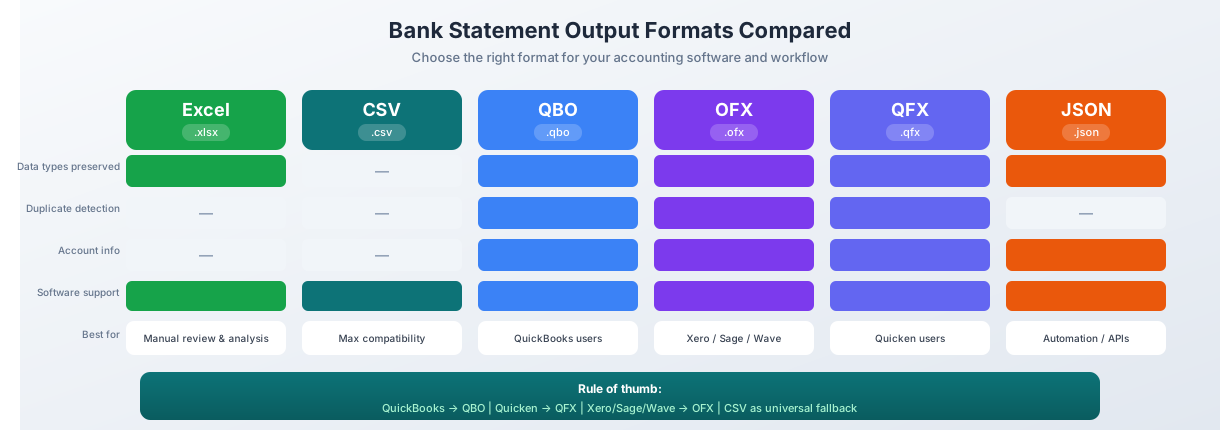
When you convert a bank statement, you choose an output format. Each format has different strengths, limitations, and ideal use cases.
Excel (.xlsx)
Standard: Office Open XML (OOXML), standardized as ECMA-376 and ISO/IEC 29500.
What it is: An .xlsx file is actually a ZIP archive containing XML files - workbook structure, cell data, styles, and shared strings. This is why it can store data types (dates as dates, numbers as numbers), formatting, formulas, and multiple sheets.
Why it's popular for bank statements:
- Dates remain dates (sortable, filterable)
- Numbers remain numbers (summable, formattable)
- Formulas for reconciliation (SUM, VLOOKUP)
- Pivot tables for spending categorization
- Conditional formatting to highlight discrepancies
- Share with clients who need a readable spreadsheet
Limitations:
- Maximum 1,048,576 rows (rarely relevant for bank statements)
- Not directly importable into most accounting software (use QBO/OFX instead)
- Requires Excel, Google Sheets, or LibreOffice Calc to open
Best for: Manual review, custom analysis, reconciliation, archiving, client reporting.
CSV (Comma-Separated Values)
Standard: RFC 4180 (2005) - "Common Format and MIME Type for Comma-Separated Values."
Core rules:
- Records delimited by CRLF (carriage return + line feed)
- Fields separated by commas
- Fields containing commas, quotes, or line breaks must be enclosed in double quotes
- Double quotes within fields escaped by doubling them
Delimiter variations in the wild:
- Comma (
,) - Standard, used in US/UK - Semicolon (
;) - Used in countries where comma is the decimal separator (France, Germany, Italy, Spain, Brazil) - Tab (
\t) - TSV format, avoids delimiter conflicts
Encoding issues:
- UTF-8 is recommended for interoperability
- UTF-8 BOM (Byte Order Mark): Not required by the standard, but Excel on Windows requires it to correctly display non-ASCII characters (accented letters, currency symbols). Without BOM, Excel may interpret UTF-8 as Windows-1252, corrupting characters.
- Excel uses semicolons instead of commas as field separators in European locales
Limitations:
- No data types - everything is text (numbers with leading zeros get corrupted, long account numbers become scientific notation)
- No multi-sheet support
- No formatting or formulas
- No metadata (no account information, no duplicate detection IDs)
Best for: Maximum compatibility - nearly every accounting program, database, and spreadsheet can import CSV. Universal fallback when QBO/OFX isn't available.
QBO (QuickBooks Web Connect)
What it is: The import format for QuickBooks (both Desktop and Online). QBO files are based on the OFX specification with QuickBooks-specific extensions.
Important clarification: ".QBO" does NOT mean "QuickBooks Online" - it stands for QuickBooks Web Connect format and works with both QuickBooks Desktop and QuickBooks Online.
Required fields per transaction:
TRNTYPE- Transaction type (DEBIT, CREDIT, CHECK, DEP, DIRECTDEP, DIRECTDEBIT, ATM, POS, XFER, PAYMENT, FEE, SRVCHG, INT, OTHER)DTPOSTED- Date in YYYYMMDD formatTRNAMT- Amount (negative for debits)FITID- Financial Institution Transaction IDNAME- Payee/description
Why FITID matters: QuickBooks tracks every FITID ever imported for each account. If a transaction with the same FITID is imported again, QuickBooks silently skips it - preventing duplicate entries when users re-import overlapping statement periods. This automatic duplicate detection is the single biggest advantage of QBO over CSV.
Additional data: QBO also carries account ID, bank ID (routing number), currency, check number, memo, and ending balance - the richest data set of any import format for QuickBooks.
Best for: QuickBooks users (Desktop and Online). Provides the richest import experience with automatic duplicate detection and transaction type classification.
OFX (Open Financial Exchange)
History: Created by Microsoft, Intuit, and CheckFree. Version 1.0 released February 1997.
Version evolution:
- OFX 1.0–1.6 (1997–1999): SGML-based syntax (no closing tags required)
- OFX 2.0+ (2000–present): XML-based (proper closing tags, well-formed XML)
Many banks still produce OFX 1.x (SGML) for maximum compatibility.
Current governance: In 2019, the OFX consortium merged into the Financial Data Exchange (FDX) consortium, which now manages the specification. FDX has over 200 member organizations and 76 million consumer accounts.
Why OFX is the universal standard: OFX is the same format used when you connect your bank account directly to accounting software via bank feeds - the same format works for file imports.
Best for Xero users: Xero auto-imports OFX files without requiring manual column mapping. Upload the file and transactions appear immediately with correct dates, amounts, and descriptions. Also works with Wave, Sage, FreshBooks, and most accounting software.
QFX (Quicken Financial Exchange)
What it is: Intuit's proprietary variant of OFX, used exclusively with Quicken. A QFX file is a standard OFX file with additional proprietary fields.
Key proprietary field: INTU.BID - Quicken Bank Identifier. This numeric ID maps to a bank in Quicken's internal database. Without it, Quicken refuses to import the file.
Differences from standard OFX:
- Requires INTU.BID in the header
- May include other INTU.* prefixed fields
- Financial institutions pay Intuit a licensing fee to provide QFX download
- Quicken will not import standard OFX files without the INTU.BID field
Best for: Quicken personal finance software users. Required format - no alternative works.
QIF (Quicken Interchange Format)
What it is: A legacy plain-text format originally developed by Intuit for Quicken. Tag-value pairs, one per line, with single character tags: D for date, T for amount, P for payee, L for category, M for memo, N for check number, ^ for end-of-record.
Why it was replaced: QIF lacks a duplicate-detection mechanism (no FITID equivalent), has no account identification fields, no bank routing information, no balance data, and inconsistent date formatting across implementations.
Still relevant: Some accounting software (Xero, Sage, GnuCash) still accepts QIF imports. Useful for legacy system migrations.
JSON (JavaScript Object Notation)
Current status: JSON is not yet a standard for bank statement files, but is increasingly used in:
- Open Banking APIs (UK Open Banking Standard, PSD2 Berlin Group)
- FDX API (Financial Data Exchange - successor to OFX, 200+ member organizations)
- Plaid, Yodlee, MX and other data aggregator APIs
- Developer and automation workflows
Growing adoption: Open Banking regulations (PSD2 in Europe, CFPB Section 1033 in the US) are accelerating JSON API adoption. The FDX API uses JSON/REST with OAuth 2.0, representing the future direction of financial data exchange.
Best for: Developers building automated workflows, fintech integrations, custom dashboards, and Open Banking API integrations.
Format Comparison at a Glance
| Format | Data Types | Duplicate Detection | Account Info | Accounting Software Support | Best For |
|---|---|---|---|---|---|
| Excel | Yes | No | No | Limited | Manual review, analysis |
| CSV | No | No | No | Universal | Maximum compatibility |
| QBO | Yes | Yes (FITID) | Yes | QuickBooks | QuickBooks users |
| OFX | Yes | Yes (FITID) | Yes | Most software | Xero, Wave, Sage |
| QFX | Yes | Yes (FITID) | Yes | Quicken only | Quicken users |
| QIF | Partial | No | No | Some legacy | Legacy migrations |
| JSON | Yes | Custom | Yes | API-based | Developers, automation |
Accounting Software Compatibility
Which format does your accounting software accept?
| Software | QBO | OFX | QFX | QIF | CSV | Best Choice |
|---|---|---|---|---|---|---|
| QuickBooks Online | Yes | Yes | Yes | No | Yes | QBO |
| QuickBooks Desktop | Yes | Yes | Yes | No | Yes | QBO |
| Quicken | No | No | Yes | Yes | No | QFX |
| Xero | Yes | Yes | Yes | Yes | Yes | OFX |
| Sage | No | Yes | No | Yes | Yes | OFX |
| Wave | No | Yes | Yes | No | Yes | OFX |
| FreshBooks | No | No | No | No | Yes | CSV |
| Zoho Books | No | Yes | No | Yes | Yes | OFX |
| GnuCash | No | Yes | No | Yes | Yes | OFX |
Rule of thumb: Use QBO for QuickBooks, QFX for Quicken, OFX for everything else, and CSV as a universal fallback.
International Format Differences
If you work with international bank statements, you'll encounter formatting differences that trip up most conversion tools.
Date Formats
| Region | Format | Example | Notes |
|---|---|---|---|
| United States | MM/DD/YYYY | 03/15/2026 | Month first |
| Europe, Latin America | DD/MM/YYYY | 15/03/2026 | Day first |
| Germany | DD.MM.YYYY | 15.03.2026 | Period separator |
| Japan | YYYY年MM月DD日 | 2026年03月01日 | Year first with kanji |
| China | YYYY年MM月DD日 | 2026年3月1日 | Similar to Japan |
| ISO 8601 | YYYY-MM-DD | 2026-03-15 | Unambiguous international standard |
The ambiguity problem: "03/04/2026" is March 4 in the US but April 3 in Europe. When all dates in a statement have day values of 12 or less, there's no algorithmic way to determine the correct format without knowing the country of origin. Conversion tools must scan all dates in the statement, looking for values greater than 12 to determine the format.
Number Formats
| Region | One Thousand and Fifty Cents | Notes |
|---|---|---|
| US, UK, Australia, Japan | 1,000.50 | Comma for thousands, period for decimal |
| Germany, France, Spain, Brazil, Italy | 1.000,50 | Period for thousands, comma for decimal |
| Switzerland | 1'000.50 | Apostrophe for thousands |
| India | 1,00,000.50 | Lakh grouping system |
| Scandinavia | 1 000,50 | Space for thousands, comma for decimal |
"10.000,45" from a European bank means ten thousand and forty-five cents - not ten point zero zero zero four five. Getting this wrong produces errors of 10,000x magnitude.
Currency Symbol Placement
- US/UK: Symbol before amount: $1,234.56 / £1,234.56
- France, Germany, Spain: Symbol after amount: 1.234,56 €
- Ireland, Netherlands: Symbol before: €1,234.56
- Japan: Symbol before: ¥123,456
Character Encodings
- UTF-8 - Universal standard, supports all scripts
- GBK/GB2312 - Simplified Chinese (used by Chinese banks)
- Shift_JIS - Japanese (used by Japanese banks)
- Big5 - Traditional Chinese (Taiwan, Hong Kong)
- EUC-KR - Korean
- ISO 8859-1 - Western European
- Windows-1252 - Western European (legacy)
- Windows-1256 - Arabic
Opening a Chinese or Japanese bank statement on a US system without correct encoding detection produces garbled characters. PDFSub handles 130+ languages with automatic detection of date formats, number formats, and character encodings - including right-to-left Arabic and Hebrew, CJK characters, and all European character sets.
Common Bank Statement Elements
Transaction Date vs. Posting Date vs. Value Date
Bank statements may include multiple dates for a single transaction:
- Transaction date - When the purchase or transfer actually occurred
- Posting date - When the bank processed and recorded it (typically 1–3 business days later for credit card purchases)
- Value date - When funds actually became available (affects interest calculations, common in international banking)
Most consumer statements show only the posting date. Business statements often include both transaction and posting dates.
Debit/Credit Representation
Banks represent debits and credits differently:
- Signed amounts: -87.50 for debits, +3,500.00 for credits
- Separate columns: "Withdrawals" and "Deposits"
- Abbreviations: "DR" for debit, "CR" for credit (common in UK/Commonwealth)
- Parentheses: (87.50) for debits (accounting convention)
Running Balance
- Per-transaction balance - Updated after every transaction (most common in US consumer statements)
- Daily balance only - Balance shown at end of each day (common in business statements)
- No running balance - Only opening and closing balances (some international statements)
Running balances are valuable for validation: you can verify that each transaction correctly moves the balance from one line to the next.
Standard Header Information
Most bank statements include: account holder name, account number (often partially masked), statement period, opening and closing balances, total deposits and withdrawals, and bank routing/sort code/SWIFT BIC.
Password Protection
How Banks Encrypt PDFs
Banks typically use AES-128 or AES-256 encryption. Two protection modes exist:
- User password (open password): Required to open the file
- Owner password (permissions password): PDF opens but editing/copying may be restricted
Common Password Patterns
| Bank | Typical Password |
|---|---|
| Chase | Full 9-digit SSN |
| Bank of America | SSN or TIN |
| Wells Fargo | SSN or last 4 digits of SSN |
| Capital One | Date of birth (MMDDYYYY) |
Other common patterns include last 4 digits of account number, customer ID, or member number. Banks typically communicate the password pattern when you first enable electronic statements.
Multi-Page Statement Challenges
Long statements (business accounts with hundreds of transactions) create several extraction challenges:
Split Transactions
A transaction description may start at the bottom of one page and continue at the top of the next. The converter must detect continuation lines and merge them into a single transaction.
Repeated Headers and Footers
Most banks repeat column headers on every page, plus page numbers, legal disclaimers, and marketing text. These must be identified and excluded from the transaction data.
Continuation Lines
Many transactions have multi-line descriptions:
01/15  ACH ELECTRONIC DEBIT VENDOR CORP         $3,200.00  $2,000.00
       REF#123456789 INVOICE 2026-001
       VENDOR CORP ACCOUNTS PAYABLE
Lines 2 and 3 are continuation lines belonging to the transaction on line 1. They typically lack a date and amount, appearing indented at the same x-coordinate as the description column.
Balance Carry-Forward
Some banks include "Balance Forward" or "Balance Brought Forward" lines at the top of continuation pages. These are informational, not transactions, and must be excluded from extracted data.
Common Transaction Abbreviations
Bank statements use abbreviations that vary across institutions:
| Abbreviation | Meaning |
|---|---|
| ACH | Automated Clearing House (electronic transfers) |
| ATM | Automated Teller Machine |
| POS | Point of Sale (debit card) |
| EFT | Electronic Funds Transfer |
| INT | Interest payment |
| CHK / CK | Check |
| WD / W/D | Withdrawal |
| DEP | Deposit |
| DD | Direct Deposit |
| OD | Overdraft |
| NSF | Non-Sufficient Funds |
| SRVCHG | Service Charge |
| XFER | Transfer |
Industry Standards You Should Know
These formats are used in corporate banking and treasury management. You'll rarely encounter them directly, but understanding them explains why bank statements work the way they do.
BAI2 (Bank Administration Institute)
Used for automated cash management and bank reconciliation in ERP systems (SAP, Oracle). A fixed-width ASCII format with transaction type codes (e.g., 165 = preauthorized ACH credit, 455 = ACH debit, 495 = wire transfer out). Originally released in 1987, now maintained by ASC X9.
SWIFT MT940 / MT942
End-of-day (MT940) and intraday (MT942) bank statements used by banks worldwide for corporate customers and treasury departments. SWIFT processes approximately 45 million messages per day. Tag-based format with colon-delimited field identifiers.
ISO 20022 (camt.053)
The modern XML-based replacement for MT940. Part of the ISO 20022 universal financial messaging standard. Richer data than MT940, no field length limits, machine-parseable XML with XSD validation. SWIFT is migrating from MT messages to ISO 20022. SEPA (Single Euro Payments Area) mandates camt format for European payments.
NACHA ACH
The file format for Automated Clearing House transactions in the US. Fixed-width ASCII, exactly 94 characters per line. ACH processes approximately 30 billion transactions per year in the US. When your bank statement shows "ACH CREDIT" or "ACH DEBIT," the underlying transaction was transmitted in NACHA format between banks.
Choosing the Right Format for Your Workflow
Decision Guide
Use QBO if: You use QuickBooks (Desktop or Online). You get transaction type classification, duplicate detection via FITID, and the richest import metadata.
Use OFX if: You use Xero, Sage, Wave, or other OFX-compatible software. Xero auto-maps fields without manual column configuration.
Use QFX if: You use Quicken. It's the only format Quicken accepts.
Use Excel if: You need to review, analyze, or manipulate data before importing. Create pivot tables, run formulas, or prepare reports.
Use CSV if: Your software isn't listed above, or you need maximum compatibility across systems. Be prepared to map columns manually.
Use JSON if: You're building automated workflows, API integrations, or custom reporting systems.
Pro Tips
- Always use QBO/OFX over CSV when your software supports it - the duplicate detection alone prevents hours of cleanup
- Keep the original PDF alongside your converted file - it's your audit trail and source document
- Verify after every import - spot-check opening/closing balances and a few random transactions
- Match format to software - using the native format for your accounting platform avoids manual column mapping and enables automatic features
Try It Free
Ready to convert your first statement? Upload a PDF now - PDFSub converts to Excel, CSV, QBO, OFX, QFX, and JSON. Digital statements are processed entirely in your browser for maximum privacy. Start a 7-day free trial with full access to all formats.