How to Process Multi-Currency Bank Statements
International clients mean bank statements in euros, pounds, yen, and rupees - with different date formats, decimal separators, and currency symbols. Here's how to handle them all.
Your client list spans three countries. One client banks in Germany, another in Japan, and a third in India. Each month, you receive bank statements in euros, yen, and rupees - with dates written differently, decimals handled differently, and amounts formatted in ways that would trip up any tool designed for a single locale.
Welcome to the reality of international bookkeeping. Multi-currency bank statement processing isn't just about exchange rates. It's about the fundamental differences in how countries format numbers, dates, and financial documents. Get any of these wrong, and your import into QuickBooks, Xero, or Zoho Books will either fail outright or - worse - silently import incorrect data.
This guide covers the challenges of multi-currency bank statements and provides practical workflows for handling them correctly.
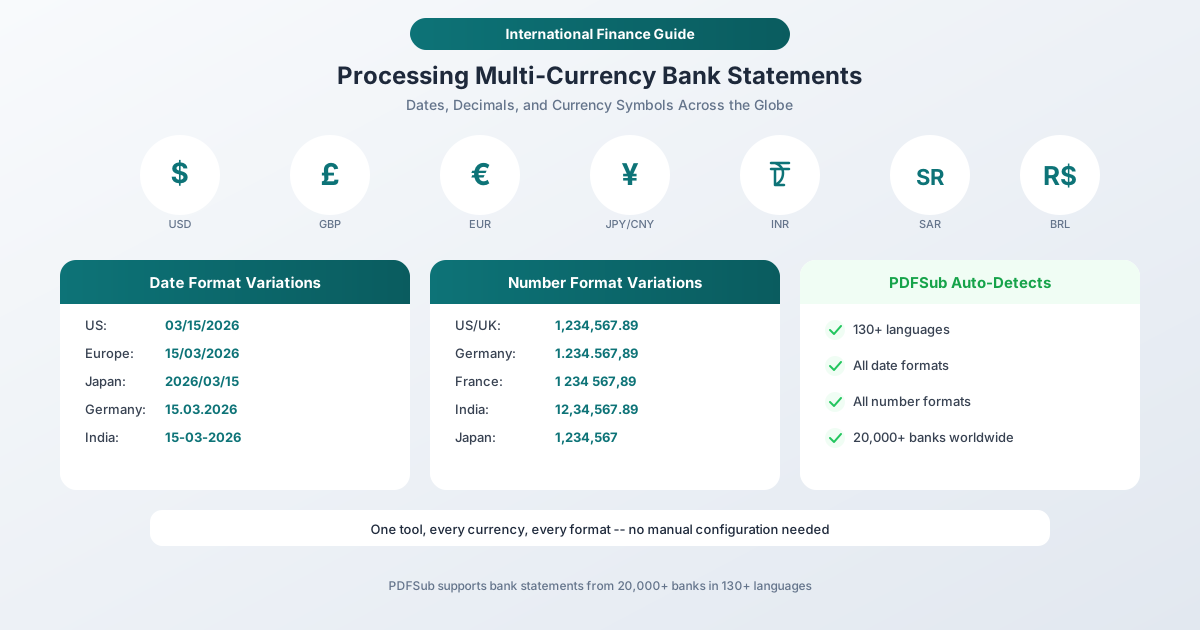
At a Glance: Six Countries, Six Conventions
Before diving into the layers, here is a side-by-side comparison showing how the same three-transaction snippet looks in six countries. Date format, decimal separator, thousand separator, and currency placement all vary independently - which is why generic "international" tools usually only get two of the four right per locale.

Want to use this guide on your blog? Copy this embed code:
The Three Layers of International Formatting
When processing bank statements from different countries, you're dealing with three independent formatting systems that vary by locale.
Layer 1: Date Formats
The same six digits - 03, 06, and 2026 - represent completely different dates depending on where the statement was issued:
| Format | Convention | Used In | Example |
|---|---|---|---|
| MM/DD/YYYY | Month-Day-Year | US, Philippines | 03/06/2026 = March 6 |
| DD/MM/YYYY | Day-Month-Year | UK, EU, India, Australia | 03/06/2026 = June 3 |
| YYYY/MM/DD | Year-Month-Day | Japan, China, Korea | 2026/03/06 = March 6 |
| DD.MM.YYYY | Day.Month.Year | Germany, Austria, Switzerland | 03.06.2026 = June 3 |
| DD-MM-YYYY | Day-Month-Year | India (alternate) | 03-06-2026 = June 3 |
| YYYY-MM-DD | ISO 8601 | International standard | 2026-03-06 = March 6 |
The danger zone is the first two. When the day is 12 or less, 03/06/2026 is ambiguous - it could be March 6 or June 3. If your conversion tool guesses wrong, every date in the statement is off by months. This doesn't cause an error - it causes silently wrong data that you might not catch until reconciliation (or worse, tax filing).
Layer 2: Number Formats
The way countries format numbers is one of the most common sources of conversion errors:
| Country/Region | Thousand Separator | Decimal Separator | Example (one million and 50 cents) |
|---|---|---|---|
| US, UK, Australia | Comma | Period | 1,000,000.50 |
| Germany, France, Italy, Spain | Period | Comma | 1.000.000,50 |
| France (alternate) | Space | Comma | 1 000 000,50 |
| India | Comma (lakhs/crores) | Period | 10,00,000.50 |
| Switzerland | Apostrophe | Period | 1'000'000.50 |
| Japan, China | None (or comma) | None (no decimal, yen are whole units) | 1,000,000 |
The Indian numbering system deserves special mention. India uses the lakh (1,00,000 = 100,000) and crore (1,00,00,000 = 10,000,000) groupings instead of the Western thousand grouping. A number that looks like 12,34,567.89 to an Indian accountant is 1,234,567.89 in Western notation. Standard conversion tools that assume three-digit grouping will misinterpret Indian-formatted numbers.
Layer 3: Currency Symbols and Placement
| Currency | Symbol | Placement | Example |
|---|---|---|---|
| US Dollar | $ | Before amount | $1,234.56 |
| Euro | EUR | Before or after | EUR1.234,56 or 1.234,56 EUR |
| British Pound | GBP | Before amount | GBP1,234.56 |
| Japanese Yen | JPY | Before amount | JPY1,234 |
| Indian Rupee | INR or Rs | Before amount | INR12,34,567 |
| Saudi Riyal | ر.س | After amount (RTL) | ١٢٣٤ ر.س |
| Brazilian Real | R$ | Before amount | R$1.234,56 |
| Swiss Franc | CHF | Before amount | CHF1'234.56 |
Some currencies don't use decimal places at all (Japanese Yen, Korean Won). Others use three decimal places (Bahraini Dinar, Kuwaiti Dinar). And right-to-left languages like Arabic add another dimension - the statement itself may read right-to-left while numbers read left-to-right.
Why Standard Tools Fail at Multi-Currency
Most bank statement conversion tools are built for a single locale - typically US. They assume:
- Dates are MM/DD/YYYY
- Commas separate thousands, periods separate decimals
- Currency symbols are placed before the amount
- Text reads left to right
When you feed these tools a German bank statement with dates formatted as 15.03.2026 and amounts like 1.234,56 EUR, they either crash, produce garbage data, or - in the worst case - silently swap commas and periods, turning 1.234,56 into 1,234.56 (correct) or 1.234 (losing everything after the decimal-that-was-actually-a-comma).
How PDFSub Handles Multi-Currency Statements
PDFSub's Bank Statement Converter is built for international use from the ground up. Here's how it handles each layer of complexity:
Automatic Language and Format Detection
PDFSub supports 130+ languages and auto-detects the language of your bank statement. When it identifies a German-language statement, it automatically applies German formatting conventions. A Japanese statement triggers Japanese conventions. An Indian statement from SBI triggers Indian number grouping.
This detection happens at the document level, so you don't need to manually configure the locale for each statement.
Intelligent Date Parsing
When PDFSub encounters an ambiguous date, it uses context clues from the statement to resolve it:
- Statement header dates - the statement period dates are usually unambiguous (e.g., "Statement Period: January 1 - January 31, 2026")
- Sequential logic - if transactions appear in chronological order and dates follow a pattern, the format can be inferred
- Bank template recognition - PDFSub recognizes templates from 20,000+ banks, many of which have known date format conventions
Number Format Normalization
During extraction, PDFSub normalizes all numbers to a standard format suitable for your target application:
- German
1.234,56becomes1234.56in CSV output - Indian
12,34,567.89becomes1234567.89 - French
1 234 567,89becomes1234567.89 - Swiss
1'234.56stays1234.56
The normalization target depends on your export format and destination accounting software. If you're importing into a US-locale QuickBooks, numbers are formatted with periods as decimals. If you're importing into a German-locale system, the tool can preserve comma-decimal format.
Currency Symbol Handling
PDFSub strips currency symbols during extraction while preserving the currency information in the metadata. This prevents symbols from breaking the amount parsing in your accounting software (which typically expects raw numbers).
Practical Workflow for Multi-Currency Processing
Here's a step-by-step workflow for accountants handling statements from multiple countries.
Step 1: Organize Statements by Currency
Create a folder structure:
Client_Name/
  USD/
    checking_2026-01.pdf
    checking_2026-02.pdf
  EUR/
    sparkasse_2026-01.pdf
    sparkasse_2026-02.pdf
  INR/
    sbi_2026-01.pdf
    sbi_2026-02.pdf
Step 2: Convert Each Statement
Process each statement through PDFSub's Bank Statement Converter:
- Upload the PDF
- PDFSub auto-detects the language and format
- Review extracted transactions - verify dates and amounts against the original
- Export in your target format (CSV, Excel, OFX, QBO, QIF)
Critical review step: For each conversion, spot-check at least 3-5 transactions:
- Compare a date from the original PDF against the converted output
- Compare a large amount (with thousand separators) against the converted output
- Compare a small amount (with decimals) against the converted output
- Verify the transaction count matches
Step 3: Standardize for Your Accounting Software
Before importing into your accounting software, ensure consistency:
- All dates in the same format - YYYY-MM-DD is safest for cross-locale compatibility
- All amounts in the same number format - decimal point, no thousand separators
- Currency identified per account - each bank account in your software should be set to the correct currency
- Consistent column structure - Date, Description, Amount (or Date, Description, Debit, Credit)
Step 4: Import and Reconcile
Import each currency's transactions into the corresponding bank account in your accounting software. Key points:
- Separate accounts per currency - don't mix EUR and USD transactions in the same account
- Exchange rate handling - set the exchange rate at the transaction level or use your software's built-in rate service
- Reconcile each account independently - match converted transactions against bank balances in the original currency
Exchange Rate Considerations
Multi-currency processing often involves exchange rate conversion at some point. A few important principles:
Don't convert during extraction. Keep transactions in their original currency during the bank statement conversion step. Convert exchange rates in your accounting software, where the rates can be tracked, audited, and adjusted.
Record the original amount. Your books should always show the original currency amount alongside any converted amount. This is essential for audit trails and for reconciling against original bank statements.
Daily vs. monthly rates. For most bookkeeping purposes, daily exchange rates at the transaction date are most accurate. Monthly average rates are acceptable for tax purposes in many jurisdictions but less precise.
Your accounting software handles this. QuickBooks, Xero, Zoho Books, and most modern platforms have built-in multi-currency features. Let the software handle exchange rate conversion - don't try to do it in the bank statement file.
Right-to-Left Language Statements
Bank statements in Arabic, Hebrew, Farsi, and Urdu present an additional challenge: right-to-left (RTL) text direction. The statement layout may mirror what you'd expect - account information on the right, amounts on the left, and text reading right-to-left.
PDFSub handles RTL statements natively. The extraction engine reads the underlying text data (which has explicit direction markers in the PDF) rather than trying to interpret the visual layout direction. This means Arabic bank statements are extracted with the same accuracy as English ones.
If you're working with Arabic or Hebrew statements, the workflow is identical to any other language - upload, auto-detect, review, export.
Common Multi-Currency Conversion Mistakes
Mistake 1: Assuming MM/DD for All Dates
A 03/06/2026 date on a UK bank statement is June 3, not March 6. If your tool assumes US format, every date in the statement is wrong. Always verify the date format by checking against the statement period header.
Mistake 2: Ignoring Thousand Separator Conventions
A German amount of 1.234 is one thousand two hundred thirty-four, not one point two three four. If your tool treats the period as a decimal separator, you've just divided the amount by a thousand.
Mistake 3: Converting Currency During Extraction
Converting EUR amounts to USD during the bank statement extraction step bakes an exchange rate into your data that can't be audited or adjusted later. Keep original currency amounts; convert in your accounting software.
Mistake 4: Mixing Currencies in One Import
Importing German EUR transactions into a USD bank account in QuickBooks creates incorrect entries. Each currency needs its own bank account in your accounting software.
Mistake 5: Not Verifying Indian Number Grouping
Indian lakhs and crores grouping is frequently misinterpreted. 10,00,000 is 1,000,000 (ten lakhs = one million) - not 100,000 or 1,000,000.0.
Frequently Asked Questions
How does PDFSub detect the language of a bank statement?
PDFSub analyzes the text content of the PDF to identify the language - looking at common banking terms, header patterns, and character sets. It recognizes 130+ languages and applies the corresponding locale conventions for date and number parsing. For statements from the 20,000+ banks in its database, it also uses bank template recognition for additional accuracy.
Can I process bank statements that mix multiple languages?
Yes. Some international banks issue statements with headers in the local language and transaction descriptions in English. PDFSub handles mixed-language statements by detecting the primary language for formatting conventions (dates, numbers) while preserving the original text of transaction descriptions regardless of language.
What about currencies with no decimal places (JPY, KRW)?
PDFSub recognizes currencies that don't use decimal places and handles them correctly. A Japanese bank statement showing 15,000 is extracted as 15000 with no decimal component. This prevents the common error of tools adding .00 to yen amounts, which is technically correct but can cause formatting issues in some accounting software.
How do I handle exchange rates when importing into QuickBooks or Xero?
Both QuickBooks and Xero have built-in multi-currency features. Create bank accounts in each currency, import transactions in their original currency, and let the software apply exchange rates. QuickBooks uses daily rates from its integrated service. Xero allows manual or automatic rate entry. The key is importing the original-currency amount, not a pre-converted amount.
What if the bank statement PDF is in a non-Latin script (Arabic, Chinese, Japanese)?
PDFSub extracts text from the PDF's data layer, which contains the actual character data regardless of script. Arabic, Chinese, Japanese, Korean, Hindi, and other non-Latin scripts are all supported. The extracted transactions preserve the original script in descriptions while normalizing dates and amounts to your chosen output format.
Summary
Multi-currency bank statement processing is about more than exchange rates. It's about handling the fundamental formatting differences in how countries write dates, numbers, and currency amounts. Getting any of these wrong leads to silent data errors that compound over time.
PDFSub eliminates this complexity by auto-detecting languages, date formats, and number conventions across 20,000+ banks in 130+ languages. Whether your client banks in Frankfurt, Tokyo, or Mumbai, the workflow is the same: upload the PDF, review the extraction, and export in the format your accounting software expects.
Process multi-currency bank statements - auto-detect language and format for any bank worldwide.