PDFSub vs Nanonets: Honest Comparison (2026)
A detailed head-to-head comparison of PDFSub and Nanonets - features, pricing, privacy, and more.
PDFSub is best for:
- Accountants, bookkeepers, and small firms who need affordable extraction without enterprise pricing
- Non-technical users who want a browser UI instead of API-based document processing
- Teams needing instant results without training custom ML models on sample documents
- Users who want bank statement conversion, AI extraction, and 98+ PDF tools at $20/month annual
PDFSub is NOT best for:
- Enterprise teams building automated document pipelines at scale with custom-trained AI models
- Organizations needing API access for integration into existing tech stacks
- High-volume operations requiring workflow automation with human-in-the-loop validation
Nanonets and PDFSub both use AI to extract data from documents. But they approach the problem from completely different directions - different audiences, different price points, and different philosophies about what a document processing tool should be.
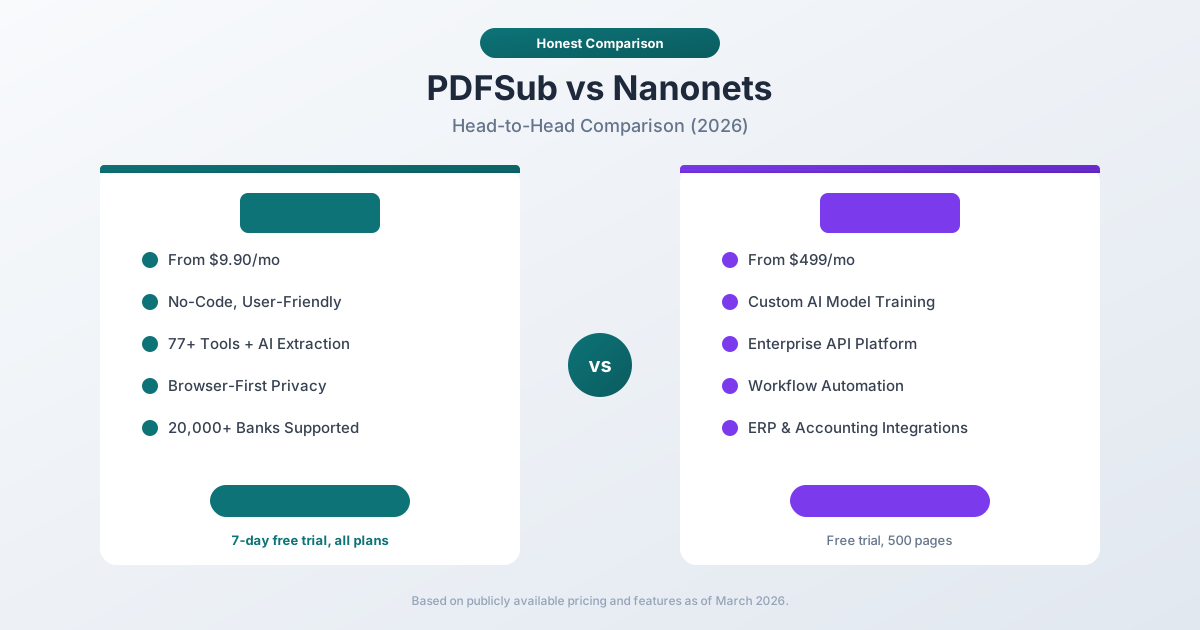
Nanonets is an enterprise AI extraction platform that starts at $499/month, requires model training, and is built primarily for developers and operations teams who need to automate high-volume document processing pipelines.
PDFSub is a user-friendly document platform with an All-In-One plan at $20/month annual ($25/month monthly) that combines 98+ PDF tools with AI-powered extraction, bank statement conversion (500 pages/mo included), e-sign with no per-envelope fees, 50 GB cloud storage, and 130+ language support - all accessible through a simple browser interface with no code required.
This comparison breaks down where each tool genuinely excels and where it falls short.
Quick Verdict
The 30-second split - these are very different products that happen to overlap on "AI document extraction."
Choose PDFSub if…
- You're an individual, small business, accountant, or bookkeeper - not an engineering team building a document pipeline.
- You want a browser interface where you upload a document and get clean output, no code or model training required.
- You need bank statement conversion (20,000+ banks, 8 export formats) alongside 98+ general PDF tools.
- Your budget is hundreds per year, not thousands - $20/mo annual fits where Nanonets' $499+/mo doesn't.
Choose Nanonets if…
- You're building automated document processing pipelines into ERP, CRM, or accounting systems with API integration as the core requirement.
- You need to train custom AI models for specialized document types - insurance claims, custom forms, industry-specific documents.
- You have a technical team to manage workflow automation, human-in-the-loop validation, and ongoing model improvement.
- Your document volume is enterprise-scale (thousands per day) and per-page processing economics justify the platform cost.
These are fundamentally different products. Nanonets is a developer-oriented automation platform. PDFSub is an end-user document platform. The overlap is limited to AI-powered data extraction.
Company Overviews
PDFSub is a document platform offering 98+ tools for PDF processing, AI-powered document features (summarization, translation, data extraction, chat), and specialized bank statement conversion supporting 20,000+ financial institutions. Editing tools run entirely in your browser. Conversions and advanced processing are powered by the PDFSub Engine - an isolated service with no internet access. Files are processed in an isolated environment and auto-deleted. It is designed for individuals, small businesses, accountants, and bookkeepers who work with documents regularly.
Nanonets is an enterprise AI document extraction and automation platform founded in 2017. It specializes in training custom machine learning models to extract structured data from any document type - invoices, purchase orders, bank statements, receipts, insurance claims, tax forms, and more. Nanonets provides a REST API, workflow automation, ERP integrations, and human-in-the-loop validation. It targets mid-market to enterprise companies with high document volumes and technical teams.
Ease of Use
This is the most fundamental difference between the two platforms.
PDFSub is designed for immediate use. You visit the website, select a tool, upload your document, and get your result. No account setup required for basic tools. No training data needed. No API keys to configure. A bookkeeper can convert bank statements on their first visit. A marketing manager can summarize a report. There is zero technical barrier.
Nanonets requires setup before you can extract data. The typical onboarding process involves:
- Creating an account and selecting a document type
- Uploading training documents (typically 50–100 sample documents)
- Annotating fields you want to extract (drawing bounding boxes, labeling data)
- Training the model (can take minutes to hours depending on complexity)
- Testing and validating results
- Deploying the model to production
- Integrating via API or setting up automated workflows
This process can take days to weeks. It produces highly accurate extraction for your specific document types, but the time and expertise investment is substantial.
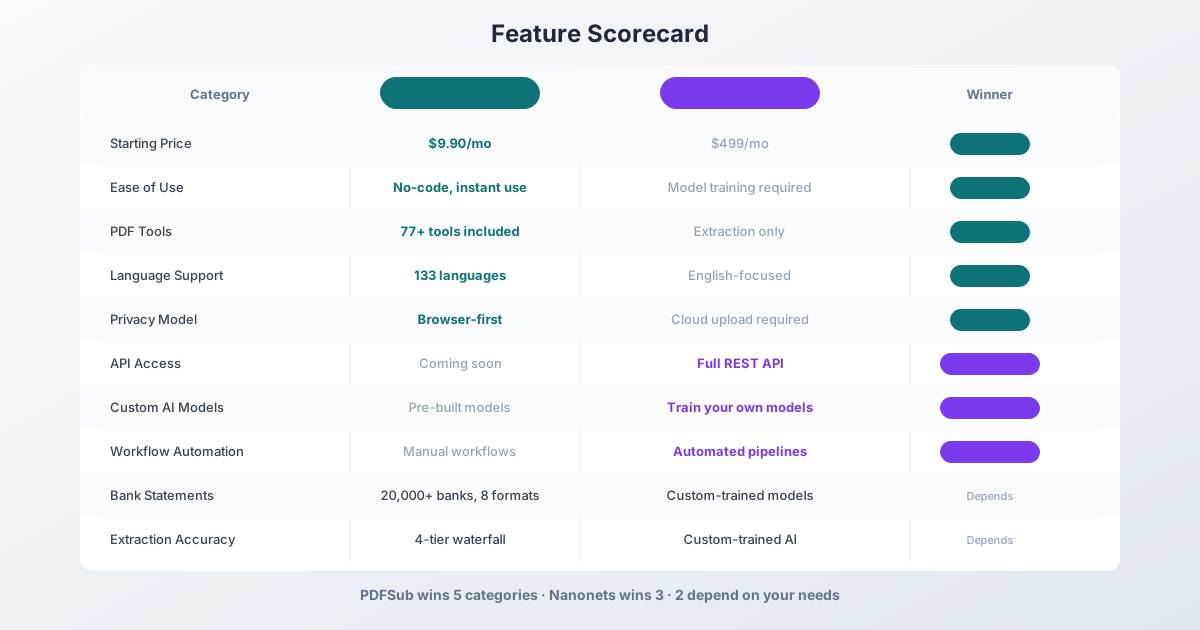
Winner: PDFSub - zero setup, instant results. Nanonets requires significant onboarding before any value is delivered.
Extraction Accuracy
Both tools achieve strong extraction accuracy, but through different mechanisms.
PDFSub uses a 4-tier extraction waterfall:
- Tier 1 - Coordinate-based extraction in your browser (no upload)
- Tier 2 - Server-side coordinate extraction for complex layouts
- Tier 3 - OCR + AI for scanned documents
- Tier 4 - AI vision for the most challenging formats
This approach is template-agnostic - it works across 20,000+ bank formats without requiring training data for each bank.
Nanonets uses custom-trained deep learning models. You feed it examples of your specific document types, and it learns to extract the fields you need. For high-volume, consistent document types (like your company's standard invoice format), this can achieve very high accuracy because the model is specifically tuned to your documents.
The tradeoff: PDFSub works immediately on any bank statement from any institution. Nanonets achieves potentially higher accuracy on your specific documents after training, but requires that training investment upfront and may struggle with document types it has not been trained on.
Winner: Depends - PDFSub for breadth (any bank, any format, no training). Nanonets for depth (highest accuracy on specific trained document types).
Pricing Comparison
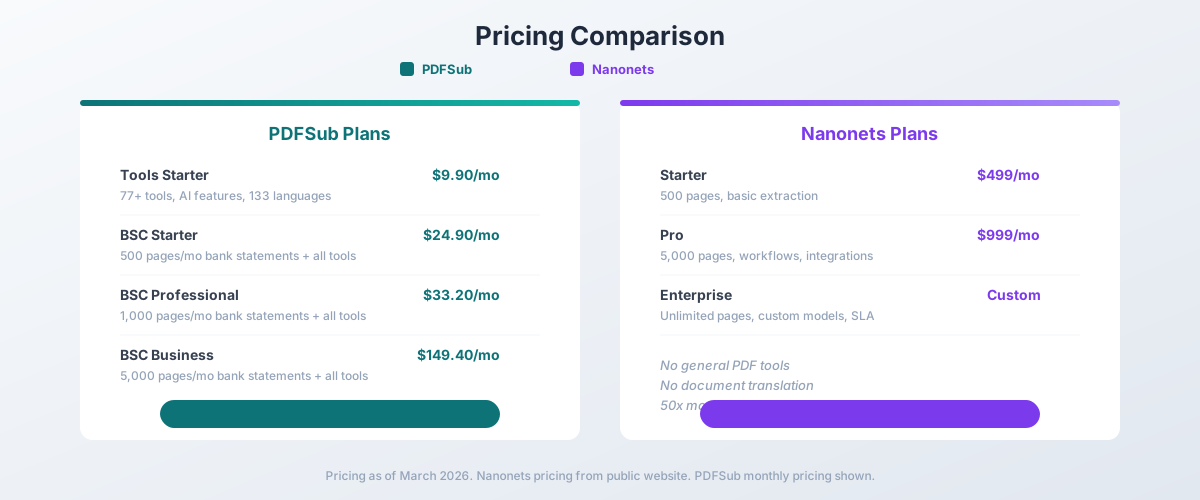
This is where the gap is most dramatic.
PDFSub Pricing
| Plan | Price | Key Features |
|---|---|---|
| All-In-One (annual) | $20/mo ($240/yr) | 98+ tools, 500 AI credits/mo, 500 bank statement pages/mo, e-sign + form filling, 50 GB cloud storage, unlimited team seats (each billed at the same per-user rate) |
| All-In-One (monthly) | $25/mo | Same as annual, billed monthly |
| Add-ons | Stackable | 500 AI credits, 500 bank statement pages, 40 GB storage, priority support |
All plans include a 7-day free trial with full functionality.
Nanonets Pricing
| Plan | Monthly Price | Key Features |
|---|---|---|
| Starter | $499 | 500 pages, basic extraction, email support |
| Pro | $999 | 5,000 pages, workflows, integrations, priority support |
| Enterprise | Custom | Unlimited pages, custom models, dedicated support, SLA |
Nanonets offers a free trial with 500 pages, but ongoing usage starts at $499/month.
The Math
The pricing difference is staggering:
| Use Case | PDFSub Cost | Nanonets Cost | Savings with PDFSub |
|---|---|---|---|
| AI extraction (general) | $20/mo annual (All-In-One) | $499/mo (Starter) | $474/mo ($5,688/yr) |
| Bank statement conversion (500 pages/mo) | $20/mo annual (All-In-One, 500 pages included) | $499/mo (Starter) | $474/mo ($5,688/yr) |
PDFSub costs about 95% less than Nanonets at entry level. A firm switching from Nanonets to PDFSub saves over $5,600 per year.
Winner: PDFSub - about 20x cheaper at entry level. The price difference is not marginal; it is an order of magnitude.
API & Automation
This is Nanonets' strongest category.
Nanonets provides a comprehensive REST API for every extraction capability. You can:
- Submit documents programmatically
- Receive structured JSON extraction results
- Set up webhooks for async processing
- Build automated pipelines that process documents without human intervention
- Integrate with ERP systems (SAP, Oracle, NetSuite)
- Connect to accounting software (QuickBooks, Xero, Sage)
- Use Zapier and other integration platforms
For a company processing thousands of invoices per month, Nanonets' API and workflow automation eliminate manual document handling entirely.
PDFSub offers a separate developer API product with 10 first-party SDKs (Node, Python, PHP, Go, Ruby, Java, .NET, Rust, C, C++). The v1 scope focuses on HTML → PDF/image/text conversion, with additional document tools planned for future phases. For full document-extraction automation with ERP integrations, Nanonets is currently the more complete enterprise automation platform.
For teams that need automated extraction-driven document processing - receiving documents via email, extracting data, pushing to an ERP, routing for approval - Nanonets provides the deeper automation infrastructure today.
Winner: Nanonets - full REST API and workflow automation are genuine enterprise advantages.
Custom AI Models
Nanonets allows you to train custom extraction models for any document type. If you have a unique form, a specialized report format, or a non-standard document layout, you can teach Nanonets to extract exactly the fields you need. This flexibility is valuable for organizations with proprietary document formats.
The process involves uploading sample documents, annotating the fields you want to extract, and letting the model train. Over time, human-in-the-loop corrections improve accuracy further.
PDFSub uses pre-built AI models optimized for common document types: bank statements, invoices, receipts, financial reports, and general PDFs. These models work well for standard document formats from thousands of institutions, but you cannot train them on custom document types.
If you need to extract data from a proprietary internal form that no commercial tool would recognize, Nanonets has a clear advantage.
Winner: Nanonets - custom model training is essential for specialized document types.
PDF Tools & General Features
This is where PDFSub's broader platform shines.
| Feature | PDFSub | Nanonets |
|---|---|---|
| Merge PDF | Yes | No |
| Split PDF | Yes | No |
| Compress PDF | Yes | No |
| Convert PDF | Yes (Word, Excel, images) | No |
| Rotate/Reorder | Yes | No |
| Watermark | Yes | No |
| AI Summarize | Yes | No |
| AI Translate | Yes (130+ languages) | No |
| AI Chat | Yes | No |
| PDF to Spreadsheet | Yes | Yes (extraction only) |
| Total Tools | 98+ | ~5 (extraction-focused) |
Nanonets is laser-focused on data extraction. It does not merge PDFs, compress files, add watermarks, translate documents, or summarize content. If you need any general PDF tool alongside your extraction workflow, you need a separate platform.
PDFSub is a full document platform. One subscription covers extraction, conversion, and every common PDF operation. For a bookkeeper who converts bank statements and also needs to merge, compress, and organize PDF files, PDFSub replaces multiple tools.
Winner: PDFSub - 98+ tools versus extraction-only. Nanonets requires additional tools for basic PDF operations.
Language & International Support
PDFSub supports 130+ languages for AI translation and document processing. Date format detection, number format detection, and currency detection all happen automatically. You can process bank statements from Deutsche Bank (German), ICBC (Chinese), or Banco Santander (Spanish) without configuration.
Nanonets supports multiple languages through its OCR pipeline, but the platform's primary market and documentation are English-focused. Custom models can be trained for non-English documents, but this requires language-specific training data and does not include translation capabilities.
Winner: PDFSub - 130+ language processing with automatic detection and built-in translation.
Privacy & Data Handling
PDFSub runs editing tools entirely in your browser. For bank statement Tier 1 extraction, files never leave your device. Conversions and advanced processing are powered by the PDFSub Engine - an isolated service with no internet access. Files are processed in an isolated environment and auto-deleted after processing.
Nanonets is entirely cloud-based. Every document is uploaded to Nanonets' infrastructure for processing. They offer SOC 2 compliance, data encryption, and enterprise security features on higher plans, but all documents pass through their servers.
For sensitive financial documents, PDFSub's approach - browser-based editing plus the isolated PDFSub Engine - provides stronger privacy than Nanonets' cloud-only model.
Winner: PDFSub - browser-based editing plus isolated PDFSub Engine processing with auto-deletion.
Who Should Choose PDFSub
PDFSub is the better choice if:
- Budget is a factor. $20/month annual versus $499/month is not a minor difference - it is roughly 25x.
- You want immediate results. Upload a document and get structured data without training models.
- You need general PDF tools. Merging, splitting, compressing, translating, summarizing - all in one platform.
- You process bank statements. 20,000+ banks supported with 8 output formats, no training required.
- You work with multiple languages. 130+ language support with automatic detection.
- You are a small team or individual. Accountants, bookkeepers, financial advisors, and small businesses.
- Privacy matters. Editing runs in your browser; conversions use the isolated PDFSub Engine with auto-deletion.
Who Should Choose Nanonets
Nanonets is the better choice if:
- You process thousands of documents monthly. Enterprise-scale automation justifies the price.
- You need API access. Programmatic document processing for automated pipelines.
- You have custom document types. Proprietary forms that require custom-trained AI models.
- You need workflow automation. Documents automatically routed, processed, validated, and pushed to downstream systems.
- You need ERP integration. Direct connections to SAP, Oracle, NetSuite, and accounting software.
- You have a technical team. Developers who can set up, maintain, and optimize the extraction pipeline.
- You have the budget. $499+/month is reasonable for organizations processing high document volumes.
The Bottom Line
Nanonets and PDFSub serve different markets despite the surface-level overlap in AI extraction capabilities.
Nanonets is an enterprise platform for organizations that process thousands of documents monthly and need automated, API-driven extraction pipelines with custom-trained models. It is powerful, flexible, and expensive. If you have the volume and budget to justify $499+/month, and you have a technical team to manage the platform, Nanonets delivers serious automation value.
PDFSub is a user-friendly document platform for individuals and small teams who need document extraction alongside general PDF tools. It works immediately without training, covers 98+ PDF operations in a single subscription, and costs a fraction of enterprise alternatives. For a solo accountant processing 200 bank statements per month, PDFSub delivers the extraction they need at a price that makes sense.
The question is simple: Do you need an enterprise automation platform, or do you need a document tool that works? If you hesitated before answering, PDFSub's 7-day free trial is the faster way to find out.
Frequently Asked Questions
Is Nanonets overkill for a small business?
For most small businesses, yes. Nanonets' $499/month starting price, model training requirements, and API-first approach are designed for organizations processing thousands of documents with technical teams. PDFSub delivers document extraction and 98+ PDF tools at $20/month annual ($25/month monthly) with zero technical setup.
Can PDFSub extract data from custom document types?
PDFSub uses pre-built AI models optimized for common document types: bank statements, invoices, receipts, and financial reports. It can extract general data from most PDF documents through its AI extraction tools. However, it does not support training custom models for proprietary document formats - that is Nanonets' strength.
How does accuracy compare between PDFSub and Nanonets?
Both achieve strong accuracy but through different approaches. Nanonets can achieve very high accuracy on specific document types after training with sample documents. PDFSub uses a 4-tier extraction approach that works across 20,000+ bank statement formats without training. For standard financial documents, both tools produce reliable results.
Does Nanonets have general PDF tools?
No. Nanonets is focused exclusively on data extraction and workflow automation. It cannot merge, split, compress, translate, or summarize PDFs. You would need a separate tool for those operations.
Can I try Nanonets for free?
Nanonets offers a free trial with up to 500 pages of extraction. After that, paid plans start at $499/month. PDFSub offers a 7-day free trial with full access to all features on every plan.
Which tool is better for bank statement conversion?
PDFSub is purpose-built for bank statement conversion with support for 20,000+ banks and 8 output formats (XLSX, CSV, QBO, OFX, QIF, QFX, TSV, JSON). Nanonets can extract data from bank statements with a custom-trained model, but does not offer ready-made accounting format exports like QBO or OFX. For bank statement conversion specifically, PDFSub is the more complete solution.
Can I switch from Nanonets to PDFSub?
If your primary use case is bank statement conversion and general document processing, yes. You would lose deep ERP integrations, custom model training, and Nanonets' extraction-focused workflow automation. You would gain 98+ PDF tools, 130+ language support, browser-first privacy, and savings of about $474/month at the 500-page level.
Already decided to switch? This page covers neutral side-by-side facts. For a migration-focused walkthrough - when Nanonets is overkill, what to test first, and switching FAQ - see the best Nanonets alternative guide.