PDFSub vs MoneyThumb: Honest Comparison (2026)
A detailed head-to-head comparison of PDFSub and MoneyThumb - features, pricing, privacy, and more.
PDFSub is best for:
- Users who want all 8 export formats in one plan instead of buying separate MoneyThumb apps
- Teams needing browser-based access on any device vs MoneyThumb's desktop-only Java install
- International firms processing 130+ languages vs MoneyThumb's English-focused tools
- Professionals who need 98+ PDF tools and AI features alongside bank statement conversion
PDFSub is NOT best for:
- Users who want fully offline, local-only processing with no internet dependency
- Firms with entrenched MoneyThumb desktop-to-QuickBooks Desktop pipelines they rely on daily
- Organizations that need a dedicated account manager or enterprise-grade SLAs
MoneyThumb has been in the bank statement conversion business since the early 2010s, building desktop software that converts PDF bank statements into formats for QuickBooks, Quicken, and spreadsheets. PDFSub takes a completely different approach: a browser-based platform with 98+ tools, 130+ languages, and AI-powered extraction that runs without installing anything.
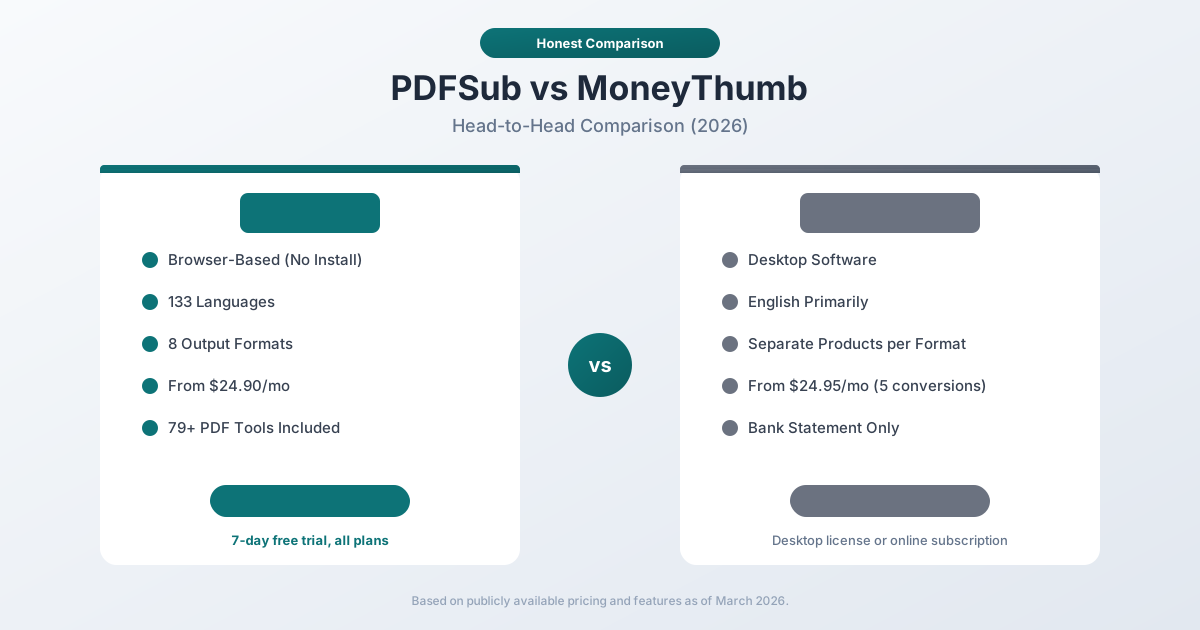
These are two fundamentally different products solving the same core problem. One is desktop software you download and install. The other is a web app you open in your browser. That architectural difference shapes everything else.
Quick Verdict
The 30-second split.
Choose PDFSub if…
- You process international bank statements where 130+ language support and automatic date/currency/number detection matter.
- You want any-device browser access without installing or maintaining desktop software like pdf2qbo or 2qbo Convert Pro.
- You also need invoices, receipts, financial reports, or general PDF tools in the same subscription.
- Flat $20/mo annual pricing fits better than MoneyThumb's per-conversion or per-app desktop licensing model.
Choose MoneyThumb if…
- You've used pdf2qbo or 2qbo Convert Pro for years and the desktop-to-QuickBooks pipeline is built into your routine.
- You want a perpetual desktop license with a one-time-purchase mindset rather than ongoing subscription.
- You exclusively work with English-language US bank and credit card statements that MoneyThumb's apps are tuned for.
- You prefer running conversions fully offline on a local machine for compliance reasons.
Neither tool is universally "better." MoneyThumb is a long-established desktop specialist for the QuickBooks ecosystem; PDFSub is a broader browser-based platform with international coverage.
Company Overviews
PDFSub is a document platform with 98+ PDF and document tools. Bank statement conversion is one part of a larger toolkit that includes PDF merging, splitting, AI summarization, translation, and more. It supports 130+ languages and runs editing tools entirely in your browser. Conversions and advanced processing are powered by the PDFSub Engine - an isolated service with no internet access. Files are processed in an isolated environment and auto-deleted.
MoneyThumb is a long-established financial file conversion company based in California. They sell specialized desktop applications like pdf2qbo, pdf2ofx, pdf2csv, and 2qbo Convert Pro that convert PDF bank and credit card statements into accounting file formats. They also offer MoneyThumb Online, a cloud-based subscription service. MoneyThumb has been serving accountants and bookkeepers for over a decade, and their desktop tools are well-known in the QuickBooks ecosystem.
Desktop vs. Browser: The Core Difference
This is the fundamental distinction between the two products, and it affects everything downstream.
MoneyThumb is primarily desktop software. You download an installer, run it on your Windows or Mac computer, and process files locally. This means:
- Files stay on your machine (good for privacy)
- You need to install and update software
- Licenses are tied to specific computers
- Performance depends on your hardware
- Windows has historically been the primary platform (Mac support varies by product)
PDFSub is entirely browser-based. You open a URL and start working. This means:
- No installation required -- works on any device with a browser
- Most digital PDFs are processed in your browser (never uploaded)
- Works identically on Windows, Mac, Linux, Chromebook, tablets
- Updates happen automatically -- you always have the latest version
- No license keys or machine-specific activation
For solo practitioners who work exclusively on one Windows desktop, this distinction may not matter much. But for anyone who works across multiple devices, shares tools with team members, or simply prefers not to install software, the browser-based approach eliminates friction.
Feature-by-Feature Comparison
Privacy and Security
PDFSub processes most digital bank statements entirely in your browser using client-side JavaScript. Your PDF file never leaves your device for Tier 1 extraction. For scanned documents that require OCR, files are uploaded temporarily and deleted after processing.
MoneyThumb Desktop processes files locally on your computer. Your data never goes to MoneyThumb's servers -- it stays on your machine. This is inherently private for the same reason PDFSub's Tier 1 is private: the file doesn't leave your device.
MoneyThumb Online uploads files to their cloud service for processing, similar to any cloud-based tool.
Assessment: Both PDFSub (Tier 1) and MoneyThumb Desktop keep files local. PDFSub's browser-based processing and MoneyThumb's desktop processing achieve similar privacy outcomes through different mechanisms. MoneyThumb Online loses this advantage.
Document Tools
PDFSub offers 98+ tools beyond bank statement conversion: PDF merging, splitting, compression, watermarking, AI summarization, translation, chat with PDF, invoice extraction, receipt scanning, and more. One subscription covers everything.
MoneyThumb focuses exclusively on financial file conversion. Each product handles a specific conversion path (PDF to QBO, PDF to OFX, PDF to CSV, etc.). There are no general PDF tools -- no merging, splitting, compressing, or editing.
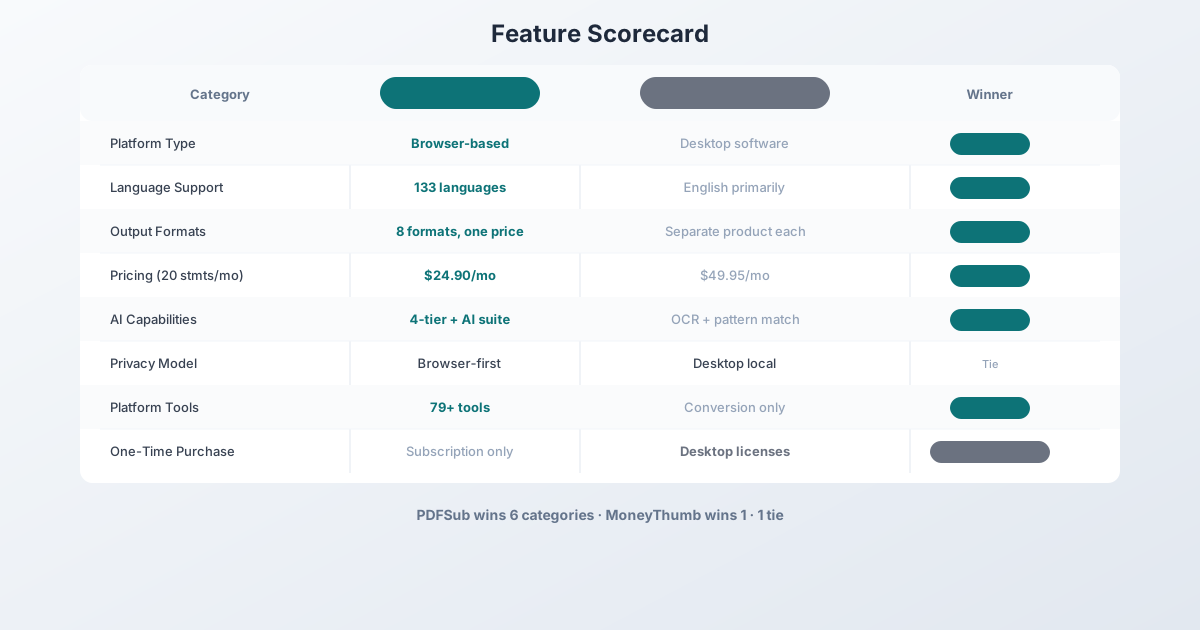
Winner: PDFSub -- a single subscription replaces multiple tools.
AI Capabilities
PDFSub uses a 4-tier extraction approach:
- Coordinate-based extraction in your browser (no AI, no upload)
- Server-side coordinate extraction for complex layouts
- OCR + AI for scanned documents
- AI vision for the most challenging formats
PDFSub also offers AI-powered summarization, translation, data extraction, chat with PDF, invoice extraction, receipt scanning, and financial report analysis.
MoneyThumb uses pattern matching and OCR for text extraction. Their PDF+ add-on provides enhanced OCR for scanned statements. There is no AI-powered analysis, summarization, or conversational features.
Winner: PDFSub -- AI capabilities across extraction and a full suite of AI document tools.
Language Support
| Capability | PDFSub | MoneyThumb |
|---|---|---|
| Languages | 133 (auto-detected) | English primarily |
| Date format detection | Auto (MM/DD, DD/MM, YYYY/MM/DD, CJK) | US/UK formats |
| Number format detection | Auto (US, European, Indian) | US format primarily |
| Currency detection | Auto (any currency) | USD primarily |
| International banks | 20,000+ (template-agnostic) | US/UK/CA banks primarily |
MoneyThumb's documentation and marketing materials focus almost exclusively on US-based banks and English-language statements. If you process international bank statements in Chinese, Arabic, German, Hindi, or any other language, MoneyThumb is not designed for that use case.
Winner: PDFSub -- 130+ languages vs. English-focused.
Bank Statement Support
PDFSub uses template-agnostic extraction that works with any bank's format automatically. It doesn't rely on pre-built templates -- it analyzes the document structure and identifies transaction patterns. This means it works with 20,000+ banks worldwide, including regional banks and credit unions.
MoneyThumb handles statements from major US, UK, and Canadian banks. Their approach works well for common statement formats from the banks they support, but unusual layouts or lesser-known banks may cause issues. Users in reviews mention needing to manually adjust conversion results for some banks.
Winner: PDFSub -- template-agnostic approach handles a wider range of banks.
Output Formats
| Format | PDFSub | MoneyThumb | Used For |
|---|---|---|---|
| XLSX | Yes | Yes (via CSV) | Excel analysis |
| CSV | Yes | Yes | Universal import |
| TSV | Yes | No | Tab-separated |
| JSON | Yes | No | Developer integrations |
| OFX | Yes | Yes (pdf2ofx) | Xero, Wave |
| QBO | Yes | Yes (pdf2qbo) | QuickBooks |
| QFX | Yes | Yes (pdf2qfx) | Quicken |
| QIF | Yes | Yes | Legacy Quicken |
PDFSub exports all 8 formats from a single conversion -- click "Download All" and get a ZIP with everything. MoneyThumb requires separate products for each format (pdf2qbo for QBO, pdf2ofx for OFX, etc.), each with its own license.
Winner: PDFSub -- all formats from one tool, one price.
Pricing Comparison
PDFSub Pricing (Bank Statement Conversion)
| Plan | Price | Bank Statement Pages |
|---|---|---|
| All-In-One (annual) | $20/mo ($240/yr) | 500 pages/mo included, 98+ tools, 500 AI credits/mo, e-sign + form filling, 50 GB cloud storage |
| All-In-One (monthly) | $25/mo | Same as annual, billed monthly |
| Add-ons | Stackable | 500 AI credits, 500 bank statement pages, 40 GB storage, priority support |
All plans include a 7-day free trial with full functionality, all 8 output formats, and no per-conversion limits within your page allowance.
MoneyThumb Pricing
MoneyThumb uses two pricing models:
Online Subscriptions:
| Plan | Monthly Price | Conversions/Month |
|---|---|---|
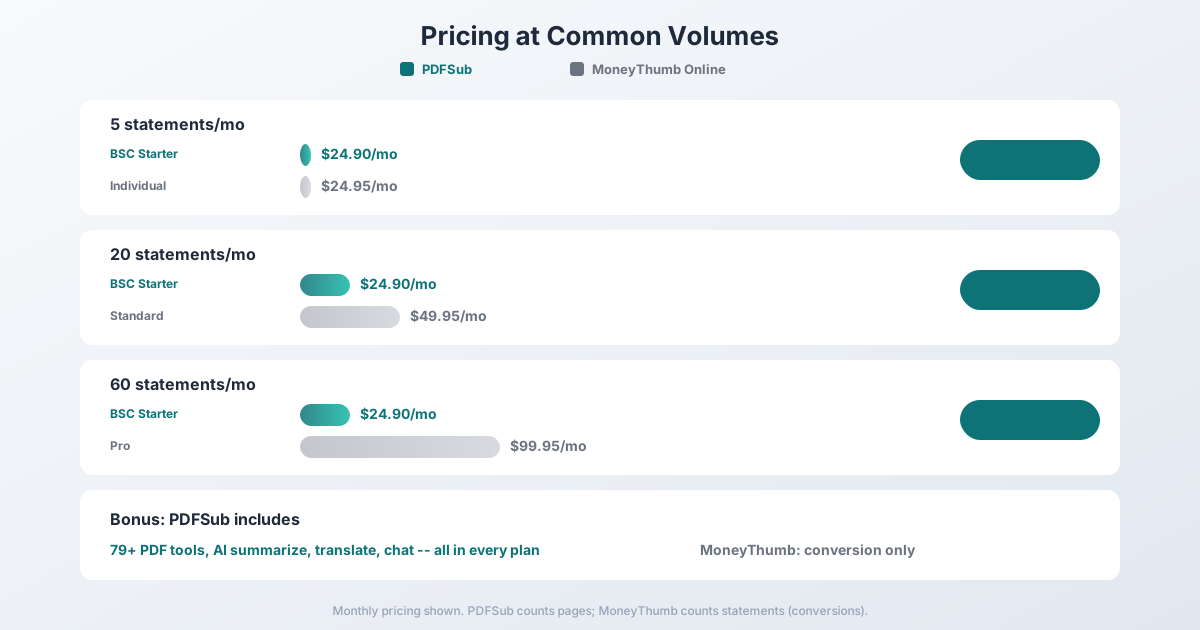
| Individual | $24.95 | 5 |
| Standard | $49.95 | 20 |
| Pro | $99.95 | 60 |
Note: Each monthly statement counts as one "conversion." A 10-page statement is one conversion. Unused conversions roll over within the subscription period.
Desktop Software: One-time license fees for individual converter products (pdf2qbo, pdf2ofx, etc.), typically ranging from $39.95-$99.95 per product. Each product handles only one output format, so full format coverage requires purchasing multiple licenses.
The Math
The pricing comparison depends on your volume and how you count usage:
| Scenario | PDFSub | MoneyThumb Online |
|---|---|---|
| 5 statements/mo | $20/mo annual (All-In-One, 500 pages included) | $24.95 (Individual) |
| 20 statements/mo | $20/mo annual (All-In-One, 500 pages included) | $49.95 (Standard) |
| 60 statements/mo | $20/mo annual (All-In-One, 500 pages included) | $99.95 (Pro) |
PDFSub counts pages, not statements. The All-In-One plan's 500-page monthly allowance covers most volumes; if 60 statements average 8 pages each, that is 480 pages - still within the included allowance.
MoneyThumb counts statements (not pages), which is simpler to predict but limits you to specific conversion counts.
Winner: PDFSub -- more generous allowances, all formats included, and 98+ additional tools.
Who Should Choose PDFSub
PDFSub is the better choice if:
- You want browser-based convenience. No software to install, works on any device, always up to date.
- You work with international clients. 130+ languages, auto-detected date/number/currency formats.
- You need more than bank statement conversion. 98+ PDF tools, AI summarization, translation, document chat -- one subscription.
- You want all output formats included. All 8 formats in every plan, every conversion.
- You prefer predictable monthly pricing. Simple page-based plans with no per-conversion anxiety.
Who Should Choose MoneyThumb
MoneyThumb is the better choice if:
- You prefer desktop software. Some users genuinely prefer installed applications over web-based tools.
- You already have MoneyThumb in your workflow. Switching costs are real -- if it works, don't fix it.
- You process very few statements per month. Their Individual plan at $24.95/mo for 5 conversions may suit ultra-low-volume users who only need one output format.
- You want a one-time purchase. MoneyThumb desktop licenses are perpetual (for a specific version), while PDFSub is subscription-only.
Frequently Asked Questions
Is MoneyThumb or PDFSub more accurate?
Both tools achieve strong accuracy on clean digital PDFs from major banks. PDFSub uses a 4-tier extraction waterfall that applies the most accurate method for each document. MoneyThumb's desktop tools use pattern matching and OCR. For your specific banks, testing both is the most reliable comparison method.
Can I use PDFSub as a drop-in replacement for MoneyThumb?
For core conversion, yes. PDFSub supports all the output formats MoneyThumb offers (QBO, OFX, QFX, QIF, CSV, Excel) plus JSON and TSV. The main workflow difference is browser-based vs. desktop software.
Does MoneyThumb work on Mac?
MoneyThumb has historically been more Windows-focused, though their Online service works in any browser. PDFSub works identically on Windows, Mac, Linux, and mobile devices since it is entirely browser-based.
Which is cheaper for a bookkeeper processing 30 statements per month?
PDFSub's All-In-One plan at $20/month annual easily handles 30 statements (at ~5 pages each, that is roughly 150 pages out of your 500-page allowance). MoneyThumb Online would require the Standard plan at $49.95/mo for 20 conversions, plus you'd exceed the limit by 10 conversions. PDFSub saves about $30/month in this scenario.
Does either tool handle scanned bank statements?
Both do. PDFSub uses OCR + AI vision (Tiers 3 and 4) for scanned documents. MoneyThumb offers a PDF+ add-on subscription for enhanced OCR. Accuracy on scanned documents is lower for both tools compared to digital PDFs.
Can PDFSub replace MoneyThumb for QuickBooks import?
Yes. PDFSub exports QBO files that import directly into QuickBooks via Banking > Upload from file. The QBO files include FITIDs for automatic duplicate detection, just like MoneyThumb's output.
The Bottom Line
PDFSub and MoneyThumb represent two different eras of software: MoneyThumb is traditional desktop software, purpose-built for a specific task. PDFSub is a modern browser-based platform that includes bank statement conversion as part of a much larger toolkit.
PDFSub wins on language support, pricing, platform breadth, cross-device compatibility, and output format convenience. It is the better value for most users, especially those with any international work or anyone who needs more than just bank statement conversion.
MoneyThumb wins on established track record and the familiarity of desktop software. Users who already rely on MoneyThumb and have no international requirements may find no compelling reason to switch.
The easiest way to decide? Try PDFSub's 7-day free trial -- it is full-featured with no export caps. Compare the results against MoneyThumb with your actual bank statements, and let the output speak for itself.
Already decided to switch? This page covers neutral side-by-side facts. For a migration-focused walkthrough - what to test first, how to verify QBO/OFX imports, and switching FAQ - see the best MoneyThumb alternative guide.