Best MoneyThumb Alternative for Bank Statement Conversion (2026)
Looking for a MoneyThumb alternative? Compare pricing, features, and platform options to find a modern bank statement converter.
PDFSub is best for:
- Users tired of buying separate MoneyThumb apps per format - PDFSub includes all 8 export formats in one plan
- Professionals who want browser-based access instead of MoneyThumb's desktop install and Java dependency
- Firms needing 130+ languages and 20,000+ banks vs MoneyThumb's English-centric coverage
- Budget-conscious users - $15-45/mo flat vs MoneyThumb's ~$0.20/page or $599 desktop license
PDFSub is NOT best for:
- Users who prefer processing files entirely offline on a local desktop
- Firms with established MoneyThumb desktop-to-QuickBooks workflows they don't want to change
- Organizations needing a dedicated account manager for high-volume support
MoneyThumb has been around since 2015 and built a solid reputation converting bank statement PDFs into QuickBooks, Quicken, and Excel formats. For years, it was one of the few reliable options for accountants and bookkeepers who needed to digitize client statements.
But the landscape has changed - and MoneyThumb hasn't kept pace.
Maybe you're frustrated with buying separate products for each output format. Maybe you've been burned by the $600+ desktop license only to discover that OCR requires an additional annual subscription. Or maybe you just want something that runs in your browser without installing Java on your Mac.
Whatever brought you here, this guide compares MoneyThumb against the best alternatives so you can find the right fit.
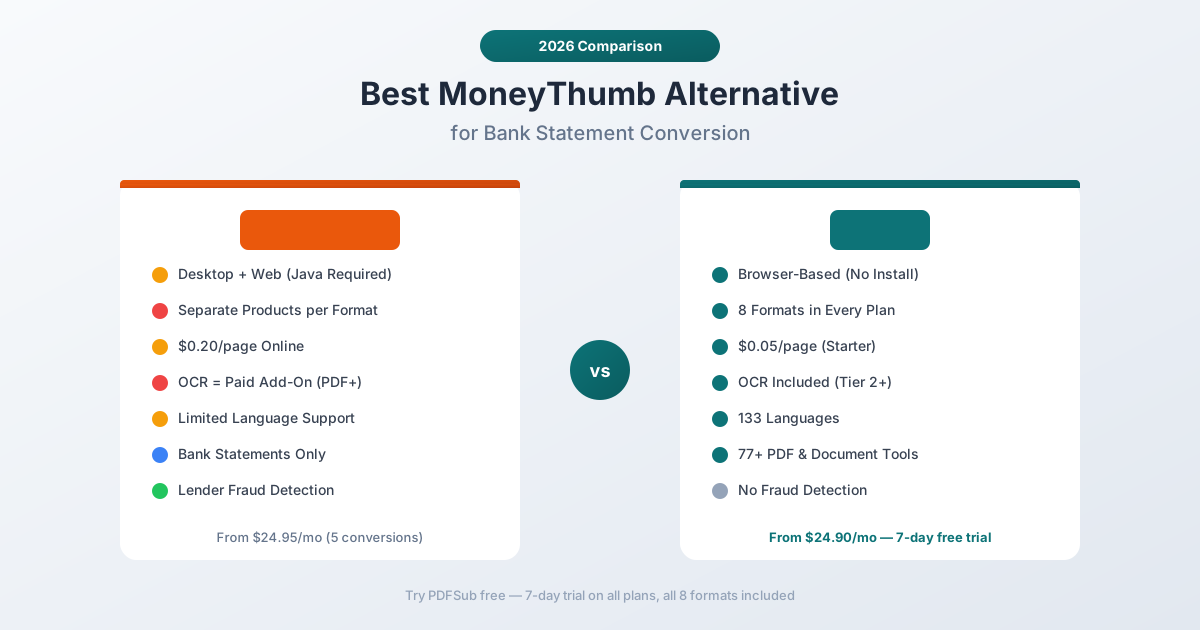
Why People Look for MoneyThumb Alternatives
Before recommending alternatives, it helps to understand what's driving people away from MoneyThumb. Based on Trustpilot reviews (3.6/5 stars - highly polarized with 59% five-star and 29% one-star), G2 feedback, and accounting forums, here are the most common reasons:
Fragmented Product Lineup
This is MoneyThumb's most confusing aspect. Instead of one product that does everything, you choose from a maze of separate applications:
- 2qbo Convert Pro - PDF to QuickBooks ($599–$699)
- 2xls Convert Pro - PDF to Excel/CSV ($599–$699)
- 2ofx Convert Pro - PDF to OFX ($599–$699)
- pdf2qfx Convert - PDF to Quicken
- pdf2qif Convert - PDF to QIF
Need both QuickBooks and Excel output? That's two separate purchases. The online versions simplify this somewhat, but you're still choosing between "MoneyThumb Online for QuickBooks," "for Accounting," "for Quicken," and "for Spreadsheets" - each with separate subscriptions.
Expensive Per-Page Pricing
MoneyThumb's online plans cost roughly $0.20 per page - significantly more than modern alternatives. The pricing structure:
| Plan | Monthly | Conversions/mo | Effective Cost |
|---|---|---|---|
| Individual | $24.95 | 5 | ~$5 per conversion |
| Standard | $49.95 | 20 | ~$2.50 per conversion |
| Pro | $99.95 | 60 | ~$1.67 per conversion |
And here's the catch: each account within each statement counts as a separate conversion. A single PDF with three bank accounts uses three of your conversions.
Desktop licenses start at $599 and are capped at 1,000 conversions per quarter. Need scanned PDF support? That's an extra annual subscription for the PDF+ OCR add-on.
Desktop-First Model
MoneyThumb's core products are installable desktop software. The Mac version requires Java. Licenses are locked to three computers per user - and multiple reviewers report being locked out for installing on too many machines, with support refusing to reinstate licenses.
The online version exists but was described by one reviewer as "12x costlier and less accurate" than the desktop product.
Inconsistent Support
Trustpilot reviews reveal a pattern: satisfied users describe support as "top-notch," while frustrated users report "zero response" and "canned replies." Multiple reviewers mention a strict no-refund policy, with one user reporting unauthorized charges after cancellation.
Bank Statements Only
MoneyThumb only converts bank and credit card statements. No invoices, receipts, or other financial documents. If you need broader document processing, you'll need a second tool.
MoneyThumb vs. PDFSub: Side-by-Side Comparison
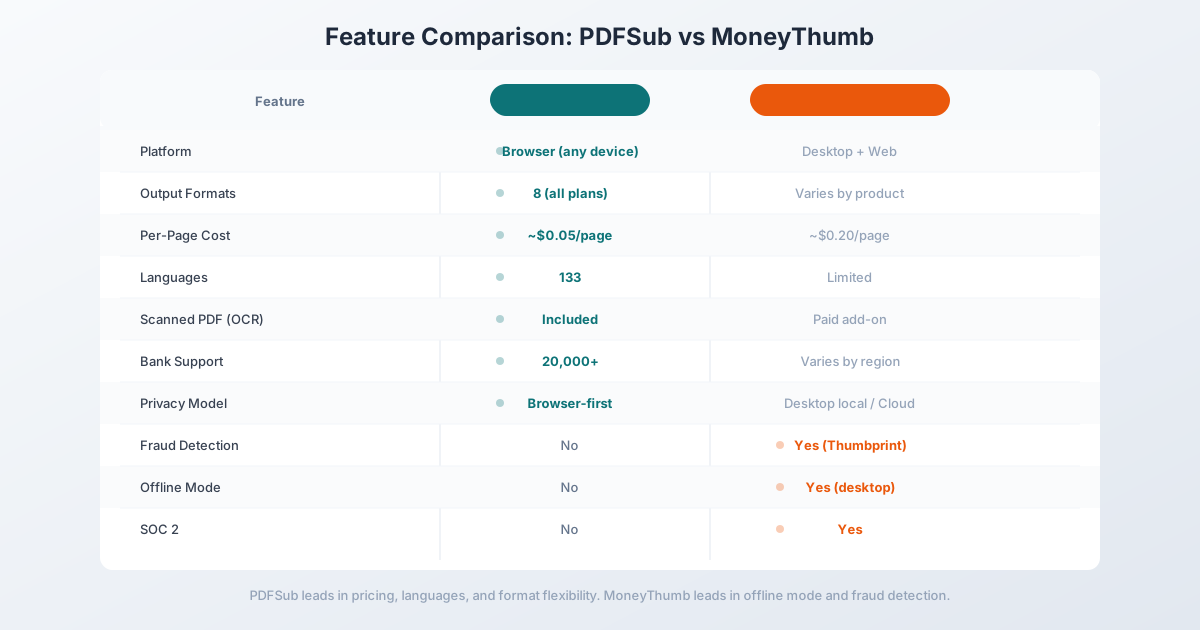
| Feature | MoneyThumb | PDFSub |
|---|---|---|
| Platform | Desktop (Win/Mac + Java) or Web | Web-based (browser-first) |
| Pricing | $24.95–$99.95/mo online; $599+ desktop | $20/mo (annual) (tools) / $29/mo (BSC, 500 pages) |
| Output Formats | Varies by product (QBO, QFX, QIF, OFX, CSV, XLS) | 8 formats in every plan (CSV, XLSX, QBO, OFX, QFX, QIF, TSV, JSON) |
| Languages | Not specified (primarily English) | 130+ languages |
| Banks Supported | Varies by region | 20,000+ worldwide |
| Scanned PDFs | Paid add-on (PDF+ OCR) | Included (Tier 2+ extraction) |
| Privacy | Desktop: local; Online: cloud | Browser-first (Tier 1 never uploads) |
| Free Trial | Limited conversions | 7-day full access |
| PDF Tools | Bank statements only | 98+ PDF & document tools |
| Per-Page Cost | ~$0.20/page (online) | ~$0.05/page (All-In-One) |
Where PDFSub Wins
All formats in one plan. Every PDFSub subscription includes all 8 output formats in the bank statement converter - CSV, XLSX, QBO, OFX, QFX, QIF, TSV, and JSON. No choosing between separate products.
Browser-first privacy. PDFSub's Tier 1 extraction processes digital PDFs entirely in your browser. The file never leaves your device. MoneyThumb's online version uploads everything to their servers.
130+ languages. MoneyThumb's language support is limited and unspecified. PDFSub handles statements in 130+ languages - critical for accountants with international clients.
Transparent pricing. PDFSub's All-In-One plan is $20/month annual ($240/year, saves $60) or $25/month billed monthly - includes 500 bank statement pages and a 7-day free trial. No separate products, no OCR add-ons, no per-account conversion counting.
98+ total tools. Beyond bank statements, PDFSub includes PDF editing, merging, splitting, watermarking, translation, e-sign, and dozens more tools.
Where MoneyThumb Wins
Desktop offline processing. If you need to process statements without any internet connection, MoneyThumb's desktop software works completely offline. PDFSub requires a browser.
Lender-specific products. MoneyThumb offers PDF Insights and Thumbprint - specialized tools for automated underwriting and fraud detection that PDFSub doesn't have.
SOC 2 compliance. MoneyThumb is SOC 2 certified, which matters for firms with strict compliance requirements.
Longer track record. MoneyThumb has been in the market since 2015 with 25,000+ customers. That longevity provides confidence for risk-averse firms.
Pricing: What You Actually Pay
MoneyThumb's pricing is complicated. Between desktop licenses, online subscriptions, OCR add-ons, and per-conversion counting, it's hard to calculate your actual cost. Here's a real-world comparison.
Scenario: 50 bank statements per month (~400 pages)
- MoneyThumb Online Pro: $99.95/month (60 conversions) = $1,199/year
- MoneyThumb Desktop: $599–$699 upfront + ~$100/year PDF+ renewal = $699+ year one
- PDFSub All-In-One: $20/month annual (500 pages included) = $240/year
PDFSub costs 80% less than MoneyThumb Online for the same workload. The desktop license has a lower ongoing cost after year one, but requires upfront investment, Java installation, and computer-locked licensing.
Scenario: 200 statements per month (~1,600 pages)
- MoneyThumb Online: Exceeds Pro plan limits. Would need multiple subscriptions or contact for enterprise pricing.
- PDFSub All-In-One: $20/month annual (500 pages included) = $240/year
At higher volumes, MoneyThumb's online plans don't scale - you hit conversion caps quickly because each account within each statement counts as a separate conversion.
Other MoneyThumb Alternatives Worth Considering
DocuClipper
Best for: Firms that need direct accounting software integrations and fraud detection.
DocuClipper offers direct QuickBooks, Xero, and Sage integrations where converted data flows straight into your accounting software without file downloads. It also includes fraud detection features similar to MoneyThumb's Thumbprint.
Limitations: English-only language support. Pricing starts at $39/month for 60 pages (more expensive per page than PDFSub). No free trial - just a 10-transaction export cap to test.
ProperSoft (ProperConvert)
Best for: QuickBooks users who want a simple desktop converter.
Mentioned frequently in QuickBooks community forums as a reliable MoneyThumb alternative. Straightforward desktop software focused on PDF-to-QBO conversion.
Limitations: Desktop-only. Limited format support compared to all-in-one solutions. Smaller user base means less community support.
Dext (formerly Receipt Bank)
Best for: Accounting firms that need expense management beyond bank statements.
Dext handles receipts, invoices, and bank statements with direct accounting software integrations. It's more of an accounts payable automation platform than a pure converter.
Limitations: Expensive for pure conversion needs ($24+/month for basic plans). Overkill if you only need bank statement conversion.
Switching from MoneyThumb: What to Expect
If you're currently using MoneyThumb and considering a switch, here's what the transition looks like:
Same output formats. PDFSub exports QBO, OFX, QFX, and QIF - the same formats MoneyThumb produces. Your accounting software import workflow stays the same.
No installation needed. Unlike MoneyThumb's desktop software, PDFSub runs in your browser. No Java, no license keys, no computer limits.
Try before you commit. PDFSub offers a 7-day free trial with full access to all features. Upload your existing bank statement PDFs to the bank statement converter and verify the output matches what you need before subscribing.
Batch processing. If you're used to MoneyThumb's batch conversion, PDFSub handles multiple statements per upload session. Drag and drop your files, review the extracted data, and download in your preferred format.
Frequently Asked Questions
Can PDFSub replace MoneyThumb for QuickBooks imports?
Yes. PDFSub exports to QBO format, which is the standard for importing bank transactions into both QuickBooks Online and QuickBooks Desktop. The QBO files include transaction IDs (FITIDs) for duplicate detection, just like MoneyThumb's output.
Does PDFSub work offline like MoneyThumb's desktop software?
Not fully. PDFSub's Tier 1 extraction processes digital PDFs in your browser without uploading the file, but you need an internet connection to access the app. For air-gapped environments, MoneyThumb's desktop version is the better choice.
What about MoneyThumb's fraud detection (Thumbprint)?
PDFSub doesn't include fraud detection or automated underwriting features. If you need Thumbprint-style fraud scoring for lending decisions, MoneyThumb or a specialized platform like Ocrolus is a better fit. PDFSub focuses on accurate conversion, not lending analysis.
Is PDFSub cheaper than MoneyThumb?
For most users, significantly. PDFSub's All-In-One plan is $20/month annual ($240/year, saves $60) or $25/month billed monthly, which includes 500 bank statement pages and all 8 output formats. MoneyThumb's online Individual plan starts at $24.95/month but only includes 5 conversions. The Standard plan ($49.95/month) includes 20 conversions, and each account within a statement counts as a separate conversion.
Can I convert the same bank statement formats with PDFSub?
PDFSub works with 20,000+ bank formats worldwide and auto-detects statement structure. It handles the same US, European, and international banks that MoneyThumb supports, plus 130+ languages for international statements.
Does PDFSub have an API for automation?
Yes - PDFSub ships a Developer API with 10 official SDKs (Node, Python, PHP, Go, Ruby, Java, .NET, Rust, C, C++). The v1 surface focuses on HTML-input rendering (HTML → PDF/PNG/JPEG/WEBP, HTML → text/markdown) with cloud delivery to Google Drive, Dropbox, S3, GCS, and Cloudflare R2. Programmatic bank statement conversion endpoints are planned for a follow-up phase - until they ship, MoneyThumb's Insights API is the better direct fit for CRM or lending-platform integration of statement parsing.
Still evaluating, not yet switching? This page is written for teams ready to leave MoneyThumb. For a neutral feature-by-feature breakdown and pricing side-by-side, see the PDFSub vs MoneyThumb comparison.