PDFSub vs ABBYY FineReader: Honest Comparison (2026)
PDFSub vs ABBYY FineReader PDF - pricing, OCR, AI features, and platform access compared.
PDFSub is best for:
- ABBYY users who want browser-based access from any device instead of a desktop-only installation
- Users who need AI-powered document chat, summarization, and translation alongside OCR and conversion
- Financial professionals who need bank statement conversion for 20,000+ institutions - ABBYY has no equivalent
- Budget-conscious users comparing PDFSub's $20/month annual to ABBYY's $99-165/yr with fewer overall tools
PDFSub is NOT best for:
- Users who need ABBYY's industry-leading OCR accuracy for degraded scans and complex document layouts
- Organizations needing Hot Folder batch automation for high-volume document processing pipelines
- Enterprise users requiring ABBYY's document comparison features (Corporate edition)
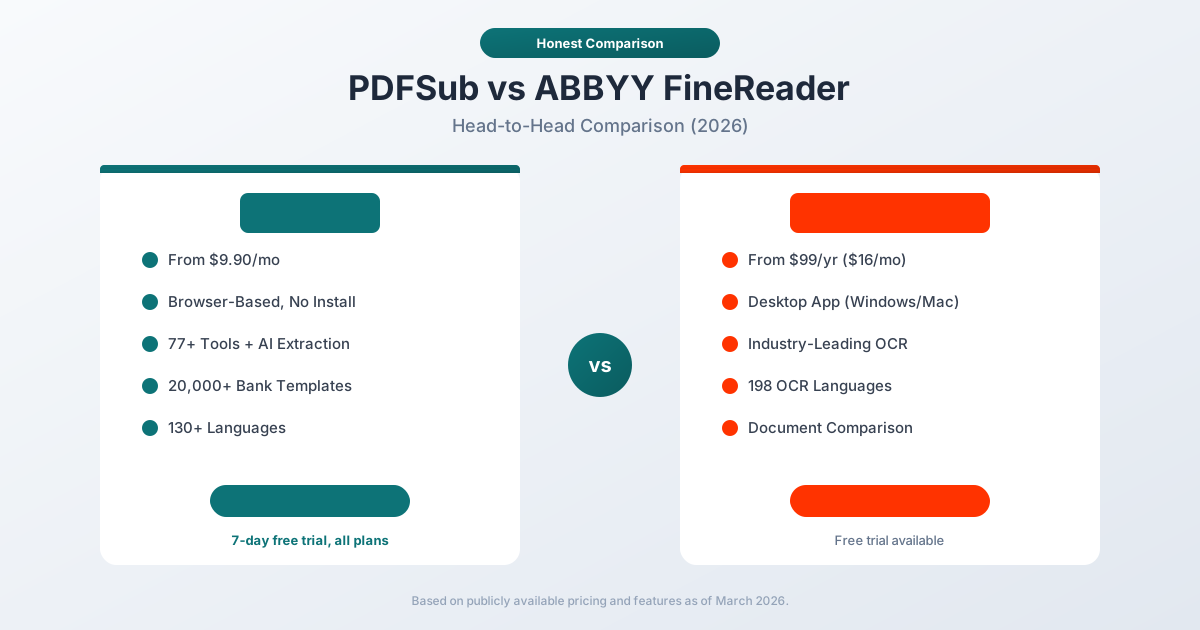
ABBYY FineReader and PDFSub both work with PDF documents, but they represent fundamentally different approaches to document processing. One is a desktop application with industry-leading OCR. The other is a browser-based platform with AI-powered features and specialized financial document support.
ABBYY FineReader PDF is a desktop application (Windows and Mac) known for its exceptional OCR engine. It converts scanned documents into editable formats, offers PDF editing, and includes document comparison in its Corporate tier. Pricing starts at $99/year for the Standard edition and $165/year for Corporate.
PDFSub is a document platform with 98+ PDF tools, AI-powered extraction and analysis, bank statement conversion supporting 20,000+ financial institutions, and 130+ language support. The All-In-One plan is $20/month annual ($25/month monthly) with a 7-day free trial.
This comparison covers where each genuinely excels and where it falls short.
Quick Verdict
If you only have 30 seconds, here's the honest split.
Choose PDFSub if…
- You want any-device browser access without installing or updating software.
- You need AI summarization, translation across 130+ languages, and document chat alongside basic PDF tools.
- You process bank statements, invoices, or receipts - ABBYY does not parse these into structured accounting formats.
- You want one subscription that covers 98+ tools, e-sign (no per-envelope fees), and 50 GB cloud storage at $20/mo annual.
Choose ABBYY FineReader if…
- You work primarily with degraded scanned paper - historical archives, faxes, old microfilm - where decades of OCR refinement still produce measurably better recognition than newer engines.
- You need Hot Folder automation to monitor a directory and auto-process incoming scans (Corporate edition only).
- You require ABBYY's granular document-comparison feature for legal or compliance workflows that depend on pixel-level diffs.
- You need 198-language OCR coverage including rare scripts, or you must run fully offline on a desktop without any network dependency.
The core tradeoff: ABBYY is a deep, specialized desktop OCR engine. PDFSub is a broad, browser-based document platform with AI and financial tooling. Each wins on different axes.
Company Overviews
PDFSub is a document platform offering 98+ tools for PDF processing, AI-powered document features (summarization, translation, data extraction, chat), and specialized bank statement conversion supporting 20,000+ financial institutions. Editing tools run entirely in your browser. Conversions and advanced processing are powered by the PDFSub Engine - an isolated service with no internet access. Files are processed in an isolated environment and auto-deleted. It is designed for individuals, small businesses, accountants, and bookkeepers who work with documents regularly.
ABBYY is a global intelligent automation company founded in 1989 in Russia, now headquartered in the United States. FineReader PDF is their flagship desktop document processing application, built on decades of OCR research. The software supports 198 recognition languages, offers robust PDF editing, document comparison (Corporate edition), and automated batch processing via Hot Folder. ABBYY also sells enterprise OCR SDKs and intelligent document processing solutions for large organizations.
Platform & Accessibility
This is a fundamental architectural difference.
PDFSub runs entirely in your web browser. No download, no installation, no updates to manage. You can access it from any device with a browser - Windows, Mac, Linux, Chromebook, tablet, or phone. You can start working on one device and continue on another. New features are available instantly without updating software.
ABBYY FineReader is a desktop application that must be installed on a specific computer. The Windows edition is the full-featured version. The Mac edition has a reduced feature set. There is no Linux version. If you work on multiple computers, you need to install the software on each one (within license terms). Updates require downloading and installing new versions.
For a team where members use different operating systems, or for anyone who needs to process documents on the go, the browser-based approach eliminates friction.
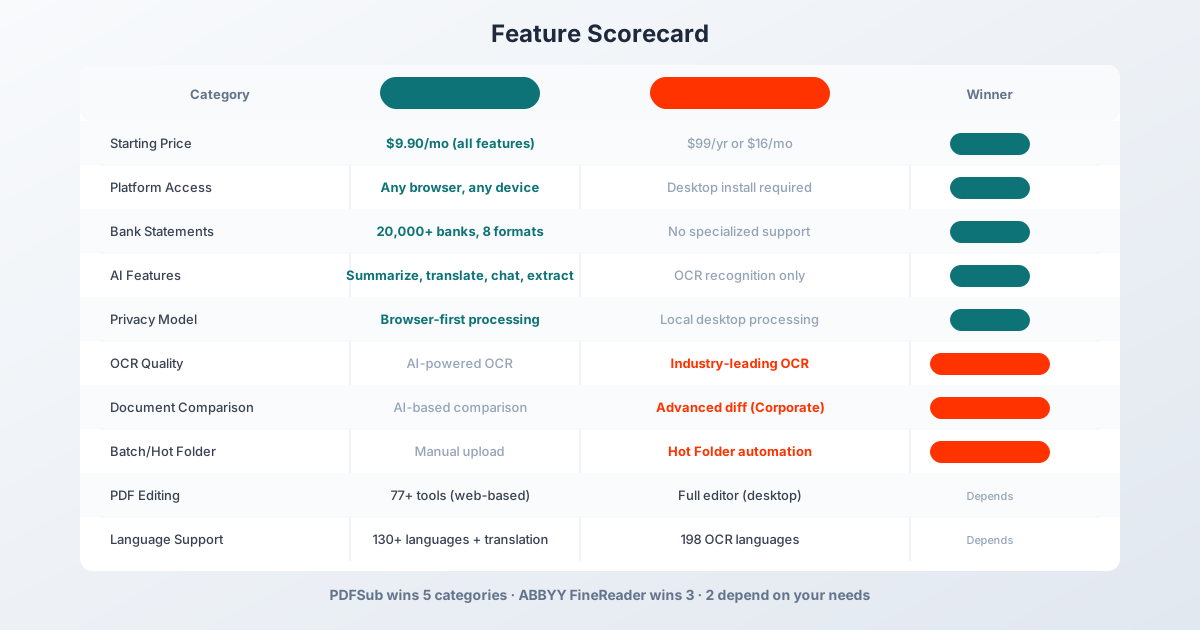
Winner: PDFSub - any browser, any device, zero installation.
OCR Quality
This is ABBYY's strongest category, and it deserves credit.
ABBYY FineReader has spent over three decades refining its OCR engine. It is widely regarded as the industry leader for scanned document recognition. The engine handles:
- Poor-quality scans and faxes
- Skewed, rotated, and distorted pages
- Mixed-language documents
- Complex layouts with tables, headers, and footnotes
- Handwritten text (ICR) in some configurations
- Barcode recognition
ABBYY recognizes 198 languages for OCR, including Arabic, Chinese, Japanese, Korean, Hebrew, and Cyrillic scripts. The accuracy on challenging scanned documents is consistently among the best available.
PDFSub uses AI-powered OCR as part of its 4-tier extraction approach. For scanned documents, it employs server-side OCR combined with AI analysis. The results are strong for typical business documents, but PDFSub's OCR was not designed to compete with ABBYY's three decades of specialized research.
For organizations that process large volumes of scanned documents - law firms digitizing archives, government agencies processing paper forms, companies digitizing historical records - ABBYY's OCR quality is a genuine competitive advantage.
Winner: ABBYY FineReader - decades of OCR research produce measurably better results on challenging scanned documents.
AI Features
This category represents the generational shift in document processing.
PDFSub includes AI-powered features across the platform:
- AI Summarization - summarize any PDF document
- AI Translation - translate documents across 130+ languages
- AI Chat - ask questions about document content
- AI Data Extraction - extract structured data from invoices, receipts, financial reports
- AI Bank Statement Extraction - extract transaction data with AI fallback for challenging formats
- AI Document Comparison - compare documents using AI analysis
These AI features work on any document type and are included in every subscription plan.
ABBYY FineReader uses AI to enhance its OCR pipeline - neural network-based text recognition, intelligent document classification, and layout analysis. However, it does not offer generative AI features like summarization, translation, or chat with documents. ABBYY's AI is focused on making OCR better, not on adding new categories of document intelligence.
For users who want to ask "What are the key financial metrics in this 50-page report?" or "Translate this contract from Japanese to English," PDFSub's AI features provide capabilities that ABBYY does not offer.
Winner: PDFSub - AI summarization, translation, chat, and extraction go well beyond OCR enhancement.
Pricing Comparison
The pricing models are quite different.
PDFSub Pricing
| Plan | Price | Key Features |
|---|---|---|
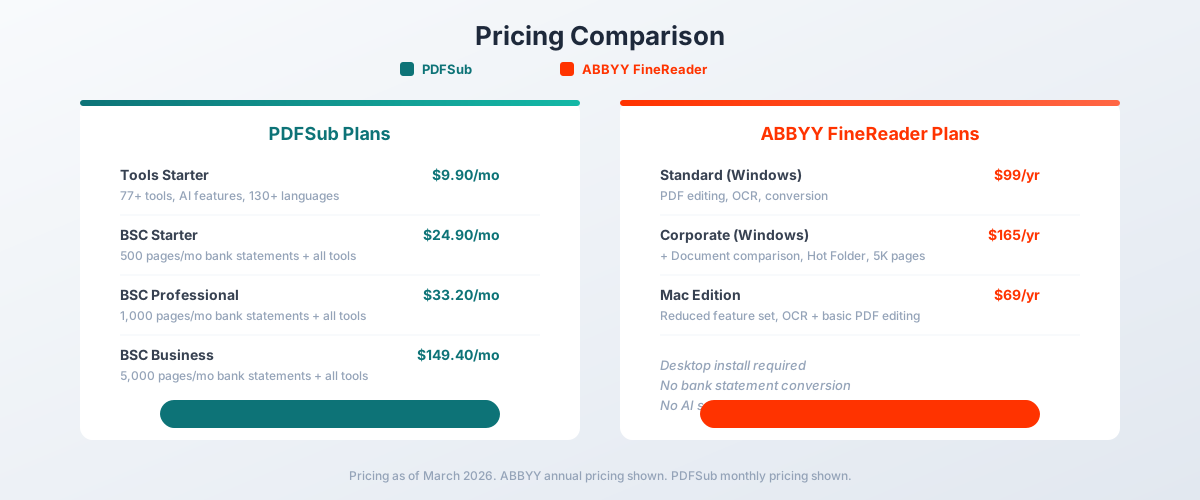
| All-In-One (annual) | $20/mo ($240/yr) | 98+ tools, 500 AI credits/mo, 500 bank statement pages/mo, e-sign + form filling, 50 GB cloud storage, unlimited team seats (each billed at the same per-user rate) |
| All-In-One (monthly) | $25/mo | Same as annual, billed monthly |
| Add-ons | Stackable | 500 AI credits, 500 bank statement pages, 40 GB storage, priority support |
All plans include a 7-day free trial with full functionality.
ABBYY FineReader PDF Pricing
| Edition | Annual Price | Monthly Price | Key Features |
|---|---|---|---|
| Standard (Windows) | $99/yr | $16/mo | PDF editing, OCR, conversion |
| Corporate (Windows) | $165/yr | $24/mo | + Document comparison, Hot Folder, 5K pages/mo batch |
| Mac Edition | $69/yr | N/A | Reduced feature set, OCR + basic editing |
ABBYY also offers 3-year subscriptions at a discount: Standard at $267/3yr ($89/yr) and Corporate at $446/3yr ($149/yr).
Price Comparison
On a pure monthly cost basis, ABBYY's Standard edition ($99/yr = ~$8.25/mo) is cheaper than PDFSub's All-In-One ($20/month annual). But the comparison is misleading because the products include very different capabilities:
- PDFSub at $20/month annual includes AI summarization, AI translation, AI chat, AI data extraction, 500 AI credits/month, 500 bank statement pages/month, e-sign + form filling with no per-envelope fees, 50 GB cloud storage; unlimited team seats (each billed at the same per-user rate) available (each billed per-user); 98+ PDF tools, and 130+ language support
- ABBYY Standard at ~$8.25/mo includes PDF editing, OCR, and file conversion - but no AI features, no bank statement processing, no e-sign, no cloud storage, and no browser access
For bank statement conversion specifically, there is no ABBYY equivalent. PDFSub's All-In-One plan at $20/month annual includes 500 bank statement pages every month.
Winner: PDFSub - more features per dollar, especially when AI capabilities and bank statement conversion are factored in.
Pros and Cons of Each
PDFSub - Pros
- Browser-based: works on any device, no install, no IT approval, instant onboarding for new team members
- AI baked into the platform - summarize, translate, chat, extract data without bolt-on subscriptions
- Purpose-built bank statement converter (20,000+ banks, 8 output formats including QBO/OFX)
PDFSub - Cons
- AI-powered OCR is solid for typical business documents but won't match ABBYY's accuracy on the most degraded historical scans
- No desktop app or fully offline mode - login and AI features require an internet connection
- No equivalent to ABBYY's Hot Folder automation or pixel-level document comparison
ABBYY FineReader - Pros
- Industry-leading OCR accuracy across 198 languages, refined over three decades
- Hot Folder automation (Corporate) enables genuine hands-free batch processing
- Fully local desktop processing - strong fit for air-gapped or strict-data-residency environments
ABBYY FineReader - Cons
- No AI summarization, translation, or chat-with-PDF features in FineReader (those live in the separate, enterprise-priced Vantage product)
- No bank statement, invoice, or receipt extraction into structured data
- Desktop-only - Mac version is feature-reduced, no Linux or ChromeOS, no browser version
Bank Statement Conversion
This is a category where ABBYY has no specialized offering.
PDFSub provides dedicated bank statement conversion supporting:
- 20,000+ bank templates worldwide
- 8 output formats: XLSX, CSV, QBO, OFX, QIF, QFX, TSV, JSON
- 4-tier extraction: browser-based coordinate extraction, server-side extraction, OCR + AI, and AI vision
- Automatic detection: date formats, number formats, currencies, and languages
- Accounting integration: QBO files import directly into QuickBooks, OFX into most accounting software
ABBYY FineReader can OCR a bank statement and convert it to Word or Excel. But the output is a visual reproduction of the original layout - not structured transaction data. ABBYY does not parse date, description, debit, credit, and balance columns. It does not detect transaction boundaries. It does not output accounting formats like QBO or OFX.
For anyone who processes bank statements professionally, this is not a close comparison.
Winner: PDFSub - purpose-built bank statement conversion versus generic OCR.
Document Comparison
ABBYY FineReader Corporate includes a robust document comparison feature that can compare:
- Two versions of the same document (e.g., contract draft vs. final)
- A scanned document against a digital original
- Documents in different formats (PDF vs. Word)
The comparison highlights text differences, formatting changes, and structural modifications. This feature is valuable for legal professionals, compliance teams, and anyone who needs to verify document integrity.
PDFSub offers AI-powered document comparison that analyzes differences between documents using AI. The approach handles both textual and structural comparisons, but it is a different tool than ABBYY's pixel-level document diff.
For legal firms that compare hundreds of contract versions, ABBYY's dedicated comparison tool with its fine-grained diff capabilities is the more mature solution.
Winner: ABBYY FineReader - established document comparison with granular diff capabilities.
Batch Processing & Automation
ABBYY FineReader Corporate includes Hot Folder - an automated batch processing feature that monitors specified folders for new files and automatically processes them according to predefined rules. You can set up automated OCR, conversion, and export pipelines that run without manual intervention.
This is particularly useful for organizations that receive documents via email, scanner, or file shares and need them automatically converted and routed.
PDFSub processes documents through its web interface one at a time (or in bulk for certain operations like merge). There is no folder-watching automation or desktop-level batch processing.
For organizations with established document workflows that involve automated file monitoring and conversion, ABBYY's Hot Folder is a genuine productivity feature.
Winner: ABBYY FineReader - Hot Folder automation enables hands-free document processing.
PDF Editing
Both tools offer PDF editing, but through different paradigms.
ABBYY FineReader provides a desktop PDF editor that can:
- Edit text and images directly in PDFs
- Add and manage annotations
- Fill and create forms
- Redact sensitive content
- Apply digital signatures
- Manage document metadata
The desktop editor provides a rich, responsive editing experience similar to working in a word processor.
PDFSub offers 98+ web-based PDF tools including merge, split, compress, rotate, reorder, watermark, encrypt, redact, convert (to Word, Excel, images), form filling, e-signatures (no per-envelope fees), page numbering, and more. The web-based approach means each operation is a discrete tool rather than a unified editor.
For intensive PDF editing sessions (rewriting paragraphs, repositioning images), ABBYY's desktop editor is more natural. For common operations like merging, splitting, compressing, and converting, PDFSub's tools are faster to access and require no installation.
Winner: Depends - ABBYY for intensive desktop editing. PDFSub for quick operations and broader tool variety.
Language Support
Both platforms support extensive language sets, but in different ways.
ABBYY FineReader recognizes 198 languages for OCR, making it one of the most comprehensive OCR engines available. It handles mixed-language documents, right-to-left scripts, and complex character sets.
PDFSub supports 130+ languages for document processing and includes AI-powered translation. You can translate a document from Japanese to English, summarize a French financial report in English, or process Arabic bank statements with automatic RTL detection. ABBYY can recognize text in these languages but cannot translate between them.
The choice depends on your need: raw OCR recognition breadth favors ABBYY; AI-powered translation and multi-language processing favors PDFSub.
Winner: Depends - ABBYY for OCR language breadth. PDFSub for translation and multi-language AI processing.
Privacy & Data Handling
Both tools offer strong privacy, through different mechanisms.
PDFSub runs editing tools entirely in your browser. For bank statement Tier 1 extraction, files never leave your device. Conversions and advanced processing are powered by the PDFSub Engine - an isolated service with no internet access. Files are processed in an isolated environment and auto-deleted after processing.
ABBYY FineReader is a desktop application that processes everything locally on your computer. Nothing is uploaded to the cloud (unless you specifically use ABBYY's cloud services). For organizations with strict data residency requirements, local processing provides certainty about where data resides.
Both approaches keep documents private - PDFSub through browser-based processing, ABBYY through local desktop processing. PDFSub's advantage is that browser-based processing requires no software installation. ABBYY's advantage is absolute local control with zero network dependency.
Winner: PDFSub - browser-based editing plus isolated PDFSub Engine processing provides strong privacy without desktop installation.
Who Should Choose PDFSub
PDFSub is the better choice if:
- You want browser-based access. Work from any device without installing software.
- You need AI features. Summarization, translation, chat, and data extraction are included in every plan.
- You process bank statements. 20,000+ banks with 8 output formats, including QBO and OFX.
- You work on multiple devices. Browser-based means your tools are available everywhere.
- You are a small business or individual. More features per dollar than ABBYY's desktop approach.
- You need document translation. 130+ languages with AI-powered translation built in.
- You want a unified platform. 98+ tools in one subscription replaces multiple software licenses.
Who Should Choose ABBYY FineReader
ABBYY FineReader is the better choice if:
- OCR quality is your top priority. Decades of research produce the best results on challenging scans.
- You work primarily with scanned documents. Paper archives, old faxes, and poor-quality images.
- You need document comparison. Corporate edition offers granular document diff for legal workflows.
- You want batch automation. Hot Folder processes files automatically without manual intervention.
- You prefer desktop software. Some users prefer installed applications over web-based tools.
- You have strict data residency requirements. Desktop processing with zero cloud dependency.
- You are in an enterprise with volume licensing needs. ABBYY offers per-seat enterprise licensing.
The Bottom Line
ABBYY FineReader is a mature, powerful desktop application built on the best OCR engine in the industry. If your primary challenge is converting scanned paper documents into editable digital formats, ABBYY is the proven solution with decades of refinement behind it.
PDFSub is a modern, browser-first platform that combines general PDF tools with AI-powered document intelligence and specialized financial document processing. It does things that ABBYY simply does not - AI summarization, translation, chat with documents, bank statement conversion to accounting formats - and it does them from any device without installation.
For most professionals who work with a mix of digital PDFs, financial documents, and occasional scanned files, PDFSub provides more value per dollar and more capability per click. For organizations whose primary workflow revolves around high-volume scanned document processing, ABBYY remains the OCR benchmark.
The question is whether your workflow is centered on scanned documents or digital ones. If your answer is "mostly digital, with some scans," PDFSub's 7-day free trial is the faster way to get started.
Already decided to leave ABBYY? This page covers neutral side-by-side facts. If you want a migration-focused walkthrough - what to bring over, what to expect in week one, and switching FAQ - see the best ABBYY FineReader alternative guide.
Frequently Asked Questions
Is ABBYY FineReader better at OCR than PDFSub?
Yes. ABBYY FineReader has the most refined OCR engine in the industry, built over three decades. For challenging scanned documents - faded text, skewed pages, mixed languages - ABBYY produces more accurate results. PDFSub's AI-powered OCR handles typical business documents well but is not designed to compete with ABBYY's specialized OCR research.
Can ABBYY FineReader convert bank statements?
ABBYY can OCR a bank statement and convert it to Word or Excel as a visual reproduction. However, it does not parse transaction data (date, description, amount, balance) into structured columns. It cannot export to accounting formats like QBO, OFX, or QIF. PDFSub is purpose-built for bank statement conversion with 20,000+ bank templates.
Does PDFSub work on Mac?
Yes. PDFSub works in any web browser on any operating system - Mac, Windows, Linux, ChromeOS, iOS, and Android. ABBYY FineReader has a Mac edition, but with a reduced feature set compared to the Windows version.
Which tool is cheaper?
On a pure annual cost basis, ABBYY Standard ($99/year) is cheaper than PDFSub All-In-One ($240/year annual or $25/month monthly). However, PDFSub includes AI features, bank statement conversion capability, e-sign, cloud storage, team management, and 98+ tools that ABBYY does not offer. Dollar-for-feature, PDFSub provides more value.
Does ABBYY FineReader have AI translation?
No. ABBYY uses AI to improve OCR accuracy, but it does not offer AI-powered document translation, summarization, or chat features. PDFSub includes all of these in every subscription plan.
Can I use ABBYY FineReader in a browser?
No. ABBYY FineReader is a desktop application that must be installed on a Windows or Mac computer. There is no browser-based version. PDFSub is entirely browser-based and requires no installation.
Which tool is better for lawyers?
ABBYY FineReader Corporate is strong for legal workflows that involve document comparison and high-volume scanned document processing. PDFSub is better for legal professionals who need AI summarization of long documents, translation for international cases, and general PDF tools (merge, redact, e-sign) from any device. Many legal professionals may benefit from both tools.